Regular Expressions
Team Emertxe
Regular Expressions
Regular Expressions
Introduction
 RE is a string that contains special symbols and characters to find and extract the information
 Operations:

Search

Match

Find

Split
 Also called as regex
 Module: re

This module contains the methods like

compile()

search()

match()

findall()

split()...
‒
import re
Regular Expressions
Steps
 Step-1: Compile the RE
 Step-2: Search the strings
 Step-3: Display the result
prog = re.compile(r’mww’)
str = “cat mat bat rat”
result = prog.search(str)
print(result.group())
Regular Expressions
Example-1: search()
import re
str = 'man sun mop run'
result = re.search(r'mww', str)
if result: #if result is not None
print(result.group())
search(): Combination of compile and run
- Point: Returns only the first string matching the RE
import re
str = 'man sun mop run'
prog = re.compile(r'mww')
result = prog.search(str)
if result: #if result is not None
print(result.group())
Regular Expressions
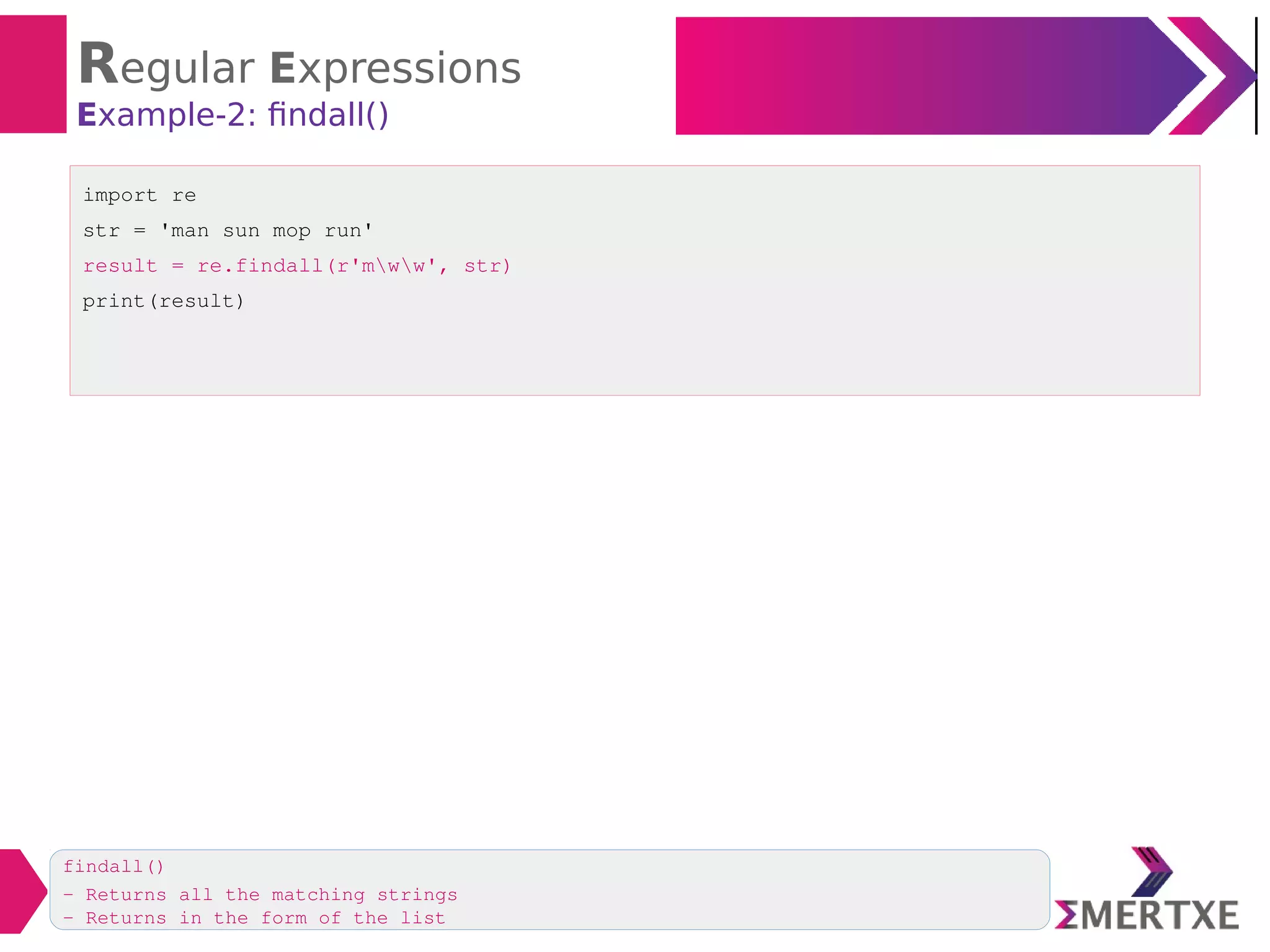
Example-2: findall()
import re
str = 'man sun mop run'
result = re.findall(r'mww', str)
print(result)
findall()
- Returns all the matching strings
- Returns in the form of the list
Regular Expressions
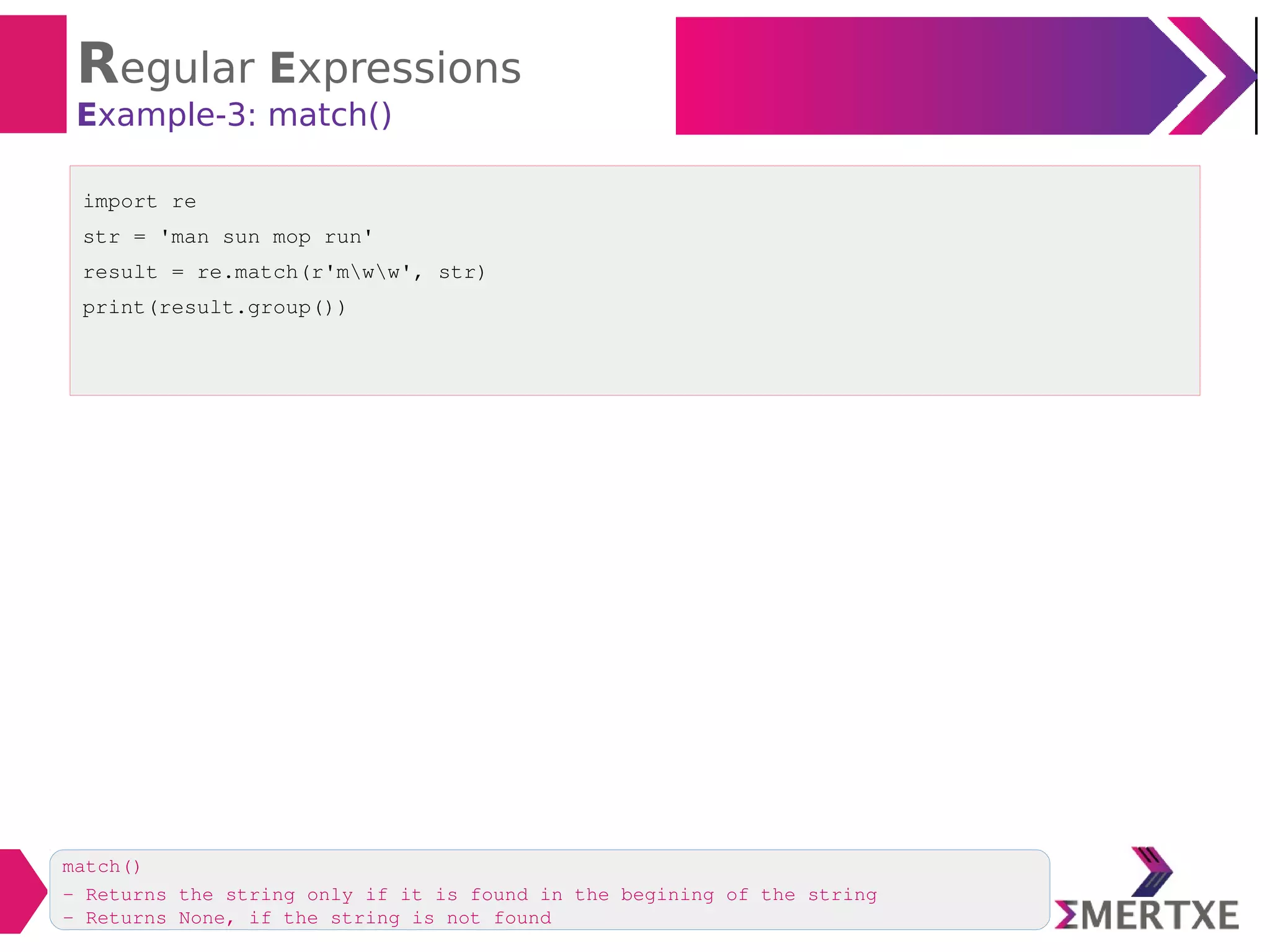
Example-3: match()
import re
str = 'man sun mop run'
result = re.match(r'mww', str)
print(result.group())
match()
- Returns the string only if it is found in the begining of the string
- Returns None, if the string is not found
Regular Expressions
Example-4: match()
import re
str = 'sun man mop run'
result = re.match(r'mww', str)
print(result)
match()
- Returns None, since the string is not found
Regular Expressions
Example-5: split()
import re
str = 'This; is the: "Core" Python's Lecturer'
result = re.split(r'w+', str)
print(result)
split()
- splits the string into pieces according to the given RE

split() - splits the RE

W : Split at non-alphanumeric character

+ : Match 1 or more occurrences of characters
Regular Expressions
Example-6: Find & Replace: sub()
import re
str = 'Kumbhmela will be conducted at Ahmedabad in India.'
res = re.sub(r'Ahmedabad', 'Allahabad', str)
print(res)
Syntax:
sub(RE, new, old)
RE: Sequence Characters
RE: sequence characters

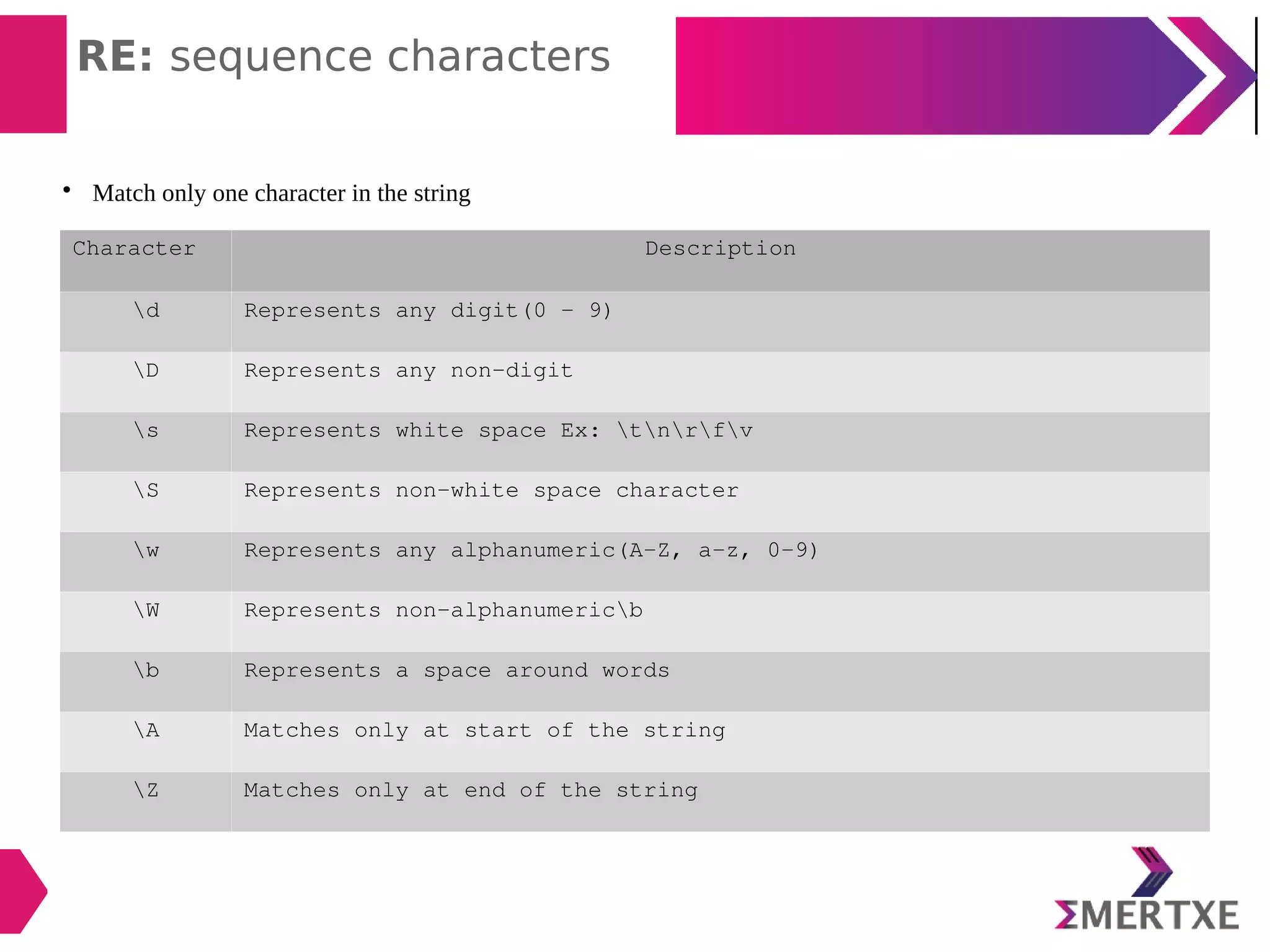
Match only one character in the string
Character Description
d Represents any digit(0 - 9)
D Represents any non-digit
s Represents white space Ex: tnrfv
S Represents non-white space character
w Represents any alphanumeric(A-Z, a-z, 0-9)
W Represents non-alphanumericb
b Represents a space around words
A Matches only at start of the string
Z Matches only at end of the string
RE: sequence characters
Example-1:
import re
str = 'an apple a day keeps the doctor away'
result = re.findall(r'a[w]*', str)
# findall() returns a list, retrieve the elements from list
for word in result:
print(word)
* Matches with 0 or more occurrences of the character
To match all words starting with ‘a’
To match all words starting with ‘a’, not sub-words then RE will look like this
import re
str = 'an apple a day keeps the doctor away'
result = re.findall(r'ba[w]*b', str)
# findall() returns a list, retrieve the elements from list
for word in result:
print(word)
RE: sequence characters
Example-2:
import re
str = 'The meeting will be conducted on 1st and 21st of every month'
result = re.findall(r'd[w]*', str)
#for word in result:
print(word)
* Matches with 0 or more occurrences of the character
To match all words starting with numeric digits
RE: sequence characters
Example-3:
import re
str = 'one two three four five six seven 8 9 10'
result = re.findall(r'bw{5}b', str)
print(result)
To retrieve all words having 5 characters
character Description
b Matches only one space
w Matches any alpha numeric character
{5} Repetition character
RE: sequence characters
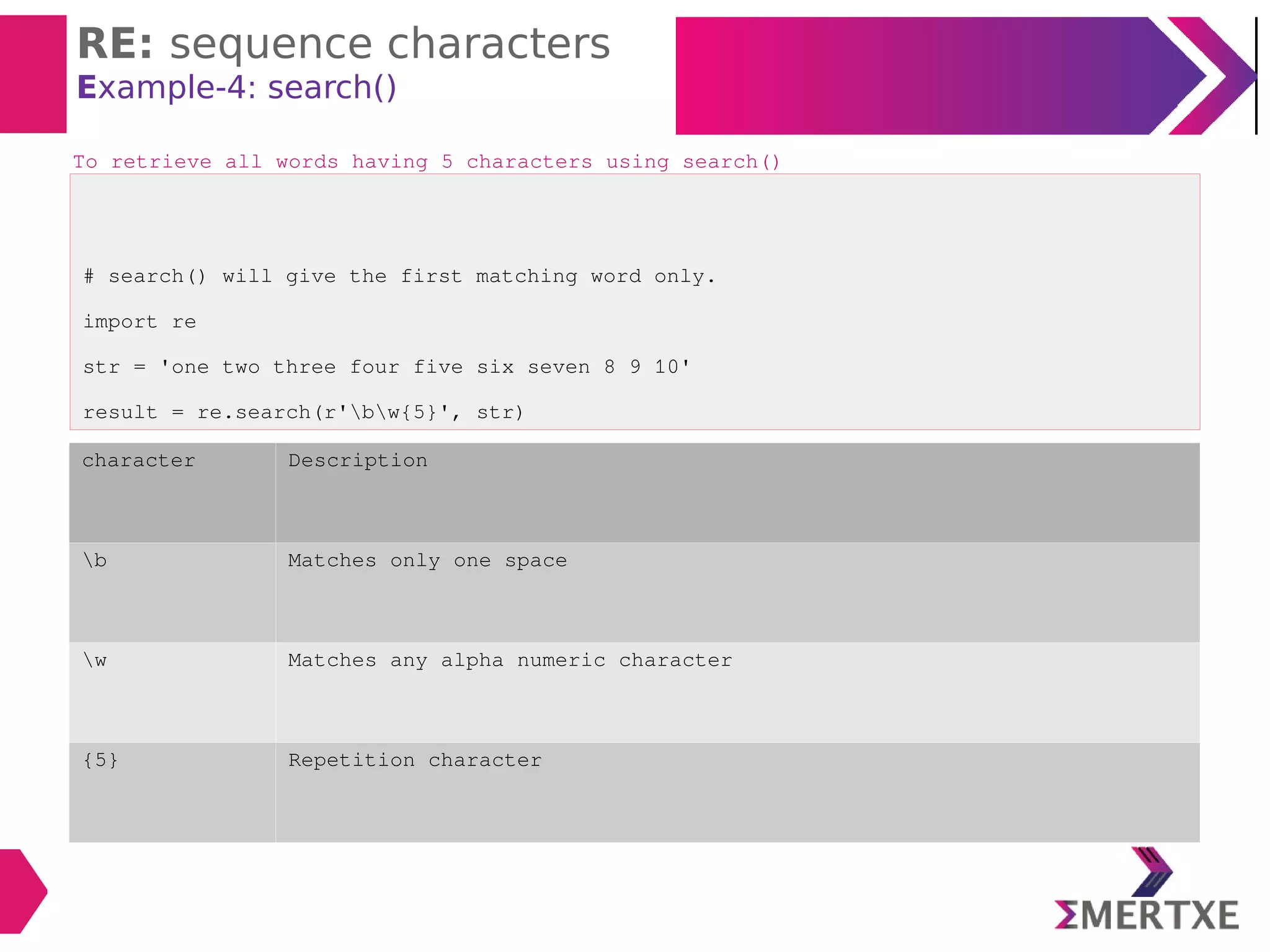
Example-4: search()
# search() will give the first matching word only.
import re
str = 'one two three four five six seven 8 9 10'
result = re.search(r'bw{5}', str)
print(result.group())
To retrieve all words having 5 characters using search()
character Description
b Matches only one space
w Matches any alpha numeric character
{5} Repetition character
RE: sequence characters
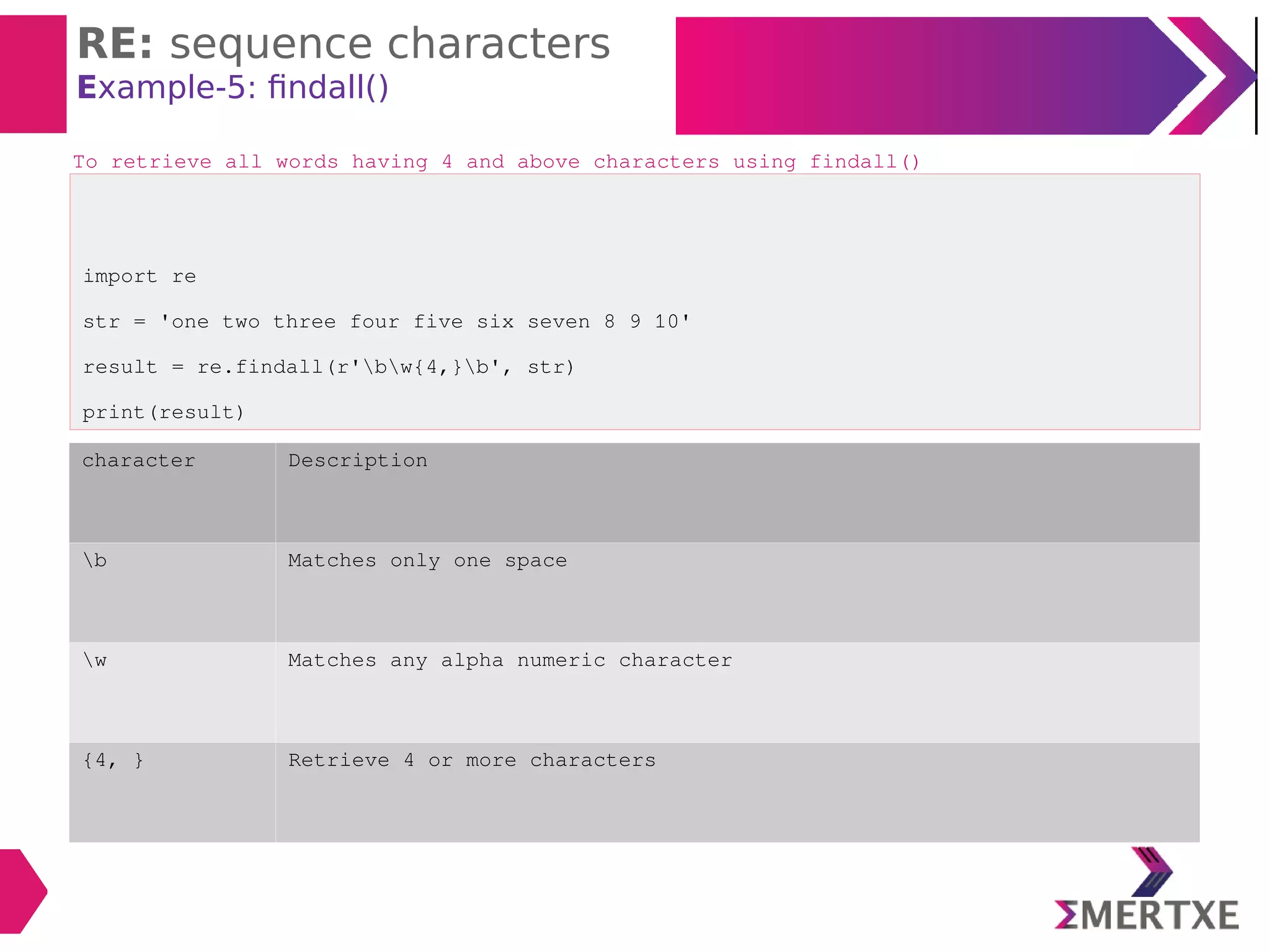
Example-5: findall()
import re
str = 'one two three four five six seven 8 9 10'
result = re.findall(r'bw{4,}b', str)
print(result)
To retrieve all words having 4 and above characters using findall()
character Description
b Matches only one space
w Matches any alpha numeric character
{4, } Retrieve 4 or more characters
RE: sequence characters
Example-6: findall()
import re
str = 'one two three four five six seven 8 9 10'
result = re.findall(r'bw{3, 5}b', str)
print(result)
To retrieve all words having 3, 4, 5 characters using findall()
character Description
b Matches only one space
w Matches any alpha numeric character
{3, 5} Retrieve 3, 4, 5 characters
RE: sequence characters
Example-7: findall()
import re
str = 'one two three four five six seven 8 9 10'
result = re.findall(r'bdb', str)
print(result)
To retrieve only single digit using findall()
character Description
b Matches only one space
d Matches only digit
RE: sequence characters
Example-7: findall()
import re
str = 'one two three one two three'
result = re.findall(r't{w}*z', str)
print(result)
To retrieve all words starts with ‘t’ from the end of the string
character Description
z Matches from end of the string
w Matches any alpha numeric character
t Starting character is ‘t’
RE: Quantifiers
RE: Quantifiers

Characters which represents more than 1 character to be matched in the string
Character Description
+ 1 or more repetitions of the preceding regexp
* 0 or more repetitions of the preceding regexp
? 0 or 1 repetitions of the preceding regexp
{m} Exactly m occurrences
{m, n} From m to n.
m defaults to 0
n defaults to infinity
RE: Quantifiers
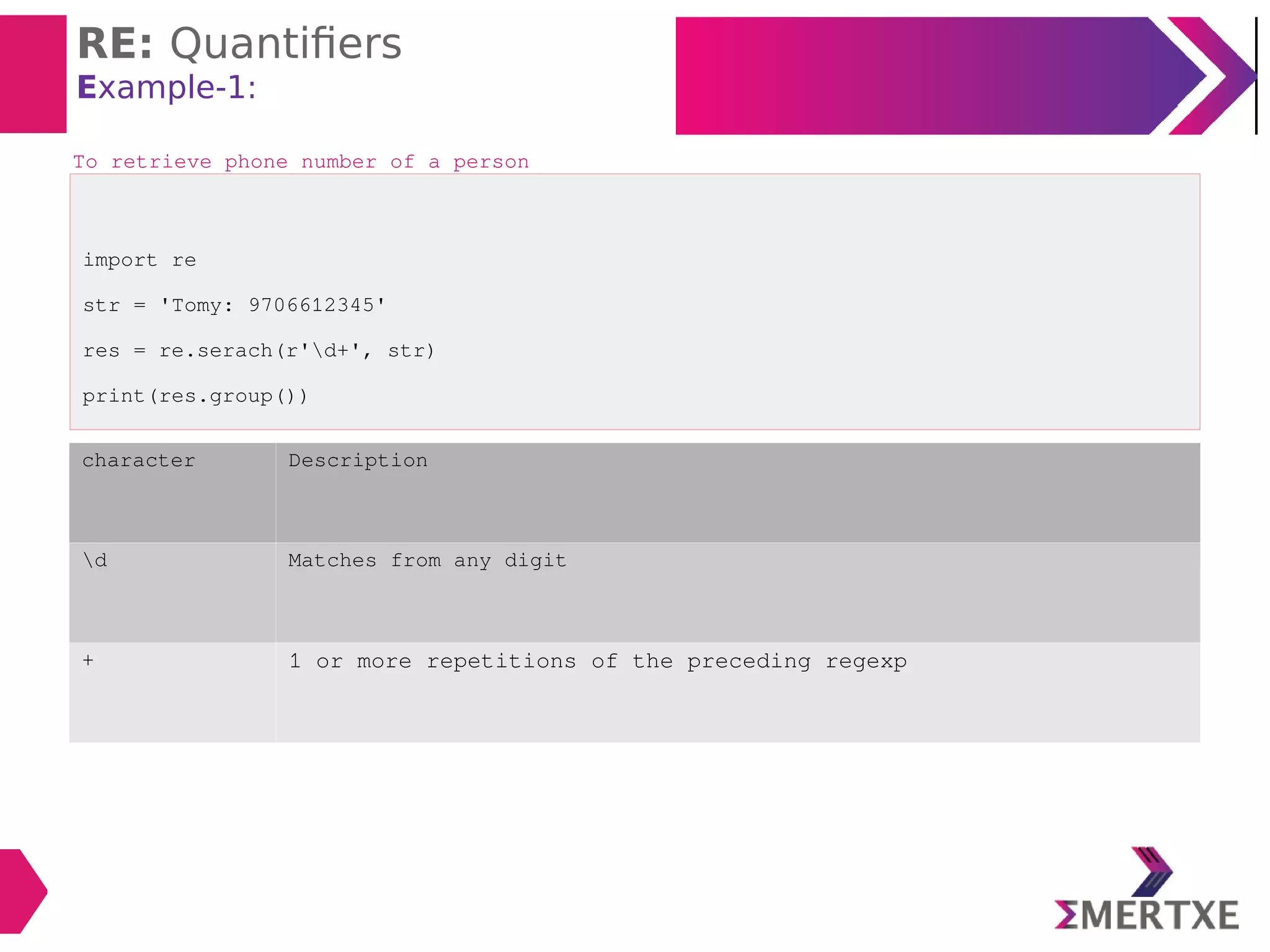
Example-1:
import re
str = 'Tomy: 9706612345'
res = re.serach(r'd+', str)
print(res.group())
To retrieve phone number of a person
character Description
d Matches from any digit
+ 1 or more repetitions of the preceding regexp
RE: Quantifiers
Example-2:
import re
str = 'Tomy: 9706612345'
res = re.serach(r'D+', str)
print(res.group())
To retrieve only name
character Description
D Matches from any non-digit
+ 1 or more repetitions of the preceding regexp
RE: Quantifiers
Example-3:
import re
str = 'anil akhil anant arun arati arundhati abhijit ankur'
res = re.findall(r'a[nk][w]*', str)
print(res)
To retrieve all words starting with “an” or “ak”
RE: Quantifiers
Example-4:
import re
str = 'Vijay 20 1-5-2001, Rohit 21 22-10-1990, Sita 22 15-09-2000'
res = re.findall(r'd{2}-d{2}-d{4}', str)
print(res)
To retrieve DoB from a string
RE Description
d{2}-d{2}-d{4} Retrieves only numeric digits in the format of 2digits-2digits-
4digits
RE: Special Character
RE: Special Characters
Character Description
 Escape special character nature
. Matches any character except new line
^ Matches begining of the string
$ Matches ending of a string
[...] Denotes a set of possible characters
Ex: [6b-d] matches any characters 6, b, c, d
[^...] Matches every character except the ones inside brackets
Ex: [^a-c6] matches any character except a, b, c or 6
(...) Matches the RE inside the parentheses and the result can be captured
R | S matches either regex R or regex S
RE: Special Characters
Example-1:
import re
str = "Hello World"
res = re.search(r"^He", str)
if res:
print("String starts with 'He'")
else
print("String does not start with 'He'")
To search whether a given string is starting with ‘He’ or not
RE Description
“^He” Search from the begining
RE: Special Characters
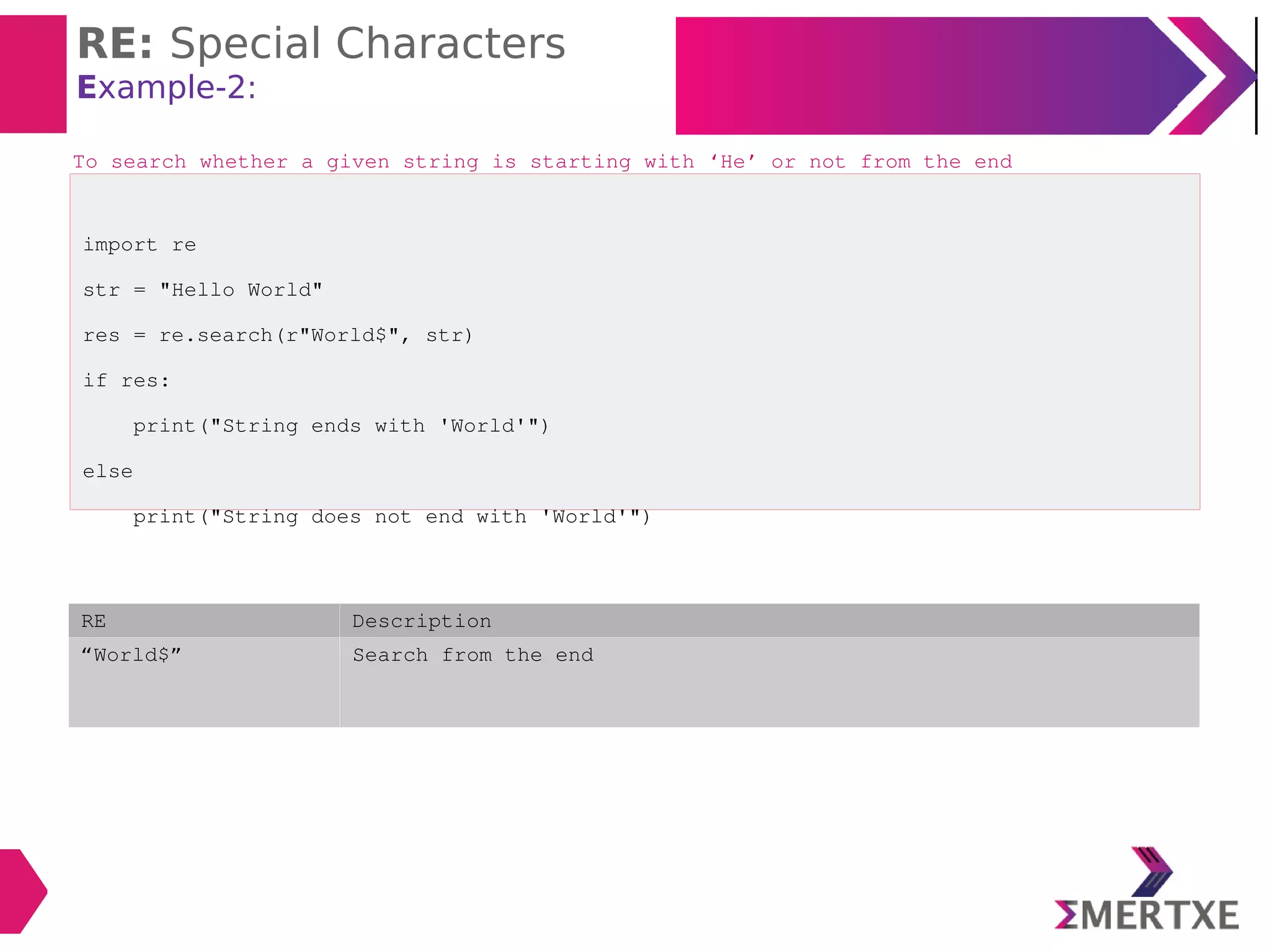
Example-2:
import re
str = "Hello World"
res = re.search(r"World$", str)
if res:
print("String ends with 'World'")
else
print("String does not end with 'World'")
To search whether a given string is starting with ‘He’ or not from the end
RE Description
“World$” Search from the end
RE: Special Characters
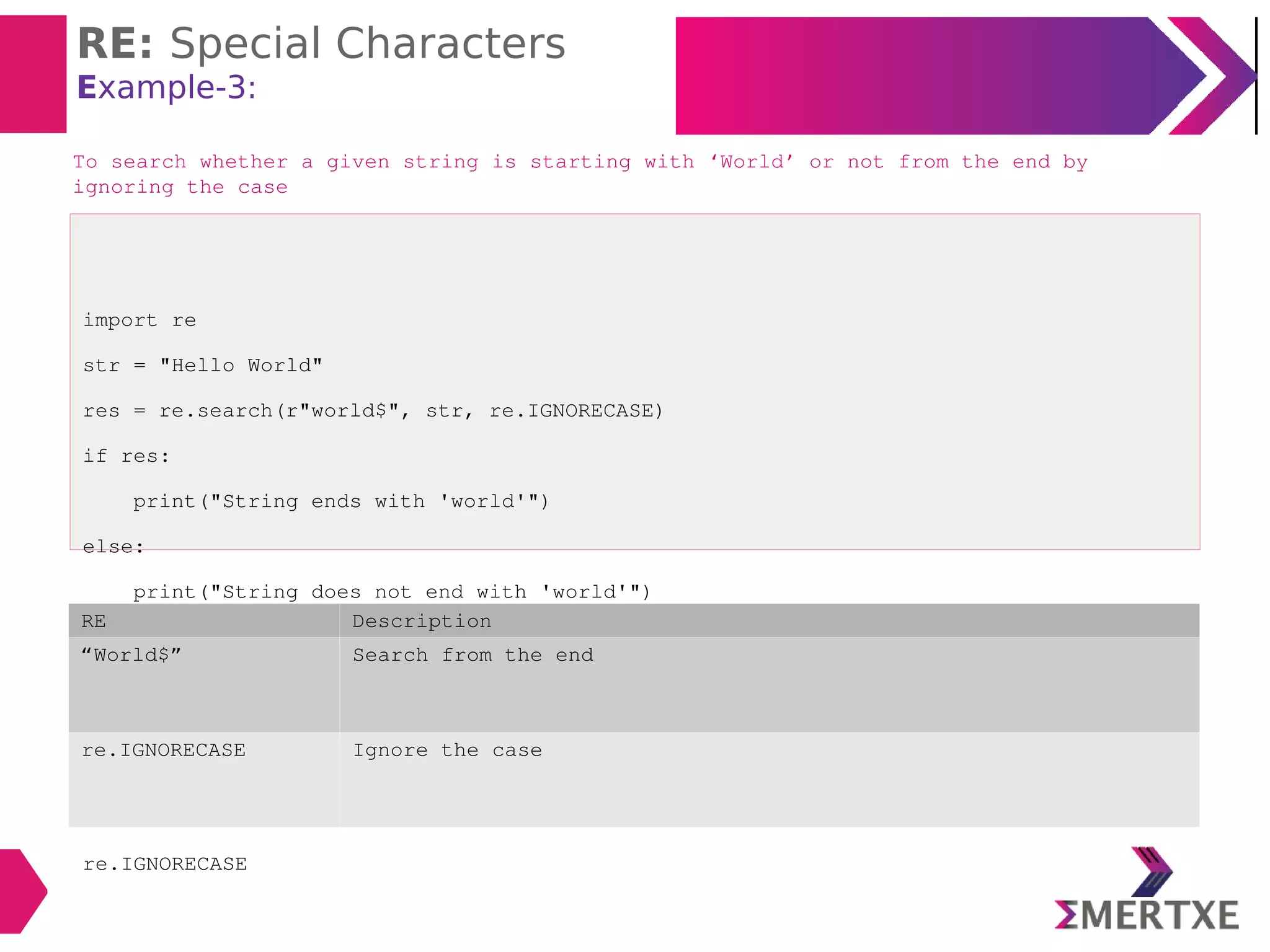
Example-3:
import re
str = "Hello World"
res = re.search(r"world$", str, re.IGNORECASE)
if res:
print("String ends with 'world'")
else:
print("String does not end with 'world'")
re.IGNORECASE
To search whether a given string is starting with ‘World’ or not from the end by
ignoring the case
RE Description
“World$” Search from the end
re.IGNORECASE Ignore the case
RE: Special Characters
Example-4:
import re
str = 'The meeting may be at 8am or 9am or 4pm or 5pm.'
res = re.findall(r'dam|dpm', str)
print(res)
To retrieve the timings am or pm
RE: On Files
RE: On Files
Example-1:
import re
# open file for reading
f = open('mails.txt', 'r')
# repeat for each line of the file
for line in f:
res = re.findall(r's+@S+', line)
# display if there ara some elements in result
if len(res)>0:
print(res)
# close the file
f.close()
To retrieve the emails from the file
RE: On Files
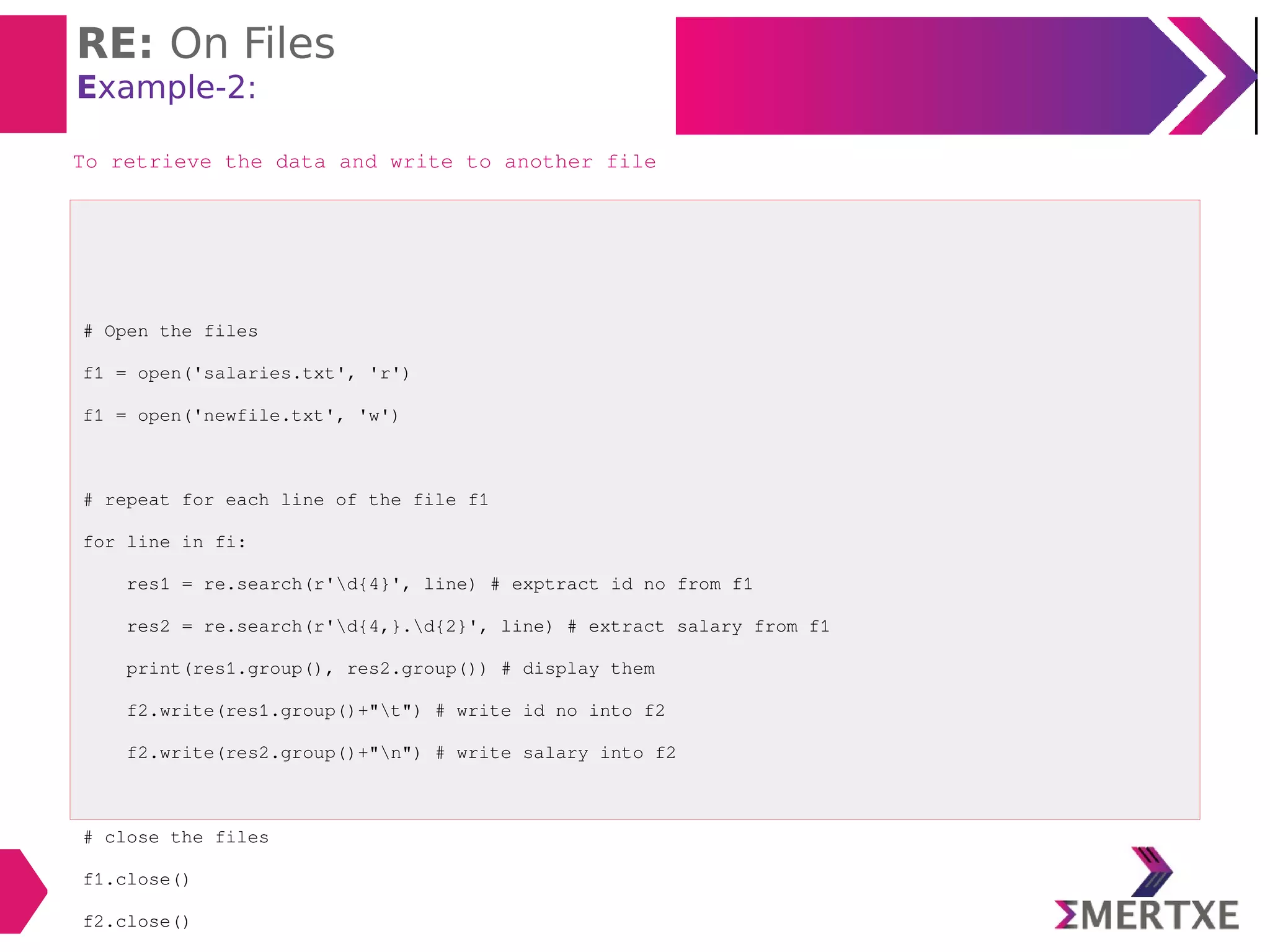
Example-2:
# Open the files
f1 = open('salaries.txt', 'r')
f1 = open('newfile.txt', 'w')
# repeat for each line of the file f1
for line in fi:
res1 = re.search(r'd{4}', line) # exptract id no from f1
res2 = re.search(r'd{4,}.d{2}', line) # extract salary from f1
print(res1.group(), res2.group()) # display them
f2.write(res1.group()+"t") # write id no into f2
f2.write(res2.group()+"n") # write salary into f2
# close the files
f1.close()
f2.close()
To retrieve the data and write to another file
RE: On HTML Files
RE: On HTML Files
Example-1:
To retrieve info from the HTML file
Step-1:
import urllib.request Import this module
f = urllib.request.urlopen(r’file:///path’)
Ex:
f = urllib.request.urlopen(r’file:///~|Pythonsample.html’)
urllib.request Module name
urlopen To open the html files
file:/// Protocol to open the local files
~|Pythonsample.html Under home DIR, under Python sub-DIR the sample.html file is
present
RE: On HTML Files
Example-1:
Step-2: read and decode
text = f.read() To read the file content
str = text.decode() Since the HTML file contains the information in the byte strings
Step-3: Apply RE
r'<td>w+</td>s<td>(w+)<td>s<td>(dd.dd)<td>'
THANK YOU

Python : Regular expressions

  • 1.
  • 2.
  • 3.
    Regular Expressions Introduction  REis a string that contains special symbols and characters to find and extract the information  Operations:  Search  Match  Find  Split  Also called as regex  Module: re  This module contains the methods like  compile()  search()  match()  findall()  split()... ‒ import re
  • 4.
    Regular Expressions Steps  Step-1:Compile the RE  Step-2: Search the strings  Step-3: Display the result prog = re.compile(r’mww’) str = “cat mat bat rat” result = prog.search(str) print(result.group())
  • 5.
    Regular Expressions Example-1: search() importre str = 'man sun mop run' result = re.search(r'mww', str) if result: #if result is not None print(result.group()) search(): Combination of compile and run - Point: Returns only the first string matching the RE import re str = 'man sun mop run' prog = re.compile(r'mww') result = prog.search(str) if result: #if result is not None print(result.group())
  • 6.
    Regular Expressions Example-2: findall() importre str = 'man sun mop run' result = re.findall(r'mww', str) print(result) findall() - Returns all the matching strings - Returns in the form of the list
  • 7.
    Regular Expressions Example-3: match() importre str = 'man sun mop run' result = re.match(r'mww', str) print(result.group()) match() - Returns the string only if it is found in the begining of the string - Returns None, if the string is not found
  • 8.
    Regular Expressions Example-4: match() importre str = 'sun man mop run' result = re.match(r'mww', str) print(result) match() - Returns None, since the string is not found
  • 9.
    Regular Expressions Example-5: split() importre str = 'This; is the: "Core" Python's Lecturer' result = re.split(r'w+', str) print(result) split() - splits the string into pieces according to the given RE  split() - splits the RE  W : Split at non-alphanumeric character  + : Match 1 or more occurrences of characters
  • 10.
    Regular Expressions Example-6: Find& Replace: sub() import re str = 'Kumbhmela will be conducted at Ahmedabad in India.' res = re.sub(r'Ahmedabad', 'Allahabad', str) print(res) Syntax: sub(RE, new, old)
  • 11.
  • 12.
    RE: sequence characters  Matchonly one character in the string Character Description d Represents any digit(0 - 9) D Represents any non-digit s Represents white space Ex: tnrfv S Represents non-white space character w Represents any alphanumeric(A-Z, a-z, 0-9) W Represents non-alphanumericb b Represents a space around words A Matches only at start of the string Z Matches only at end of the string
  • 13.
    RE: sequence characters Example-1: importre str = 'an apple a day keeps the doctor away' result = re.findall(r'a[w]*', str) # findall() returns a list, retrieve the elements from list for word in result: print(word) * Matches with 0 or more occurrences of the character To match all words starting with ‘a’ To match all words starting with ‘a’, not sub-words then RE will look like this import re str = 'an apple a day keeps the doctor away' result = re.findall(r'ba[w]*b', str) # findall() returns a list, retrieve the elements from list for word in result: print(word)
  • 14.
    RE: sequence characters Example-2: importre str = 'The meeting will be conducted on 1st and 21st of every month' result = re.findall(r'd[w]*', str) #for word in result: print(word) * Matches with 0 or more occurrences of the character To match all words starting with numeric digits
  • 15.
    RE: sequence characters Example-3: importre str = 'one two three four five six seven 8 9 10' result = re.findall(r'bw{5}b', str) print(result) To retrieve all words having 5 characters character Description b Matches only one space w Matches any alpha numeric character {5} Repetition character
  • 16.
    RE: sequence characters Example-4:search() # search() will give the first matching word only. import re str = 'one two three four five six seven 8 9 10' result = re.search(r'bw{5}', str) print(result.group()) To retrieve all words having 5 characters using search() character Description b Matches only one space w Matches any alpha numeric character {5} Repetition character
  • 17.
    RE: sequence characters Example-5:findall() import re str = 'one two three four five six seven 8 9 10' result = re.findall(r'bw{4,}b', str) print(result) To retrieve all words having 4 and above characters using findall() character Description b Matches only one space w Matches any alpha numeric character {4, } Retrieve 4 or more characters
  • 18.
    RE: sequence characters Example-6:findall() import re str = 'one two three four five six seven 8 9 10' result = re.findall(r'bw{3, 5}b', str) print(result) To retrieve all words having 3, 4, 5 characters using findall() character Description b Matches only one space w Matches any alpha numeric character {3, 5} Retrieve 3, 4, 5 characters
  • 19.
    RE: sequence characters Example-7:findall() import re str = 'one two three four five six seven 8 9 10' result = re.findall(r'bdb', str) print(result) To retrieve only single digit using findall() character Description b Matches only one space d Matches only digit
  • 20.
    RE: sequence characters Example-7:findall() import re str = 'one two three one two three' result = re.findall(r't{w}*z', str) print(result) To retrieve all words starts with ‘t’ from the end of the string character Description z Matches from end of the string w Matches any alpha numeric character t Starting character is ‘t’
  • 21.
  • 22.
    RE: Quantifiers  Characters whichrepresents more than 1 character to be matched in the string Character Description + 1 or more repetitions of the preceding regexp * 0 or more repetitions of the preceding regexp ? 0 or 1 repetitions of the preceding regexp {m} Exactly m occurrences {m, n} From m to n. m defaults to 0 n defaults to infinity
  • 23.
    RE: Quantifiers Example-1: import re str= 'Tomy: 9706612345' res = re.serach(r'd+', str) print(res.group()) To retrieve phone number of a person character Description d Matches from any digit + 1 or more repetitions of the preceding regexp
  • 24.
    RE: Quantifiers Example-2: import re str= 'Tomy: 9706612345' res = re.serach(r'D+', str) print(res.group()) To retrieve only name character Description D Matches from any non-digit + 1 or more repetitions of the preceding regexp
  • 25.
    RE: Quantifiers Example-3: import re str= 'anil akhil anant arun arati arundhati abhijit ankur' res = re.findall(r'a[nk][w]*', str) print(res) To retrieve all words starting with “an” or “ak”
  • 26.
    RE: Quantifiers Example-4: import re str= 'Vijay 20 1-5-2001, Rohit 21 22-10-1990, Sita 22 15-09-2000' res = re.findall(r'd{2}-d{2}-d{4}', str) print(res) To retrieve DoB from a string RE Description d{2}-d{2}-d{4} Retrieves only numeric digits in the format of 2digits-2digits- 4digits
  • 27.
  • 28.
    RE: Special Characters CharacterDescription Escape special character nature . Matches any character except new line ^ Matches begining of the string $ Matches ending of a string [...] Denotes a set of possible characters Ex: [6b-d] matches any characters 6, b, c, d [^...] Matches every character except the ones inside brackets Ex: [^a-c6] matches any character except a, b, c or 6 (...) Matches the RE inside the parentheses and the result can be captured R | S matches either regex R or regex S
  • 29.
    RE: Special Characters Example-1: importre str = "Hello World" res = re.search(r"^He", str) if res: print("String starts with 'He'") else print("String does not start with 'He'") To search whether a given string is starting with ‘He’ or not RE Description “^He” Search from the begining
  • 30.
    RE: Special Characters Example-2: importre str = "Hello World" res = re.search(r"World$", str) if res: print("String ends with 'World'") else print("String does not end with 'World'") To search whether a given string is starting with ‘He’ or not from the end RE Description “World$” Search from the end
  • 31.
    RE: Special Characters Example-3: importre str = "Hello World" res = re.search(r"world$", str, re.IGNORECASE) if res: print("String ends with 'world'") else: print("String does not end with 'world'") re.IGNORECASE To search whether a given string is starting with ‘World’ or not from the end by ignoring the case RE Description “World$” Search from the end re.IGNORECASE Ignore the case
  • 32.
    RE: Special Characters Example-4: importre str = 'The meeting may be at 8am or 9am or 4pm or 5pm.' res = re.findall(r'dam|dpm', str) print(res) To retrieve the timings am or pm
  • 33.
  • 34.
    RE: On Files Example-1: importre # open file for reading f = open('mails.txt', 'r') # repeat for each line of the file for line in f: res = re.findall(r's+@S+', line) # display if there ara some elements in result if len(res)>0: print(res) # close the file f.close() To retrieve the emails from the file
  • 35.
    RE: On Files Example-2: #Open the files f1 = open('salaries.txt', 'r') f1 = open('newfile.txt', 'w') # repeat for each line of the file f1 for line in fi: res1 = re.search(r'd{4}', line) # exptract id no from f1 res2 = re.search(r'd{4,}.d{2}', line) # extract salary from f1 print(res1.group(), res2.group()) # display them f2.write(res1.group()+"t") # write id no into f2 f2.write(res2.group()+"n") # write salary into f2 # close the files f1.close() f2.close() To retrieve the data and write to another file
  • 36.
  • 37.
    RE: On HTMLFiles Example-1: To retrieve info from the HTML file Step-1: import urllib.request Import this module f = urllib.request.urlopen(r’file:///path’) Ex: f = urllib.request.urlopen(r’file:///~|Pythonsample.html’) urllib.request Module name urlopen To open the html files file:/// Protocol to open the local files ~|Pythonsample.html Under home DIR, under Python sub-DIR the sample.html file is present
  • 38.
    RE: On HTMLFiles Example-1: Step-2: read and decode text = f.read() To read the file content str = text.decode() Since the HTML file contains the information in the byte strings Step-3: Apply RE r'<td>w+</td>s<td>(w+)<td>s<td>(dd.dd)<td>'
  • 39.