UGC NET- ICT
MEMORY AND DATA
Megha V
Research Scholar
Kannur University
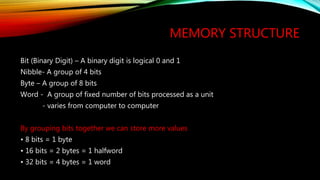
MEMORY STRUCTURE
Bit (Binary Digit) – A binary digit is logical 0 and 1
Nibble- A group of 4 bits
Byte – A group of 8 bits
Word - A group of fixed number of bits processed as a unit
- varies from computer to computer
By grouping bits together we can store more values
• 8 bits = 1 byte
• 16 bits = 2 bytes = 1 halfword
• 32 bits = 4 bytes = 1 word
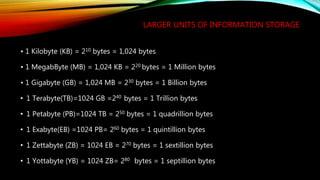
LARGER UNITS OF INFORMATION STORAGE
• 1 Kilobyte (KB) = 210 bytes = 1,024 bytes
• 1 MegabByte (MB) = 1,024 KB = 220 bytes = 1 Million bytes
• 1 Gigabyte (GB) = 1,024 MB = 230 bytes = 1 Billion bytes
• 1 Terabyte(TB)=1024 GB =240 bytes = 1 Trillion bytes
• 1 Petabyte (PB)=1024 TB = 250 bytes = 1 quadrillion bytes
• 1 Exabyte(EB) =1024 PB= 260 bytes = 1 quintillion bytes
• 1 Zettabyte (ZB) = 1024 EB = 270 bytes = 1 sextillion bytes
• 1 Yottabyte (YB) = 1024 ZB= 280 bytes = 1 septillion bytes
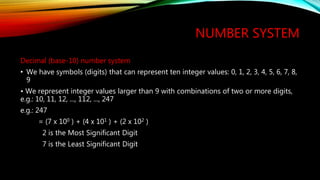
NUMBER SYSTEM
Decimal (base-10) number system
• We have symbols (digits) that can represent ten integer values: 0, 1, 2, 3, 4, 5, 6, 7, 8,
9
• We represent integer values larger than 9 with combinations of two or more digits,
e.g.: 10, 11, 12, ..., 112, ..., 247
e.g.: 247
= (7 x 100 ) + (4 x 101 ) + (2 x 10² )
2 is the Most Significant Digit
7 is the Least Significant Digit
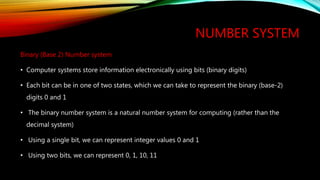
NUMBER SYSTEM
Binary (Base 2) Number system
• Computer systems store information electronically using bits (binary digits)
• Each bit can be in one of two states, which we can take to represent the binary (base-2)
digits 0 and 1
• The binary number system is a natural number system for computing (rather than the
decimal system)
• Using a single bit, we can represent integer values 0 and 1
• Using two bits, we can represent 0, 1, 10, 11
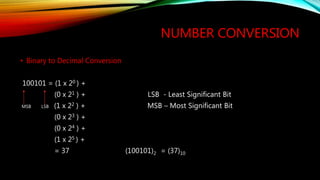
NUMBER CONVERSION
• Binary to Decimal Conversion
100101 = (1 x 20 ) +
(0 x 21 ) + LSB - Least Significant Bit
MSB LSB (1 x 22 ) + MSB – Most Significant Bit
(0 x 23 ) +
(0 x 24 ) +
(1 x 25 ) +
= 37 (100101)2 = (37)10
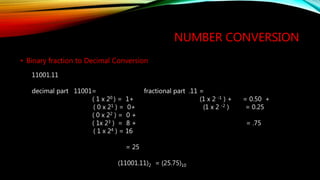
• Binary fraction to Decimal Conversion
NUMBER CONVERSION
11001.11
decimal part 11001= fractional part .11 =
( 1 x 20 ) = 1+ (1 x 2 -1 ) + = 0.50 +
( 0 x 21 ) = 0+ (1 x 2 -2 ) = 0.25
( 0 x 22 ) = 0 +
( 1x 23 ) = 8 + = .75
( 1 x 24 ) = 16
= 25
(11001.11)2 = (25.75)10
NUMBER CONVERSION
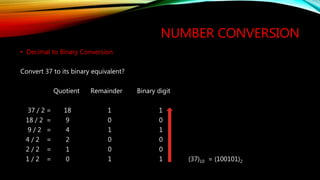
• Decimal to Binary Conversion
Convert 37 to its binary equivalent?
Quotient Remainder Binary digit
37 / 2 = 18 1 1
18 / 2 = 9 0 0
9 / 2 = 4 1 1
4 / 2 = 2 0 0
2 / 2 = 1 0 0
1 / 2 = 0 1 1 (37)10 = (100101)2
NUMBER CONVERSION
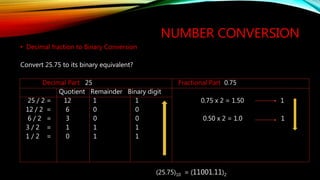
• Decimal fraction to Binary Conversion
Convert 25.75 to its binary equivalent?
Decimal Part 25 Fractional Part 0.75
Quotient Remainder Binary digit
25 / 2 = 12 1 1 0.75 x 2 = 1.50 1
12 / 2 = 6 0 0
6 / 2 = 3 0 0 0.50 x 2 = 1.0 1
3 / 2 = 1 1 1
1 / 2 = 0 1 1
(25.75)10 = (11001.11)2

UGC NET Paper 1 ICT Memory and data

  • 1.
    UGC NET- ICT MEMORYAND DATA Megha V Research Scholar Kannur University
  • 2.
    MEMORY STRUCTURE Bit (BinaryDigit) – A binary digit is logical 0 and 1 Nibble- A group of 4 bits Byte – A group of 8 bits Word - A group of fixed number of bits processed as a unit - varies from computer to computer By grouping bits together we can store more values • 8 bits = 1 byte • 16 bits = 2 bytes = 1 halfword • 32 bits = 4 bytes = 1 word
  • 3.
    LARGER UNITS OFINFORMATION STORAGE • 1 Kilobyte (KB) = 210 bytes = 1,024 bytes • 1 MegabByte (MB) = 1,024 KB = 220 bytes = 1 Million bytes • 1 Gigabyte (GB) = 1,024 MB = 230 bytes = 1 Billion bytes • 1 Terabyte(TB)=1024 GB =240 bytes = 1 Trillion bytes • 1 Petabyte (PB)=1024 TB = 250 bytes = 1 quadrillion bytes • 1 Exabyte(EB) =1024 PB= 260 bytes = 1 quintillion bytes • 1 Zettabyte (ZB) = 1024 EB = 270 bytes = 1 sextillion bytes • 1 Yottabyte (YB) = 1024 ZB= 280 bytes = 1 septillion bytes
  • 4.
    NUMBER SYSTEM Decimal (base-10)number system • We have symbols (digits) that can represent ten integer values: 0, 1, 2, 3, 4, 5, 6, 7, 8, 9 • We represent integer values larger than 9 with combinations of two or more digits, e.g.: 10, 11, 12, ..., 112, ..., 247 e.g.: 247 = (7 x 100 ) + (4 x 101 ) + (2 x 10² ) 2 is the Most Significant Digit 7 is the Least Significant Digit
  • 5.
    NUMBER SYSTEM Binary (Base2) Number system • Computer systems store information electronically using bits (binary digits) • Each bit can be in one of two states, which we can take to represent the binary (base-2) digits 0 and 1 • The binary number system is a natural number system for computing (rather than the decimal system) • Using a single bit, we can represent integer values 0 and 1 • Using two bits, we can represent 0, 1, 10, 11
  • 6.
    NUMBER CONVERSION • Binaryto Decimal Conversion 100101 = (1 x 20 ) + (0 x 21 ) + LSB - Least Significant Bit MSB LSB (1 x 22 ) + MSB – Most Significant Bit (0 x 23 ) + (0 x 24 ) + (1 x 25 ) + = 37 (100101)2 = (37)10
  • 7.
    • Binary fractionto Decimal Conversion NUMBER CONVERSION 11001.11 decimal part 11001= fractional part .11 = ( 1 x 20 ) = 1+ (1 x 2 -1 ) + = 0.50 + ( 0 x 21 ) = 0+ (1 x 2 -2 ) = 0.25 ( 0 x 22 ) = 0 + ( 1x 23 ) = 8 + = .75 ( 1 x 24 ) = 16 = 25 (11001.11)2 = (25.75)10
  • 8.
    NUMBER CONVERSION • Decimalto Binary Conversion Convert 37 to its binary equivalent? Quotient Remainder Binary digit 37 / 2 = 18 1 1 18 / 2 = 9 0 0 9 / 2 = 4 1 1 4 / 2 = 2 0 0 2 / 2 = 1 0 0 1 / 2 = 0 1 1 (37)10 = (100101)2
  • 9.
    NUMBER CONVERSION • Decimalfraction to Binary Conversion Convert 25.75 to its binary equivalent? Decimal Part 25 Fractional Part 0.75 Quotient Remainder Binary digit 25 / 2 = 12 1 1 0.75 x 2 = 1.50 1 12 / 2 = 6 0 0 6 / 2 = 3 0 0 0.50 x 2 = 1.0 1 3 / 2 = 1 1 1 1 / 2 = 0 1 1 (25.75)10 = (11001.11)2