OBJECTIVES
Introduction tosearch engines
Identify suitable information sources
Access main search engines on the web
3.
What is aSearch Engine?
It is to extract requested information from the huge database of
resources available on the internet.
It is for finding the required information without knowing where exactly
it is stored.
Internet usage has been increased in recent days with the easy to use
search engines like Google, Bing and Yahoo!
4.
Appropriate place tosearch
•
PubMed/Scopus/Goo
gle Scholar database
etc
• Free open Access
• Fee Based – From Libraries
• HON certified sites
• Web Search
Engines-Google
• Cochrane Library
• Map of Medicine
Systematic
reviews/Meta –
analysis/EBMS
CochraneLibrary
Map of Medicine
General Info
Specific query
PubMed/
Scopus/Google
Scolar database
etc
Archived full text
articles
Free open Access
Fee Based – From
Libraries
5.
Different Types ofSearch
Engines
Search engines are classified into the following
three categories based on how it works.
1. Crawler based search engines
2. Human powered directories
3. Hybrid search engines
6.
Why searching aliterature?
Staying current with advances in medicine
Identifying information and ideas
Increasing breadth of knowledge
Putting our work into perspective
Carrying on from where others have already reached
7.
Why perform literaturereview?
Saves ourself from work!
Know the subject matter better
Suggest new research topics, questions and methods
8.
How to conductliterature review :
The first step is to identify broad keywords relevant to our subject
These keywords used by search engines to construct and index their archived references,
enabling us to access vast information online.
Later on these keywords can be expanded to refine the search into specific subheadings and
enable us to structure our review
It is essential to read the entire article so that we can assess the evidence and summarise the
findings in our own words.
9.
How to writea literature review
start with a brief introduction,
followed by the text broken up into subsections
conclude with a summary to bring everything together.
A summary table including title, author, publication date
key findings is a useful feature to present in your review
We should group similar findings and comment on differences in results or study
outcomes. This may be due to differences in subjects, experimental materials,
methodology or how the data were analysed.
10.
Literature review: Organizedsearch
Organize information relate it to the research question
Synthesise results : summary of what is known and not known
Identify lacunae as appears in the literature
Develop questions for further research
11.
Introduction to literaturesearch
Websites
Search engines
Databases
Know your resources – map them to your needs
Know the principles of searching
STEP BY STEP APPROACH
12.
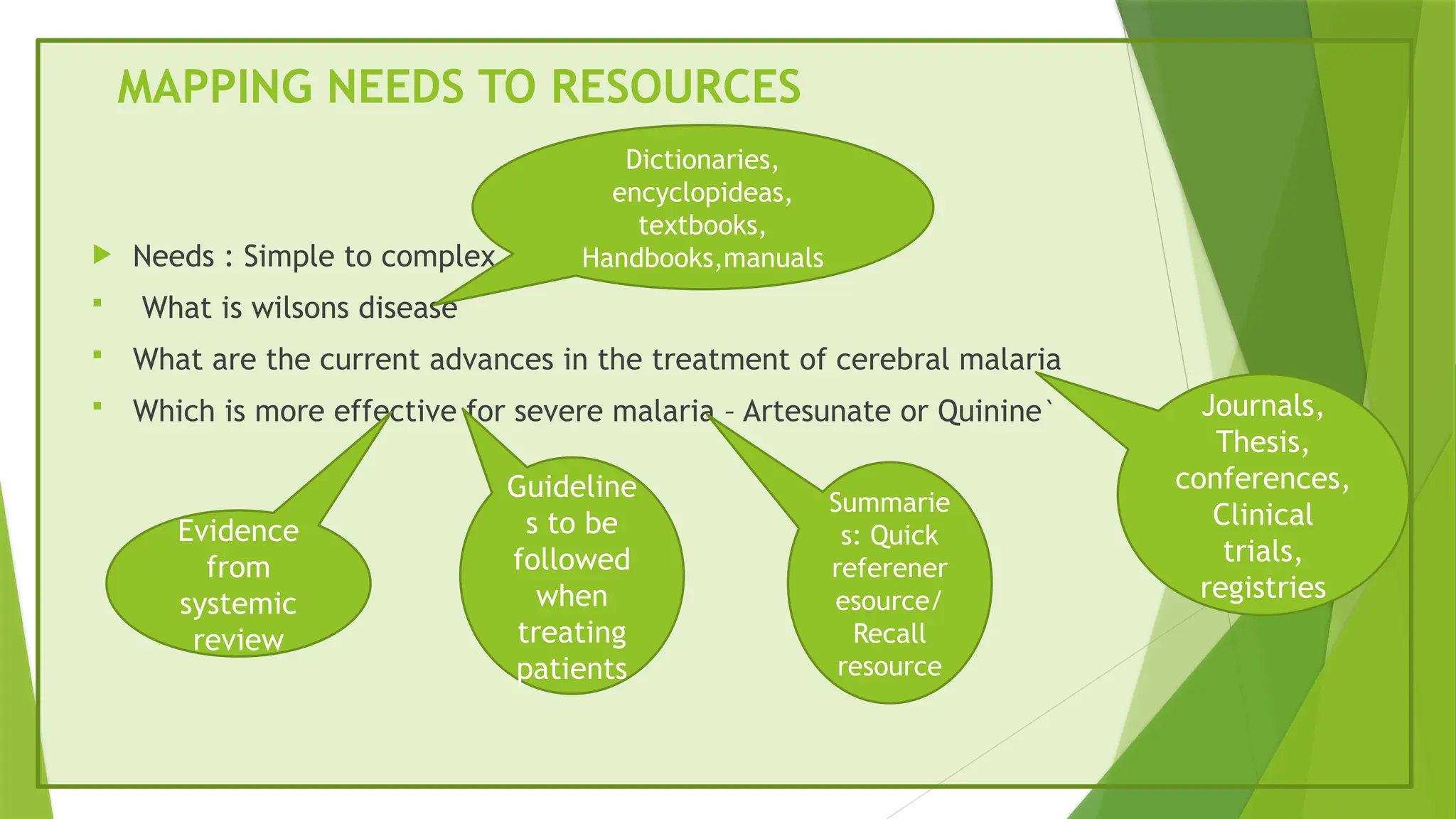
MAPPING NEEDS TORESOURCES
Needs : Simple to complex
What is wilsons disease
What are the current advances in the treatment of cerebral malaria
Which is more effective for severe malaria – Artesunate or Quinine`
Dictionaries,
encyclopideas,
textbooks,
Handbooks,manuals
Journals,
Thesis,
conferences,
Clinical
trials,
registries
Evidence
from
systemic
review
Guideline
s to be
followed
when
treating
patients
Summarie
s: Quick
referener
esource/
Recall
resource
13.
EXAMPLES
http://WWW.harrisonism.com/
Website ofHarrison’s Principles of internal Medicine
Text book – Type I resources
http://www.pubmed.gov
Website of Pubmed – a resource for journal articles
journal articles- Type II resources
http://www.cochranelibrary.com/
Website of the Cochrane library
Systematic reviews – Type III resources
Other Bibliographic databases –Type II resources
- Mix of Type II & Type III resources
INTRODUCTION TO PUBMED
What is Pubmed?
It is an INDEX to articles published
It has around 5000 articles
It has English and other languages
16.
What does anindex mean?
An index means it contains “ bibliographic details “ of
articles ( in the journals)
- Author
- Title
- Journal details ( issue no, volume no, page no)
- Abstracts…..
17.
PUBMED
Pub Med– the data base – does NOT contain the full
text of articles
It may link a bibliographic record to the full text on
the journal website
The article being free or not on the jouranls website
it is publishers decision
18.
PUBMED
The Pubmed database is compiled in the National Library of
Medicine, USA
For every journal selected for inclusion on PubMed , the Editor has
to
Send every issue to the NLM
Provide full text access of articles to the NLM
It includes books of medical sciences but not clinical ones
PubMed comprise more than 27 million citations
19.
What is medline?
It was the original database compiled by the National Library of
Medicine before it was hosted on the internet
It first started as a print resource called the Index Medicus and when
computerized catalogue started it became a computerized resource
called MEDLINE
It used to be available only on subscription online later dispatched to
libraries as CDs
It has descriptive keywords or tags
20.
PUBMED CENTRAL
Itis called an archive
It is a place where full articles are deposited
It is not an index to an journal but full text archives
of different journals
21.
FOUR PRINCIPLES OFSEARCHING
Principle I : Word search
Principle II: MeSH search
Principle III : Field search
Principle IV: Boolean operators
22.
Principle I (Word search )
When we search for a term, PubMed looks for records that contain our
search term
This search term contains in the bibliographic details & Abstract
The PubMed search engine does not go out of the web and search the
full text
The full text is not in the PubMed database it’s in the journal website
23.
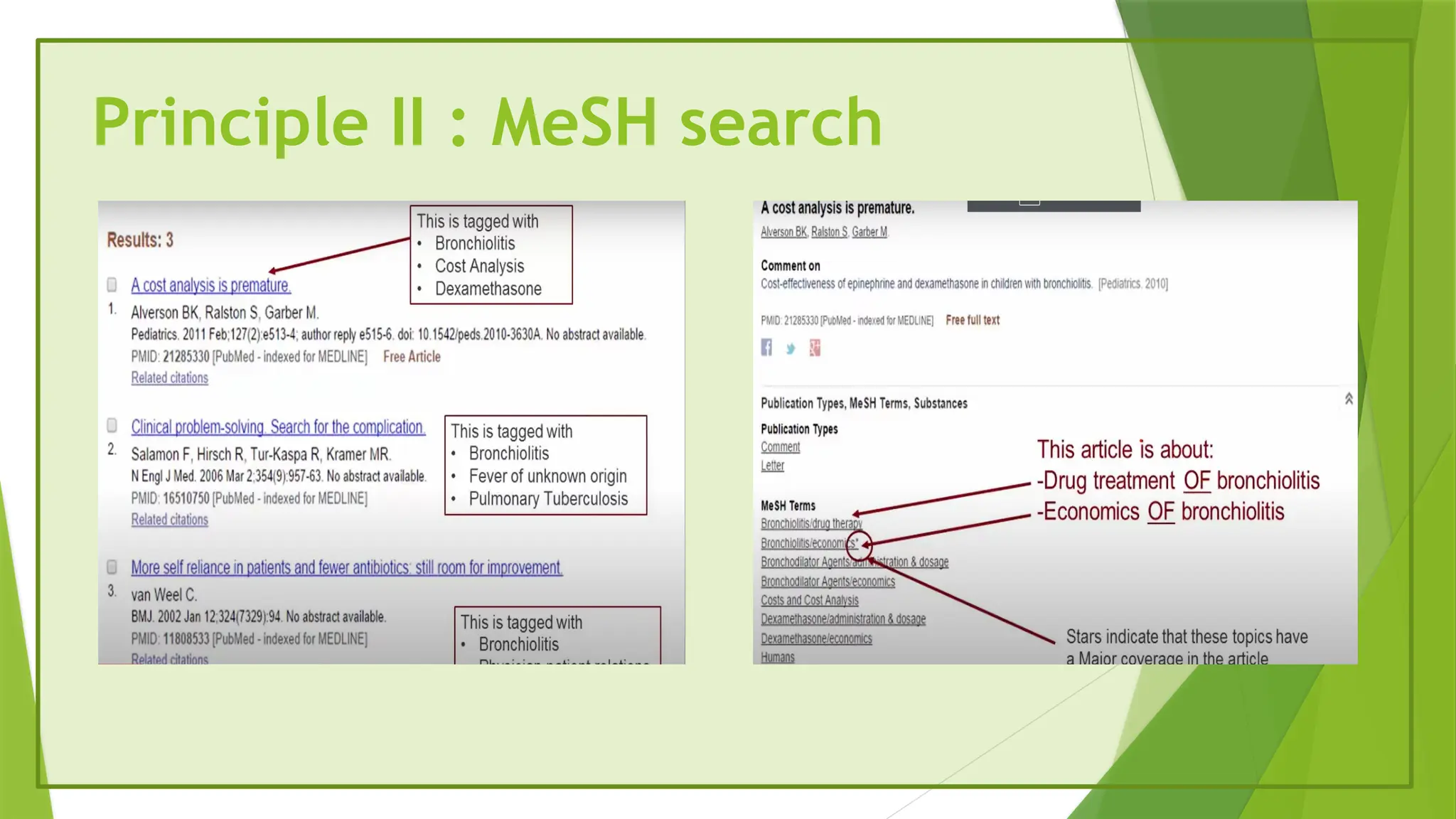
Principle II :MeSH search
MeSH terms are used to describe the article
If we click on MeSH terms we will get tags
If there are star on the terms that means they are explained more detailly
Standardized , specific keywords are tagged to most PubMed records
WHAT IS MESH
Medical Subject Headings
MeSH terms : A collection of standard terms
MeSH terms are from THESAUSRUS specifically the mesh thesaurus
Terms from this collection are used to tag or describe every article record
Tagging done by : Professional “ Indexers “ in the NLM
26.
HOW DO WESEARCH USING MESH TERMS
Search for records that contain the word bronchiolitis
This word must contains in the list of MeSH terms
How can we instruct PubMed to do that?
Principle III (Field search )
We can search for our terms
(word or number) in other
fields /areas of a Bibliographic
record
29.
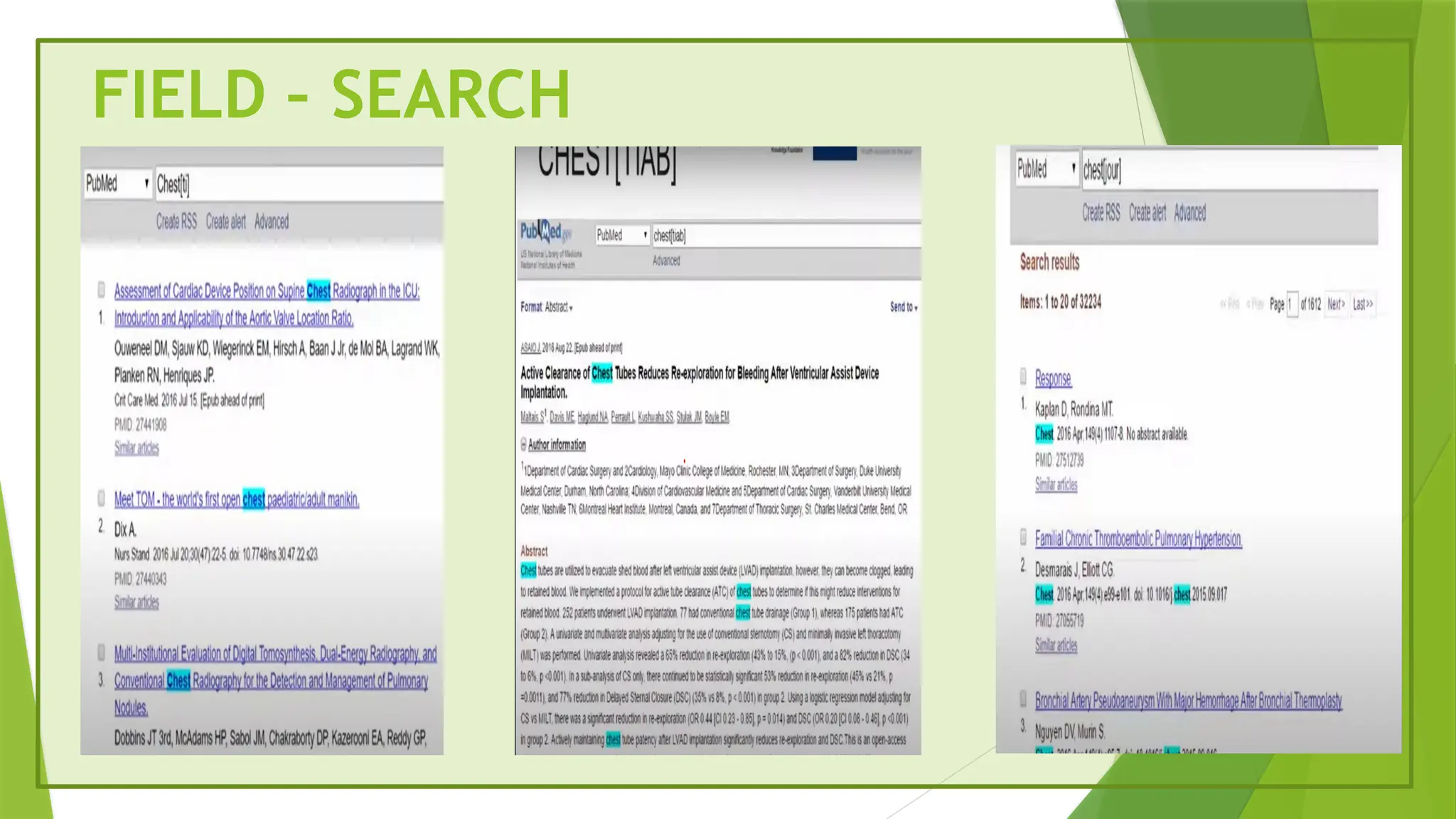
FIELD – SEARCH“ CHEST “
Chest[TI] Title
Chest[tiab] Title or abstract or both cases
Chest[Jour] Journal title
If we search as We will find our term in the
30.
FIELD SEARCH
Chest[Au]Author
Chest[AD] Author’s address
Chest[MeSH] List of Mesh terms
Chest ALL AREAS (except the full
text)
143[page] Page number
2016[pdat] Date/year
If you search as You will find your term in the
Principle IV (UsingBoolean Operators)
Combining for more than one search term
HOW DO WE COMBINE SEARCH TERMS ?
We want to find records in PubMed
About both asthma as well as bronchitis
Articles by White in Thorax in 2015
33.
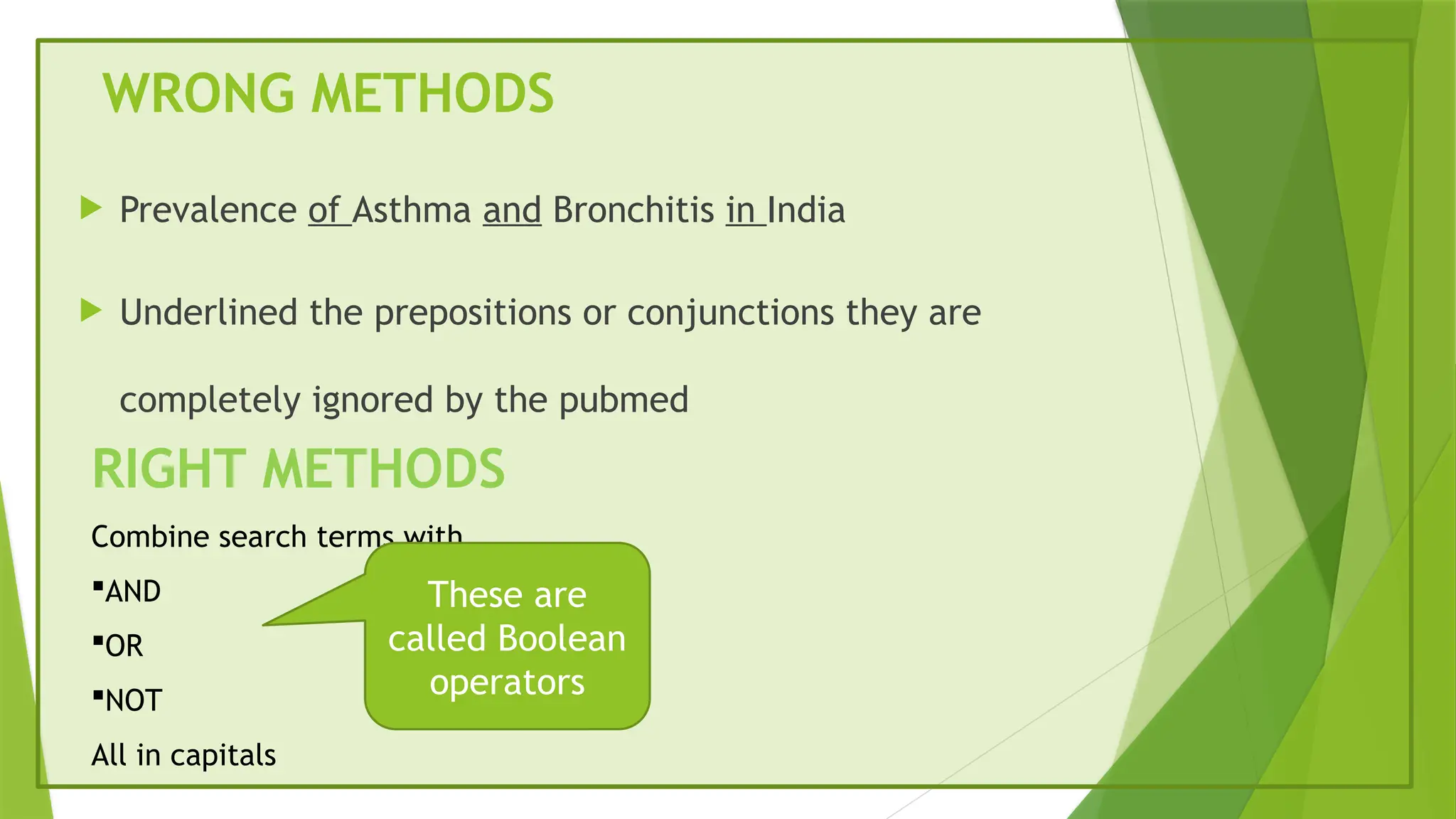
WRONG METHODS
Prevalenceof Asthma and Bronchitis in India
Underlined the prepositions or conjunctions they are
completely ignored by the pubmed
RIGHT METHODS
Combine search terms with
AND
OR
NOT
All in capitals
These are
called Boolean
operators
34.
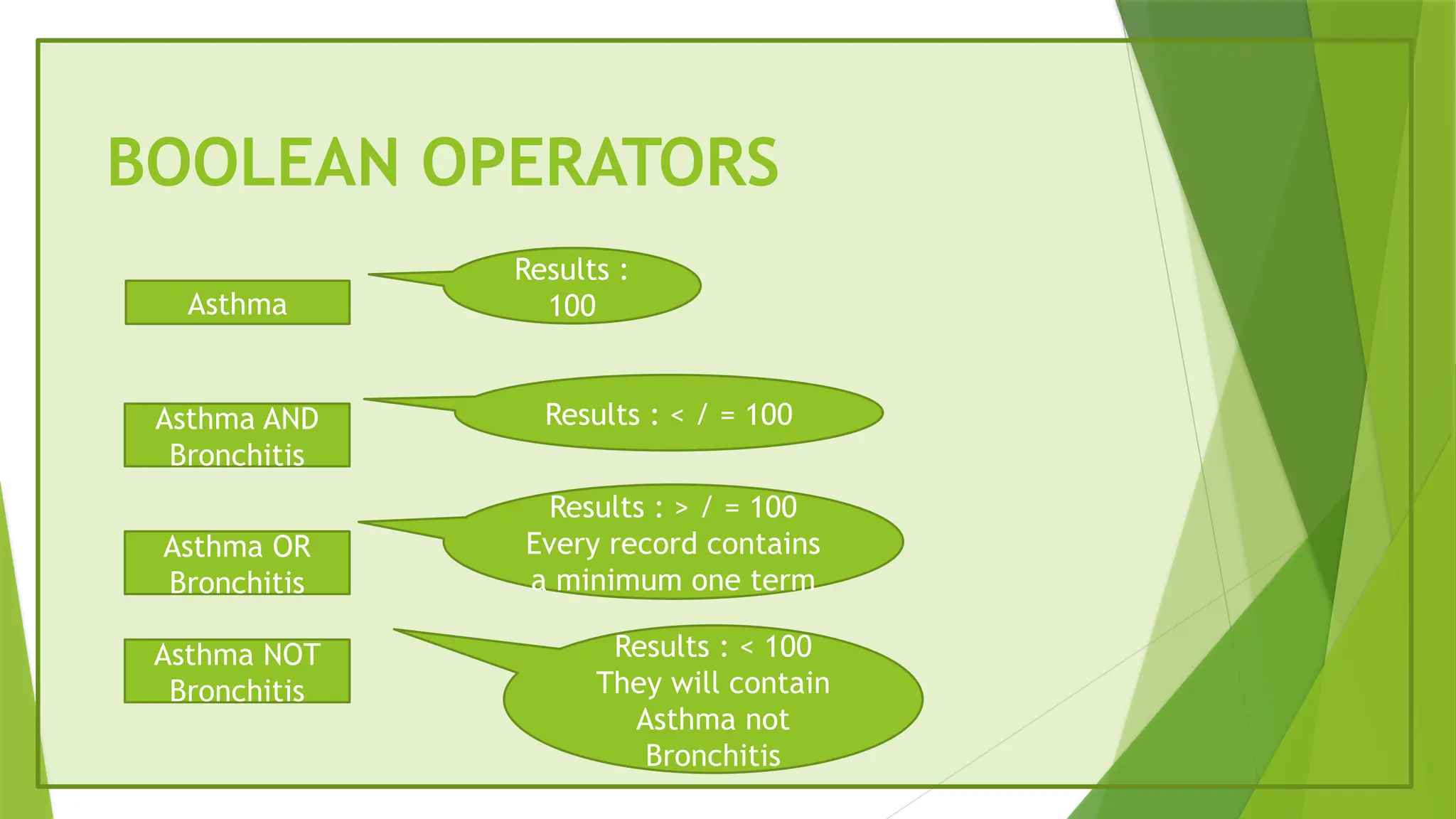
BOOLEAN OPERATORS
Asthma
Asthma AND
Bronchitis
AsthmaOR
Bronchitis
Asthma NOT
Bronchitis
Results :
100
Results : < / = 100
Results : > / = 100
Every record contains
a minimum one term
Results : < 100
They will contain
Asthma not
Bronchitis
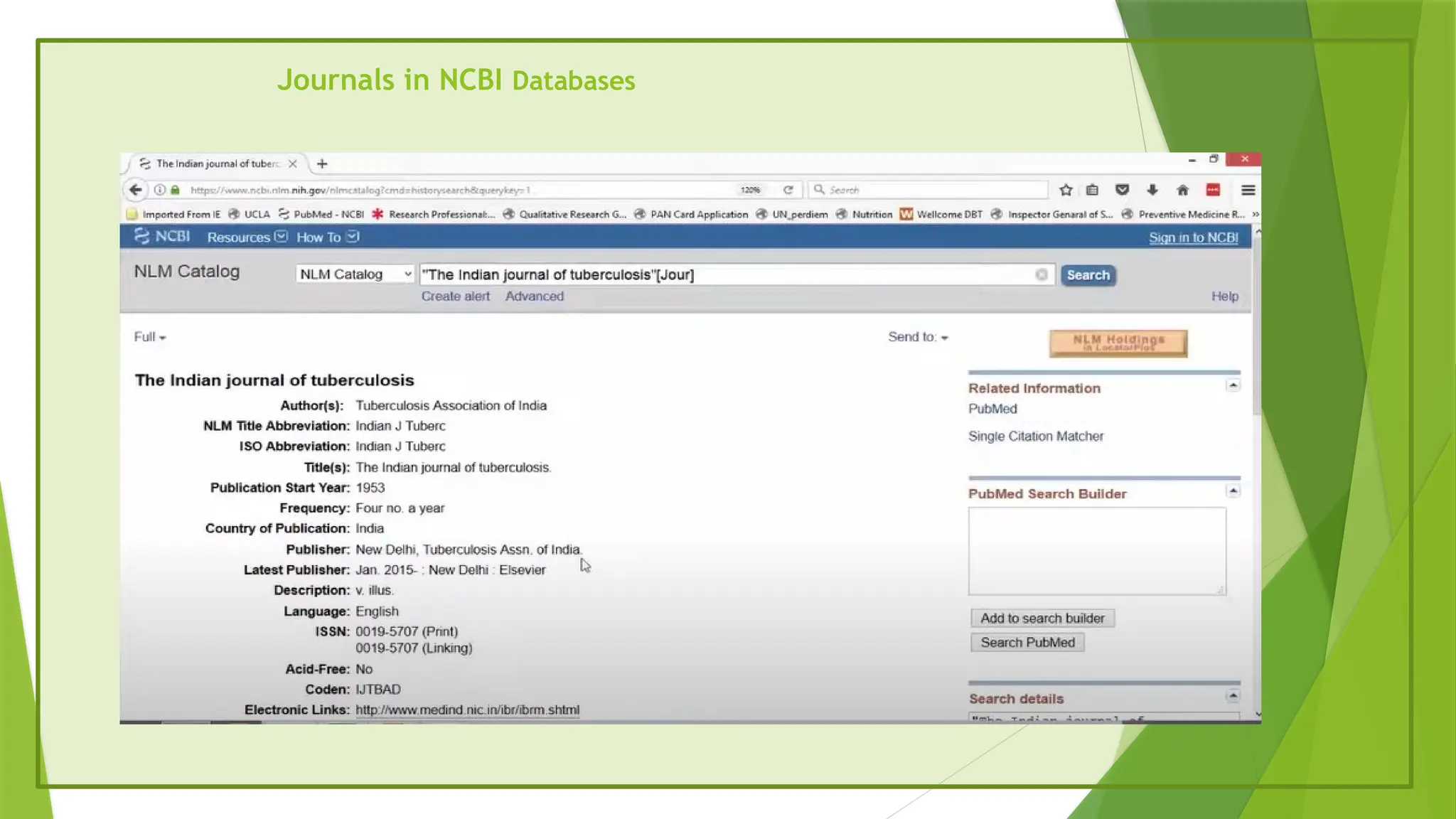
Journals in NCBIDatabases
We can find a journal by
Title
MeSH Terms – eg Tuberculosis
Broad subjects terms – eg Pediatrics
Abbreviations – eg Indian J Tuberc
We can find a detailed information about journals
We can find the journal abbreviation by searching for the title or vice versa
Finding free fulltexts of articles
Literature search is a first step to identify what has been published
Second step is to find free article
While searching PubMed
Filter – Free full text
For the rest
Some are free for short durations ( even if not marked free )
Some foreign journals are free in India
In their case , just click icon and try
55.
Finding free fulltext of articles
Paste the article title in Google scholar. We may find the article in :
The authors institutional archive
Research Gate ( requires free registration to use )
56.
While searching PubMed
If not free, try emailing the author – find the address in the address area
Several Indian / developing country articles are not marked free ; go to the journal
website and check for the article
MedInd is a national informatic center of India ( NIC) .In this website they host several
journals
MedInd is a full text website
57.
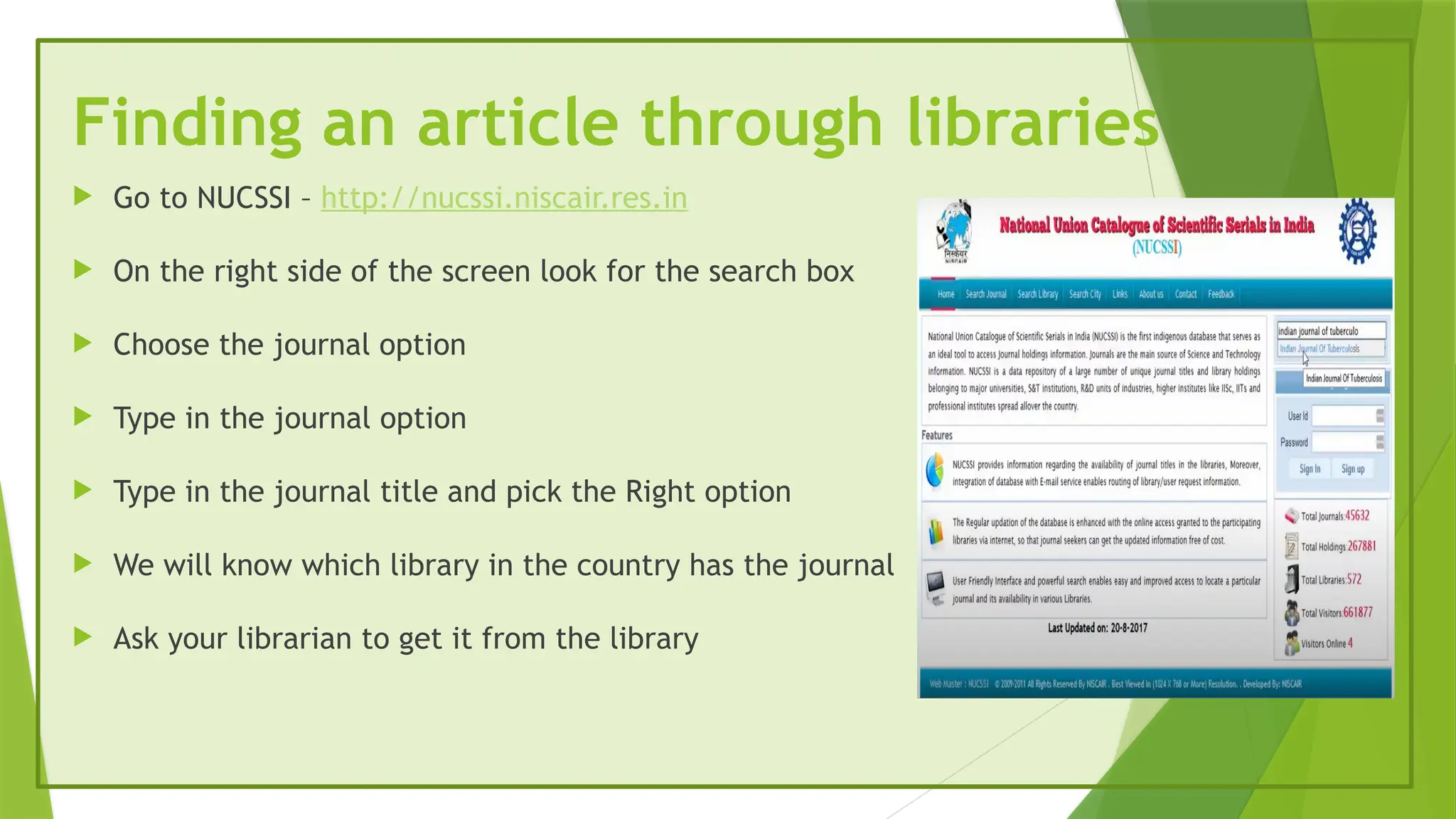
Finding an articlethrough libraries
Go to NUCSSI – http://nucssi.niscair.res.in
On the right side of the screen look for the search box
Choose the journal option
Type in the journal option
Type in the journal title and pick the Right option
We will know which library in the country has the journal
Ask your librarian to get it from the library
58.
Finding an articlethrough libraries
Go to the CSIR Gateway
Type in the name of the journal in the search box
There is an option – RA – to request the article
Make a request , or take librarians help to ask for the article
Check the Qmed website page for more details
http://www.qmed.ngo/full-text-articles/
Another source ofinformation is searchable
online reference databases
MalaCards
Reactome
MalaCards,the human disease database that integrates a wealth of
clinical information with data on clinical trials, molecular bases of
disease and experimental resources from other reference databases
and published research.
Online pathway tools, such as Reactome, can also be used to access
collective knowledge of molecular interactions with disease
61.
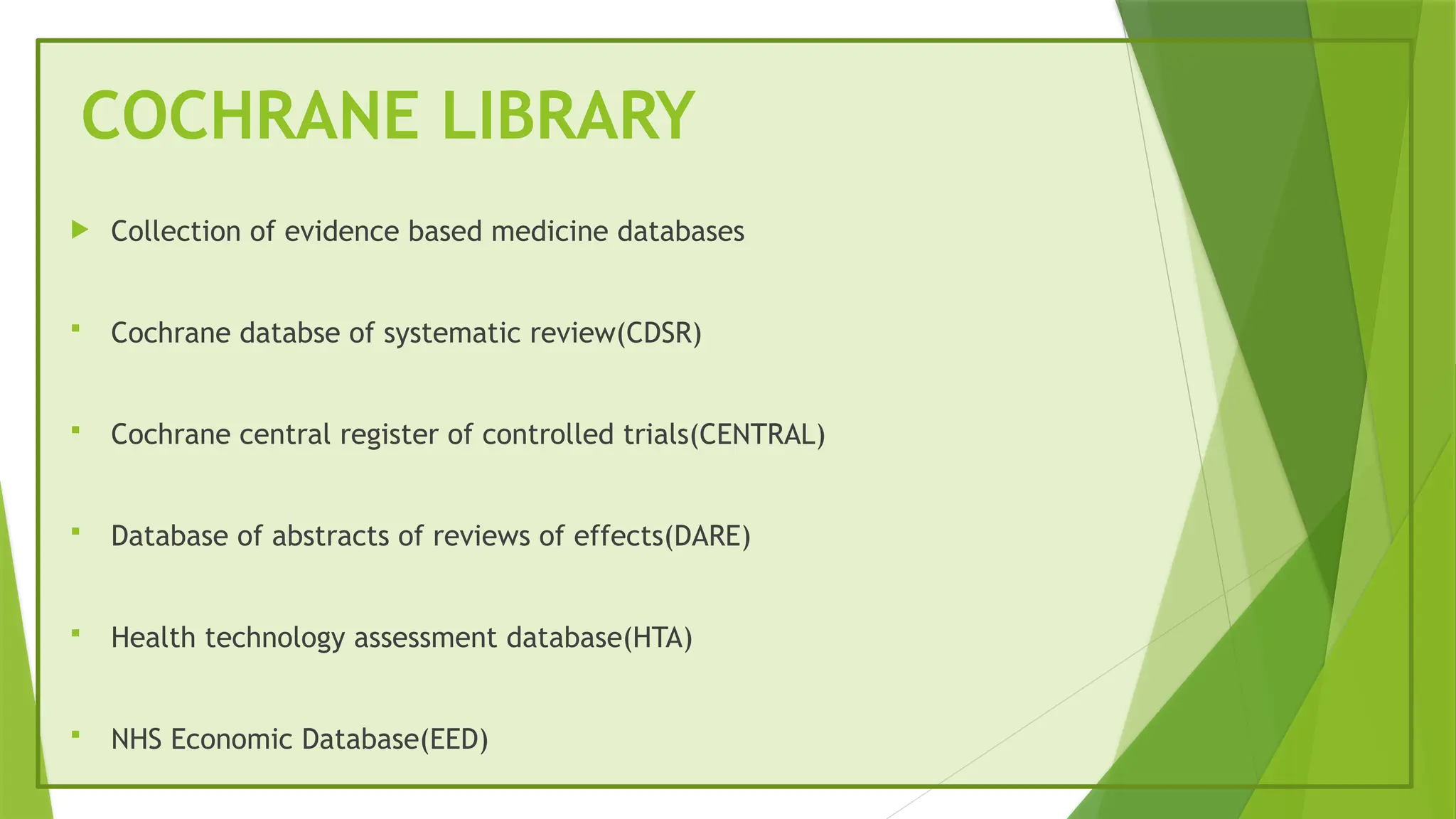
COCHRANE LIBRARY
Collectionof evidence based medicine databases
Cochrane databse of systematic review(CDSR)
Cochrane central register of controlled trials(CENTRAL)
Database of abstracts of reviews of effects(DARE)
Health technology assessment database(HTA)
NHS Economic Database(EED)
62.
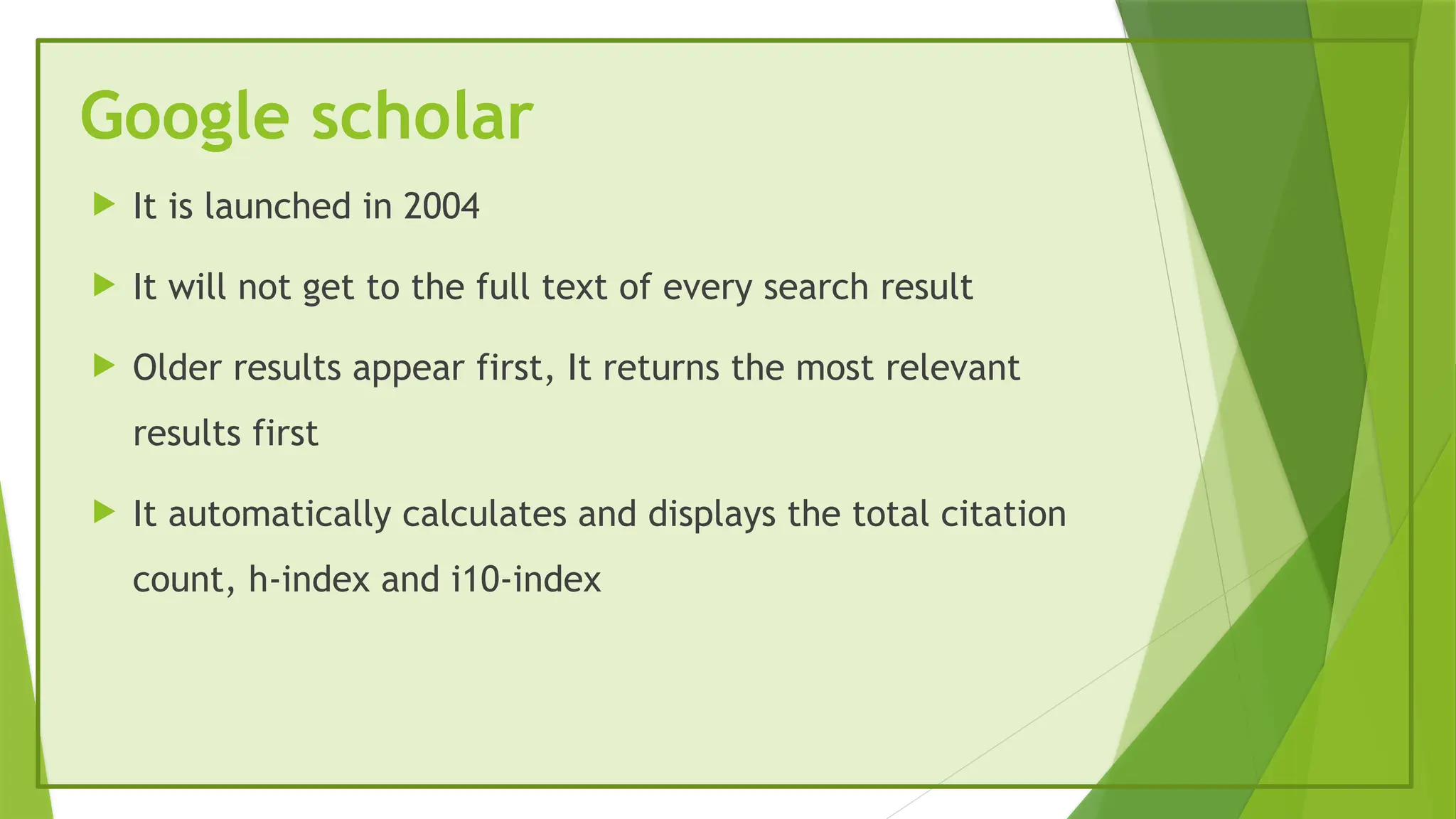
Google scholar
Itis launched in 2004
It will not get to the full text of every search result
Older results appear first, It returns the most relevant
results first
It automatically calculates and displays the total citation
count, h-index and i10-index
63.
ELSEVIER
It isa Dutch Academic publishing Company specialising in scientific,
technical and medical content
It published more than 600000 articles annually in over
2700 journals and 40000 e books
64.
SHODHGANGA
Shodhgnagaa isan open access of Indian Theses & Dissertation
It is maintained by INFLIBNET centre
The INFLIBNET centre is also maintaining another repository – Shodhgangotri which is a repository
of the synopsis and research proposals of the PhD programmes in Indian university
It is a collection of 3880 thesis
71 Universities are signed
62 Universities started contribution
65.
Take home messages
A literature review should set the scene, demonstrate current knowledge, identify gaps in the field and, if
relevant, demonstrate where your research fits.
It should be a personal critical appraisal of the current knowledge in a subject area.
It should be evidence-based, using a variety of peer-reviewed original research articles, reporting facts,
commenting on similarities or discrepancies and highlighting knowledge gaps or areas of unmet need.
Structure your review with an introduction, subsections and a summary table.
Summarise information in your own words and give appropriate credit to other authors’ work.
A systematic approach to writing a literature review should be used to reduce bias.
Editor's Notes
#3 Search engines are part of daily life for two types of people.
Users who search and get information
Site owners who try to optimize their websites for getting top rank in the search results.
#4 Health on the net foundation
EBMs : Effect based
Healthy on the net foundation
#5 Crawler based search engines use software programs such as spiders,crawlers,robots,bots
Human powered directories: they gather data manually , Example:yahoo directory,open directory,look smart
Hybrid search engins uses both crawler based searches and directory serches to obtain results.example: yahoo.com,google.com
#8 they are responsible for directing our literature search and affect the material you will acquire to read
How to start your literature serach?
to use published review articles or academic text books to learn the background to a subject.
This might help you to compile your list of keywords, identify areas that you want to explore further and to see which articles other people have read.
Generate a reading list by searching online citation databases such as PubMed®,3 which incorporates MEDLINE®,4 or Europe PubMed Central (PMC).5
Europe PMC has over 3.5 million full text articles available directly. Use your medical school or university library’s subscription to journals to obtain older articles that are not available digitally or those that are not published under open access. In some cases these libraries may also be able to obtain papers from other libraries, such as the British Library.
#9 Remember to consider negative findings by consulting sources such as the Journal of Negative Results in Biomedicine
#11 Now we will talk about these terms
Websites: locations where information resou/search engines/databases are located starting with www
SE: search engine does the function of searching so it could be generic search engine like google which crawls the whole web looking for whatever you have searched for where is a search engine within a website searches only the content in that website
Database: collection of data which is organiswd in a proper structure eg: telephone directory it has individuals name address and telephone number
Databases in a electronic space could be on a website the search engine in that website searches only the contents of the database
We should go step by step approach we should know our resources and map them to our needs and also need to know principles of searching
#12 First we will see about mapping to resources
Focused questions
1.dictionaries,encyclopideas,textbooks,handbook,manuals
2.Next question which is specific to our disease we will choose journals bcoz they are published with periodicity there is always something look forward to
Every issue that come to us
Journals and first group are called published infrmtn resources they are in a review are formal channel , of publication
Unpublished are thesis , conference presentation and also clinical trial registries online registry( current information resource)
3.Systematic review: factual evidence whether for a question like this whether artesunate or quinine better ,systematic review are compiled by people who read up all the available large trials on such a topic and compile the resource , we also have resources called guidelines
Guidelines are step to step processes that health care providers follow for treating specific illness
Summaries are broader covering broader topics, authors refer from journals, guidelines and systematic reviews and all the primry resoucrs and compiled what is called quick review or recall kind of document
Website may have any one of these or combination of 3 resources
#13 When we visit a website it has combination of 3 resources
It is a type 1 textbook resource
Cochrane library has systematic review type 3 and other bibliographic databases which is type 2 resources so it is mix of both type 2 and type 3 resources
#14 When we visit a website we have to check whether it has type 1 2 3 resouces
#16 Short form of the article
Pub Med – the data base – does NOT contain the full text of articles
It may link a bibliographic record to the full text on the journal website
The article being free or not is publishers decision
#19 In 1996 PubMed became hosted online with medline database once it came to the internet the Pubmed website the NLM hosted it decided to include lot mpre journals but are not part of medline databse
#20 In the archive we may not get information of how to subscribe to the journal and more its just where all the articles of a specific issue where deposited so if a journal ever decides to close down the archive of all articles old ones are still available in pubmed central
#22 We type the word and expect results about that word
Many of our searches contains the keywords but not about the keywords
#23 If we search for a disesase bronchiolitis we got 3 results
First result is tagged with
#24 If we search for a disesase bronchiolitis we got 3 results
First result is tagged with
#25 Thesaurus terms gives the meaning of terms but they are more specifically used in context to represent a collection of similar sounding concepts
#26 We can tell the pubmed to search for records
Med line journals where mesh terms are attached
Non medline journals they never get mesh terms
We can tell pubmed
#27 Look for bronchiolitis in the list of mesh terms
major means in the list of mesh terms with the star
We are keeping subheading
#28 To know what kind of articles that journal cover or we may want to know that publications from specific institution it is similar to principle 2 where we search for mesh terms by using tags here we search for factual things( tags) like who is author which is the journal or which is the institution from which the article was published
Here we will say to look for our terms in specific fields or areas of a record for example if this is one bibliographic record in PubMed we can tell the search engine to look for asthma in the title of the record we could say look for the word white in the author area of the record otherwise white could be just a color or white could be white cells or white matter we could ask num 1302 as the page no
And num 2015 as the date of publication
#29 Lets see how to tag chest
If we type TI it will search the term in title
If we search for chest tiab we will find our term in the titile or abstract
#30 chest[AD]means the word chest comes in the authpors adress
Lets see the page nums if we tag 143 with page we are looking for results whare the article starts on page 143 of the jpurnal 2016 pdat means date and yr of publication these two tages are substituted for PG for page or DP for date of publication
#31 All the results are from the jpournal title chest
None of these areas are from anatomical area chest
#32 Here we see how we use for Combining for more than one search term
We want infmtin about asthma as well as bronchitid or we want to look for articles by white in the journal thorax in 2015 so in first case we try to combine 2 terms in the second case we combine 3 terms so how do we combine 3 terms these are called Boolean operators
#33 Underlined they could be prepositions or conjunctions they are completely ignored by the search engine pub med so the right method
#34 If we search for asthma without any tags we will get 100 results
If we search for asthma and bronchitis we will get less results or equal results and equal results are rare because not everybody writes about astma has writes about bronchitis
If we search for asthma or bronchitis the results will be more than or equal to 100 because we are searching for one of the terms
If we search for asthma not bronchitis the results will be less than 100 because we searching for records that contains asthma we are excluding the second set we are in the records that contain asthma bronchitis was also present we are specifying asthma not bronchitis
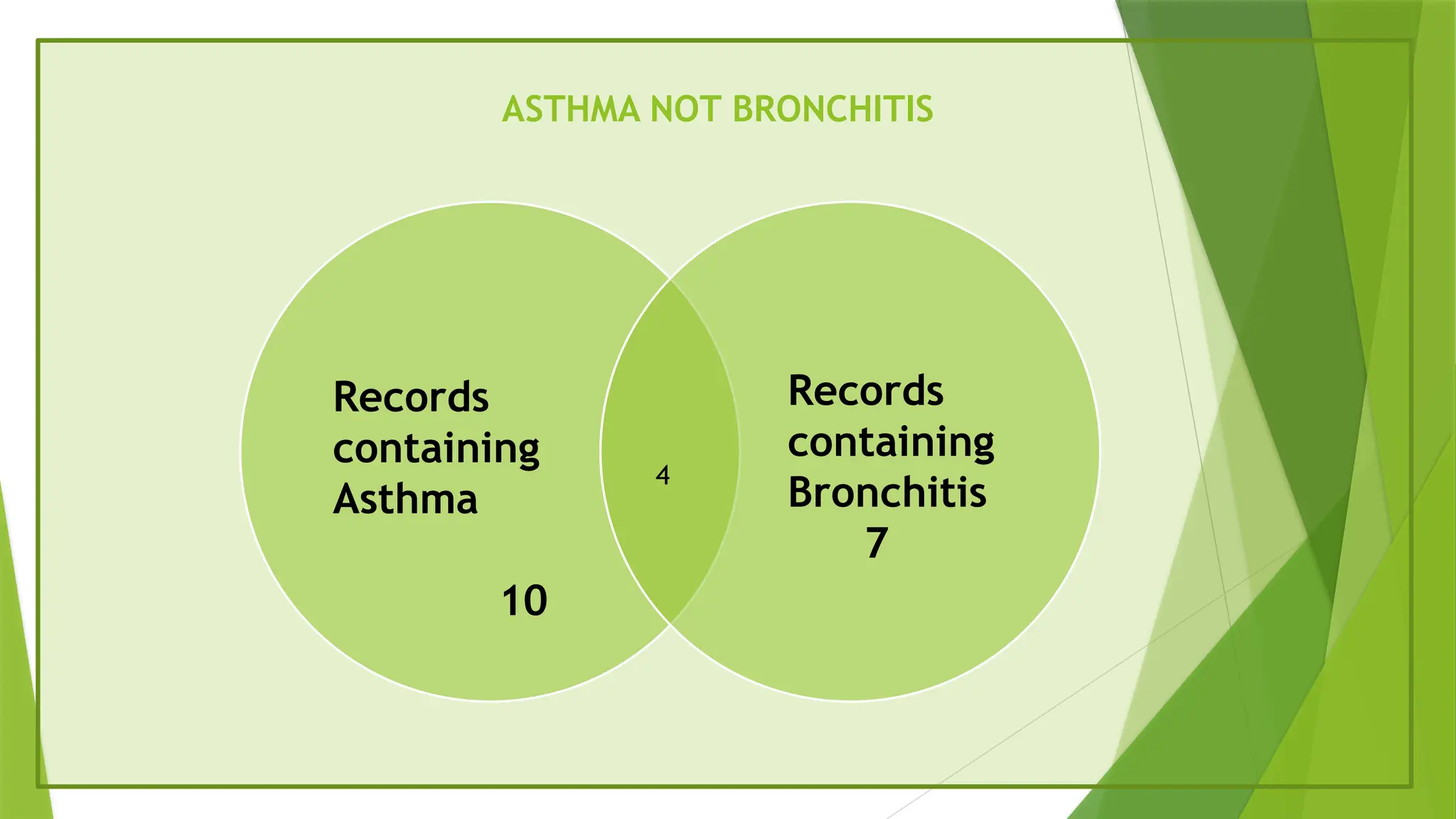
#35 This area represents part of 10 records that contain asthma and part of 7 records that contain bronchitis
#37 10 records contain asthma out of which 4 recpords contain bronchitis so that is 10 – 4 is 6 that contains asthma not bronchitis
#38 Finding right mesh terms from the thesaurus
For examole heart arrst or cardiac arrest which is the right term
So where is the thesaurus
Here there is the mesh database insisde the meshdatabase
We are here inside the mesh database
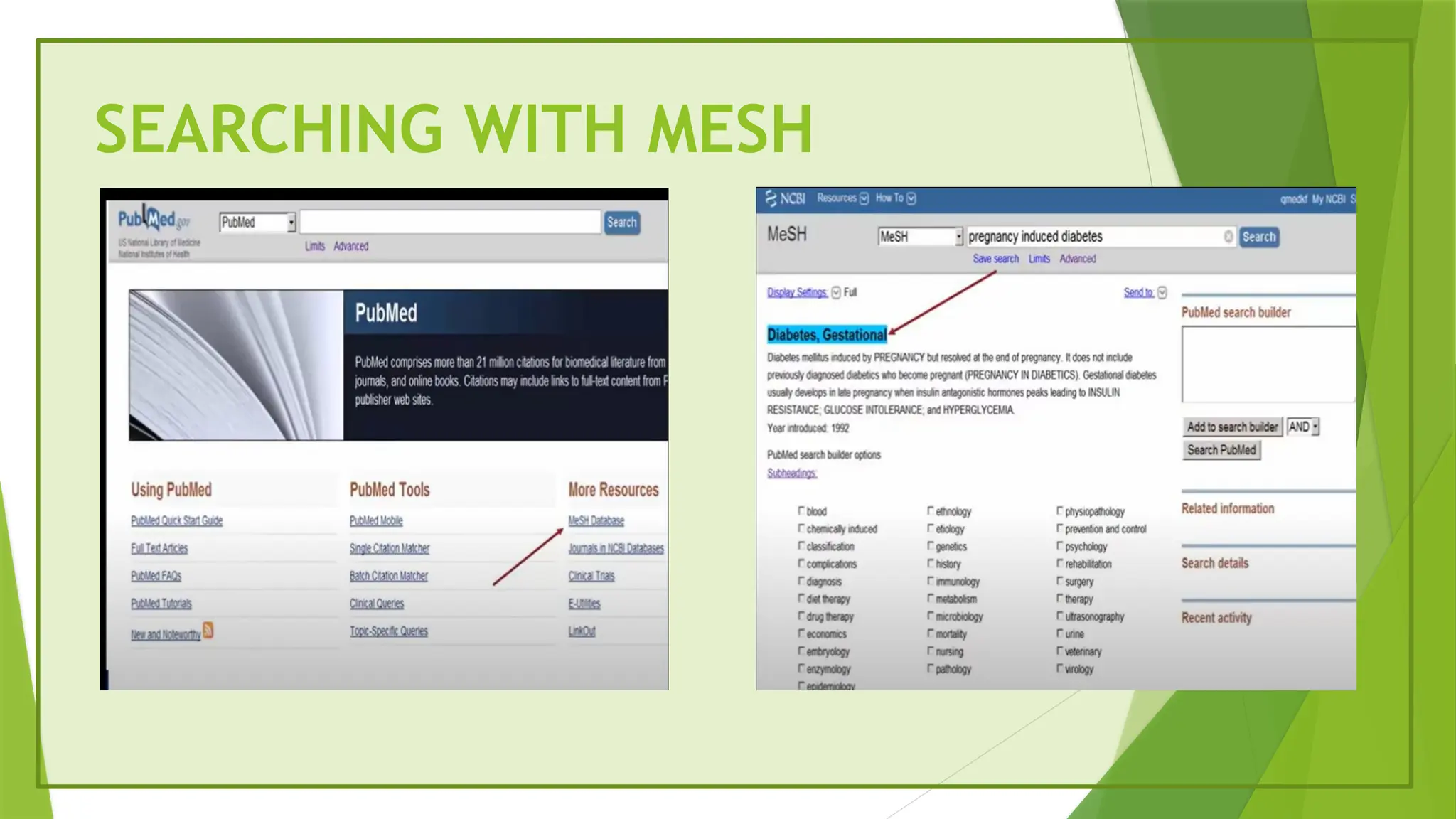
If we type preg induced diabetes and then click search here we gets diabetes,gestational it is the standard thesaurus term
Whatever in scope note it is mesh terms
Here we enterd into mesh database
If we search for pregnancy induced diabetes mellitus standard thesaurus term for preg induced daibets is Diabets ,Gestational
Below diabetes ,gestational there is paragraph called scope note this contains what is preg unduced diabetes
In the scope notes whatever is in capitals they are called mesh terms
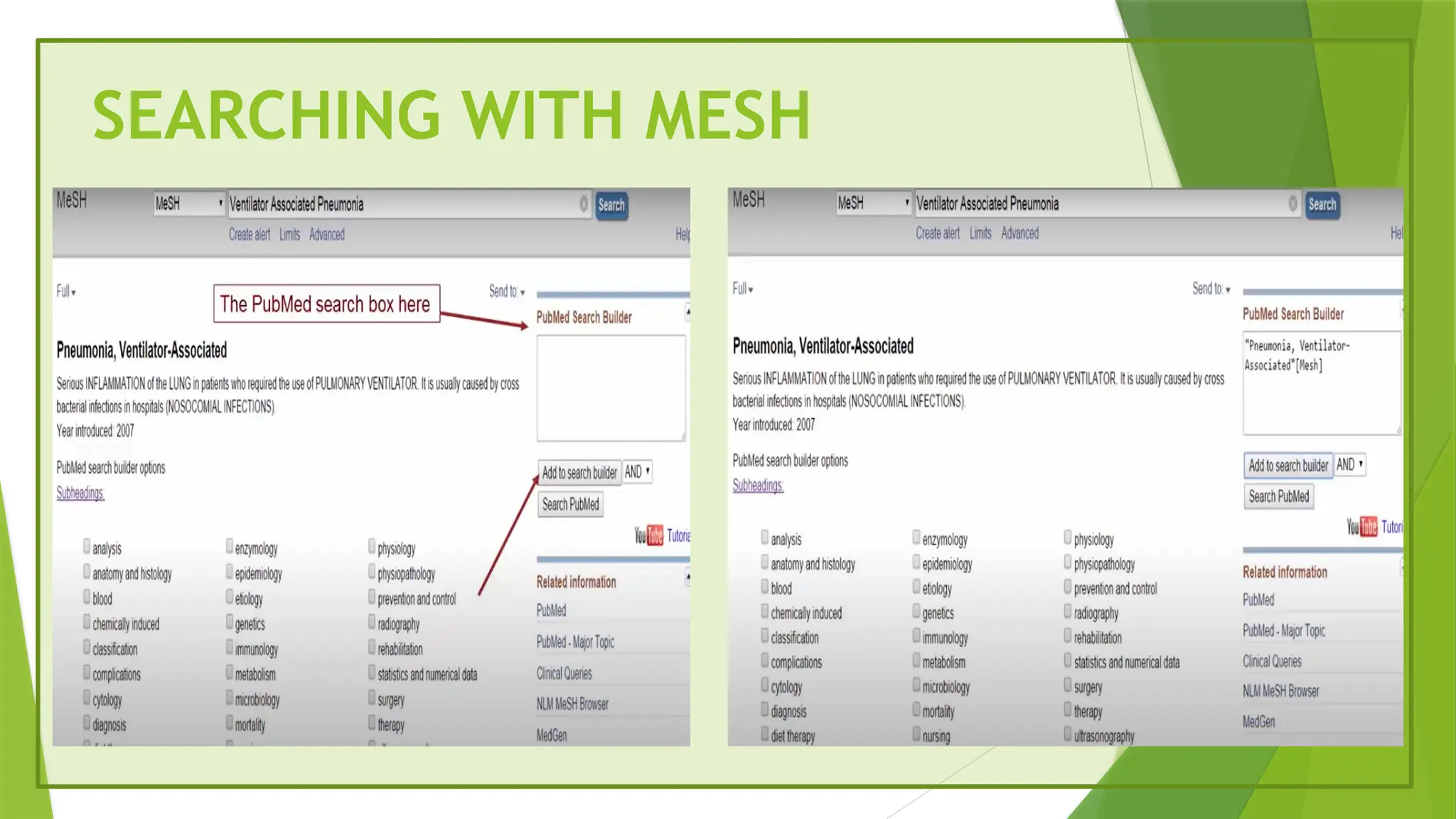
#40 Foe suppose if we are searching for ventilator associated pneumonia and add to search builder and when we click that button it automatically puts in pneumonia ventilator associated mesh
#41 And if we type pubmed it will automatically takes to pubmed
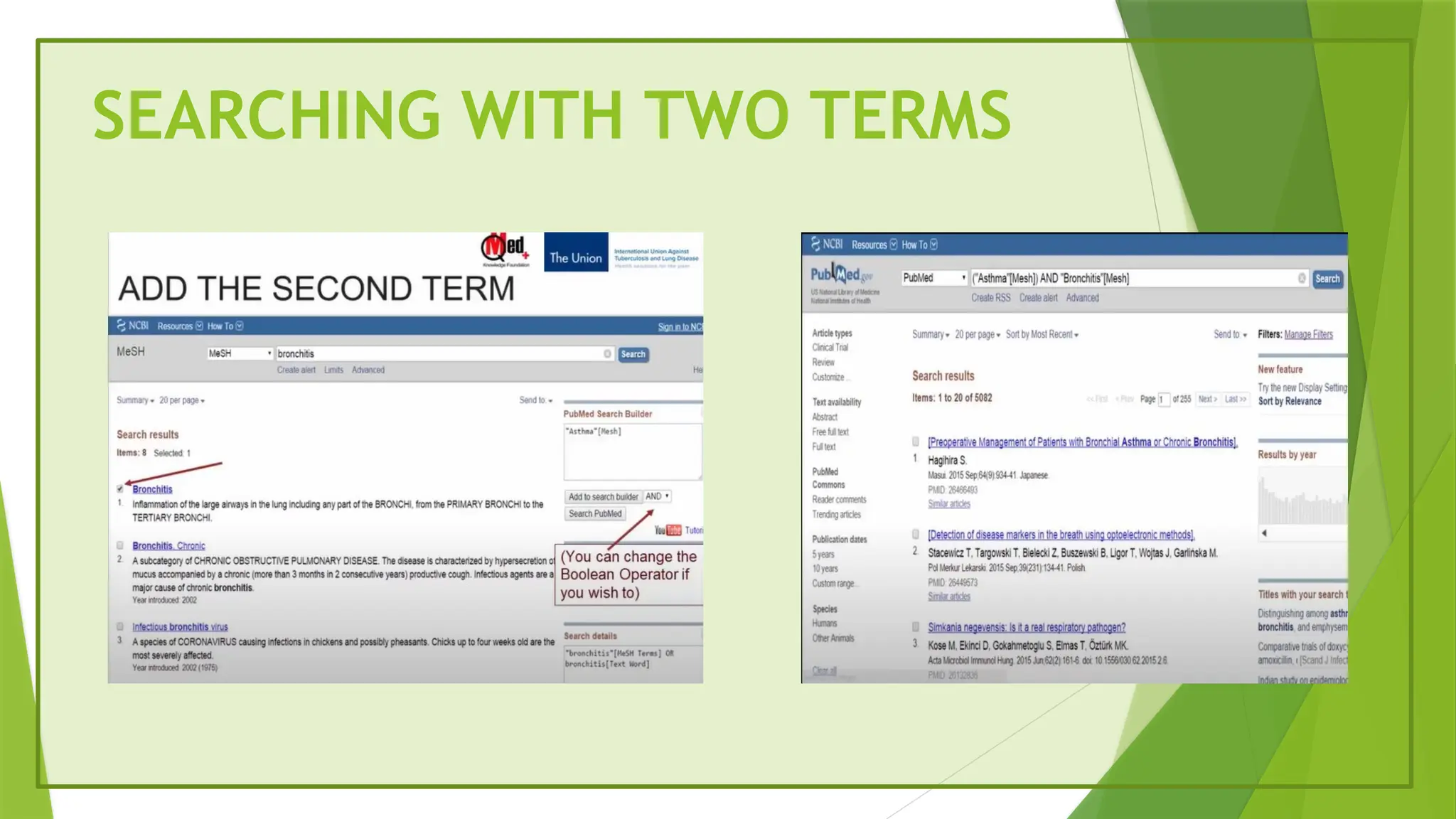
#42 Iif we want to search asthma and bronchits
We have to type bronchitis and in search box we have to type and
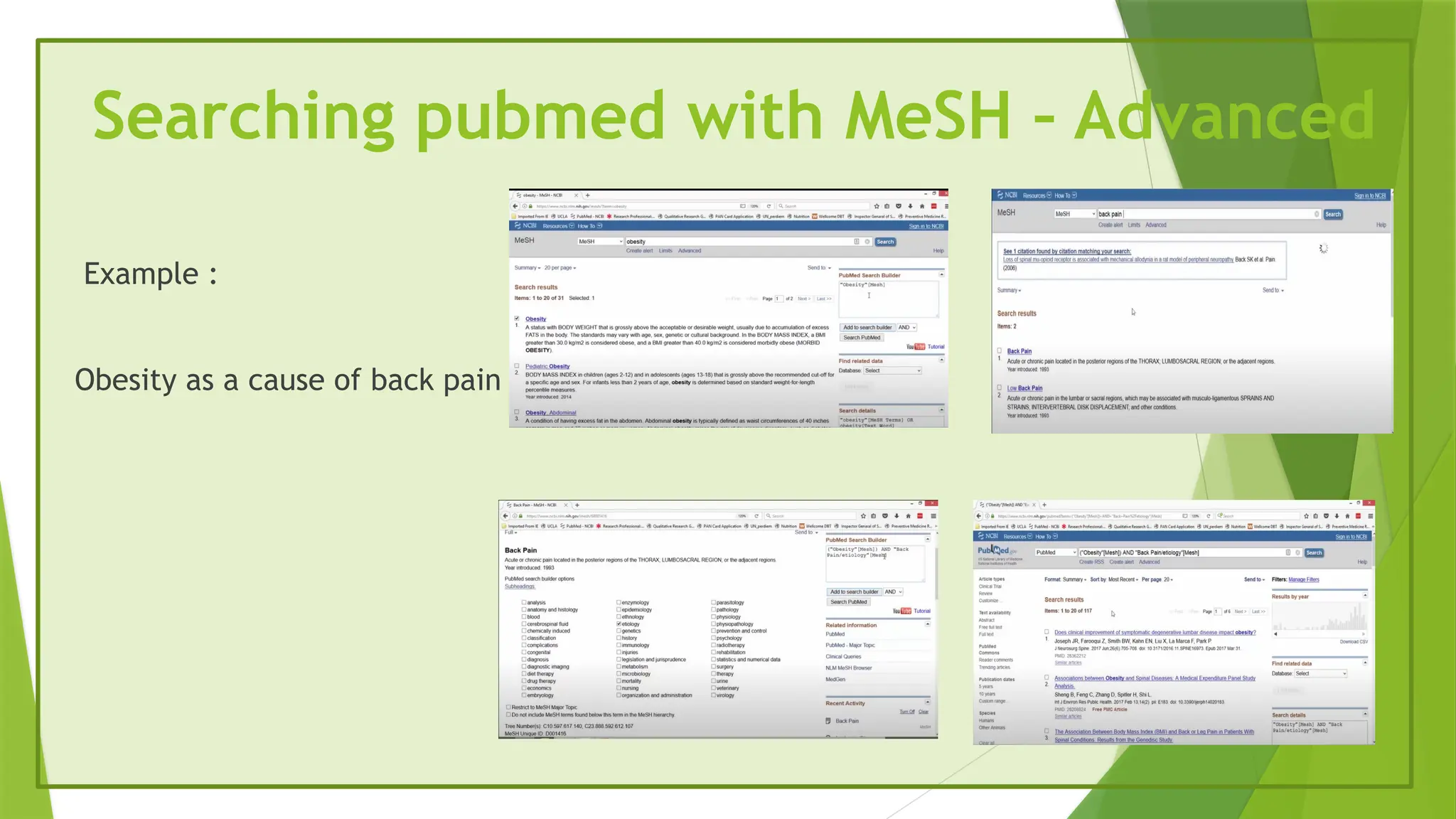
#43 Subheadings like etiology etc
CLICK ON ASTHMA
If we want to know about diet therapy and drug therapy we select that and we add to serach builder and then we we click on search pubmed and the page refreshes and here it shows results about diet therapy some with drug therapy and some with both
#44 If we type cirrhosis and tag it with mesh and search pubmed and pubmed will understand iam searchiong the mesh databse for
When we search the database for every term it is important to see the scope note as well as entry term and then finalize which is mesh term which we will use
#45 In advanced there is history it lasts for 8 hrs
Sb stands for subset of articles
More filters first select the filters and then apply the filter
#46 We have already searched some topics from the history we will take the topic and search the topic
XML is other format of export where we can import into other
programs
DOI: Digital object identifier,Epub:Electronic pub,PMID:Pubmedid
In the summary text file we have references
displaying number of items per page
Sort options means latest journals coming on the top and old ones are below
CSV : common separated values
#47 National centre for biotechnology information
After logging into NCBI account we should click create alert’ to save our strategy,give a proper name to your search strategy,email alerts are optional
Inside file we have six options
Collections are permanent storage
We can send it to email first we have to send to our mail and then to others
We can send items to clip board and then make permanent list
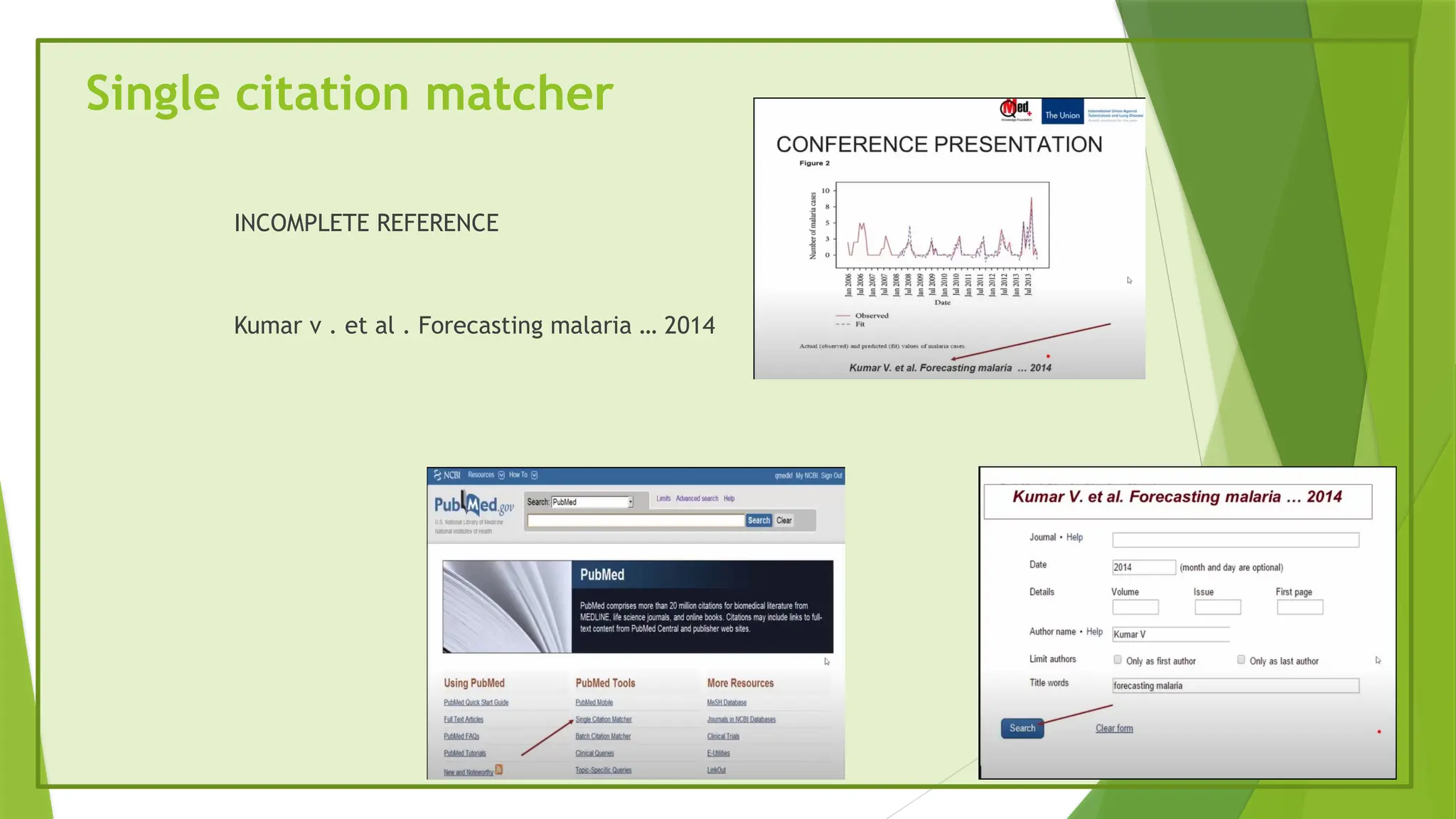
#48 In pubmed we have link called single citation matcher which will match our incomplete citation to the full one
If you want to read this article where there is incomplete refernce
We will get lot of results from this incomplete refernce so in pubmed we will have a link called single citation manager
#52 There are 2 results one it is started in 2004 and the other is issues in medical ethics and if we click the second one from 2004 it is continued as Indian journal of medical ethics
Here we getbthe historical journey also
#53 Here we find this word in pubmed pubmed central we can get open access because its an archive
Tuberculosiss India we have to go to advanced and type india in search fields
#54 There is a filter for free full text
Most of us think that all artcles are not free so we could not find anything so we can find only abstracts
Publisher decides for some reason that for next six months the journal articles are going to be free so they don’t tell PubMed to mark it as free but it is available free
Some foreign jjournals are free for india bcoz it is not free for whole world so the pubmed cannot mark it as free
In either case clicling the the journal icon and see
#55 Here we can find aricles in research gate
This is authors institutional archive
#56 ELSEVIER is a fully paid form
Science direct is for ELSEVIER
#57 National union catalogue of scientific serials in India
#59 If we kow mesh same as mesh we can search here
#62 H index is an author lebvel metric that attempts to mausre both the productivity and citation impact of the publications of a scientist
I 10 index is the newest in the line of journal metrics and was introduced by google scholar in 2011
It is straight forward indexing measure found by tallying a scholars total number of published papers with atleast 10 citations









![TYPES OF MESH SEARCHES
Bronchiolitis[mesh] 42336
Bronchiolitis/etiology[mesh] 22430
Bronchiolitis[major] 33571
Bronchiolitis /etiology[major] 12284](https://image.slidesharecdn.com/searchenginesreviewliterature-250506121308-48b89789/75/search-engines-review-literature-pptx-PUBMED-27-2048.jpg)

![FIELD – SEARCH “ CHEST “
Chest[TI] Title
Chest[tiab] Title or abstract or both cases
Chest[Jour] Journal title
If we search as We will find our term in the](https://image.slidesharecdn.com/searchenginesreviewliterature-250506121308-48b89789/75/search-engines-review-literature-pptx-PUBMED-29-2048.jpg)
![FIELD SEARCH
Chest[Au] Author
Chest[AD] Author’s address
Chest[MeSH] List of Mesh terms
Chest ALL AREAS (except the full
text)
143[page] Page number
2016[pdat] Date/year
If you search as You will find your term in the](https://image.slidesharecdn.com/searchenginesreviewliterature-250506121308-48b89789/75/search-engines-review-literature-pptx-PUBMED-30-2048.jpg)
















![Chapter4_Initiation_of_Sediment_Motion_v2[1].pptx](https://cdn.slidesharecdn.com/ss_thumbnails/chapter4initiationofsedimentmotionv21-251208223747-f94ef163-thumbnail.jpg?width=640&height=640&fit=bounds)


![AnyTrans for iOS 8.9.14.20251127 With Crack for MacOS [Latest] pptx](https://cdn.slidesharecdn.com/ss_thumbnails/softwareoverview-251207190907-2316965f-thumbnail.jpg?width=640&height=640&fit=bounds)


![iStat Menus 7.20 Crack for MacOS 2026 Full Version [Latest] pptx](https://cdn.slidesharecdn.com/ss_thumbnails/softwareoverview-251207191544-22b737dc-thumbnail.jpg?width=640&height=640&fit=bounds)


![Driver Easy Pro Key 7.1.0.2641 Full Mac Crack Free Activated Download [2026]....](https://cdn.slidesharecdn.com/ss_thumbnails/software-251207185324-b2fb71b4-thumbnail.jpg?width=640&height=640&fit=bounds)
