PROJECTIONS
1
What is projection?
projection is the process of transforming a 3D object or scene onto a 2D surface,
typically the computer screen, while retaining certain properties such as shape
and size relationships. This transformation is necessary because while the world
exists in three dimensions (width, height, and depth), screens are two-
dimensional. The type of projection defines how the 3D information is
represented in 2D.
Transform 3D objects on to a 2D plane using projections
2 types of projections
Perspective projection
Parallel projection
2
Perspective Projection
3
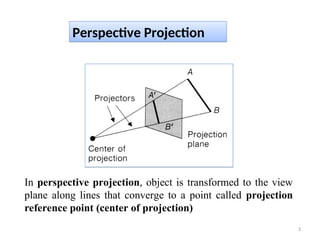
In perspective projection, object is transformed to the view
plane along lines that converge to a point called projection
reference point (center of projection)
• Perspective projection is a type of projection in computer
graphics and geometry that simulates the way objects appear
to the human eye, making objects look smaller as their
distance from the observer increases. This type of projection
is commonly used in 3D rendering to create realistic scenes.
4
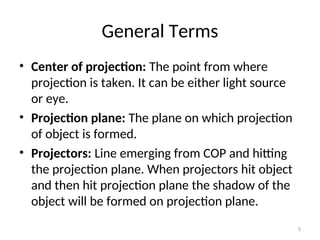
General Terms
• Center of projection: The point from where
projection is taken. It can be either light source
or eye.
• Projection plane: The plane on which projection
of object is formed.
• Projectors: Line emerging from COP and hitting
the projection plane. When projectors hit object
and then hit projection plane the shadow of the
object will be formed on projection plane.
5
Key Features of Perspective
Projection
• Vanishing Point: In a perspective projection, parallel lines appear to
converge at a point in the distance, called the vanishing point. This creates
a sense of depth.
• Foreshortening: Objects closer to the viewer appear larger, while objects
farther away appear smaller, even if their real-world dimensions are the
same.
• Depth Perception: Perspective projection is used to simulate depth, as
objects farther from the viewer shrink and appear closer to the vanishing
point.
6
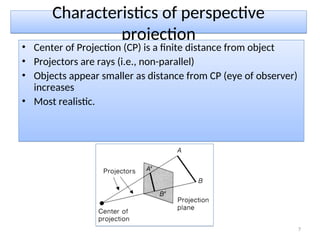
Characteristics of perspective
projection
• Center of Projection (CP) is a finite distance from object
• Projectors are rays (i.e., non-parallel)
• Objects appear smaller as distance from CP (eye of observer)
increases
• Most realistic.
7
• Parallel projection is a type of projection used in computer graphics
where all projection lines (rays) are parallel to each other, unlike
perspective projection, where projection lines converge at a single point
(the vanishing point). Parallel projection preserves the relative
proportions of objects regardless of their distance from the viewer,
making it particularly useful for technical drawings and CAD applications.
8
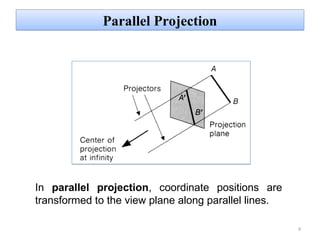
Parallel Projection
9
In parallel projection, coordinate positions are
transformed to the view plane along parallel lines.
TYPES OF PARALLEL PROJECTION
• Orthographic projection
• Oblique projection
10
Key Features of Parallel Projection:
• No Perspective Distortion: Objects retain their true
dimensions and shape regardless of their distance from the
camera. This means distant objects do not appear smaller,
unlike in perspective projection.
• Parallel Lines Stay Parallel: All parallel lines in the 3D scene
remain parallel after the projection. There is no convergence
at a vanishing point.
• Proportionality: The relative proportions and sizes of objects
are preserved, making parallel projection useful for tasks
where accuracy and measurement are important.
11
• Perspective:
– This type of projection is similar to human visual system...
– In this system 'perspective foreshortening‘ occur.
• size of object varies inversely with distance from the center of
projection. Projection of a distant object are smaller than the
projection of objects of the same size that are closer to the
projection plane.
• Parallel:
It preserves relative proportion of object.
– less realistic view because of no foreshortening
– however, parallel lines remain parallel.
Perspective v Parallel
12
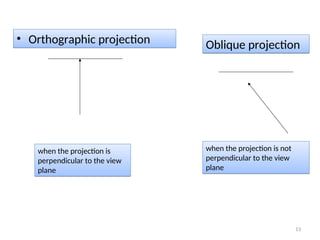
when the projection is
perpendicular to the view
plane
when the projection is not
perpendicular to the view
plane
• Orthographic projection Oblique projection
13
– Front, side and rear orthographic projection of an object
are called elevations.
– all have projection plane perpendicular to a principle axes.
– This type of projection is used in architectural drawings .
• Different types of view can be shown by this type of
projection.
Orthographic (or orthogonal) projections:
14
Types of orthographic projections:
• Multiview (or first-angle/third-angle
projection)
• Axonometric projection
15
Multiview (or first-angle/third-
angle projection)
• This method involves projecting the views of the
object onto different planes (top, front, side, etc.)
and placing these views together to represent the
object from various angles.
• In first-angle projection, the object is placed in the
first quadrant, and views are projected onto adjacent
planes.
• In third-angle projection the object is placed in the
third quadrant, and views are projected directly onto
planes.
16
TYPES of Axonometric projection
• This is a type of orthographic projection where the object is
viewed from a skewed angle to show multiple sides at once.
Common types include:
– Isometric projection: The angles between the projection
of the axes are equal (120°), providing a balanced view of
the object.
– Dimetric projection: Two of the three axes have the same
scale or angle, while the third axis is different.
– Trimetric projection: All three axes are scaled differently.
17
THANK YOU!!
18

projection in computer graphics us.ppt

  • 1.
  • 2.
    What is projection? projectionis the process of transforming a 3D object or scene onto a 2D surface, typically the computer screen, while retaining certain properties such as shape and size relationships. This transformation is necessary because while the world exists in three dimensions (width, height, and depth), screens are two- dimensional. The type of projection defines how the 3D information is represented in 2D. Transform 3D objects on to a 2D plane using projections 2 types of projections Perspective projection Parallel projection 2
  • 3.
    Perspective Projection 3 In perspectiveprojection, object is transformed to the view plane along lines that converge to a point called projection reference point (center of projection)
  • 4.
    • Perspective projectionis a type of projection in computer graphics and geometry that simulates the way objects appear to the human eye, making objects look smaller as their distance from the observer increases. This type of projection is commonly used in 3D rendering to create realistic scenes. 4
  • 5.
    General Terms • Centerof projection: The point from where projection is taken. It can be either light source or eye. • Projection plane: The plane on which projection of object is formed. • Projectors: Line emerging from COP and hitting the projection plane. When projectors hit object and then hit projection plane the shadow of the object will be formed on projection plane. 5
  • 6.
    Key Features ofPerspective Projection • Vanishing Point: In a perspective projection, parallel lines appear to converge at a point in the distance, called the vanishing point. This creates a sense of depth. • Foreshortening: Objects closer to the viewer appear larger, while objects farther away appear smaller, even if their real-world dimensions are the same. • Depth Perception: Perspective projection is used to simulate depth, as objects farther from the viewer shrink and appear closer to the vanishing point. 6
  • 7.
    Characteristics of perspective projection •Center of Projection (CP) is a finite distance from object • Projectors are rays (i.e., non-parallel) • Objects appear smaller as distance from CP (eye of observer) increases • Most realistic. 7
  • 8.
    • Parallel projectionis a type of projection used in computer graphics where all projection lines (rays) are parallel to each other, unlike perspective projection, where projection lines converge at a single point (the vanishing point). Parallel projection preserves the relative proportions of objects regardless of their distance from the viewer, making it particularly useful for technical drawings and CAD applications. 8
  • 9.
    Parallel Projection 9 In parallelprojection, coordinate positions are transformed to the view plane along parallel lines.
  • 10.
    TYPES OF PARALLELPROJECTION • Orthographic projection • Oblique projection 10
  • 11.
    Key Features ofParallel Projection: • No Perspective Distortion: Objects retain their true dimensions and shape regardless of their distance from the camera. This means distant objects do not appear smaller, unlike in perspective projection. • Parallel Lines Stay Parallel: All parallel lines in the 3D scene remain parallel after the projection. There is no convergence at a vanishing point. • Proportionality: The relative proportions and sizes of objects are preserved, making parallel projection useful for tasks where accuracy and measurement are important. 11
  • 12.
    • Perspective: – Thistype of projection is similar to human visual system... – In this system 'perspective foreshortening‘ occur. • size of object varies inversely with distance from the center of projection. Projection of a distant object are smaller than the projection of objects of the same size that are closer to the projection plane. • Parallel: It preserves relative proportion of object. – less realistic view because of no foreshortening – however, parallel lines remain parallel. Perspective v Parallel 12
  • 13.
    when the projectionis perpendicular to the view plane when the projection is not perpendicular to the view plane • Orthographic projection Oblique projection 13
  • 14.
    – Front, sideand rear orthographic projection of an object are called elevations. – all have projection plane perpendicular to a principle axes. – This type of projection is used in architectural drawings . • Different types of view can be shown by this type of projection. Orthographic (or orthogonal) projections: 14
  • 15.
    Types of orthographicprojections: • Multiview (or first-angle/third-angle projection) • Axonometric projection 15
  • 16.
    Multiview (or first-angle/third- angleprojection) • This method involves projecting the views of the object onto different planes (top, front, side, etc.) and placing these views together to represent the object from various angles. • In first-angle projection, the object is placed in the first quadrant, and views are projected onto adjacent planes. • In third-angle projection the object is placed in the third quadrant, and views are projected directly onto planes. 16
  • 17.
    TYPES of Axonometricprojection • This is a type of orthographic projection where the object is viewed from a skewed angle to show multiple sides at once. Common types include: – Isometric projection: The angles between the projection of the axes are equal (120°), providing a balanced view of the object. – Dimetric projection: Two of the three axes have the same scale or angle, while the third axis is different. – Trimetric projection: All three axes are scaled differently. 17
  • 18.