Module 6
Project Schedule Management
Agus Suhanto
Module Overview
• Lesson 1: Key Concepts & Terms
• Lesson 2: Plan Schedule Management
• Lesson 3: Define Activities
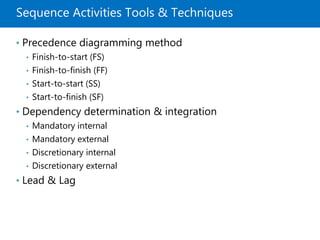
• Lesson 4: Sequence Activities
• Lesson 5: Estimate Activity Duration
• Lesson 6: Develop Schedule
• Lesson 7: Control Schedule
Lesson 1: Key Concepts & Terms
• Project Schedule Management
• Key Terms
• Trends & Emerging Practices
• Tailoring Considerations
• Considerations for Adaptive Environment
Project Schedule Management
Project schedule management is the processes
required to manage the timely completion of the
project.
Key Terms
• Schedule baseline: the version of the schedule model
used to manage the project; it is what the project team’s
performance is measured against.
• Schedule compression: a technique to shorten an already
developed schedule.
• Crashing: schedule compression technique by adding resources.
• Fast tracking: schedule compression technique in which activities
normally done in sequence are performed in parallel for at least a
portion of their duration.
• Activity list: list of activities to be managed in the project
schedule.
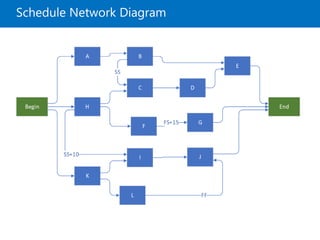
• Network diagram: a diagram of project activities that
shows the sequential relationships of activities using
arrows and nodes.
Key Terms (continued)
• Contingency (schedule) reserve: the estimated duration
within the schedule baseline, which is allocated for
identified risks that are accepted.
• Management reserve: specified amount of the project
duration (not included in baseline) withheld for
management control purposes and are reserved for
unforeseen work that is within the scope of the project.
• Critical path: the longest duration path through a network
diagram, and it determines the shortest time it could take
to complete the project.
• Milestone: significant events within the project schedule;
not work activities and have no duration.
Key Terms (continued)
• Near critical path: closest in duration to the critical path.
• Total float: the amount of time an activity can be delayed
without delaying the project end date or an intermediary
milestone.
• Free float: the amount of time an activity can be delayed
without delaying the early start date of its successor(s).
• Project float: the amount of time a project can be delayed
without delaying the externally imposed project
completion date required by the customer.
Key Terms (continued)
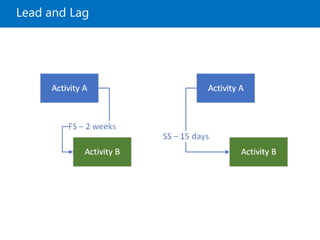
• Lead: the amount of time a successor activity can be
advanced with respect to a predecessor activity.
• Lag: the amount of time a successor activity will be
delayed with respect to a predecessor activity.
• Student syndrome (procrastination): people start to apply
themselves only at the last possible moment before
deadline.
• Parkinson’s Law: work expands to fill the time available
for its completion.
Trends & Emerging Practices
• Iterative scheduling with backlog
• On-demand scheduling
Tailoring Considerations
• Life cycle approach
• Resource availability
• Project dimensions
• Technology support
Considerations for Adaptive Environments
• Adaptive approaches use short cycles to
undertake work, review the results, and adapt as
necessary.
• To address the full delivery life cycle for larger,
enterprise-wide systems, a range of techniques
utilizing the predictive, adaptive, or hybrid
approach may need to be adopted.
• The role of project manager does not change.
Lesson 2: Plan Schedule Management
• Plan Schedule Management Overview
• Plan Schedule Management Data Flow
• Plan Schedule Management Input
• Plan Schedule Management Tools & Technique
• Plan Schedule Management Output
Plan Schedule Management Overview
Plan schedule management is the process of
establishing the policies, procedures, and
documentation for planning, developing,
managing, executing, and controlling the project
schedule.
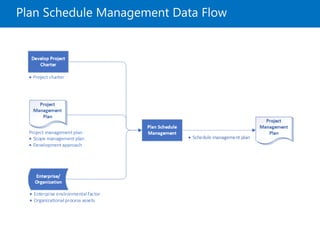
Plan Schedule Management Data Flow
Plan Schedule Management Input
• Project charter
• Project management plan
• Scope management plan
• Development approach
• Enterprise Environmental factors
• Organizational process assets
Plan Schedule Management Tools & Techniques
• Expert judgment
• Data analysis
• Alternative analysis
• Meetings
Plan Schedule Management Output
• Project management plan
• Schedule management plan
• Project schedule model development
• Release and iteration length
• Level of accuracy
• Units of measure
• Organizational procedures links
• Project schedule model maintenance
• Control thresholds
• Rules of performance measurement
• Rules for establishing percent complete
• EVM techniques to be employed
• Schedule performance measurements
• Reporting formats
Lesson 3: Define Activities
• Define Activities Overview
• Define Activities Data Flow
• Define Activities Input
• Define Activities Tools & Techniques
• Define Activities Output
Define Activities Overview
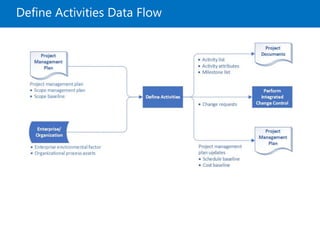
• Define activities is the process of identifying and
documenting the specific actions to be performed to
produce the project deliverables.
• It decomposes work packages into schedule activities
that provide a basis for estimating, scheduling,
executing, monitoring, and controlling the project
work.
Define Activities Data Flow
Define Activities Input
• Project management plan
• Scope management plan
• Scope baseline
• Enterprise environmental factors
• Organizational process assets
Define Activities Tools & Techniques
• Decomposition
• Rolling wave planning
• Meetings
Define Activities Output
• Project documents
• Activity list
• Activity attributes
• Milestone list
• Change requests
• Project management plan updates
• Schedule baseline
• Cost baseline
Lesson 4: Sequence Activities
• Sequence Activities Overview
• Sequence Activities Data Flow
• Sequence Activities Input
• Sequence Activities Tools & Techniques
• Sequence Activities Output
Sequence Activities Overview
• Sequence activities is the process of identifying
and documenting relationships among the project
activities.
• It defines the logical sequence of work to obtain
the greatest efficiency given all project constraints.
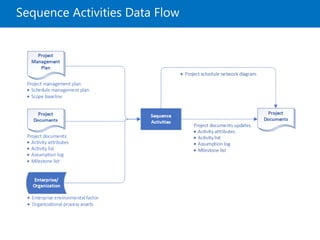
Sequence Activities Data Flow
Sequence Activities Input
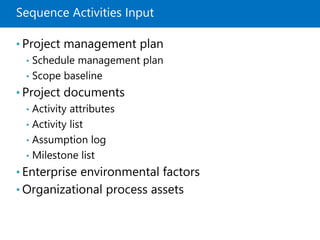
• Project management plan
• Schedule management plan
• Scope baseline
• Project documents
• Activity attributes
• Activity list
• Assumption log
• Milestone list
• Enterprise environmental factors
• Organizational process assets
Sequence Activities Tools & Techniques
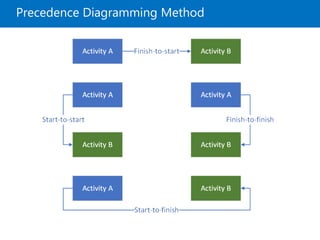
• Precedence diagramming method
• Finish-to-start (FS)
• Finish-to-finish (FF)
• Start-to-start (SS)
• Start-to-finish (SF)
• Dependency determination & integration
• Mandatory internal
• Mandatory external
• Discretionary internal
• Discretionary external
• Lead & Lag
Precedence Diagramming Method
Lead and Lag
Schedule Network Diagram
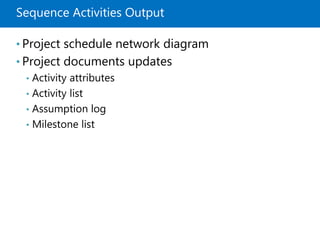
Sequence Activities Output
• Project schedule network diagram
• Project documents updates
• Activity attributes
• Activity list
• Assumption log
• Milestone list
Lesson 5: Estimate Activity Duration
• Estimate Activity Duration Overview
• Estimate Activity Duration Data Flow
• Estimate Activity Duration Input
• Estimate Activity Duration Tools & Techniques
• Estimate Activity Duration Output
Estimate Activity Duration Overview
Estimate activity duration is the process of
estimating the number of work periods needed to
complete individual activities with estimated
resources.
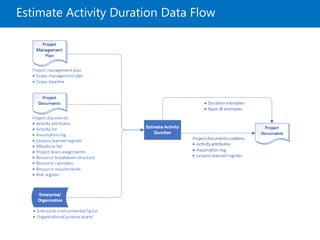
Estimate Activity Duration Data Flow
Estimating Duration Factors
• Law of diminishing return
• Number of resources
• Advances in technology
• Motivation of staff
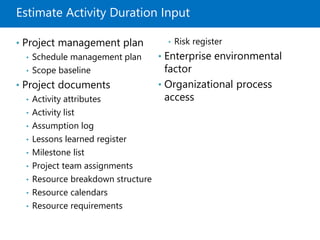
Estimate Activity Duration Input
• Project management plan
• Schedule management plan
• Scope baseline
• Project documents
• Activity attributes
• Activity list
• Assumption log
• Lessons learned register
• Milestone list
• Project team assignments
• Resource breakdown structure
• Resource calendars
• Resource requirements
• Risk register
• Enterprise environmental
factor
• Organizational process
access
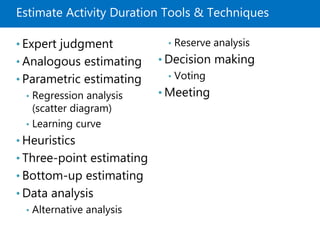
Estimate Activity Duration Tools & Techniques
• Expert judgment
• Analogous estimating
• Parametric estimating
• Regression analysis
(scatter diagram)
• Learning curve
• Heuristics
• Three-point estimating
• Bottom-up estimating
• Data analysis
• Alternative analysis
• Reserve analysis
• Decision making
• Voting
• Meeting
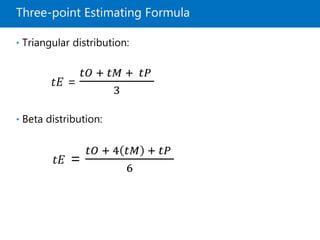
Three-point Estimating Formula
• Triangular distribution:
𝑡𝐸 =
𝑡𝑂 + 𝑡𝑀 + 𝑡𝑃
3
• Beta distribution:
𝑡𝐸 =
𝑡𝑂 + 4 𝑡𝑀 + 𝑡𝑃
6
Estimate Activity Duration Output
• Duration estimates
• Basis of estimates
• Project documents updates
• Activity attributes
• Assumption log
• Lesson learned register
Lesson 6: Develop Schedule
• Develop Schedule Overview
• Develop Schedule Data Flow
• Develop Schedule Input
• Develop Schedule Tools & Techniques
• Develop Schedule Output
Develop Schedule Overview
• Develop schedule is the process of analyzing,
activity sequences, durations, resource
requirements, and schedule constraints to create a
schedule model for project execution and
monitoring & controlling.
• Key benefit: it generates a schedule model with
planned dates for completing project activities.
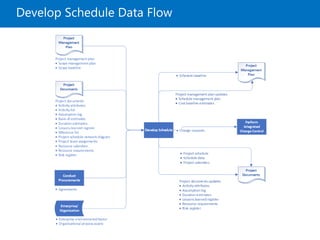
Develop Schedule Data Flow
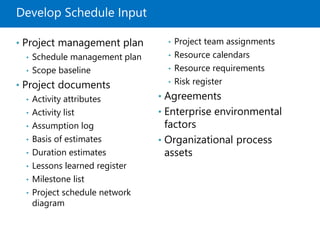
Develop Schedule Input
• Project management plan
• Schedule management plan
• Scope baseline
• Project documents
• Activity attributes
• Activity list
• Assumption log
• Basis of estimates
• Duration estimates
• Lessons learned register
• Milestone list
• Project schedule network
diagram
• Project team assignments
• Resource calendars
• Resource requirements
• Risk register
• Agreements
• Enterprise environmental
factors
• Organizational process
assets
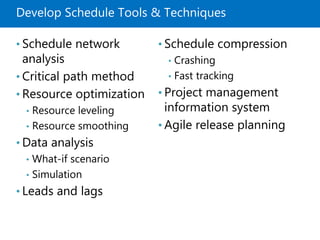
Develop Schedule Tools & Techniques
• Schedule network
analysis
• Critical path method
• Resource optimization
• Resource leveling
• Resource smoothing
• Data analysis
• What-if scenario
• Simulation
• Leads and lags
• Schedule compression
• Crashing
• Fast tracking
• Project management
information system
• Agile release planning
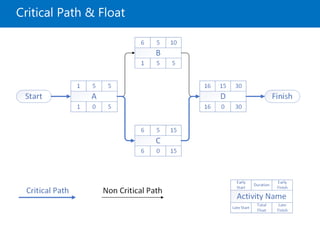
Critical Path & Float
Finding Float
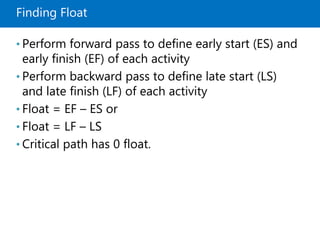
• Perform forward pass to define early start (ES) and
early finish (EF) of each activity
• Perform backward pass to define late start (LS)
and late finish (LF) of each activity
• Float = EF – ES or
• Float = LF – LS
• Critical path has 0 float.
Develop Schedule Output
• Project management plan
• Schedule baseline
• Project documents
• Project schedule
• Bar chart
• Milestone chart
• Project schedule network
diagrams
• Schedule data
• Project calendars
• Change requests
• Project management plan
updates
• Schedule management plan
• Cost baseline
• Project documents updates
• Activity attributes
• Assumption log
• Duration estimates
• Lessons learned register
• Resource requirements
• Risk register
Lesson 7: Control Schedule
• Control Schedule Overview
• Control Schedule Data Flow
• Control Schedule Input
• Control Schedule Tools & Techniques
• Control Schedule Output
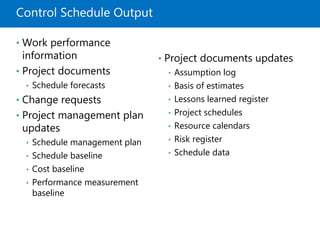
Control Schedule Overview
• Control schedule is the process to update the
project schedule and managing changes to the
schedule baseline.
• The key benefit of this process is that the schedule
baseline is maintained throughout the project.
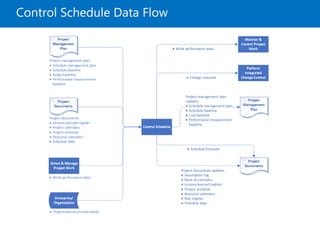
Control Schedule Data Flow
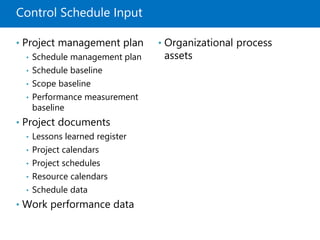
Control Schedule Input
• Project management plan
• Schedule management plan
• Schedule baseline
• Scope baseline
• Performance measurement
baseline
• Project documents
• Lessons learned register
• Project calendars
• Project schedules
• Resource calendars
• Schedule data
• Work performance data
• Organizational process
assets
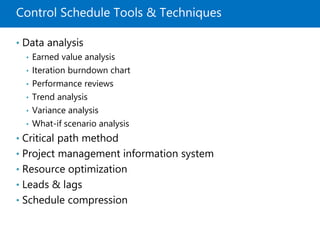
Control Schedule Tools & Techniques
• Data analysis
• Earned value analysis
• Iteration burndown chart
• Performance reviews
• Trend analysis
• Variance analysis
• What-if scenario analysis
• Critical path method
• Project management information system
• Resource optimization
• Leads & lags
• Schedule compression
Control Schedule Output
• Work performance
information
• Project documents
• Schedule forecasts
• Change requests
• Project management plan
updates
• Schedule management plan
• Schedule baseline
• Cost baseline
• Performance measurement
baseline
• Project documents updates
• Assumption log
• Basis of estimates
• Lessons learned register
• Project schedules
• Resource calendars
• Risk register
• Schedule data
Quiz
Module Reviews
References
• [PMBOK6] – The PMBOK 6th edition from pmi.org
• [RITA9] – Rita Mulcahy’s PMP Exam Prep 9th
edition from RMC Publications™

Project Schedule Management - PMBOK6

  • 1.
    Module 6 Project ScheduleManagement Agus Suhanto
  • 2.
    Module Overview • Lesson1: Key Concepts & Terms • Lesson 2: Plan Schedule Management • Lesson 3: Define Activities • Lesson 4: Sequence Activities • Lesson 5: Estimate Activity Duration • Lesson 6: Develop Schedule • Lesson 7: Control Schedule
  • 3.
    Lesson 1: KeyConcepts & Terms • Project Schedule Management • Key Terms • Trends & Emerging Practices • Tailoring Considerations • Considerations for Adaptive Environment
  • 4.
    Project Schedule Management Projectschedule management is the processes required to manage the timely completion of the project.
  • 5.
    Key Terms • Schedulebaseline: the version of the schedule model used to manage the project; it is what the project team’s performance is measured against. • Schedule compression: a technique to shorten an already developed schedule. • Crashing: schedule compression technique by adding resources. • Fast tracking: schedule compression technique in which activities normally done in sequence are performed in parallel for at least a portion of their duration. • Activity list: list of activities to be managed in the project schedule. • Network diagram: a diagram of project activities that shows the sequential relationships of activities using arrows and nodes.
  • 6.
    Key Terms (continued) •Contingency (schedule) reserve: the estimated duration within the schedule baseline, which is allocated for identified risks that are accepted. • Management reserve: specified amount of the project duration (not included in baseline) withheld for management control purposes and are reserved for unforeseen work that is within the scope of the project. • Critical path: the longest duration path through a network diagram, and it determines the shortest time it could take to complete the project. • Milestone: significant events within the project schedule; not work activities and have no duration.
  • 7.
    Key Terms (continued) •Near critical path: closest in duration to the critical path. • Total float: the amount of time an activity can be delayed without delaying the project end date or an intermediary milestone. • Free float: the amount of time an activity can be delayed without delaying the early start date of its successor(s). • Project float: the amount of time a project can be delayed without delaying the externally imposed project completion date required by the customer.
  • 8.
    Key Terms (continued) •Lead: the amount of time a successor activity can be advanced with respect to a predecessor activity. • Lag: the amount of time a successor activity will be delayed with respect to a predecessor activity. • Student syndrome (procrastination): people start to apply themselves only at the last possible moment before deadline. • Parkinson’s Law: work expands to fill the time available for its completion.
  • 9.
    Trends & EmergingPractices • Iterative scheduling with backlog • On-demand scheduling
  • 10.
    Tailoring Considerations • Lifecycle approach • Resource availability • Project dimensions • Technology support
  • 11.
    Considerations for AdaptiveEnvironments • Adaptive approaches use short cycles to undertake work, review the results, and adapt as necessary. • To address the full delivery life cycle for larger, enterprise-wide systems, a range of techniques utilizing the predictive, adaptive, or hybrid approach may need to be adopted. • The role of project manager does not change.
  • 12.
    Lesson 2: PlanSchedule Management • Plan Schedule Management Overview • Plan Schedule Management Data Flow • Plan Schedule Management Input • Plan Schedule Management Tools & Technique • Plan Schedule Management Output
  • 13.
    Plan Schedule ManagementOverview Plan schedule management is the process of establishing the policies, procedures, and documentation for planning, developing, managing, executing, and controlling the project schedule.
  • 14.
  • 15.
    Plan Schedule ManagementInput • Project charter • Project management plan • Scope management plan • Development approach • Enterprise Environmental factors • Organizational process assets
  • 16.
    Plan Schedule ManagementTools & Techniques • Expert judgment • Data analysis • Alternative analysis • Meetings
  • 17.
    Plan Schedule ManagementOutput • Project management plan • Schedule management plan • Project schedule model development • Release and iteration length • Level of accuracy • Units of measure • Organizational procedures links • Project schedule model maintenance • Control thresholds • Rules of performance measurement • Rules for establishing percent complete • EVM techniques to be employed • Schedule performance measurements • Reporting formats
  • 18.
    Lesson 3: DefineActivities • Define Activities Overview • Define Activities Data Flow • Define Activities Input • Define Activities Tools & Techniques • Define Activities Output
  • 19.
    Define Activities Overview •Define activities is the process of identifying and documenting the specific actions to be performed to produce the project deliverables. • It decomposes work packages into schedule activities that provide a basis for estimating, scheduling, executing, monitoring, and controlling the project work.
  • 20.
  • 21.
    Define Activities Input •Project management plan • Scope management plan • Scope baseline • Enterprise environmental factors • Organizational process assets
  • 22.
    Define Activities Tools& Techniques • Decomposition • Rolling wave planning • Meetings
  • 23.
    Define Activities Output •Project documents • Activity list • Activity attributes • Milestone list • Change requests • Project management plan updates • Schedule baseline • Cost baseline
  • 24.
    Lesson 4: SequenceActivities • Sequence Activities Overview • Sequence Activities Data Flow • Sequence Activities Input • Sequence Activities Tools & Techniques • Sequence Activities Output
  • 25.
    Sequence Activities Overview •Sequence activities is the process of identifying and documenting relationships among the project activities. • It defines the logical sequence of work to obtain the greatest efficiency given all project constraints.
  • 26.
  • 27.
    Sequence Activities Input •Project management plan • Schedule management plan • Scope baseline • Project documents • Activity attributes • Activity list • Assumption log • Milestone list • Enterprise environmental factors • Organizational process assets
  • 28.
    Sequence Activities Tools& Techniques • Precedence diagramming method • Finish-to-start (FS) • Finish-to-finish (FF) • Start-to-start (SS) • Start-to-finish (SF) • Dependency determination & integration • Mandatory internal • Mandatory external • Discretionary internal • Discretionary external • Lead & Lag
  • 29.
  • 30.
  • 31.
  • 32.
    Sequence Activities Output •Project schedule network diagram • Project documents updates • Activity attributes • Activity list • Assumption log • Milestone list
  • 33.
    Lesson 5: EstimateActivity Duration • Estimate Activity Duration Overview • Estimate Activity Duration Data Flow • Estimate Activity Duration Input • Estimate Activity Duration Tools & Techniques • Estimate Activity Duration Output
  • 34.
    Estimate Activity DurationOverview Estimate activity duration is the process of estimating the number of work periods needed to complete individual activities with estimated resources.
  • 35.
  • 36.
    Estimating Duration Factors •Law of diminishing return • Number of resources • Advances in technology • Motivation of staff
  • 37.
    Estimate Activity DurationInput • Project management plan • Schedule management plan • Scope baseline • Project documents • Activity attributes • Activity list • Assumption log • Lessons learned register • Milestone list • Project team assignments • Resource breakdown structure • Resource calendars • Resource requirements • Risk register • Enterprise environmental factor • Organizational process access
  • 38.
    Estimate Activity DurationTools & Techniques • Expert judgment • Analogous estimating • Parametric estimating • Regression analysis (scatter diagram) • Learning curve • Heuristics • Three-point estimating • Bottom-up estimating • Data analysis • Alternative analysis • Reserve analysis • Decision making • Voting • Meeting
  • 39.
    Three-point Estimating Formula •Triangular distribution: 𝑡𝐸 = 𝑡𝑂 + 𝑡𝑀 + 𝑡𝑃 3 • Beta distribution: 𝑡𝐸 = 𝑡𝑂 + 4 𝑡𝑀 + 𝑡𝑃 6
  • 40.
    Estimate Activity DurationOutput • Duration estimates • Basis of estimates • Project documents updates • Activity attributes • Assumption log • Lesson learned register
  • 41.
    Lesson 6: DevelopSchedule • Develop Schedule Overview • Develop Schedule Data Flow • Develop Schedule Input • Develop Schedule Tools & Techniques • Develop Schedule Output
  • 42.
    Develop Schedule Overview •Develop schedule is the process of analyzing, activity sequences, durations, resource requirements, and schedule constraints to create a schedule model for project execution and monitoring & controlling. • Key benefit: it generates a schedule model with planned dates for completing project activities.
  • 43.
  • 44.
    Develop Schedule Input •Project management plan • Schedule management plan • Scope baseline • Project documents • Activity attributes • Activity list • Assumption log • Basis of estimates • Duration estimates • Lessons learned register • Milestone list • Project schedule network diagram • Project team assignments • Resource calendars • Resource requirements • Risk register • Agreements • Enterprise environmental factors • Organizational process assets
  • 45.
    Develop Schedule Tools& Techniques • Schedule network analysis • Critical path method • Resource optimization • Resource leveling • Resource smoothing • Data analysis • What-if scenario • Simulation • Leads and lags • Schedule compression • Crashing • Fast tracking • Project management information system • Agile release planning
  • 46.
  • 47.
    Finding Float • Performforward pass to define early start (ES) and early finish (EF) of each activity • Perform backward pass to define late start (LS) and late finish (LF) of each activity • Float = EF – ES or • Float = LF – LS • Critical path has 0 float.
  • 48.
    Develop Schedule Output •Project management plan • Schedule baseline • Project documents • Project schedule • Bar chart • Milestone chart • Project schedule network diagrams • Schedule data • Project calendars • Change requests • Project management plan updates • Schedule management plan • Cost baseline • Project documents updates • Activity attributes • Assumption log • Duration estimates • Lessons learned register • Resource requirements • Risk register
  • 49.
    Lesson 7: ControlSchedule • Control Schedule Overview • Control Schedule Data Flow • Control Schedule Input • Control Schedule Tools & Techniques • Control Schedule Output
  • 50.
    Control Schedule Overview •Control schedule is the process to update the project schedule and managing changes to the schedule baseline. • The key benefit of this process is that the schedule baseline is maintained throughout the project.
  • 51.
  • 52.
    Control Schedule Input •Project management plan • Schedule management plan • Schedule baseline • Scope baseline • Performance measurement baseline • Project documents • Lessons learned register • Project calendars • Project schedules • Resource calendars • Schedule data • Work performance data • Organizational process assets
  • 53.
    Control Schedule Tools& Techniques • Data analysis • Earned value analysis • Iteration burndown chart • Performance reviews • Trend analysis • Variance analysis • What-if scenario analysis • Critical path method • Project management information system • Resource optimization • Leads & lags • Schedule compression
  • 54.
    Control Schedule Output •Work performance information • Project documents • Schedule forecasts • Change requests • Project management plan updates • Schedule management plan • Schedule baseline • Cost baseline • Performance measurement baseline • Project documents updates • Assumption log • Basis of estimates • Lessons learned register • Project schedules • Resource calendars • Risk register • Schedule data
  • 55.
  • 56.
  • 57.
    References • [PMBOK6] –The PMBOK 6th edition from pmi.org • [RITA9] – Rita Mulcahy’s PMP Exam Prep 9th edition from RMC Publications™

Editor's Notes

  • #2 Presentation: 80 minutes Lab: 90 minutes After completing this module, students will be able to: Describe the architectural features of Microsoft SharePoint 2016. Identify new, deprecated, and removed features in SharePoint 2016. Describe the editions for SharePoint 2016 on-premises and Microsoft SharePoint Online. Required materials To teach this module, you need the Microsoft PowerPoint file 20339-2A_01.pptx. Preparation tasks To prepare for this module: Read all of the materials for this module. Practice performing the demonstrations and labs. Work through the Module Review and Takeaways section, and determine how you will use the information to reinforce student learning and promote knowledge transfer to on-the-job performance. As you prepare for this class, it is imperative that you complete the labs yourself. This gives you an understanding of how the labs work and the concepts that each covers, so that you can provide meaningful hints to students who might have issues. Furthermore, it will help guide your lecture to ensure that you discuss the concepts that the labs cover. Ask the students to start 20339-2A-NYC-DC1-A at this point, as per step 1 of the Lab.