LECTURER:
ENG.HISHAM ALI, PMP
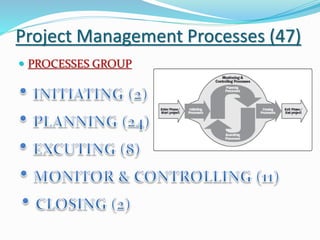
Project Management Processes (47)
 PROCESSES GROUP
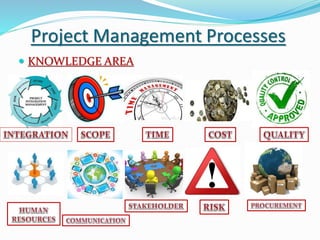
Project Management Processes
 KNOWLEDGE AREA
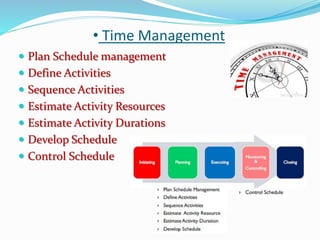
• Time Management
 Plan Schedule management
 Define Activities
 Sequence Activities
 Estimate Activity Resources
 Estimate Activity Durations
 Develop Schedule
 Control Schedule
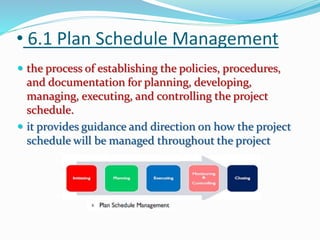
• 6.1 Plan Schedule Management
 the process of establishing the policies, procedures,
and documentation for planning, developing,
managing, executing, and controlling the project
schedule.
 it provides guidance and direction on how the project
schedule will be managed throughout the project
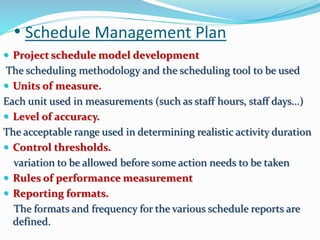
• Schedule Management Plan
 Project schedule model development
The scheduling methodology and the scheduling tool to be used
 Units of measure.
Each unit used in measurements (such as staff hours, staff days...)
 Level of accuracy.
The acceptable range used in determining realistic activity duration
 Control thresholds.
variation to be allowed before some action needs to be taken
 Rules of performance measurement
 Reporting formats.
The formats and frequency for the various schedule reports are
defined.
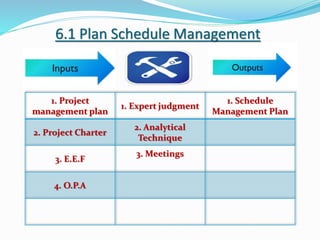
6.1 Plan Schedule Management
1. Project
management plan
1. Expert judgment
1. Schedule
Management Plan
2. Project Charter
2. Analytical
Technique
3. E.E.F
3. Meetings
4. O.P.A
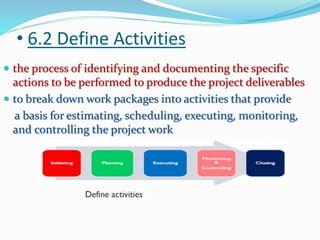
• 6.2 Define Activities
 the process of identifying and documenting the specific
actions to be performed to produce the project deliverables
 to break down work packages into activities that provide
a basis for estimating, scheduling, executing, monitoring,
and controlling the project work
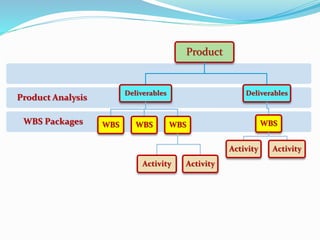
WBS Packages
Product Analysis
Product
Deliverables
WBS WBS WBS
Activity Activity
Deliverables
WBS
Activity Activity
• 6.2 Define Activities
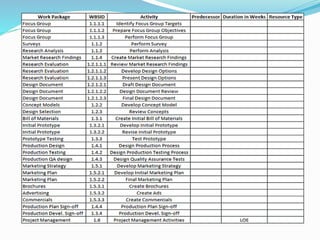
 Activity List
The activity list is a comprehensive list that includes all
schedule activities required on the project.
 Activity Attributes
Activity attributes extend the description of the activity by
identifying the multiple components associated with each
activity.
 Milestone List
A milestone is a significant point or
event in a project
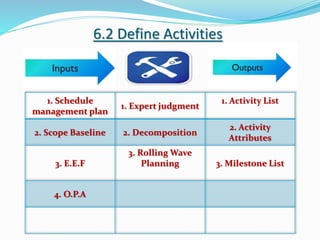
6.2 Define Activities
1. Schedule
management plan
1. Expert judgment
1. Activity List
2. Scope Baseline 2. Decomposition
2. Activity
Attributes
3. E.E.F
3. Rolling Wave
Planning 3. Milestone List
4. O.P.A
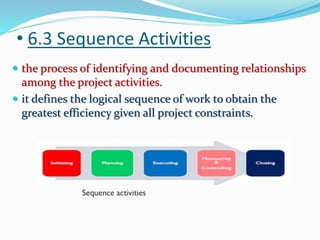
• 6.3 Sequence Activities
 the process of identifying and documenting relationships
among the project activities.
 it defines the logical sequence of work to obtain the
greatest efficiency given all project constraints.
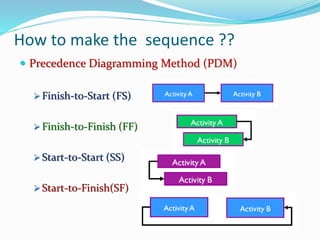
How to make the sequence ??
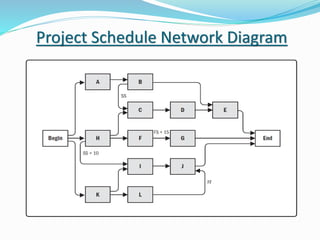
 Precedence Diagramming Method (PDM)
 Finish-to-Start (FS)
 Finish-to-Finish (FF)
 Start-to-Start (SS)
 Start-to-Finish(SF)
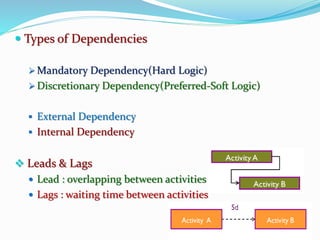
 Types of Dependencies
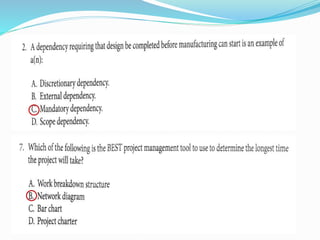
 Mandatory Dependency(Hard Logic)
 Discretionary Dependency(Preferred-Soft Logic)
 External Dependency
 Internal Dependency
 Leads & Lags
 Lead : overlapping between activities
 Lags : waiting time between activities
Project Schedule Network Diagram
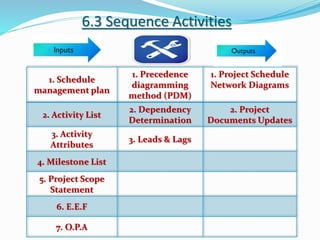
6.3 Sequence Activities
1. Schedule
management plan
1. Precedence
diagramming
method (PDM)
1. Project Schedule
Network Diagrams
2. Activity List
2. Dependency
Determination
2. Project
Documents Updates
3. Activity
Attributes
3. Leads & Lags
4. Milestone List
5. Project Scope
Statement
6. E.E.F
7. O.P.A
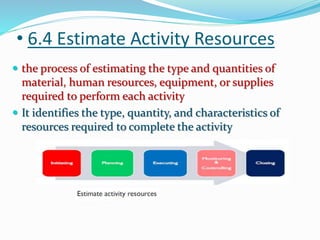
• 6.4 Estimate Activity Resources
 the process of estimating the type and quantities of
material, human resources, equipment, or supplies
required to perform each activity
 It identifies the type, quantity, and characteristics of
resources required to complete the activity
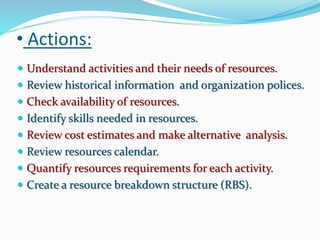
• Actions:
 Understand activities and their needs of resources.
 Review historical information and organization polices.
 Check availability of resources.
 Identify skills needed in resources.
 Review cost estimates and make alternative analysis.
 Review resources calendar.
 Quantify resources requirements for each activity.
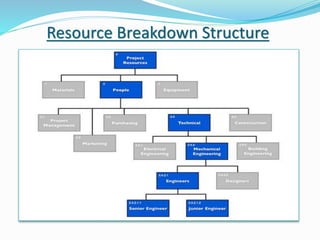
 Create a resource breakdown structure (RBS).
Resource Breakdown Structure
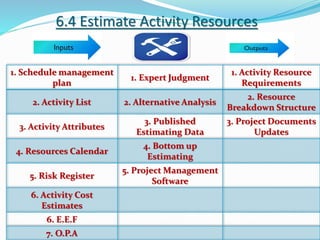
6.4 Estimate Activity Resources
1. Schedule management
plan
1. Expert Judgment
1. Activity Resource
Requirements
2. Activity List 2. Alternative Analysis
2. Resource
Breakdown Structure
3. Activity Attributes
3. Published
Estimating Data
3. Project Documents
Updates
4. Resources Calendar
4. Bottom up
Estimating
5. Risk Register
5. Project Management
Software
6. Activity Cost
Estimates
6. E.E.F
7. O.P.A
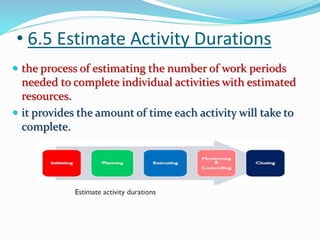
• 6.5 Estimate Activity Durations
 the process of estimating the number of work periods
needed to complete individual activities with estimated
resources.
 it provides the amount of time each activity will take to
complete.
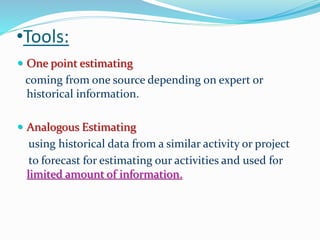
•Tools:
 One point estimating
coming from one source depending on expert or
historical information.
 Analogous Estimating
using historical data from a similar activity or project
to forecast for estimating our activities and used for
limited amount of information.
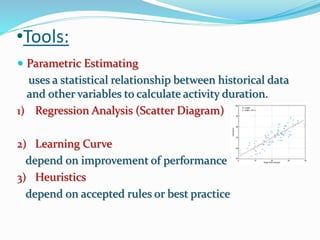
•Tools:
 Parametric Estimating
uses a statistical relationship between historical data
and other variables to calculate activity duration.
1) Regression Analysis (Scatter Diagram)
2) Learning Curve
depend on improvement of performance
3) Heuristics
depend on accepted rules or best practice
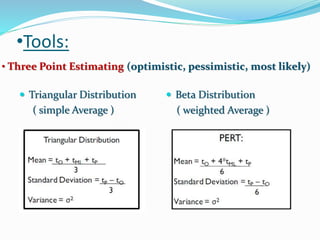
•Tools:
• Three Point Estimating (optimistic, pessimistic, most likely)
 Triangular Distribution
( simple Average )
 Beta Distribution
( weighted Average )
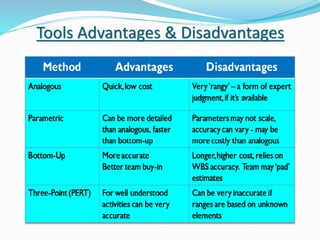
Tools Advantages & Disadvantages
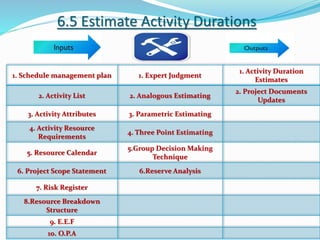
6.5 Estimate Activity Durations
1. Schedule management plan 1. Expert Judgment
1. Activity Duration
Estimates
2. Activity List 2. Analogous Estimating
2. Project Documents
Updates
3. Activity Attributes 3. Parametric Estimating
4. Activity Resource
Requirements
4. Three Point Estimating
5. Resource Calendar
5.Group Decision Making
Technique
6. Project Scope Statement 6.Reserve Analysis
7. Risk Register
8.Resource Breakdown
Structure
9. E.E.F
10. O.P.A
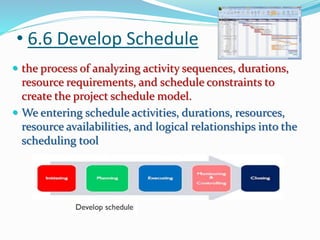
• 6.6 Develop Schedule
 the process of analyzing activity sequences, durations,
resource requirements, and schedule constraints to
create the project schedule model.
 We entering schedule activities, durations, resources,
resource availabilities, and logical relationships into the
scheduling tool
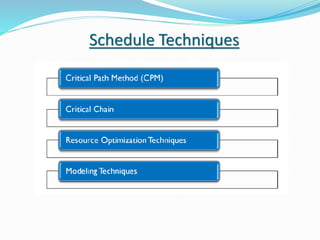
Schedule Techniques
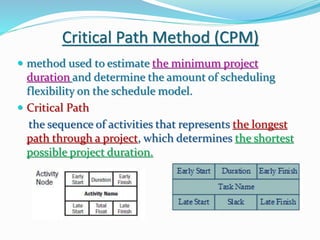
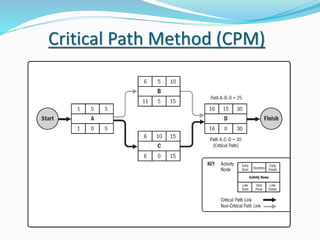
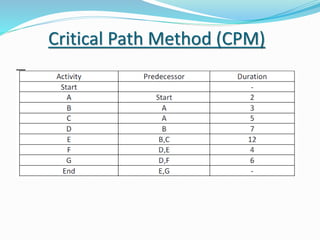
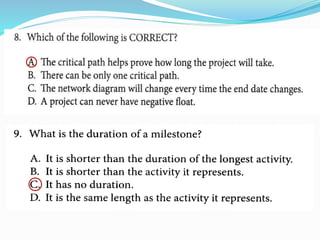
Critical Path Method (CPM)
 method used to estimate the minimum project
duration and determine the amount of scheduling
flexibility on the schedule model.
 Critical Path
the sequence of activities that represents the longest
path through a project, which determines the shortest
possible project duration.
Critical Path Method (CPM)
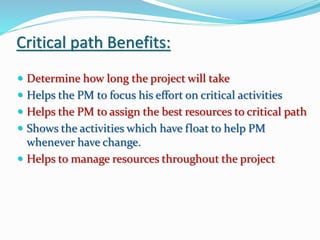
Critical path Benefits:
 Determine how long the project will take
 Helps the PM to focus his effort on critical activities
 Helps the PM to assign the best resources to critical path
 Shows the activities which have float to help PM
whenever have change.
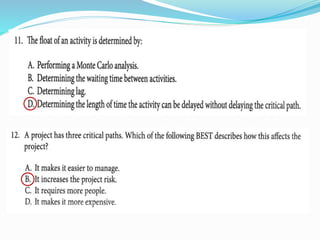
 Helps to manage resources throughout the project
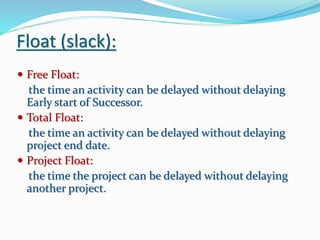
Float (slack):
 Free Float:
the time an activity can be delayed without delaying
Early start of Successor.
 Total Float:
the time an activity can be delayed without delaying
project end date.
 Project Float:
the time the project can be delayed without delaying
another project.
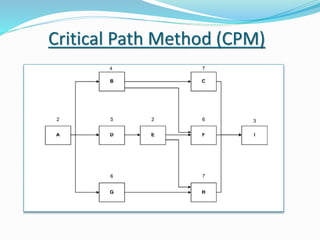
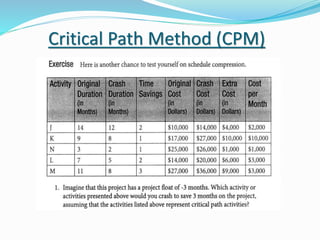
Critical Path Method (CPM)
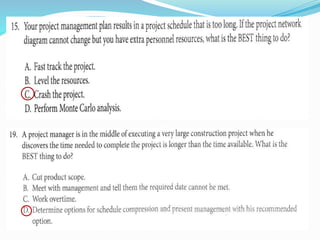
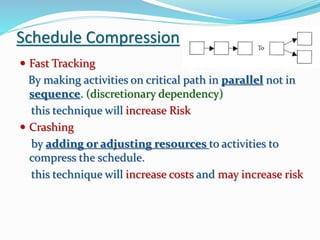
Schedule Compression
 Fast Tracking
By making activities on critical path in parallel not in
sequence. (discretionary dependency)
this technique will increase Risk
 Crashing
by adding or adjusting resources to activities to
compress the schedule.
this technique will increase costs and may increase risk
Critical Path Method (CPM)
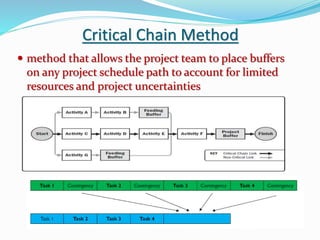
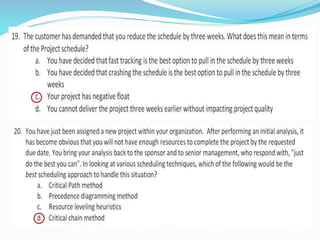
Critical Chain Method
 method that allows the project team to place buffers
on any project schedule path to account for limited
resources and project uncertainties
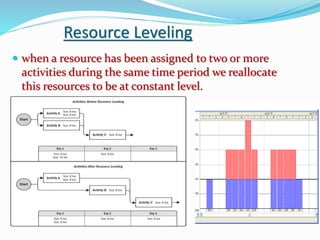
Resource Leveling
 when a resource has been assigned to two or more
activities during the same time period we reallocate
this resources to be at constant level.
Modeling Techniques
 What if Scenario
the process of evaluating scenarios in order to predict
their effect, positively or negatively, on project objectives.
 Simulation
calculating multiple project durations with different sets
of activity assumptions, usually using probability
distributions (Monte Carlo analysis)
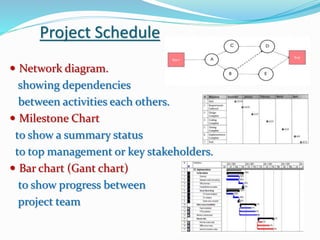
Project Schedule
 Network diagram.
showing dependencies
between activities each others.
 Milestone Chart
to show a summary status
to top management or key stakeholders.
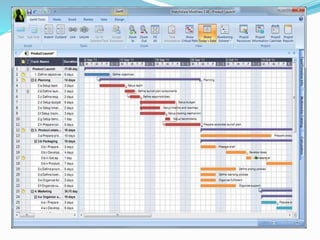
 Bar chart (Gant chart)
to show progress between
project team
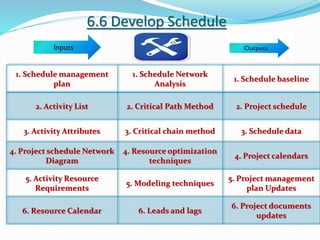
6.6 Develop Schedule
1. Schedule management
plan
1. Schedule Network
Analysis
1. Schedule baseline
2. Activity List 2. Critical Path Method 2. Project schedule
3. Activity Attributes 3. Critical chain method 3. Schedule data
4. Project schedule Network
Diagram
4. Resource optimization
techniques
4. Project calendars
5. Activity Resource
Requirements
5. Modeling techniques
5. Project management
plan Updates
6. Resource Calendar 6. Leads and lags
6. Project documents
updates
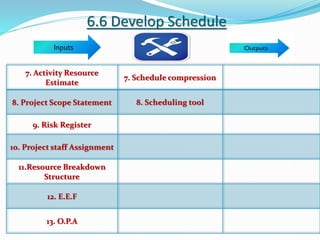
6.6 Develop Schedule
7. Activity Resource
Estimate
7. Schedule compression
8. Project Scope Statement 8. Scheduling tool
9. Risk Register
10. Project staff Assignment
11.Resource Breakdown
Structure
12. E.E.F
13. O.P.A
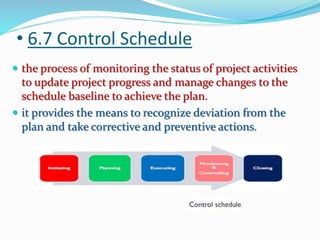
• 6.7 Control Schedule
 the process of monitoring the status of project activities
to update project progress and manage changes to the
schedule baseline to achieve the plan.
 it provides the means to recognize deviation from the
plan and take corrective and preventive actions.
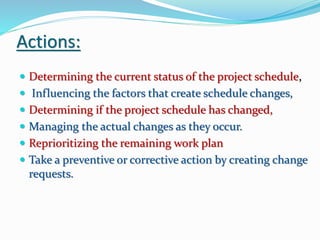
Actions:
 Determining the current status of the project schedule,
 Influencing the factors that create schedule changes,
 Determining if the project schedule has changed,
 Managing the actual changes as they occur.
 Reprioritizing the remaining work plan
 Take a preventive or corrective action by creating change
requests.
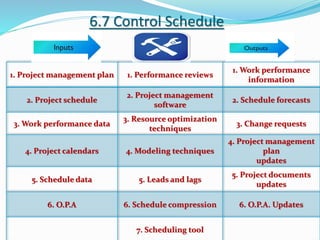
6.7 Control Schedule
1. Project management plan 1. Performance reviews
1. Work performance
information
2. Project schedule
2. Project management
software
2. Schedule forecasts
3. Work performance data
3. Resource optimization
techniques
3. Change requests
4. Project calendars 4. Modeling techniques
4. Project management
plan
updates
5. Schedule data 5. Leads and lags
5. Project documents
updates
6. O.P.A 6. Schedule compression 6. O.P.A. Updates
7. Scheduling tool
TIME MANAGEMENT chapter(6), PMBOK5

TIME MANAGEMENT chapter(6), PMBOK5

  • 1.
  • 2.
    Project Management Processes(47)  PROCESSES GROUP
  • 3.
  • 4.
    • Time Management Plan Schedule management  Define Activities  Sequence Activities  Estimate Activity Resources  Estimate Activity Durations  Develop Schedule  Control Schedule
  • 5.
    • 6.1 PlanSchedule Management  the process of establishing the policies, procedures, and documentation for planning, developing, managing, executing, and controlling the project schedule.  it provides guidance and direction on how the project schedule will be managed throughout the project
  • 6.
    • Schedule ManagementPlan  Project schedule model development The scheduling methodology and the scheduling tool to be used  Units of measure. Each unit used in measurements (such as staff hours, staff days...)  Level of accuracy. The acceptable range used in determining realistic activity duration  Control thresholds. variation to be allowed before some action needs to be taken  Rules of performance measurement  Reporting formats. The formats and frequency for the various schedule reports are defined.
  • 7.
    6.1 Plan ScheduleManagement 1. Project management plan 1. Expert judgment 1. Schedule Management Plan 2. Project Charter 2. Analytical Technique 3. E.E.F 3. Meetings 4. O.P.A
  • 8.
    • 6.2 DefineActivities  the process of identifying and documenting the specific actions to be performed to produce the project deliverables  to break down work packages into activities that provide a basis for estimating, scheduling, executing, monitoring, and controlling the project work
  • 9.
    WBS Packages Product Analysis Product Deliverables WBSWBS WBS Activity Activity Deliverables WBS Activity Activity
  • 12.
    • 6.2 DefineActivities  Activity List The activity list is a comprehensive list that includes all schedule activities required on the project.  Activity Attributes Activity attributes extend the description of the activity by identifying the multiple components associated with each activity.  Milestone List A milestone is a significant point or event in a project
  • 13.
    6.2 Define Activities 1.Schedule management plan 1. Expert judgment 1. Activity List 2. Scope Baseline 2. Decomposition 2. Activity Attributes 3. E.E.F 3. Rolling Wave Planning 3. Milestone List 4. O.P.A
  • 14.
    • 6.3 SequenceActivities  the process of identifying and documenting relationships among the project activities.  it defines the logical sequence of work to obtain the greatest efficiency given all project constraints.
  • 15.
    How to makethe sequence ??  Precedence Diagramming Method (PDM)  Finish-to-Start (FS)  Finish-to-Finish (FF)  Start-to-Start (SS)  Start-to-Finish(SF)
  • 16.
     Types ofDependencies  Mandatory Dependency(Hard Logic)  Discretionary Dependency(Preferred-Soft Logic)  External Dependency  Internal Dependency  Leads & Lags  Lead : overlapping between activities  Lags : waiting time between activities
  • 17.
  • 18.
    6.3 Sequence Activities 1.Schedule management plan 1. Precedence diagramming method (PDM) 1. Project Schedule Network Diagrams 2. Activity List 2. Dependency Determination 2. Project Documents Updates 3. Activity Attributes 3. Leads & Lags 4. Milestone List 5. Project Scope Statement 6. E.E.F 7. O.P.A
  • 19.
    • 6.4 EstimateActivity Resources  the process of estimating the type and quantities of material, human resources, equipment, or supplies required to perform each activity  It identifies the type, quantity, and characteristics of resources required to complete the activity
  • 20.
    • Actions:  Understandactivities and their needs of resources.  Review historical information and organization polices.  Check availability of resources.  Identify skills needed in resources.  Review cost estimates and make alternative analysis.  Review resources calendar.  Quantify resources requirements for each activity.  Create a resource breakdown structure (RBS).
  • 21.
  • 22.
    6.4 Estimate ActivityResources 1. Schedule management plan 1. Expert Judgment 1. Activity Resource Requirements 2. Activity List 2. Alternative Analysis 2. Resource Breakdown Structure 3. Activity Attributes 3. Published Estimating Data 3. Project Documents Updates 4. Resources Calendar 4. Bottom up Estimating 5. Risk Register 5. Project Management Software 6. Activity Cost Estimates 6. E.E.F 7. O.P.A
  • 23.
    • 6.5 EstimateActivity Durations  the process of estimating the number of work periods needed to complete individual activities with estimated resources.  it provides the amount of time each activity will take to complete.
  • 24.
    •Tools:  One pointestimating coming from one source depending on expert or historical information.  Analogous Estimating using historical data from a similar activity or project to forecast for estimating our activities and used for limited amount of information.
  • 25.
    •Tools:  Parametric Estimating usesa statistical relationship between historical data and other variables to calculate activity duration. 1) Regression Analysis (Scatter Diagram) 2) Learning Curve depend on improvement of performance 3) Heuristics depend on accepted rules or best practice
  • 26.
    •Tools: • Three PointEstimating (optimistic, pessimistic, most likely)  Triangular Distribution ( simple Average )  Beta Distribution ( weighted Average )
  • 27.
    Tools Advantages &Disadvantages
  • 28.
    6.5 Estimate ActivityDurations 1. Schedule management plan 1. Expert Judgment 1. Activity Duration Estimates 2. Activity List 2. Analogous Estimating 2. Project Documents Updates 3. Activity Attributes 3. Parametric Estimating 4. Activity Resource Requirements 4. Three Point Estimating 5. Resource Calendar 5.Group Decision Making Technique 6. Project Scope Statement 6.Reserve Analysis 7. Risk Register 8.Resource Breakdown Structure 9. E.E.F 10. O.P.A
  • 29.
    • 6.6 DevelopSchedule  the process of analyzing activity sequences, durations, resource requirements, and schedule constraints to create the project schedule model.  We entering schedule activities, durations, resources, resource availabilities, and logical relationships into the scheduling tool
  • 30.
  • 31.
    Critical Path Method(CPM)  method used to estimate the minimum project duration and determine the amount of scheduling flexibility on the schedule model.  Critical Path the sequence of activities that represents the longest path through a project, which determines the shortest possible project duration.
  • 32.
  • 33.
    Critical path Benefits: Determine how long the project will take  Helps the PM to focus his effort on critical activities  Helps the PM to assign the best resources to critical path  Shows the activities which have float to help PM whenever have change.  Helps to manage resources throughout the project
  • 34.
    Float (slack):  FreeFloat: the time an activity can be delayed without delaying Early start of Successor.  Total Float: the time an activity can be delayed without delaying project end date.  Project Float: the time the project can be delayed without delaying another project.
  • 35.
  • 36.
  • 37.
    Schedule Compression  FastTracking By making activities on critical path in parallel not in sequence. (discretionary dependency) this technique will increase Risk  Crashing by adding or adjusting resources to activities to compress the schedule. this technique will increase costs and may increase risk
  • 38.
  • 39.
    Critical Chain Method method that allows the project team to place buffers on any project schedule path to account for limited resources and project uncertainties
  • 40.
    Resource Leveling  whena resource has been assigned to two or more activities during the same time period we reallocate this resources to be at constant level.
  • 41.
    Modeling Techniques  Whatif Scenario the process of evaluating scenarios in order to predict their effect, positively or negatively, on project objectives.  Simulation calculating multiple project durations with different sets of activity assumptions, usually using probability distributions (Monte Carlo analysis)
  • 42.
    Project Schedule  Networkdiagram. showing dependencies between activities each others.  Milestone Chart to show a summary status to top management or key stakeholders.  Bar chart (Gant chart) to show progress between project team
  • 43.
    6.6 Develop Schedule 1.Schedule management plan 1. Schedule Network Analysis 1. Schedule baseline 2. Activity List 2. Critical Path Method 2. Project schedule 3. Activity Attributes 3. Critical chain method 3. Schedule data 4. Project schedule Network Diagram 4. Resource optimization techniques 4. Project calendars 5. Activity Resource Requirements 5. Modeling techniques 5. Project management plan Updates 6. Resource Calendar 6. Leads and lags 6. Project documents updates
  • 44.
    6.6 Develop Schedule 7.Activity Resource Estimate 7. Schedule compression 8. Project Scope Statement 8. Scheduling tool 9. Risk Register 10. Project staff Assignment 11.Resource Breakdown Structure 12. E.E.F 13. O.P.A
  • 45.
    • 6.7 ControlSchedule  the process of monitoring the status of project activities to update project progress and manage changes to the schedule baseline to achieve the plan.  it provides the means to recognize deviation from the plan and take corrective and preventive actions.
  • 46.
    Actions:  Determining thecurrent status of the project schedule,  Influencing the factors that create schedule changes,  Determining if the project schedule has changed,  Managing the actual changes as they occur.  Reprioritizing the remaining work plan  Take a preventive or corrective action by creating change requests.
  • 47.
    6.7 Control Schedule 1.Project management plan 1. Performance reviews 1. Work performance information 2. Project schedule 2. Project management software 2. Schedule forecasts 3. Work performance data 3. Resource optimization techniques 3. Change requests 4. Project calendars 4. Modeling techniques 4. Project management plan updates 5. Schedule data 5. Leads and lags 5. Project documents updates 6. O.P.A 6. Schedule compression 6. O.P.A. Updates 7. Scheduling tool