Project Management Basic concepts
with
Microsoft
®
Project 2010
By:
Abdul Ghaffar PMP
ghaffarsarwar@gmail.com
+923434017209
Objective
• Projects Management Basics
– What is a Project
– Project Constraints
– Project Planning, Monitoring & control
– WBS
• Getting started with MS Project
(General Schedule Settings and Currency)
• Creating Project in MS Project
– Project Calendar
– Task List
– Task Notes
– Duration
– Linking Tasks
6/10/2014 By : Abdul Ghaffar, PMP 3
Objective …
– Lead & Lag
– MileStone
– Network Diagram
– Critical Path
– Adding Resource and its cost
– Creating Baseline
– Custom Fields
• Tracking Project
• Other Views and Reports
6/10/2014 By : Abdul Ghaffar, PMP 4
What is a Project?
A project is a temporary endeavor that helps to
accomplish some specific objective by utilizing definite
interconnected tasks and the effective utilization of
resources.
• To achieve an objective
• One Time (Start and finish dates)
• Constraints of time, cost and resources
• Performed by People – Single or Group
• Coordinated and controlled activities
• Specific Deliverables
• Progressive Elaboration
6/10/2014 By : Abdul Ghaffar, PMP 5
Major Constraint on Project
6/10/2014 By : Abdul Ghaffar, PMP 6
Project Process Groups
6/10/2014 By : Abdul Ghaffar, PMP 7
PMBOK 5
6/10/2014 By : Abdul Ghaffar, PMP 8
WBS for MS Project Training
1. Soft ware
Development Plan
1.1
Scope
1.2
Analysis/Soft
ware
Requirements
1.3
Design
1.4
Developme
nt
1.5
Testing
1.5.1
Unit Testing
1.5.2
Integration Testing
1.6
Training
1.7
Documenta
tion
1.8
Pilot
1.9
Deploymen
t
1.10
Post
Implement
ation
Review
6/10/2014 By : Abdul Ghaffar, PMP 9
Starting With MS Project 2010
File
->options
-> Display
6/10/2014 By : Abdul Ghaffar, PMP 10
Starting With MS Project 2010
File
->options
-> Schedule
6/10/2014 By : Abdul Ghaffar, PMP 11
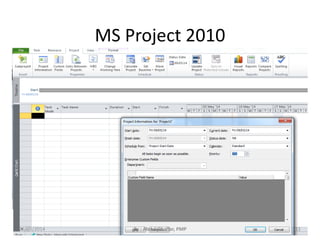
MS Project 2010
6/10/2014 By : Abdul Ghaffar, PMP 12
Task List
6/10/2014 By : Abdul Ghaffar, PMP 13
Task Duration
6/10/2014 By : Abdul Ghaffar, PMP 14
WBS Code
6/10/2014 By : Abdul Ghaffar, PMP 15
Sub Task
6/10/2014 By : Abdul Ghaffar, PMP 16
Link Task..
Finish to Start (FS),
where the first must be finished before
the next begins.
Start to Start (SS),
where 2 tasks must start at the same
time.
Finish to Finish (FF),
where 2 tasks must end at the same time.
Start to Finish (SF) ,
where the start of the first is linked to
the completion of the second (with a lag
time specified as well.
6/10/2014 By : Abdul Ghaffar, PMP 17
Link Task
6/10/2014 By : Abdul Ghaffar, PMP 18
Predecessors
6/10/2014 By : Abdul Ghaffar, PMP 19
Lead & Lag Time
• Lead time causes a successor task to overlap
a predecessor even though they are linked
finish to start (FS).
• Lag time allows you to add a delay between
the start of the successor and the end of the
predecessor.
– Simply specify lead or lag time in the
Predecessor column.
• Lead time is represented with a minus sign (-)
• Lag time is represented with a plus sign (+).
6/10/2014 By : Abdul Ghaffar, PMP 20
Lead and Lag
6/10/2014 By : Abdul Ghaffar, PMP 21
Calendar
6/10/2014 By : Abdul Ghaffar, PMP 22
MileStone
Milestones let you gauge your progress through the project.
It’s good practice to include a Start and Finish Milestone for each division/part of your WBS.6/10/2014 By : Abdul Ghaffar, PMP 23
Resource
6/10/2014 By : Abdul Ghaffar, PMP 24
Assign Resources to Tasks
6/10/2014 By : Abdul Ghaffar, PMP 25
The Critical Path
The Critical path is the flow of tasks, of which,
a delay in any one of these tasks will cause a
delay to the project.
It is the longest path through the project
network diagram and the shortest possible
time to complete the project
6/10/2014 By : Abdul Ghaffar, PMP 26
Critical Path
6/10/2014 By : Abdul Ghaffar, PMP 27
Critical Path..
6/10/2014 By : Abdul Ghaffar, PMP 28
Slack
6/10/2014 By : Abdul Ghaffar, PMP 29
Slack is the amount of time that a task can slip before it affects another task
or the project's finish date.
Custom Field
6/10/2014 By : Abdul Ghaffar, PMP 30
Tracking Project
To control the variations from actual plan (baseline)
we need to track project and continuously check
the health of the project.
• EVM is a financial measurement tool that
combines the conflicting aspects of scope,
schedule and cost into a unified set of metrics.
• These metrics can be used for measuring,
monitoring, reporting and forecasting project
performance. It can be used through all the
phases of a project, from initiation to closure.
6/10/2014 By : Abdul Ghaffar, PMP 31
Earned Value …
6/10/2014 By : Abdul Ghaffar, PMP 32
Example
You have a project to build a new fence. the fence is
four sided as shown.
Each side is to take one day to build and is budgeted
for $1000 per side.
The sides are planed to be completed one after the
other.
Today is the end of day three.
• Calculate AC, BAC, CV, CPI,SV, SPI, EAC etc.
6/10/2014 By : Abdul Ghaffar, PMP 33
Plan Tasks
6/10/2014 By : Abdul Ghaffar, PMP 34
Set Baseline
6/10/2014 By : Abdul Ghaffar, PMP 35
Actual Status
6/10/2014 By : Abdul Ghaffar, PMP 36
Check Status
6/10/2014 By : Abdul Ghaffar, PMP 37
Status Summary
6/10/2014 By : Abdul Ghaffar, PMP 38
Calendar View
6/10/2014 By : Abdul Ghaffar, PMP 39
Network Diagram
6/10/2014 By : Abdul Ghaffar, PMP 40
Other Reports
6/10/2014 By : Abdul Ghaffar, PMP 41
THANKS
6/10/2014 By : Abdul Ghaffar, PMP 42

Project Management using MS Project 2010

  • 2.
    Project Management Basicconcepts with Microsoft ® Project 2010 By: Abdul Ghaffar PMP ghaffarsarwar@gmail.com +923434017209
  • 3.
    Objective • Projects ManagementBasics – What is a Project – Project Constraints – Project Planning, Monitoring & control – WBS • Getting started with MS Project (General Schedule Settings and Currency) • Creating Project in MS Project – Project Calendar – Task List – Task Notes – Duration – Linking Tasks 6/10/2014 By : Abdul Ghaffar, PMP 3
  • 4.
    Objective … – Lead& Lag – MileStone – Network Diagram – Critical Path – Adding Resource and its cost – Creating Baseline – Custom Fields • Tracking Project • Other Views and Reports 6/10/2014 By : Abdul Ghaffar, PMP 4
  • 5.
    What is aProject? A project is a temporary endeavor that helps to accomplish some specific objective by utilizing definite interconnected tasks and the effective utilization of resources. • To achieve an objective • One Time (Start and finish dates) • Constraints of time, cost and resources • Performed by People – Single or Group • Coordinated and controlled activities • Specific Deliverables • Progressive Elaboration 6/10/2014 By : Abdul Ghaffar, PMP 5
  • 6.
    Major Constraint onProject 6/10/2014 By : Abdul Ghaffar, PMP 6
  • 7.
    Project Process Groups 6/10/2014By : Abdul Ghaffar, PMP 7
  • 8.
    PMBOK 5 6/10/2014 By: Abdul Ghaffar, PMP 8
  • 9.
    WBS for MSProject Training 1. Soft ware Development Plan 1.1 Scope 1.2 Analysis/Soft ware Requirements 1.3 Design 1.4 Developme nt 1.5 Testing 1.5.1 Unit Testing 1.5.2 Integration Testing 1.6 Training 1.7 Documenta tion 1.8 Pilot 1.9 Deploymen t 1.10 Post Implement ation Review 6/10/2014 By : Abdul Ghaffar, PMP 9
  • 10.
    Starting With MSProject 2010 File ->options -> Display 6/10/2014 By : Abdul Ghaffar, PMP 10
  • 11.
    Starting With MSProject 2010 File ->options -> Schedule 6/10/2014 By : Abdul Ghaffar, PMP 11
  • 12.
    MS Project 2010 6/10/2014By : Abdul Ghaffar, PMP 12
  • 13.
    Task List 6/10/2014 By: Abdul Ghaffar, PMP 13
  • 14.
    Task Duration 6/10/2014 By: Abdul Ghaffar, PMP 14
  • 15.
    WBS Code 6/10/2014 By: Abdul Ghaffar, PMP 15
  • 16.
    Sub Task 6/10/2014 By: Abdul Ghaffar, PMP 16
  • 17.
    Link Task.. Finish toStart (FS), where the first must be finished before the next begins. Start to Start (SS), where 2 tasks must start at the same time. Finish to Finish (FF), where 2 tasks must end at the same time. Start to Finish (SF) , where the start of the first is linked to the completion of the second (with a lag time specified as well. 6/10/2014 By : Abdul Ghaffar, PMP 17
  • 18.
    Link Task 6/10/2014 By: Abdul Ghaffar, PMP 18
  • 19.
    Predecessors 6/10/2014 By :Abdul Ghaffar, PMP 19
  • 20.
    Lead & LagTime • Lead time causes a successor task to overlap a predecessor even though they are linked finish to start (FS). • Lag time allows you to add a delay between the start of the successor and the end of the predecessor. – Simply specify lead or lag time in the Predecessor column. • Lead time is represented with a minus sign (-) • Lag time is represented with a plus sign (+). 6/10/2014 By : Abdul Ghaffar, PMP 20
  • 21.
    Lead and Lag 6/10/2014By : Abdul Ghaffar, PMP 21
  • 22.
    Calendar 6/10/2014 By :Abdul Ghaffar, PMP 22
  • 23.
    MileStone Milestones let yougauge your progress through the project. It’s good practice to include a Start and Finish Milestone for each division/part of your WBS.6/10/2014 By : Abdul Ghaffar, PMP 23
  • 24.
    Resource 6/10/2014 By :Abdul Ghaffar, PMP 24
  • 25.
    Assign Resources toTasks 6/10/2014 By : Abdul Ghaffar, PMP 25
  • 26.
    The Critical Path TheCritical path is the flow of tasks, of which, a delay in any one of these tasks will cause a delay to the project. It is the longest path through the project network diagram and the shortest possible time to complete the project 6/10/2014 By : Abdul Ghaffar, PMP 26
  • 27.
    Critical Path 6/10/2014 By: Abdul Ghaffar, PMP 27
  • 28.
    Critical Path.. 6/10/2014 By: Abdul Ghaffar, PMP 28
  • 29.
    Slack 6/10/2014 By :Abdul Ghaffar, PMP 29 Slack is the amount of time that a task can slip before it affects another task or the project's finish date.
  • 30.
    Custom Field 6/10/2014 By: Abdul Ghaffar, PMP 30
  • 31.
    Tracking Project To controlthe variations from actual plan (baseline) we need to track project and continuously check the health of the project. • EVM is a financial measurement tool that combines the conflicting aspects of scope, schedule and cost into a unified set of metrics. • These metrics can be used for measuring, monitoring, reporting and forecasting project performance. It can be used through all the phases of a project, from initiation to closure. 6/10/2014 By : Abdul Ghaffar, PMP 31
  • 32.
    Earned Value … 6/10/2014By : Abdul Ghaffar, PMP 32
  • 33.
    Example You have aproject to build a new fence. the fence is four sided as shown. Each side is to take one day to build and is budgeted for $1000 per side. The sides are planed to be completed one after the other. Today is the end of day three. • Calculate AC, BAC, CV, CPI,SV, SPI, EAC etc. 6/10/2014 By : Abdul Ghaffar, PMP 33
  • 34.
    Plan Tasks 6/10/2014 By: Abdul Ghaffar, PMP 34
  • 35.
    Set Baseline 6/10/2014 By: Abdul Ghaffar, PMP 35
  • 36.
    Actual Status 6/10/2014 By: Abdul Ghaffar, PMP 36
  • 37.
    Check Status 6/10/2014 By: Abdul Ghaffar, PMP 37
  • 38.
    Status Summary 6/10/2014 By: Abdul Ghaffar, PMP 38
  • 39.
    Calendar View 6/10/2014 By: Abdul Ghaffar, PMP 39
  • 40.
    Network Diagram 6/10/2014 By: Abdul Ghaffar, PMP 40
  • 41.
    Other Reports 6/10/2014 By: Abdul Ghaffar, PMP 41
  • 42.
    THANKS 6/10/2014 By :Abdul Ghaffar, PMP 42