Chapter 3
Managing the Information
Systems Project
Modern Systems Analysis
and Design
Learning Objectives
 Explain the process of managing an information systems
project.
 Describe the skills required to be an effective project
manager.
 List and describe the skills and activities of a project
manager during project initiation, project planning,
project execution, and project closedown.
 Explain what is meant by critical path scheduling and
describe the process of creating Gantt charts and
network diagrams.
 Explain how commercial project management software
packages can be used to assist in representing and
managing project schedules.
2
Importance of Project Management
 Project management may be the most
important aspect of systems development.
 Effective PM helps to ensure
The meeting of customer expectations.
The satisfying of budget and time constraints.
 PM skills are difficult and important to
learn.
3
Pine Valley Application Project
4
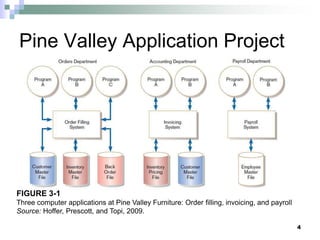
FIGURE 3-1
Three computer applications at Pine Valley Furniture: Order filling, invoicing, and payroll
Source: Hoffer, Prescott, and Topi, 2009.
Deciding on Systems Projects
 System Service Request (SSR)
A standard form for requesting or proposing
systems development work within an
organization
 Feasibility study
A study that determines whether a requested
system makes economic and operational
sense for an organization
5
6
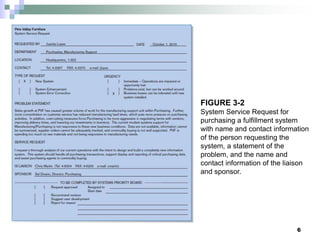
FIGURE 3-2
System Service Request for
purchasing a fulfillment system
with name and contact information
of the person requesting the
system, a statement of the
problem, and the name and
contact information of the liaison
and sponsor.
Managing the Information Systems
Project
 Project
A planned undertaking of related activities to
reach an objective that has a beginning and
an end
 Project management
A controlled process of initiating, planning,
executing, and closing down a project
7
Managing the Information Systems
Project (cont.)
 Project manager
 Systems analyst with management and leadership skills
responsible for leading project initiation, planning, execution, and
closedown
 Skills:
 Management
 Technical
 Leadership
 Conflict Management
 Customer relationship
 Deliverable
 The end product of an SDLC phase
8
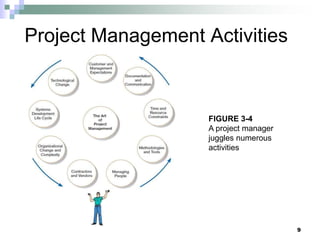
Project Management Activities
9
FIGURE 3-4
A project manager
juggles numerous
activities
Phases of Project Management
Process
 Phase 1: Initiation
 Phase 2: Planning
 Phase 3: Execution
 Phase 4: Closedown
10
PM Phase 1: Project Initiation
 Assess size, scope and complexity, and
establish procedures.
 Establish:
 Initiation team
 Relationship with customer
 Project initiation plan
 Management procedures
 Project management environment
 Project workbook
11
12
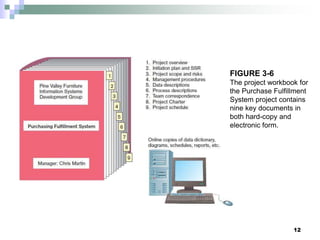
FIGURE 3-6
The project workbook for
the Purchase Fulfillment
System project contains
nine key documents in
both hard-copy and
electronic form.
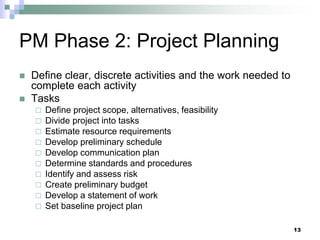
PM Phase 2: Project Planning
 Define clear, discrete activities and the work needed to
complete each activity
 Tasks
 Define project scope, alternatives, feasibility
 Divide project into tasks
 Estimate resource requirements
 Develop preliminary schedule
 Develop communication plan
 Determine standards and procedures
 Identify and assess risk
 Create preliminary budget
 Develop a statement of work
 Set baseline project plan
13
Planning Detail
14
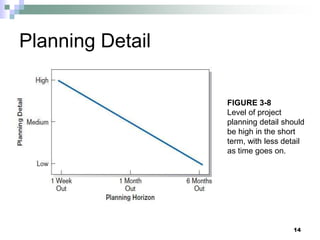
FIGURE 3-8
Level of project
planning detail should
be high in the short
term, with less detail
as time goes on.
Some Components of Project
Planning
 Statement of Work (SOW)
 “Contract” between the IS staff and the customer
regarding deliverables and time estimates for a
system development project
 The Baseline Project Plan (BPP)
 Contains estimates of scope, benefits, schedules,
costs, risks, and resource requirements
 Preliminary Budget
 Cost-benefit analysis outlining planned expenses and
revenues
15
Some Components of Project
Planning (cont.)
 Work Breakdown Structure (WBS)
Division of project into manageable and
logically ordered tasks and subtasks
 Scheduling Diagrams
Gantt chart: horizontal bars represent task
durations
Network diagram: boxes and links represent
task dependencies
16
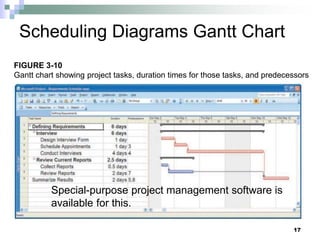
Scheduling Diagrams Gantt Chart
Special-purpose project management software is
available for this.
17
FIGURE 3-10
Gantt chart showing project tasks, duration times for those tasks, and predecessors
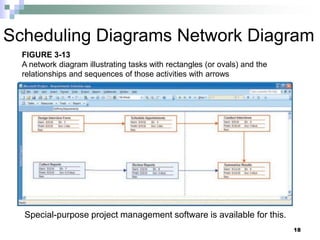
Scheduling Diagrams Network Diagram
Special-purpose project management software is available for this.
18
FIGURE 3-13
A network diagram illustrating tasks with rectangles (or ovals) and the
relationships and sequences of those activities with arrows
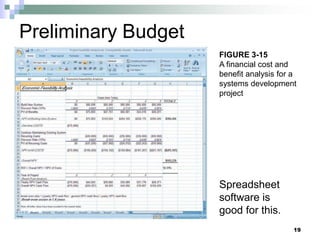
Preliminary Budget
Spreadsheet
software is
good for this.
19
FIGURE 3-15
A financial cost and
benefit analysis for a
systems development
project
PM Phase 3: Project Execution
 Plans created in prior phases are put into
action.
 Actions
Execute baseline project plan
Monitor progress against baseline plan
Manage changes in baseline plan
Maintain project workbook
Communicate project status
20
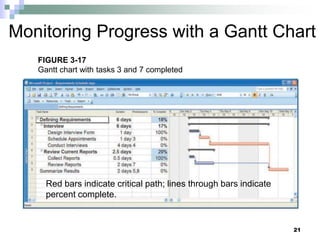
Monitoring Progress with a Gantt Chart
Red bars indicate critical path; lines through bars indicate
percent complete.
21
FIGURE 3-17
Gantt chart with tasks 3 and 7 completed
Communication Methods
 High Formality
 Project workbook
 Newsletters
 Status reports
 Specification documents
 Meeting minutes
 Medium Formality
 Meetings
 Seminars and workshops
 Memos
 Low Formality
 Bulletin boards
 Brown bag lunches
 Hallway discussions
22
PM Phase 4: Project Closedown
 Bring the project to an end
 Actions
Close down the project.
Conduct post-project reviews.
Close the customer contract.
23
Representing and Scheduling
Project Plans
 Gantt Charts
 Network Diagrams
 PERT Calculations
 Critical Path Scheduling
 Project Management Software
24
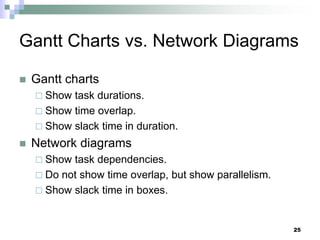
Gantt Charts vs. Network Diagrams
 Gantt charts
 Show task durations.
 Show time overlap.
 Show slack time in duration.
 Network diagrams
 Show task dependencies.
 Do not show time overlap, but show parallelism.
 Show slack time in boxes.
25
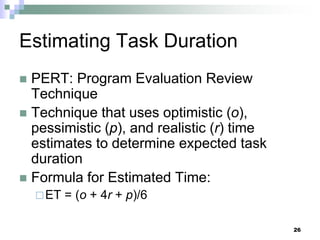
Estimating Task Duration
 PERT: Program Evaluation Review
Technique
 Technique that uses optimistic (o),
pessimistic (p), and realistic (r) time
estimates to determine expected task
duration
 Formula for Estimated Time:
ET = (o + 4r + p)/6
26
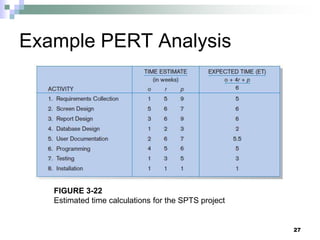
Example PERT Analysis
FIGURE 3-22
Estimated time calculations for the SPTS project
27
Critical Path Scheduling
 A scheduling technique whose order and
duration of a sequence of task activities directly
affect the completion
 Critical path: the shortest time in which a project
can be completed
 Slack time: the time an activity can be delayed
without delaying the project
28
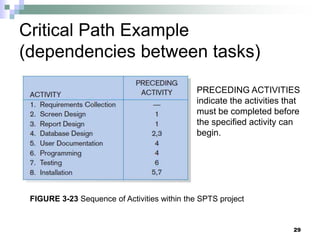
Critical Path Example
(dependencies between tasks)
PRECEDING ACTIVITIES
indicate the activities that
must be completed before
the specified activity can
begin.
FIGURE 3-23 Sequence of Activities within the SPTS project
29
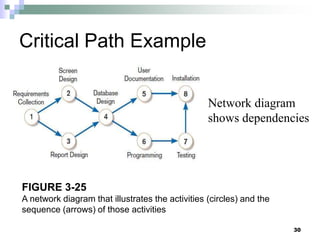
FIGURE 3-25
A network diagram that illustrates the activities (circles) and the
sequence (arrows) of those activities
Critical Path Example
Network diagram
shows dependencies
30
Determining the Critical Path
 Calculate the earliest possible completion time
for each activity by summing the activity times
in the longest path to the activity. This gives
total expected project time.
 Calculate the latest possible completion time
for each activity by subtracting the activity
times in the path following the activity from the
total expected time. This gives slack time for
activities.
 Critical path – contains no activities with slack
time.
31
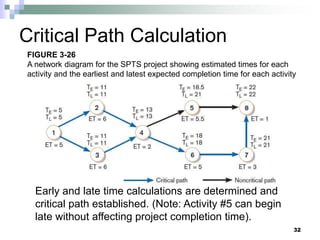
Critical Path Calculation
Early and late time calculations are determined and
critical path established. (Note: Activity #5 can begin
late without affecting project completion time).
32
FIGURE 3-26
A network diagram for the SPTS project showing estimated times for each
activity and the earliest and latest expected completion time for each activity
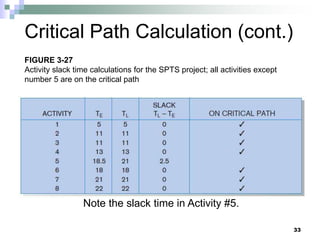
Critical Path Calculation (cont.)
Note the slack time in Activity #5.
33
FIGURE 3-27
Activity slack time calculations for the SPTS project; all activities except
number 5 are on the critical path
Using Project Management
Software
 Many powerful software tools exist for
assisting with project management.
 Example: Microsoft Project can help with
Entering project start date.
Establishing tasks and task dependencies.
Viewing project information as Gantt or
Network diagrams.
34
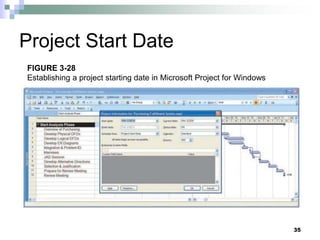
Project Start Date
35
FIGURE 3-28
Establishing a project starting date in Microsoft Project for Windows
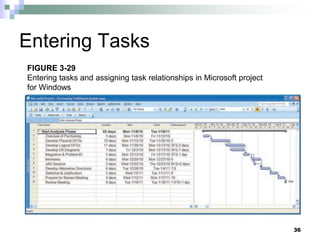
Entering Tasks
36
FIGURE 3-29
Entering tasks and assigning task relationships in Microsoft project
for Windows
Viewing Network Diagram
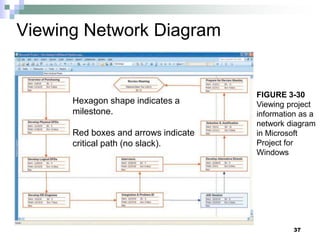
Hexagon shape indicates a
milestone.
Red boxes and arrows indicate
critical path (no slack).
37
FIGURE 3-30
Viewing project
information as a
network diagram
in Microsoft
Project for
Windows
Viewing Gantt Chart
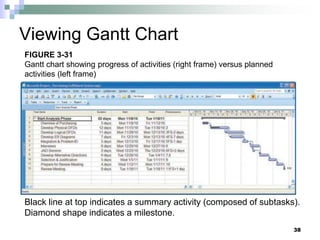
Black line at top indicates a summary activity (composed of subtasks).
Diamond shape indicates a milestone.
38
FIGURE 3-31
Gantt chart showing progress of activities (right frame) versus planned
activities (left frame)
Summary
 In this chapter you learned how to:
 Explain the process of managing an information systems
project.
 Describe the skills required to be an effective project
manager.
 List and describe the skills and activities of a project
manager during project initiation, project planning, project
execution, and project closedown.
 Explain what is meant by critical path scheduling and
describe the process of creating Gantt charts and network
diagrams.
 Explain how commercial project management software
packages can be used to assist in representing and
managing project schedules.
39

Chapter 3(1) system development life .ppt

  • 1.
    Chapter 3 Managing theInformation Systems Project Modern Systems Analysis and Design
  • 2.
    Learning Objectives  Explainthe process of managing an information systems project.  Describe the skills required to be an effective project manager.  List and describe the skills and activities of a project manager during project initiation, project planning, project execution, and project closedown.  Explain what is meant by critical path scheduling and describe the process of creating Gantt charts and network diagrams.  Explain how commercial project management software packages can be used to assist in representing and managing project schedules. 2
  • 3.
    Importance of ProjectManagement  Project management may be the most important aspect of systems development.  Effective PM helps to ensure The meeting of customer expectations. The satisfying of budget and time constraints.  PM skills are difficult and important to learn. 3
  • 4.
    Pine Valley ApplicationProject 4 FIGURE 3-1 Three computer applications at Pine Valley Furniture: Order filling, invoicing, and payroll Source: Hoffer, Prescott, and Topi, 2009.
  • 5.
    Deciding on SystemsProjects  System Service Request (SSR) A standard form for requesting or proposing systems development work within an organization  Feasibility study A study that determines whether a requested system makes economic and operational sense for an organization 5
  • 6.
    6 FIGURE 3-2 System ServiceRequest for purchasing a fulfillment system with name and contact information of the person requesting the system, a statement of the problem, and the name and contact information of the liaison and sponsor.
  • 7.
    Managing the InformationSystems Project  Project A planned undertaking of related activities to reach an objective that has a beginning and an end  Project management A controlled process of initiating, planning, executing, and closing down a project 7
  • 8.
    Managing the InformationSystems Project (cont.)  Project manager  Systems analyst with management and leadership skills responsible for leading project initiation, planning, execution, and closedown  Skills:  Management  Technical  Leadership  Conflict Management  Customer relationship  Deliverable  The end product of an SDLC phase 8
  • 9.
    Project Management Activities 9 FIGURE3-4 A project manager juggles numerous activities
  • 10.
    Phases of ProjectManagement Process  Phase 1: Initiation  Phase 2: Planning  Phase 3: Execution  Phase 4: Closedown 10
  • 11.
    PM Phase 1:Project Initiation  Assess size, scope and complexity, and establish procedures.  Establish:  Initiation team  Relationship with customer  Project initiation plan  Management procedures  Project management environment  Project workbook 11
  • 12.
    12 FIGURE 3-6 The projectworkbook for the Purchase Fulfillment System project contains nine key documents in both hard-copy and electronic form.
  • 13.
    PM Phase 2:Project Planning  Define clear, discrete activities and the work needed to complete each activity  Tasks  Define project scope, alternatives, feasibility  Divide project into tasks  Estimate resource requirements  Develop preliminary schedule  Develop communication plan  Determine standards and procedures  Identify and assess risk  Create preliminary budget  Develop a statement of work  Set baseline project plan 13
  • 14.
    Planning Detail 14 FIGURE 3-8 Levelof project planning detail should be high in the short term, with less detail as time goes on.
  • 15.
    Some Components ofProject Planning  Statement of Work (SOW)  “Contract” between the IS staff and the customer regarding deliverables and time estimates for a system development project  The Baseline Project Plan (BPP)  Contains estimates of scope, benefits, schedules, costs, risks, and resource requirements  Preliminary Budget  Cost-benefit analysis outlining planned expenses and revenues 15
  • 16.
    Some Components ofProject Planning (cont.)  Work Breakdown Structure (WBS) Division of project into manageable and logically ordered tasks and subtasks  Scheduling Diagrams Gantt chart: horizontal bars represent task durations Network diagram: boxes and links represent task dependencies 16
  • 17.
    Scheduling Diagrams GanttChart Special-purpose project management software is available for this. 17 FIGURE 3-10 Gantt chart showing project tasks, duration times for those tasks, and predecessors
  • 18.
    Scheduling Diagrams NetworkDiagram Special-purpose project management software is available for this. 18 FIGURE 3-13 A network diagram illustrating tasks with rectangles (or ovals) and the relationships and sequences of those activities with arrows
  • 19.
    Preliminary Budget Spreadsheet software is goodfor this. 19 FIGURE 3-15 A financial cost and benefit analysis for a systems development project
  • 20.
    PM Phase 3:Project Execution  Plans created in prior phases are put into action.  Actions Execute baseline project plan Monitor progress against baseline plan Manage changes in baseline plan Maintain project workbook Communicate project status 20
  • 21.
    Monitoring Progress witha Gantt Chart Red bars indicate critical path; lines through bars indicate percent complete. 21 FIGURE 3-17 Gantt chart with tasks 3 and 7 completed
  • 22.
    Communication Methods  HighFormality  Project workbook  Newsletters  Status reports  Specification documents  Meeting minutes  Medium Formality  Meetings  Seminars and workshops  Memos  Low Formality  Bulletin boards  Brown bag lunches  Hallway discussions 22
  • 23.
    PM Phase 4:Project Closedown  Bring the project to an end  Actions Close down the project. Conduct post-project reviews. Close the customer contract. 23
  • 24.
    Representing and Scheduling ProjectPlans  Gantt Charts  Network Diagrams  PERT Calculations  Critical Path Scheduling  Project Management Software 24
  • 25.
    Gantt Charts vs.Network Diagrams  Gantt charts  Show task durations.  Show time overlap.  Show slack time in duration.  Network diagrams  Show task dependencies.  Do not show time overlap, but show parallelism.  Show slack time in boxes. 25
  • 26.
    Estimating Task Duration PERT: Program Evaluation Review Technique  Technique that uses optimistic (o), pessimistic (p), and realistic (r) time estimates to determine expected task duration  Formula for Estimated Time: ET = (o + 4r + p)/6 26
  • 27.
    Example PERT Analysis FIGURE3-22 Estimated time calculations for the SPTS project 27
  • 28.
    Critical Path Scheduling A scheduling technique whose order and duration of a sequence of task activities directly affect the completion  Critical path: the shortest time in which a project can be completed  Slack time: the time an activity can be delayed without delaying the project 28
  • 29.
    Critical Path Example (dependenciesbetween tasks) PRECEDING ACTIVITIES indicate the activities that must be completed before the specified activity can begin. FIGURE 3-23 Sequence of Activities within the SPTS project 29
  • 30.
    FIGURE 3-25 A networkdiagram that illustrates the activities (circles) and the sequence (arrows) of those activities Critical Path Example Network diagram shows dependencies 30
  • 31.
    Determining the CriticalPath  Calculate the earliest possible completion time for each activity by summing the activity times in the longest path to the activity. This gives total expected project time.  Calculate the latest possible completion time for each activity by subtracting the activity times in the path following the activity from the total expected time. This gives slack time for activities.  Critical path – contains no activities with slack time. 31
  • 32.
    Critical Path Calculation Earlyand late time calculations are determined and critical path established. (Note: Activity #5 can begin late without affecting project completion time). 32 FIGURE 3-26 A network diagram for the SPTS project showing estimated times for each activity and the earliest and latest expected completion time for each activity
  • 33.
    Critical Path Calculation(cont.) Note the slack time in Activity #5. 33 FIGURE 3-27 Activity slack time calculations for the SPTS project; all activities except number 5 are on the critical path
  • 34.
    Using Project Management Software Many powerful software tools exist for assisting with project management.  Example: Microsoft Project can help with Entering project start date. Establishing tasks and task dependencies. Viewing project information as Gantt or Network diagrams. 34
  • 35.
    Project Start Date 35 FIGURE3-28 Establishing a project starting date in Microsoft Project for Windows
  • 36.
    Entering Tasks 36 FIGURE 3-29 Enteringtasks and assigning task relationships in Microsoft project for Windows
  • 37.
    Viewing Network Diagram Hexagonshape indicates a milestone. Red boxes and arrows indicate critical path (no slack). 37 FIGURE 3-30 Viewing project information as a network diagram in Microsoft Project for Windows
  • 38.
    Viewing Gantt Chart Blackline at top indicates a summary activity (composed of subtasks). Diamond shape indicates a milestone. 38 FIGURE 3-31 Gantt chart showing progress of activities (right frame) versus planned activities (left frame)
  • 39.
    Summary  In thischapter you learned how to:  Explain the process of managing an information systems project.  Describe the skills required to be an effective project manager.  List and describe the skills and activities of a project manager during project initiation, project planning, project execution, and project closedown.  Explain what is meant by critical path scheduling and describe the process of creating Gantt charts and network diagrams.  Explain how commercial project management software packages can be used to assist in representing and managing project schedules. 39