Damian Gordon
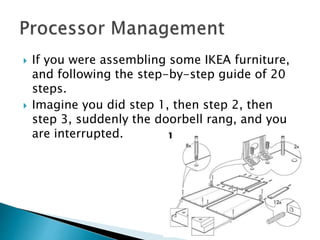
 If you were assembling some IKEA furniture,
and following the step-by-step guide of 20
steps.
 Imagine you did step 1, then step 2, then
step 3, suddenly the doorbell rang, and you
are interrupted.
 You would stop what you are doing and deal
with whoever is at the door.
 Then you would return to the assembly,
check what step you were on, and then
continue on from there (step 4).
 This is how the computer runs multiple
processes simultaneously … you do a few
steps on one process, get interrupted, work
on other processes, then return to the first
process, remembering where you left off
from, and continue on.
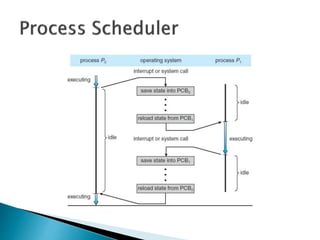
 This swapping of processes is called a pre-
emptive scheduling policy.
 A “Process” is the basic unit of execution in
the operating system
 A “Process” is the name we give to a program
when it is running in memory
◦ So a “Program” is the complied executable
◦ And a “Process” is the running executable with the
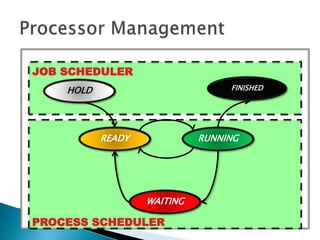
execution state.
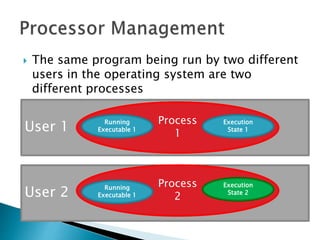
 The same program being run by two different
users in the operating system are two
different processes
User 1
Process
1
Running
Executable 1
Execution
State 1
User 2
Process
2
Execution
State 2
Running
Executable 1
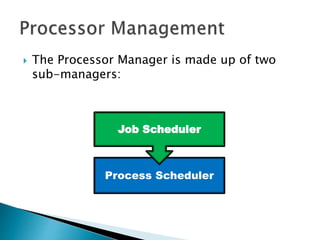
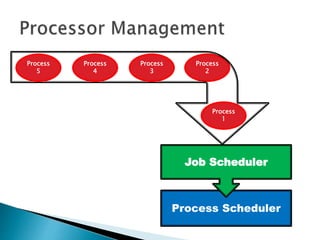
 The Processor Manager is made up of two
sub-managers:
Process Scheduler
Job Scheduler
Process Scheduler
Job Scheduler
Process
2
Process
3
Process
4
Process
5
Process
1
 We describe a collection of processes as a
“job”.
 When the operating systems is presented with
a queue of jobs or processes to run, the Job
Scheduler has the task of deciding which
order to run the are jobs in.
 The Job Scheduler wants to ensure that the all
components of the operating system are
busy, and there is no component that is idle.
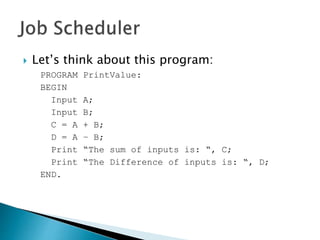
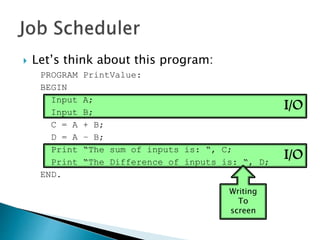
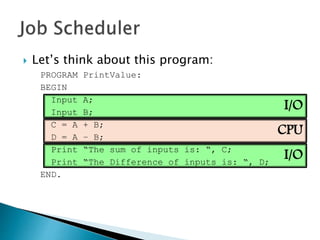
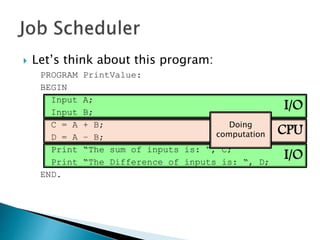
 Let’s think about this program:
PROGRAM PrintValue:
BEGIN
Input A;
Input B;
C = A + B;
D = A – B;
Print “The sum of inputs is: “, C;
Print “The Difference of inputs is: “, D;
END.
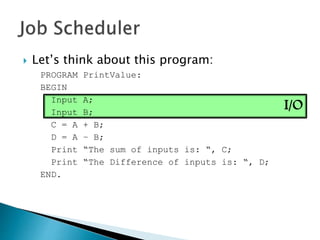
I/O
 Let’s think about this program:
PROGRAM PrintValue:
BEGIN
Input A;
Input B;
C = A + B;
D = A – B;
Print “The sum of inputs is: “, C;
Print “The Difference of inputs is: “, D;
END.
I/O
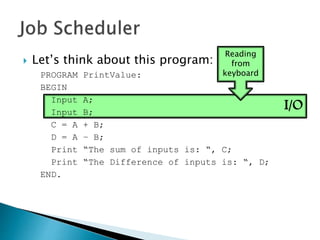
 Let’s think about this program:
PROGRAM PrintValue:
BEGIN
Input A;
Input B;
C = A + B;
D = A – B;
Print “The sum of inputs is: “, C;
Print “The Difference of inputs is: “, D;
END.
Reading
from
keyboard
I/O
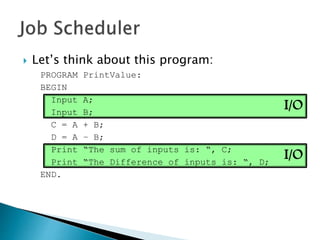
I/O
 Let’s think about this program:
PROGRAM PrintValue:
BEGIN
Input A;
Input B;
C = A + B;
D = A – B;
Print “The sum of inputs is: “, C;
Print “The Difference of inputs is: “, D;
END.
I/O
I/O
 Let’s think about this program:
PROGRAM PrintValue:
BEGIN
Input A;
Input B;
C = A + B;
D = A – B;
Print “The sum of inputs is: “, C;
Print “The Difference of inputs is: “, D;
END.
Writing
To
screen
CPU
I/O
I/O
 Let’s think about this program:
PROGRAM PrintValue:
BEGIN
Input A;
Input B;
C = A + B;
D = A – B;
Print “The sum of inputs is: “, C;
Print “The Difference of inputs is: “, D;
END.
CPU
I/O
I/O
 Let’s think about this program:
PROGRAM PrintValue:
BEGIN
Input A;
Input B;
C = A + B;
D = A – B;
Print “The sum of inputs is: “, C;
Print “The Difference of inputs is: “, D;
END.
Doing
computation
CPU
I/O
I/O
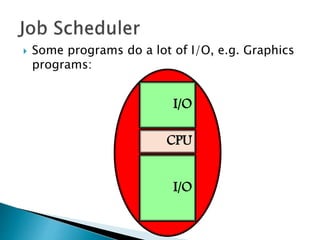
 Some programs do a lot of I/O, e.g. Graphics
programs:
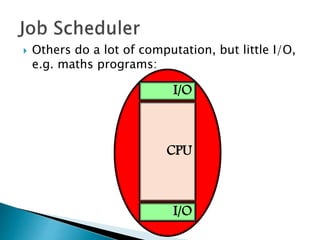
 Others do a lot of computation, but little I/O,
e.g. maths programs:
CPU
I/O
I/O
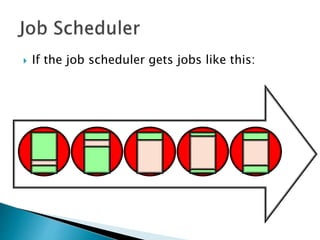
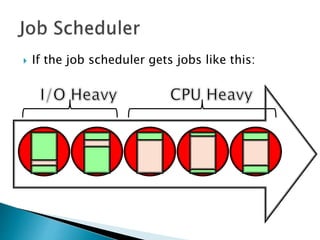
 If the job scheduler gets jobs like this:
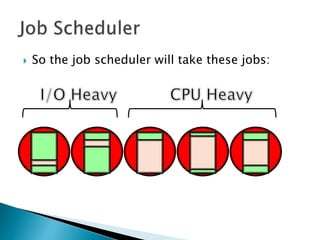
 So the job scheduler will take these jobs:
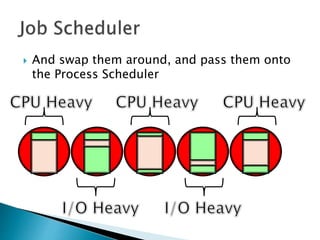
 And swap them around, and pass them onto
the Process Scheduler
 So in this case the Job Scheduler wants to
balance the jobs coming in, so that the
components of the operating system are all
kept busy.
 If we don’t change the order of job, the CPU
will be very busy, but the I/O component will
be idle, and then vice versa.
 This is not an optimal use of resources, so we
swap them around.
 We'll call jobs that are CPU-bound Batch Jobs,
and we’ll call jobs that have a lot of I/O
operations Interactive Jobs.
 This is the first level of swapping of
processes that will occur, and more will be
done by the Process Scheduler. The Job
Scheduler is looking at jobs (or groups of
processes), and looking at the whole process
from a high-level.
 For obvious reasons, the Job Scheduler is also
called the High-Level Scheduler.
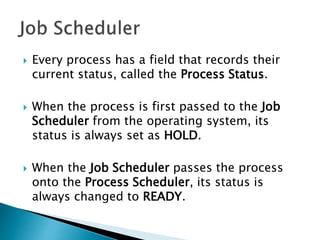
 Every process has a field that records their
current status, called the Process Status.
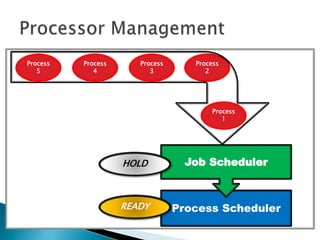
 When the process is first passed to the Job
Scheduler from the operating system, its
status is always set as HOLD.
 When the Job Scheduler passes the process
onto the Process Scheduler, its status is
always changed to READY.
Process
2
Process
3
Process
4
Process
5
Process
1
Process Scheduler
Job SchedulerHOLD
READY
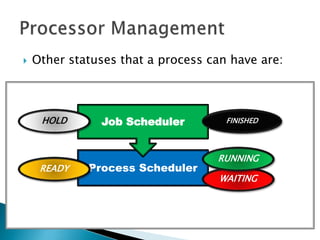
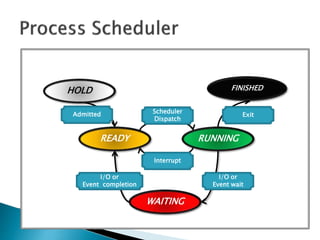
 Other statuses that a process can have are:
Process Scheduler
Job SchedulerHOLD
WAITING
READY
RUNNING
FINISHED
HOLD FINISHED
READY RUNNING
WAITING
Scheduler
Dispatch
Interrupt
Admitted Exit
I/O or
Event wait
I/O or
Event completion
HOLD
READY
WAITING
RUNNING
FINISHED
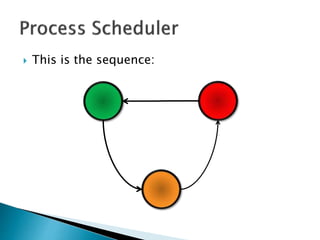
 Think about traffic lights:
 This is the sequence:
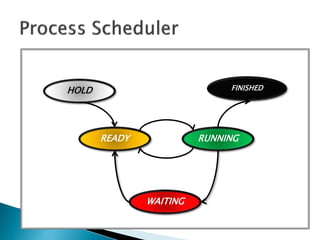
 As mentioned previously the process is first
passed to the Job Scheduler from the
operating system, its status is always set as
HOLD. When the Job Scheduler passes the
process onto the Process Scheduler, its status
is always changed to READY.
 When the CPU is available, the Process
Scheduler will look at all of the upcoming
processes and will select one of them (based
on a predefined algorithm) and assuming
there is memory free, the process will start
running and its status is changed to RUNNING
by the Process Scheduler.
 After a predefined time, the process will be
interrupted, and another process will take
over the CPU, and the interrupted process will
have its status changed to READY by the
Process Scheduler. We will remember that this
swapping of processes is called a pre-
emptive scheduling policy.
 When is CPU is available for this process
again the process status be changed to
RUNNING by the Process Scheduler.
 If the process has to wait for some I/O from
the user or some other event, it is put in a
status of WAITING by the Process Scheduler.
 When the I/O device lets the Process
Scheduler know that the I/O is completed, the
process status will be changed to READY by
the Process Scheduler.
 Finally the process status will be changed to
FINISHED either when the process has
successful completed, or if an error occurs
and the process has to terminate
prematurely. The status change is usually
handled by the Process Scheduler informing
the Job Scheduler of the process completion,
and the Job Scheduler of changing the status.
PROCESS SCHEDULER
JOB SCHEDULER
HOLD
READY
WAITING
RUNNING
FINISHED
 The Process status is only one of a collection
of descriptors that are associated with a
process.
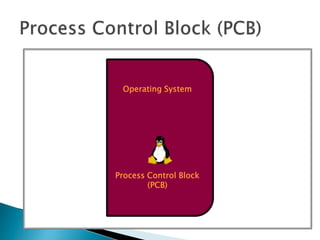
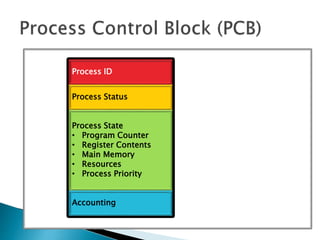
 Each process has a data structure called a
Process Control Block (PCB) associated with it,
rather like a passport.
Operating System
Process Control Block
(PCB)
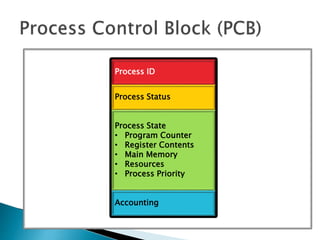
Process ID
Process Status
Process State
• Program Counter
• Register Contents
• Main Memory
• Resources
• Process Priority
Accounting
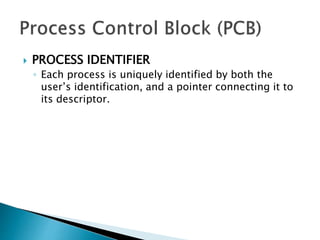
 PROCESS IDENTIFIER
◦ Each process is uniquely identified by both the
user’s identification, and a pointer connecting it to
its descriptor.
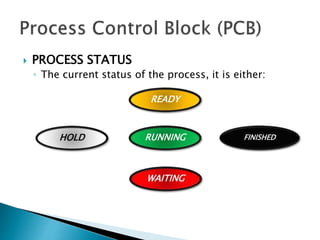
 PROCESS STATUS
◦ The current status of the process, it is either:
HOLD
READY
WAITING
RUNNING FINISHED
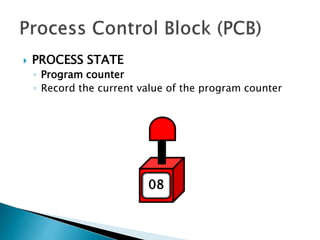
 PROCESS STATE
◦ Program counter
◦ Record the current value of the program counter
0708
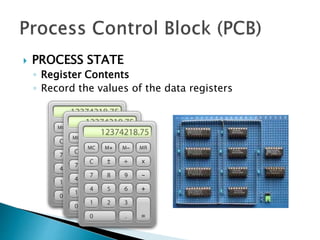
 PROCESS STATE
◦ Register Contents
◦ Record the values of the data registers
9 10 11
12 13 14
15
16
18
19
1 2
3 4 5
6 7 8
0
17
20
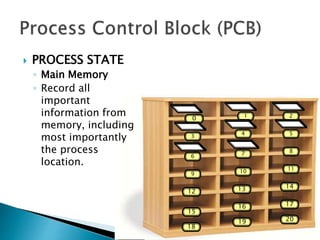
 PROCESS STATE
◦ Main Memory
◦ Record all
important
information from
memory, including
most importantly
the process
location.
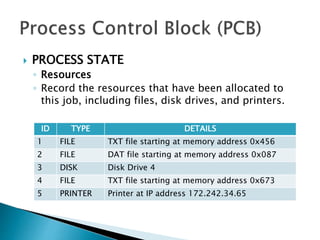
 PROCESS STATE
◦ Resources
◦ Record the resources that have been allocated to
this job, including files, disk drives, and printers.
ID TYPE DETAILS
1 FILE TXT file starting at memory address 0x456
2 FILE DAT file starting at memory address 0x087
3 DISK Disk Drive 4
4 FILE TXT file starting at memory address 0x673
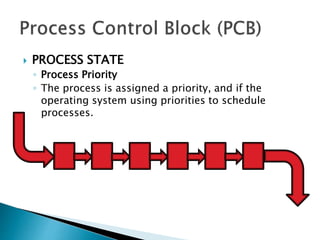
5 PRINTER Printer at IP address 172.242.34.65
 PROCESS STATE
◦ Process Priority
◦ The process is assigned a priority, and if the
operating system using priorities to schedule
processes.
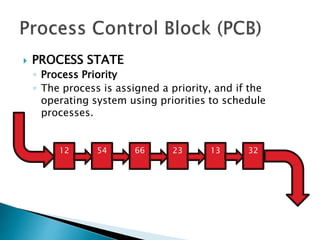
 PROCESS STATE
◦ Process Priority
◦ The process is assigned a priority, and if the
operating system using priorities to schedule
processes.
12 54 66 23 13 32
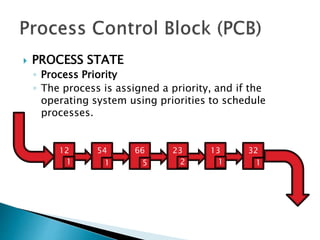
 PROCESS STATE
◦ Process Priority
◦ The process is assigned a priority, and if the
operating system using priorities to schedule
processes.
12 54 66 23 13 32
1 1 5 2 1 1
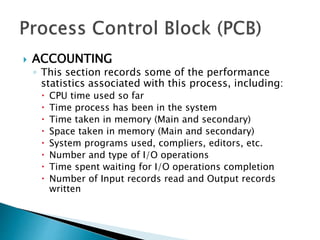
 ACCOUNTING
◦ This section records some of the performance
statistics associated with this process, including:
 CPU time used so far
 Time process has been in the system
 Time taken in memory (Main and secondary)
 Space taken in memory (Main and secondary)
 System programs used, compliers, editors, etc.
 Number and type of I/O operations
 Time spent waiting for I/O operations completion
 Number of Input records read and Output records
written
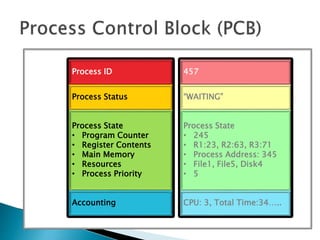
Process ID
Process Status
Process State
• Program Counter
• Register Contents
• Main Memory
• Resources
• Process Priority
Accounting
457
“WAITING”
Process State
• 245
• R1:23, R2:63, R3:71
• Process Address: 345
• File1, File5, Disk4
• 5
CPU: 3, Total Time:34…..
Process ID
Process Status
Process State
• Program Counter
• Register Contents
• Main Memory
• Resources
• Process Priority
Accounting
 What are good policies to schedule
processes?
 MAXIMUM THROUGHPUT
 Get as many jobs done as quickly as possible.
 There are several ways to achieve this, e.g.
run only short jobs, run jobs without
interruptions.
 MINIMIZE RESPONSE TIME
 Ensure that interactive requests are dealt with
as quickly as possible.
 This could be achieved by scheduling just
with a lot of I/O jobs first, and leave the
computational jobs for later.
 MINIMIZE TURNAROUND TIME
 Ensure that jobs are completed as quickly as
possible.
 This could be achieved by scheduling just
with a lot of computation jobs first, and leave
the I/O jobs for later, so there is no user
delays.
 MINIMIZE WAITING TIME
 Move jobs out of the READY status as soon as
possible.
 This could be achieved by reduce the number
of users allowed on the system, so that the
CPU would be available whenever a job enters
the READY status.
 MINIMIZE WAITING TIME
 Move jobs out of the READY status as soon as
possible.
 This could be achieved by reduce the number
of users allowed on the system, so that the
CPU would be available whenever a job enters
the READY status.
 MAXIMISE CPU EFFICIENCY
 Keep the CPU busy 100% of the time.
 This could be achieved by scheduling just
with a lot of computation jobs, and never run
the I/O jobs.
 ENSURE FAIRNESS FOR ALL JOBS
 Give everyone an equal amount of CPU time
and I/O time.
 This could be achieved by giving all jobs
equal priority, regardless of it’s
characteristics.
 Here are six commonly used process
scheduling algorithms
 First Come, First Served (FCFS)
 A very simple algorithm that uses a FIFO
structure.
 Implemented as a non-pre-emptive
scheduling algorithm.
 Works well for Batch Processes, where users
don’t expect any interaction.
 Shortest Job Next (SJN)
 Also called Shortest Job First (SJF).
 A very simple algorithm that schedules
processes based on CPU cycle time.
 Implemented as a non-pre-emptive
scheduling algorithm.
 Works well for Batch Processes, where it is
easy to estimate CPU time.
 Priority Scheduling
 An algorithm that schedules processes based
on priority.
 Implemented as a non-pre-emptive
scheduling algorithm.
 One of the most common algorithms used in
systems that are mainly Batch Processes.
 If two jobs come in of equal priority are
READY, if works on a FIRST COME, FIRST
SERVED basis.
 Shortest Remaining Time (SRT)
 A pre-emptive scheduling version of the
Shortest Job Next (SJN) algorithm.
 An algorithm that schedules processes based
on the one which is nearest to completion.
 It can only be implemented on systems that
are only Batch Processes, since you have to
know the CPU time required to complete each
job.
 Round Robin
 A pre-emptive scheduling algorithm that is
used extensively in interactive systems
 All active processes are given a pre-
determined slice of time (“time quantum”).
 Choosing the time quantum is the key
decision, for interactive systems the quantum
must be small, whereas for batch systems it
can be longer.
 Multi-Level Queues
 This isn’t really a separate scheduling
algorithm, it can be used with others.
 Jobs are grouped together based on common
characteristics.
 For example, CPU-bound jobs based in one
queue, and the I/O-bound jobs in another
queue, and the process scheduler can select
jobs from each queue based on balancing the
load.

Operating Systems - Processor Management

  • 1.
  • 2.
     If youwere assembling some IKEA furniture, and following the step-by-step guide of 20 steps.  Imagine you did step 1, then step 2, then step 3, suddenly the doorbell rang, and you are interrupted.
  • 3.
     You wouldstop what you are doing and deal with whoever is at the door.  Then you would return to the assembly, check what step you were on, and then continue on from there (step 4).
  • 4.
     This ishow the computer runs multiple processes simultaneously … you do a few steps on one process, get interrupted, work on other processes, then return to the first process, remembering where you left off from, and continue on.  This swapping of processes is called a pre- emptive scheduling policy.
  • 5.
     A “Process”is the basic unit of execution in the operating system  A “Process” is the name we give to a program when it is running in memory ◦ So a “Program” is the complied executable ◦ And a “Process” is the running executable with the execution state.
  • 6.
     The sameprogram being run by two different users in the operating system are two different processes User 1 Process 1 Running Executable 1 Execution State 1 User 2 Process 2 Execution State 2 Running Executable 1
  • 7.
     The ProcessorManager is made up of two sub-managers: Process Scheduler Job Scheduler
  • 8.
  • 9.
     We describea collection of processes as a “job”.  When the operating systems is presented with a queue of jobs or processes to run, the Job Scheduler has the task of deciding which order to run the are jobs in.  The Job Scheduler wants to ensure that the all components of the operating system are busy, and there is no component that is idle.
  • 10.
     Let’s thinkabout this program: PROGRAM PrintValue: BEGIN Input A; Input B; C = A + B; D = A – B; Print “The sum of inputs is: “, C; Print “The Difference of inputs is: “, D; END.
  • 11.
    I/O  Let’s thinkabout this program: PROGRAM PrintValue: BEGIN Input A; Input B; C = A + B; D = A – B; Print “The sum of inputs is: “, C; Print “The Difference of inputs is: “, D; END.
  • 12.
    I/O  Let’s thinkabout this program: PROGRAM PrintValue: BEGIN Input A; Input B; C = A + B; D = A – B; Print “The sum of inputs is: “, C; Print “The Difference of inputs is: “, D; END. Reading from keyboard
  • 13.
    I/O I/O  Let’s thinkabout this program: PROGRAM PrintValue: BEGIN Input A; Input B; C = A + B; D = A – B; Print “The sum of inputs is: “, C; Print “The Difference of inputs is: “, D; END.
  • 14.
    I/O I/O  Let’s thinkabout this program: PROGRAM PrintValue: BEGIN Input A; Input B; C = A + B; D = A – B; Print “The sum of inputs is: “, C; Print “The Difference of inputs is: “, D; END. Writing To screen
  • 15.
    CPU I/O I/O  Let’s thinkabout this program: PROGRAM PrintValue: BEGIN Input A; Input B; C = A + B; D = A – B; Print “The sum of inputs is: “, C; Print “The Difference of inputs is: “, D; END.
  • 16.
    CPU I/O I/O  Let’s thinkabout this program: PROGRAM PrintValue: BEGIN Input A; Input B; C = A + B; D = A – B; Print “The sum of inputs is: “, C; Print “The Difference of inputs is: “, D; END. Doing computation
  • 17.
    CPU I/O I/O  Some programsdo a lot of I/O, e.g. Graphics programs:
  • 18.
     Others doa lot of computation, but little I/O, e.g. maths programs: CPU I/O I/O
  • 19.
     If thejob scheduler gets jobs like this:
  • 20.
     If thejob scheduler gets jobs like this:
  • 21.
     So thejob scheduler will take these jobs:
  • 22.
     And swapthem around, and pass them onto the Process Scheduler
  • 23.
     So inthis case the Job Scheduler wants to balance the jobs coming in, so that the components of the operating system are all kept busy.  If we don’t change the order of job, the CPU will be very busy, but the I/O component will be idle, and then vice versa.  This is not an optimal use of resources, so we swap them around.
  • 24.
     We'll calljobs that are CPU-bound Batch Jobs, and we’ll call jobs that have a lot of I/O operations Interactive Jobs.
  • 25.
     This isthe first level of swapping of processes that will occur, and more will be done by the Process Scheduler. The Job Scheduler is looking at jobs (or groups of processes), and looking at the whole process from a high-level.  For obvious reasons, the Job Scheduler is also called the High-Level Scheduler.
  • 26.
     Every processhas a field that records their current status, called the Process Status.  When the process is first passed to the Job Scheduler from the operating system, its status is always set as HOLD.  When the Job Scheduler passes the process onto the Process Scheduler, its status is always changed to READY.
  • 27.
  • 28.
     Other statusesthat a process can have are: Process Scheduler Job SchedulerHOLD WAITING READY RUNNING FINISHED
  • 29.
  • 30.
    Scheduler Dispatch Interrupt Admitted Exit I/O or Eventwait I/O or Event completion HOLD READY WAITING RUNNING FINISHED
  • 31.
     Think abouttraffic lights:
  • 32.
     This isthe sequence:
  • 33.
     As mentionedpreviously the process is first passed to the Job Scheduler from the operating system, its status is always set as HOLD. When the Job Scheduler passes the process onto the Process Scheduler, its status is always changed to READY.
  • 34.
     When theCPU is available, the Process Scheduler will look at all of the upcoming processes and will select one of them (based on a predefined algorithm) and assuming there is memory free, the process will start running and its status is changed to RUNNING by the Process Scheduler.
  • 35.
     After apredefined time, the process will be interrupted, and another process will take over the CPU, and the interrupted process will have its status changed to READY by the Process Scheduler. We will remember that this swapping of processes is called a pre- emptive scheduling policy.  When is CPU is available for this process again the process status be changed to RUNNING by the Process Scheduler.
  • 37.
     If theprocess has to wait for some I/O from the user or some other event, it is put in a status of WAITING by the Process Scheduler.  When the I/O device lets the Process Scheduler know that the I/O is completed, the process status will be changed to READY by the Process Scheduler.
  • 38.
     Finally theprocess status will be changed to FINISHED either when the process has successful completed, or if an error occurs and the process has to terminate prematurely. The status change is usually handled by the Process Scheduler informing the Job Scheduler of the process completion, and the Job Scheduler of changing the status.
  • 39.
  • 40.
     The Processstatus is only one of a collection of descriptors that are associated with a process.  Each process has a data structure called a Process Control Block (PCB) associated with it, rather like a passport.
  • 41.
  • 42.
    Process ID Process Status ProcessState • Program Counter • Register Contents • Main Memory • Resources • Process Priority Accounting
  • 43.
     PROCESS IDENTIFIER ◦Each process is uniquely identified by both the user’s identification, and a pointer connecting it to its descriptor.
  • 44.
     PROCESS STATUS ◦The current status of the process, it is either: HOLD READY WAITING RUNNING FINISHED
  • 45.
     PROCESS STATE ◦Program counter ◦ Record the current value of the program counter 0708
  • 46.
     PROCESS STATE ◦Register Contents ◦ Record the values of the data registers
  • 47.
    9 10 11 1213 14 15 16 18 19 1 2 3 4 5 6 7 8 0 17 20  PROCESS STATE ◦ Main Memory ◦ Record all important information from memory, including most importantly the process location.
  • 48.
     PROCESS STATE ◦Resources ◦ Record the resources that have been allocated to this job, including files, disk drives, and printers. ID TYPE DETAILS 1 FILE TXT file starting at memory address 0x456 2 FILE DAT file starting at memory address 0x087 3 DISK Disk Drive 4 4 FILE TXT file starting at memory address 0x673 5 PRINTER Printer at IP address 172.242.34.65
  • 49.
     PROCESS STATE ◦Process Priority ◦ The process is assigned a priority, and if the operating system using priorities to schedule processes.
  • 50.
     PROCESS STATE ◦Process Priority ◦ The process is assigned a priority, and if the operating system using priorities to schedule processes. 12 54 66 23 13 32
  • 51.
     PROCESS STATE ◦Process Priority ◦ The process is assigned a priority, and if the operating system using priorities to schedule processes. 12 54 66 23 13 32 1 1 5 2 1 1
  • 52.
     ACCOUNTING ◦ Thissection records some of the performance statistics associated with this process, including:  CPU time used so far  Time process has been in the system  Time taken in memory (Main and secondary)  Space taken in memory (Main and secondary)  System programs used, compliers, editors, etc.  Number and type of I/O operations  Time spent waiting for I/O operations completion  Number of Input records read and Output records written
  • 53.
    Process ID Process Status ProcessState • Program Counter • Register Contents • Main Memory • Resources • Process Priority Accounting
  • 54.
    457 “WAITING” Process State • 245 •R1:23, R2:63, R3:71 • Process Address: 345 • File1, File5, Disk4 • 5 CPU: 3, Total Time:34….. Process ID Process Status Process State • Program Counter • Register Contents • Main Memory • Resources • Process Priority Accounting
  • 56.
     What aregood policies to schedule processes?
  • 57.
     MAXIMUM THROUGHPUT Get as many jobs done as quickly as possible.  There are several ways to achieve this, e.g. run only short jobs, run jobs without interruptions.
  • 58.
     MINIMIZE RESPONSETIME  Ensure that interactive requests are dealt with as quickly as possible.  This could be achieved by scheduling just with a lot of I/O jobs first, and leave the computational jobs for later.
  • 59.
     MINIMIZE TURNAROUNDTIME  Ensure that jobs are completed as quickly as possible.  This could be achieved by scheduling just with a lot of computation jobs first, and leave the I/O jobs for later, so there is no user delays.
  • 60.
     MINIMIZE WAITINGTIME  Move jobs out of the READY status as soon as possible.  This could be achieved by reduce the number of users allowed on the system, so that the CPU would be available whenever a job enters the READY status.
  • 61.
     MINIMIZE WAITINGTIME  Move jobs out of the READY status as soon as possible.  This could be achieved by reduce the number of users allowed on the system, so that the CPU would be available whenever a job enters the READY status.
  • 62.
     MAXIMISE CPUEFFICIENCY  Keep the CPU busy 100% of the time.  This could be achieved by scheduling just with a lot of computation jobs, and never run the I/O jobs.
  • 63.
     ENSURE FAIRNESSFOR ALL JOBS  Give everyone an equal amount of CPU time and I/O time.  This could be achieved by giving all jobs equal priority, regardless of it’s characteristics.
  • 65.
     Here aresix commonly used process scheduling algorithms
  • 66.
     First Come,First Served (FCFS)  A very simple algorithm that uses a FIFO structure.  Implemented as a non-pre-emptive scheduling algorithm.  Works well for Batch Processes, where users don’t expect any interaction.
  • 67.
     Shortest JobNext (SJN)  Also called Shortest Job First (SJF).  A very simple algorithm that schedules processes based on CPU cycle time.  Implemented as a non-pre-emptive scheduling algorithm.  Works well for Batch Processes, where it is easy to estimate CPU time.
  • 68.
     Priority Scheduling An algorithm that schedules processes based on priority.  Implemented as a non-pre-emptive scheduling algorithm.  One of the most common algorithms used in systems that are mainly Batch Processes.  If two jobs come in of equal priority are READY, if works on a FIRST COME, FIRST SERVED basis.
  • 69.
     Shortest RemainingTime (SRT)  A pre-emptive scheduling version of the Shortest Job Next (SJN) algorithm.  An algorithm that schedules processes based on the one which is nearest to completion.  It can only be implemented on systems that are only Batch Processes, since you have to know the CPU time required to complete each job.
  • 70.
     Round Robin A pre-emptive scheduling algorithm that is used extensively in interactive systems  All active processes are given a pre- determined slice of time (“time quantum”).  Choosing the time quantum is the key decision, for interactive systems the quantum must be small, whereas for batch systems it can be longer.
  • 71.
     Multi-Level Queues This isn’t really a separate scheduling algorithm, it can be used with others.  Jobs are grouped together based on common characteristics.  For example, CPU-bound jobs based in one queue, and the I/O-bound jobs in another queue, and the process scheduler can select jobs from each queue based on balancing the load.