PROCESS MANAGEMENT INPROCESS MANAGEMENT IN
OPERATING SYSTEMSOPERATING SYSTEMS
V.V. SUBRAHMANYAMV.V. SUBRAHMANYAM
SOCIS, IGNOUSOCIS, IGNOU
DATE: 12-05-06DATE: 12-05-06
TIME: 2-30PM TO 3-15PMTIME: 2-30PM TO 3-15PM
ObjectivesObjectives
 Process ConceptProcess Concept
 Process StatesProcess States
 Operations on ProcessesOperations on Processes
 Scheduling AlgorithmsScheduling Algorithms
 Interprocess CommunicationInterprocess Communication
 Communication in Client-Server SystemsCommunication in Client-Server Systems
ProcessProcess
 The term “process” was first used by theThe term “process” was first used by the
operating system designers of theoperating system designers of the
MULTICS system way back in 1960s.MULTICS system way back in 1960s.
Contd..Contd..
 The CPU executes a large number ofThe CPU executes a large number of
programs. While its main concern is theprograms. While its main concern is the
execution of user programs, the CPU is alsoexecution of user programs, the CPU is also
needed for other system activities. Theseneeded for other system activities. These
activities are called processes.activities are called processes.
 A process isA process is
 a program in execution.a program in execution.
 A batch job is a process.A batch job is a process.
 A time-shared user programA time-shared user program
 A system task, such as spoolingA system task, such as spooling
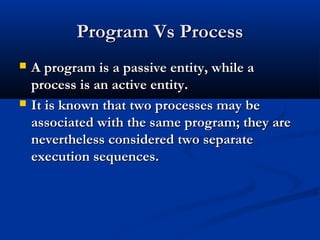
Program Vs ProcessProgram Vs Process
 A program is a passive entity, while aA program is a passive entity, while a
process is an active entity.process is an active entity.
 It is known that two processes may beIt is known that two processes may be
associated with the same program; they areassociated with the same program; they are
nevertheless considered two separatenevertheless considered two separate
execution sequences.execution sequences.
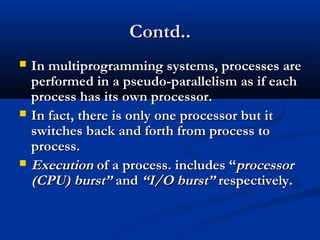
Contd..Contd..
 In multiprogramming systems, processes areIn multiprogramming systems, processes are
performed in a pseudo-parallelism as if eachperformed in a pseudo-parallelism as if each
process has its own processor.process has its own processor.
 In fact, there is only one processor but itIn fact, there is only one processor but it
switches back and forth from process toswitches back and forth from process to
process.process.
 ExecutionExecution of a process. includes “of a process. includes “processorprocessor
(CPU) burst”(CPU) burst” andand “I/O burst”“I/O burst” respectively.respectively.
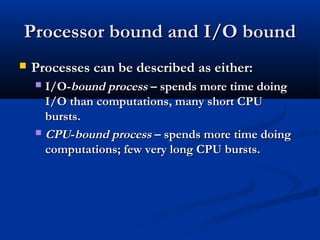
Processor bound and I/O boundProcessor bound and I/O bound
 Processes can be described as either:Processes can be described as either:
 I/O-I/O-bound processbound process – spends more time doing– spends more time doing
I/O than computations, many short CPUI/O than computations, many short CPU
bursts.bursts.
 CPUCPU--bound processbound process – spends more time doing– spends more time doing
computations; few very long CPU bursts.computations; few very long CPU bursts.
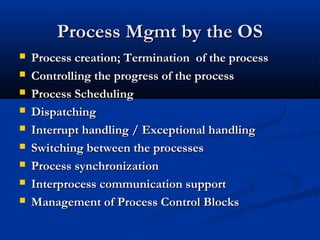
Process Mgmt by the OSProcess Mgmt by the OS
 Process creation; Termination of the processProcess creation; Termination of the process
 Controlling the progress of the processControlling the progress of the process
 Process SchedulingProcess Scheduling
 DispatchingDispatching
 Interrupt handling / Exceptional handlingInterrupt handling / Exceptional handling
 Switching between the processesSwitching between the processes
 Process synchronizationProcess synchronization
 Interprocess communication supportInterprocess communication support
 Management of Process Control BlocksManagement of Process Control Blocks
Process RelationshipProcess Relationship
 In the concurrent environment, basicallyIn the concurrent environment, basically
processes has two relationship, competitionprocesses has two relationship, competition
and cooperation. In the concurrentand cooperation. In the concurrent
environment, processes compete with eachenvironment, processes compete with each
other for allocation of system resources toother for allocation of system resources to
execute their instructions. In addition, aexecute their instructions. In addition, a
collection of related processes thatcollection of related processes that
collectively represent a single logicalcollectively represent a single logical
application cooperate to each other.application cooperate to each other.
Process StateProcess State
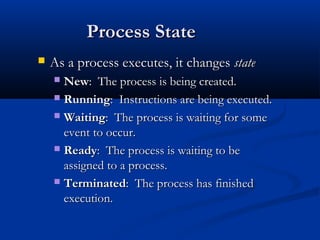
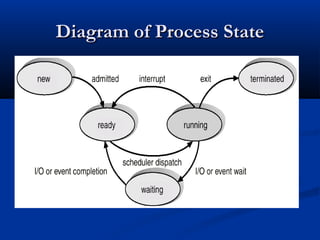
 As a process executes, it changesAs a process executes, it changes statestate
 NewNew: The process is being created.: The process is being created.
 RunningRunning: Instructions are being executed.: Instructions are being executed.
 WaitingWaiting: The process is waiting for some: The process is waiting for some
event to occur.event to occur.
 ReadyReady: The process is waiting to be: The process is waiting to be
assigned to a process.assigned to a process.
 TerminatedTerminated: The process has finished: The process has finished
execution.execution.
Diagram of Process StateDiagram of Process State
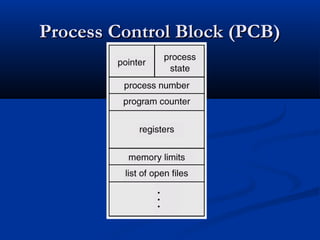
Process Table or PCBProcess Table or PCB
 To implement the process model, the operatingTo implement the process model, the operating
system maintains a table, an array of structures,system maintains a table, an array of structures,
called thecalled the process table or a process control blockprocess table or a process control block..
Each entry identifies a process with informationEach entry identifies a process with information
such as process state, its program counter, stacksuch as process state, its program counter, stack
pointer, memory allocation, the status of its openpointer, memory allocation, the status of its open
files, its accounting and scheduling information. Infiles, its accounting and scheduling information. In
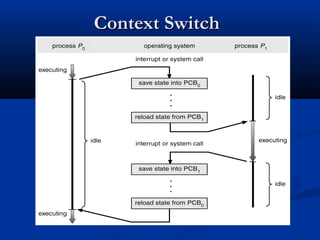
another words, it must contain everything aboutanother words, it must contain everything about
the process that must be saved when the process isthe process that must be saved when the process is
switched from the running state to the ready stateswitched from the running state to the ready state
so that it can be restarted later as if it had neverso that it can be restarted later as if it had never
been stopped.been stopped.
Process Control Block (PCB)Process Control Block (PCB)
Context SwitchContext Switch
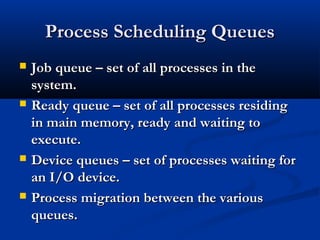
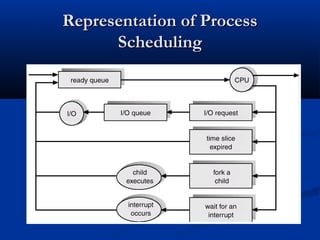
Process Scheduling QueuesProcess Scheduling Queues
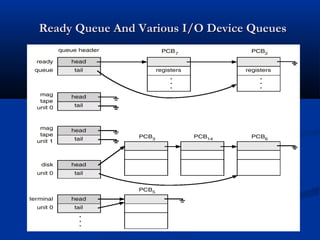
 Job queue – set of all processes in theJob queue – set of all processes in the
system.system.
 Ready queue – set of all processes residingReady queue – set of all processes residing
in main memory, ready and waiting toin main memory, ready and waiting to
execute.execute.
 Device queues – set of processes waiting forDevice queues – set of processes waiting for
an I/O device.an I/O device.
 Process migration between the variousProcess migration between the various
queues.queues.
Ready Queue And Various I/O Device QueuesReady Queue And Various I/O Device Queues
Representation of ProcessRepresentation of Process
SchedulingScheduling
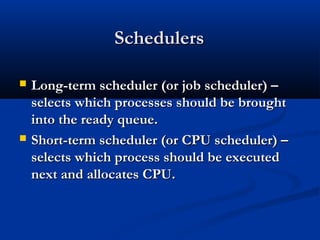
SchedulersSchedulers
 Long-term scheduler (or job scheduler) –Long-term scheduler (or job scheduler) –
selects which processes should be broughtselects which processes should be brought
into the ready queue.into the ready queue.
 Short-term scheduler (or CPU scheduler) –Short-term scheduler (or CPU scheduler) –
selects which process should be executedselects which process should be executed
next and allocates CPU.next and allocates CPU.
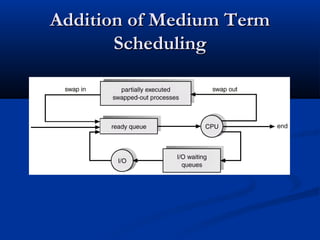
Addition of Medium TermAddition of Medium Term
SchedulingScheduling
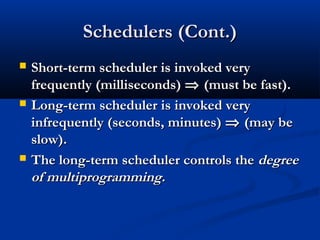
Schedulers (Cont.)Schedulers (Cont.)
 Short-term scheduler is invoked veryShort-term scheduler is invoked very
frequently (milliseconds)frequently (milliseconds) ⇒⇒ (must be fast).(must be fast).
 Long-term scheduler is invoked veryLong-term scheduler is invoked very
infrequently (seconds, minutes)infrequently (seconds, minutes) ⇒⇒ (may be(may be
slow).slow).
 The long-term scheduler controls theThe long-term scheduler controls the degreedegree
of multiprogramming.of multiprogramming.
Scheduling AlgorithmsScheduling Algorithms
 The goal of scheduling algorithm is toThe goal of scheduling algorithm is to
identify the process whose selection willidentify the process whose selection will
result in the “best” possible systemresult in the “best” possible system
performance.performance.
 A major division among schedulingA major division among scheduling
algorithms is that whether they support pre-algorithms is that whether they support pre-
emptive or non-preemptive schedulingemptive or non-preemptive scheduling
discipline.discipline.
Preemptive SchedulingPreemptive Scheduling
 Preemption means the operating systemPreemption means the operating system
moves a process from running to readymoves a process from running to ready
without the process requesting it.without the process requesting it.
 Round Robin scheduling, priority basedRound Robin scheduling, priority based
scheduling or event driven scheduling arescheduling or event driven scheduling are
considered to the preemptive schedulingconsidered to the preemptive scheduling
algorithms.algorithms.
Non- Preemptive schedulingNon- Preemptive scheduling
 A scheduling discipline is non-preemptive ifA scheduling discipline is non-preemptive if
once a process has been allotted to the CPU,once a process has been allotted to the CPU,
the CPU cannot be taken away from thethe CPU cannot be taken away from the
process.process.
 First come first served (FCFS), Shortest jobFirst come first served (FCFS), Shortest job
first (SJF), Shortest Remaining time firstfirst (SJF), Shortest Remaining time first
(SRTF) are considered to be the non(SRTF) are considered to be the non
preemptive scheduling algorithms.preemptive scheduling algorithms.
Interprocess CommunicationInterprocess Communication
(IPC)(IPC)
 Mechanism for processes to communicateMechanism for processes to communicate
and to synchronize their actions.and to synchronize their actions.
 Message system – processes communicateMessage system – processes communicate
with each other without resorting to sharedwith each other without resorting to shared
variables.variables.
 IPC facility provides two operations:IPC facility provides two operations:
 send(send(messagemessage) – message size fixed or variable) – message size fixed or variable
 receive(receive(messagemessage))
Contd…Contd…
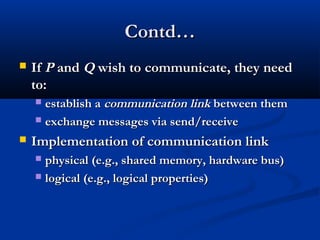
 IfIf PP andand QQ wish to communicate, they needwish to communicate, they need
to:to:
 establish aestablish a communicationcommunication linklink between thembetween them
 exchange messages via send/receiveexchange messages via send/receive
 Implementation of communication linkImplementation of communication link
 physical (e.g., shared memory, hardware bus)physical (e.g., shared memory, hardware bus)
 logical (e.g., logical properties)logical (e.g., logical properties)
Implementation QuestionsImplementation Questions
 How are links established?How are links established?
 Can a link be associated with more than twoCan a link be associated with more than two
processes?processes?
 How many links can there be between everyHow many links can there be between every
pair of communicating processes?pair of communicating processes?
 What is the capacity of a link?What is the capacity of a link?
 Is the size of a message that the link canIs the size of a message that the link can
accommodate fixed or variable?accommodate fixed or variable?
 Is a link unidirectional or bi-directional?Is a link unidirectional or bi-directional?
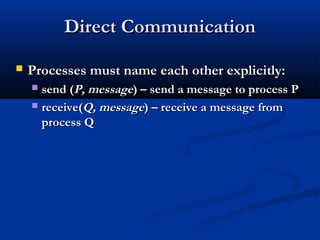
Direct CommunicationDirect Communication
 Processes must name each other explicitly:Processes must name each other explicitly:
 send (send (P, messageP, message) – send a message to process P) – send a message to process P
 receive(receive(Q, messageQ, message) – receive a message from) – receive a message from
process Qprocess Q
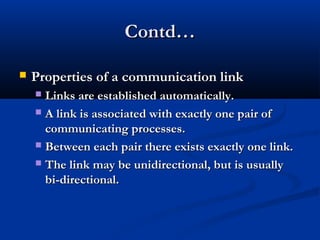
Contd…Contd…
 Properties of a communication linkProperties of a communication link
 Links are established automatically.Links are established automatically.
 A link is associated with exactly one pair ofA link is associated with exactly one pair of
communicating processes.communicating processes.
 Between each pair there exists exactly one link.Between each pair there exists exactly one link.
 The link may be unidirectional, but is usuallyThe link may be unidirectional, but is usually
bi-directional.bi-directional.
Indirect CommunicationIndirect Communication
 Messages are directed and receivedMessages are directed and received
from mailboxes (also referred to asfrom mailboxes (also referred to as
ports).ports).
 Each mailbox has a unique id.Each mailbox has a unique id.
 Processes can communicate only if theyProcesses can communicate only if they
share a mailbox.share a mailbox.
Contd…Contd…
 Properties of communication linkProperties of communication link
 Link established only if processes share aLink established only if processes share a
common mailboxcommon mailbox
 A link may be associated with many processes.A link may be associated with many processes.
 Each pair of processes may share severalEach pair of processes may share several
communication links.communication links.
 Link may be unidirectional or bi-directional.Link may be unidirectional or bi-directional.
Indirect CommunicationIndirect Communication
 OperationsOperations
 create a new mailboxcreate a new mailbox
 send and receive messages through mailboxsend and receive messages through mailbox
 destroy a mailboxdestroy a mailbox
 Primitives are defined as:Primitives are defined as:
send(send(A, messageA, message) – send a message to) – send a message to
mailbox Amailbox A
receive(receive(A, messageA, message) – receive a message) – receive a message
from mailbox Afrom mailbox A
Indirect CommunicationIndirect Communication
 Mailbox sharingMailbox sharing
 PP11, P, P22,, andand PP33 share mailbox A.share mailbox A.
 PP11, sends;, sends; PP22 andand PP33 receive.receive.
 Who gets the message?Who gets the message?
Contd…Contd…
 SolutionsSolutions
 Allow a link to be associated with at most twoAllow a link to be associated with at most two
processes.processes.
 Allow only one process at a time to execute aAllow only one process at a time to execute a
receive operation.receive operation.
 Allow the system to select arbitrarily theAllow the system to select arbitrarily the
receiver. Sender is notified who the receiverreceiver. Sender is notified who the receiver
was.was.
SynchronizationSynchronization
 Message passing may be either blocking orMessage passing may be either blocking or
non-blocking.non-blocking.
 Blocking is considered synchronousBlocking is considered synchronous
 Non-blocking is considered asynchronousNon-blocking is considered asynchronous
 send and receive primitives may be eithersend and receive primitives may be either
blocking or non-blocking.blocking or non-blocking.
BufferingBuffering
 Queue of messages attached to the link;Queue of messages attached to the link;
implemented in one of three ways.implemented in one of three ways.
1.1. Zero capacity – 0 messagesZero capacity – 0 messages
Sender must wait for receiver (rendezvous).Sender must wait for receiver (rendezvous).
2.2.Bounded capacity – finite length ofBounded capacity – finite length of nn messagesmessages
Sender must wait if link full.Sender must wait if link full.
3.3.Unbounded capacity – infinite lengthUnbounded capacity – infinite length
Sender never waits.Sender never waits.

Processes

  • 1.
    PROCESS MANAGEMENT INPROCESSMANAGEMENT IN OPERATING SYSTEMSOPERATING SYSTEMS V.V. SUBRAHMANYAMV.V. SUBRAHMANYAM SOCIS, IGNOUSOCIS, IGNOU DATE: 12-05-06DATE: 12-05-06 TIME: 2-30PM TO 3-15PMTIME: 2-30PM TO 3-15PM
  • 2.
    ObjectivesObjectives  Process ConceptProcessConcept  Process StatesProcess States  Operations on ProcessesOperations on Processes  Scheduling AlgorithmsScheduling Algorithms  Interprocess CommunicationInterprocess Communication  Communication in Client-Server SystemsCommunication in Client-Server Systems
  • 3.
    ProcessProcess  The term“process” was first used by theThe term “process” was first used by the operating system designers of theoperating system designers of the MULTICS system way back in 1960s.MULTICS system way back in 1960s.
  • 4.
    Contd..Contd..  The CPUexecutes a large number ofThe CPU executes a large number of programs. While its main concern is theprograms. While its main concern is the execution of user programs, the CPU is alsoexecution of user programs, the CPU is also needed for other system activities. Theseneeded for other system activities. These activities are called processes.activities are called processes.  A process isA process is  a program in execution.a program in execution.  A batch job is a process.A batch job is a process.  A time-shared user programA time-shared user program  A system task, such as spoolingA system task, such as spooling
  • 5.
    Program Vs ProcessProgramVs Process  A program is a passive entity, while aA program is a passive entity, while a process is an active entity.process is an active entity.  It is known that two processes may beIt is known that two processes may be associated with the same program; they areassociated with the same program; they are nevertheless considered two separatenevertheless considered two separate execution sequences.execution sequences.
  • 6.
    Contd..Contd..  In multiprogrammingsystems, processes areIn multiprogramming systems, processes are performed in a pseudo-parallelism as if eachperformed in a pseudo-parallelism as if each process has its own processor.process has its own processor.  In fact, there is only one processor but itIn fact, there is only one processor but it switches back and forth from process toswitches back and forth from process to process.process.  ExecutionExecution of a process. includes “of a process. includes “processorprocessor (CPU) burst”(CPU) burst” andand “I/O burst”“I/O burst” respectively.respectively.
  • 7.
    Processor bound andI/O boundProcessor bound and I/O bound  Processes can be described as either:Processes can be described as either:  I/O-I/O-bound processbound process – spends more time doing– spends more time doing I/O than computations, many short CPUI/O than computations, many short CPU bursts.bursts.  CPUCPU--bound processbound process – spends more time doing– spends more time doing computations; few very long CPU bursts.computations; few very long CPU bursts.
  • 8.
    Process Mgmt bythe OSProcess Mgmt by the OS  Process creation; Termination of the processProcess creation; Termination of the process  Controlling the progress of the processControlling the progress of the process  Process SchedulingProcess Scheduling  DispatchingDispatching  Interrupt handling / Exceptional handlingInterrupt handling / Exceptional handling  Switching between the processesSwitching between the processes  Process synchronizationProcess synchronization  Interprocess communication supportInterprocess communication support  Management of Process Control BlocksManagement of Process Control Blocks
  • 9.
    Process RelationshipProcess Relationship In the concurrent environment, basicallyIn the concurrent environment, basically processes has two relationship, competitionprocesses has two relationship, competition and cooperation. In the concurrentand cooperation. In the concurrent environment, processes compete with eachenvironment, processes compete with each other for allocation of system resources toother for allocation of system resources to execute their instructions. In addition, aexecute their instructions. In addition, a collection of related processes thatcollection of related processes that collectively represent a single logicalcollectively represent a single logical application cooperate to each other.application cooperate to each other.
  • 10.
    Process StateProcess State As a process executes, it changesAs a process executes, it changes statestate  NewNew: The process is being created.: The process is being created.  RunningRunning: Instructions are being executed.: Instructions are being executed.  WaitingWaiting: The process is waiting for some: The process is waiting for some event to occur.event to occur.  ReadyReady: The process is waiting to be: The process is waiting to be assigned to a process.assigned to a process.  TerminatedTerminated: The process has finished: The process has finished execution.execution.
  • 11.
    Diagram of ProcessStateDiagram of Process State
  • 12.
    Process Table orPCBProcess Table or PCB  To implement the process model, the operatingTo implement the process model, the operating system maintains a table, an array of structures,system maintains a table, an array of structures, called thecalled the process table or a process control blockprocess table or a process control block.. Each entry identifies a process with informationEach entry identifies a process with information such as process state, its program counter, stacksuch as process state, its program counter, stack pointer, memory allocation, the status of its openpointer, memory allocation, the status of its open files, its accounting and scheduling information. Infiles, its accounting and scheduling information. In another words, it must contain everything aboutanother words, it must contain everything about the process that must be saved when the process isthe process that must be saved when the process is switched from the running state to the ready stateswitched from the running state to the ready state so that it can be restarted later as if it had neverso that it can be restarted later as if it had never been stopped.been stopped.
  • 13.
    Process Control Block(PCB)Process Control Block (PCB)
  • 14.
  • 15.
    Process Scheduling QueuesProcessScheduling Queues  Job queue – set of all processes in theJob queue – set of all processes in the system.system.  Ready queue – set of all processes residingReady queue – set of all processes residing in main memory, ready and waiting toin main memory, ready and waiting to execute.execute.  Device queues – set of processes waiting forDevice queues – set of processes waiting for an I/O device.an I/O device.  Process migration between the variousProcess migration between the various queues.queues.
  • 16.
    Ready Queue AndVarious I/O Device QueuesReady Queue And Various I/O Device Queues
  • 17.
    Representation of ProcessRepresentationof Process SchedulingScheduling
  • 18.
    SchedulersSchedulers  Long-term scheduler(or job scheduler) –Long-term scheduler (or job scheduler) – selects which processes should be broughtselects which processes should be brought into the ready queue.into the ready queue.  Short-term scheduler (or CPU scheduler) –Short-term scheduler (or CPU scheduler) – selects which process should be executedselects which process should be executed next and allocates CPU.next and allocates CPU.
  • 19.
    Addition of MediumTermAddition of Medium Term SchedulingScheduling
  • 20.
    Schedulers (Cont.)Schedulers (Cont.) Short-term scheduler is invoked veryShort-term scheduler is invoked very frequently (milliseconds)frequently (milliseconds) ⇒⇒ (must be fast).(must be fast).  Long-term scheduler is invoked veryLong-term scheduler is invoked very infrequently (seconds, minutes)infrequently (seconds, minutes) ⇒⇒ (may be(may be slow).slow).  The long-term scheduler controls theThe long-term scheduler controls the degreedegree of multiprogramming.of multiprogramming.
  • 21.
    Scheduling AlgorithmsScheduling Algorithms The goal of scheduling algorithm is toThe goal of scheduling algorithm is to identify the process whose selection willidentify the process whose selection will result in the “best” possible systemresult in the “best” possible system performance.performance.  A major division among schedulingA major division among scheduling algorithms is that whether they support pre-algorithms is that whether they support pre- emptive or non-preemptive schedulingemptive or non-preemptive scheduling discipline.discipline.
  • 22.
    Preemptive SchedulingPreemptive Scheduling Preemption means the operating systemPreemption means the operating system moves a process from running to readymoves a process from running to ready without the process requesting it.without the process requesting it.  Round Robin scheduling, priority basedRound Robin scheduling, priority based scheduling or event driven scheduling arescheduling or event driven scheduling are considered to the preemptive schedulingconsidered to the preemptive scheduling algorithms.algorithms.
  • 23.
    Non- Preemptive schedulingNon-Preemptive scheduling  A scheduling discipline is non-preemptive ifA scheduling discipline is non-preemptive if once a process has been allotted to the CPU,once a process has been allotted to the CPU, the CPU cannot be taken away from thethe CPU cannot be taken away from the process.process.  First come first served (FCFS), Shortest jobFirst come first served (FCFS), Shortest job first (SJF), Shortest Remaining time firstfirst (SJF), Shortest Remaining time first (SRTF) are considered to be the non(SRTF) are considered to be the non preemptive scheduling algorithms.preemptive scheduling algorithms.
  • 24.
    Interprocess CommunicationInterprocess Communication (IPC)(IPC) Mechanism for processes to communicateMechanism for processes to communicate and to synchronize their actions.and to synchronize their actions.  Message system – processes communicateMessage system – processes communicate with each other without resorting to sharedwith each other without resorting to shared variables.variables.  IPC facility provides two operations:IPC facility provides two operations:  send(send(messagemessage) – message size fixed or variable) – message size fixed or variable  receive(receive(messagemessage))
  • 25.
    Contd…Contd…  IfIf PPandand QQ wish to communicate, they needwish to communicate, they need to:to:  establish aestablish a communicationcommunication linklink between thembetween them  exchange messages via send/receiveexchange messages via send/receive  Implementation of communication linkImplementation of communication link  physical (e.g., shared memory, hardware bus)physical (e.g., shared memory, hardware bus)  logical (e.g., logical properties)logical (e.g., logical properties)
  • 26.
    Implementation QuestionsImplementation Questions How are links established?How are links established?  Can a link be associated with more than twoCan a link be associated with more than two processes?processes?  How many links can there be between everyHow many links can there be between every pair of communicating processes?pair of communicating processes?  What is the capacity of a link?What is the capacity of a link?  Is the size of a message that the link canIs the size of a message that the link can accommodate fixed or variable?accommodate fixed or variable?  Is a link unidirectional or bi-directional?Is a link unidirectional or bi-directional?
  • 27.
    Direct CommunicationDirect Communication Processes must name each other explicitly:Processes must name each other explicitly:  send (send (P, messageP, message) – send a message to process P) – send a message to process P  receive(receive(Q, messageQ, message) – receive a message from) – receive a message from process Qprocess Q
  • 28.
    Contd…Contd…  Properties ofa communication linkProperties of a communication link  Links are established automatically.Links are established automatically.  A link is associated with exactly one pair ofA link is associated with exactly one pair of communicating processes.communicating processes.  Between each pair there exists exactly one link.Between each pair there exists exactly one link.  The link may be unidirectional, but is usuallyThe link may be unidirectional, but is usually bi-directional.bi-directional.
  • 29.
    Indirect CommunicationIndirect Communication Messages are directed and receivedMessages are directed and received from mailboxes (also referred to asfrom mailboxes (also referred to as ports).ports).  Each mailbox has a unique id.Each mailbox has a unique id.  Processes can communicate only if theyProcesses can communicate only if they share a mailbox.share a mailbox.
  • 30.
    Contd…Contd…  Properties ofcommunication linkProperties of communication link  Link established only if processes share aLink established only if processes share a common mailboxcommon mailbox  A link may be associated with many processes.A link may be associated with many processes.  Each pair of processes may share severalEach pair of processes may share several communication links.communication links.  Link may be unidirectional or bi-directional.Link may be unidirectional or bi-directional.
  • 31.
    Indirect CommunicationIndirect Communication OperationsOperations  create a new mailboxcreate a new mailbox  send and receive messages through mailboxsend and receive messages through mailbox  destroy a mailboxdestroy a mailbox  Primitives are defined as:Primitives are defined as: send(send(A, messageA, message) – send a message to) – send a message to mailbox Amailbox A receive(receive(A, messageA, message) – receive a message) – receive a message from mailbox Afrom mailbox A
  • 32.
    Indirect CommunicationIndirect Communication Mailbox sharingMailbox sharing  PP11, P, P22,, andand PP33 share mailbox A.share mailbox A.  PP11, sends;, sends; PP22 andand PP33 receive.receive.  Who gets the message?Who gets the message?
  • 33.
    Contd…Contd…  SolutionsSolutions  Allowa link to be associated with at most twoAllow a link to be associated with at most two processes.processes.  Allow only one process at a time to execute aAllow only one process at a time to execute a receive operation.receive operation.  Allow the system to select arbitrarily theAllow the system to select arbitrarily the receiver. Sender is notified who the receiverreceiver. Sender is notified who the receiver was.was.
  • 34.
    SynchronizationSynchronization  Message passingmay be either blocking orMessage passing may be either blocking or non-blocking.non-blocking.  Blocking is considered synchronousBlocking is considered synchronous  Non-blocking is considered asynchronousNon-blocking is considered asynchronous  send and receive primitives may be eithersend and receive primitives may be either blocking or non-blocking.blocking or non-blocking.
  • 35.
    BufferingBuffering  Queue ofmessages attached to the link;Queue of messages attached to the link; implemented in one of three ways.implemented in one of three ways. 1.1. Zero capacity – 0 messagesZero capacity – 0 messages Sender must wait for receiver (rendezvous).Sender must wait for receiver (rendezvous). 2.2.Bounded capacity – finite length ofBounded capacity – finite length of nn messagesmessages Sender must wait if link full.Sender must wait if link full. 3.3.Unbounded capacity – infinite lengthUnbounded capacity – infinite length Sender never waits.Sender never waits.