A process isa program in execution. For example, when
we write a program in C or C++ and compile it, it
becomes a process.
Process Management
PROCESS V/S PROGRAM
A Program is a Piece of code which may be single
line or multiple lines .A computer program is a
collection of instructions that perform a specific task.
3.
Process States
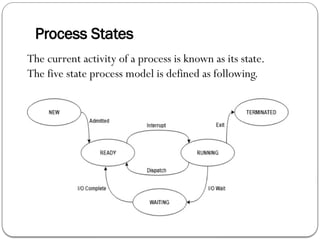
The currentactivity of a process is known as its state.
The five state process model is defined as following.
4.
1.New
When a programwhich is going to be picked up by the OS into the main
memory is called a new process.
OR
The process is in new state when it has just been created
2.Ready
The processes which are ready for the execution and reside in the main
memory are called ready state processes.
There can be many processes present in the ready state.
3.Running
When the process instructions are being executed by the processor.
• if we have only one CPU in our system, the number of running
processes for a particular time will always be one.
•If we have n processors in the system then we can have n processes
running simultaneously.
5.
4. Block/ wait
When a process waits for a certain resource to be assigned or for the
input from the user then the OS move this process to the block or wait
state and assigns the CPU to the other processes.
block or wait state depending upon the scheduling algorithm.
5. Terminated
When a process finishes its execution, it comes in the termination state.
All the context of the process (Process Control Block) will also be
deleted the process will be terminated by the Operating system.
6.
Process Control Block
ProcessNumber(ID)
Process States
Pointer
Program Counter
Priority
General Purpose Registers
Open Files List
Accounting and status Data
A process control block is associated with each of the processes. It
contains important details about that particular process. These are as
follows:
Process Attributes
7.
Attributes of aPCB
1.Process ID:-When a process is created, a unique id is
assigned to the process which is used for unique
identification of the process in the system.
2. Process State
The Process, from its creation to the completion, goes
through various states which are new, ready, running and
waiting.
3.Pointer
This is stack pointer store current position of the process.
8.
Process Control Block
4.Program counter
A program counter stores the address of the last instruction of the
process on which the process was suspended.The CPU uses this
address when the execution of this process is resumed.
5. Priority
Every process has its own priority.The process with the highest
priority among the processes gets the CPU first.This is also
stored on the process control block.
6. General Purpose Registers
Every process has its own set of registers which are used to hold
the data which is generated during the execution of the process.
9.
Attributes of aPCB continue
7. List of open files
During the Execution, Every process uses some files which
need to be present in the main memory. OS also maintains a
list of open files in the PCB.
8.Accounting and Status of data
This field include information about the amount of CPU
used, process numbers.
10.
Process scheduling
Processscheduling is the activity of the process
manager that handles the removal of the running
process from the CPU and the selection of another
process based on a particular strategy.
11.
Schedulers
Schedulers arespecial system software which handle process
scheduling in various ways.
Their main task is to select the jobs to be submitted into the system
and to decide which process to run.
• Types of Schedulers −
1. Long-Term Scheduler
2. Short-Term Scheduler
3. Medium-Term Scheduler
12.
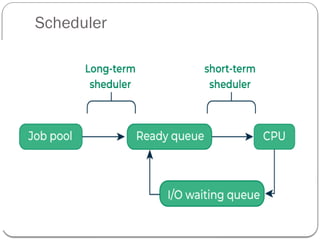
1. Long Termor Job Scheduler
It is also called a job scheduler.
It brings the new process to the ‘Ready State’.
2. Short-Term or CPU Scheduler
It is also called as CPU scheduler.
Its main objective is to increase system performance in
accordance with the chosen set of criteria.
It is the change of ready state to running state of the
process.
Short-term schedulers, also known as dispatchers,
make the decision of which process to execute next.
Short-term schedulers are faster than long-term
schedulers.
Types of Scheduler
Types of Scheduler
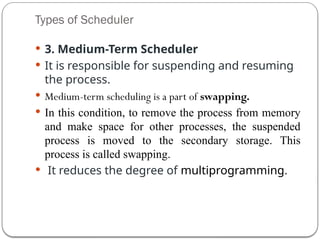
3. Medium-Term Scheduler
It is responsible for suspending and resuming
the process.
Medium-term scheduling is a part of swapping.
In this condition, to remove the process from memory
and make space for other processes, the suspended
process is moved to the secondary storage. This
process is called swapping.
It reduces the degree of multiprogramming.
15.
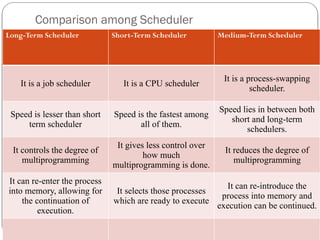
Comparison among Scheduler
Long-TermScheduler Short-Term Scheduler Medium-Term Scheduler
It is a job scheduler It is a CPU scheduler
It is a process-swapping
scheduler.
Speed is lesser than short
term scheduler
Speed is the fastest among
all of them.
Speed lies in between both
short and long-term
schedulers.
It controls the degree of
multiprogramming
It gives less control over
how much
multiprogramming is done.
It reduces the degree of
multiprogramming
It can re-enter the process
into memory, allowing for
the continuation of
execution.
It selects those processes
which are ready to execute
It can re-introduce the
process into memory and
execution can be continued.
16.
Criteria of CPUScheduling
1. CPU utilization
2. Turnaround Time
3. Waiting Time
4. Response Time
5. Completion Time
17.
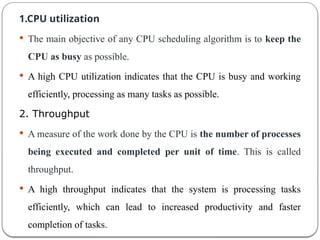
1.CPU utilization
Themain objective of any CPU scheduling algorithm is to keep the
CPU as busy as possible.
A high CPU utilization indicates that the CPU is busy and working
efficiently, processing as many tasks as possible.
2. Throughput
A measure of the work done by the CPU is the number of processes
being executed and completed per unit of time. This is called
throughput.
A high throughput indicates that the system is processing tasks
efficiently, which can lead to increased productivity and faster
completion of tasks.
18.
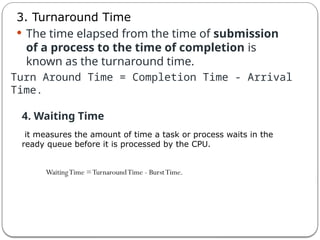
3. Turnaround Time
The time elapsed from the time of submission
of a process to the time of completion is
known as the turnaround time.
Turn Around Time = Completion Time - Arrival
Time.
4. Waiting Time
it measures the amount of time a task or process waits in the
ready queue before it is processed by the CPU.
WaitingTime =TurnaroundTime - BurstTime.
19.
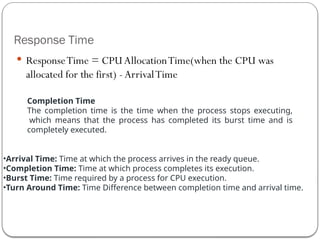
Response Time
ResponseTime= CPU AllocationTime(when the CPU was
allocated for the first) - ArrivalTime
Completion Time
The completion time is the time when the process stops executing,
which means that the process has completed its burst time and is
completely executed.
•Arrival Time: Time at which the process arrives in the ready queue.
•Completion Time: Time at which process completes its execution.
•Burst Time: Time required by a process for CPU execution.
•Turn Around Time: Time Difference between completion time and arrival time.