Process Management in Linux
Manikandan.C
9677718889
Senior Redhat Trainer
!!!Process!!! what it is ??
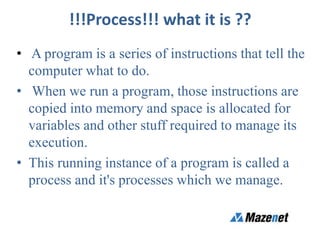
• A program is a series of instructions that tell the
computer what to do.
• When we run a program, those instructions are
copied into memory and space is allocated for
variables and other stuff required to manage its
execution.
• This running instance of a program is called a
process and it's processes which we manage.
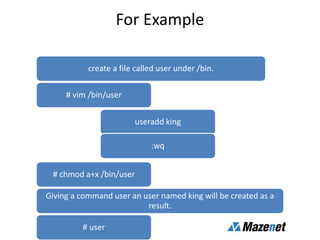
For Example
create a file called user under /bin.
# vim /bin/user
useradd king
:wq
# chmod a+x /bin/user
Giving a command user an user named king will be created as a
result.
# user
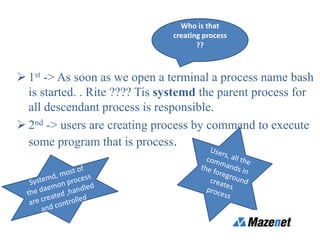
 1st -> As soon as we open a terminal a process name bash
is started. . Rite ???? Tis systemd the parent process for
all descendant process is responsible.
 2nd -> users are creating process by command to execute
some program that is process.
Who is that
creating process
??
Description of process
• Like humans even process has the information like
when it is created,
• address space of allocated memory,
• security properties including ownership credentials
and privileges,
• one or more execution threads of program code, and
the process state.
NOTE: All processes are descendants of the first system process SYSTEMD.
Small briefing on -> fork, pthreads.
FORK:
Fork is nothing but an existing parent process
duplicates its own address space and create a
new child process structure.
Pthreads:(POSIX THREADS)
Parallel execution model which allows a
program to control multiple different flows of
work that overlap in time.
Mainly for the multitasking purpose
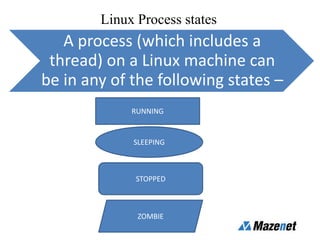
Linux Process states
A process (which includes a
thread) on a Linux machine can
be in any of the following states –
RUNNING
SLEEPING
STOPPED
ZOMBIE
Types of terminal
• Tty and pty:
 tty is called teletype where user interacts
with the system.
 Pty is called as the psuedoterminal where the
process uses as its terminal in the background.
And many would have came across the pts
terminal where pts is nothing but the slave
part of pty terminal.
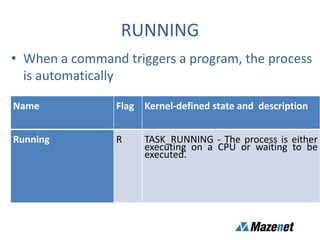
RUNNING
• When a command triggers a program, the process
is automatically
Name Flag Kernel-defined state and description
Running R TASK_RUNNING - The process is either
executing on a CPU or waiting to be
executed.
Sleeping
Sleeping
S
TASK_INTERRUPTIBE: The
process is waiting for some
condition: a h/w request ,
system resource access or
signal. When an event or
signal satisfies the condition,
the process returns to
Running.
D TASK_UNINTERRUPTIBLE -
Like TASK_INTERRUPTIBLE,
except that delivering a
signal to the sleeping process
leaves its state unchanged.
K TASK_KILLABLE: identical to D
state, but modifies to allow
the waiting task to respond
to a signal to be killed.
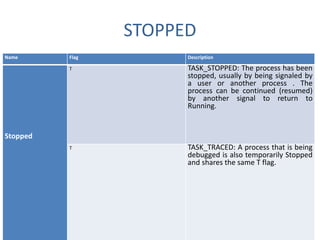
STOPPED
Name Flag Description
Stopped
T TASK_STOPPED: The process has been
stopped, usually by being signaled by
a user or another process . The
process can be continued (resumed)
by another signal to return to
Running.
T TASK_TRACED: A process that is being
debugged is also temporarily Stopped
and shares the same T flag.
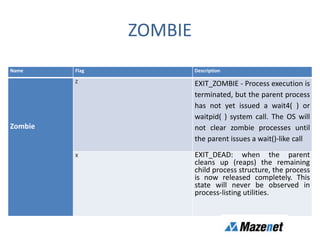
ZOMBIE
Name Flag Description
Zombie
Z EXIT_ZOMBIE - Process execution is
terminated, but the parent process
has not yet issued a wait4( ) or
waitpid( ) system call. The OS will
not clear zombie processes until
the parent issues a wait()-like call
X EXIT_DEAD: when the parent
cleans up (reaps) the remaining
child process structure, the process
is now released completely. This
state will never be observed in
process-listing utilities.
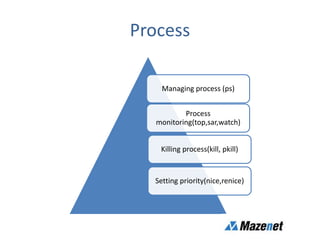
Process
Process
monitoring(top,sar,watch)
Managing process (ps)
Killing process(kill, pkill)
Setting priority(nice,renice)
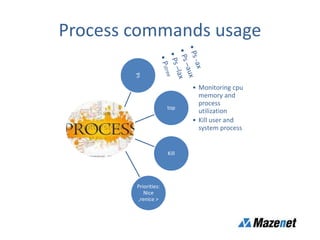
Process commands usage
top
• Monitoring cpu
memory and
process
utilization
• Kill user and
system process
Kill
Priorities:
Nice
,renice >
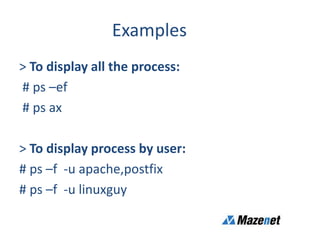
Examples
> To display all the process:
# ps –ef
# ps ax
> To display process by user:
# ps –f -u apache,postfix
# ps –f -u linuxguy
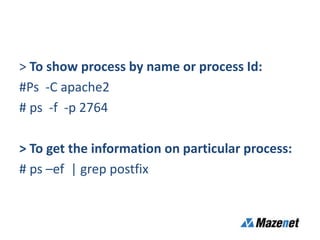
> To show process by name or process Id:
#Ps -C apache2
# ps -f -p 2764
> To get the information on particular process:
# ps –ef | grep postfix
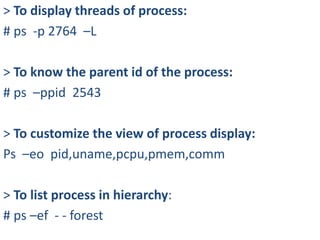
> To display threads of process:
# ps -p 2764 –L
> To know the parent id of the process:
# ps –ppid 2543
> To customize the view of process display:
Ps –eo pid,uname,pcpu,pmem,comm
> To list process in hierarchy:
# ps –ef - - forest
Thanks for watching

Process management in linux

  • 1.
    Process Management inLinux Manikandan.C 9677718889 Senior Redhat Trainer
  • 2.
    !!!Process!!! what itis ?? • A program is a series of instructions that tell the computer what to do. • When we run a program, those instructions are copied into memory and space is allocated for variables and other stuff required to manage its execution. • This running instance of a program is called a process and it's processes which we manage.
  • 3.
    For Example create afile called user under /bin. # vim /bin/user useradd king :wq # chmod a+x /bin/user Giving a command user an user named king will be created as a result. # user
  • 4.
     1st ->As soon as we open a terminal a process name bash is started. . Rite ???? Tis systemd the parent process for all descendant process is responsible.  2nd -> users are creating process by command to execute some program that is process. Who is that creating process ??
  • 5.
    Description of process •Like humans even process has the information like when it is created, • address space of allocated memory, • security properties including ownership credentials and privileges, • one or more execution threads of program code, and the process state. NOTE: All processes are descendants of the first system process SYSTEMD.
  • 6.
    Small briefing on-> fork, pthreads. FORK: Fork is nothing but an existing parent process duplicates its own address space and create a new child process structure. Pthreads:(POSIX THREADS) Parallel execution model which allows a program to control multiple different flows of work that overlap in time. Mainly for the multitasking purpose
  • 7.
    Linux Process states Aprocess (which includes a thread) on a Linux machine can be in any of the following states – RUNNING SLEEPING STOPPED ZOMBIE
  • 8.
    Types of terminal •Tty and pty:  tty is called teletype where user interacts with the system.  Pty is called as the psuedoterminal where the process uses as its terminal in the background. And many would have came across the pts terminal where pts is nothing but the slave part of pty terminal.
  • 9.
    RUNNING • When acommand triggers a program, the process is automatically Name Flag Kernel-defined state and description Running R TASK_RUNNING - The process is either executing on a CPU or waiting to be executed.
  • 10.
    Sleeping Sleeping S TASK_INTERRUPTIBE: The process iswaiting for some condition: a h/w request , system resource access or signal. When an event or signal satisfies the condition, the process returns to Running. D TASK_UNINTERRUPTIBLE - Like TASK_INTERRUPTIBLE, except that delivering a signal to the sleeping process leaves its state unchanged. K TASK_KILLABLE: identical to D state, but modifies to allow the waiting task to respond to a signal to be killed.
  • 11.
    STOPPED Name Flag Description Stopped TTASK_STOPPED: The process has been stopped, usually by being signaled by a user or another process . The process can be continued (resumed) by another signal to return to Running. T TASK_TRACED: A process that is being debugged is also temporarily Stopped and shares the same T flag.
  • 12.
    ZOMBIE Name Flag Description Zombie ZEXIT_ZOMBIE - Process execution is terminated, but the parent process has not yet issued a wait4( ) or waitpid( ) system call. The OS will not clear zombie processes until the parent issues a wait()-like call X EXIT_DEAD: when the parent cleans up (reaps) the remaining child process structure, the process is now released completely. This state will never be observed in process-listing utilities.
  • 13.
    Process Process monitoring(top,sar,watch) Managing process (ps) Killingprocess(kill, pkill) Setting priority(nice,renice)
  • 14.
    Process commands usage top •Monitoring cpu memory and process utilization • Kill user and system process Kill Priorities: Nice ,renice >
  • 15.
    Examples > To displayall the process: # ps –ef # ps ax > To display process by user: # ps –f -u apache,postfix # ps –f -u linuxguy
  • 16.
    > To showprocess by name or process Id: #Ps -C apache2 # ps -f -p 2764 > To get the information on particular process: # ps –ef | grep postfix
  • 17.
    > To displaythreads of process: # ps -p 2764 –L > To know the parent id of the process: # ps –ppid 2543 > To customize the view of process display: Ps –eo pid,uname,pcpu,pmem,comm > To list process in hierarchy: # ps –ef - - forest
  • 18.