Static
Testing
1 Principles 2 Lifecycle
4 Dynamic test
techniques
3 Static testing
5 Management 6 Tools
Software Testing
Contents
 Reviews and the test process
 Types of review
 Static analysis
People techniques
 individual:
desk-checking, data-stepping, proof-reading
 group:
Reviews (informal & formal): for consensus
Walkthrough: for education
Inspection (most formal): to find faults
Static techniques do not execute codeStatic techniques do not execute code
Benefits of reviews
 Development productivity improvement
 Reduced development timescales
 Reduced testing time and cost
 Lifetime cost reductions
 Reduced fault levels
 Improved customer relations
 etc.
Reviews are cost-effective
 10 times reduction in faults reaching test,
testing cost reduced by 50% to 80%
Handbook of Walkthroughs, Inspections &
Technical Reviews - Freedman & Weinberg
 reduce faults by a factor of 10
Structured Walkthroughs - Yourdon
 25% reduction in schedules, remove 80% -
95% of faults at each stage, 28 times
reduction in maintenance cost, many others
Software Inspection - Gilb & Graham
What can be Inspected?
Anything written down
can be Inspected
 policy, strategy, business plans, marketing or
advertising material, contracts
 system requirements, feasibility studies,
acceptance test plans
 test plans, test designs, test cases, test
results
 system designs, logical & physical
 software code
 user manuals, procedures, training material
What can be reviewed?
 anything which could be Inspected
i.e. anything written down
 plans, visions, “big picture”, strategic
directions, ideas
 project progress
work completed to schedule, etc.
 “Should we develop this” marketing options
What to review / Inspect?
Tests
Tests
Tests
Tests
Requirements
Design
Code
Functions
Integration T
Unit Test
Accept. Test
System Test
Costs of reviews
 Rough guide: 5%-15% of development effort
half day a week is 10%
 Effort required for reviews
planning (by leader / moderator)
preparation / self-study checking
meeting
fixing / editing / follow-up
recording & analysis of statistics / metrics
process improvement (should!)
Contents
Reviews and the test process
Types of review
Static analysis
Static testing
1 2
4 5
3
6
Types of review of documents
Informal Review
undocumented
 widely viewed as useful and cheap (but no one can
prove it!) A helpful first step for chaotic
organisations.
Technical Review: (or peer review)
 includes peer and technical experts, no
management participation. Normally documented,
fault-finding. Can be rather subjective.
Decision-making Review:
 group discusses document and makes a decision about
the content, e.g. how something should be done, go or
no-go decision, or technical comments
Types of review of documents
Walkthrough
 author guides the group through a document and his
or her thought processes, so all understand the
same thing, consensus on changes to make
Inspection:
 formal individual and group checking, using sources
and standards, according to generic and specific
rules and checklists, using entry and exit criteria,
Leader must be trained & certified, metrics required
Reviews in general 1
 Objectives / goals
validation & verification against specifications &
standards
achieve consensus (excluding Inspection)
process improvement (ideal, included in
Inspection)
Reviews in general 2
 Activities
planning
overview / kick-off meeting (Inspection)
preparation / individual checking
review meeting (not always)
follow-up (for some types)
metrics recording & analysis (Inspections and
sometimes reviews)
Reviews in general 3
 Roles and responsibilities
Leader / moderator - plans the review / Inspection,
chooses participants, helps & encourages,
conducts the meeting, performs follow-up,
manages metrics
Author of the document being reviewed /
Inspected
Reviewers / Inspectors - specialised fault-finding
roles for Inspection
Managers - excluded from some types of review,
need to plan project time for review / Inspection
Others: e.g. Inspection/ review Co-ordinator
Reviews in general 4
 Deliverables
Changes (edits) in review product
Change requests for source documents
(predecessor documents to product being
reviewed / Inspected)
Process improvement suggestions
 to the review / Inspection process
 to the development process which produced the product
just reviewed / Inspected
Metrics (Inspection and some types of review)
Reviews in general 5
 Pitfalls (they don’t always work!)
lack of training in the technique (especially
Inspection, the most formal)
lack of or quality of documentation - what is being
reviewed / Inspected
Lack of management support - “lip service” - want
them done, but don’t allow time for them to
happen in project schedules
Failure to improve processes (gets disheartening
just getting better at finding the same thing over
again)
Inspection is different
• the document to be
reviewed is given out in
advance
• typically dozens of
pages to review
• instructions are "please
review this"
• not just product,
sources
• chunk or sample
• training, roles
Inspection is different
• some people have time
to look through it and
make comments before
the meeting (which is
difficult to arrange)
• the meeting often lasts
for hours
 entry criteria to
meeting, may not be
worth holding
 2 max., often much
shorter
Inspection is different
• "I don't like this"
• much discussion, some
about technical
approaches, some about
trivia
• don't really know if it was
worthwhile, but we keep
doing it
 Rule violations, objective,
not subjective
• no discussion, highly
focused, anti-trivia
 only do it if value is
proven (continually)
Inspection is more and better
 entry criteria
 training
 optimum checking rate
 prioritising the words
 standards
 process improvement
 exit criteria
 quantified estimates of
remaining major faults
per page
typical review
early Inspection
mature Inspection
effectiveness return on investment
10 - 20% unknown
30 - 40% 6 - 8 hrs / Insp hr
80 - 95% 8 - 30 hrs / Insp hr
The Inspection Process
Software
Development
Stage
.
.
Planning
Kick
off
Ind
Chk
Meet Edit
Change
Request
Process
Improvement
Entry
Next Software
Development
Stage
Exit
At first glance..
Here’s a document: review this (or Inspect it)
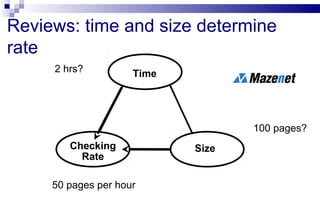
Reviews: time and size determine
rate
Time
Checking
Rate
Size
2 hrs?
100 pages?
50 pages per hour
Checking
Rate
Review “Thoroughness”?
ordinary “review” - finds some faults, one major, fix them,
consider the document now corrected and OK
major minor
minor
Inspection: time and rate determine size
Time
Checking
Rate
Size
2 hrs?
Optimum:
1 page*
per hour
2 pages (at optimum rate)
Size
* 1 page = 300 important words
Inspection Thoroughness
Inspection can find deep-seated faults:
• all of that type can be corrected
• but needs optimum checking rate
Inspection surprises
 Fundamental importance of Rules
democratically agreed as applying
define major issues / faults
 Slow checking rates
 Strict entry & exit criteria
 Fast logging rates
 Amount of responsibility given to author
Contents
 Reviews and the test process
 Types of review
 Static analysis
What can static analysis do?
Remember: static techniques do
not execute
the code
 A form of automated testing
check for violations of standards
check for things which may be a fault
 Descended from compiler technology
a compiler statically analyses code, and “knows” a
lot about it, e.g. variable usage; finds syntax faults
static analysis tools extend this knowledge
can find unreachable code, undeclared variables,
parameter type mis-matches, uncalled functions &
procedures, array bound violations, etc.
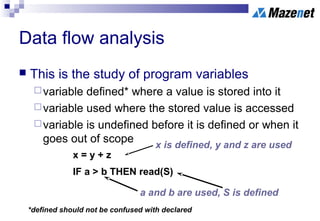
Data flow analysis
 This is the study of program variables
variable defined* where a value is stored into it
variable used where the stored value is accessed
variable is undefined before it is defined or when it
goes out of scope
*defined should not be confused with declared
x = y + z
IF a > b THEN read(S)
x is defined, y and z are used
a and b are used, S is defined
Data flow analysis faults
n := 0
read (x)
n := 1
while x > y do
begin
read (y)
write( n*y)
x := x - n
end
Data flow anomaly: n is
re-defined without being used
Data flow fault: y is used
before it has been defined
(first time around the loop)
Control flow analysis
 Highlights:
nodes not accessible from start node
infinite loops
multiple entry to loops
whether code is well structured, i.e. reducible
whether code conforms to a flowchart grammar
any jumps to undefined labels
any labels not jumped to
cyclomatic complexity and other metrics
Unreachable code example
 Macro definitions
(different for different platforms the code runs on)
Buffsize: 1000
Mailboxmax: 1000
IF Buffsize < Mailboxmax THEN
Error-Exit
ENDIF
 Static Analysis finds the THEN clause
unreachable, so will flag a fault
Cyclomatic complexity
 cyclomatic complexity is a measure of the
complexity of a flow graph
(and therefore the code that the flow graph
represents)
 the more complex the flow graph, the greater
the measure
 it can most easily be calculated as:
complexity = number of decisions + 1
Which flow graph is most complex?
1
2 3 5
What is the cyclomatic complexity?
Example control flow graph
Result = 0
Right = 0
DO WHILE more Questions
IF Answer = Correct THEN
Right = Right + 1
ENDIF
END DO
Result = (Right / Questions)
IF Result > 60% THEN
Print "pass"
ELSE
Print "fail”
ENDIF
do
if r=r+1
end
init
if
res
pass
fail
end
Pseudo-code:
Other static metrics
 lines of code (LOC)
 operands & operators (Halstead’s metrics)
 fan-in & fan-out
 nesting levels
 function calls
 OO metrics: inheritance tree depth, number of
methods, coupling & cohesion
Limitations and advantages
 Limitations:
cannot distinguish "fail-safe" code from
programming faults or anomalies (often creates
overload of spurious error messages)
does not execute the code, so not related to
operating conditions
 Advantages:
can find faults difficult to "see"
gives objective quality assessment of code
Summary: Key Points
 Reviews help to find faults in development
and test documentation, and should be
applied early
 Types of review: informal, walkthrough,
technical / peer review, Inspection
 Static analysis can find faults and give
information about code without executing it

Static testing techniques

  • 1.
    Static Testing 1 Principles 2Lifecycle 4 Dynamic test techniques 3 Static testing 5 Management 6 Tools Software Testing
  • 2.
    Contents  Reviews andthe test process  Types of review  Static analysis
  • 3.
    People techniques  individual: desk-checking,data-stepping, proof-reading  group: Reviews (informal & formal): for consensus Walkthrough: for education Inspection (most formal): to find faults Static techniques do not execute codeStatic techniques do not execute code
  • 4.
    Benefits of reviews Development productivity improvement  Reduced development timescales  Reduced testing time and cost  Lifetime cost reductions  Reduced fault levels  Improved customer relations  etc.
  • 5.
    Reviews are cost-effective 10 times reduction in faults reaching test, testing cost reduced by 50% to 80% Handbook of Walkthroughs, Inspections & Technical Reviews - Freedman & Weinberg  reduce faults by a factor of 10 Structured Walkthroughs - Yourdon
  • 6.
     25% reductionin schedules, remove 80% - 95% of faults at each stage, 28 times reduction in maintenance cost, many others Software Inspection - Gilb & Graham
  • 7.
    What can beInspected? Anything written down can be Inspected  policy, strategy, business plans, marketing or advertising material, contracts  system requirements, feasibility studies, acceptance test plans  test plans, test designs, test cases, test results
  • 8.
     system designs,logical & physical  software code  user manuals, procedures, training material
  • 9.
    What can bereviewed?  anything which could be Inspected i.e. anything written down  plans, visions, “big picture”, strategic directions, ideas  project progress work completed to schedule, etc.  “Should we develop this” marketing options
  • 10.
    What to review/ Inspect? Tests Tests Tests Tests Requirements Design Code Functions Integration T Unit Test Accept. Test System Test
  • 11.
    Costs of reviews Rough guide: 5%-15% of development effort half day a week is 10%  Effort required for reviews planning (by leader / moderator) preparation / self-study checking meeting fixing / editing / follow-up recording & analysis of statistics / metrics process improvement (should!)
  • 12.
    Contents Reviews and thetest process Types of review Static analysis Static testing 1 2 4 5 3 6
  • 13.
    Types of reviewof documents Informal Review undocumented  widely viewed as useful and cheap (but no one can prove it!) A helpful first step for chaotic organisations. Technical Review: (or peer review)  includes peer and technical experts, no management participation. Normally documented, fault-finding. Can be rather subjective.
  • 14.
    Decision-making Review:  groupdiscusses document and makes a decision about the content, e.g. how something should be done, go or no-go decision, or technical comments
  • 15.
    Types of reviewof documents Walkthrough  author guides the group through a document and his or her thought processes, so all understand the same thing, consensus on changes to make Inspection:  formal individual and group checking, using sources and standards, according to generic and specific rules and checklists, using entry and exit criteria, Leader must be trained & certified, metrics required
  • 16.
    Reviews in general1  Objectives / goals validation & verification against specifications & standards achieve consensus (excluding Inspection) process improvement (ideal, included in Inspection)
  • 17.
    Reviews in general2  Activities planning overview / kick-off meeting (Inspection) preparation / individual checking review meeting (not always) follow-up (for some types) metrics recording & analysis (Inspections and sometimes reviews)
  • 18.
    Reviews in general3  Roles and responsibilities Leader / moderator - plans the review / Inspection, chooses participants, helps & encourages, conducts the meeting, performs follow-up, manages metrics Author of the document being reviewed / Inspected
  • 19.
    Reviewers / Inspectors- specialised fault-finding roles for Inspection Managers - excluded from some types of review, need to plan project time for review / Inspection Others: e.g. Inspection/ review Co-ordinator
  • 20.
    Reviews in general4  Deliverables Changes (edits) in review product Change requests for source documents (predecessor documents to product being reviewed / Inspected) Process improvement suggestions  to the review / Inspection process  to the development process which produced the product just reviewed / Inspected Metrics (Inspection and some types of review)
  • 21.
    Reviews in general5  Pitfalls (they don’t always work!) lack of training in the technique (especially Inspection, the most formal) lack of or quality of documentation - what is being reviewed / Inspected
  • 22.
    Lack of managementsupport - “lip service” - want them done, but don’t allow time for them to happen in project schedules Failure to improve processes (gets disheartening just getting better at finding the same thing over again)
  • 23.
    Inspection is different •the document to be reviewed is given out in advance • typically dozens of pages to review • instructions are "please review this" • not just product, sources • chunk or sample • training, roles
  • 24.
    Inspection is different •some people have time to look through it and make comments before the meeting (which is difficult to arrange) • the meeting often lasts for hours  entry criteria to meeting, may not be worth holding  2 max., often much shorter
  • 25.
    Inspection is different •"I don't like this" • much discussion, some about technical approaches, some about trivia • don't really know if it was worthwhile, but we keep doing it  Rule violations, objective, not subjective • no discussion, highly focused, anti-trivia  only do it if value is proven (continually)
  • 26.
    Inspection is moreand better  entry criteria  training  optimum checking rate  prioritising the words  standards  process improvement  exit criteria  quantified estimates of remaining major faults per page typical review early Inspection mature Inspection effectiveness return on investment 10 - 20% unknown 30 - 40% 6 - 8 hrs / Insp hr 80 - 95% 8 - 30 hrs / Insp hr
  • 27.
    The Inspection Process Software Development Stage . . Planning Kick off Ind Chk MeetEdit Change Request Process Improvement Entry Next Software Development Stage Exit
  • 28.
    At first glance.. Here’sa document: review this (or Inspect it)
  • 29.
    Reviews: time andsize determine rate Time Checking Rate Size 2 hrs? 100 pages? 50 pages per hour Checking Rate
  • 30.
    Review “Thoroughness”? ordinary “review”- finds some faults, one major, fix them, consider the document now corrected and OK major minor minor
  • 31.
    Inspection: time andrate determine size Time Checking Rate Size 2 hrs? Optimum: 1 page* per hour 2 pages (at optimum rate) Size * 1 page = 300 important words
  • 32.
    Inspection Thoroughness Inspection canfind deep-seated faults: • all of that type can be corrected • but needs optimum checking rate
  • 33.
    Inspection surprises  Fundamentalimportance of Rules democratically agreed as applying define major issues / faults  Slow checking rates  Strict entry & exit criteria  Fast logging rates  Amount of responsibility given to author
  • 34.
    Contents  Reviews andthe test process  Types of review  Static analysis
  • 35.
    What can staticanalysis do? Remember: static techniques do not execute the code  A form of automated testing check for violations of standards check for things which may be a fault
  • 36.
     Descended fromcompiler technology a compiler statically analyses code, and “knows” a lot about it, e.g. variable usage; finds syntax faults static analysis tools extend this knowledge can find unreachable code, undeclared variables, parameter type mis-matches, uncalled functions & procedures, array bound violations, etc.
  • 37.
    Data flow analysis This is the study of program variables variable defined* where a value is stored into it variable used where the stored value is accessed variable is undefined before it is defined or when it goes out of scope *defined should not be confused with declared x = y + z IF a > b THEN read(S) x is defined, y and z are used a and b are used, S is defined
  • 38.
    Data flow analysisfaults n := 0 read (x) n := 1 while x > y do begin read (y) write( n*y) x := x - n end Data flow anomaly: n is re-defined without being used Data flow fault: y is used before it has been defined (first time around the loop)
  • 39.
    Control flow analysis Highlights: nodes not accessible from start node infinite loops multiple entry to loops whether code is well structured, i.e. reducible whether code conforms to a flowchart grammar any jumps to undefined labels any labels not jumped to cyclomatic complexity and other metrics
  • 40.
    Unreachable code example Macro definitions (different for different platforms the code runs on) Buffsize: 1000 Mailboxmax: 1000 IF Buffsize < Mailboxmax THEN Error-Exit ENDIF
  • 41.
     Static Analysisfinds the THEN clause unreachable, so will flag a fault
  • 42.
    Cyclomatic complexity  cyclomaticcomplexity is a measure of the complexity of a flow graph (and therefore the code that the flow graph represents)  the more complex the flow graph, the greater the measure  it can most easily be calculated as: complexity = number of decisions + 1
  • 43.
    Which flow graphis most complex? 1 2 3 5 What is the cyclomatic complexity?
  • 44.
    Example control flowgraph Result = 0 Right = 0 DO WHILE more Questions IF Answer = Correct THEN Right = Right + 1 ENDIF END DO Result = (Right / Questions) IF Result > 60% THEN Print "pass" ELSE Print "fail” ENDIF do if r=r+1 end init if res pass fail end Pseudo-code:
  • 45.
    Other static metrics lines of code (LOC)  operands & operators (Halstead’s metrics)  fan-in & fan-out  nesting levels  function calls  OO metrics: inheritance tree depth, number of methods, coupling & cohesion
  • 46.
    Limitations and advantages Limitations: cannot distinguish "fail-safe" code from programming faults or anomalies (often creates overload of spurious error messages) does not execute the code, so not related to operating conditions  Advantages: can find faults difficult to "see" gives objective quality assessment of code
  • 47.
    Summary: Key Points Reviews help to find faults in development and test documentation, and should be applied early  Types of review: informal, walkthrough, technical / peer review, Inspection  Static analysis can find faults and give information about code without executing it