Tool support for testing (CAST)
Presented by
Baskaran E
Tool support for testing (CAST)
1 Principles 2 Lifecycle
4 Dynamic test
techniques
3 Static testing
5 Management 6 Tools
Software Testing
Contents
Types of CAST tool
Why capture/replay is not test automation
Automating and testing are separate skills
Best practice
Tool support
1 2
4 5
3
6
Testing tool classification
Requirements testing tools
Static analysis tools
Test design tools
Test data preparation tools
Test running tools - character-based, GUI
Comparison tools
Test harnesses and drivers
Performance test tools
Dynamic analysis tools
Debugging tools
Test management tools
Coverage measurement
Static
analysis
Test management tools
Test design
Test data
preparation
Coverage
measures
Test running
Dynamic
analysis
Debug
Performance
measurement
Comp. Test
Where tools fit
Req Anal
Code
Function
Design
Sys Test
Int Test
Acc Test
Requirements
testing
Test harness
& drivers
Comparison
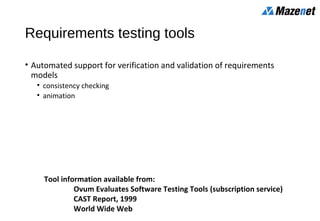
Requirements testing tools
• Automated support for verification and validation of requirements
models
• consistency checking
• animation
Tool information available from:
Ovum Evaluates Software Testing Tools (subscription service)
CAST Report, 1999
World Wide Web
Static analysis tools
• Provide information about the quality of software
• Code is examined, not executed
• Objective measures
• cyclomatic complexity
• others: nesting levels, size
Test design tools
• Generate test inputs
• from a formal specification or CASE repository
• from code (e.g. code not covered yet)
Test data preparation tools
• Data manipulation
• selected from existing databases or files
• created according to some rules
• edited from other sources
Test running tools 1
• Interface to the software being tested
• Run tests as though run by a human tester
• Test scripts in a programmable language
• Data, test inputs and expected results held in test repositories
• Most often used to automate regression testing
Test running tools 2
• Character-based
• simulates user interaction from dumb terminals
• capture keystrokes and screen responses
• GUI (Graphical User Interface)
• simulates user interaction for WIMP applications (Windows, Icons, Mouse,
Pointer)
• capture mouse movement, button clicks, and keyboard inputs
• capture screens, bitmaps, characters, object states
Comparison tools
• Detect differences between actual test results and expected results
• screens, characters, bitmaps
• masking and filtering
• Test running tools normally include comparison capability
• Stand-alone comparison tools for files or databases
Test harnesses and drivers
• Used to exercise software which does not have a user interface (yet)
• Used to run groups of automated tests or comparisons
• Often custom-build
• Simulators (where testing in real environment would be too costly or
dangerous)
Performance testing tools
• Load generation
• drive application via user interface or test harness
• simulates realistic load on the system & logs the number of transactions
• Transaction measurement
• response times for selected transactions via user interface
• Reports based on logs, graphs of load versus response times
Dynamic analysis tools
• Provide run-time information on software (while tests are run)
• allocation, use and de-allocation of resources, e.g. memory leaks
• flag unassigned pointers or pointer arithmetic faults
Debugging tools
• Used by programmers when investigating, fixing and testing faults
• Used to reproduce faults and examine program execution in detail
• single-stepping
• breakpoints or watchpoints at any statement
• examine contents of variables and other data
Test management tools
• Management of testware: test plans, specifications, results
• Project management of the test process, e.g. estimation, schedule tests,
log results
• Incident management tools (may include workflow facilities to track
allocation, correction and retesting)
• Traceability (of tests to requirements, designs)
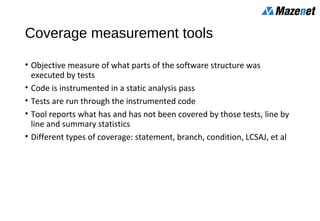
Coverage measurement tools
• Objective measure of what parts of the software structure was
executed by tests
• Code is instrumented in a static analysis pass
• Tests are run through the instrumented code
• Tool reports what has and has not been covered by those tests, line by
line and summary statistics
• Different types of coverage: statement, branch, condition, LCSAJ, et al
Content
Types of CAST tool
Why capture/replay is not test automation
Automating and testing are separate skills
Best practice
Tool support
1 2
4 5
3
6
Advantages of recording manual tests
• documents what the tester actually did
• useful for capturing ad hoc tests (e.g. end users)
• may enable software failures to be reproduced
• produces a detailed “script”
• records actual inputs
• can be used by a technical person to implement a more maintainable
automated test
• ideal for one-off tasks
• such as long or complicated data entry
Captured test scripts
• will not be very understandable
• it is a programming language after all!
• during maintenance will need to know more than can ever be ‘automatically
commented’
• will not be resilient to many software changes
• a simple interface change can impact many scripts
• do not include verification
• may be easy to add a few simple screen based comparisons
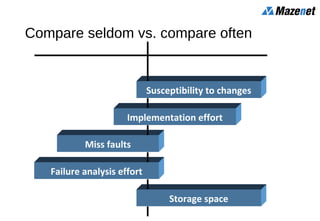
Compare seldom vs. compare often
Storage space
Failure analysis effort
Miss faults
Implementation effort
Susceptibility to changes
Robust Tests Sensitive Tests
Too much sensitivity = redundancy
If all tests are
robust, the
unexpected
change is
missed
If all tests are
sensitive, they
all show the
unexpected change
Three tests,
each changes
a different field
Unexpected
change occurs
for every test
Test output
Automated verification
• there are many choices to be made
• dynamic / post execution, compare lots / compare little, resilience to change /
bug finding effective
• scripts can soon become very complex
• more susceptible to change, harder to maintain
• there is a lot of work involved
• speed and accuracy of tool use is very important
• usually there is more verification that can
(and perhaps should) be done
• automation can lead to better testing (not guaranteed!)
Content
Types of CAST tool
Why capture/replay is not test automation
Automating and testing are separate skills
Best practice
Tool support
1 2
4 5
3
6
Effort to automate
• The effort required to automate any one test varies greatly
• typically between 2 and 10 times the manual test effort
• and depends on:
• tool, skills, environment and software under test
• existing manual test process which may be:
• unscripted manual testing
• scripted (vague) manual testing
• scripted (detailed) manual testing
Unscripted manual testing
Step 4: check
it worked OK
“Try this”
“Try that”
“What about ...”
“What if ...”
Step 3: enter the inputs
Step 2: think
up specific
inputs
Step 1: identify
conditions
to test
Wizzo
Computer
Wizzo
Computer
Step Input Expected Result Pass
1 Run up Scribble Document menu displayed
2 Open file with sorted list Menus displayed
3 Select Add items to List Item box displayed
4 Add some items to List Items added in order
5 Move an item Item moved, list is unsorted
6Add an item Item added at end of List
7Delete item from List Item deleted
8 Delete item not in List Error message displayed
9 Save changes in new file New file created
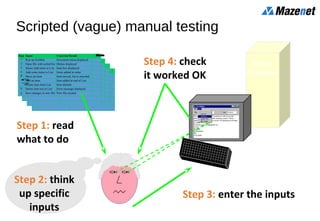
Scripted (vague) manual testing
Step 4: check
it worked OK
Step 3: enter the inputs
Step 2: think
up specific
inputs
Step 1: read
what to do
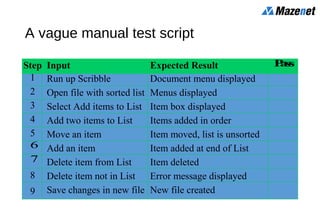
Step Input Expected Result Pass
1 Run up Scribble Document menu displayed
2 Open file with sorted list Menus displayed
3 Select Add items to List Item box displayed
4 Add two items to List Items added in order
5 Move an item Item moved, list is unsorted
6 Add an item Item added at end of List
7 Delete item from List Item deleted
8 Delete item not in List Error message displayed
9 Save changes in new file New file created
A vague manual test script
Wizzo
Computer
Step Input Expected Result Pass
1 Double click “Scribble”
icon.
Scribble opened, List menu
disabled.
2 Click on “File” menu. File menu appears, options
enabled: Open, New, Exit.
3 Click on “Open” option. “Open” dialogue box lists
document "countries.dcm" in
current folder.
4 Select “countries.dcm”
and click OK button.
“Open” dialogue box
removed, file “countries.dcm”
opened and displayed. List
menu enabled.
Scripted (detailed) manual testing
Step 3: check
it worked OK
Step 2: enter the inputs
Step 1: read
what to do
Content
Types of CAST tool
Why capture/replay is not test automation
Automating and testing are separate skills
Best practice
Tool support
1 2
4 5
3
6
Don’t automate too much long term
• as the test suite grows ever larger, so do the maintenance costs
• maintenance effort is cumulative, benefits are not
• the test suite takes on a life of its own
• testers depart, others arrive, test suite grows larger nobody knows exactly what
they all do … dare not throw away tests in case they’re important
• inappropriate tests are automated
• automation becomes an end in itself
Maintain control
• keep pruning
• remove dead-wood: redundant, superceded, duplicated, worn-out
• challenge new additions (what’s the benefit?)
• measure costs & benefits
• maintenance costs
• time or effort saved, faults found?
Invest
• commit and maintain resources
• “champion” to promote automation
• technical support
• consultancy/advice
• scripting
• develop and maintain library
• data driven approach, lots of re-use
Tests to automate
• run many times
• regression tests
• mundane
• expensive to perform manually
• time consuming and necessary
• multi-user tests, endurance/reliability tests
• difficult to perform manually
• timing critical
• complex / intricate
Automate
Tests not to automate
• not run often
• if no need (rather than expensive to run manually)
• one off tests (unless several iterations likely and build cost can be minimised)
• not important
• will not find serious problems
• usability tests
• do the colours look nice?
• some aspects of multi-media applications
Automate
Summary: Key Points
There are many different types of tool support for testing,
covering all areas of the life cycle.
Automation requires planning and up-front effort
Identify and adopt best practice
Tool support
1 2
4 5
3
6

Software Testing - Tool support for testing (CAST) - Mazenet Solution

  • 1.
    Tool support fortesting (CAST) Presented by Baskaran E
  • 2.
    Tool support fortesting (CAST) 1 Principles 2 Lifecycle 4 Dynamic test techniques 3 Static testing 5 Management 6 Tools Software Testing
  • 3.
    Contents Types of CASTtool Why capture/replay is not test automation Automating and testing are separate skills Best practice Tool support 1 2 4 5 3 6
  • 4.
    Testing tool classification Requirementstesting tools Static analysis tools Test design tools Test data preparation tools Test running tools - character-based, GUI Comparison tools Test harnesses and drivers Performance test tools Dynamic analysis tools Debugging tools Test management tools Coverage measurement
  • 5.
    Static analysis Test management tools Testdesign Test data preparation Coverage measures Test running Dynamic analysis Debug Performance measurement Comp. Test Where tools fit Req Anal Code Function Design Sys Test Int Test Acc Test Requirements testing Test harness & drivers Comparison
  • 6.
    Requirements testing tools •Automated support for verification and validation of requirements models • consistency checking • animation Tool information available from: Ovum Evaluates Software Testing Tools (subscription service) CAST Report, 1999 World Wide Web
  • 7.
    Static analysis tools •Provide information about the quality of software • Code is examined, not executed • Objective measures • cyclomatic complexity • others: nesting levels, size
  • 8.
    Test design tools •Generate test inputs • from a formal specification or CASE repository • from code (e.g. code not covered yet)
  • 9.
    Test data preparationtools • Data manipulation • selected from existing databases or files • created according to some rules • edited from other sources
  • 10.
    Test running tools1 • Interface to the software being tested • Run tests as though run by a human tester • Test scripts in a programmable language • Data, test inputs and expected results held in test repositories • Most often used to automate regression testing
  • 11.
    Test running tools2 • Character-based • simulates user interaction from dumb terminals • capture keystrokes and screen responses • GUI (Graphical User Interface) • simulates user interaction for WIMP applications (Windows, Icons, Mouse, Pointer) • capture mouse movement, button clicks, and keyboard inputs • capture screens, bitmaps, characters, object states
  • 12.
    Comparison tools • Detectdifferences between actual test results and expected results • screens, characters, bitmaps • masking and filtering • Test running tools normally include comparison capability • Stand-alone comparison tools for files or databases
  • 13.
    Test harnesses anddrivers • Used to exercise software which does not have a user interface (yet) • Used to run groups of automated tests or comparisons • Often custom-build • Simulators (where testing in real environment would be too costly or dangerous)
  • 14.
    Performance testing tools •Load generation • drive application via user interface or test harness • simulates realistic load on the system & logs the number of transactions • Transaction measurement • response times for selected transactions via user interface • Reports based on logs, graphs of load versus response times
  • 15.
    Dynamic analysis tools •Provide run-time information on software (while tests are run) • allocation, use and de-allocation of resources, e.g. memory leaks • flag unassigned pointers or pointer arithmetic faults
  • 16.
    Debugging tools • Usedby programmers when investigating, fixing and testing faults • Used to reproduce faults and examine program execution in detail • single-stepping • breakpoints or watchpoints at any statement • examine contents of variables and other data
  • 17.
    Test management tools •Management of testware: test plans, specifications, results • Project management of the test process, e.g. estimation, schedule tests, log results • Incident management tools (may include workflow facilities to track allocation, correction and retesting) • Traceability (of tests to requirements, designs)
  • 18.
    Coverage measurement tools •Objective measure of what parts of the software structure was executed by tests • Code is instrumented in a static analysis pass • Tests are run through the instrumented code • Tool reports what has and has not been covered by those tests, line by line and summary statistics • Different types of coverage: statement, branch, condition, LCSAJ, et al
  • 19.
    Content Types of CASTtool Why capture/replay is not test automation Automating and testing are separate skills Best practice Tool support 1 2 4 5 3 6
  • 20.
    Advantages of recordingmanual tests • documents what the tester actually did • useful for capturing ad hoc tests (e.g. end users) • may enable software failures to be reproduced • produces a detailed “script” • records actual inputs • can be used by a technical person to implement a more maintainable automated test • ideal for one-off tasks • such as long or complicated data entry
  • 21.
    Captured test scripts •will not be very understandable • it is a programming language after all! • during maintenance will need to know more than can ever be ‘automatically commented’ • will not be resilient to many software changes • a simple interface change can impact many scripts • do not include verification • may be easy to add a few simple screen based comparisons
  • 22.
    Compare seldom vs.compare often Storage space Failure analysis effort Miss faults Implementation effort Susceptibility to changes Robust Tests Sensitive Tests
  • 23.
    Too much sensitivity= redundancy If all tests are robust, the unexpected change is missed If all tests are sensitive, they all show the unexpected change Three tests, each changes a different field Unexpected change occurs for every test Test output
  • 24.
    Automated verification • thereare many choices to be made • dynamic / post execution, compare lots / compare little, resilience to change / bug finding effective • scripts can soon become very complex • more susceptible to change, harder to maintain • there is a lot of work involved • speed and accuracy of tool use is very important • usually there is more verification that can (and perhaps should) be done • automation can lead to better testing (not guaranteed!)
  • 25.
    Content Types of CASTtool Why capture/replay is not test automation Automating and testing are separate skills Best practice Tool support 1 2 4 5 3 6
  • 26.
    Effort to automate •The effort required to automate any one test varies greatly • typically between 2 and 10 times the manual test effort • and depends on: • tool, skills, environment and software under test • existing manual test process which may be: • unscripted manual testing • scripted (vague) manual testing • scripted (detailed) manual testing
  • 27.
    Unscripted manual testing Step4: check it worked OK “Try this” “Try that” “What about ...” “What if ...” Step 3: enter the inputs Step 2: think up specific inputs Step 1: identify conditions to test Wizzo Computer
  • 28.
    Wizzo Computer Step Input ExpectedResult Pass 1 Run up Scribble Document menu displayed 2 Open file with sorted list Menus displayed 3 Select Add items to List Item box displayed 4 Add some items to List Items added in order 5 Move an item Item moved, list is unsorted 6Add an item Item added at end of List 7Delete item from List Item deleted 8 Delete item not in List Error message displayed 9 Save changes in new file New file created Scripted (vague) manual testing Step 4: check it worked OK Step 3: enter the inputs Step 2: think up specific inputs Step 1: read what to do
  • 29.
    Step Input ExpectedResult Pass 1 Run up Scribble Document menu displayed 2 Open file with sorted list Menus displayed 3 Select Add items to List Item box displayed 4 Add two items to List Items added in order 5 Move an item Item moved, list is unsorted 6 Add an item Item added at end of List 7 Delete item from List Item deleted 8 Delete item not in List Error message displayed 9 Save changes in new file New file created A vague manual test script
  • 30.
    Wizzo Computer Step Input ExpectedResult Pass 1 Double click “Scribble” icon. Scribble opened, List menu disabled. 2 Click on “File” menu. File menu appears, options enabled: Open, New, Exit. 3 Click on “Open” option. “Open” dialogue box lists document "countries.dcm" in current folder. 4 Select “countries.dcm” and click OK button. “Open” dialogue box removed, file “countries.dcm” opened and displayed. List menu enabled. Scripted (detailed) manual testing Step 3: check it worked OK Step 2: enter the inputs Step 1: read what to do
  • 31.
    Content Types of CASTtool Why capture/replay is not test automation Automating and testing are separate skills Best practice Tool support 1 2 4 5 3 6
  • 32.
    Don’t automate toomuch long term • as the test suite grows ever larger, so do the maintenance costs • maintenance effort is cumulative, benefits are not • the test suite takes on a life of its own • testers depart, others arrive, test suite grows larger nobody knows exactly what they all do … dare not throw away tests in case they’re important • inappropriate tests are automated • automation becomes an end in itself
  • 33.
    Maintain control • keeppruning • remove dead-wood: redundant, superceded, duplicated, worn-out • challenge new additions (what’s the benefit?) • measure costs & benefits • maintenance costs • time or effort saved, faults found?
  • 34.
    Invest • commit andmaintain resources • “champion” to promote automation • technical support • consultancy/advice • scripting • develop and maintain library • data driven approach, lots of re-use
  • 35.
    Tests to automate •run many times • regression tests • mundane • expensive to perform manually • time consuming and necessary • multi-user tests, endurance/reliability tests • difficult to perform manually • timing critical • complex / intricate Automate
  • 36.
    Tests not toautomate • not run often • if no need (rather than expensive to run manually) • one off tests (unless several iterations likely and build cost can be minimised) • not important • will not find serious problems • usability tests • do the colours look nice? • some aspects of multi-media applications Automate
  • 37.
    Summary: Key Points Thereare many different types of tool support for testing, covering all areas of the life cycle. Automation requires planning and up-front effort Identify and adopt best practice Tool support 1 2 4 5 3 6