Insights Unveiled -
Test Reporting and
Observability
Excellence
Deepansh Gupta
Senior Automation Consultant
Test Automation Competency
Lack of etiquette and manners is a huge turn off.
KnolX Etiquettes
 Punctuality
Join the session 5 minutes prior to the session start time. We start on
time and conclude on time!
 Feedback
Make sure to submit a constructive feedback for all sessions as it is very
helpful for the presenter.
 Silent Mode
Keep your mobile devices in silent mode, feel free to move out of session
in case you need to attend an urgent call.
 Avoid Disturbance
Avoid unwanted chit chat during the session.
1. Introduction
2. Importance of Test Reporting
3. Who needs Test Reporting
4. Types of Test Reports
5. Best Practices in Test Reporting
6. Tools for Test Reporting
7. Importance of Observability
8. Key Metrics in Observability
9. Integrating Test Reporting and Observability
10. Challenges and Solutions
11. Future Trends in Test Reporting and Observability
12. Conclusion
Introduction
Test Reporting:
Test reporting is a process in software testing that
involves gathering, analyzing, and presenting essential
test results and statistics to stakeholders. Additionally, a
Test Report is a detailed document that contains a
summary of the test, the process involved and the final
test results.
Observability:
Observability refers to the ability to measure and
understand a system's internal state by analyzing
outputs such as logs and metrics. It plays a vital role in
real-time monitoring, debugging, and optimizing system
performance, providing insights into system behavior
and facilitating proactive management of operational
issues.
Importance of Test Reporting
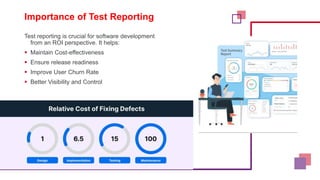
Test reporting is crucial for software development
from an ROI perspective. It helps:
 Maintain Cost-effectiveness
 Ensure release readiness
 Improve User Churn Rate
 Better Visibility and Control
Who needs Test Reporting?
 Developers, who perform unit testing and debug
code based on test results to deliver error-free
code.
 QAs, who test the application using different
testing techniques like functional, regression,
usability, and cross-browser testing to find bugs
and document them in detailed Test Execution
Reports.
 Product Managers, who foresee the entire
software development lifecycle of the product and
ensure optimum performance with faster delivery
and high quality.
 Business Analysts, who ensure all the test
cases are well aligned with the business
requirements specs at every stage, keeping
users’ interests in mind.
When to create a Test Report?
 A test report is ideally created at the end of testing cycles, so
it can also include details about regression tests. However,
there should be enough time after submitting the report and
before the product is shipped to the customers for any
troubleshooting.
 The intention here is to help the client and the stakeholders
with the information on the overall health of the testing cycle
and the application being tested so that any corrective action
can be taken if necessary.
Types of Test Reports
 There are different types of test reports which have
relevant information and key metrics regarding the
tests:
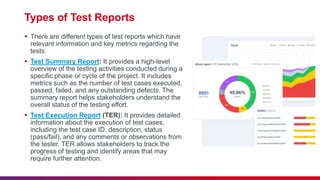
 Test Summary Report: It provides a high-level
overview of the testing activities conducted during a
specific phase or cycle of the project. It includes
metrics such as the number of test cases executed,
passed, failed, and any outstanding defects. The
summary report helps stakeholders understand the
overall status of the testing effort.
 Test Execution Report (TER): It provides detailed
information about the execution of test cases,
including the test case ID, description, status
(pass/fail), and any comments or observations from
the tester. TER allows stakeholders to track the
progress of testing and identify areas that may
require further attention.
Types of Test Reports
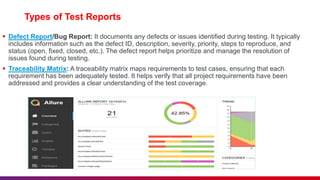
 Defect Report/Bug Report: It documents any defects or issues identified during testing. It typically
includes information such as the defect ID, description, severity, priority, steps to reproduce, and
status (open, fixed, closed, etc.). The defect report helps prioritize and manage the resolution of
issues found during testing.
 Traceability Matrix: A traceability matrix maps requirements to test cases, ensuring that each
requirement has been adequately tested. It helps verify that all project requirements have been
addressed and provides a clear understanding of the test coverage.
Best Practices in Test Reporting
 Consistency
 Use standardized formats and templates
 Automation
 Automate the generation of reports to save time and reduce errors
 Clarity
 Use clear visualizations and provide actionable insights
 Relevance
 Tailor reports to the audience’s needs
 Regular Updates
 Provide timely updates to keep stakeholders informed
Tools for Test Reporting
 Jira (with plugins like Xray or Zephyr): Issue and project tracking tool with powerful test
management capabilities and customizable reporting dashboards for tracking testing progress
and results.
 qTest: Test management platform offering real-time insights into test case execution, defects,
requirements coverage, and test cycle progress with customizable reporting features.
 PractiTest: Test management tool with advanced reporting capabilities, providing
customizable dashboards, graphs, and analytics to track testing metrics, trends, and project
status effectively.
 TestLink: Open-source test management tool offering basic reporting functionalities on test
plans, test cases, and test executions, generating metrics for assessing testing progress.
 Zephyr (Jira plugin): Test management plugin for Jira, enhancing project management with
robust reporting features on test execution, coverage, and defects within Jira workflows.
 Allure Report: Open-source framework for creating interactive and visually appealing test
reports that include detailed test execution results, metrics, and trends to enhance visibility
and understanding of test outcomes.
Importance of Observability
 In software systems (IT, software, and cloud
computing), observability refers to the ability to
understand and measure a system's internal state
and external outputs by collecting and analyzing
data from various sources.
 Most importantly, observability isn't all about
monitoring; it also involves careful tracking of
predefined metrics, logs, and alerts from the data a
system generates or performs, as well as
interacting with and responding to user requests.
Key Metrics in Observability
 Response Times
− Measure how quickly the system responds to requests
 Error Rates
− Track the frequency of errors occurring in the system
 Throughput
− Measure the number of requests the system handles
 Latency
− Time taken for a request to be processed
 Uptime
− Percentage of time the system is operational
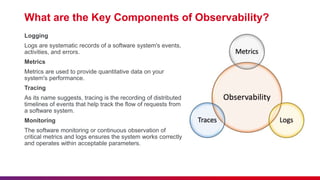
What are the Key Components of Observability?
Logging
Logs are systematic records of a software system's events,
activities, and errors.
Metrics
Metrics are used to provide quantitative data on your
system's performance.
Tracing
As its name suggests, tracing is the recording of distributed
timelines of events that help track the flow of requests from
a software system.
Monitoring
The software monitoring or continuous observation of
critical metrics and logs ensures the system works correctly
and operates within acceptable parameters.
Integrating Test Reporting and Observability
 Unified Data: Integrating test reporting and observability combines structured test
results with real-time system metrics, providing a unified source of truth for
understanding software performance and health.
 Enhanced Context: This integration offers deeper insights into issues by correlating
test outcomes with system behavior data, enabling teams to diagnose and resolve
problems more effectively.
 Streamlined Workflows: By leveraging integrated data, teams can efficiently manage
incidents and QA processes, reducing resolution times and ensuring continuous
software improvement.
 Improved Collaboration: Integrated insights foster better communication and
collaboration across development, QA, and operations teams, aligning efforts to deliver
reliable software and improve overall system reliability.
Challenges and Solutions
 Challenge: Data Overload
 Solution: Use intelligent filtering and prioritization
 Challenge: Tool Integration
 Solution: Use platforms and tools that offer seamless integration
 Challenge: Real-time Monitoring
 Solution: Implement robust real-time monitoring solutions
 Challenge: Ensuring Data Accuracy
 Solution: Regularly validate and audit data sources
Future Trends in Test Reporting and
Observability
 AI and Machine Learning
-Predictive analytics and automated anomaly detection
 Real-time Reporting
-Instant insights and live dashboards
 Integration and Collaboration
-Seamless integration with DevOps tools and collaborative
platforms
 Enhanced User Experience
- Focus on user-centric metrics and feedback loops
 Observability as Code
-Embedding observability practices into the development
lifecycle
Conclusion
In conclusion:
1. Integrating effective test reporting and observability
practices is crucial for ensuring software quality and
performance.
2. Test reporting provides transparency and
accountability through documented testing
outcomes, while observability offers real-time
insights into system behavior.
3. Continuous improvement through investment in
optimized tools and practices, such as data
prioritization and regular validation, will further
enhance efficiency and reliability in software
development and operations.
Insights Unveiled Test Reporting and Observability Excellence

Insights Unveiled Test Reporting and Observability Excellence

  • 1.
    Insights Unveiled - TestReporting and Observability Excellence Deepansh Gupta Senior Automation Consultant Test Automation Competency
  • 2.
    Lack of etiquetteand manners is a huge turn off. KnolX Etiquettes  Punctuality Join the session 5 minutes prior to the session start time. We start on time and conclude on time!  Feedback Make sure to submit a constructive feedback for all sessions as it is very helpful for the presenter.  Silent Mode Keep your mobile devices in silent mode, feel free to move out of session in case you need to attend an urgent call.  Avoid Disturbance Avoid unwanted chit chat during the session.
  • 3.
    1. Introduction 2. Importanceof Test Reporting 3. Who needs Test Reporting 4. Types of Test Reports 5. Best Practices in Test Reporting 6. Tools for Test Reporting 7. Importance of Observability 8. Key Metrics in Observability 9. Integrating Test Reporting and Observability 10. Challenges and Solutions 11. Future Trends in Test Reporting and Observability 12. Conclusion
  • 4.
    Introduction Test Reporting: Test reportingis a process in software testing that involves gathering, analyzing, and presenting essential test results and statistics to stakeholders. Additionally, a Test Report is a detailed document that contains a summary of the test, the process involved and the final test results. Observability: Observability refers to the ability to measure and understand a system's internal state by analyzing outputs such as logs and metrics. It plays a vital role in real-time monitoring, debugging, and optimizing system performance, providing insights into system behavior and facilitating proactive management of operational issues.
  • 5.
    Importance of TestReporting Test reporting is crucial for software development from an ROI perspective. It helps:  Maintain Cost-effectiveness  Ensure release readiness  Improve User Churn Rate  Better Visibility and Control
  • 6.
    Who needs TestReporting?  Developers, who perform unit testing and debug code based on test results to deliver error-free code.  QAs, who test the application using different testing techniques like functional, regression, usability, and cross-browser testing to find bugs and document them in detailed Test Execution Reports.  Product Managers, who foresee the entire software development lifecycle of the product and ensure optimum performance with faster delivery and high quality.  Business Analysts, who ensure all the test cases are well aligned with the business requirements specs at every stage, keeping users’ interests in mind.
  • 7.
    When to createa Test Report?  A test report is ideally created at the end of testing cycles, so it can also include details about regression tests. However, there should be enough time after submitting the report and before the product is shipped to the customers for any troubleshooting.  The intention here is to help the client and the stakeholders with the information on the overall health of the testing cycle and the application being tested so that any corrective action can be taken if necessary.
  • 8.
    Types of TestReports  There are different types of test reports which have relevant information and key metrics regarding the tests:  Test Summary Report: It provides a high-level overview of the testing activities conducted during a specific phase or cycle of the project. It includes metrics such as the number of test cases executed, passed, failed, and any outstanding defects. The summary report helps stakeholders understand the overall status of the testing effort.  Test Execution Report (TER): It provides detailed information about the execution of test cases, including the test case ID, description, status (pass/fail), and any comments or observations from the tester. TER allows stakeholders to track the progress of testing and identify areas that may require further attention.
  • 9.
    Types of TestReports  Defect Report/Bug Report: It documents any defects or issues identified during testing. It typically includes information such as the defect ID, description, severity, priority, steps to reproduce, and status (open, fixed, closed, etc.). The defect report helps prioritize and manage the resolution of issues found during testing.  Traceability Matrix: A traceability matrix maps requirements to test cases, ensuring that each requirement has been adequately tested. It helps verify that all project requirements have been addressed and provides a clear understanding of the test coverage.
  • 10.
    Best Practices inTest Reporting  Consistency  Use standardized formats and templates  Automation  Automate the generation of reports to save time and reduce errors  Clarity  Use clear visualizations and provide actionable insights  Relevance  Tailor reports to the audience’s needs  Regular Updates  Provide timely updates to keep stakeholders informed
  • 11.
    Tools for TestReporting  Jira (with plugins like Xray or Zephyr): Issue and project tracking tool with powerful test management capabilities and customizable reporting dashboards for tracking testing progress and results.  qTest: Test management platform offering real-time insights into test case execution, defects, requirements coverage, and test cycle progress with customizable reporting features.  PractiTest: Test management tool with advanced reporting capabilities, providing customizable dashboards, graphs, and analytics to track testing metrics, trends, and project status effectively.  TestLink: Open-source test management tool offering basic reporting functionalities on test plans, test cases, and test executions, generating metrics for assessing testing progress.  Zephyr (Jira plugin): Test management plugin for Jira, enhancing project management with robust reporting features on test execution, coverage, and defects within Jira workflows.  Allure Report: Open-source framework for creating interactive and visually appealing test reports that include detailed test execution results, metrics, and trends to enhance visibility and understanding of test outcomes.
  • 12.
    Importance of Observability In software systems (IT, software, and cloud computing), observability refers to the ability to understand and measure a system's internal state and external outputs by collecting and analyzing data from various sources.  Most importantly, observability isn't all about monitoring; it also involves careful tracking of predefined metrics, logs, and alerts from the data a system generates or performs, as well as interacting with and responding to user requests.
  • 13.
    Key Metrics inObservability  Response Times − Measure how quickly the system responds to requests  Error Rates − Track the frequency of errors occurring in the system  Throughput − Measure the number of requests the system handles  Latency − Time taken for a request to be processed  Uptime − Percentage of time the system is operational
  • 14.
    What are theKey Components of Observability? Logging Logs are systematic records of a software system's events, activities, and errors. Metrics Metrics are used to provide quantitative data on your system's performance. Tracing As its name suggests, tracing is the recording of distributed timelines of events that help track the flow of requests from a software system. Monitoring The software monitoring or continuous observation of critical metrics and logs ensures the system works correctly and operates within acceptable parameters.
  • 15.
    Integrating Test Reportingand Observability  Unified Data: Integrating test reporting and observability combines structured test results with real-time system metrics, providing a unified source of truth for understanding software performance and health.  Enhanced Context: This integration offers deeper insights into issues by correlating test outcomes with system behavior data, enabling teams to diagnose and resolve problems more effectively.  Streamlined Workflows: By leveraging integrated data, teams can efficiently manage incidents and QA processes, reducing resolution times and ensuring continuous software improvement.  Improved Collaboration: Integrated insights foster better communication and collaboration across development, QA, and operations teams, aligning efforts to deliver reliable software and improve overall system reliability.
  • 16.
    Challenges and Solutions Challenge: Data Overload  Solution: Use intelligent filtering and prioritization  Challenge: Tool Integration  Solution: Use platforms and tools that offer seamless integration  Challenge: Real-time Monitoring  Solution: Implement robust real-time monitoring solutions  Challenge: Ensuring Data Accuracy  Solution: Regularly validate and audit data sources
  • 17.
    Future Trends inTest Reporting and Observability  AI and Machine Learning -Predictive analytics and automated anomaly detection  Real-time Reporting -Instant insights and live dashboards  Integration and Collaboration -Seamless integration with DevOps tools and collaborative platforms  Enhanced User Experience - Focus on user-centric metrics and feedback loops  Observability as Code -Embedding observability practices into the development lifecycle
  • 18.
    Conclusion In conclusion: 1. Integratingeffective test reporting and observability practices is crucial for ensuring software quality and performance. 2. Test reporting provides transparency and accountability through documented testing outcomes, while observability offers real-time insights into system behavior. 3. Continuous improvement through investment in optimized tools and practices, such as data prioritization and regular validation, will further enhance efficiency and reliability in software development and operations.