


T R E A S U R E D A T A
OPTIMIZING PRESTO CONNECTOR
ON CLOUD STORAGE
DB Tech Showcase Tokyo 2017
Kai Sasaki
Software Engineer at Treasure Data Inc.
ABOUT ME
• Kai Sasaki (佐々木 海)
• Software Engineer at TreasureData

• Hadoop/Spark contributor

• Hivemall committer

• Java/Scala/Python
TREASURE DATA
Data Analytics Platform
Unify all your raw data in scalable and
secure platform. Supporting 100+
integrations to enable you to easily connect
all your data sources in real-time.
Live with OSS
• Fluentd
• Embulk
• Digdag
• Hivemall
and more
https://www.treasuredata.com/opensource/
AGENDA
• What is Presto?

• Presto Connector Detail

• Cloud Storage and PlazmaDB

• Transaction and Partitioning

• Time Index Partitioning

• User Defined Partitioning
WHAT IS PRESTO?
WHAT IS PRESTO?
• Presto is an open source scalable distributed SQL 

engine for huge OLAP workloads

• Mainly developed by Facebook, Teradata

• Used by FB, Uber, Netflix etc

• In-Memory processing

• Pluggable architecture

Hive, Cassandra, Kafka etc
PRESTO IN TREASURE DATA
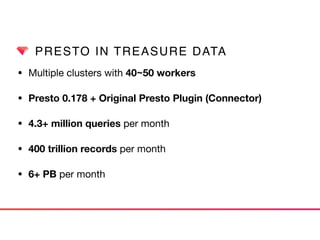
• Multiple clusters with 40~50 workers
• Presto 0.178 + Original Presto Plugin (Connector)
• 4.3+ million queries per month
• 400 trillion records per month

• 6+ PB per month
PRESTO CONNECTOR
PRESTO CONNECTOR
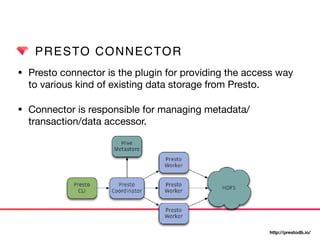
• Presto connector is the plugin for providing the access way
to various kind of existing data storage from Presto.

• Connector is responsible for managing metadata/
transaction/data accessor.
http://prestodb.io/
PRESTO CONNECTOR
• Hive Connector

Use metastore as metadata and S3/HDFS as storage.

• Kafka Connector

Querying Kafka topic as table. Each message as interpreted as row
in a table.

• Redis Connector

Key/value pair is interpreted as a row in Presto.

• Cassandra Connector

Support Cassandra 2.1.5 or later.
PRESTO CONNECTOR
• Black Hole Connector

Works like /dev/null or /dev/zero in Unix like system. Used for
catastrophic test or integration test.

• Memory Connector

Metadata and data are stored in RAM on worker nodes. 

Still experimental connector mainly used for test.

• System Connector

Provides information about the cluster state and running
query metrics. It is useful for runtime monitoring.
CONNECTOR DETAIL
PRESTO CONNECTOR
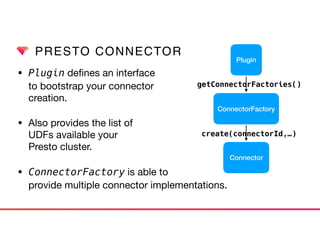
• Plugin defines an interface 

to bootstrap your connector 

creation.

• Also provides the list of 

UDFs available your 

Presto cluster.

• ConnectorFactory is able to

provide multiple connector implementations.
Plugin
ConnectorFactory
Connector
getConnectorFactories()
create(connectorId,…)
PRESTO CONNECTOR
• Connector provides classes to manage metadata, storage
accessor and table access control.

• ConnectorSplitManager create 

data source metadata to be 

distributed multiple worker 

node. 

• ConnectorPage

[Source|Sink]Provider

is provided to split 

operator. Connector
Connector
Metadata
Connector
SplitManager
Connector
PageSource
Provider
Connector
PageSink
Provider
Connector
Access
Control
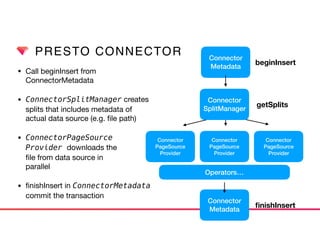
PRESTO CONNECTOR
• Call beginInsert from 

ConnectorMetadata

• ConnectorSplitManager creates

splits that includes metadata of 

actual data source (e.g. file path)

• ConnectorPageSource

Provider downloads the

file from data source in 

parallel

• finishInsert in ConnectorMetadata

commit the transaction
Connector
Metadata
beginInsert
getSplits
Connector
PageSource
Provider
Connector
PageSource
Provider
Connector
PageSource
Provider
Connector
Metadata
finishInsert
Operators…
Connector
SplitManager
PRESTO ON CLOUD STORAGE
• Distributed execution engine like Presto cannot make use of
data locality any more on cloud storage. 

• Read/Write of data can be a dominant factor of query
performance, stability and money.

→ Connector should be implemented to take care of 

network IO cost.
CLOUD STORAGE IN TD
• Our Treasure Data storage service is built on cloud storage
like S3. 

• Presto just provides a distributed query execution layer. It
requires us to make our storage system also scalable.
• On the other hand, we should make use of maintainability
and availability provided cloud service provider (IaaS).
EASE-UP APPROACH
PLAZMADB
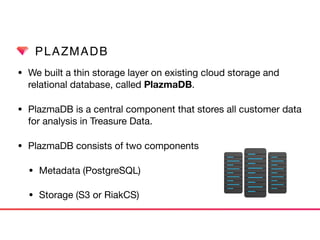
• We built a thin storage layer on existing cloud storage and
relational database, called PlazmaDB.

• PlazmaDB is a central component that stores all customer data
for analysis in Treasure Data.

• PlazmaDB consists of two components

• Metadata (PostgreSQL)

• Storage (S3 or RiakCS)
PLAZMADB
• PlazmaDB stores metadata of data files in PostgreSQL
hosted by Amazon RDS.
PLAZMADB
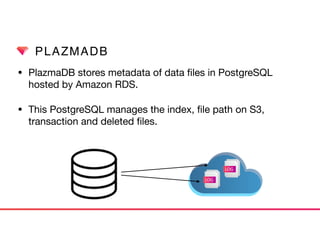
• PlazmaDB stores metadata of data files in PostgreSQL
hosted by Amazon RDS. 

• This PostgreSQL manages the index, file path on S3,
transaction and deleted files.
LOG
LOG
TRANSACTION AND PARTITIONING
• Consistency is the most important factor for enterprise
analytics workload. Therefore MPP engine like Presto and
backend storage MUST always guarantee the consistency.

→ UPDATE is done atomically by PlazmaDB

• At the same time, we want to achieve high throughput by
distributing workload to multiple worker nodes.

→ Data files are partitioned in PlazmaDB
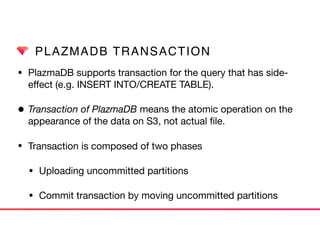
PLAZMADB TRANSACTION
• PlazmaDB supports transaction for the query that has side-
effect (e.g. INSERT INTO/CREATE TABLE).

• Transaction of PlazmaDB means the atomic operation on the
appearance of the data on S3, not actual file.
• Transaction is composed of two phases

• Uploading uncommitted partitions

• Commit transaction by moving uncommitted partitions
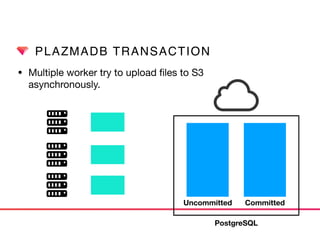
PLAZMADB TRANSACTION
• Multiple worker try to upload files to S3

asynchronously.
Uncommitted Committed
PostgreSQL
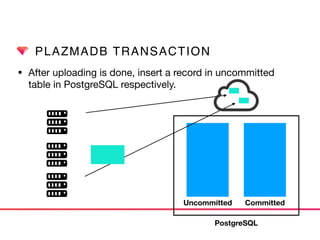
PLAZMADB TRANSACTION
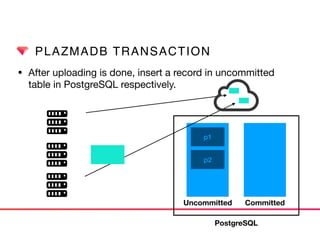
• After uploading is done, insert a record in uncommitted 

table in PostgreSQL respectively.
Uncommitted Committed
PostgreSQL
PLAZMADB TRANSACTION
• After uploading is done, insert a record in uncommitted 

table in PostgreSQL respectively.
Uncommitted Committed
PostgreSQL
p1
p2
PLAZMADB TRANSACTION
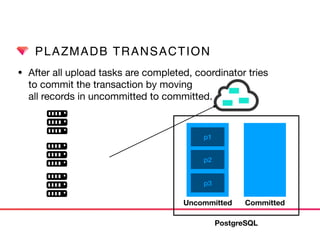
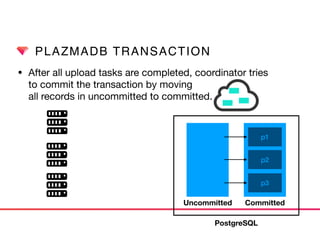
• After all upload tasks are completed, coordinator tries 

to commit the transaction by moving 

all records in uncommitted to committed.
Uncommitted Committed
p1
p2
p3
PostgreSQL
PLAZMADB TRANSACTION
• After all upload tasks are completed, coordinator tries 

to commit the transaction by moving 

all records in uncommitted to committed.
Uncommitted Committed
p1
p2
p3
PostgreSQL
PLAZMADB DELETE
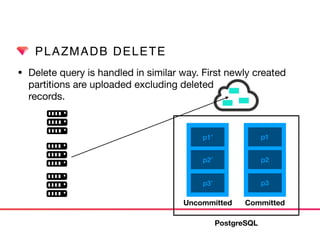
• Delete query is handled in similar way. First newly created

partitions are uploaded excluding deleted 

records.
Uncommitted Committed
p1
p2
p3
p1’
p2’
p3’
PostgreSQL
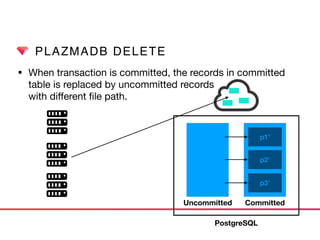
PLAZMADB DELETE
• When transaction is committed, the records in committed
table is replaced by uncommitted records 

with different file path.
Uncommitted Committed
p1’
p2’
p3’
PostgreSQL
PARTITIONING
• To make the best of high throughput by Presto parallel
processing, it is necessary to distribute data source too.

• Distributing data source evenly can contribute the high
throughput and performance stability. 

• Two basic partitioning method

• Key range partitioning -> Time-Index partitioning
• Hash partitioning -> User Defined Partitioning
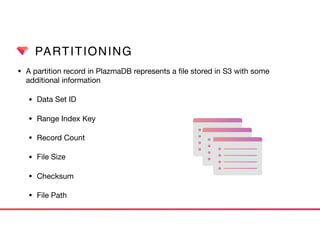
PARTITIONING
• A partition record in PlazmaDB represents a file stored in S3 with some
additional information

• Data Set ID

• Range Index Key

• Record Count

• File Size

• Checksum

• File Path
PARTITIONING
• All partitions in PlazmaDB are indexed by time when it is
generated. Time index is recorded as UNIX epoch. 

• A partition keeps first_index_key and last_index_key
to specifies the range where the partition includes. 

• PlazmaDB index is constructed as multicolumn index by
using GiST index of PostgreSQL. 

(https://www.postgresql.org/docs/current/static/gist.html)

• (data_set_id, index_range(first_index_key, last_index_key))
LIFECYCLE OF PARTITION
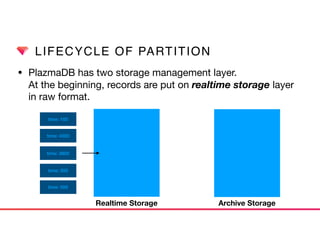
• PlazmaDB has two storage management layer.

At the beginning, records are put on realtime storage layer
in raw format.
Realtime Storage Archive Storage
time: 100
time: 4000
time: 3800
time: 300
time: 500
LIFECYCLE OF PARTITION
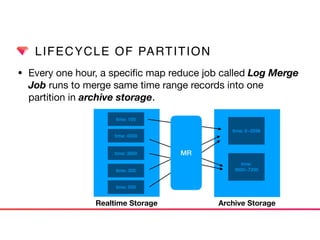
• Every one hour, a specific map reduce job called Log Merge
Job runs to merge same time range records into one
partition in archive storage.
Realtime Storage Archive Storage
time: 100
time: 4000
time: 3800
time: 300
time: 500
time: 0~3599
time:
3600~7200
MR
LIFECYCLE OF PARTITION
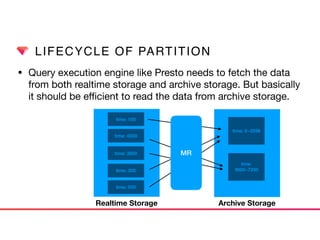
• Query execution engine like Presto needs to fetch the data
from both realtime storage and archive storage. But basically
it should be efficient to read the data from archive storage.
Realtime Storage Archive Storage
time: 100
time: 4000
time: 3800
time: 300
time: 500
time: 0~3599
time:
3600~7200
MR
TWO PARTITIONING TYPES
TIME INDEX PARTITIONING
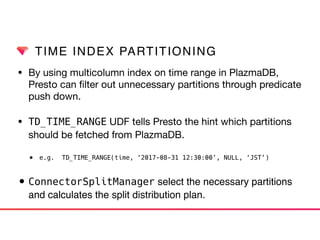
• By using multicolumn index on time range in PlazmaDB,
Presto can filter out unnecessary partitions through predicate
push down.

• TD_TIME_RANGE UDF tells Presto the hint which partitions
should be fetched from PlazmaDB.

• e.g. TD_TIME_RANGE(time, ‘2017-08-31 12:30:00’, NULL, ‘JST’)
• ConnectorSplitManager select the necessary partitions
and calculates the split distribution plan.
TIME INDEX PARTITIONING
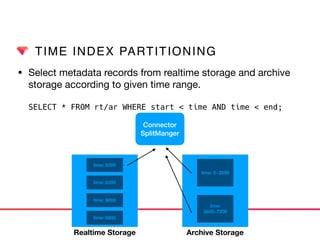
• Select metadata records from realtime storage and archive
storage according to given time range.


SELECT * FROM rt/ar WHERE start < time AND time < end;
Connector

SplitManger
time: 0~3599
time:
3600~7200
time: 8000
time: 8200
time: 9000
time: 8800
Realtime Storage Archive Storage
TIME INDEX PARTITIONING
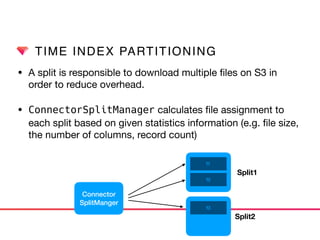
• A split is responsible to download multiple files on S3 in
order to reduce overhead. 

• ConnectorSplitManager calculates file assignment to
each split based on given statistics information (e.g. file size,
the number of columns, record count)
f1
f2
f3
Connector

SplitManger
Split1
Split2
TIME INDEX PARTITIONING
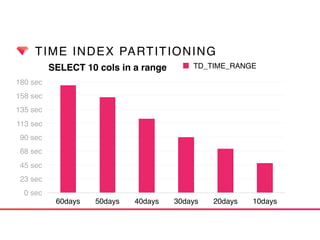
SELECT 10 cols in a range
0 sec
23 sec
45 sec
68 sec
90 sec
113 sec
135 sec
158 sec
180 sec
60days 50days 40days 30days 20days 10days
TD_TIME_RANGE
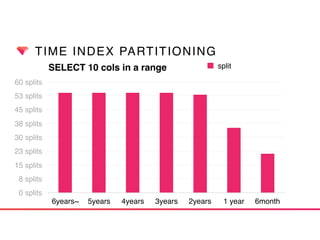
TIME INDEX PARTITIONING
SELECT 10 cols in a range
0 splits
8 splits
15 splits
23 splits
30 splits
38 splits
45 splits
53 splits
60 splits
6years~ 5years 4years 3years 2years 1 year 6month
split
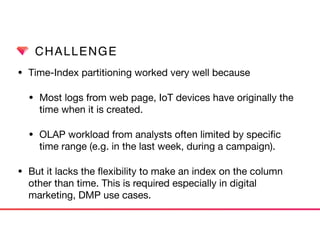
CHALLENGE
• Time-Index partitioning worked very well because

• Most logs from web page, IoT devices have originally the
time when it is created.

• OLAP workload from analysts often limited by specific
time range (e.g. in the last week, during a campaign).

• But it lacks the flexibility to make an index on the column
other than time. This is required especially in digital
marketing, DMP use cases.
USER DEFINED PARTITIONING
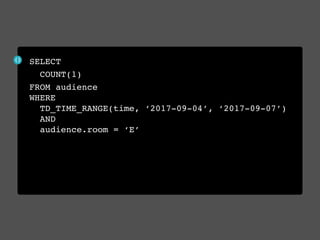
• Now evaluating user defined partitioning with Presto.

• User defined partitioning allows customer to set index on
arbitrary data attribute flexibly. 

• User defined partitioning can co-exist with time-index
partitioning as secondary index.
SELECT
COUNT(1)
FROM audience 

WHERE 

TD_TIME_RANGE(time, ‘2017-09-04’, ‘2017-09-07’)

AND

audience.room = ‘E’
BUCKETING
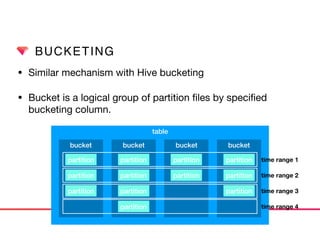
• Similar mechanism with Hive bucketing

• Bucket is a logical group of partition files by specified
bucketing column.
table
bucket bucket bucket bucket
partition
partition
partition
partition
partition
partition
partition
partition
partition
partition
partition
partition
time range 1
time range 2
time range 3
time range 4
BUCKETING
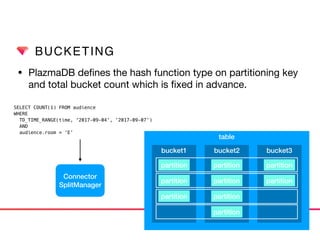
• PlazmaDB defines the hash function type on partitioning key
and total bucket count which is fixed in advance.
Connector
SplitManager
SELECT COUNT(1) FROM audience 

WHERE 

TD_TIME_RANGE(time, ‘2017-09-04’, ‘2017-09-07’)

AND

audience.room = ‘E’
table
bucket1 bucket2 bucket3
partition
partition
partition
partition
partition
partition
partition
partition
partition
BUCKETING
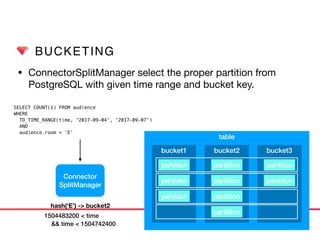
• ConnectorSplitManager select the proper partition from
PostgreSQL with given time range and bucket key.
Connector
SplitManager
SELECT COUNT(1) FROM audience 

WHERE 

TD_TIME_RANGE(time, ‘2017-09-04’, ‘2017-09-07’)

AND

audience.room = ‘E’
table
bucket1 bucket2 bucket3
partition
partition
partition
partition
partition
partition
partition
partition
partition
hash(‘E’) -> bucket2
1504483200 < time
&& time < 1504742400
USER DEFINED PARTITIONING
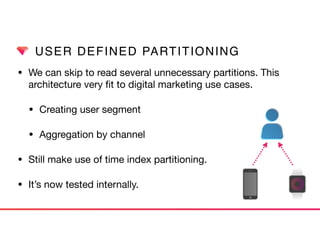
• We can skip to read several unnecessary partitions. This
architecture very fit to digital marketing use cases.

• Creating user segment

• Aggregation by channel

• Still make use of time index partitioning.

• It’s now tested internally.
RECAP
• Presto provides a plugin mechanism called connector.
• Though Presto itself is highly scalable distributed engine, connector is
also responsible for efficient query execution.
• PlazmaDB has some desirable features to be integrated with such kind
of connector because of
• Transaction support
• Time-Index Partitioning
• User Defined Partitioning
T R E A S U R E D A T A

Optimizing Presto Connector on Cloud Storage

  • 1.
    T R EA S U R E D A T A OPTIMIZING PRESTO CONNECTOR ON CLOUD STORAGE DB Tech Showcase Tokyo 2017 Kai Sasaki Software Engineer at Treasure Data Inc.
  • 2.
    ABOUT ME • KaiSasaki (佐々木 海) • Software Engineer at TreasureData • Hadoop/Spark contributor • Hivemall committer • Java/Scala/Python
  • 3.
    TREASURE DATA Data AnalyticsPlatform Unify all your raw data in scalable and secure platform. Supporting 100+ integrations to enable you to easily connect all your data sources in real-time. Live with OSS • Fluentd • Embulk • Digdag • Hivemall and more https://www.treasuredata.com/opensource/
  • 4.
    AGENDA • What isPresto? • Presto Connector Detail • Cloud Storage and PlazmaDB • Transaction and Partitioning • Time Index Partitioning • User Defined Partitioning
  • 5.
  • 6.
    WHAT IS PRESTO? •Presto is an open source scalable distributed SQL 
 engine for huge OLAP workloads • Mainly developed by Facebook, Teradata • Used by FB, Uber, Netflix etc • In-Memory processing • Pluggable architecture
 Hive, Cassandra, Kafka etc
  • 7.
  • 8.
    PRESTO IN TREASUREDATA • Multiple clusters with 40~50 workers • Presto 0.178 + Original Presto Plugin (Connector) • 4.3+ million queries per month • 400 trillion records per month • 6+ PB per month
  • 9.
  • 10.
    PRESTO CONNECTOR • Prestoconnector is the plugin for providing the access way to various kind of existing data storage from Presto. • Connector is responsible for managing metadata/ transaction/data accessor. http://prestodb.io/
  • 11.
    PRESTO CONNECTOR • HiveConnector
 Use metastore as metadata and S3/HDFS as storage. • Kafka Connector
 Querying Kafka topic as table. Each message as interpreted as row in a table. • Redis Connector
 Key/value pair is interpreted as a row in Presto. • Cassandra Connector
 Support Cassandra 2.1.5 or later.
  • 12.
    PRESTO CONNECTOR • BlackHole Connector
 Works like /dev/null or /dev/zero in Unix like system. Used for catastrophic test or integration test. • Memory Connector
 Metadata and data are stored in RAM on worker nodes. 
 Still experimental connector mainly used for test. • System Connector
 Provides information about the cluster state and running query metrics. It is useful for runtime monitoring.
  • 13.
  • 14.
    PRESTO CONNECTOR • Plugindefines an interface 
 to bootstrap your connector 
 creation. • Also provides the list of 
 UDFs available your 
 Presto cluster. • ConnectorFactory is able to
 provide multiple connector implementations. Plugin ConnectorFactory Connector getConnectorFactories() create(connectorId,…)
  • 15.
    PRESTO CONNECTOR • Connectorprovides classes to manage metadata, storage accessor and table access control. • ConnectorSplitManager create 
 data source metadata to be 
 distributed multiple worker 
 node. • ConnectorPage
 [Source|Sink]Provider
 is provided to split 
 operator. Connector Connector Metadata Connector SplitManager Connector PageSource Provider Connector PageSink Provider Connector Access Control
  • 16.
    PRESTO CONNECTOR • CallbeginInsert from 
 ConnectorMetadata • ConnectorSplitManager creates
 splits that includes metadata of 
 actual data source (e.g. file path) • ConnectorPageSource
 Provider downloads the
 file from data source in 
 parallel • finishInsert in ConnectorMetadata
 commit the transaction Connector Metadata beginInsert getSplits Connector PageSource Provider Connector PageSource Provider Connector PageSource Provider Connector Metadata finishInsert Operators… Connector SplitManager
  • 17.
    PRESTO ON CLOUDSTORAGE • Distributed execution engine like Presto cannot make use of data locality any more on cloud storage. • Read/Write of data can be a dominant factor of query performance, stability and money. → Connector should be implemented to take care of 
 network IO cost.
  • 18.
    CLOUD STORAGE INTD • Our Treasure Data storage service is built on cloud storage like S3. • Presto just provides a distributed query execution layer. It requires us to make our storage system also scalable. • On the other hand, we should make use of maintainability and availability provided cloud service provider (IaaS).
  • 19.
  • 20.
    PLAZMADB • We builta thin storage layer on existing cloud storage and relational database, called PlazmaDB. • PlazmaDB is a central component that stores all customer data for analysis in Treasure Data. • PlazmaDB consists of two components • Metadata (PostgreSQL) • Storage (S3 or RiakCS)
  • 21.
    PLAZMADB • PlazmaDB storesmetadata of data files in PostgreSQL hosted by Amazon RDS.
  • 22.
    PLAZMADB • PlazmaDB storesmetadata of data files in PostgreSQL hosted by Amazon RDS. • This PostgreSQL manages the index, file path on S3, transaction and deleted files. LOG LOG
  • 23.
  • 24.
    TRANSACTION AND PARTITIONING •Consistency is the most important factor for enterprise analytics workload. Therefore MPP engine like Presto and backend storage MUST always guarantee the consistency. → UPDATE is done atomically by PlazmaDB • At the same time, we want to achieve high throughput by distributing workload to multiple worker nodes. → Data files are partitioned in PlazmaDB
  • 25.
    PLAZMADB TRANSACTION • PlazmaDBsupports transaction for the query that has side- effect (e.g. INSERT INTO/CREATE TABLE). • Transaction of PlazmaDB means the atomic operation on the appearance of the data on S3, not actual file. • Transaction is composed of two phases • Uploading uncommitted partitions • Commit transaction by moving uncommitted partitions
  • 26.
    PLAZMADB TRANSACTION • Multipleworker try to upload files to S3
 asynchronously. Uncommitted Committed PostgreSQL
  • 27.
    PLAZMADB TRANSACTION • Afteruploading is done, insert a record in uncommitted 
 table in PostgreSQL respectively. Uncommitted Committed PostgreSQL
  • 28.
    PLAZMADB TRANSACTION • Afteruploading is done, insert a record in uncommitted 
 table in PostgreSQL respectively. Uncommitted Committed PostgreSQL p1 p2
  • 29.
    PLAZMADB TRANSACTION • Afterall upload tasks are completed, coordinator tries 
 to commit the transaction by moving 
 all records in uncommitted to committed. Uncommitted Committed p1 p2 p3 PostgreSQL
  • 30.
    PLAZMADB TRANSACTION • Afterall upload tasks are completed, coordinator tries 
 to commit the transaction by moving 
 all records in uncommitted to committed. Uncommitted Committed p1 p2 p3 PostgreSQL
  • 31.
    PLAZMADB DELETE • Deletequery is handled in similar way. First newly created
 partitions are uploaded excluding deleted 
 records. Uncommitted Committed p1 p2 p3 p1’ p2’ p3’ PostgreSQL
  • 32.
    PLAZMADB DELETE • Whentransaction is committed, the records in committed table is replaced by uncommitted records 
 with different file path. Uncommitted Committed p1’ p2’ p3’ PostgreSQL
  • 33.
    PARTITIONING • To makethe best of high throughput by Presto parallel processing, it is necessary to distribute data source too. • Distributing data source evenly can contribute the high throughput and performance stability. • Two basic partitioning method • Key range partitioning -> Time-Index partitioning • Hash partitioning -> User Defined Partitioning
  • 34.
    PARTITIONING • A partitionrecord in PlazmaDB represents a file stored in S3 with some additional information • Data Set ID • Range Index Key • Record Count • File Size • Checksum • File Path
  • 35.
    PARTITIONING • All partitionsin PlazmaDB are indexed by time when it is generated. Time index is recorded as UNIX epoch. • A partition keeps first_index_key and last_index_key to specifies the range where the partition includes. • PlazmaDB index is constructed as multicolumn index by using GiST index of PostgreSQL. 
 (https://www.postgresql.org/docs/current/static/gist.html) • (data_set_id, index_range(first_index_key, last_index_key))
  • 36.
    LIFECYCLE OF PARTITION •PlazmaDB has two storage management layer.
 At the beginning, records are put on realtime storage layer in raw format. Realtime Storage Archive Storage time: 100 time: 4000 time: 3800 time: 300 time: 500
  • 37.
    LIFECYCLE OF PARTITION •Every one hour, a specific map reduce job called Log Merge Job runs to merge same time range records into one partition in archive storage. Realtime Storage Archive Storage time: 100 time: 4000 time: 3800 time: 300 time: 500 time: 0~3599 time: 3600~7200 MR
  • 38.
    LIFECYCLE OF PARTITION •Query execution engine like Presto needs to fetch the data from both realtime storage and archive storage. But basically it should be efficient to read the data from archive storage. Realtime Storage Archive Storage time: 100 time: 4000 time: 3800 time: 300 time: 500 time: 0~3599 time: 3600~7200 MR
  • 39.
  • 40.
    TIME INDEX PARTITIONING •By using multicolumn index on time range in PlazmaDB, Presto can filter out unnecessary partitions through predicate push down. • TD_TIME_RANGE UDF tells Presto the hint which partitions should be fetched from PlazmaDB. • e.g. TD_TIME_RANGE(time, ‘2017-08-31 12:30:00’, NULL, ‘JST’) • ConnectorSplitManager select the necessary partitions and calculates the split distribution plan.
  • 41.
    TIME INDEX PARTITIONING •Select metadata records from realtime storage and archive storage according to given time range.
 
 SELECT * FROM rt/ar WHERE start < time AND time < end; Connector
 SplitManger time: 0~3599 time: 3600~7200 time: 8000 time: 8200 time: 9000 time: 8800 Realtime Storage Archive Storage
  • 42.
    TIME INDEX PARTITIONING •A split is responsible to download multiple files on S3 in order to reduce overhead. • ConnectorSplitManager calculates file assignment to each split based on given statistics information (e.g. file size, the number of columns, record count) f1 f2 f3 Connector
 SplitManger Split1 Split2
  • 43.
    TIME INDEX PARTITIONING SELECT10 cols in a range 0 sec 23 sec 45 sec 68 sec 90 sec 113 sec 135 sec 158 sec 180 sec 60days 50days 40days 30days 20days 10days TD_TIME_RANGE
  • 44.
    TIME INDEX PARTITIONING SELECT10 cols in a range 0 splits 8 splits 15 splits 23 splits 30 splits 38 splits 45 splits 53 splits 60 splits 6years~ 5years 4years 3years 2years 1 year 6month split
  • 45.
    CHALLENGE • Time-Index partitioningworked very well because • Most logs from web page, IoT devices have originally the time when it is created. • OLAP workload from analysts often limited by specific time range (e.g. in the last week, during a campaign). • But it lacks the flexibility to make an index on the column other than time. This is required especially in digital marketing, DMP use cases.
  • 46.
  • 47.
    USER DEFINED PARTITIONING •Now evaluating user defined partitioning with Presto. • User defined partitioning allows customer to set index on arbitrary data attribute flexibly. • User defined partitioning can co-exist with time-index partitioning as secondary index.
  • 48.
    SELECT COUNT(1) FROM audience 
 WHERE
 TD_TIME_RANGE(time, ‘2017-09-04’, ‘2017-09-07’)
 AND
 audience.room = ‘E’
  • 49.
    BUCKETING • Similar mechanismwith Hive bucketing • Bucket is a logical group of partition files by specified bucketing column. table bucket bucket bucket bucket partition partition partition partition partition partition partition partition partition partition partition partition time range 1 time range 2 time range 3 time range 4
  • 50.
    BUCKETING • PlazmaDB definesthe hash function type on partitioning key and total bucket count which is fixed in advance. Connector SplitManager SELECT COUNT(1) FROM audience 
 WHERE 
 TD_TIME_RANGE(time, ‘2017-09-04’, ‘2017-09-07’)
 AND
 audience.room = ‘E’ table bucket1 bucket2 bucket3 partition partition partition partition partition partition partition partition partition
  • 51.
    BUCKETING • ConnectorSplitManager selectthe proper partition from PostgreSQL with given time range and bucket key. Connector SplitManager SELECT COUNT(1) FROM audience 
 WHERE 
 TD_TIME_RANGE(time, ‘2017-09-04’, ‘2017-09-07’)
 AND
 audience.room = ‘E’ table bucket1 bucket2 bucket3 partition partition partition partition partition partition partition partition partition hash(‘E’) -> bucket2 1504483200 < time && time < 1504742400
  • 52.
    USER DEFINED PARTITIONING •We can skip to read several unnecessary partitions. This architecture very fit to digital marketing use cases. • Creating user segment • Aggregation by channel • Still make use of time index partitioning. • It’s now tested internally.
  • 53.
    RECAP • Presto providesa plugin mechanism called connector. • Though Presto itself is highly scalable distributed engine, connector is also responsible for efficient query execution. • PlazmaDB has some desirable features to be integrated with such kind of connector because of • Transaction support • Time-Index Partitioning • User Defined Partitioning
  • 54.
    T R EA S U R E D A T A