Managed Print Services Managed Print  A smart cost control strategy
KYOCERA FACING CHALLENGES. FINDING OPPORTUNITIES. FORGING GREAT STRATEGIES.
CAN YOU ANSWER THESE QUESTIONS? How many printers, copiers and faxes do you have?  Are they being properly used? Too much? Too little?  How often are they in need of service?  How often are the printers out of toner?  How old are they?  What is your current meter read submission process?  How much IT time is spent supporting printing devices?  How much time is spent processing invoices monthly?  How much do you spend on printing, copying and faxing?  Don’t know the answers? Good news:  You are not alone. 90% of all companies do not know what they are currently spending on internal desktop and network printing.
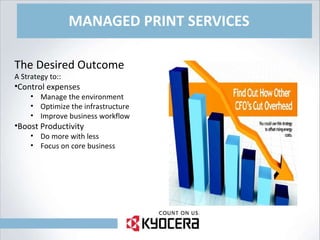
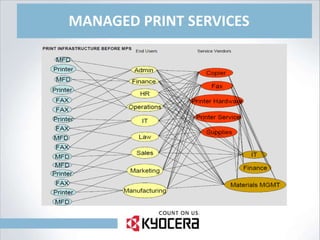
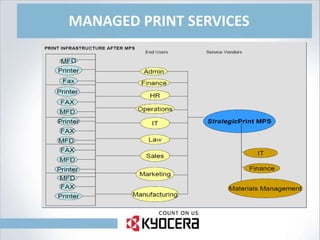
MANAGED PRINT SERVICES The Desired Outcome A Strategy to:: Control expenses Manage the environment Optimize the infrastructure Improve business workflow Boost Productivity Do more with less Focus on core business
MANAGED PRINT SERVICES
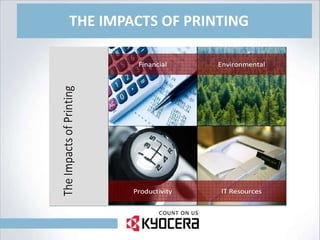
THE IMPACTS OF PRINTING
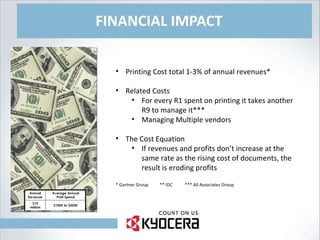
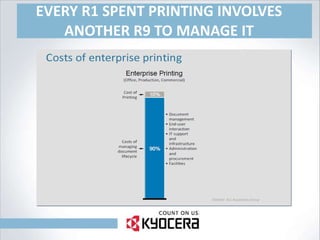
FINANCIAL IMPACT Printing Cost total 1-3% of annual revenues* Related Costs For every R1 spent on printing it takes another R9 to manage it*** Managing Multiple vendors The Cost Equation If revenues and profits don’t increase at the same rate as the rising cost of documents, the result is eroding profits * Gartner Group  ** IDC  *** All Associates Group
EVERY R1 SPENT PRINTING INVOLVES ANOTHER R9 TO MANAGE IT
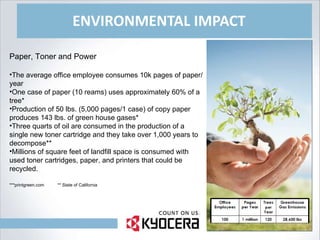
ENVIRONMENTAL IMPACT Paper, Toner and Power The average office employee consumes 10k pages of paper/year One case of paper (10 reams) uses approximately 60% of a tree* Production of 50 lbs. (5,000 pages/1 case) of copy paper produces 143 lbs. of green house gases* Three quarts of oil are consumed in the production of a single new toner cartridge and they take over 1,000 years to decompose** Millions of square feet of landfill space is consumed with used toner cartridges, paper, and printers that could be recycled. ***printgreen.com  ** State of California
PRODUCTIVITY IMPACT Work Flow Print support not core function Old drivers not compatible with new applications Consumables not in stock Broken Devices Documents not delivered Delays Customer responsible for having consumables available Increased costs in procurement, IT, and Accounting.
I.T. IMPACT Maintenance Burden Low priority, large expense of time 15% of IT personnel time spent on printer related issues.* Required driver updates for multiple models/brands of printers. Not trained or certified as printer technician. Pulls I.T. personnel away from higher priority projects requiring their expertise. * IDC
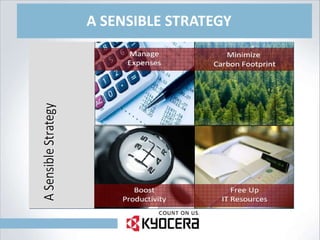
A SENSIBLE STRATEGY
MANAGE EXPENSES Outsource Management of the Printers via Managed Print Services: The Actual Printed Pages: Reduce the high cost of I.T.’s involvement with printers Reduce administration of the fleet with one vendor providing one invoice a month for the pages printed Reduce wasted consumables Reduce downtime Protect the technology investment
MINIMIZE CARBON FOOTPRINT Green Printing Recycle toner cartridges, paper, and printers diverts millions of cubic feet of material from landfills The recovery and reuse of toner cartridges and paper saves power through less manufacturing* Use post consumer recycled paper Reduce consumables inventory and the associated waste When possible, replace laser with alternative inks that have less environmental impact Approximately 50% less energy is used by one multifunction printer than the combined annual consumption of the individual products it replaces * State of California
BOOST PRODUCTIVITY Improve Workflow Proactive maintenance by trained, certified technicians increases availability of required devices Having the right consumables and devices in the right locations at the right time eliminates delays in producing needed documents via automated ordering Replace unplanned disruptions to core business work flow (i.e. paper jams) with scheduled events.
FREE UP I.T. RESOURCES Reduce the printer burden 24/7 remote monitoring software reports device status and errors reducing help desk calls. Outsourced printer service allows I.T. to spend more time on critical issues & strategic projects, supported by their core competency.
IMPLEMENTING THE STRATEGY TO OPTIMIZE YOUR PRINTER FLEET Stop Buying Without knowing what you have, what you are doing with those devices, and what those devices are costing, adding more devices generally does not solve current problems or reduce the costs related to printer fleets. Discovery Conduct an assessment of print devices resulting in a report that details the current usage, costs, and issues related to your fleet of printers. Our 6Sigma Assessment methodology is based on the Six Sigma approach popularised by Motorolla.
IMPLEMENTING THE STRATEGY TO OPTIMIZE YOUR PRINTER FLEET Outsource the Printer Management Without remote monitoring technology and an expertise in printers, companies are best served by outsourcing this non-core maintenance and management function to a qualified partner. Optimize the Infrastructure With reporting of usage trends, informed decisions, when appropriate, can begin to be made regarding the consolidation of print assets, involving the strategic placement of MFP’s to increase overall productivity, and software solutions to improve user productivity.
TRAINING End-User Training Basic (30 Minutes) “ Green Button” training Basic functions for day-to-day usage “ Green Button Plus” training – Power Users Advanced (120 Minutes) Additional features training Hands-on training to maximise the usage of devices One-on-one or small group basis Objective full understanding of how their desktop computer, network and multifunctional device interact and how to extract the most from the new device Key Operator Training (1 Day) Typically for 60+PPM devices in CRD Environment Special considerations i.t.o. management, workflow & usage Administrator Training Systems Administrator Higher level of skill required to manage entire network of MFP’s Typically IT team member or key personnel Aim is to: Recognise problems Troubleshoot Issues Resolve issues Admin training can be custom-designed to unique requirements
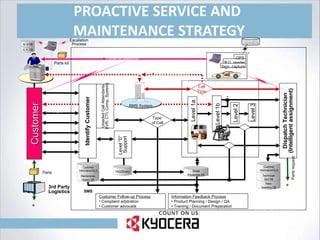
PROACTIVE SERVICE AND  MAINTENANCE STRATEGY E-mail RMS/RDS Phone VOIP Web Fax Portal/Extranet SMS Level “0”  Support Customer Follow-up Process Complaint arbitration Customer advocate Type  of Call Call Escalation Reset SC condition Change parameter Note: Level 1a: Call operator Level 1b: Helpdesk 1st line Level 2: Helpdesk 2nd line Level 3: High end engineer FAQ/Drivers Call  Type  Information Feedback Process Product Planning / Design / QA Training / Document Preparation Maintenance History DB Customer information/SLA Global Knowledge DB Unaided Call Attendants (IVR, CTI, Comp. System) Identify Customer Technician Skill DB Customer information/SLA Dispatch Technician (Intelligent assignment) Customer data / Call history Site environment Recommended solution/parts Directions Customer comments/remarks Sales promo. / leads Field modification order GPS Satellite Level 3 Level 1a Recommended sol./parts Travel to customer Contact customer to confirm ETA via phone, email, etc Parts kit 3rd Party Logistics Parts * Parts  Inventory DB B.C. reader Sign. capture Parts request * G. K  DB M. H DB Escalation Process Customer RMS System Level 1b Level 2
ANY QUESTIONS? DISCOUNTING THANK YOU

PRESENTATION

  • 1.
    Managed Print ServicesManaged Print A smart cost control strategy
  • 2.
    KYOCERA FACING CHALLENGES.FINDING OPPORTUNITIES. FORGING GREAT STRATEGIES.
  • 3.
    CAN YOU ANSWERTHESE QUESTIONS? How many printers, copiers and faxes do you have? Are they being properly used? Too much? Too little? How often are they in need of service? How often are the printers out of toner? How old are they? What is your current meter read submission process? How much IT time is spent supporting printing devices? How much time is spent processing invoices monthly? How much do you spend on printing, copying and faxing? Don’t know the answers? Good news: You are not alone. 90% of all companies do not know what they are currently spending on internal desktop and network printing.
  • 4.
    MANAGED PRINT SERVICESThe Desired Outcome A Strategy to:: Control expenses Manage the environment Optimize the infrastructure Improve business workflow Boost Productivity Do more with less Focus on core business
  • 5.
  • 6.
  • 7.
  • 8.
    FINANCIAL IMPACT PrintingCost total 1-3% of annual revenues* Related Costs For every R1 spent on printing it takes another R9 to manage it*** Managing Multiple vendors The Cost Equation If revenues and profits don’t increase at the same rate as the rising cost of documents, the result is eroding profits * Gartner Group ** IDC *** All Associates Group
  • 9.
    EVERY R1 SPENTPRINTING INVOLVES ANOTHER R9 TO MANAGE IT
  • 10.
    ENVIRONMENTAL IMPACT Paper,Toner and Power The average office employee consumes 10k pages of paper/year One case of paper (10 reams) uses approximately 60% of a tree* Production of 50 lbs. (5,000 pages/1 case) of copy paper produces 143 lbs. of green house gases* Three quarts of oil are consumed in the production of a single new toner cartridge and they take over 1,000 years to decompose** Millions of square feet of landfill space is consumed with used toner cartridges, paper, and printers that could be recycled. ***printgreen.com ** State of California
  • 11.
    PRODUCTIVITY IMPACT WorkFlow Print support not core function Old drivers not compatible with new applications Consumables not in stock Broken Devices Documents not delivered Delays Customer responsible for having consumables available Increased costs in procurement, IT, and Accounting.
  • 12.
    I.T. IMPACT MaintenanceBurden Low priority, large expense of time 15% of IT personnel time spent on printer related issues.* Required driver updates for multiple models/brands of printers. Not trained or certified as printer technician. Pulls I.T. personnel away from higher priority projects requiring their expertise. * IDC
  • 13.
  • 14.
    MANAGE EXPENSES OutsourceManagement of the Printers via Managed Print Services: The Actual Printed Pages: Reduce the high cost of I.T.’s involvement with printers Reduce administration of the fleet with one vendor providing one invoice a month for the pages printed Reduce wasted consumables Reduce downtime Protect the technology investment
  • 15.
    MINIMIZE CARBON FOOTPRINTGreen Printing Recycle toner cartridges, paper, and printers diverts millions of cubic feet of material from landfills The recovery and reuse of toner cartridges and paper saves power through less manufacturing* Use post consumer recycled paper Reduce consumables inventory and the associated waste When possible, replace laser with alternative inks that have less environmental impact Approximately 50% less energy is used by one multifunction printer than the combined annual consumption of the individual products it replaces * State of California
  • 16.
    BOOST PRODUCTIVITY ImproveWorkflow Proactive maintenance by trained, certified technicians increases availability of required devices Having the right consumables and devices in the right locations at the right time eliminates delays in producing needed documents via automated ordering Replace unplanned disruptions to core business work flow (i.e. paper jams) with scheduled events.
  • 17.
    FREE UP I.T.RESOURCES Reduce the printer burden 24/7 remote monitoring software reports device status and errors reducing help desk calls. Outsourced printer service allows I.T. to spend more time on critical issues & strategic projects, supported by their core competency.
  • 18.
    IMPLEMENTING THE STRATEGYTO OPTIMIZE YOUR PRINTER FLEET Stop Buying Without knowing what you have, what you are doing with those devices, and what those devices are costing, adding more devices generally does not solve current problems or reduce the costs related to printer fleets. Discovery Conduct an assessment of print devices resulting in a report that details the current usage, costs, and issues related to your fleet of printers. Our 6Sigma Assessment methodology is based on the Six Sigma approach popularised by Motorolla.
  • 19.
    IMPLEMENTING THE STRATEGYTO OPTIMIZE YOUR PRINTER FLEET Outsource the Printer Management Without remote monitoring technology and an expertise in printers, companies are best served by outsourcing this non-core maintenance and management function to a qualified partner. Optimize the Infrastructure With reporting of usage trends, informed decisions, when appropriate, can begin to be made regarding the consolidation of print assets, involving the strategic placement of MFP’s to increase overall productivity, and software solutions to improve user productivity.
  • 20.
    TRAINING End-User TrainingBasic (30 Minutes) “ Green Button” training Basic functions for day-to-day usage “ Green Button Plus” training – Power Users Advanced (120 Minutes) Additional features training Hands-on training to maximise the usage of devices One-on-one or small group basis Objective full understanding of how their desktop computer, network and multifunctional device interact and how to extract the most from the new device Key Operator Training (1 Day) Typically for 60+PPM devices in CRD Environment Special considerations i.t.o. management, workflow & usage Administrator Training Systems Administrator Higher level of skill required to manage entire network of MFP’s Typically IT team member or key personnel Aim is to: Recognise problems Troubleshoot Issues Resolve issues Admin training can be custom-designed to unique requirements
  • 21.
    PROACTIVE SERVICE AND MAINTENANCE STRATEGY E-mail RMS/RDS Phone VOIP Web Fax Portal/Extranet SMS Level “0” Support Customer Follow-up Process Complaint arbitration Customer advocate Type of Call Call Escalation Reset SC condition Change parameter Note: Level 1a: Call operator Level 1b: Helpdesk 1st line Level 2: Helpdesk 2nd line Level 3: High end engineer FAQ/Drivers Call Type Information Feedback Process Product Planning / Design / QA Training / Document Preparation Maintenance History DB Customer information/SLA Global Knowledge DB Unaided Call Attendants (IVR, CTI, Comp. System) Identify Customer Technician Skill DB Customer information/SLA Dispatch Technician (Intelligent assignment) Customer data / Call history Site environment Recommended solution/parts Directions Customer comments/remarks Sales promo. / leads Field modification order GPS Satellite Level 3 Level 1a Recommended sol./parts Travel to customer Contact customer to confirm ETA via phone, email, etc Parts kit 3rd Party Logistics Parts * Parts Inventory DB B.C. reader Sign. capture Parts request * G. K DB M. H DB Escalation Process Customer RMS System Level 1b Level 2
  • 22.