PACS
PICTURE ARCHIVING
& COMMUNICATIONS
SYSTEM
A picture archiving and communications
system (PACS) is a medical
imaging technology which provides
economical storage of, and convenient access
to, images from multiple modalities.
DEFINITION
Concept began with Albert Jutras in Canada in
the 1950s.
Early PACS systems were developed by the
military to send images between Veterans
Administration hospitals in the 1980s.
Development was encouraged and supported
by the U.S. government.
HISTORICAL DEVELOPMENT
Early process involved scanning radiographs
into the computer and sending them from
computer to computer.
Images were then stored in PACS.
Computed and digital radiography followed.
A network of computers used by radiology
departments that replaces film with
electronically stored & displayed digital images.
It provides archives for storage of multimodality
images, integrates images with patient database
information, facilitates laser printing of images &
displays both images & patient information at
work stations throughout the network.
It also allows viewing of images in remote
locations.
PACS
Can accept any image that is in DICOM format
Custom designed for each facility
Components/features can vary based on the
following:
• Volume of patients
• Number of interpretation areas
• Viewing locations
• Funding
PACS
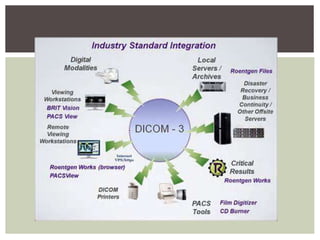
DICOM (Digital Imaging and Communications
in Medicine) is the universal format for PACS
image storage and transfer.
Non-image data, such as scanned documents,
may be incorporated using consumer industry
standard formats like PDF (Portable
Document Format), once encapsulated in
DICOM.
DICOM
Early systems did not have standardized
image formats.
Matching up systems was difficult.
Vendors kept systems proprietary and did not
share information.
DICOM standards helped change this by
allowing communication between vendors’
products.
INITIAL PROBLEMS
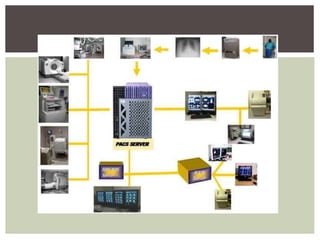
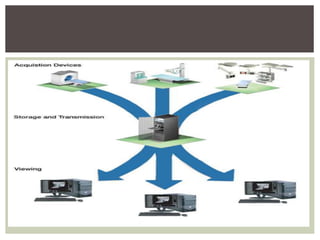
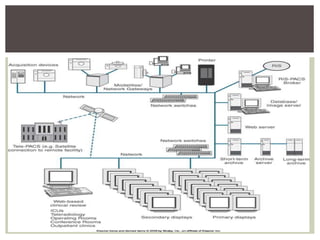
Made up of 4 major components:
1. Imaging modalities- such as X-ray plain film
(PF), CT and MRI.
2. A secured network for the transmission of
patient information.
3. Workstations for interpreting and reviewing
images.
4. Archives for the storage and retrieval of
images and reports.
COMPONENTS
Images of a PACS are produced by several
radiologic imaging modalities.
Images of CT, U/S, MRI & nuclear medicine
imaging (PET/SPECT) are digitally captured.
 Images of X-ray scanners have to be
digitalized first.
The images can be transmitted from the
modalities using a specified interface.
DICOM interface is most frequently used.
IMAGE ACQUISITION COMPONENT
The architecture is the physical
implementation of required functionality, or
what one sees from the outside.
 A radiologist typically sees a viewing station.
A technologist present at a QA workstation.
While a PACS administrator spend most of
their time in computer room.
ARCHITECTURE
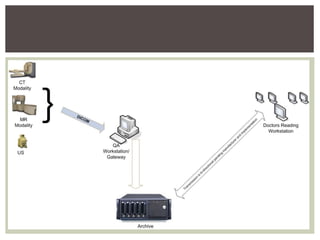
QA workstation is a checkpoint to make sure
patient demographics are correct.
If study information is correct, images are passed
to archive for storage.
The central storage device (archive) stores
images & may also store reports, measurements
& other information present with images.
Next step is the reading workstations.
Reading workstation is where radiologist reviews
patient's study and formulates their diagnosis.
ARCHITECTURE CONTINUED…
Normally attached to a reading workstation is
a reporting package assisting with final
report.
Reporting software is optional.
CD/DVD authoring software may also be
annexed, used to burn patient studies for
distribution to patients or referring physicians
ARCHITECTURE CONTINUED…
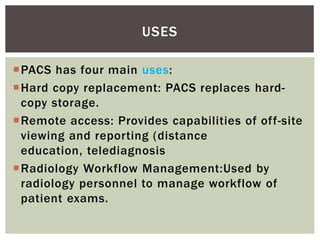
PACS has four main uses:
Hard copy replacement: PACS replaces hard-
copy storage.
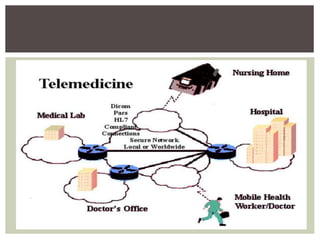
Remote access: Provides capabilities of off-site
viewing and reporting (distance
education, telediagnosis
Radiology Workflow Management:Used by
radiology personnel to manage workflow of
patient exams.
USES
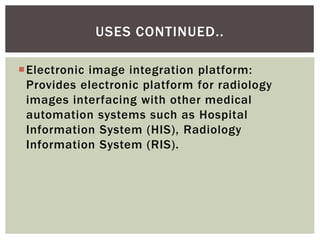
Electronic image integration platform:
Provides electronic platform for radiology
images interfacing with other medical
automation systems such as Hospital
Information System (HIS), Radiology
Information System (RIS).
USES CONTINUED..
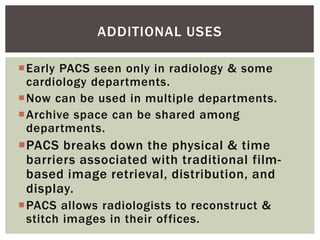
Early PACS seen only in radiology & some
cardiology departments.
Now can be used in multiple departments.
Archive space can be shared among
departments.
PACS breaks down the physical & time
barriers associated with traditional film-
based image retrieval, distribution, and
display.
PACS allows radiologists to reconstruct &
stitch images in their offices.
ADDITIONAL USES
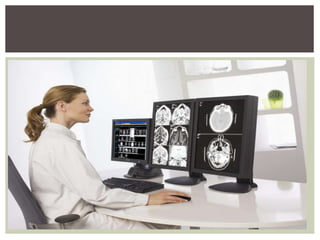
PACS reading stations may also have image
processing capabilities.
Orthopedic workstations are available for the
following:
• Surgeons can plan joint replacement surgery.
• Specialized software allows matching of best
replacement for patient with patient anatomy.
• System saves time and provides better fit.
USES
 Firstly, implementing a PACS is an expensive
project.
 The change in workflow could be frightening for
conservative radiologists & physicians.
 Most of staff will need introduction & additional
trainings to work with PACS software.
 No archive can guarantee a total fault-tolerance
as a result images can be lost or deleted.
 Computer engineer availability required, to
serve daily faults and problems.
 Confidentiality can be a problem.
DISADVANTAGES
 To put things in a nutshell, the benefits of PACS are
clearly visible, but there are some reasonable doubts
left.
 To improve the number of PACS installations, the
vendors and developers of PACS systems should,
besides the technical advancement, focus in helping
the end users to remove the last doubts.
 This could be reached with easier introductions into
the topic, even better adjustable systems to the
clinical workflows and reliable archiving and backup
solutions.
CONCLUSION
THANK YOU

Pacs

  • 1.
  • 2.
    A picture archivingand communications system (PACS) is a medical imaging technology which provides economical storage of, and convenient access to, images from multiple modalities. DEFINITION
  • 3.
    Concept began withAlbert Jutras in Canada in the 1950s. Early PACS systems were developed by the military to send images between Veterans Administration hospitals in the 1980s. Development was encouraged and supported by the U.S. government. HISTORICAL DEVELOPMENT
  • 4.
    Early process involvedscanning radiographs into the computer and sending them from computer to computer. Images were then stored in PACS. Computed and digital radiography followed.
  • 5.
    A network ofcomputers used by radiology departments that replaces film with electronically stored & displayed digital images. It provides archives for storage of multimodality images, integrates images with patient database information, facilitates laser printing of images & displays both images & patient information at work stations throughout the network. It also allows viewing of images in remote locations. PACS
  • 6.
    Can accept anyimage that is in DICOM format Custom designed for each facility Components/features can vary based on the following: • Volume of patients • Number of interpretation areas • Viewing locations • Funding PACS
  • 8.
    DICOM (Digital Imagingand Communications in Medicine) is the universal format for PACS image storage and transfer. Non-image data, such as scanned documents, may be incorporated using consumer industry standard formats like PDF (Portable Document Format), once encapsulated in DICOM. DICOM
  • 10.
    Early systems didnot have standardized image formats. Matching up systems was difficult. Vendors kept systems proprietary and did not share information. DICOM standards helped change this by allowing communication between vendors’ products. INITIAL PROBLEMS
  • 11.
    Made up of4 major components: 1. Imaging modalities- such as X-ray plain film (PF), CT and MRI. 2. A secured network for the transmission of patient information. 3. Workstations for interpreting and reviewing images. 4. Archives for the storage and retrieval of images and reports. COMPONENTS
  • 12.
    Images of aPACS are produced by several radiologic imaging modalities. Images of CT, U/S, MRI & nuclear medicine imaging (PET/SPECT) are digitally captured.  Images of X-ray scanners have to be digitalized first. The images can be transmitted from the modalities using a specified interface. DICOM interface is most frequently used. IMAGE ACQUISITION COMPONENT
  • 14.
    The architecture isthe physical implementation of required functionality, or what one sees from the outside.  A radiologist typically sees a viewing station. A technologist present at a QA workstation. While a PACS administrator spend most of their time in computer room. ARCHITECTURE
  • 15.
    QA workstation isa checkpoint to make sure patient demographics are correct. If study information is correct, images are passed to archive for storage. The central storage device (archive) stores images & may also store reports, measurements & other information present with images. Next step is the reading workstations. Reading workstation is where radiologist reviews patient's study and formulates their diagnosis. ARCHITECTURE CONTINUED…
  • 16.
    Normally attached toa reading workstation is a reporting package assisting with final report. Reporting software is optional. CD/DVD authoring software may also be annexed, used to burn patient studies for distribution to patients or referring physicians ARCHITECTURE CONTINUED…
  • 18.
    PACS has fourmain uses: Hard copy replacement: PACS replaces hard- copy storage. Remote access: Provides capabilities of off-site viewing and reporting (distance education, telediagnosis Radiology Workflow Management:Used by radiology personnel to manage workflow of patient exams. USES
  • 19.
    Electronic image integrationplatform: Provides electronic platform for radiology images interfacing with other medical automation systems such as Hospital Information System (HIS), Radiology Information System (RIS). USES CONTINUED..
  • 21.
    Early PACS seenonly in radiology & some cardiology departments. Now can be used in multiple departments. Archive space can be shared among departments. PACS breaks down the physical & time barriers associated with traditional film- based image retrieval, distribution, and display. PACS allows radiologists to reconstruct & stitch images in their offices. ADDITIONAL USES
  • 23.
    PACS reading stationsmay also have image processing capabilities. Orthopedic workstations are available for the following: • Surgeons can plan joint replacement surgery. • Specialized software allows matching of best replacement for patient with patient anatomy. • System saves time and provides better fit. USES
  • 24.
     Firstly, implementinga PACS is an expensive project.  The change in workflow could be frightening for conservative radiologists & physicians.  Most of staff will need introduction & additional trainings to work with PACS software.  No archive can guarantee a total fault-tolerance as a result images can be lost or deleted.  Computer engineer availability required, to serve daily faults and problems.  Confidentiality can be a problem. DISADVANTAGES
  • 25.
     To putthings in a nutshell, the benefits of PACS are clearly visible, but there are some reasonable doubts left.  To improve the number of PACS installations, the vendors and developers of PACS systems should, besides the technical advancement, focus in helping the end users to remove the last doubts.  This could be reached with easier introductions into the topic, even better adjustable systems to the clinical workflows and reliable archiving and backup solutions. CONCLUSION
  • 27.