McGraw-Hill ©TheMcGraw-HillCompanies,Inc., 2000
DATA COMMUNICATION &
COMPUTER NETWORKS
Presented by: Pankaj Gautam
(IT 3rd Semester)
DATA COMMUNICATIONS & COMPUTER NETWORKS
Introduction to computer networks
 Définition and Objectives of computer networks
 Networking models
 Types of Networks
 Networking Topologies
Topics discussed in this chapter:
Chapter -2
NETWORKS
A network is a set of devices (often referred to as nodes)
connected by communication links. A node can be a
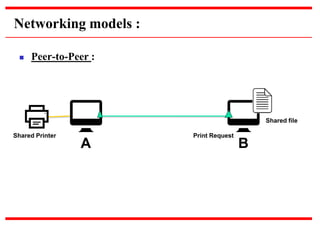
computer, printer, or any other device capable of sending
and/or receiving data generated by other nodes on the
network. A link can be a cable, air, optical fiber, or any
medium which can transport a signal carrying
information.
Computer Network : Definition
A computer network is defined as a collection of
interconnected autonomous computers, for information
exchange. Computer are said to be interconnected, if they
are able to exchange information. Connection is physically
established through cables, radio & microwaves, fiber
optics and communication satellites etc.
By autonomous we means that, any one computer in the
network cannot forcibly start, stop or control another
computer in the network. In other words, every computer
works independently.
Networking Elements
The computer network includes the following networking
elements:
 At least two computers
 Transmission medium either wired or wireless
 Protocols or rules that govern the communication
 Network software such as Network Operating System
Network Criteria
 Performance
 Depends on Network Elements
 Measured in terms of Delay and Throughput
 Reliability
 Failure rate of network components
 Measured in terms of availability/robustness
 Security
 Data protection against corruption/loss of data due to:
 Errors
 Malicious users
The following are some important objectives of computer
networks:
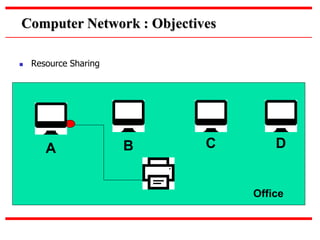
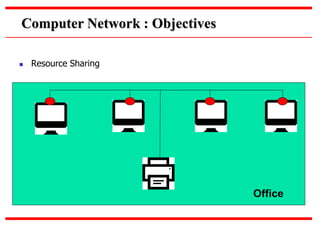
 Resource Sharing –
Many organization has a substantial number of computers in
operations, which are located apart. Ex. A group of office workers can
share a common printer, fax, modem, scanner etc.
 High Reliability –
If there are alternate sources of supply, all files could be replicated on
two or, machines. If one of them is not available, due to hardware
failure, the other copies could be used.
Computer Network : Objectives
 Resource Sharing
Office
A B C D
Computer Network : Objectives
 Resource Sharing
Office
The following are some important objectives of computer
networks:
 Communication –
Network users, located geographically apart, may converse in an
interactive session through the network. In order to permit this, the
network must provide almost error-free communications.
 Flexible access –
Files can be accessed from any computer in the network. The project
can be begun on one computer and finished on another.
Computer Network : Objectives
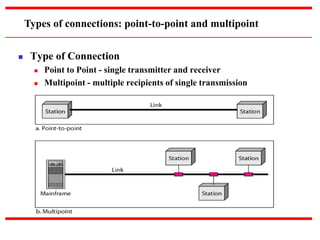
 Type of Connection
 Point to Point - single transmitter and receiver
 Multipoint - multiple recipients of single transmission
Types of connections: point-to-point and multipoint
1. Peer-to-Peer(Point to Point) : Peer-to-peer (P2P) computing or
networking is a distributed application architecture that partitions
tasks or workloads between peers. Peers are equally privileged,
equipotent participants in the application. They are said to form a
peer-to-peer network of nodes.
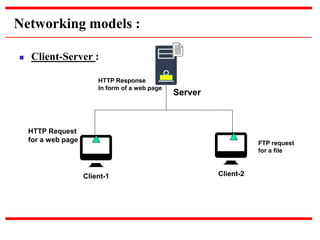
2. Client-Server(Multipoint) : Client–server model is a distributed
application structure that partitions tasks or workloads between
the providers of a resource or service, called servers, and service
requesters, called clients.
Networking models :
Networking models :
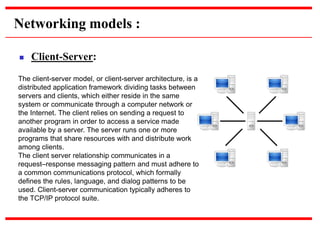
 Client-Server:
The client-server model, or client-server architecture, is a
distributed application framework dividing tasks between
servers and clients, which either reside in the same
system or communicate through a computer network or
the Internet. The client relies on sending a request to
another program in order to access a service made
available by a server. The server runs one or more
programs that share resources with and distribute work
among clients.
The client server relationship communicates in a
request–response messaging pattern and must adhere to
a common communications protocol, which formally
defines the rules, language, and dialog patterns to be
used. Client-server communication typically adheres to
the TCP/IP protocol suite.
Networking models :
 Client-Server:
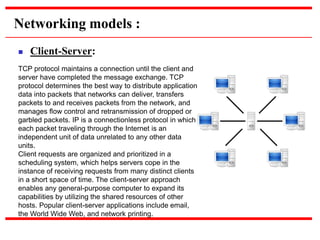
TCP protocol maintains a connection until the client and
server have completed the message exchange. TCP
protocol determines the best way to distribute application
data into packets that networks can deliver, transfers
packets to and receives packets from the network, and
manages flow control and retransmission of dropped or
garbled packets. IP is a connectionless protocol in which
each packet traveling through the Internet is an
independent unit of data unrelated to any other data
units.
Client requests are organized and prioritized in a
scheduling system, which helps servers cope in the
instance of receiving requests from many distinct clients
in a short space of time. The client-server approach
enables any general-purpose computer to expand its
capabilities by utilizing the shared resources of other
hosts. Popular client-server applications include email,
the World Wide Web, and network printing.
Networking models :
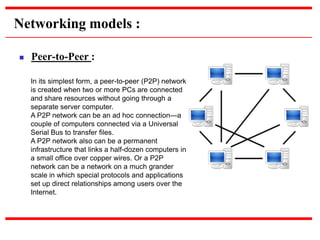
 Peer-to-Peer :
In its simplest form, a peer-to-peer (P2P) network
is created when two or more PCs are connected
and share resources without going through a
separate server computer.
A P2P network can be an ad hoc connection—a
couple of computers connected via a Universal
Serial Bus to transfer files.
A P2P network also can be a permanent
infrastructure that links a half-dozen computers in
a small office over copper wires. Or a P2P
network can be a network on a much grander
scale in which special protocols and applications
set up direct relationships among users over the
Internet.
Networking models :
 Peer-to-Peer :
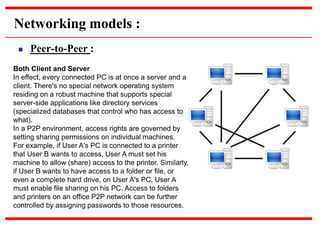
Both Client and Server
In effect, every connected PC is at once a server and a
client. There's no special network operating system
residing on a robust machine that supports special
server-side applications like directory services
(specialized databases that control who has access to
what).
In a P2P environment, access rights are governed by
setting sharing permissions on individual machines.
For example, if User A's PC is connected to a printer
that User B wants to access, User A must set his
machine to allow (share) access to the printer. Similarly,
if User B wants to have access to a folder or file, or
even a complete hard drive, on User A's PC, User A
must enable file sharing on his PC. Access to folders
and printers on an office P2P network can be further
controlled by assigning passwords to those resources.
Networking models :
 Peer-to-Peer :
A B
Shared Printer Print Request
Shared file
Networking models :
 Client-Server :
Server
Client-1 Client-2
HTTP Request
for a web page
HTTP Response
In form of a web page
FTP request
for a file
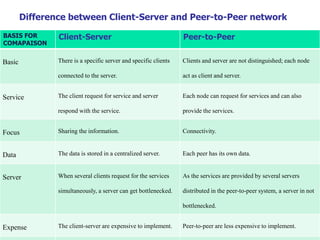
Difference between Client-Server and Peer-to-Peer network
BASIS FOR
COMAPAISON
Client-Server Peer-to-Peer
Basic There is a specific server and specific clients
connected to the server.
Clients and server are not distinguished; each node
act as client and server.
Service The client request for service and server
respond with the service.
Each node can request for services and can also
provide the services.
Focus Sharing the information. Connectivity.
Data The data is stored in a centralized server. Each peer has its own data.
Server When several clients request for the services
simultaneously, a server can get bottlenecked.
As the services are provided by several servers
distributed in the peer-to-peer system, a server in not
bottlenecked.
Expense The client-server are expensive to implement. Peer-to-peer are less expensive to implement.
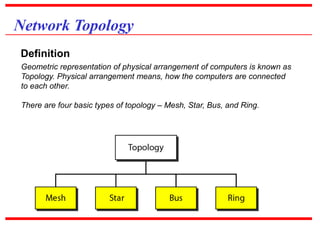
Network Topology
Geometric representation of physical arrangement of computers is known as
Topology. Physical arrangement means, how the computers are connected
to each other.
There are four basic types of topology – Mesh, Star, Bus, and Ring.
Definition
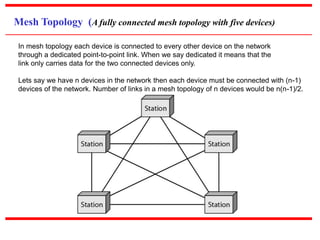
Mesh Topology (A fully connected mesh topology with five devices)
In mesh topology each device is connected to every other device on the network
through a dedicated point-to-point link. When we say dedicated it means that the
link only carries data for the two connected devices only.
Lets say we have n devices in the network then each device must be connected with (n-1)
devices of the network. Number of links in a mesh topology of n devices would be n(n-1)/2.
Mesh Topology
1. No data traffic issues as there is a dedicated link between two devices which means the
link is only available for those two devices.
2. Mesh topology is reliable and robust as failure of one link doesn’t affect other links and the
communication between other devices on the network.
3. Mesh topology is secure because there is a point to point link thus unauthorized access
is not possible.
4. Fault detection is easy.
Advantages :
1. Amount of wires required to connected each system is large.
2. Since each device needs to be connected with other devices, number of I/O ports
required must be huge.
3. Scalability issues because a device cannot be connected with large number of devices
with a dedicated point to point link.
Disadvantages :
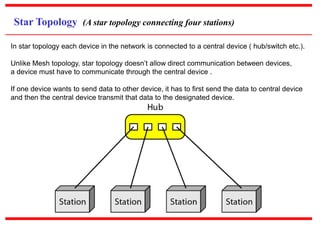
Star Topology (A star topology connecting four stations)
In star topology each device in the network is connected to a central device ( hub/switch etc.).
Unlike Mesh topology, star topology doesn’t allow direct communication between devices,
a device must have to communicate through the central device .
If one device wants to send data to other device, it has to first send the data to central device
and then the central device transmit that data to the designated device.
Star Topology
1. Less expensive because each device only need one I/O port and needs to be connected
with central hub/switch with one link.
2. Easier to install.
3. Less amount of cables required as each device needs to be connected to central device only.
4. Robust, if one link fails, other links will work just fine.
5. Easy fault detection because the link can be easily identified.
Advantages :
1. If central device goes down everything goes down, none of the devices can work without it.
2. Central device requires more resources and regular maintenance because it is the
central system of star topology.
Disadvantages :
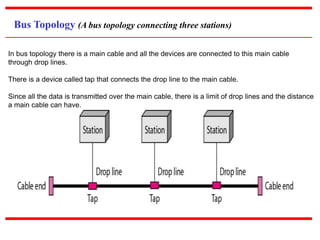
Bus Topology (A bus topology connecting three stations)
In bus topology there is a main cable and all the devices are connected to this main cable
through drop lines.
There is a device called tap that connects the drop line to the main cable.
Since all the data is transmitted over the main cable, there is a limit of drop lines and the distance
a main cable can have.
Bus Topology
1. Easy installation, each cable needs to be connected with backbone cable.
2. Less cables required than Mesh and star topology
Advantages :
1. Difficultly in fault detection.
2. Not scalable as there is a limit of how many nodes you can connect with backbone cable.
Disadvantages :
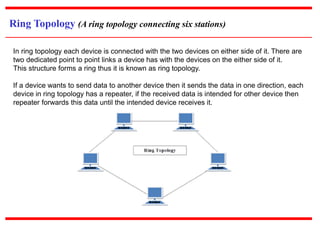
Ring Topology (A ring topology connecting six stations)
In ring topology each device is connected with the two devices on either side of it. There are
two dedicated point to point links a device has with the devices on the either side of it.
This structure forms a ring thus it is known as ring topology.
If a device wants to send data to another device then it sends the data in one direction, each
device in ring topology has a repeater, if the received data is intended for other device then
repeater forwards this data until the intended device receives it.
Ring Topology
1. Easy to install.
2. Managing is easier as to add or remove a device from the topology only two links
are required to be changed.
Advantages :
1. A link failure can fail the entire network as the signal will not travel forward due to failure.
2. Data traffic issues, since all the data is circulating in a ring.
Disadvantages :
Hybrid Topology
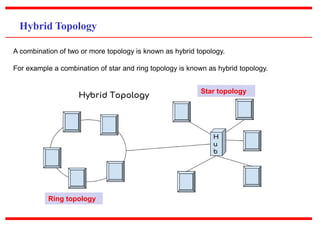
A combination of two or more topology is known as hybrid topology.
For example a combination of star and ring topology is known as hybrid topology.
Star topology
Ring topology
Hybrid Topology
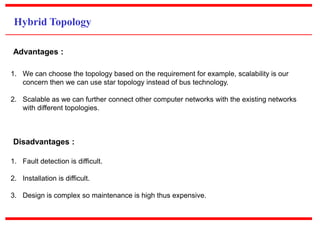
1. We can choose the topology based on the requirement for example, scalability is our
concern then we can use star topology instead of bus technology.
2. Scalable as we can further connect other computer networks with the existing networks
with different topologies.
Advantages :
1. Fault detection is difficult.
2. Installation is difficult.
3. Design is complex so maintenance is high thus expensive.
Disadvantages :
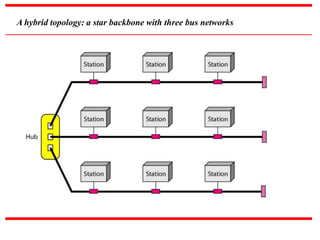
A hybrid topology: a star backbone with three bus networks
Types of Networks
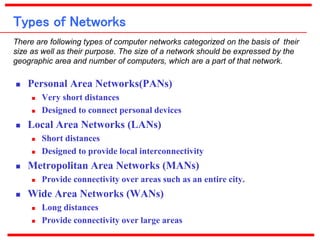
 Personal Area Networks(PANs)
 Very short distances
 Designed to connect personal devices
 Local Area Networks (LANs)
 Short distances
 Designed to provide local interconnectivity
 Metropolitan Area Networks (MANs)
 Provide connectivity over areas such as an entire city.
 Wide Area Networks (WANs)
 Long distances
 Provide connectivity over large areas
There are following types of computer networks categorized on the basis of their
size as well as their purpose. The size of a network should be expressed by the
geographic area and number of computers, which are a part of that network.
Personal Area Networks(PANs)
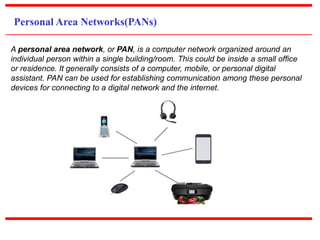
A personal area network, or PAN, is a computer network organized around an
individual person within a single building/room. This could be inside a small office
or residence. It generally consists of a computer, mobile, or personal digital
assistant. PAN can be used for establishing communication among these personal
devices for connecting to a digital network and the internet.
Personal Area Networks(PANs)
Characteristics of PAN :
1. It is mostly personal devices network equipped within a limited area.
2. Allows you to handle the interconnection of IT devices at the surrounding of a
single user.
3. PAN includes mobile devices, tablet, and laptop.
4. It can be wirelessly connected to the internet called WPAN.
5. Appliances use for PAN: cordless mice, keyboards, and Bluetooth systems.
Advantages of PAN :
Here, are important pros/benefits of using PAN network:
1. PAN networks are relatively secure and safe
2. It offers only short-range solution up to ten meters.
3. Provide very fast data transmission.
Disadvantages of PAN:
Here are important cons/ drawback of using PAN network:
1. It may cause interference to other networks at the same radio bands.
2. Strictly limited to very short distances.
Local Area Networks(LANs)
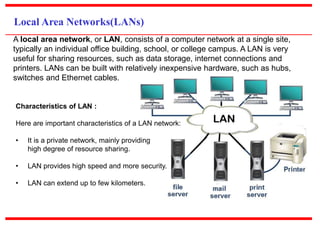
A local area network, or LAN, consists of a computer network at a single site,
typically an individual office building, school, or college campus. A LAN is very
useful for sharing resources, such as data storage, internet connections and
printers. LANs can be built with relatively inexpensive hardware, such as hubs,
switches and Ethernet cables.
Characteristics of LAN :
Here are important characteristics of a LAN network:
• It is a private network, mainly providing
high degree of resource sharing.
• LAN provides high speed and more security.
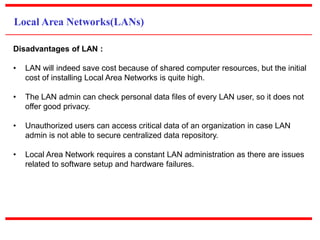
• LAN can extend up to few kilometers.
Local Area Networks(LANs)
The smallest LAN may only use two computers, while larger LANs can
accommodate thousands of computers. A LAN typically relies mostly on wired
connections for increased speed and security, but wireless connections can also
be part of a LAN. High speed and relatively low cost are the main characteristics of
LANs.
Advantages of LAN :
1. Computer resources like hard-disks, DVD-ROM, and printers can share local
area networks. This significantly reduces the cost of hardware purchases.
2. You can use the same software over the network instead of purchasing the
licensed software for each client in the network.
3. Data of all network users(backups) can be stored on a single hard disk of the
server computer.
4. You can easily transfer data and messages over networked computers.
5. It will be easy to manage data at only one place, which makes data more
secure.
6. Local Area Network offers the facility to share a single internet connection
among all the LAN users.
Local Area Networks(LANs)
Disadvantages of LAN :
• LAN will indeed save cost because of shared computer resources, but the initial
cost of installing Local Area Networks is quite high.
• The LAN admin can check personal data files of every LAN user, so it does not
offer good privacy.
• Unauthorized users can access critical data of an organization in case LAN
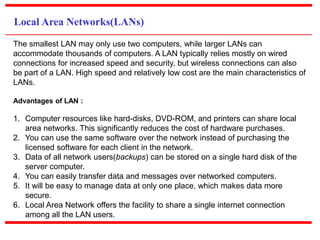
admin is not able to secure centralized data repository.
• Local Area Network requires a constant LAN administration as there are issues
related to software setup and hardware failures.
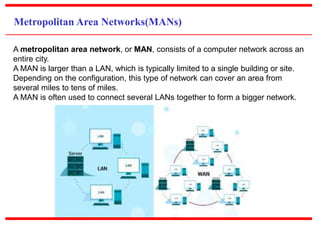
Metropolitan Area Networks(MANs)
A metropolitan area network, or MAN, consists of a computer network across an
entire city.
A MAN is larger than a LAN, which is typically limited to a single building or site.
Depending on the configuration, this type of network can cover an area from
several miles to tens of miles.
A MAN is often used to connect several LANs together to form a bigger network.
Metropolitan Area Networks(MANs)
Characteristics of MAN :
It mostly covers towns and cities in a maximum 50 km range
Mostly used medium is optical fibers, cables
Data rates adequate for distributed computing applications.
Advantages of MAN :
It offers fast communication using high-speed carriers, like fiber optic cables.
It provides excellent support for an extensive size network and greater access to
WANs.
The dual bus in MAN network provides support to transmit data in both directions
concurrently.
A MAN network mostly includes some areas of a city or an entire city.
Disadvantages of MAN :
You need more cable to establish MAN connection from one place to another.
In MAN network it is tough to make the system secure from hackers
Wide Area Networks(WANs)
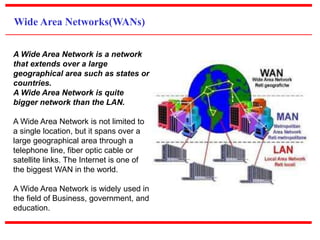
A Wide Area Network is a network
that extends over a large
geographical area such as states or
countries.
A Wide Area Network is quite
bigger network than the LAN.
A Wide Area Network is not limited to
a single location, but it spans over a
large geographical area through a
telephone line, fiber optic cable or
satellite links. The Internet is one of
the biggest WAN in the world.
A Wide Area Network is widely used in
the field of Business, government, and
education.
Wide Area Networks(WANs)
Advantages Of Wide Area Network:
1. Geographical area: A Wide Area Network provides a large geographical area.
Suppose if the branch of our office is in a different city then we can connect
with them through WAN. The internet provides a leased line through which we
can connect with another branch.
2. Centralized data: In case of WAN network, data is centralized. Therefore, we
do not need to buy the emails, files or back up servers.
3. Get updated files: Software companies work on the live server. Therefore, the
programmers get the updated files within seconds.
4. Exchange messages: In a WAN network, messages are transmitted fast. The
web application like Facebook, Whatsapp, Skype allows you to communicate
with friends.
5. Sharing of software and resources: In WAN network, we can share the
software and other resources like a hard drive, RAM etc.
Wide Area Networks(WANs)
Disadvantages Of Wide Area Network:
1. Security issue: A WAN network has more security issues as compared to LAN
and MAN network as all the technologies are combined together that creates
the security problem.
2. Needs Firewall & antivirus software: The data is transferred on the internet
which can be changed or hacked by the hackers, so the firewall needs to be
used. Some people can inject the virus in our system so antivirus is needed to
protect from such a virus.
3. High Setup cost: An installation cost of the WAN network is high as it involves
the purchasing of routers, switches.
4. Troubleshooting problems: It covers a large area so fixing the problem is
difficult.
5. Low Speed : It provides low transmission rate as compared to LANs.
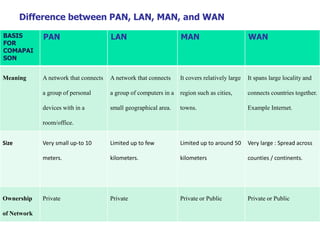
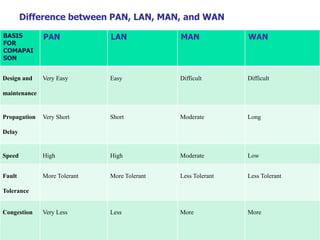
Difference between PAN, LAN, MAN, and WAN
BASIS
FOR
COMAPAI
SON
PAN LAN MAN WAN
Meaning A network that connects
a group of personal
devices with in a
room/office.
A network that connects
a group of computers in a
small geographical area.
It covers relatively large
region such as cities,
towns.
It spans large locality and
connects countries together.
Example Internet.
Size Very small up-to 10
meters.
Limited up to few
kilometers.
Limited up to around 50
kilometers
Very large : Spread across
counties / continents.
Ownership
of Network
Private Private Private or Public Private or Public
Difference between PAN, LAN, MAN, and WAN
BASIS
FOR
COMAPAI
SON
PAN LAN MAN WAN
Design and
maintenance
Very Easy Easy Difficult Difficult
Propagation
Delay
Very Short Short Moderate Long
Speed High High Moderate Low
Fault
Tolerance
More Tolerant More Tolerant Less Tolerant Less Tolerant
Congestion Very Less Less More More

Introduction to Computer Networks

  • 1.
    McGraw-Hill ©TheMcGraw-HillCompanies,Inc., 2000 DATACOMMUNICATION & COMPUTER NETWORKS Presented by: Pankaj Gautam (IT 3rd Semester)
  • 2.
    DATA COMMUNICATIONS &COMPUTER NETWORKS Introduction to computer networks  Définition and Objectives of computer networks  Networking models  Types of Networks  Networking Topologies Topics discussed in this chapter: Chapter -2
  • 3.
    NETWORKS A network isa set of devices (often referred to as nodes) connected by communication links. A node can be a computer, printer, or any other device capable of sending and/or receiving data generated by other nodes on the network. A link can be a cable, air, optical fiber, or any medium which can transport a signal carrying information.
  • 4.
    Computer Network :Definition A computer network is defined as a collection of interconnected autonomous computers, for information exchange. Computer are said to be interconnected, if they are able to exchange information. Connection is physically established through cables, radio & microwaves, fiber optics and communication satellites etc. By autonomous we means that, any one computer in the network cannot forcibly start, stop or control another computer in the network. In other words, every computer works independently.
  • 5.
    Networking Elements The computernetwork includes the following networking elements:  At least two computers  Transmission medium either wired or wireless  Protocols or rules that govern the communication  Network software such as Network Operating System
  • 6.
    Network Criteria  Performance Depends on Network Elements  Measured in terms of Delay and Throughput  Reliability  Failure rate of network components  Measured in terms of availability/robustness  Security  Data protection against corruption/loss of data due to:  Errors  Malicious users
  • 7.
    The following aresome important objectives of computer networks:  Resource Sharing – Many organization has a substantial number of computers in operations, which are located apart. Ex. A group of office workers can share a common printer, fax, modem, scanner etc.  High Reliability – If there are alternate sources of supply, all files could be replicated on two or, machines. If one of them is not available, due to hardware failure, the other copies could be used. Computer Network : Objectives
  • 8.
    Computer Network :Objectives  Resource Sharing Office A B C D
  • 9.
    Computer Network :Objectives  Resource Sharing Office
  • 10.
    The following aresome important objectives of computer networks:  Communication – Network users, located geographically apart, may converse in an interactive session through the network. In order to permit this, the network must provide almost error-free communications.  Flexible access – Files can be accessed from any computer in the network. The project can be begun on one computer and finished on another. Computer Network : Objectives
  • 11.
     Type ofConnection  Point to Point - single transmitter and receiver  Multipoint - multiple recipients of single transmission Types of connections: point-to-point and multipoint
  • 12.
    1. Peer-to-Peer(Point toPoint) : Peer-to-peer (P2P) computing or networking is a distributed application architecture that partitions tasks or workloads between peers. Peers are equally privileged, equipotent participants in the application. They are said to form a peer-to-peer network of nodes. 2. Client-Server(Multipoint) : Client–server model is a distributed application structure that partitions tasks or workloads between the providers of a resource or service, called servers, and service requesters, called clients. Networking models :
  • 13.
    Networking models : Client-Server: The client-server model, or client-server architecture, is a distributed application framework dividing tasks between servers and clients, which either reside in the same system or communicate through a computer network or the Internet. The client relies on sending a request to another program in order to access a service made available by a server. The server runs one or more programs that share resources with and distribute work among clients. The client server relationship communicates in a request–response messaging pattern and must adhere to a common communications protocol, which formally defines the rules, language, and dialog patterns to be used. Client-server communication typically adheres to the TCP/IP protocol suite.
  • 14.
    Networking models : Client-Server: TCP protocol maintains a connection until the client and server have completed the message exchange. TCP protocol determines the best way to distribute application data into packets that networks can deliver, transfers packets to and receives packets from the network, and manages flow control and retransmission of dropped or garbled packets. IP is a connectionless protocol in which each packet traveling through the Internet is an independent unit of data unrelated to any other data units. Client requests are organized and prioritized in a scheduling system, which helps servers cope in the instance of receiving requests from many distinct clients in a short space of time. The client-server approach enables any general-purpose computer to expand its capabilities by utilizing the shared resources of other hosts. Popular client-server applications include email, the World Wide Web, and network printing.
  • 15.
    Networking models : Peer-to-Peer : In its simplest form, a peer-to-peer (P2P) network is created when two or more PCs are connected and share resources without going through a separate server computer. A P2P network can be an ad hoc connection—a couple of computers connected via a Universal Serial Bus to transfer files. A P2P network also can be a permanent infrastructure that links a half-dozen computers in a small office over copper wires. Or a P2P network can be a network on a much grander scale in which special protocols and applications set up direct relationships among users over the Internet.
  • 16.
    Networking models : Peer-to-Peer : Both Client and Server In effect, every connected PC is at once a server and a client. There's no special network operating system residing on a robust machine that supports special server-side applications like directory services (specialized databases that control who has access to what). In a P2P environment, access rights are governed by setting sharing permissions on individual machines. For example, if User A's PC is connected to a printer that User B wants to access, User A must set his machine to allow (share) access to the printer. Similarly, if User B wants to have access to a folder or file, or even a complete hard drive, on User A's PC, User A must enable file sharing on his PC. Access to folders and printers on an office P2P network can be further controlled by assigning passwords to those resources.
  • 17.
    Networking models : Peer-to-Peer : A B Shared Printer Print Request Shared file
  • 18.
    Networking models : Client-Server : Server Client-1 Client-2 HTTP Request for a web page HTTP Response In form of a web page FTP request for a file
  • 19.
    Difference between Client-Serverand Peer-to-Peer network BASIS FOR COMAPAISON Client-Server Peer-to-Peer Basic There is a specific server and specific clients connected to the server. Clients and server are not distinguished; each node act as client and server. Service The client request for service and server respond with the service. Each node can request for services and can also provide the services. Focus Sharing the information. Connectivity. Data The data is stored in a centralized server. Each peer has its own data. Server When several clients request for the services simultaneously, a server can get bottlenecked. As the services are provided by several servers distributed in the peer-to-peer system, a server in not bottlenecked. Expense The client-server are expensive to implement. Peer-to-peer are less expensive to implement.
  • 20.
    Network Topology Geometric representationof physical arrangement of computers is known as Topology. Physical arrangement means, how the computers are connected to each other. There are four basic types of topology – Mesh, Star, Bus, and Ring. Definition
  • 21.
    Mesh Topology (Afully connected mesh topology with five devices) In mesh topology each device is connected to every other device on the network through a dedicated point-to-point link. When we say dedicated it means that the link only carries data for the two connected devices only. Lets say we have n devices in the network then each device must be connected with (n-1) devices of the network. Number of links in a mesh topology of n devices would be n(n-1)/2.
  • 22.
    Mesh Topology 1. Nodata traffic issues as there is a dedicated link between two devices which means the link is only available for those two devices. 2. Mesh topology is reliable and robust as failure of one link doesn’t affect other links and the communication between other devices on the network. 3. Mesh topology is secure because there is a point to point link thus unauthorized access is not possible. 4. Fault detection is easy. Advantages : 1. Amount of wires required to connected each system is large. 2. Since each device needs to be connected with other devices, number of I/O ports required must be huge. 3. Scalability issues because a device cannot be connected with large number of devices with a dedicated point to point link. Disadvantages :
  • 23.
    Star Topology (Astar topology connecting four stations) In star topology each device in the network is connected to a central device ( hub/switch etc.). Unlike Mesh topology, star topology doesn’t allow direct communication between devices, a device must have to communicate through the central device . If one device wants to send data to other device, it has to first send the data to central device and then the central device transmit that data to the designated device.
  • 24.
    Star Topology 1. Lessexpensive because each device only need one I/O port and needs to be connected with central hub/switch with one link. 2. Easier to install. 3. Less amount of cables required as each device needs to be connected to central device only. 4. Robust, if one link fails, other links will work just fine. 5. Easy fault detection because the link can be easily identified. Advantages : 1. If central device goes down everything goes down, none of the devices can work without it. 2. Central device requires more resources and regular maintenance because it is the central system of star topology. Disadvantages :
  • 25.
    Bus Topology (Abus topology connecting three stations) In bus topology there is a main cable and all the devices are connected to this main cable through drop lines. There is a device called tap that connects the drop line to the main cable. Since all the data is transmitted over the main cable, there is a limit of drop lines and the distance a main cable can have.
  • 26.
    Bus Topology 1. Easyinstallation, each cable needs to be connected with backbone cable. 2. Less cables required than Mesh and star topology Advantages : 1. Difficultly in fault detection. 2. Not scalable as there is a limit of how many nodes you can connect with backbone cable. Disadvantages :
  • 27.
    Ring Topology (Aring topology connecting six stations) In ring topology each device is connected with the two devices on either side of it. There are two dedicated point to point links a device has with the devices on the either side of it. This structure forms a ring thus it is known as ring topology. If a device wants to send data to another device then it sends the data in one direction, each device in ring topology has a repeater, if the received data is intended for other device then repeater forwards this data until the intended device receives it.
  • 28.
    Ring Topology 1. Easyto install. 2. Managing is easier as to add or remove a device from the topology only two links are required to be changed. Advantages : 1. A link failure can fail the entire network as the signal will not travel forward due to failure. 2. Data traffic issues, since all the data is circulating in a ring. Disadvantages :
  • 29.
    Hybrid Topology A combinationof two or more topology is known as hybrid topology. For example a combination of star and ring topology is known as hybrid topology. Star topology Ring topology
  • 30.
    Hybrid Topology 1. Wecan choose the topology based on the requirement for example, scalability is our concern then we can use star topology instead of bus technology. 2. Scalable as we can further connect other computer networks with the existing networks with different topologies. Advantages : 1. Fault detection is difficult. 2. Installation is difficult. 3. Design is complex so maintenance is high thus expensive. Disadvantages :
  • 31.
    A hybrid topology:a star backbone with three bus networks
  • 32.
    Types of Networks Personal Area Networks(PANs)  Very short distances  Designed to connect personal devices  Local Area Networks (LANs)  Short distances  Designed to provide local interconnectivity  Metropolitan Area Networks (MANs)  Provide connectivity over areas such as an entire city.  Wide Area Networks (WANs)  Long distances  Provide connectivity over large areas There are following types of computer networks categorized on the basis of their size as well as their purpose. The size of a network should be expressed by the geographic area and number of computers, which are a part of that network.
  • 33.
    Personal Area Networks(PANs) Apersonal area network, or PAN, is a computer network organized around an individual person within a single building/room. This could be inside a small office or residence. It generally consists of a computer, mobile, or personal digital assistant. PAN can be used for establishing communication among these personal devices for connecting to a digital network and the internet.
  • 34.
    Personal Area Networks(PANs) Characteristicsof PAN : 1. It is mostly personal devices network equipped within a limited area. 2. Allows you to handle the interconnection of IT devices at the surrounding of a single user. 3. PAN includes mobile devices, tablet, and laptop. 4. It can be wirelessly connected to the internet called WPAN. 5. Appliances use for PAN: cordless mice, keyboards, and Bluetooth systems. Advantages of PAN : Here, are important pros/benefits of using PAN network: 1. PAN networks are relatively secure and safe 2. It offers only short-range solution up to ten meters. 3. Provide very fast data transmission. Disadvantages of PAN: Here are important cons/ drawback of using PAN network: 1. It may cause interference to other networks at the same radio bands. 2. Strictly limited to very short distances.
  • 35.
    Local Area Networks(LANs) Alocal area network, or LAN, consists of a computer network at a single site, typically an individual office building, school, or college campus. A LAN is very useful for sharing resources, such as data storage, internet connections and printers. LANs can be built with relatively inexpensive hardware, such as hubs, switches and Ethernet cables. Characteristics of LAN : Here are important characteristics of a LAN network: • It is a private network, mainly providing high degree of resource sharing. • LAN provides high speed and more security. • LAN can extend up to few kilometers.
  • 36.
    Local Area Networks(LANs) Thesmallest LAN may only use two computers, while larger LANs can accommodate thousands of computers. A LAN typically relies mostly on wired connections for increased speed and security, but wireless connections can also be part of a LAN. High speed and relatively low cost are the main characteristics of LANs. Advantages of LAN : 1. Computer resources like hard-disks, DVD-ROM, and printers can share local area networks. This significantly reduces the cost of hardware purchases. 2. You can use the same software over the network instead of purchasing the licensed software for each client in the network. 3. Data of all network users(backups) can be stored on a single hard disk of the server computer. 4. You can easily transfer data and messages over networked computers. 5. It will be easy to manage data at only one place, which makes data more secure. 6. Local Area Network offers the facility to share a single internet connection among all the LAN users.
  • 37.
    Local Area Networks(LANs) Disadvantagesof LAN : • LAN will indeed save cost because of shared computer resources, but the initial cost of installing Local Area Networks is quite high. • The LAN admin can check personal data files of every LAN user, so it does not offer good privacy. • Unauthorized users can access critical data of an organization in case LAN admin is not able to secure centralized data repository. • Local Area Network requires a constant LAN administration as there are issues related to software setup and hardware failures.
  • 38.
    Metropolitan Area Networks(MANs) Ametropolitan area network, or MAN, consists of a computer network across an entire city. A MAN is larger than a LAN, which is typically limited to a single building or site. Depending on the configuration, this type of network can cover an area from several miles to tens of miles. A MAN is often used to connect several LANs together to form a bigger network.
  • 39.
    Metropolitan Area Networks(MANs) Characteristicsof MAN : It mostly covers towns and cities in a maximum 50 km range Mostly used medium is optical fibers, cables Data rates adequate for distributed computing applications. Advantages of MAN : It offers fast communication using high-speed carriers, like fiber optic cables. It provides excellent support for an extensive size network and greater access to WANs. The dual bus in MAN network provides support to transmit data in both directions concurrently. A MAN network mostly includes some areas of a city or an entire city. Disadvantages of MAN : You need more cable to establish MAN connection from one place to another. In MAN network it is tough to make the system secure from hackers
  • 40.
    Wide Area Networks(WANs) AWide Area Network is a network that extends over a large geographical area such as states or countries. A Wide Area Network is quite bigger network than the LAN. A Wide Area Network is not limited to a single location, but it spans over a large geographical area through a telephone line, fiber optic cable or satellite links. The Internet is one of the biggest WAN in the world. A Wide Area Network is widely used in the field of Business, government, and education.
  • 41.
    Wide Area Networks(WANs) AdvantagesOf Wide Area Network: 1. Geographical area: A Wide Area Network provides a large geographical area. Suppose if the branch of our office is in a different city then we can connect with them through WAN. The internet provides a leased line through which we can connect with another branch. 2. Centralized data: In case of WAN network, data is centralized. Therefore, we do not need to buy the emails, files or back up servers. 3. Get updated files: Software companies work on the live server. Therefore, the programmers get the updated files within seconds. 4. Exchange messages: In a WAN network, messages are transmitted fast. The web application like Facebook, Whatsapp, Skype allows you to communicate with friends. 5. Sharing of software and resources: In WAN network, we can share the software and other resources like a hard drive, RAM etc.
  • 42.
    Wide Area Networks(WANs) DisadvantagesOf Wide Area Network: 1. Security issue: A WAN network has more security issues as compared to LAN and MAN network as all the technologies are combined together that creates the security problem. 2. Needs Firewall & antivirus software: The data is transferred on the internet which can be changed or hacked by the hackers, so the firewall needs to be used. Some people can inject the virus in our system so antivirus is needed to protect from such a virus. 3. High Setup cost: An installation cost of the WAN network is high as it involves the purchasing of routers, switches. 4. Troubleshooting problems: It covers a large area so fixing the problem is difficult. 5. Low Speed : It provides low transmission rate as compared to LANs.
  • 43.
    Difference between PAN,LAN, MAN, and WAN BASIS FOR COMAPAI SON PAN LAN MAN WAN Meaning A network that connects a group of personal devices with in a room/office. A network that connects a group of computers in a small geographical area. It covers relatively large region such as cities, towns. It spans large locality and connects countries together. Example Internet. Size Very small up-to 10 meters. Limited up to few kilometers. Limited up to around 50 kilometers Very large : Spread across counties / continents. Ownership of Network Private Private Private or Public Private or Public
  • 44.
    Difference between PAN,LAN, MAN, and WAN BASIS FOR COMAPAI SON PAN LAN MAN WAN Design and maintenance Very Easy Easy Difficult Difficult Propagation Delay Very Short Short Moderate Long Speed High High Moderate Low Fault Tolerance More Tolerant More Tolerant Less Tolerant Less Tolerant Congestion Very Less Less More More