Introducti
on

Basic Concept of
Computer
Prepared by: EngAbdirahman Hassan Nou
Network
McGraw-Hill Technology Education
Copyright © 2006
Companies, Inc. All Berbera
Prepared by: EngAbdirahman Hassan Nour by The McGraw-Hill Golis Universityrights reserved.
Definition of Computer network
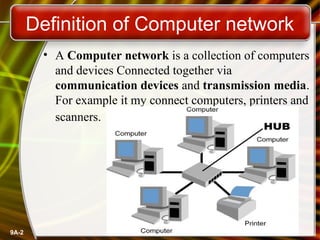
• A Computer network is a collection of computers
and devices Connected together via
communication devices and transmission media.
For example it my connect computers, printers and
scanners.

9A-2
Definition of Network Communication
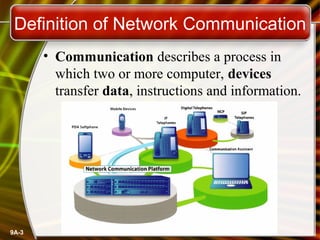
• Communication describes a process in
which two or more computer, devices
transfer data, instructions and information.

9A-3
Advantage of Computer networks
• Sharing of Devices such as printer and
scanner
• Sharing program / software
• Sharing files
• Sharing data
• Sharing information
• Sharing of single high-speed internet
connection
• Better communication using internet
services such as email, mailing list and
internet Relate chat (IRC)
9A-4
Disadvantage of Computer Network
•
•

•

9A-5

The larger network becomes, the more
difficult it is to manage.
If the network stops operating system,
then it may not be possible to access
various resources
Computer Viruses: If any computer
system in a network gets affected
by computer virus, there is a possible
threat of other systems getting affected
too.
Sharing Data

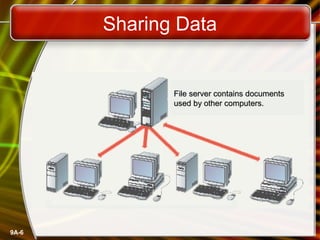
File server contains documents
used by other computers.

9A-6
Types of Network

9A-7
Local Area Network (LAN)
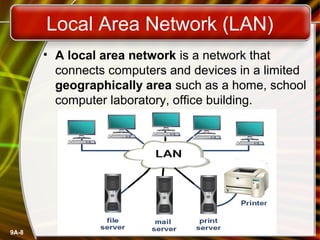
• A local area network is a network that
connects computers and devices in a limited
geographically area such as a home, school
computer laboratory, office building.

9A-8
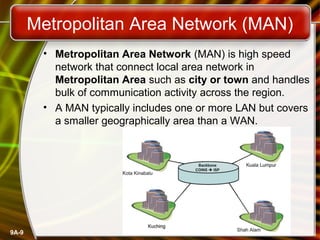
Metropolitan Area Network (MAN)
• Metropolitan Area Network (MAN) is high speed
network that connect local area network in
Metropolitan Area such as city or town and handles
bulk of communication activity across the region.
• A MAN typically includes one or more LAN but covers
a smaller geographically area than a WAN.

9A-9
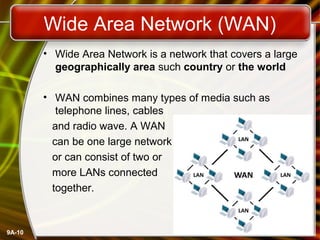
Wide Area Network (WAN)
• Wide Area Network is a network that covers a large
geographically area such country or the world
• WAN combines many types of media such as
telephone lines, cables
and radio wave. A WAN
can be one large network
or can consist of two or
more LANs connected
together.

9A-10
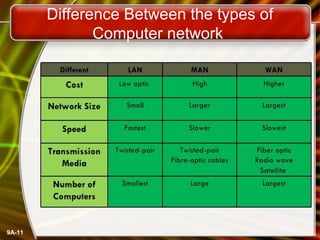
Difference Between the types of
Computer network

9A-11
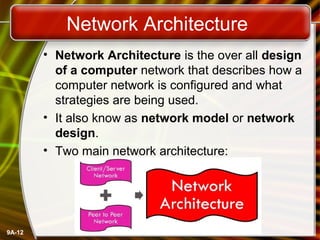
Network Architecture
• Network Architecture is the over all design
of a computer network that describes how a
computer network is configured and what
strategies are being used.
• It also know as network model or network
design.
• Two main network architecture:

9A-12
Server and Clients
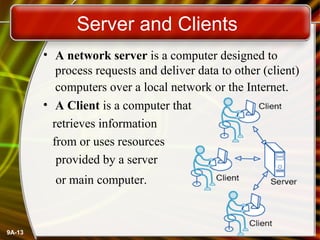
• A network server is a computer designed to
process requests and deliver data to other (client)
computers over a local network or the Internet.
• A Client is a computer that
retrieves information
from or uses resources
provided by a server
or main computer.

9A-13
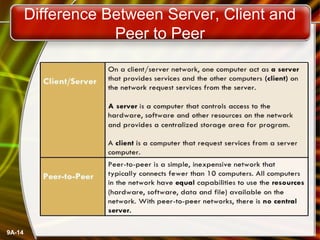
Difference Between Server, Client and
Peer to Peer

9A-14
Network Communication Technology
•

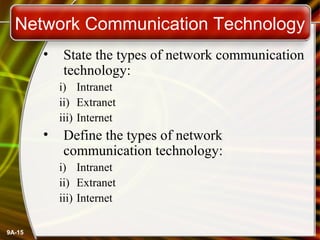
State the types of network communication
technology:
i) Intranet
ii) Extranet
iii) Internet

•

Define the types of network
communication technology:
i) Intranet
ii) Extranet
iii) Internet

9A-15
Types of Network Communication

9A-16
Intranet
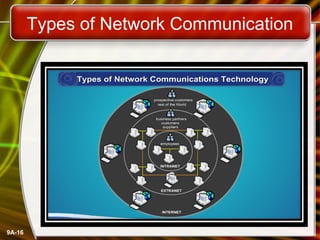
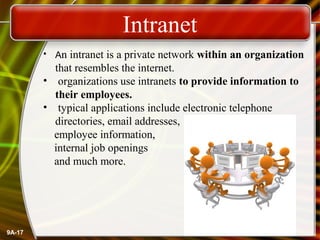
• An intranet is a private network within an organization

that resembles the internet.
• organizations use intranets to provide information to
their employees.
• typical applications include electronic telephone
directories, email addresses,
employee information,
internal job openings
and much more.

9A-17
Extranet
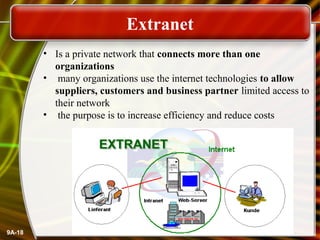
• Is a private network that connects more than one
organizations
• many organizations use the internet technologies to allow
suppliers, customers and business partner limited access to
their network
• the purpose is to increase efficiency and reduce costs

9A-18
Internet
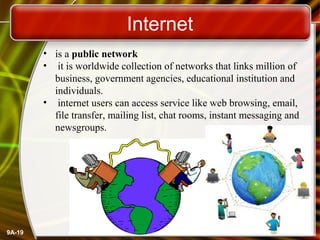
• is a public network
• it is worldwide collection of networks that links million of
business, government agencies, educational institution and
individuals.
• internet users can access service like web browsing, email,
file transfer, mailing list, chat rooms, instant messaging and
newsgroups.

9A-19
Difference Between Internet, Intranet
and Extranet
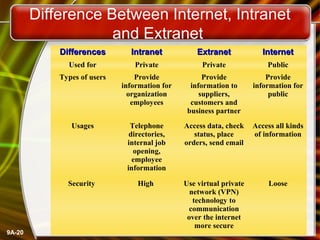
Differences

Extranet

Internet

Used for

Private

Private

Public

Types of users

Provide
information for
organization
employees

Provide
information to
suppliers,
customers and
business partner

Provide
information for
public

Usages

Telephone
directories,
internal job
opening,
employee
information

Access data, check
status, place
orders, send email

Access all kinds
of information

Security

9A-20

Intranet

High

Use virtual private
network (VPN)
technology to
communication
over the internet
more secure

Loose
THANK`S
ANY
QUESTION

McGraw-Hill by: EngAbdirahman Hassan © 2006 by The McGraw-Hill Companies, Inc. All rights reserved.
Copyright Nour
Prepared Technology Education
Golis University Berbera

Prepared by: EngAbdirahman Hassan Nour

Golis University Berbera

Basic concept of computer network

  • 1.
    Introducti on Basic Concept of Computer Preparedby: EngAbdirahman Hassan Nou Network McGraw-Hill Technology Education Copyright © 2006 Companies, Inc. All Berbera Prepared by: EngAbdirahman Hassan Nour by The McGraw-Hill Golis Universityrights reserved.
  • 2.
    Definition of Computernetwork • A Computer network is a collection of computers and devices Connected together via communication devices and transmission media. For example it my connect computers, printers and scanners. 9A-2
  • 3.
    Definition of NetworkCommunication • Communication describes a process in which two or more computer, devices transfer data, instructions and information. 9A-3
  • 4.
    Advantage of Computernetworks • Sharing of Devices such as printer and scanner • Sharing program / software • Sharing files • Sharing data • Sharing information • Sharing of single high-speed internet connection • Better communication using internet services such as email, mailing list and internet Relate chat (IRC) 9A-4
  • 5.
    Disadvantage of ComputerNetwork • • • 9A-5 The larger network becomes, the more difficult it is to manage. If the network stops operating system, then it may not be possible to access various resources Computer Viruses: If any computer system in a network gets affected by computer virus, there is a possible threat of other systems getting affected too.
  • 6.
    Sharing Data File servercontains documents used by other computers. 9A-6
  • 7.
  • 8.
    Local Area Network(LAN) • A local area network is a network that connects computers and devices in a limited geographically area such as a home, school computer laboratory, office building. 9A-8
  • 9.
    Metropolitan Area Network(MAN) • Metropolitan Area Network (MAN) is high speed network that connect local area network in Metropolitan Area such as city or town and handles bulk of communication activity across the region. • A MAN typically includes one or more LAN but covers a smaller geographically area than a WAN. 9A-9
  • 10.
    Wide Area Network(WAN) • Wide Area Network is a network that covers a large geographically area such country or the world • WAN combines many types of media such as telephone lines, cables and radio wave. A WAN can be one large network or can consist of two or more LANs connected together. 9A-10
  • 11.
    Difference Between thetypes of Computer network 9A-11
  • 12.
    Network Architecture • NetworkArchitecture is the over all design of a computer network that describes how a computer network is configured and what strategies are being used. • It also know as network model or network design. • Two main network architecture: 9A-12
  • 13.
    Server and Clients •A network server is a computer designed to process requests and deliver data to other (client) computers over a local network or the Internet. • A Client is a computer that retrieves information from or uses resources provided by a server or main computer. 9A-13
  • 14.
    Difference Between Server,Client and Peer to Peer 9A-14
  • 15.
    Network Communication Technology • Statethe types of network communication technology: i) Intranet ii) Extranet iii) Internet • Define the types of network communication technology: i) Intranet ii) Extranet iii) Internet 9A-15
  • 16.
    Types of NetworkCommunication 9A-16
  • 17.
    Intranet • An intranetis a private network within an organization that resembles the internet. • organizations use intranets to provide information to their employees. • typical applications include electronic telephone directories, email addresses, employee information, internal job openings and much more. 9A-17
  • 18.
    Extranet • Is aprivate network that connects more than one organizations • many organizations use the internet technologies to allow suppliers, customers and business partner limited access to their network • the purpose is to increase efficiency and reduce costs 9A-18
  • 19.
    Internet • is apublic network • it is worldwide collection of networks that links million of business, government agencies, educational institution and individuals. • internet users can access service like web browsing, email, file transfer, mailing list, chat rooms, instant messaging and newsgroups. 9A-19
  • 20.
    Difference Between Internet,Intranet and Extranet Differences Extranet Internet Used for Private Private Public Types of users Provide information for organization employees Provide information to suppliers, customers and business partner Provide information for public Usages Telephone directories, internal job opening, employee information Access data, check status, place orders, send email Access all kinds of information Security 9A-20 Intranet High Use virtual private network (VPN) technology to communication over the internet more secure Loose
  • 21.
    THANK`S ANY QUESTION McGraw-Hill by: EngAbdirahmanHassan © 2006 by The McGraw-Hill Companies, Inc. All rights reserved. Copyright Nour Prepared Technology Education Golis University Berbera Prepared by: EngAbdirahman Hassan Nour Golis University Berbera

Editor's Notes

  • #4 Teaching Tip Figure 9A.2 on page 342 visually describes the sharing process. It can be helpful to have students open a shared file that you control. Make a change then have the students open it again. Alternatively, share a document and allow your students to write in it. Then demonstrate how the shared document changes. Spend time discussing why application servers need to be so powerful.
  • #5 Teaching tip Figure 9A.4 on page 344 shows a print queue. It can be helpful to demonstrate your classroom queue.
  • #8 Teaching tip It is fun if you can setup a teleconference in your classroom. Students get to learn how to join or create the conference. Additionally, they learn how to participate. Finally, students have fun, especially with shared whiteboards.
  • #10 Insider information The text describes needing special software to back up data from user drives. However, the backup utility that comes with Windows 2000 and XP is capable of performing this chore.
  • #11 Teaching tip Use a real world example to describe an organization with interconnected LANs.
  • #12 Teaching tip Blockbuster Video uses a WAN to connect it’s stores nationwide. Customers from Pittsburgh may rent videos in Hilton Head. Late fees will even be displayed!
  • #14 Teaching tip An example of a regional resource is a supercomputer. For example, Pittsburgh has the Pittsburgh Super Computing center (www.psc.edu). The various colleges in Pittsburgh connect to the center through a MAN in Pittsburgh.