Thursday, October 27, 2016
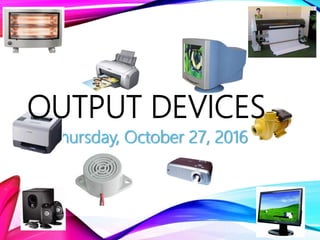
OUTPUT DEVICES
LEARNING OUTCOMES:
At the end of the lesson, i should be able to do the following:
a. Identify output devices from a pictures displayed
b. Suggest a suitable use of output devices
c. State advantages and disadvantages of output devices
MONITOR/VISUAL DISPLAY UNIT (VDU)
A monitor displays text and image data passed to it by the
computer.
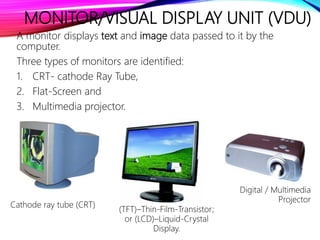
Three types of monitors are identified:
1. CRT- cathode Ray Tube,
2. Flat-Screen and
3. Multimedia projector.
Cathode ray tube (CRT)
(TFT)–Thin-Film-Transistor;
or (LCD)–Liquid-Crystal
Display.
Digital / Multimedia
Projector
PRINTERS
Printers produce a hard copy version of document of file.
There are basically two kinds of printers:
1. Impact and
2. Non-impact
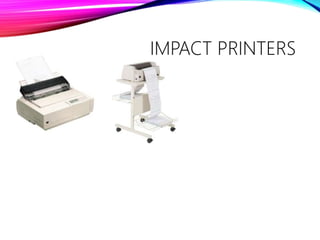
Impact printers: Impact printers operate by having an element strike
the paper.
Examples:
1. Dot-Matrix Printers
2. Daisy-Wheel Printer
3. Drum Printer
4. Chain printer
5. Band printers
6. Line Printer
7. Wire matrix printer
8. Wang image printer
IMPACT PRINTERS
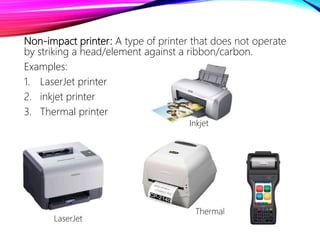
Non-impact printer: A type of printer that does not operate
by striking a head/element against a ribbon/carbon.
Examples:
1. LaserJet printer
2. inkjet printer
3. Thermal printer
LaserJet
Inkjet
Thermal
PLOTER
A plotter is a computer printing device for printing vector
graphics. Plotters differ from printers in that they draw lines using
a pen.
In general, plotters are considerably more expensive than
printers. They are used in engineering and architectural
applications where precision is mandatory.
ACTUATORS
An actuator is a device, controlled by a computer, that can
affect the real-world.
Actuators are used extensively in computer control systems.
Actuators and what they can do:
Actuator What it Can Do
Light bulb or LED Creates light
Heater Increases temperature
Cooling Unit Decreases temperature
Motor Spins things around
Pump Pushes water / air through pipes
Buzzer/Bell / Siren Creates noise
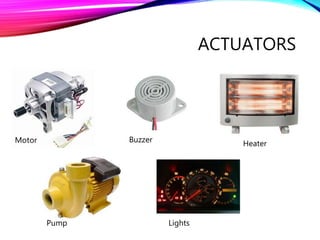
ACTUATORS
Lights
HeaterBuzzerMotor
Pump
ASSIGNMENT
1. Outline the advantages of Non-impact printers over impact
printers.
2. In a tabular form, compare and contrast LaserJet with Inkjet
printers. [use the internet if need be]
3. Read up the topic: system unit
WORD LIST

Output devices

  • 1.
    Thursday, October 27,2016 OUTPUT DEVICES
  • 2.
    LEARNING OUTCOMES: At theend of the lesson, i should be able to do the following: a. Identify output devices from a pictures displayed b. Suggest a suitable use of output devices c. State advantages and disadvantages of output devices
  • 3.
    MONITOR/VISUAL DISPLAY UNIT(VDU) A monitor displays text and image data passed to it by the computer. Three types of monitors are identified: 1. CRT- cathode Ray Tube, 2. Flat-Screen and 3. Multimedia projector. Cathode ray tube (CRT) (TFT)–Thin-Film-Transistor; or (LCD)–Liquid-Crystal Display. Digital / Multimedia Projector
  • 4.
    PRINTERS Printers produce ahard copy version of document of file. There are basically two kinds of printers: 1. Impact and 2. Non-impact Impact printers: Impact printers operate by having an element strike the paper. Examples: 1. Dot-Matrix Printers 2. Daisy-Wheel Printer 3. Drum Printer 4. Chain printer 5. Band printers 6. Line Printer 7. Wire matrix printer 8. Wang image printer
  • 5.
  • 6.
    Non-impact printer: Atype of printer that does not operate by striking a head/element against a ribbon/carbon. Examples: 1. LaserJet printer 2. inkjet printer 3. Thermal printer LaserJet Inkjet Thermal
  • 7.
    PLOTER A plotter isa computer printing device for printing vector graphics. Plotters differ from printers in that they draw lines using a pen. In general, plotters are considerably more expensive than printers. They are used in engineering and architectural applications where precision is mandatory.
  • 8.
    ACTUATORS An actuator isa device, controlled by a computer, that can affect the real-world. Actuators are used extensively in computer control systems. Actuators and what they can do: Actuator What it Can Do Light bulb or LED Creates light Heater Increases temperature Cooling Unit Decreases temperature Motor Spins things around Pump Pushes water / air through pipes Buzzer/Bell / Siren Creates noise
  • 9.
  • 10.
    ASSIGNMENT 1. Outline theadvantages of Non-impact printers over impact printers. 2. In a tabular form, compare and contrast LaserJet with Inkjet printers. [use the internet if need be] 3. Read up the topic: system unit
  • 11.