CONCEPT OF
COMPUTER
FILES I
TUESDAY, OCTOBER 18, 2016
LEARNING OUTCOMES
At the end of the lesson, I should be able to:
1. Define the following:
a) File
b) Record
c) Field
2. List three types of data
3. Draw the order in a file
structure
Definition of computer files
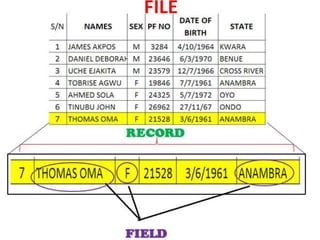
Computer files are a collection of
related records. They are the
most basic unit of data that
users can store on a disk.
Every program, image, video,
song and document is stored
as a file.
Definition of Record
A record is a collection of
related data items or fields.
Each record normally
corresponds to a specific unit
of information. Examples are:
Employee’s name, basic salary
and house rent allowance.
Field
A field is a collection of related data
items. It a space allocated for a
particular item of information.
A tax form for example contains a
number of fields; one for your name,
one for your tax identification number
(TIN), one for your income and so on.
Data Item
Data item is the smallest unit of information stored in a
computer file. It is a single element used to represent
a fact such as an employee’s name, item price.
Data items are physically arranged as fields in a
computer file.
Types of Data items
1. Numeric data consist of numbers from 0 – 9
2. Alphabetic data consist of letters A –Z
3. Alphanumeric data is a combination of numbers
and letters, can also refer to collection of Latin
letters and Arabic digits or text constructed from
these collection. There are either 36 (Single case) or
62 (Case Sensitive) alphanumeric characters. The
alphanumeric data set consist of number 0-9 and
letters A – Z.
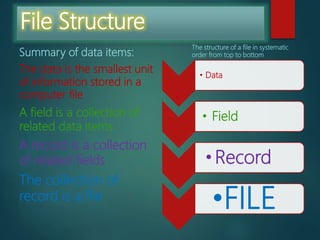
File Structure
Summary of data items:
The data is the smallest unit
of information stored in a
computer file
A field is a collection of
related data items
A record is a collection
of related fields
The collection of
record is a file
The structure of a file in systematic
order from top to bottom
• Data
• Field
•Record
•FILE
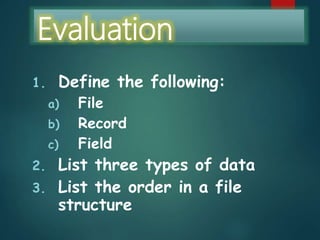
Evaluation
1. Define the following:
a) File
b) Record
c) Field
2. List three types of data
3. List the order in a file
structure
CONCEPT OF
COMPUTER
FILES II
TUESDAY, OCTOBER 18, 2016
LEARNING OUTCOMES
At the end of the lesson, I should be able to:
a) -identify types of file organization
b) -outline methods of accessing files
c) -Classify computer files
d) -itemize criteria for classifying computer files
 File organization refers primarily to
the logical arrangement of data in a
file system.
Choosing a file organization is a design
decision, hence it must be done having in mind
the achievement of good performance with
respect to the most likely usage of the file. The
criteria usually considered important are:
1. Fast access to single record or collection of
related records.
2. Easy record adding/update/removal,
without disrupting .
3. Storage efficiency.
4. Redundancy as a warranty against data
corruption.
TYPES OF FILE ORGANIZATION
1. Serial
2. Sequential
3. Indexed Sequential
4. Direct Access /Random Access
Serial File Organization
 A collection of records
 No particular sequence
 Cannot be used as master
 Used as temporary transaction file
 Records stored in the order received
 can be stored on magnetic tape e.g. VHS
Sequential File Organization
 A collection of records
 Stored in key sequence
 Adding/deleting record requires
making new file
 Used as master files
 Can be stored on optical disk,
memory stick and magnetic disk.
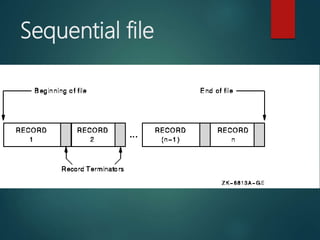
Sequential file
Advantages
 Simple file design
 Very efficient when most of the records
must be processed e.g. Payroll
 Very efficient if the data has a natural order
 Can be stored on inexpensive devices like
magnetic tape.
Disadvantages
 Entire file must be processed even if a
single record is to be searched.
 Transactions have to be sorted before
processing
 Overall processing is slow
Direct (Random) File
Organization
 Records are read directly from or written on
to the file.
 The records are stored at known address.
 Address is calculated by applying a
mathematical function to the key field.
Direct (Random) File
Organization
 A random file would have to be stored on a
direct access backing storage medium e.g.
magnetic disc, CD, DVD
 Example : Any information retrieval system.
Eg Train timetable system.
Advantages
 Any record can be directly accessed.
 Speed of record processing is very fast.
 Up-to-date file because of online updating.
 Concurrent processing is possible.
Disadvantages
 More complex than sequential
 Does not fully use memory locations
 More security and backup problems
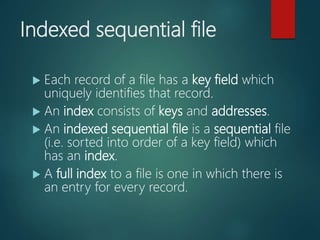
Indexed sequential file
 Each record of a file has a key field which
uniquely identifies that record.
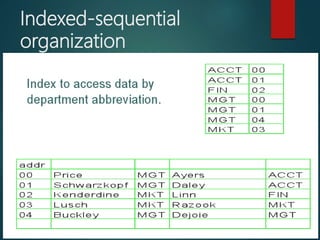
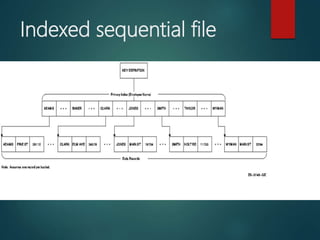
 An index consists of keys and addresses.
 An indexed sequential file is a sequential file
(i.e. sorted into order of a key field) which
has an index.
 A full index to a file is one in which there is
an entry for every record.
Indexed-sequential
organization
Indexed sequential file
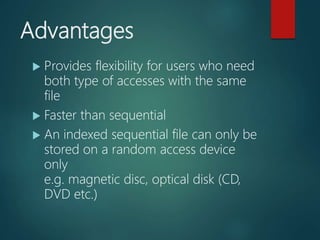
Advantages
 Provides flexibility for users who need
both type of accesses with the same
file
 Faster than sequential
 An indexed sequential file can only be
stored on a random access device
only
e.g. magnetic disc, optical disk (CD,
DVD etc.)
Disadvantages
 Extra storage space for the index is
required
Methods of accessing
computer files
 Serial file access
 Sequential file access
 Direct/Random file access
Computer file classification
 Mater file
 Transaction file
 Reference/work file
Computer file classification
A file is a collection of data that is treated as a
single unit on a peripheral device.
TYPES OF FILES-
Master file
 It contains record of permanent data types.
 They are created when you install your business.
Transaction file
Contains data which is used to update the
records of master file. Ex-address of a
customer.
Transaction files also serves as audit trails
and history of the organization.
Reference/Work files
This is a file with reasonable amount of
permanency. Examples of data used for
reference purposes are price list, tables of
rates of pay, names and addresses.
Criteria for Computer file classification
Criteria for classifying computer files are:
 By nature of content: refers to the nature of
file content
 By organization method: refers to the way
files are arranged e.g. serial, sequential,
random etc.
 By storage medium: refers to storage
devices in which a file could only be stored
such as magnetic or optical disk and
magnetic tape.
Evaluation
1. -identify types of file organization
2. -outline methods of accessing files
3. -Classify computer files
4. -itemize criteria for classifying computer files
Assignment
1. Read up the topic: “handling
computer files”.
2. Outline the operating procedure for
computer data processing [see pages 86
& 87 of your ICT textbook]
Terminologies
 Serial
 Sequential
 Random
 Index

Concept of computer files

  • 1.
  • 2.
    LEARNING OUTCOMES At theend of the lesson, I should be able to: 1. Define the following: a) File b) Record c) Field 2. List three types of data 3. Draw the order in a file structure
  • 3.
    Definition of computerfiles Computer files are a collection of related records. They are the most basic unit of data that users can store on a disk. Every program, image, video, song and document is stored as a file.
  • 4.
    Definition of Record Arecord is a collection of related data items or fields. Each record normally corresponds to a specific unit of information. Examples are: Employee’s name, basic salary and house rent allowance.
  • 5.
    Field A field isa collection of related data items. It a space allocated for a particular item of information. A tax form for example contains a number of fields; one for your name, one for your tax identification number (TIN), one for your income and so on.
  • 6.
    Data Item Data itemis the smallest unit of information stored in a computer file. It is a single element used to represent a fact such as an employee’s name, item price. Data items are physically arranged as fields in a computer file.
  • 7.
    Types of Dataitems 1. Numeric data consist of numbers from 0 – 9 2. Alphabetic data consist of letters A –Z 3. Alphanumeric data is a combination of numbers and letters, can also refer to collection of Latin letters and Arabic digits or text constructed from these collection. There are either 36 (Single case) or 62 (Case Sensitive) alphanumeric characters. The alphanumeric data set consist of number 0-9 and letters A – Z.
  • 8.
    File Structure Summary ofdata items: The data is the smallest unit of information stored in a computer file A field is a collection of related data items A record is a collection of related fields The collection of record is a file The structure of a file in systematic order from top to bottom • Data • Field •Record •FILE
  • 10.
    Evaluation 1. Define thefollowing: a) File b) Record c) Field 2. List three types of data 3. List the order in a file structure
  • 11.
  • 12.
    LEARNING OUTCOMES At theend of the lesson, I should be able to: a) -identify types of file organization b) -outline methods of accessing files c) -Classify computer files d) -itemize criteria for classifying computer files
  • 13.
     File organizationrefers primarily to the logical arrangement of data in a file system.
  • 14.
    Choosing a fileorganization is a design decision, hence it must be done having in mind the achievement of good performance with respect to the most likely usage of the file. The criteria usually considered important are: 1. Fast access to single record or collection of related records. 2. Easy record adding/update/removal, without disrupting . 3. Storage efficiency. 4. Redundancy as a warranty against data corruption.
  • 15.
    TYPES OF FILEORGANIZATION 1. Serial 2. Sequential 3. Indexed Sequential 4. Direct Access /Random Access
  • 16.
    Serial File Organization A collection of records  No particular sequence  Cannot be used as master  Used as temporary transaction file  Records stored in the order received  can be stored on magnetic tape e.g. VHS
  • 17.
    Sequential File Organization A collection of records  Stored in key sequence  Adding/deleting record requires making new file  Used as master files  Can be stored on optical disk, memory stick and magnetic disk.
  • 18.
  • 19.
    Advantages  Simple filedesign  Very efficient when most of the records must be processed e.g. Payroll  Very efficient if the data has a natural order  Can be stored on inexpensive devices like magnetic tape.
  • 20.
    Disadvantages  Entire filemust be processed even if a single record is to be searched.  Transactions have to be sorted before processing  Overall processing is slow
  • 21.
    Direct (Random) File Organization Records are read directly from or written on to the file.  The records are stored at known address.  Address is calculated by applying a mathematical function to the key field.
  • 22.
    Direct (Random) File Organization A random file would have to be stored on a direct access backing storage medium e.g. magnetic disc, CD, DVD  Example : Any information retrieval system. Eg Train timetable system.
  • 23.
    Advantages  Any recordcan be directly accessed.  Speed of record processing is very fast.  Up-to-date file because of online updating.  Concurrent processing is possible.
  • 24.
    Disadvantages  More complexthan sequential  Does not fully use memory locations  More security and backup problems
  • 25.
    Indexed sequential file Each record of a file has a key field which uniquely identifies that record.  An index consists of keys and addresses.  An indexed sequential file is a sequential file (i.e. sorted into order of a key field) which has an index.  A full index to a file is one in which there is an entry for every record.
  • 26.
  • 27.
  • 28.
    Advantages  Provides flexibilityfor users who need both type of accesses with the same file  Faster than sequential  An indexed sequential file can only be stored on a random access device only e.g. magnetic disc, optical disk (CD, DVD etc.)
  • 29.
    Disadvantages  Extra storagespace for the index is required
  • 30.
    Methods of accessing computerfiles  Serial file access  Sequential file access  Direct/Random file access
  • 31.
    Computer file classification Mater file  Transaction file  Reference/work file
  • 32.
    Computer file classification Afile is a collection of data that is treated as a single unit on a peripheral device. TYPES OF FILES- Master file  It contains record of permanent data types.  They are created when you install your business.
  • 33.
    Transaction file Contains datawhich is used to update the records of master file. Ex-address of a customer. Transaction files also serves as audit trails and history of the organization. Reference/Work files This is a file with reasonable amount of permanency. Examples of data used for reference purposes are price list, tables of rates of pay, names and addresses.
  • 34.
    Criteria for Computerfile classification Criteria for classifying computer files are:  By nature of content: refers to the nature of file content  By organization method: refers to the way files are arranged e.g. serial, sequential, random etc.  By storage medium: refers to storage devices in which a file could only be stored such as magnetic or optical disk and magnetic tape.
  • 35.
    Evaluation 1. -identify typesof file organization 2. -outline methods of accessing files 3. -Classify computer files 4. -itemize criteria for classifying computer files
  • 36.
    Assignment 1. Read upthe topic: “handling computer files”. 2. Outline the operating procedure for computer data processing [see pages 86 & 87 of your ICT textbook]
  • 37.