Instructor : Muhammad Hammad Waseem
Email: m.hammad.wasim@gmail.com
Muhammad Hammad Waseem 2
• The Von Neumann Architecture and its
figure
• Important Features of the Von Neumann
Architecture

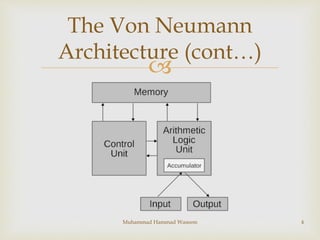
 The Von Neumann architecture is a design model for
a stored-program digital computer. Its main
characteristic is a single separate storage structure
(the memory) that holds both program and data.
 Von Neumann computer architecture, which is
illustrated in the following figure:
3
The Von Neumann
Architecture
Muhammad Hammad Waseem

4Muhammad Hammad Waseem
The Von Neumann
Architecture (cont…)

 both instructions (code) and data (variables and
input/output) are stored in memory;
 memory is a collection of binary digits (bits) that
have been organized into bytes, words, and regions
with addresses;
 the code instructions and all data have memory
addresses;
 to execute each instruction, it has to be moved to
registers;
5
Important Features of Von
Neumann Architecture
Muhammad Hammad Waseem

 only the registers have the “smarts” to do anything
with the instructions; memory locations have no
“smarts”;
 to save a result computed in the registers, it has to be
moved back to memory;
 operating systems and compilers keep the
instructions and data in memory organized so it
doesn't get mixed up together;
Muhammad Hammad Waseem 6
Important Features
(Cont.)

TYPES OF
COMPUTERS
• Introduction
• Types based on Principle of operation
• Analog computers
• Digital computers
• Hybrid computers

 Computers can be classified based on their principles
of operation or on their configuration. By
configuration, we mean the size, speed of doing
computation and storage capacity of a computer.
8
TYPES OF COMPUTERS
Muhammad Hammad Waseem

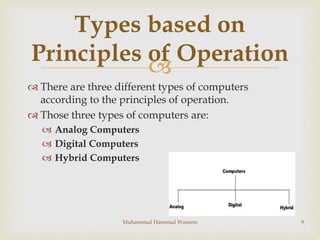
 There are three different types of computers
according to the principles of operation.
 Those three types of computers are:
 Analog Computers
 Digital Computers
 Hybrid Computers
9
Types based on
Principles of Operation
Muhammad Hammad Waseem

 Analog Computer is a computing device that works
on continuous range of values.
 The results given by the analog computers will only
be approximate since they deal with quantities that
vary continuously.
 It generally deals with physical variables such as
voltage, pressure, temperature, speed, etc.
10
Analog Computers
Muhammad Hammad Waseem
11
Examples
• Speedometer
• Weight machine
• Thermometer
• Temperature
• Speed
Analog watch
Applications
• Engineering
• Scientific Work
• To control process
• Chemical industries
Muhammad Hammad Waseem
Muhammad Hammad Waseem 12
Advantage & Disadvantages
Of Analog Computer
ADVANTAGE OF ANALOG COMPUTERS
• Analog computers are fast.
DISADVANTAGES OF ANALOG COMPUTERS
• Analog computers are not accurate.
• Analog computers lack memory.

 On the other hand a digital computer operates on
digital data such as numbers.
 It uses binary number system in which there are only
two digits 0 and 1. (a bit)
 Digital Computers can give more accurate and faster
results.
 Digital computer is well suited for solving complex
problems in engineering and technology.
13
Digital Computers
Muhammad Hammad Waseem

 Hence digital computers have an increasing use in
the field of design, research and data processing.
 Based on the purpose, Digital computers can be
further classified as:
 General Purpose Computers:
 Used for any type of applications.
 Special Purpose Computers:
 One that is built for a specific application.
Muhammad Hammad Waseem 14
Digital Computers (Cont…)
15
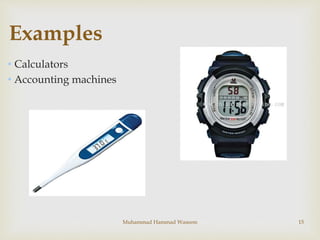
Examples
• Calculators
• Accounting machines
Muhammad Hammad Waseem
16
Applications
• Scientific research
• Business
• Education
• Factories
• Market
• Art
Muhammad Hammad Waseem
17
Advantage & Disadvantages
Of Digital Computer
ADVANTAGES OF DIGITAL COMPUTERS
• Digital computers are accurate.
• Store information.
DISADVANTAGES OF DIGITAL COMPUTERS
• Digital computers are slow as compared to
Analog computers.
Muhammad Hammad Waseem

 A hybrid computer combines the desirable features
of analog and digital computers.
 It is mostly used for automatic operations of
complicated physical processes and machines.
 Now-a-days analog-to-digital and digital-to-analog
converters are used for transforming the data into
suitable form for either type of computation.
 Hybrid computers are mainly used for specialized
tasks.
Muhammad Hammad Waseem 18
Hybrid Computers

 It combines the best features of both digital and analog.
 Hybrid computers have the accuracy of analog and speed
of digital computers
Applications
 In hospitals
 In Air Defence system
Muhammad Hammad Waseem 19
Advantages Of Hybrid
Computers

Types of Computers
based on Configuration
/ Size
• Types of Computers based on Configuration / Size
• Super computers
• Mainframe computers
• Mini computers
• Micro computers
Muhammad Hammad Waseem 20

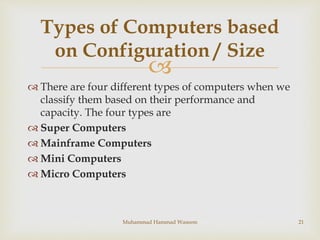
 There are four different types of computers when we
classify them based on their performance and
capacity. The four types are
 Super Computers
 Mainframe Computers
 Mini Computers
 Micro Computers
Muhammad Hammad Waseem 21
Types of Computers based
on Configuration / Size

 They are the best in terms of processing capacity and
also the most expensive ones.
 These computers can process billions of instructions
per second.
 Perhaps the best known super computer
manufacturer is Cray Research.
 Some of the "traditional" companies which produce
super computers are Cray, IBM and Hewlett-
Packard.
Muhammad Hammad Waseem 22
Super Computers

 Weather forecasting
 Stock analysis
 Nuclear research
 Designing complex
machines
 Scientific simulations
 (animated) Graphics,
analysis of geological
data
Muhammad Hammad Waseem 23
Applications & Uses

 Mainframe computers can also process data at very
high speeds i.e., hundreds of million instructions per
second and they are also quite expensive.
 They are large in size and occupy the space of a
room.
 Need cooling requirements as well.
 Perform multiple jobs and support hundred of users.
 Normally, they are used in banking, airlines and
railways etc. for their applications
Muhammad Hammad Waseem 24
Mainframe Computers

 Mini computers are lower to mainframe computers
in terms of speed and storage capacity.
 They are also less expensive than mainframe
computers.
 Some of the features of mainframes will not be
available in mini computers. Hence, their
performance also will be less than that of
mainframes.
Muhammad Hammad Waseem 25
Mini Computers

 The invention of microprocessor (single chip CPU)
gave birth to the much cheaper micro computers.
They are further classified into
 Desktop Computers
 Laptop Computers
 Handheld Computers(PDAs)
Muhammad Hammad Waseem 26
Micro Computers

 Today the Desktop computers are the most popular
computer systems. These desktop computers are also
known as personal computers or simply PCs.
 They are usually easier to use and more affordable.
 They are normally intended for individual users for
their word processing and other small application
requirements.
Muhammad Hammad Waseem 27
Desktop Computers

 Laptop computers are portable computers.
 They are lightweight computers with a thin screen.
 They are also called as notebook computers because
of their small size.
 They can operate on batteries and hence are very
popular with travellers.
 The screen folds down onto the keyboard when not
in use.
Muhammad Hammad Waseem 28
Laptop Computers

 Handheld computers or Personal Digital Assistants
(PDAs) are pen-based and also battery-powered.
 They are small and can be carried anywhere.
 They use a pen like stylus and accept handwritten
input directly on the screen.
 They are not as powerful as desktops or laptops but
they are used for scheduling appointments, storing
addresses and playing games.
 They have touch screens which we use with a finger
or a stylus.
Muhammad Hammad Waseem 29
Handheld Computers

Types of Computer

  • 1.
    Instructor : MuhammadHammad Waseem Email: m.hammad.wasim@gmail.com
  • 2.
    Muhammad Hammad Waseem2 • The Von Neumann Architecture and its figure • Important Features of the Von Neumann Architecture
  • 3.
      The VonNeumann architecture is a design model for a stored-program digital computer. Its main characteristic is a single separate storage structure (the memory) that holds both program and data.  Von Neumann computer architecture, which is illustrated in the following figure: 3 The Von Neumann Architecture Muhammad Hammad Waseem
  • 4.
     4Muhammad Hammad Waseem TheVon Neumann Architecture (cont…)
  • 5.
      both instructions(code) and data (variables and input/output) are stored in memory;  memory is a collection of binary digits (bits) that have been organized into bytes, words, and regions with addresses;  the code instructions and all data have memory addresses;  to execute each instruction, it has to be moved to registers; 5 Important Features of Von Neumann Architecture Muhammad Hammad Waseem
  • 6.
      only theregisters have the “smarts” to do anything with the instructions; memory locations have no “smarts”;  to save a result computed in the registers, it has to be moved back to memory;  operating systems and compilers keep the instructions and data in memory organized so it doesn't get mixed up together; Muhammad Hammad Waseem 6 Important Features (Cont.)
  • 7.
     TYPES OF COMPUTERS • Introduction •Types based on Principle of operation • Analog computers • Digital computers • Hybrid computers
  • 8.
      Computers canbe classified based on their principles of operation or on their configuration. By configuration, we mean the size, speed of doing computation and storage capacity of a computer. 8 TYPES OF COMPUTERS Muhammad Hammad Waseem
  • 9.
      There arethree different types of computers according to the principles of operation.  Those three types of computers are:  Analog Computers  Digital Computers  Hybrid Computers 9 Types based on Principles of Operation Muhammad Hammad Waseem
  • 10.
      Analog Computeris a computing device that works on continuous range of values.  The results given by the analog computers will only be approximate since they deal with quantities that vary continuously.  It generally deals with physical variables such as voltage, pressure, temperature, speed, etc. 10 Analog Computers Muhammad Hammad Waseem
  • 11.
    11 Examples • Speedometer • Weightmachine • Thermometer • Temperature • Speed Analog watch Applications • Engineering • Scientific Work • To control process • Chemical industries Muhammad Hammad Waseem
  • 12.
    Muhammad Hammad Waseem12 Advantage & Disadvantages Of Analog Computer ADVANTAGE OF ANALOG COMPUTERS • Analog computers are fast. DISADVANTAGES OF ANALOG COMPUTERS • Analog computers are not accurate. • Analog computers lack memory.
  • 13.
      On theother hand a digital computer operates on digital data such as numbers.  It uses binary number system in which there are only two digits 0 and 1. (a bit)  Digital Computers can give more accurate and faster results.  Digital computer is well suited for solving complex problems in engineering and technology. 13 Digital Computers Muhammad Hammad Waseem
  • 14.
      Hence digitalcomputers have an increasing use in the field of design, research and data processing.  Based on the purpose, Digital computers can be further classified as:  General Purpose Computers:  Used for any type of applications.  Special Purpose Computers:  One that is built for a specific application. Muhammad Hammad Waseem 14 Digital Computers (Cont…)
  • 15.
    15 Examples • Calculators • Accountingmachines Muhammad Hammad Waseem
  • 16.
    16 Applications • Scientific research •Business • Education • Factories • Market • Art Muhammad Hammad Waseem
  • 17.
    17 Advantage & Disadvantages OfDigital Computer ADVANTAGES OF DIGITAL COMPUTERS • Digital computers are accurate. • Store information. DISADVANTAGES OF DIGITAL COMPUTERS • Digital computers are slow as compared to Analog computers. Muhammad Hammad Waseem
  • 18.
      A hybridcomputer combines the desirable features of analog and digital computers.  It is mostly used for automatic operations of complicated physical processes and machines.  Now-a-days analog-to-digital and digital-to-analog converters are used for transforming the data into suitable form for either type of computation.  Hybrid computers are mainly used for specialized tasks. Muhammad Hammad Waseem 18 Hybrid Computers
  • 19.
      It combinesthe best features of both digital and analog.  Hybrid computers have the accuracy of analog and speed of digital computers Applications  In hospitals  In Air Defence system Muhammad Hammad Waseem 19 Advantages Of Hybrid Computers
  • 20.
     Types of Computers basedon Configuration / Size • Types of Computers based on Configuration / Size • Super computers • Mainframe computers • Mini computers • Micro computers Muhammad Hammad Waseem 20
  • 21.
      There arefour different types of computers when we classify them based on their performance and capacity. The four types are  Super Computers  Mainframe Computers  Mini Computers  Micro Computers Muhammad Hammad Waseem 21 Types of Computers based on Configuration / Size
  • 22.
      They arethe best in terms of processing capacity and also the most expensive ones.  These computers can process billions of instructions per second.  Perhaps the best known super computer manufacturer is Cray Research.  Some of the "traditional" companies which produce super computers are Cray, IBM and Hewlett- Packard. Muhammad Hammad Waseem 22 Super Computers
  • 23.
      Weather forecasting Stock analysis  Nuclear research  Designing complex machines  Scientific simulations  (animated) Graphics, analysis of geological data Muhammad Hammad Waseem 23 Applications & Uses
  • 24.
      Mainframe computerscan also process data at very high speeds i.e., hundreds of million instructions per second and they are also quite expensive.  They are large in size and occupy the space of a room.  Need cooling requirements as well.  Perform multiple jobs and support hundred of users.  Normally, they are used in banking, airlines and railways etc. for their applications Muhammad Hammad Waseem 24 Mainframe Computers
  • 25.
      Mini computersare lower to mainframe computers in terms of speed and storage capacity.  They are also less expensive than mainframe computers.  Some of the features of mainframes will not be available in mini computers. Hence, their performance also will be less than that of mainframes. Muhammad Hammad Waseem 25 Mini Computers
  • 26.
      The inventionof microprocessor (single chip CPU) gave birth to the much cheaper micro computers. They are further classified into  Desktop Computers  Laptop Computers  Handheld Computers(PDAs) Muhammad Hammad Waseem 26 Micro Computers
  • 27.
      Today theDesktop computers are the most popular computer systems. These desktop computers are also known as personal computers or simply PCs.  They are usually easier to use and more affordable.  They are normally intended for individual users for their word processing and other small application requirements. Muhammad Hammad Waseem 27 Desktop Computers
  • 28.
      Laptop computersare portable computers.  They are lightweight computers with a thin screen.  They are also called as notebook computers because of their small size.  They can operate on batteries and hence are very popular with travellers.  The screen folds down onto the keyboard when not in use. Muhammad Hammad Waseem 28 Laptop Computers
  • 29.
      Handheld computersor Personal Digital Assistants (PDAs) are pen-based and also battery-powered.  They are small and can be carried anywhere.  They use a pen like stylus and accept handwritten input directly on the screen.  They are not as powerful as desktops or laptops but they are used for scheduling appointments, storing addresses and playing games.  They have touch screens which we use with a finger or a stylus. Muhammad Hammad Waseem 29 Handheld Computers