
PRINTERS
20nd
June 2011
INTRODUCTION
 What is a Printer?
 It is an output device that produces text and graphics
on paper.
 Function - To present data on paper
 Types of Printer:-
 Inkjet Printer
 Laser Printer
 Dot-Matrix Printer
 Plotter
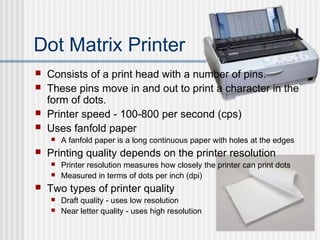
Dot Matrix Printer
 Consists of a print head with a number of pins.
 These pins move in and out to print a character in the
form of dots.
 Printer speed - 100-800 per second (cps)
 Uses fanfold paper
 A fanfold paper is a long continuous paper with holes at the edges
 Printing quality depends on the printer resolution
 Printer resolution measures how closely the printer can print dots
 Measured in terms of dots per inch (dpi)
 Two types of printer quality
 Draft quality - uses low resolution
 Near letter quality - uses high resolution
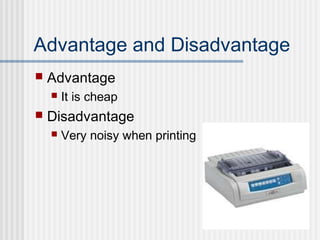
Advantage and Disadvantage
 Advantage
 It is cheap
 Disadvantage
 Very noisy when printing
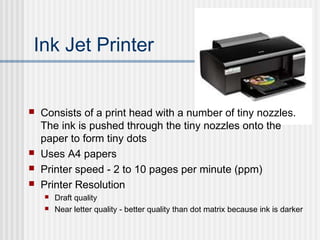
Ink Jet Printer
 Consists of a print head with a number of tiny nozzles.
The ink is pushed through the tiny nozzles onto the
paper to form tiny dots
 Uses A4 papers
 Printer speed - 2 to 10 pages per minute (ppm)
 Printer Resolution
 Draft quality
 Near letter quality - better quality than dot matrix because ink is darker
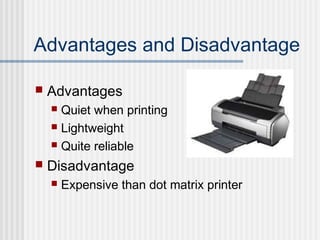
Advantages and Disadvantage
 Advantages
 Quiet when printing
 Lightweight
 Quite reliable
 Disadvantage
 Expensive than dot matrix printer
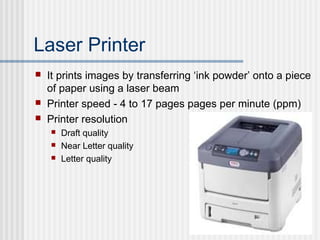
Laser Printer
 It prints images by transferring ‘ink powder’ onto a piece
of paper using a laser beam
 Printer speed - 4 to 17 pages pages per minute (ppm)
 Printer resolution
 Draft quality
 Near Letter quality
 Letter quality
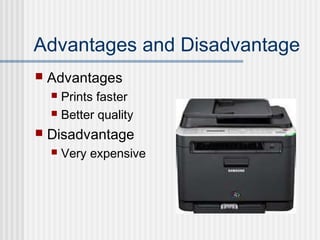
Advantages and Disadvantage
 Advantages
 Prints faster
 Better quality
 Disadvantage
 Very expensive
Differences between the
Printers
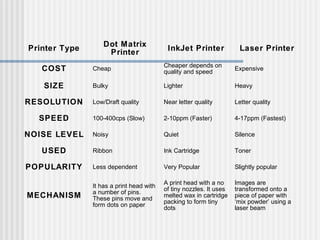
Printer Type
Dot Matrix
Printer
InkJet Printer Laser Printer
COST Cheap
Cheaper depends on
quality and speed
Expensive
SIZE Bulky Lighter Heavy
RESOLUTION Low/Draft quality Near letter quality Letter quality
SPEED 100-400cps (Slow) 2-10ppm (Faster) 4-17ppm (Fastest)
NOISE LEVEL Noisy Quiet Silence
USED Ribbon Ink Cartridge Toner
POPULARITY Less dependent Very Popular Slightly popular
MECHANISM
It has a print head with
a number of pins.
These pins move and
form dots on paper
A print head with a no
of tiny nozzles. It uses
melted wax in cartridge
packing to form tiny
dots
Images are
transformed onto a
piece of paper with
‘mix powder’ using a
laser beam
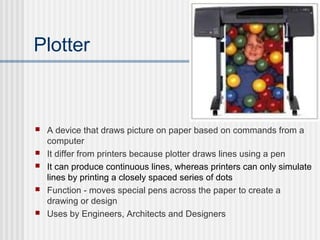
Plotter
 A device that draws picture on paper based on commands from a
computer
 It differ from printers because plotter draws lines using a pen
 It can produce continuous lines, whereas printers can only simulate
lines by printing a closely spaced series of dots
 Function - moves special pens across the paper to create a
drawing or design
 Uses by Engineers, Architects and Designers
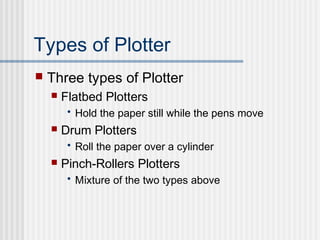
Types of Plotter
 Three types of Plotter
 Flatbed Plotters
• Hold the paper still while the pens move
 Drum Plotters
• Roll the paper over a cylinder
 Pinch-Rollers Plotters
• Mixture of the two types above
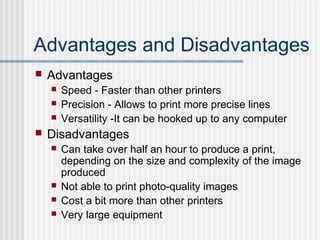
Advantages and Disadvantages
 Advantages
 Speed - Faster than other printers
 Precision - Allows to print more precise lines
 Versatility -It can be hooked up to any computer
 Disadvantages
 Can take over half an hour to produce a print,
depending on the size and complexity of the image
produced
 Not able to print photo-quality images
 Cost a bit more than other printers
 Very large equipment
Printer

Printer

  • 1.
  • 2.
    INTRODUCTION  What isa Printer?  It is an output device that produces text and graphics on paper.  Function - To present data on paper  Types of Printer:-  Inkjet Printer  Laser Printer  Dot-Matrix Printer  Plotter
  • 3.
    Dot Matrix Printer Consists of a print head with a number of pins.  These pins move in and out to print a character in the form of dots.  Printer speed - 100-800 per second (cps)  Uses fanfold paper  A fanfold paper is a long continuous paper with holes at the edges  Printing quality depends on the printer resolution  Printer resolution measures how closely the printer can print dots  Measured in terms of dots per inch (dpi)  Two types of printer quality  Draft quality - uses low resolution  Near letter quality - uses high resolution
  • 4.
    Advantage and Disadvantage Advantage  It is cheap  Disadvantage  Very noisy when printing
  • 5.
    Ink Jet Printer Consists of a print head with a number of tiny nozzles. The ink is pushed through the tiny nozzles onto the paper to form tiny dots  Uses A4 papers  Printer speed - 2 to 10 pages per minute (ppm)  Printer Resolution  Draft quality  Near letter quality - better quality than dot matrix because ink is darker
  • 6.
    Advantages and Disadvantage Advantages  Quiet when printing  Lightweight  Quite reliable  Disadvantage  Expensive than dot matrix printer
  • 7.
    Laser Printer  Itprints images by transferring ‘ink powder’ onto a piece of paper using a laser beam  Printer speed - 4 to 17 pages pages per minute (ppm)  Printer resolution  Draft quality  Near Letter quality  Letter quality
  • 8.
    Advantages and Disadvantage Advantages  Prints faster  Better quality  Disadvantage  Very expensive
  • 9.
  • 10.
    Printer Type Dot Matrix Printer InkJetPrinter Laser Printer COST Cheap Cheaper depends on quality and speed Expensive SIZE Bulky Lighter Heavy RESOLUTION Low/Draft quality Near letter quality Letter quality SPEED 100-400cps (Slow) 2-10ppm (Faster) 4-17ppm (Fastest) NOISE LEVEL Noisy Quiet Silence USED Ribbon Ink Cartridge Toner POPULARITY Less dependent Very Popular Slightly popular MECHANISM It has a print head with a number of pins. These pins move and form dots on paper A print head with a no of tiny nozzles. It uses melted wax in cartridge packing to form tiny dots Images are transformed onto a piece of paper with ‘mix powder’ using a laser beam
  • 11.
    Plotter  A devicethat draws picture on paper based on commands from a computer  It differ from printers because plotter draws lines using a pen  It can produce continuous lines, whereas printers can only simulate lines by printing a closely spaced series of dots  Function - moves special pens across the paper to create a drawing or design  Uses by Engineers, Architects and Designers
  • 12.
    Types of Plotter Three types of Plotter  Flatbed Plotters • Hold the paper still while the pens move  Drum Plotters • Roll the paper over a cylinder  Pinch-Rollers Plotters • Mixture of the two types above
  • 13.
    Advantages and Disadvantages Advantages  Speed - Faster than other printers  Precision - Allows to print more precise lines  Versatility -It can be hooked up to any computer  Disadvantages  Can take over half an hour to produce a print, depending on the size and complexity of the image produced  Not able to print photo-quality images  Cost a bit more than other printers  Very large equipment