10. File Systems 10.1 Basic Functions of File Management 10.2 Hierarchical Model of a File System  10.4 File Directories Hierarchical Directory Organizations Operations on Directories Implementation of File Directories 10.5 Basic File System File Descriptors Opening and Closing of Files 10.6 Physical Organization Methods Contiguous Organization Linked Organization Indexed Organization Management of Free Storage Space 10.7 Distributed File Systems Directory Structures and Sharing Semantics of File Sharing  10.8 Implementing DFS
Basic Functions of FS Present logical (abstract) view of   files and directories Hide complexity of hardware devices Facilitate efficient use of storage devices Optimize access, e.g., to disk Support sharing Provide protection
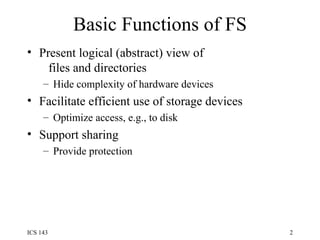
Hierarchical Model of FS Basic file system Open/close files Physical organization methods Map file data to disk blocks Figure 10-1 Abstract user interface Present convenient view Directory management Map logical name to unique Id, file descriptor
User View of Files File name and type Valid name  Number of characters Lower  vs  upper case Extension Tied to type of file Used by applications File type recorded in header Cannot be changed (even when extension changes) Basic types: text, object, load file; directory Application-specific types, e.g., .doc, .ps, .html
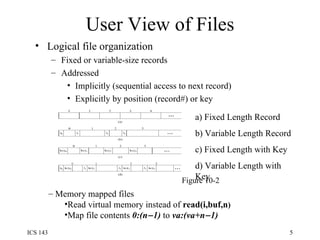
User View of Files Logical file organization Fixed or variable-size records Addressed Implicitly (sequential access to next record) Explicitly by position (record#) or key Figure 10-2 a) Fixed Length Record b) Variable Length Record c) Fixed Length with Key d) Variable Length with Key Memory mapped files Read virtual memory instead of  read(i,buf,n ) Map file contents  0:(n  1)  to  va:(va+n  1)
Other File Attributes Ownership File Size File Use Time of creation, last access, last modification File Disposition Permanent or Temporary Protection Who can access and what type of access Location
Operations on Files Create/Delete Create/delete file descriptor Modify directory Open/Close Modify open file table (“OFT”) Read/Write (sequential or direct) Modify file descriptor Transfer data between disk and memory Seek/Rewind Modify open file table
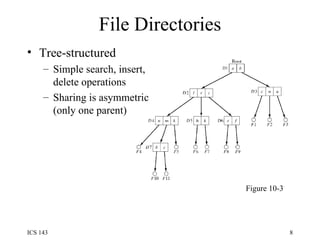
File Directories Tree-structured Simple search, insert, delete operations Sharing is asymmetric (only one parent) Figure 10-3
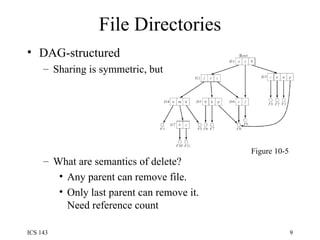
File Directories DAG-structured Sharing is symmetric, but What are semantics of delete? Any parent can remove file. Only last parent can remove it. Need reference count Figure 10-5
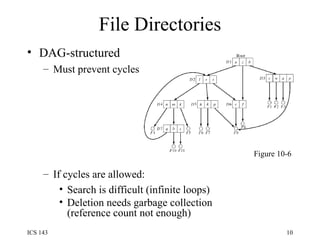
File Directories DAG-structured Must prevent cycles  If cycles are allowed: Search is difficult (infinite loops) Deletion needs garbage collection (reference count not enough) Figure 10-6
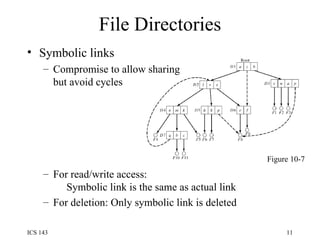
File Directories Symbolic links Compromise to allow sharing but avoid cycles For read/write access:   Symbolic link is the same as actual link For deletion: Only symbolic link is deleted Figure 10-7
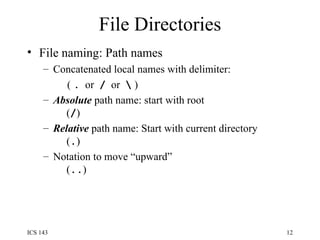
File Directories File naming: Path names Concatenated local names with delimiter:  (  .   or  /   or  \  ) Absolute  path name: start with root   ( / ) Relative  path name: Start with current directory   ( . ) Notation to move “upward”   ( .. )
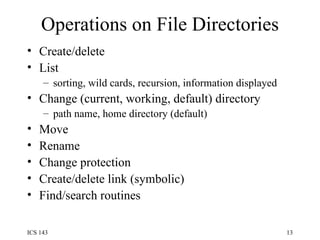
Operations on File Directories Create/delete List sorting, wild cards, recursion, information displayed Change (current, working, default) directory path name, home directory (default) Move Rename Change protection Create/delete link (symbolic) Find/search routines
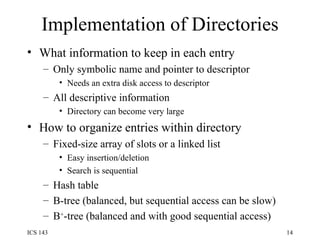
Implementation of Directories What information to keep in each entry Only symbolic name and pointer to descriptor Needs an extra disk access to descriptor All descriptive information Directory can become very large How to organize entries within directory Fixed-size array of slots or a linked list Easy insertion/deletion Search is sequential Hash table B-tree (balanced, but sequential access can be slow) B + -tree (balanced and with good sequential access)
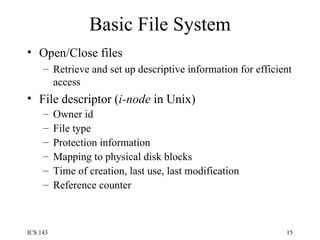
Basic File System Open/Close files Retrieve and set up descriptive information for efficient access File descriptor ( i-node  in Unix) Owner id File type Protection information Mapping to physical disk blocks Time of creation, last use, last modification Reference counter
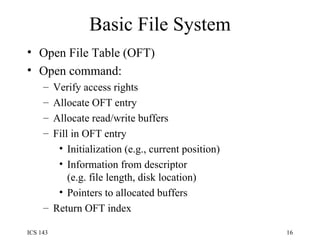
Basic File System Open File Table (OFT) Open command: Verify access rights Allocate OFT entry Allocate read/write buffers Fill in OFT entry Initialization (e.g., current position) Information from descriptor  (e.g. file length, disk location) Pointers to allocated buffers Return OFT index
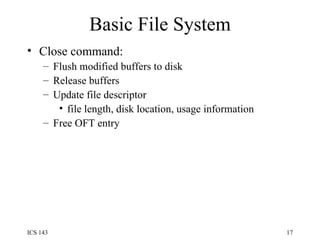
Basic File System Close command: Flush modified buffers to disk Release buffers Update file descriptor file length, disk location, usage information Free OFT entry
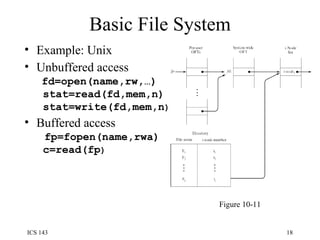
Basic File System Example: Unix Unbuffered access   fd=open(name,rw,…)  stat=read(fd,mem,n)  stat=write(fd,mem,n ) Buffered access   fp=fopen(name,rwa)  c=read(fp ) Figure 10-11
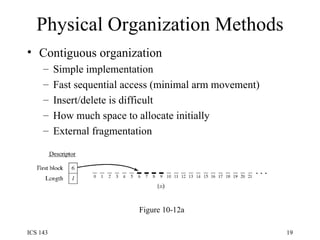
Physical Organization Methods Contiguous organization Simple implementation Fast sequential access (minimal arm movement) Insert/delete is difficult How much space to allocate initially External fragmentation Figure 10-12a
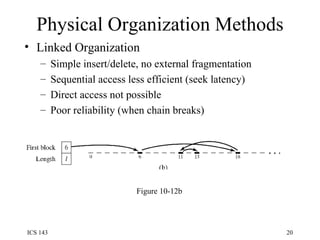
Physical Organization Methods Linked Organization Simple insert/delete, no external fragmentation Sequential access less efficient (seek latency) Direct access not possible Poor reliability (when chain breaks) Figure 10-12b
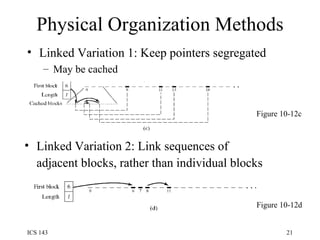
Physical Organization Methods Linked Variation 1: Keep pointers segregated May be cached Figure 10-12d Figure 10-12c Linked Variation 2: Link sequences of adjacent blocks, rather than individual blocks
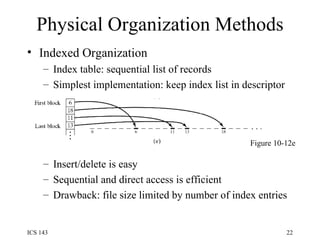
Physical Organization Methods Indexed Organization Index table: sequential list of records Simplest implementation: keep index list in descriptor  Insert/delete is easy Sequential and direct access is efficient Drawback: file size limited by number of index entries Figure 10-12e
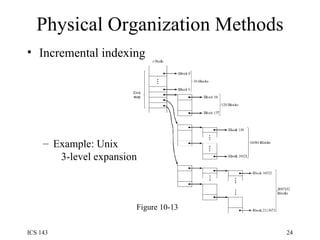
Physical Organization Methods Variations of indexing Multi-level index hierarchy Primary index points to secondary indices Problem: number of disk accesses increases with depth of hierarchy Incremental indexing Fixed number of entries at top-level index When insufficient, allocate additional index levels   Example: Unix -- 3-level expansion  (see next slide)
Physical Organization Methods Incremental indexing Example: Unix   3-level expansion Figure 10-13
Free Storage Space Management Similar to main memory management Linked list organization Linking individual blocks -- inefficient: No block clustering to   minimize seek operations Groups of blocks are   allocated/released one at a time Linking groups of consecutive blocks Bit map organization Analogous to main memory
Distributed File Systems Directory structures differentiated by: Global  vs  Local naming: Single global structure or different for each user? Location transparency: Does the path name reveal anything about machine or server? Location independence When a file moves between machines, does its path name change?
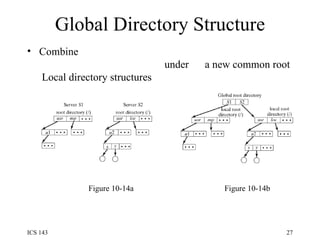
Global Directory Structure Combine   under  a new common root  Local directory structures Figure 10-14b Figure 10-14a
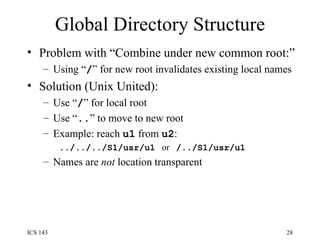
Global Directory Structure Problem with “Combine under new common root:” Using “ / ” for new root invalidates existing local names Solution (Unix United): Use “ / ” for local root Use “ .. ” to move to new root Example: reach  u1  from  u2 :  ../../../S1/usr/u1   or  /../S1/usr/u1 Names are  not  location transparent
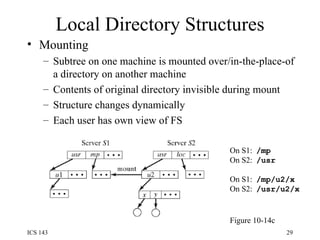
Local Directory Structures Mounting Subtree on one machine is mounted over/in-the-place-of a directory on another machine Contents of original directory invisible during mount Structure changes dynamically Each user has own view of FS Figure 10-14c On S1:  /mp On S2:  /usr On S1:  /mp/u2/x On S2:  /usr/u2/x
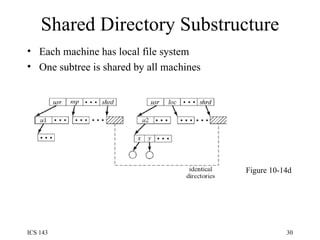
Shared Directory Substructure Each machine has local file system One subtree is shared by all machines Figure 10-14d
Semantics of File Sharing Unix semantics All updates are immediately visible Generates a lot of network traffic Session semantics Updates visible when file closes Simultaneous updates are unpredictable (lost) Transaction semantics Updates visible at end of transaction Immutable-files semantics Updates create a new version of file Now the problem is one of version management
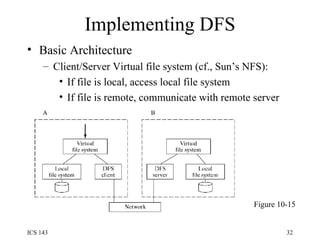
Implementing DFS Basic Architecture Client/Server Virtual file system (cf., Sun’s NFS): If file is local, access local file system If file is remote, communicate with remote server Figure 10-15
Implementing DFS Caching reduces Network delay Disk access delay Server caching - simple No disk access on subsequent access No cache coherence problems But network delay still exists Client caching - more complicated When to update file on server? When/how to inform other processes?
Implementing DFS Client caching Write-through Allows Unix semantics but overhead is significant Delayed writing Requires weaker semantics Server propagate changes to other caches Violates client/server relationship Clients need to check periodically Requires weaker semantics
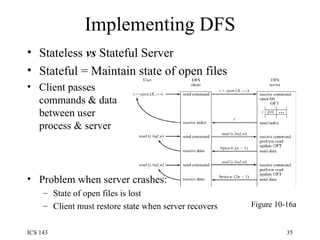
Implementing DFS Stateless  vs  Stateful Server Stateful = Maintain state of open files Client passes commands & data between user process & server Problem when server crashes: State of open files is lost Client must restore state when server recovers Figure 10-16a
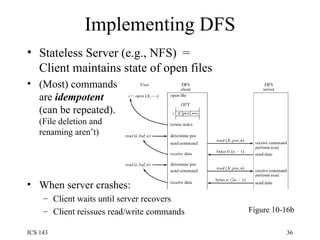
Implementing DFS Stateless Server (e.g., NFS)  =  Client maintains state of open files (Most) commands are  idempotent (can be repeated). (File deletion and renaming aren’t) When server crashes: Client waits until server recovers Client reissues read/write commands Figure 10-16b
Implementing DFS File replication improves Availability  Multiple copies available Reliability  Multiple copies help in recovery Performance Multiple copies remove bottlenecks and reduce network latency Scalability Multiple copies reduce bottlenecks
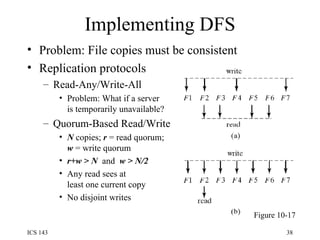
Implementing DFS Problem: File copies must be consistent Replication protocols Read-Any/Write-All Problem: What if a server is temporarily unavailable? Quorum-Based Read/Write N  copies;  r  = read quorum; w  = write quorum r+w > N  and  w > N/2 Any read sees at  least one current copy No disjoint writes Figure 10-17

Os10

  • 1.
    10. File Systems10.1 Basic Functions of File Management 10.2 Hierarchical Model of a File System 10.4 File Directories Hierarchical Directory Organizations Operations on Directories Implementation of File Directories 10.5 Basic File System File Descriptors Opening and Closing of Files 10.6 Physical Organization Methods Contiguous Organization Linked Organization Indexed Organization Management of Free Storage Space 10.7 Distributed File Systems Directory Structures and Sharing Semantics of File Sharing 10.8 Implementing DFS
  • 2.
    Basic Functions ofFS Present logical (abstract) view of files and directories Hide complexity of hardware devices Facilitate efficient use of storage devices Optimize access, e.g., to disk Support sharing Provide protection
  • 3.
    Hierarchical Model ofFS Basic file system Open/close files Physical organization methods Map file data to disk blocks Figure 10-1 Abstract user interface Present convenient view Directory management Map logical name to unique Id, file descriptor
  • 4.
    User View ofFiles File name and type Valid name Number of characters Lower vs upper case Extension Tied to type of file Used by applications File type recorded in header Cannot be changed (even when extension changes) Basic types: text, object, load file; directory Application-specific types, e.g., .doc, .ps, .html
  • 5.
    User View ofFiles Logical file organization Fixed or variable-size records Addressed Implicitly (sequential access to next record) Explicitly by position (record#) or key Figure 10-2 a) Fixed Length Record b) Variable Length Record c) Fixed Length with Key d) Variable Length with Key Memory mapped files Read virtual memory instead of read(i,buf,n ) Map file contents 0:(n  1) to va:(va+n  1)
  • 6.
    Other File AttributesOwnership File Size File Use Time of creation, last access, last modification File Disposition Permanent or Temporary Protection Who can access and what type of access Location
  • 7.
    Operations on FilesCreate/Delete Create/delete file descriptor Modify directory Open/Close Modify open file table (“OFT”) Read/Write (sequential or direct) Modify file descriptor Transfer data between disk and memory Seek/Rewind Modify open file table
  • 8.
    File Directories Tree-structuredSimple search, insert, delete operations Sharing is asymmetric (only one parent) Figure 10-3
  • 9.
    File Directories DAG-structuredSharing is symmetric, but What are semantics of delete? Any parent can remove file. Only last parent can remove it. Need reference count Figure 10-5
  • 10.
    File Directories DAG-structuredMust prevent cycles If cycles are allowed: Search is difficult (infinite loops) Deletion needs garbage collection (reference count not enough) Figure 10-6
  • 11.
    File Directories Symboliclinks Compromise to allow sharing but avoid cycles For read/write access: Symbolic link is the same as actual link For deletion: Only symbolic link is deleted Figure 10-7
  • 12.
    File Directories Filenaming: Path names Concatenated local names with delimiter: ( . or / or \ ) Absolute path name: start with root ( / ) Relative path name: Start with current directory ( . ) Notation to move “upward” ( .. )
  • 13.
    Operations on FileDirectories Create/delete List sorting, wild cards, recursion, information displayed Change (current, working, default) directory path name, home directory (default) Move Rename Change protection Create/delete link (symbolic) Find/search routines
  • 14.
    Implementation of DirectoriesWhat information to keep in each entry Only symbolic name and pointer to descriptor Needs an extra disk access to descriptor All descriptive information Directory can become very large How to organize entries within directory Fixed-size array of slots or a linked list Easy insertion/deletion Search is sequential Hash table B-tree (balanced, but sequential access can be slow) B + -tree (balanced and with good sequential access)
  • 15.
    Basic File SystemOpen/Close files Retrieve and set up descriptive information for efficient access File descriptor ( i-node in Unix) Owner id File type Protection information Mapping to physical disk blocks Time of creation, last use, last modification Reference counter
  • 16.
    Basic File SystemOpen File Table (OFT) Open command: Verify access rights Allocate OFT entry Allocate read/write buffers Fill in OFT entry Initialization (e.g., current position) Information from descriptor (e.g. file length, disk location) Pointers to allocated buffers Return OFT index
  • 17.
    Basic File SystemClose command: Flush modified buffers to disk Release buffers Update file descriptor file length, disk location, usage information Free OFT entry
  • 18.
    Basic File SystemExample: Unix Unbuffered access fd=open(name,rw,…) stat=read(fd,mem,n) stat=write(fd,mem,n ) Buffered access fp=fopen(name,rwa) c=read(fp ) Figure 10-11
  • 19.
    Physical Organization MethodsContiguous organization Simple implementation Fast sequential access (minimal arm movement) Insert/delete is difficult How much space to allocate initially External fragmentation Figure 10-12a
  • 20.
    Physical Organization MethodsLinked Organization Simple insert/delete, no external fragmentation Sequential access less efficient (seek latency) Direct access not possible Poor reliability (when chain breaks) Figure 10-12b
  • 21.
    Physical Organization MethodsLinked Variation 1: Keep pointers segregated May be cached Figure 10-12d Figure 10-12c Linked Variation 2: Link sequences of adjacent blocks, rather than individual blocks
  • 22.
    Physical Organization MethodsIndexed Organization Index table: sequential list of records Simplest implementation: keep index list in descriptor Insert/delete is easy Sequential and direct access is efficient Drawback: file size limited by number of index entries Figure 10-12e
  • 23.
    Physical Organization MethodsVariations of indexing Multi-level index hierarchy Primary index points to secondary indices Problem: number of disk accesses increases with depth of hierarchy Incremental indexing Fixed number of entries at top-level index When insufficient, allocate additional index levels Example: Unix -- 3-level expansion (see next slide)
  • 24.
    Physical Organization MethodsIncremental indexing Example: Unix 3-level expansion Figure 10-13
  • 25.
    Free Storage SpaceManagement Similar to main memory management Linked list organization Linking individual blocks -- inefficient: No block clustering to minimize seek operations Groups of blocks are allocated/released one at a time Linking groups of consecutive blocks Bit map organization Analogous to main memory
  • 26.
    Distributed File SystemsDirectory structures differentiated by: Global vs Local naming: Single global structure or different for each user? Location transparency: Does the path name reveal anything about machine or server? Location independence When a file moves between machines, does its path name change?
  • 27.
    Global Directory StructureCombine under a new common root Local directory structures Figure 10-14b Figure 10-14a
  • 28.
    Global Directory StructureProblem with “Combine under new common root:” Using “ / ” for new root invalidates existing local names Solution (Unix United): Use “ / ” for local root Use “ .. ” to move to new root Example: reach u1 from u2 : ../../../S1/usr/u1 or /../S1/usr/u1 Names are not location transparent
  • 29.
    Local Directory StructuresMounting Subtree on one machine is mounted over/in-the-place-of a directory on another machine Contents of original directory invisible during mount Structure changes dynamically Each user has own view of FS Figure 10-14c On S1: /mp On S2: /usr On S1: /mp/u2/x On S2: /usr/u2/x
  • 30.
    Shared Directory SubstructureEach machine has local file system One subtree is shared by all machines Figure 10-14d
  • 31.
    Semantics of FileSharing Unix semantics All updates are immediately visible Generates a lot of network traffic Session semantics Updates visible when file closes Simultaneous updates are unpredictable (lost) Transaction semantics Updates visible at end of transaction Immutable-files semantics Updates create a new version of file Now the problem is one of version management
  • 32.
    Implementing DFS BasicArchitecture Client/Server Virtual file system (cf., Sun’s NFS): If file is local, access local file system If file is remote, communicate with remote server Figure 10-15
  • 33.
    Implementing DFS Cachingreduces Network delay Disk access delay Server caching - simple No disk access on subsequent access No cache coherence problems But network delay still exists Client caching - more complicated When to update file on server? When/how to inform other processes?
  • 34.
    Implementing DFS Clientcaching Write-through Allows Unix semantics but overhead is significant Delayed writing Requires weaker semantics Server propagate changes to other caches Violates client/server relationship Clients need to check periodically Requires weaker semantics
  • 35.
    Implementing DFS Stateless vs Stateful Server Stateful = Maintain state of open files Client passes commands & data between user process & server Problem when server crashes: State of open files is lost Client must restore state when server recovers Figure 10-16a
  • 36.
    Implementing DFS StatelessServer (e.g., NFS) = Client maintains state of open files (Most) commands are idempotent (can be repeated). (File deletion and renaming aren’t) When server crashes: Client waits until server recovers Client reissues read/write commands Figure 10-16b
  • 37.
    Implementing DFS Filereplication improves Availability Multiple copies available Reliability Multiple copies help in recovery Performance Multiple copies remove bottlenecks and reduce network latency Scalability Multiple copies reduce bottlenecks
  • 38.
    Implementing DFS Problem:File copies must be consistent Replication protocols Read-Any/Write-All Problem: What if a server is temporarily unavailable? Quorum-Based Read/Write N copies; r = read quorum; w = write quorum r+w > N and w > N/2 Any read sees at least one current copy No disjoint writes Figure 10-17

Editor's Notes

  • #10 DAG = Directed Acyclic Graph
  • #11 With cycles, need 2 passes for deletion: 1 to mark all accessible nodes; 1 to delete inaccessible ones Reference count in cycles never 0 even if cycle’s only connections are to itself.
  • #30 On S1, /mp is the same as what appears as /usr on S2
  • #36 OFT is on the server. X named only in 1 st call to server
  • #37 OFT on client. X named in each call to server.
  • #39 R-A/W-A a special case of more flexible Q-B R/W with r=1, w=N