BY
CHANDINI SANS
FILE SYSTEM INTERFACE
The user level ( visible) portion of the file system.
FILE
‘related information’ that is recorded on secondary
storage such as magnetic disks, magnetic tapes and
optical disks.
a. a file is a sequence of bits, bytes, lines or records
b. The file is an entry in a directory
c. Information about files is kept in the directory
structure, which is maintained on the disk.
FILE SYSTEM INTERFACE
The file may have attributes :
(name, creator, date, type, permissions)
1. Name – only information kept in human-readable form
2. Identifier – unique tag (number) identifies file within file
system
3. Type – needed for systems that support different types
4. Location – pointer to file location on device
5. Size – current file size
6. Protection – controls who can do reading, writing, executing
7. Time, date, and user identification – data for protection,
security, and usage monitoring
ATTRIBUTES OF A FILE
 Create
 Write
 Read
 Reposition within file – file seek
 Delete
 Truncate
 Open(Fi) – search the directory structure on disk for entry Fi,
and move the content of entry to memory.
 Close (Fi) – move the content of entry Fi in memory to
directory structure on disk.
FILE OPERATIONS
refers to the ability of the operating system to distinguish types of file such as
‘text files, source files and binary files’ etc
MS-DOS and UNIX have the following types of files:
 ORDINARY FILES :
These files contain user information,text, databases or executable program.
The user can apply various operations on files like add, modify, delete.
 DIRECTORY FILES :
These files ‘contain list of file names and other information’ related to these files.
 SPECIAL FILES :
These files are also known as device files , they represent physical device like disks,
terminals, printers, networks, tape drive.
These files are of two types
 Character special files - data is handled character by character as in case of
terminals or printers.
 Block special files - data is handled in blocks as in the case of disks and tapes.
FILE TYPES
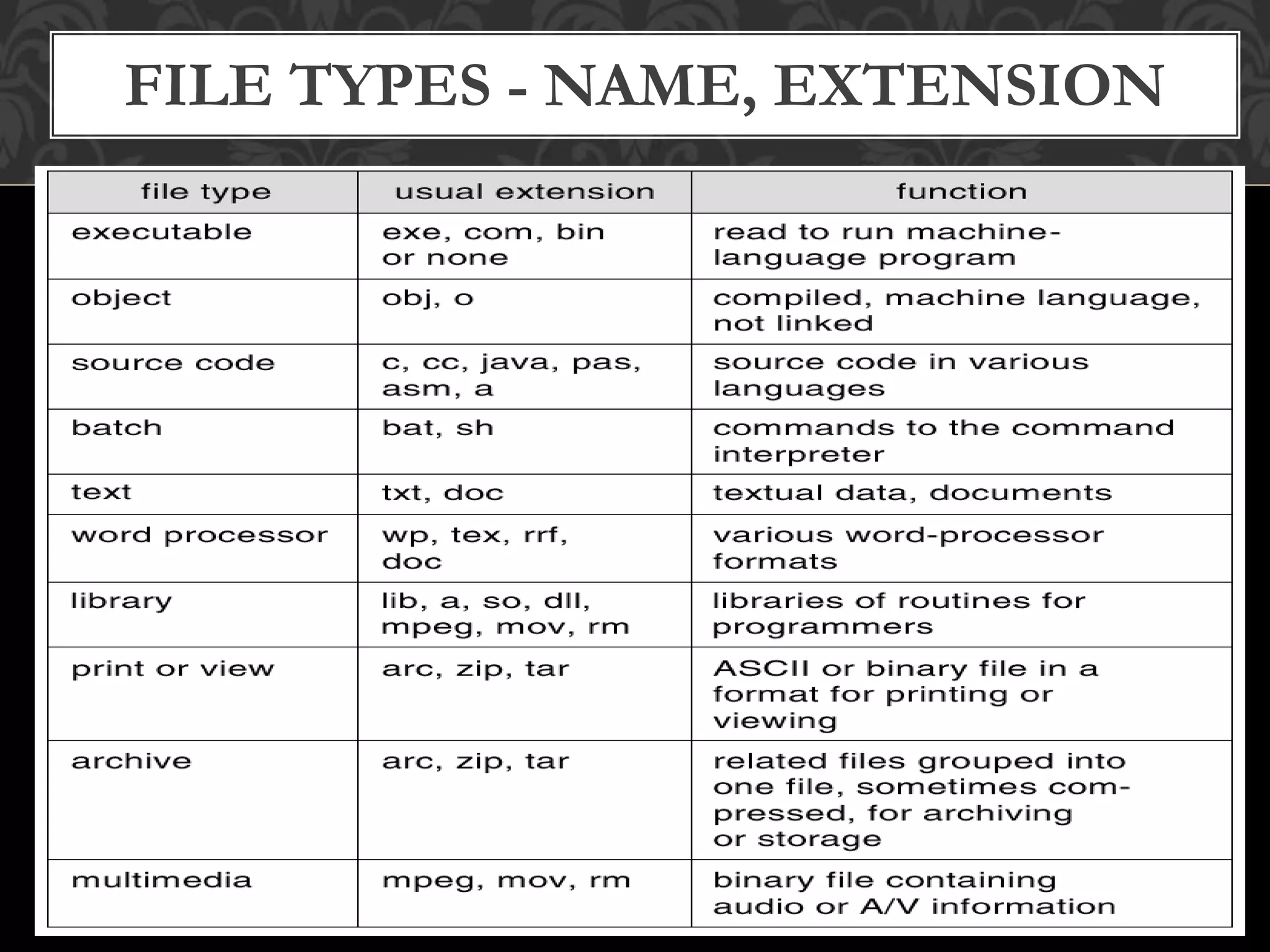
FILE TYPES - NAME, EXTENSION
The manner in which the records of a file may be accessed.
There are several ways to access files:
 SEQUENTIAL ACCESS
records are accessed in some sequence i.e the information in the file is processed
inorder, one record after the other. This access method is the most primitive one.
Example: Compilers usually access files in this fashion.
 DIRECT/RANDOM ACCESS
1. Each record has its own address on the file with by the help of which it can
be directly accessed for reading or writing.
2. The records need not be in any sequence within the file and they need not be
in adjacent locations on the storage medium.
 INDEXED SEQUENTIAL ACCESS
1. This mechanism is built up on base of sequential access.
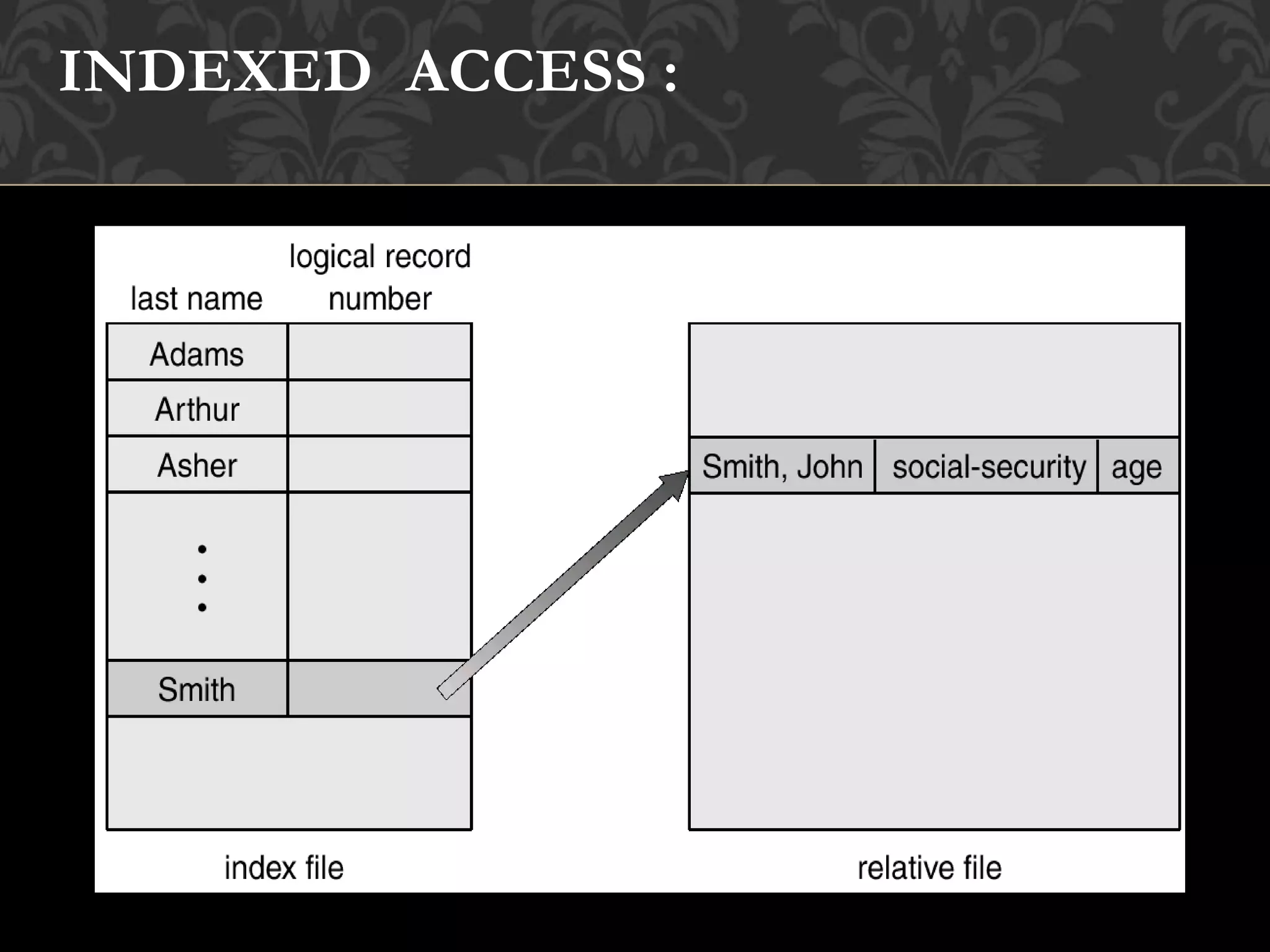
2. An index is created for each file which contains pointers to various blocks.
3. Index is searched sequentially and its pointer is used to access the file directly.
FILE ACCESS MECHANISMS
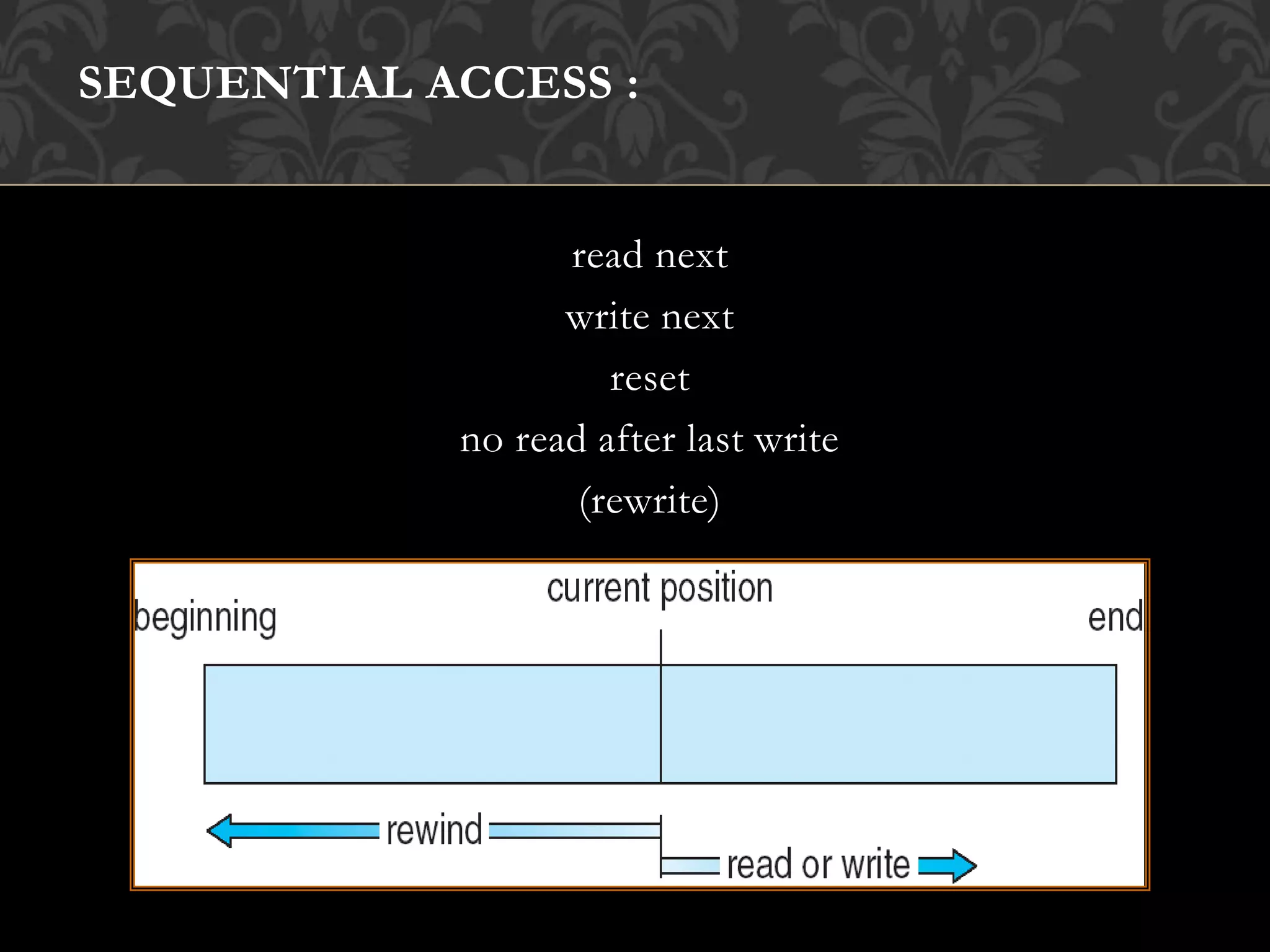
SEQUENTIAL ACCESS :
read next
write next
reset
no read after last write
(rewrite)
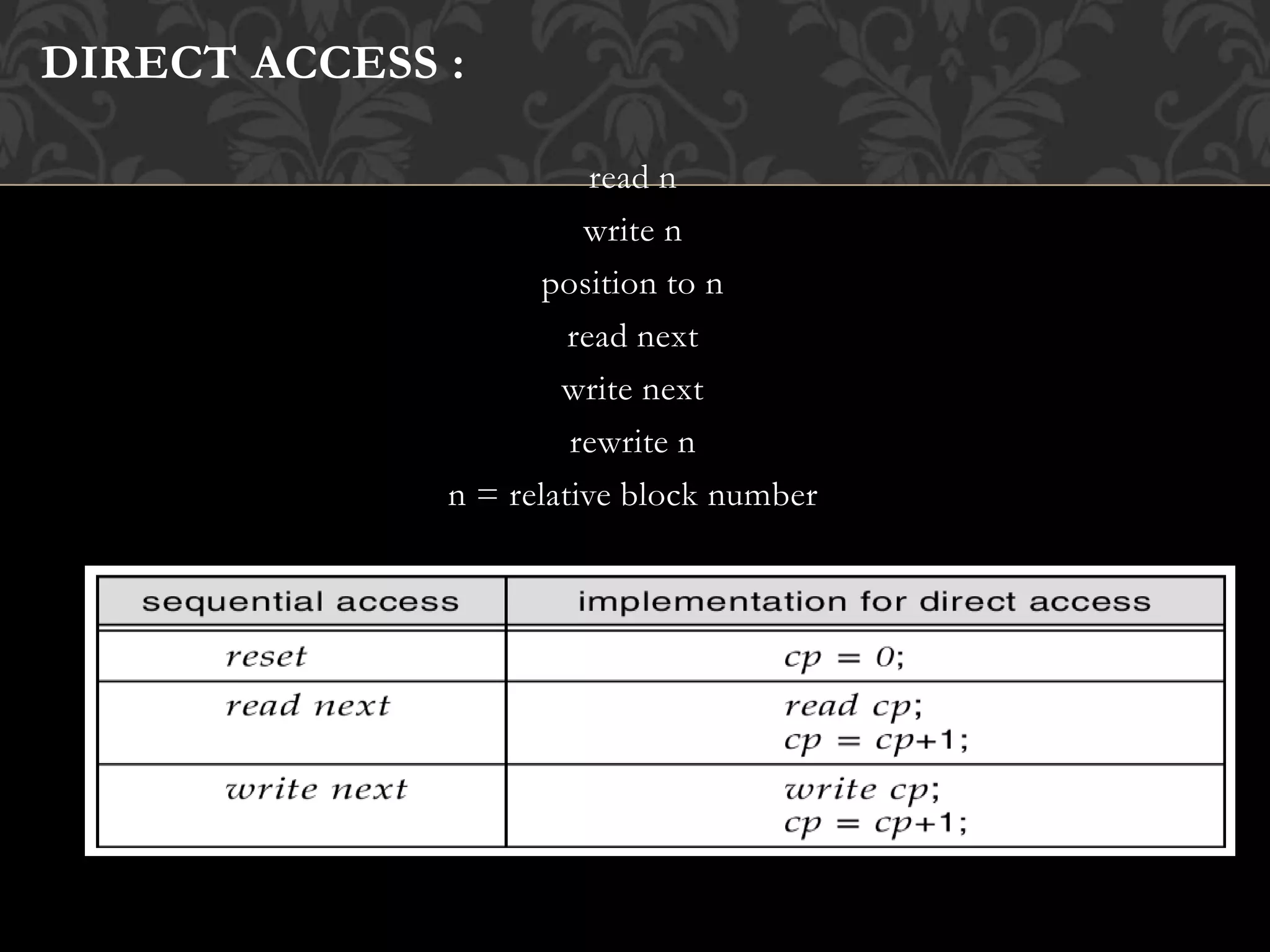
DIRECT ACCESS :
read n
write n
position to n
read next
write next
rewrite n
n = relative block number
INDEXED ACCESS :
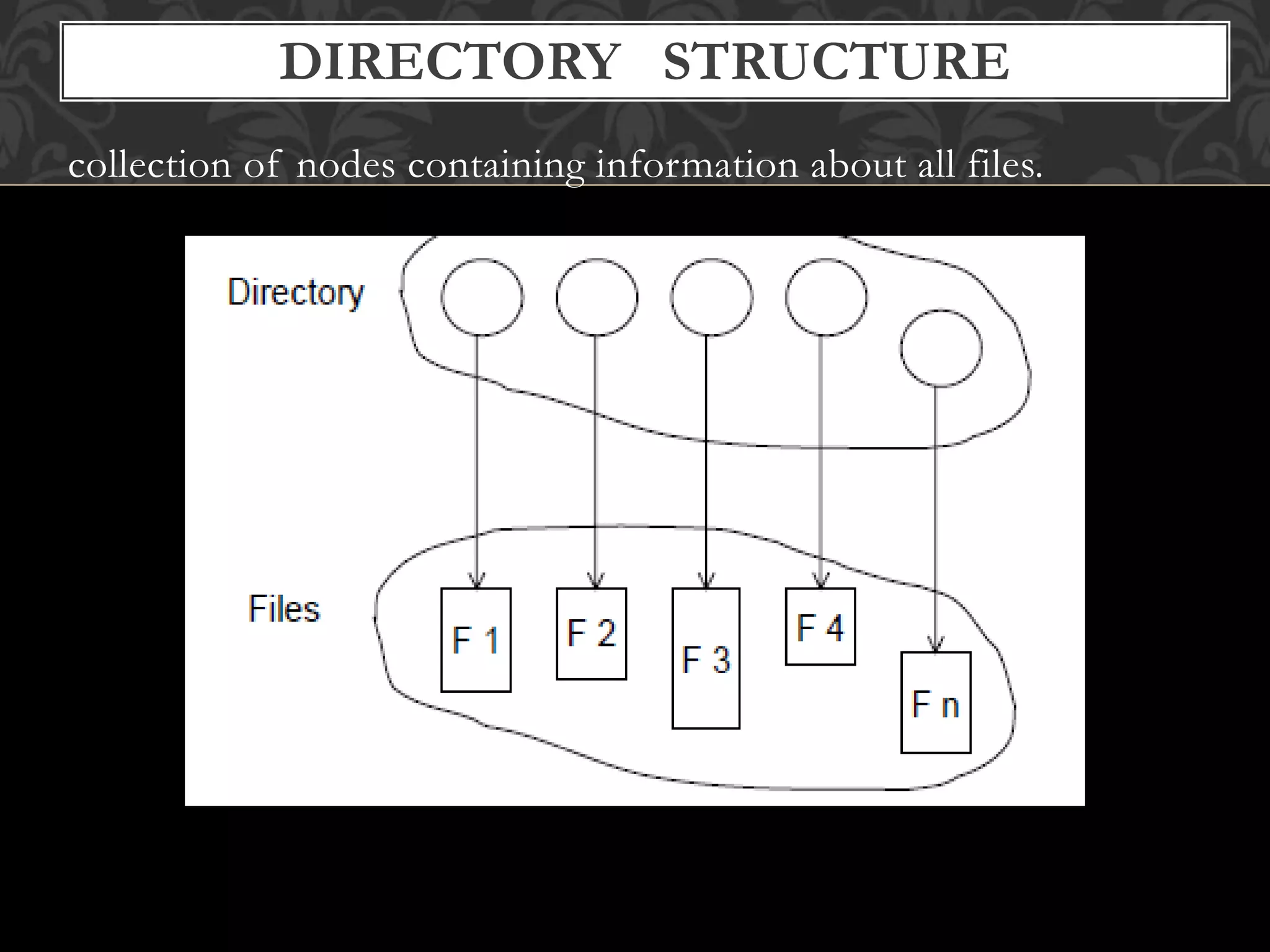
collection of nodes containing information about all files.
DIRECTORY STRUCTURE
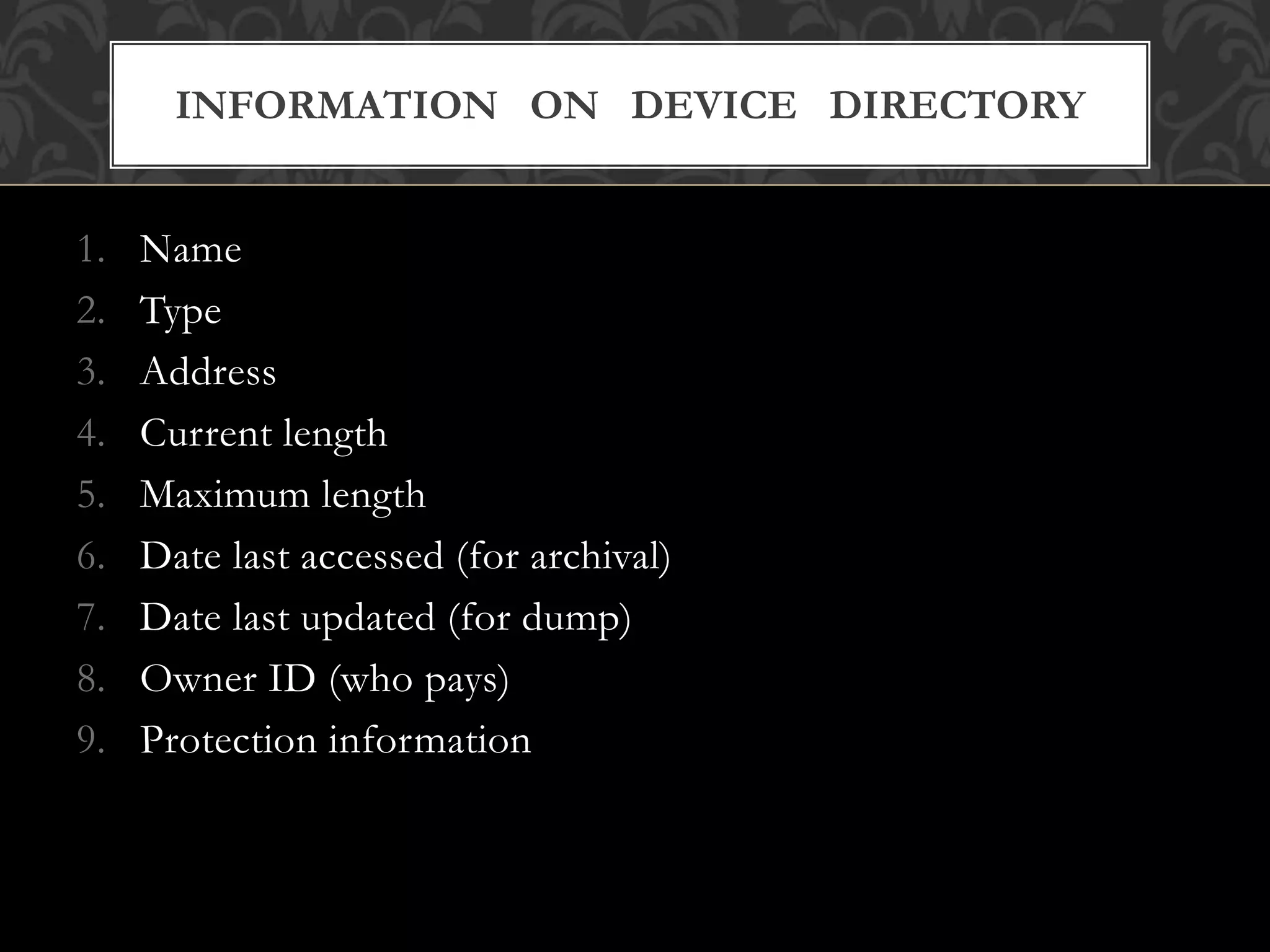
1. Name
2. Type
3. Address
4. Current length
5. Maximum length
6. Date last accessed (for archival)
7. Date last updated (for dump)
8. Owner ID (who pays)
9. Protection information
INFORMATION ON DEVICE DIRECTORY
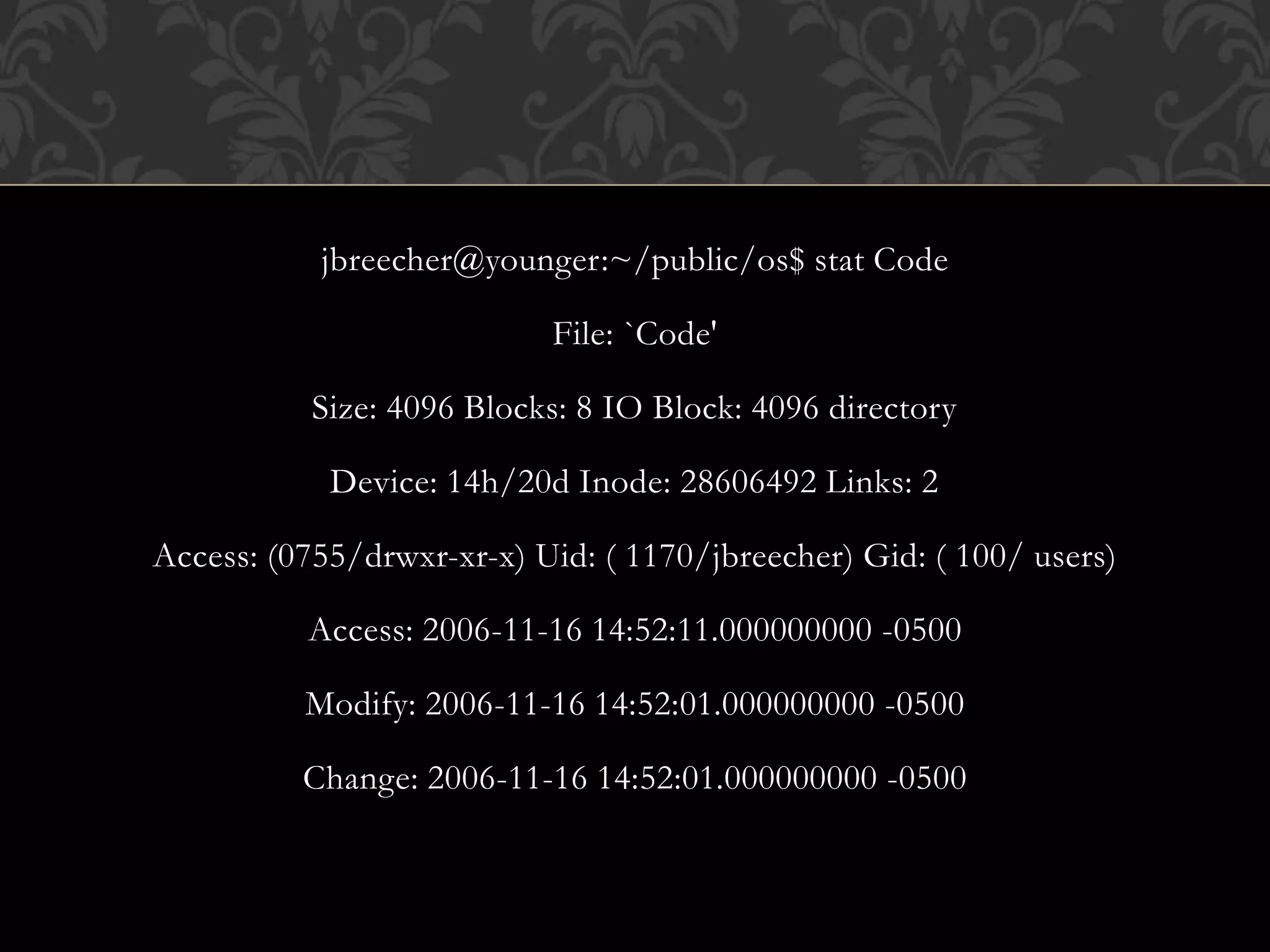
jbreecher@younger:~/public/os$ stat Code
File: `Code'
Size: 4096 Blocks: 8 IO Block: 4096 directory
Device: 14h/20d Inode: 28606492 Links: 2
Access: (0755/drwxr-xr-x) Uid: ( 1170/jbreecher) Gid: ( 100/ users)
Access: 2006-11-16 14:52:11.000000000 -0500
Modify: 2006-11-16 14:52:01.000000000 -0500
Change: 2006-11-16 14:52:01.000000000 -0500
 Search for a file
❒ Create a file
❒ Delete a file
❒ List a directory
❒ Rename a file
❒ Traverse the file system
OPERATIONS PERFORMED ON A DIRECTORY
1. Efficiency – locating a file quickly.
2. Naming – convenient to users.
 Two users can have same name for different files.
 The same file can have several different names.
3. Grouping – logical grouping of files by properties
(e.g., all Java programs, allgames, …)
ORGANIZE THE DIRECTIORY (LOGICALLY) TO OBTAIN
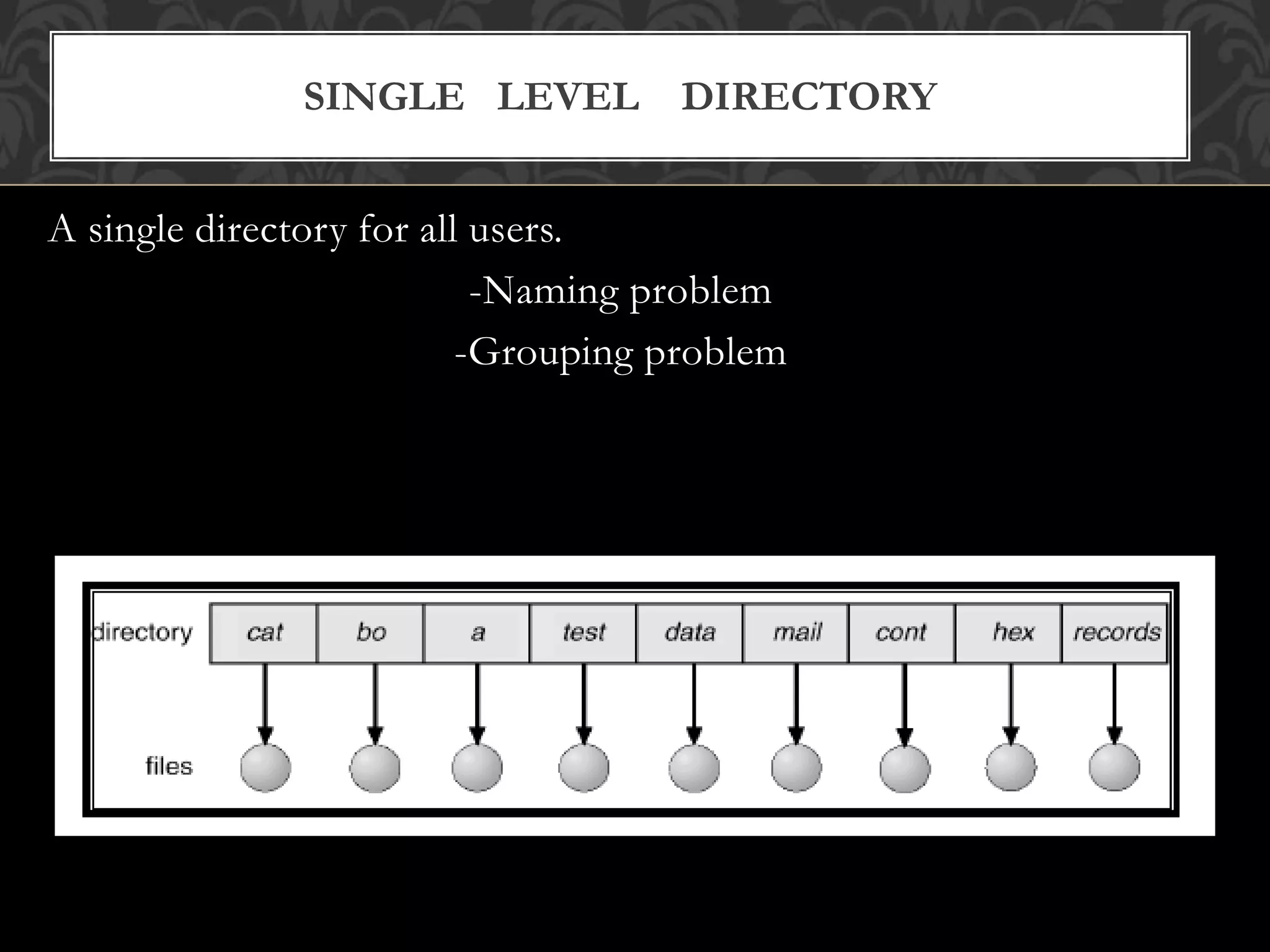
A single directory for all users.
-Naming problem
-Grouping problem
SINGLE LEVEL DIRECTORY
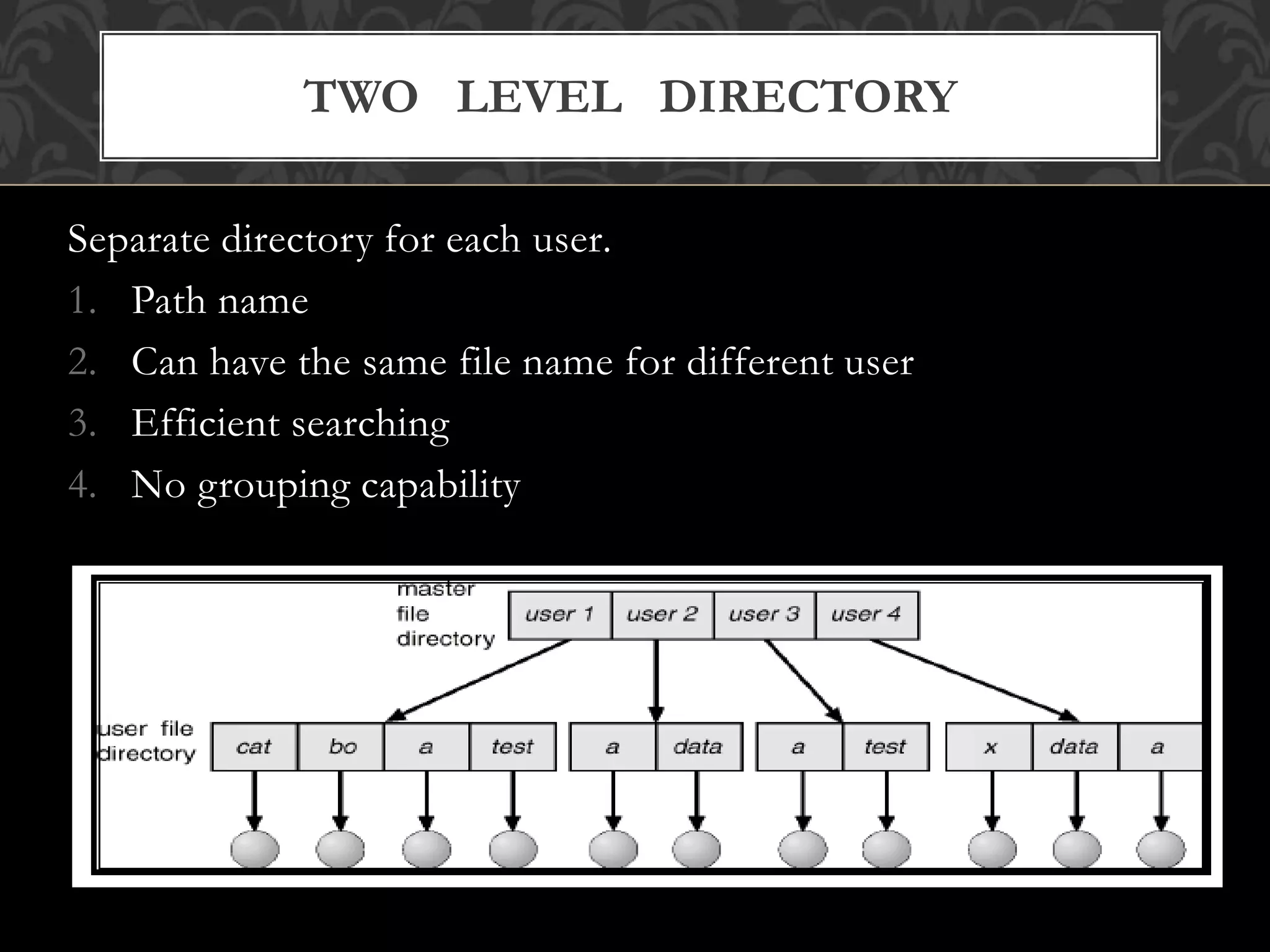
Separate directory for each user.
1. Path name
2. Can have the same file name for different user
3. Efficient searching
4. No grouping capability
TWO LEVEL DIRECTORY
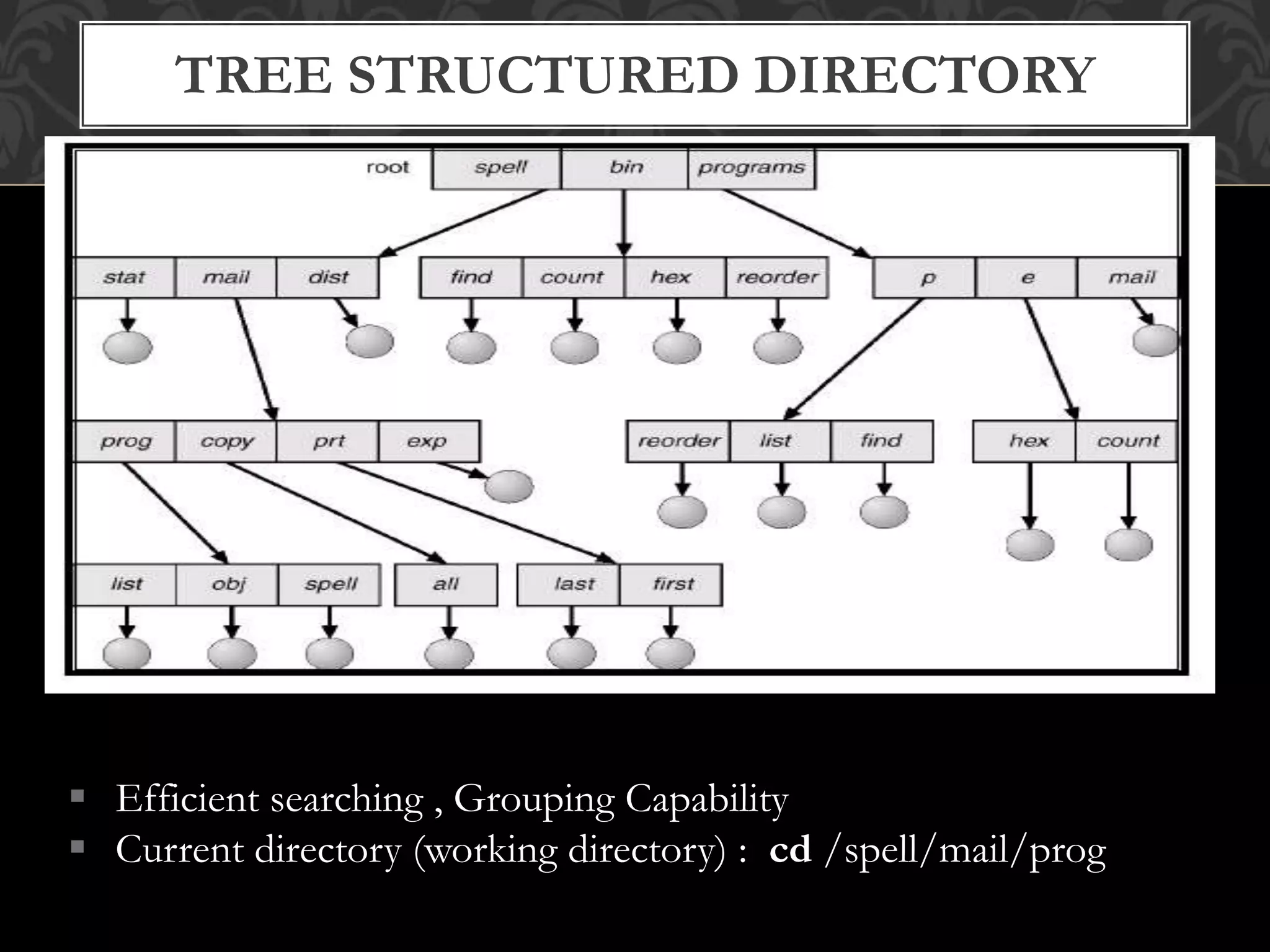
 Efficient searching , Grouping Capability
 Current directory (working directory) : cd /spell/mail/prog
TREE STRUCTURED DIRECTORY
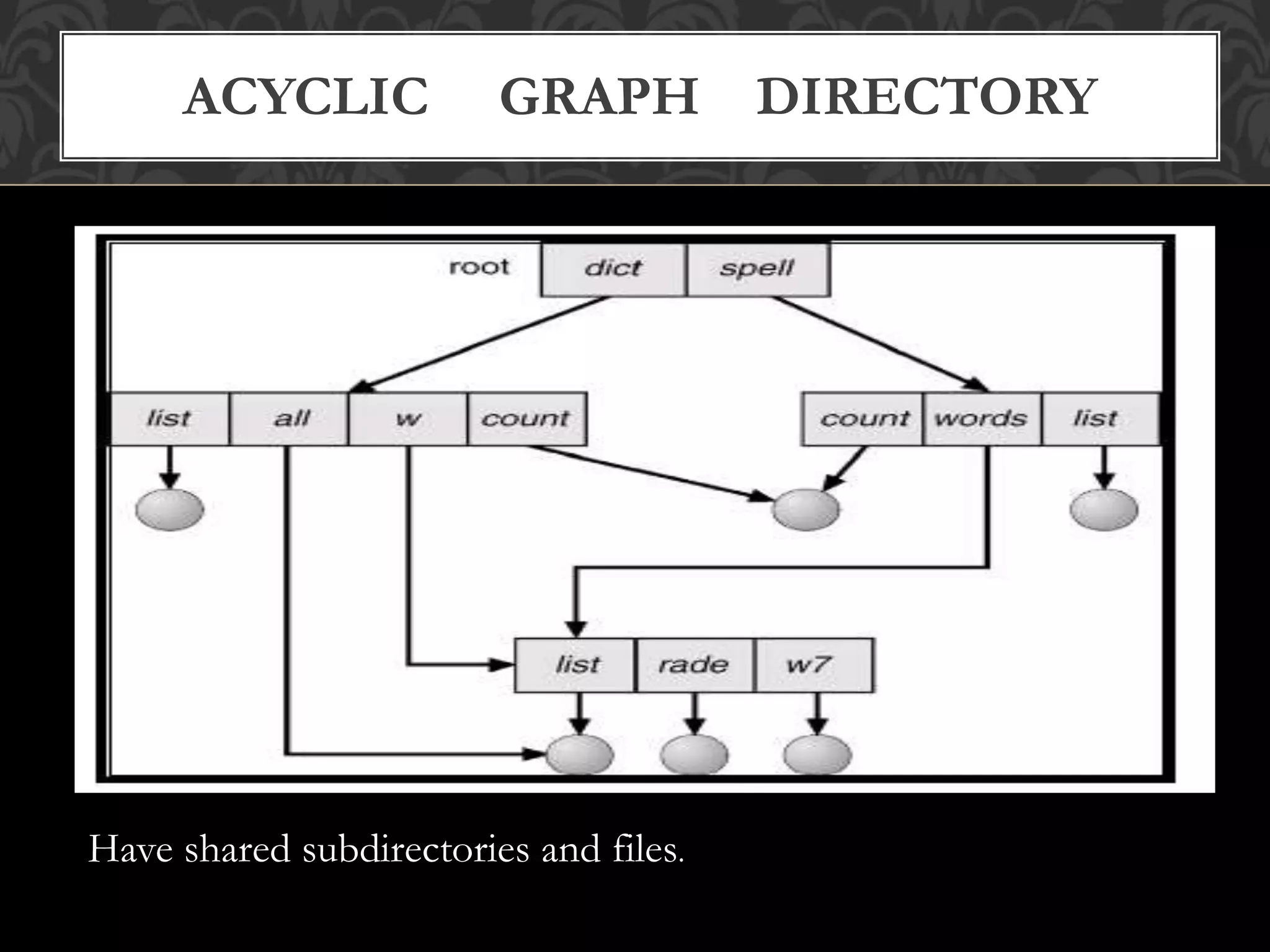
ACYCLIC GRAPH DIRECTORY
Have shared subdirectories and files.
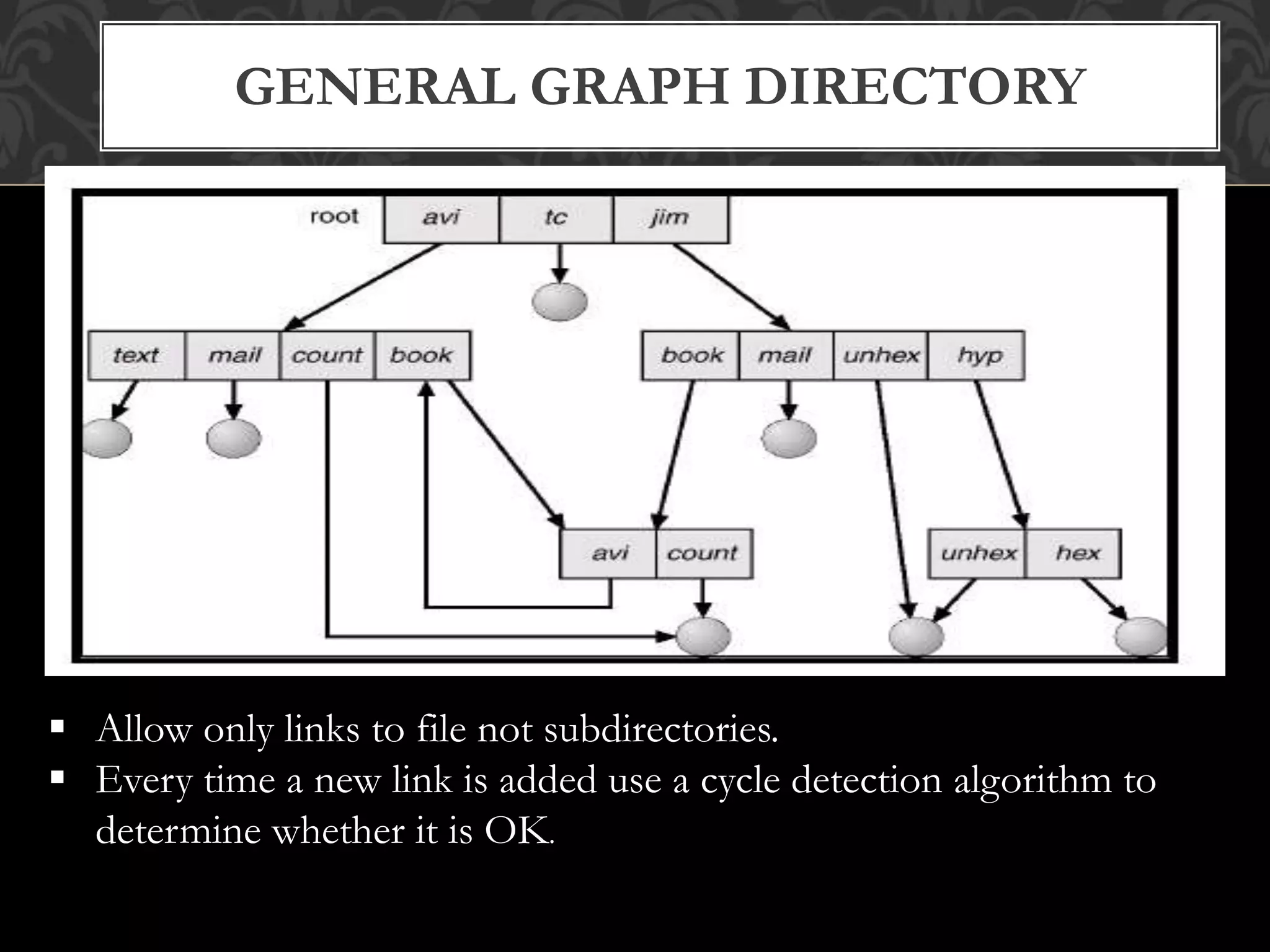
GENERAL GRAPH DIRECTORY
 Allow only links to file not subdirectories.
 Every time a new link is added use a cycle detection algorithm to
determine whether it is OK.

File System Interface

  • 1.
  • 2.
    The user level( visible) portion of the file system. FILE ‘related information’ that is recorded on secondary storage such as magnetic disks, magnetic tapes and optical disks. a. a file is a sequence of bits, bytes, lines or records b. The file is an entry in a directory c. Information about files is kept in the directory structure, which is maintained on the disk. FILE SYSTEM INTERFACE
  • 3.
    The file mayhave attributes : (name, creator, date, type, permissions) 1. Name – only information kept in human-readable form 2. Identifier – unique tag (number) identifies file within file system 3. Type – needed for systems that support different types 4. Location – pointer to file location on device 5. Size – current file size 6. Protection – controls who can do reading, writing, executing 7. Time, date, and user identification – data for protection, security, and usage monitoring ATTRIBUTES OF A FILE
  • 4.
     Create  Write Read  Reposition within file – file seek  Delete  Truncate  Open(Fi) – search the directory structure on disk for entry Fi, and move the content of entry to memory.  Close (Fi) – move the content of entry Fi in memory to directory structure on disk. FILE OPERATIONS
  • 5.
    refers to theability of the operating system to distinguish types of file such as ‘text files, source files and binary files’ etc MS-DOS and UNIX have the following types of files:  ORDINARY FILES : These files contain user information,text, databases or executable program. The user can apply various operations on files like add, modify, delete.  DIRECTORY FILES : These files ‘contain list of file names and other information’ related to these files.  SPECIAL FILES : These files are also known as device files , they represent physical device like disks, terminals, printers, networks, tape drive. These files are of two types  Character special files - data is handled character by character as in case of terminals or printers.  Block special files - data is handled in blocks as in the case of disks and tapes. FILE TYPES
  • 6.
    FILE TYPES -NAME, EXTENSION
  • 7.
    The manner inwhich the records of a file may be accessed. There are several ways to access files:  SEQUENTIAL ACCESS records are accessed in some sequence i.e the information in the file is processed inorder, one record after the other. This access method is the most primitive one. Example: Compilers usually access files in this fashion.  DIRECT/RANDOM ACCESS 1. Each record has its own address on the file with by the help of which it can be directly accessed for reading or writing. 2. The records need not be in any sequence within the file and they need not be in adjacent locations on the storage medium.  INDEXED SEQUENTIAL ACCESS 1. This mechanism is built up on base of sequential access. 2. An index is created for each file which contains pointers to various blocks. 3. Index is searched sequentially and its pointer is used to access the file directly. FILE ACCESS MECHANISMS
  • 8.
    SEQUENTIAL ACCESS : readnext write next reset no read after last write (rewrite)
  • 9.
    DIRECT ACCESS : readn write n position to n read next write next rewrite n n = relative block number
  • 10.
  • 11.
    collection of nodescontaining information about all files. DIRECTORY STRUCTURE
  • 12.
    1. Name 2. Type 3.Address 4. Current length 5. Maximum length 6. Date last accessed (for archival) 7. Date last updated (for dump) 8. Owner ID (who pays) 9. Protection information INFORMATION ON DEVICE DIRECTORY
  • 13.
    jbreecher@younger:~/public/os$ stat Code File:`Code' Size: 4096 Blocks: 8 IO Block: 4096 directory Device: 14h/20d Inode: 28606492 Links: 2 Access: (0755/drwxr-xr-x) Uid: ( 1170/jbreecher) Gid: ( 100/ users) Access: 2006-11-16 14:52:11.000000000 -0500 Modify: 2006-11-16 14:52:01.000000000 -0500 Change: 2006-11-16 14:52:01.000000000 -0500
  • 14.
     Search fora file ❒ Create a file ❒ Delete a file ❒ List a directory ❒ Rename a file ❒ Traverse the file system OPERATIONS PERFORMED ON A DIRECTORY
  • 15.
    1. Efficiency –locating a file quickly. 2. Naming – convenient to users.  Two users can have same name for different files.  The same file can have several different names. 3. Grouping – logical grouping of files by properties (e.g., all Java programs, allgames, …) ORGANIZE THE DIRECTIORY (LOGICALLY) TO OBTAIN
  • 16.
    A single directoryfor all users. -Naming problem -Grouping problem SINGLE LEVEL DIRECTORY
  • 17.
    Separate directory foreach user. 1. Path name 2. Can have the same file name for different user 3. Efficient searching 4. No grouping capability TWO LEVEL DIRECTORY
  • 18.
     Efficient searching, Grouping Capability  Current directory (working directory) : cd /spell/mail/prog TREE STRUCTURED DIRECTORY
  • 19.
    ACYCLIC GRAPH DIRECTORY Haveshared subdirectories and files.
  • 20.
    GENERAL GRAPH DIRECTORY Allow only links to file not subdirectories.  Every time a new link is added use a cycle detection algorithm to determine whether it is OK.