File System Implementation
 File-System Structure
 File-System Implementation
 Directory Implementation
 Allocation Methods
 Free-Space Management
 Efficiency and Performance
Objectives
 To describe the details of implementing local
file systems and directory structures
 To describe the implementation of remote file
systems
 To discuss block allocation and free-block
algorithms and trade-offs
File-System Structure
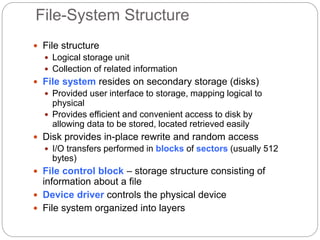
 File structure
 Logical storage unit
 Collection of related information
 File system resides on secondary storage (disks)
 Provided user interface to storage, mapping logical to
physical
 Provides efficient and convenient access to disk by
allowing data to be stored, located retrieved easily
 Disk provides in-place rewrite and random access
 I/O transfers performed in blocks of sectors (usually 512
bytes)
 File control block – storage structure consisting of
information about a file
 Device driver controls the physical device
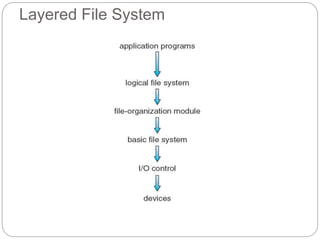
 File system organized into layers
Layered File System
File System Layers
 Device drivers manage I/O devices at the I/O
control layer
 Given commands like “read drive1, cylinder 72, track
2, sector 10, into memory location 1060” outputs low-
level hardware specific commands to hardware
controller
 Basic file system given command like “retrieve
block 123” translates to device driver
 Also manages memory buffers and caches
(allocation, freeing, replacement)
 Buffers hold data in transit
 Caches hold frequently used data
 File organization module understands files, logical
address, and physical blocks
 Translates logical block # to physical block #
 Manages free space, disk allocation
File System Layers (Cont.)
 Logical file system manages metadata
information
 Translates file name into file number, file
handle, location by maintaining file control
blocks (inodes in UNIX)
 Directory management
 Protection
 Layering useful for reducing complexity and
redundancy, but adds overhead and can
decrease performanceTranslates file name
into file number, file handle, location by
maintaining file control blocks (inodes in
UNIX)
 Logical layers can be implemented by any
File System Layers (Cont.)
 Many file systems, sometimes many within
an operating system
 Each with its own format (CD-ROM is ISO
9660; Unix has UFS, FFS; Windows has
FAT, FAT32, NTFS as well as floppy, CD,
DVD Blu-ray, Linux has more than 40 types,
with extended file system ext2 and ext3
leading; plus distributed file systems, etc.)
 New ones still arriving – ZFS, GoogleFS,
Oracle ASM, FUSE
File-System Implementation
 We have system calls at the API level, but
how do we implement their functions?
 On-disk and in-memory structures
 Boot control block contains info needed by
system to boot OS from that volume
 Needed if volume contains OS, usually first
block of volume
 Volume control block (superblock, master
file table) contains volume details
 Total # of blocks, # of free blocks, block size,
free block pointers or array
 Directory structure organizes the files
 Names and inode numbers, master file table
(Cont.)
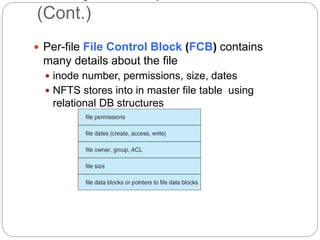
 Per-file File Control Block (FCB) contains
many details about the file
 inode number, permissions, size, dates
 NFTS stores into in master file table using
relational DB structures
Structures
 Mount table storing file system mounts,
mount points, file system types
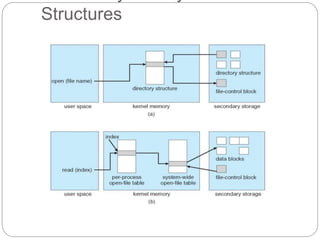
 The following figure illustrates the
necessary file system structures provided
by the operating systems
 Figure 12-3(a) refers to opening a file
 Figure 12-3(b) refers to reading a file
 Plus buffers hold data blocks from
secondary storage
 Open returns a file handle for subsequent
use
 Data from read eventually copied to
specified user process memory address
Structures
Partitions and Mounting
 Partition can be a volume containing a file
system (“cooked”) or raw – just a sequence of
blocks with no file system
 Boot block can point to boot volume or boot
loader set of blocks that contain enough code
to know how to load the kernel from the file
system
 Or a boot management program for multi-os
booting
 Root partition contains the OS, other
partitions can hold other Oses, other file
systems, or be raw
 Mounted at boot time
 Other partitions can mount automatically or
Virtual File Systems
 Virtual File Systems (VFS) on Unix provide
an object-oriented way of implementing file
systems
 VFS allows the same system call interface
(the API) to be used for different types of file
systems
 Separates file-system generic operations from
implementation details
 Implementation can be one of many file
systems types, or network file system
 Implements vnodes which hold inodes or network file
details
 Then dispatches operation to appropriate file
system implementation routines
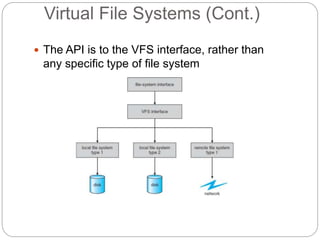
Virtual File Systems (Cont.)
 The API is to the VFS interface, rather than
any specific type of file system
Implementation
 For example, Linux has four object types:
 inode, file, superblock, dentry
 VFS defines set of operations on the objects that
must be implemented
 Every object has a pointer to a function table
 Function table has addresses of routines to implement that
function on that object
 For example:
 • int open(. . .)—Open a file
 • int close(. . .)—Close an already-open file
 • ssize t read(. . .)—Read from a file
 • ssize t write(. . .)—Write to a file
 • int mmap(. . .)—Memory-map a file
Directory Implementation
 Linear list of file names with pointer to the
data blocks
 Simple to program
 Time-consuming to execute
 Linear search time
 Could keep ordered alphabetically via linked list or
use B+ tree
 Hash Table – linear list with hash data
structure
 Decreases directory search time
 Collisions – situations where two file names
hash to the same location
 Only good if entries are fixed size, or use
chained-overflow method
Allocation Methods - Contiguous
 An allocation method refers to how disk
blocks are allocated for files:
 Contiguous allocation – each file occupies
set of contiguous blocks
 Best performance in most cases
 Simple – only starting location (block #) and
length (number of blocks) are required
 Problems include finding space for file,
knowing file size, external fragmentation, need
for compaction off-line (downtime) or on-
line
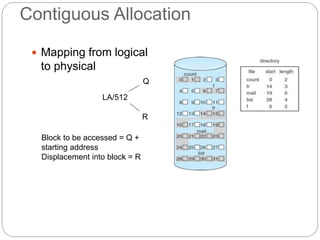
Contiguous Allocation
 Mapping from logical
to physical
LA/512
Q
R
Block to be accessed = Q +
starting address
Displacement into block = R
Extent-Based Systems
 Many newer file systems (i.e., Veritas File
System) use a modified contiguous
allocation scheme
 Extent-based file systems allocate disk
blocks in extents
 An extent is a contiguous block of disks
 Extents are allocated for file allocation
 A file consists of one or more extents
Allocation Methods - Linked
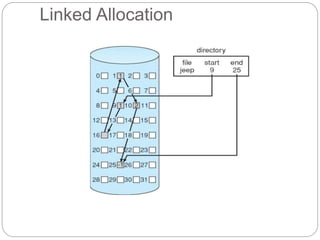
 Linked allocation – each file a linked list of
blocks
 File ends at nil pointer
 No external fragmentation
 Each block contains pointer to next block
 No compaction, external fragmentation
 Free space management system called when
new block needed
 Improve efficiency by clustering blocks into
groups but increases internal fragmentation
 Reliability can be a problem
 Locating a block can take many I/Os and disk
seeks
(Cont.)
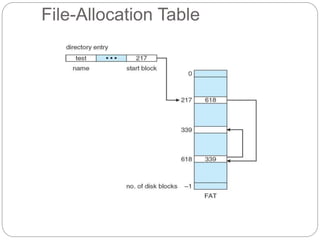
 FAT (File Allocation Table) variation
 Beginning of volume has table, indexed by block
number
 Much like a linked list, but faster on disk and cacheable
 New block allocation simple
Linked Allocation
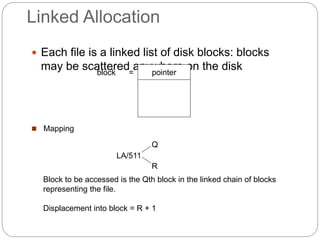
 Each file is a linked list of disk blocks: blocks
may be scattered anywhere on the disk
pointer
block =
 Mapping
Block to be accessed is the Qth block in the linked chain of blocks
representing the file.
Displacement into block = R + 1
LA/511
Q
R
Linked Allocation
File-Allocation Table
Allocation Methods - Indexed
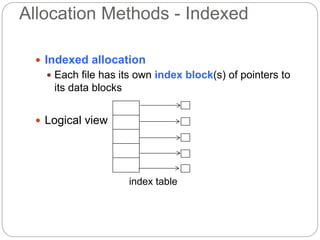
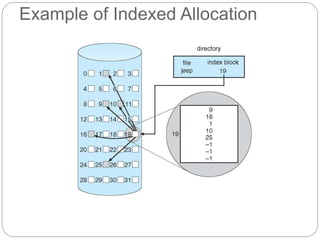
 Indexed allocation
 Each file has its own index block(s) of pointers to
its data blocks
 Logical view
index table
Example of Indexed Allocation
Indexed Allocation (Cont.)
 Need index table
 Random access
 Dynamic access without external
fragmentation, but have overhead of index
block
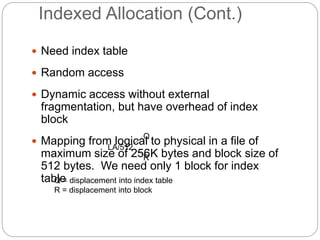
 Mapping from logical to physical in a file of
maximum size of 256K bytes and block size of
512 bytes. We need only 1 block for index
table
LA/512
Q
R
Q = displacement into index table
R = displacement into block
Indexed Allocation – Mapping
(Cont.)
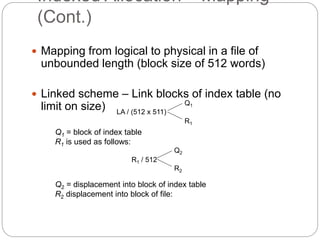
 Mapping from logical to physical in a file of
unbounded length (block size of 512 words)
 Linked scheme – Link blocks of index table (no
limit on size) LA / (512 x 511)
Q1
R1
Q1 = block of index table
R1 is used as follows:
R1 / 512
Q2
R2
Q2 = displacement into block of index table
R2 displacement into block of file:
Indexed Allocation – Mapping
(Cont.)
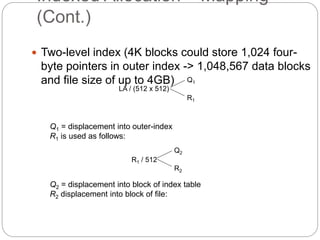
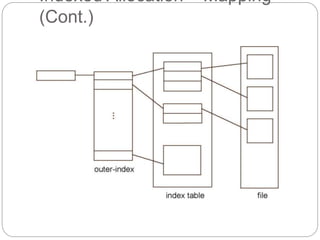
 Two-level index (4K blocks could store 1,024 four-
byte pointers in outer index -> 1,048,567 data blocks
and file size of up to 4GB)
LA / (512 x 512)
Q1
R1
Q1 = displacement into outer-index
R1 is used as follows:
R1 / 512
Q2
R2
Q2 = displacement into block of index table
R2 displacement into block of file:
Indexed Allocation – Mapping
(Cont.)
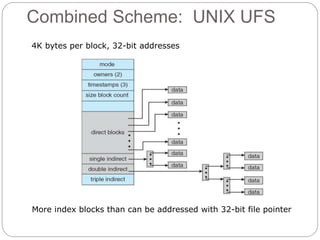
Combined Scheme: UNIX UFS
More index blocks than can be addressed with 32-bit file pointer
4K bytes per block, 32-bit addresses
Performance
 Best method depends on file access type
 Contiguous great for sequential and random
 Linked good for sequential, not random
 Declare access type at creation -> select
either contiguous or linked
 Indexed more complex
 Single block access could require 2 index block
reads then data block read
 Clustering can help improve throughput,
reduce CPU overhead
Performance (Cont.)
 Adding instructions to the execution path to
save one disk I/O is reasonable
 Intel Core i7 Extreme Edition 990x (2011) at
3.46Ghz = 159,000 MIPS
 http://en.wikipedia.org/wiki/Instructions_per_second
 Typical disk drive at 250 I/Os per second
 159,000 MIPS / 250 = 630 million instructions during one
disk I/O
 Fast SSD drives provide 60,000 IOPS
 159,000 MIPS / 60,000 = 2.65 millions instructions during
one disk I/O
Free-Space Management
 File system maintains free-space list to track
available blocks/clusters
 (Using term “block” for simplicity)
 Bit vector or bit map (n blocks)
…
0 1 2 n-1
bit[i] =

1  block[i] free
0  block[i] occupied
Block number calculation
(number of bits per word) *
(number of 0-value words) +
offset of first 1 bit
CPUs have instructions to return offset within word of first “1” bit
(Cont.)
 Bit map requires extra space
 Example:
block size = 4KB = 212 bytes
disk size = 240 bytes (1 terabyte)
n = 240/212 = 228 bits (or 32MB)
if clusters of 4 blocks -> 8MB of
memory
 Easy to get contiguous files
Linked Free Space List on Disk
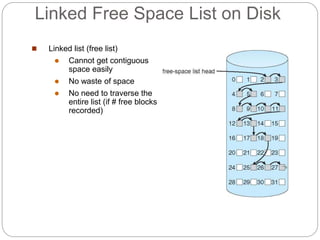
 Linked list (free list)
 Cannot get contiguous
space easily
 No waste of space
 No need to traverse the
entire list (if # free blocks
recorded)
Free-Space Management (Cont.)
 Grouping
 Modify linked list to store address of next n-1 free
blocks in first free block, plus a pointer to next
block that contains free-block-pointers (like this
one)
 Counting
 Because space is frequently contiguously used
and freed, with contiguous-allocation allocation,
extents, or clustering
 Keep address of first free block and count of following
free blocks
 Free space list then has entries containing addresses
and counts
Free-Space Management (Cont.)
 Space Maps
 Used in ZFS
 Consider meta-data I/O on very large file systems
 Full data structures like bit maps couldn’t fit in memory ->
thousands of I/Os
 Divides device space into metaslab units and
manages metaslabs
 Given volume can contain hundreds of metaslabs
 Each metaslab has associated space map
 Uses counting algorithm
 But records to log file rather than file system
 Log of all block activity, in time order, in counting format
 Metaslab activity -> load space map into memory in
balanced-tree structure, indexed by offset
 Replay log into that structure
 Combine contiguous free blocks into single entry
Efficiency and Performance
 Efficiency dependent on:
 Disk allocation and directory algorithms
 Types of data kept in file’s directory entry
 Pre-allocation or as-needed allocation of
metadata structures
 Fixed-size or varying-size data structures
(Cont.)
 Performance
 Keeping data and metadata close together
 Buffer cache – separate section of main
memory for frequently used blocks
 Synchronous writes sometimes requested by
apps or needed by OS
 No buffering / caching – writes must hit disk before
acknowledgement
 Asynchronous writes more common, buffer-able, faster
 Free-behind and read-ahead – techniques to
optimize sequential access
 Reads frequently slower than writes
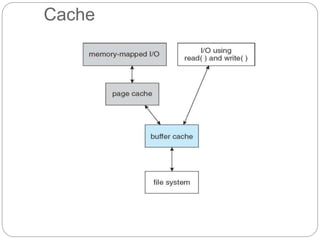
Page Cache
 A page cache caches pages rather than disk
blocks using virtual memory techniques and
addresses
 Memory-mapped I/O uses a page cache
 Routine I/O through the file system uses the
buffer (disk) cache
 This leads to the following figure
Cache
Unified Buffer Cache
 A unified buffer cache uses the same
page cache to cache both memory-mapped
pages and ordinary file system I/O to avoid
double caching
 But which caches get priority, and what
replacement algorithms to use?

file management_part2_os_notes.ppt

  • 1.
  • 2.
     File-System Structure File-System Implementation  Directory Implementation  Allocation Methods  Free-Space Management  Efficiency and Performance
  • 3.
    Objectives  To describethe details of implementing local file systems and directory structures  To describe the implementation of remote file systems  To discuss block allocation and free-block algorithms and trade-offs
  • 4.
    File-System Structure  Filestructure  Logical storage unit  Collection of related information  File system resides on secondary storage (disks)  Provided user interface to storage, mapping logical to physical  Provides efficient and convenient access to disk by allowing data to be stored, located retrieved easily  Disk provides in-place rewrite and random access  I/O transfers performed in blocks of sectors (usually 512 bytes)  File control block – storage structure consisting of information about a file  Device driver controls the physical device  File system organized into layers
  • 5.
  • 6.
    File System Layers Device drivers manage I/O devices at the I/O control layer  Given commands like “read drive1, cylinder 72, track 2, sector 10, into memory location 1060” outputs low- level hardware specific commands to hardware controller  Basic file system given command like “retrieve block 123” translates to device driver  Also manages memory buffers and caches (allocation, freeing, replacement)  Buffers hold data in transit  Caches hold frequently used data  File organization module understands files, logical address, and physical blocks  Translates logical block # to physical block #  Manages free space, disk allocation
  • 7.
    File System Layers(Cont.)  Logical file system manages metadata information  Translates file name into file number, file handle, location by maintaining file control blocks (inodes in UNIX)  Directory management  Protection  Layering useful for reducing complexity and redundancy, but adds overhead and can decrease performanceTranslates file name into file number, file handle, location by maintaining file control blocks (inodes in UNIX)  Logical layers can be implemented by any
  • 8.
    File System Layers(Cont.)  Many file systems, sometimes many within an operating system  Each with its own format (CD-ROM is ISO 9660; Unix has UFS, FFS; Windows has FAT, FAT32, NTFS as well as floppy, CD, DVD Blu-ray, Linux has more than 40 types, with extended file system ext2 and ext3 leading; plus distributed file systems, etc.)  New ones still arriving – ZFS, GoogleFS, Oracle ASM, FUSE
  • 9.
    File-System Implementation  Wehave system calls at the API level, but how do we implement their functions?  On-disk and in-memory structures  Boot control block contains info needed by system to boot OS from that volume  Needed if volume contains OS, usually first block of volume  Volume control block (superblock, master file table) contains volume details  Total # of blocks, # of free blocks, block size, free block pointers or array  Directory structure organizes the files  Names and inode numbers, master file table
  • 10.
    (Cont.)  Per-file FileControl Block (FCB) contains many details about the file  inode number, permissions, size, dates  NFTS stores into in master file table using relational DB structures
  • 11.
    Structures  Mount tablestoring file system mounts, mount points, file system types  The following figure illustrates the necessary file system structures provided by the operating systems  Figure 12-3(a) refers to opening a file  Figure 12-3(b) refers to reading a file  Plus buffers hold data blocks from secondary storage  Open returns a file handle for subsequent use  Data from read eventually copied to specified user process memory address
  • 12.
  • 13.
    Partitions and Mounting Partition can be a volume containing a file system (“cooked”) or raw – just a sequence of blocks with no file system  Boot block can point to boot volume or boot loader set of blocks that contain enough code to know how to load the kernel from the file system  Or a boot management program for multi-os booting  Root partition contains the OS, other partitions can hold other Oses, other file systems, or be raw  Mounted at boot time  Other partitions can mount automatically or
  • 14.
    Virtual File Systems Virtual File Systems (VFS) on Unix provide an object-oriented way of implementing file systems  VFS allows the same system call interface (the API) to be used for different types of file systems  Separates file-system generic operations from implementation details  Implementation can be one of many file systems types, or network file system  Implements vnodes which hold inodes or network file details  Then dispatches operation to appropriate file system implementation routines
  • 15.
    Virtual File Systems(Cont.)  The API is to the VFS interface, rather than any specific type of file system
  • 16.
    Implementation  For example,Linux has four object types:  inode, file, superblock, dentry  VFS defines set of operations on the objects that must be implemented  Every object has a pointer to a function table  Function table has addresses of routines to implement that function on that object  For example:  • int open(. . .)—Open a file  • int close(. . .)—Close an already-open file  • ssize t read(. . .)—Read from a file  • ssize t write(. . .)—Write to a file  • int mmap(. . .)—Memory-map a file
  • 17.
    Directory Implementation  Linearlist of file names with pointer to the data blocks  Simple to program  Time-consuming to execute  Linear search time  Could keep ordered alphabetically via linked list or use B+ tree  Hash Table – linear list with hash data structure  Decreases directory search time  Collisions – situations where two file names hash to the same location  Only good if entries are fixed size, or use chained-overflow method
  • 18.
    Allocation Methods -Contiguous  An allocation method refers to how disk blocks are allocated for files:  Contiguous allocation – each file occupies set of contiguous blocks  Best performance in most cases  Simple – only starting location (block #) and length (number of blocks) are required  Problems include finding space for file, knowing file size, external fragmentation, need for compaction off-line (downtime) or on- line
  • 19.
    Contiguous Allocation  Mappingfrom logical to physical LA/512 Q R Block to be accessed = Q + starting address Displacement into block = R
  • 20.
    Extent-Based Systems  Manynewer file systems (i.e., Veritas File System) use a modified contiguous allocation scheme  Extent-based file systems allocate disk blocks in extents  An extent is a contiguous block of disks  Extents are allocated for file allocation  A file consists of one or more extents
  • 21.
    Allocation Methods -Linked  Linked allocation – each file a linked list of blocks  File ends at nil pointer  No external fragmentation  Each block contains pointer to next block  No compaction, external fragmentation  Free space management system called when new block needed  Improve efficiency by clustering blocks into groups but increases internal fragmentation  Reliability can be a problem  Locating a block can take many I/Os and disk seeks
  • 22.
    (Cont.)  FAT (FileAllocation Table) variation  Beginning of volume has table, indexed by block number  Much like a linked list, but faster on disk and cacheable  New block allocation simple
  • 23.
    Linked Allocation  Eachfile is a linked list of disk blocks: blocks may be scattered anywhere on the disk pointer block =  Mapping Block to be accessed is the Qth block in the linked chain of blocks representing the file. Displacement into block = R + 1 LA/511 Q R
  • 24.
  • 25.
  • 26.
    Allocation Methods -Indexed  Indexed allocation  Each file has its own index block(s) of pointers to its data blocks  Logical view index table
  • 27.
  • 28.
    Indexed Allocation (Cont.) Need index table  Random access  Dynamic access without external fragmentation, but have overhead of index block  Mapping from logical to physical in a file of maximum size of 256K bytes and block size of 512 bytes. We need only 1 block for index table LA/512 Q R Q = displacement into index table R = displacement into block
  • 29.
    Indexed Allocation –Mapping (Cont.)  Mapping from logical to physical in a file of unbounded length (block size of 512 words)  Linked scheme – Link blocks of index table (no limit on size) LA / (512 x 511) Q1 R1 Q1 = block of index table R1 is used as follows: R1 / 512 Q2 R2 Q2 = displacement into block of index table R2 displacement into block of file:
  • 30.
    Indexed Allocation –Mapping (Cont.)  Two-level index (4K blocks could store 1,024 four- byte pointers in outer index -> 1,048,567 data blocks and file size of up to 4GB) LA / (512 x 512) Q1 R1 Q1 = displacement into outer-index R1 is used as follows: R1 / 512 Q2 R2 Q2 = displacement into block of index table R2 displacement into block of file:
  • 31.
    Indexed Allocation –Mapping (Cont.)
  • 32.
    Combined Scheme: UNIXUFS More index blocks than can be addressed with 32-bit file pointer 4K bytes per block, 32-bit addresses
  • 33.
    Performance  Best methoddepends on file access type  Contiguous great for sequential and random  Linked good for sequential, not random  Declare access type at creation -> select either contiguous or linked  Indexed more complex  Single block access could require 2 index block reads then data block read  Clustering can help improve throughput, reduce CPU overhead
  • 34.
    Performance (Cont.)  Addinginstructions to the execution path to save one disk I/O is reasonable  Intel Core i7 Extreme Edition 990x (2011) at 3.46Ghz = 159,000 MIPS  http://en.wikipedia.org/wiki/Instructions_per_second  Typical disk drive at 250 I/Os per second  159,000 MIPS / 250 = 630 million instructions during one disk I/O  Fast SSD drives provide 60,000 IOPS  159,000 MIPS / 60,000 = 2.65 millions instructions during one disk I/O
  • 35.
    Free-Space Management  Filesystem maintains free-space list to track available blocks/clusters  (Using term “block” for simplicity)  Bit vector or bit map (n blocks) … 0 1 2 n-1 bit[i] =  1  block[i] free 0  block[i] occupied Block number calculation (number of bits per word) * (number of 0-value words) + offset of first 1 bit CPUs have instructions to return offset within word of first “1” bit
  • 36.
    (Cont.)  Bit maprequires extra space  Example: block size = 4KB = 212 bytes disk size = 240 bytes (1 terabyte) n = 240/212 = 228 bits (or 32MB) if clusters of 4 blocks -> 8MB of memory  Easy to get contiguous files
  • 37.
    Linked Free SpaceList on Disk  Linked list (free list)  Cannot get contiguous space easily  No waste of space  No need to traverse the entire list (if # free blocks recorded)
  • 38.
    Free-Space Management (Cont.) Grouping  Modify linked list to store address of next n-1 free blocks in first free block, plus a pointer to next block that contains free-block-pointers (like this one)  Counting  Because space is frequently contiguously used and freed, with contiguous-allocation allocation, extents, or clustering  Keep address of first free block and count of following free blocks  Free space list then has entries containing addresses and counts
  • 39.
    Free-Space Management (Cont.) Space Maps  Used in ZFS  Consider meta-data I/O on very large file systems  Full data structures like bit maps couldn’t fit in memory -> thousands of I/Os  Divides device space into metaslab units and manages metaslabs  Given volume can contain hundreds of metaslabs  Each metaslab has associated space map  Uses counting algorithm  But records to log file rather than file system  Log of all block activity, in time order, in counting format  Metaslab activity -> load space map into memory in balanced-tree structure, indexed by offset  Replay log into that structure  Combine contiguous free blocks into single entry
  • 40.
    Efficiency and Performance Efficiency dependent on:  Disk allocation and directory algorithms  Types of data kept in file’s directory entry  Pre-allocation or as-needed allocation of metadata structures  Fixed-size or varying-size data structures
  • 41.
    (Cont.)  Performance  Keepingdata and metadata close together  Buffer cache – separate section of main memory for frequently used blocks  Synchronous writes sometimes requested by apps or needed by OS  No buffering / caching – writes must hit disk before acknowledgement  Asynchronous writes more common, buffer-able, faster  Free-behind and read-ahead – techniques to optimize sequential access  Reads frequently slower than writes
  • 42.
    Page Cache  Apage cache caches pages rather than disk blocks using virtual memory techniques and addresses  Memory-mapped I/O uses a page cache  Routine I/O through the file system uses the buffer (disk) cache  This leads to the following figure
  • 43.
  • 44.
    Unified Buffer Cache A unified buffer cache uses the same page cache to cache both memory-mapped pages and ordinary file system I/O to avoid double caching  But which caches get priority, and what replacement algorithms to use?