ICS 143 - Principles of
Operating Systems
Lectures 17-20 - FileSystem Interface and Implementation
Prof. Nalini Venkatasubramanian
nalini@ics.uci.edu
(includes slides from Prof. Sani)
Outline
■ File Concept and Structure
■ Directory Structures
■ File Organizations
■ Access Methods
■ Protection
File Concept
❑ Contiguous logical address space
■ OS abstracts from the physical properties of its storage
device to define a logical storage unit called file.
■ Persistent
■ OS maps files to physical devices.
❑ Types
■ Data
❑ numeric, character, binary
■ Program
❑ source, object (load image)
■ Documents
File Structure
❑ None - sequence of words/bytes
❑ Simple record structure
❑ Lines
❑ Fixed Length
❑ Variable Length
❑ Complex Structures
❑ Formatted document
❑ Relocatable Load File
❑ Can simulate last two with first method by
inserting appropriate control characters
❑ Who decides
❑ Operating System
❑ Program
File Attributes
❑ Name
❑ symbolic file-name, only information in human-readable form
❑ Identifier
❑ Unique tag that identifies file within filesystem; non-human readable name
❑ Type -
❑ for systems that support multiple types
❑ Location -
❑ pointer to a device and to file location on device
❑ Size -
❑ current file size, maximal possible size
❑ Protection -
❑ controls who can read, write, execute
❑ Time, Date and user identification
❑ data for protection, security and usage monitoring
❑ Information about files are kept in the directory structure,
maintained on disk
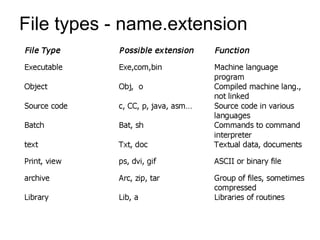
File types - name.extension
File Operations
❑ A file is an abstract data type. It can be defined by
operations:
■ Create a file
■ Write a file
■ Read a file
■ Reposition within file - file seek
■ Delete a file
■ Truncate a file
■ Open(Fi)
❑ search the directory structure on disk for entry Fi, initialize
access to Fi, returns a descriptor/handle to the file;
❑ may allocate buffers to hold content.
❑ may create file if it does not exist.
■ Close(Fi)
❑ move the content of entry Fi in memory to directory structure on
disk, flushes file buffers, terminates access to a file.
Directory Structure
❑ Number of files on a system can be extensive
❑ Break file systems into partitions ( treated as a separate
storage device)
❑ Hold information about files within partitions.
❑ Device Directory: A collection of nodes containing
information about all files on a partition.
❑ Both the directory structure and files reside on
disk.
❑ Backups of these two structures are kept on
tapes.
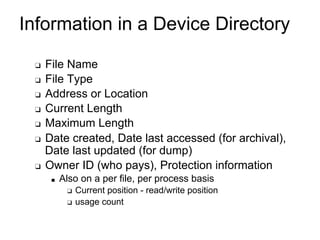
Information in a Device Directory
❑ File Name
❑ File Type
❑ Address or Location
❑ Current Length
❑ Maximum Length
❑ Date created, Date last accessed (for archival),
Date last updated (for dump)
❑ Owner ID (who pays), Protection information
■ Also on a per file, per process basis
❑ Current position - read/write position
❑ usage count
Operations Performed on Directory
❑ Search for a file
❑ Create a file
❑ Delete a file
❑ List a directory
❑ Rename a file
❑ Traverse the filesystem
Logical Directory Organization --
Goals
■ Efficiency - locating a file quickly
■ Naming - convenient to users
■ Two users can have the same name for different files.
■ The same file can have several different names.
■ Grouping
■ Logical grouping of files by properties (e.g. all Python
programs, all games, all pictures…)
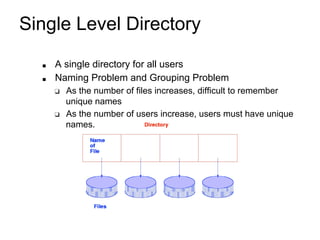
Single Level Directory
■ A single directory for all users
■ Naming Problem and Grouping Problem
❑ As the number of files increases, difficult to remember
unique names
❑ As the number of users increase, users must have unique
names.
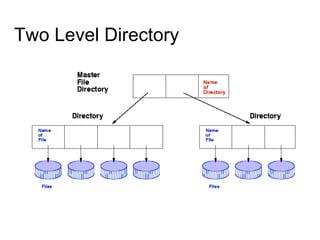
Two Level Directory
■ Introduced to remove naming problem
between users
❑ First Level contains list of user directories
❑ Second Level contains user files
❑ Need to specify Path name
❑ Can have same file names for different users.
❑ System files kept in separate directory or Level 1.
❑ Efficient searching
Two Level Directory
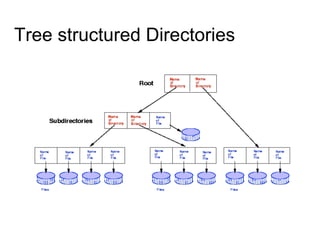
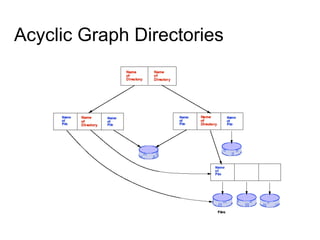
Tree structured Directories
Tree Structured Directories
■ Arbitrary depth of directories
■ Leaf nodes are files, interior nodes are directories.
■ Efficient Searching
■ Grouping Capability
■ Current Directory (working directory)
■ cd /spell/mail/prog, cd ..
■ dir, ls
■ MS-DOS uses a tree structured directory
Tree Structured Directories
❑ Absolute or relative path name
❑ Absolute from root
❑ Relative paths from current working directory pointer.
❑ Creating a new file is done in current directory
❑ Creating a new subdirectory is done in current
directory, e.g. mkdir <dir-name>
❑ Delete a file , e.g. rm file-name
❑ Deletion of directory
■ Option 1 : Only delete if directory is empty
■ Option 2: delete all files and subdirectories under
directory
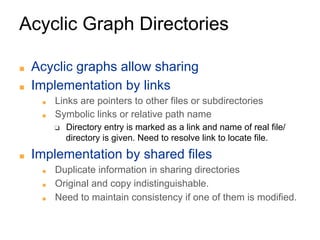
Acyclic Graph Directories
■ Acyclic graphs allow sharing
■ Implementation by links
■ Links are pointers to other files or subdirectories
■ Symbolic links or relative path name
❑ Directory entry is marked as a link and name of real file/
directory is given. Need to resolve link to locate file.
■ Implementation by shared files
■ Duplicate information in sharing directories
■ Original and copy indistinguishable.
■ Need to maintain consistency if one of them is modified.
Acyclic Graph Directories
❑ Naming : File may have multiple absolute path names
■ Two different names for the same file
❑ Traversal
❑ ensure that shared data structures are traversed only once.
❑ Deletion
■ Removing file when someone deletes it may leave dangling
pointers.
■ Preserve file until all references to it are deleted
❑ Keep a list of all references to a file or
❑ Keep a count of the number of references - reference count.
❑ When count = 0, file can be deleted.
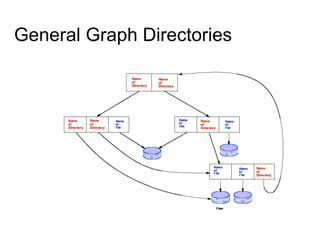
General Graph Directories
General Graph Directories (cont.)
❑ How do we guarantee no cycles in a tree
structured directory?
❑ Allow only links to file not subdirectories.
❑ Every time a new link is added use a cycle detection
algorithm to determine whether it is ok.
❑ If links to directories are allowed, we have a
simple graph structure
❑ Need to ensure that components are not traversed twice
both for correctness and for performance, e.g. search
can be non-terminating.
❑ File Deletion - reference count can be non-zero
❑ Need garbage collection mechanism to determine if file
can be deleted.
Access Methods
■ Sequential Access
read next
write next
reset
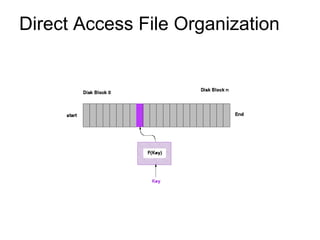
■ Direct Access ( n = relative block number)
read n
write n
position to n
read next
write next
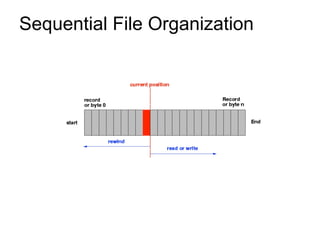
Sequential File Organization
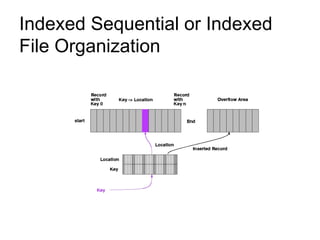
Indexed Sequential or Indexed
File Organization
Direct Access File Organization
Protection
■ File owner/creator should be able to control
■ what can be done
■ by whom
■ Types of access
❑ read
❑ write
❑ execute
❑ append
❑ delete
❑ list
Access lists and groups
❑ Associate each file/directory with access list
■ Problem - length of access list..
❑ Solution - condensed version of list
■ Mode of access: read, write, execute
■ Three classes of users
❑ owner access - user who created the file
❑ groups access - set of users who are sharing the file and need
similar access
❑ public access - all other users
■ In UNIX, 3 fields of length 3 bits are used.
❑ Fields are user, group, others(u,g,o),
❑ Bits are read, write, execute (r,w,x).
❑ E.g. chmod go+rw file , chmod 761 game
File-System Implementation
■ File System Structure
■ Allocation Methods
■ Free-Space Management
■ Directory Implementation
■ Efficiency and Performance
■ Recovery
File-System Structure
■ File Structure
■ Logical Storage Unit with collection of related
information
❑ File System resides on secondary storage (disks).
■ To improve I/O efficiency, I/O transfers between memory
and disk are performed in blocks.
❑ Read/Write/Modify/Access each block on disk.
■ File system organized into layers.
■ File control block - storage structure
consisting of information about a file.
File System Mounting
■ File System must be mounted before it can
be available to process on the system
■ The OS is given the name of the device and the mount
point (location within file structure at which files attach).
■ OS verifies that the device contains a valid file system.
■ OS notes in its directory structure that a file system is
mounted at the specified mount point.
Allocation of Disk Space
■ Low level access methods depend upon the
disk allocation scheme used to store file data
❑ Contiguous Allocation
❑ Linked List Allocation
❑ Indexed Allocation
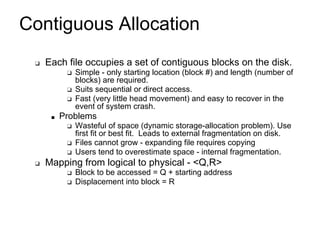
Contiguous Allocation
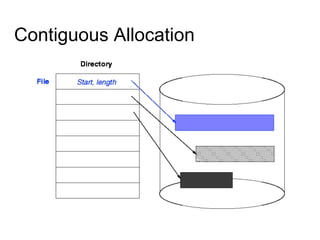
❑ Each file occupies a set of contiguous blocks on the disk.
❑ Simple - only starting location (block #) and length (number of
blocks) are required.
❑ Suits sequential or direct access.
❑ Fast (very little head movement) and easy to recover in the
event of system crash.
■ Problems
❑ Wasteful of space (dynamic storage-allocation problem). Use
first fit or best fit. Leads to external fragmentation on disk.
❑ Files cannot grow - expanding file requires copying
❑ Users tend to overestimate space - internal fragmentation.
❑ Mapping from logical to physical - <Q,R>
❑ Block to be accessed = Q + starting address
❑ Displacement into block = R
Contiguous Allocation
Linked Allocation
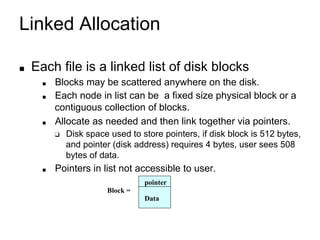
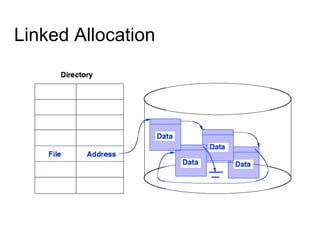
■ Each file is a linked list of disk blocks
■ Blocks may be scattered anywhere on the disk.
■ Each node in list can be a fixed size physical block or a
contiguous collection of blocks.
■ Allocate as needed and then link together via pointers.
❑ Disk space used to store pointers, if disk block is 512 bytes,
and pointer (disk address) requires 4 bytes, user sees 508
bytes of data.
■ Pointers in list not accessible to user.
pointer
Block =
Data
Linked Allocation
Linked Allocation
❑ Simple - need only starting address.
❑ Free-space management system - space efficient.
■ Can grow in middle and at ends. No estimation of size
necessary.
❑ Suited for sequential access but not random
access.
❑ Directory Table maps files into head of list for a
file.
❑ Mapping - <Q, R>
❑ Block to be accessed is the Qth block in the linked chain of
blocks representing the file.
❑ Displacement into block = R + 1
Linked Allocation (cont.)
❑ Slow - defies principle of locality.
❑ Need to read through linked list nodes sequentially to find
the record of interest.
❑ Not very reliable
❑ System crashes can scramble files being updated.
❑ Important variation on linked allocation method
■ File-allocation table (FAT) - disk-space allocation used
by MS-DOS and OS/2.
File Implementations
CS-4513, D-Term 2007
39
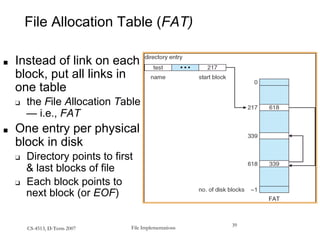
File Allocation Table (FAT)
■ Instead of link on each
block, put all links in
one table
❑ the File Allocation Table
— i.e., FAT
■ One entry per physical
block in disk
❑ Directory points to first
& last blocks of file
❑ Each block points to
next block (or EOF)
File Implementations CS-4513, D-Term 2007 40
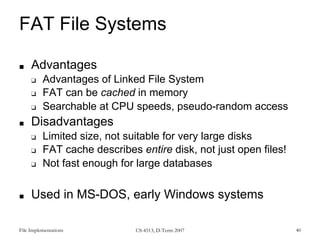
FAT File Systems
■ Advantages
❑ Advantages of Linked File System
❑ FAT can be cached in memory
❑ Searchable at CPU speeds, pseudo-random access
■ Disadvantages
❑ Limited size, not suitable for very large disks
❑ FAT cache describes entire disk, not just open files!
❑ Not fast enough for large databases
■ Used in MS-DOS, early Windows systems
File Implementations CS-4513, D-Term 2007 41
Disk Defragmentation
■ Re-organize blocks in disk so that file is
(mostly) contiguous
■ Link or FAT organization preserved
■ Purpose:
❑ To reduce disk arm movement during sequential
accesses
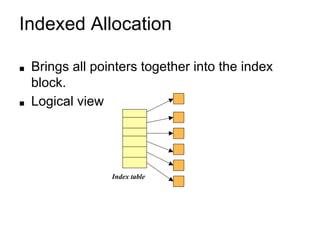
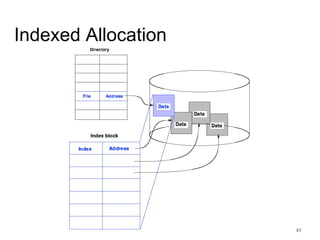
Indexed Allocation
■ Brings all pointers together into the index
block.
■ Logical view
Index table
43
Indexed Allocation
Indexed Allocation (cont.)
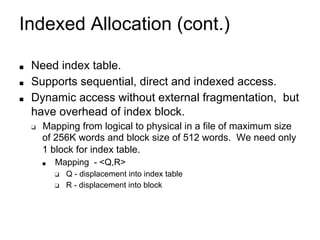
■ Need index table.
■ Supports sequential, direct and indexed access.
■ Dynamic access without external fragmentation, but
have overhead of index block.
❑ Mapping from logical to physical in a file of maximum size
of 256K words and block size of 512 words. We need only
1 block for index table.
■ Mapping - <Q,R>
❑ Q - displacement into index table
❑ R - displacement into block
Indexed Allocation - Mapping
❑ Mapping from logical to physical in a file of
unbounded length.
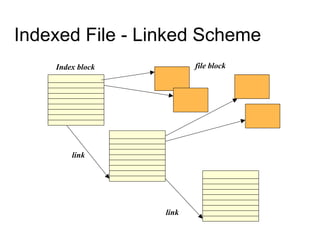
❑ Linked scheme -
■ Link blocks of index tables (no limit on size)
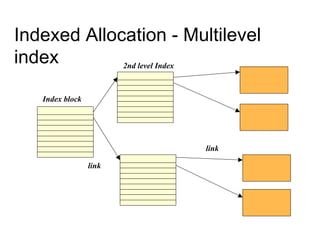
❑ Multilevel Index
■ E.g. Two Level Index - first level index block points to a
set of second level index blocks, which in turn point to
file blocks.
■ Increase number of levels based on maximum file size
desired.
■ Maximum size of file is bounded.
Indexed File - Linked Scheme
Index block file block
link
link
Indexed Allocation - Multilevel
index
Index block
2nd level Index
link
link
48
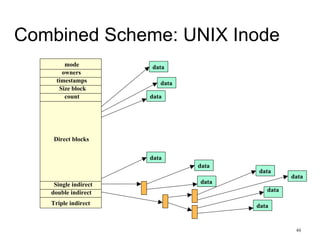
Combined Scheme: UNIX Inode
mode
Size block
owners
timestamps
count
Direct blocks
Single indirect
double indirect
Triple indirect
data
data
data
data
data
data
data
data
data
data
Copyright ©: Nahrstedt, Angrave,
Abdelzaher 49
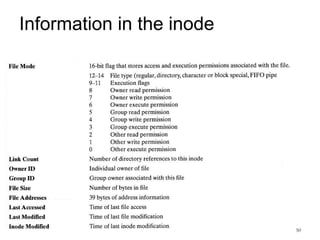
What is an inode?
■ An inode (index node) is a control structure that contains
key information needed by the OS to access a particular
file. Several file names may be associated with a single
inode, but each file is controlled by exactly ONE inode.
■ On the disk, there is an inode table that contains the
inodes of all the files in the filesystem. When a file is
opened, its inode is brought into main memory and stored
in a memory-resident inode table.
Copyright ©: Nahrstedt, Angrave,
Abdelzaher 50
Information in the inode
Copyright ©: Nahrstedt, Angrave,
Abdelzaher
51
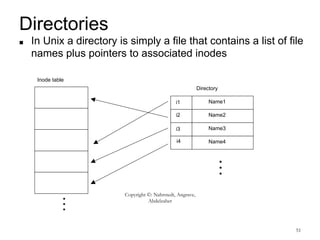
Directories
■ In Unix a directory is simply a file that contains a list of file
names plus pointers to associated inodes
Inode table
i1
i2
i3
i4
Name1
Name2
Name3
Name4
…
Directory
…
Free Space Management
■ Bit Vector (n blocks) - bit map of free blocks
■ Block number calculation
(number of bits per word) *
(number of 0-value words) +
offset of 1st bit
■ Bit map requires extra space.
❑ Eg. Block size = 2^12 bytes, Disk size = 2^30 bytes
n = 2^30/2^12 = 2^18 bits ( or 32K bytes)
■ Easy to get contiguous files
■ Example: BSD File system
bit[i] =
0 1 2 n-1
0 implies block[i] occupied
1 implies block[i] free
{
Free Space Management
❑ Linked list (free list)
❑ Keep a linked list of free blocks
❑ Cannot get contiguous space easily, not very efficient because
linked list needs traversal.
❑ No waste of space
❑ Linked list of indices - Grouping
❑ Keep a linked list of index blocks. Each index block contains
addresses of free blocks and a pointer to the next index block.
❑ Can find a large number of free blocks contiguously.
❑ Counting
❑ Linked list of contiguous blocks that are free
❑ Free list node contains pointer and number of free blocks
starting from that address.
Free Space Management
■ Need to protect
■ pointer to free list
■ Bit map
❑ Must be kept on disk
❑ Copy in memory and disk may differ.
❑ Cannot allow for block[i] to have a situation where bit[i] = 1
in memory and bit[i] = 0 on disk
■ Solution
❑ Set bit[i] = 1 in disk
❑ Allocate block[i]
❑ Set bit[i] = 1 in memory.
Directory Implementation
■ Linear list of file names with pointers to the data
blocks
■ simple to program
■ time-consuming to execute - linear search to find entry.
■ Sorted list helps - allows binary search and decreases search
time.
■ Hash Table - linear list with hash data structure
■ decreases directory search time
■ collisions - situations where two file names hash to the same
location.
■ Each hash entry can be a linked list - resolve collisions by
adding new entry to linked list.
Efficiency and Performance
❑ Efficiency dependent on:
❑ disk allocation and directory algorithms
❑ types of data kept in the files directory entry
❑ Dynamic allocation of kernel structures
❑ Performance improved by:
■ On-board cache - for disk controllers
■ Disk Cache - separate section of main memory for frequently
used blocks. Block replacement mechanisms
❑ LRU
❑ Free-behind - removes block from buffer as soon as next block
is requested.
❑ Read-ahead - request block and several subsequent blocks are
read and cached.
■ Improve PC performance by dedicating section of memory as
virtual disk or RAM disk.
Recovery
■ Ensure that system failure does not result in
loss of data or data inconsistency.
■ Consistency checker
■ compares data in directory structure with data blocks on
disk and tries to fix inconsistencies.
■ Backup
■ Use system programs to back up data from disk to
another storage device (floppy disk, magnetic tape).
■ Restore
■ Recover lost file or disk by restoring data from backup.

oslectureset7.pdf

  • 1.
    ICS 143 -Principles of Operating Systems Lectures 17-20 - FileSystem Interface and Implementation Prof. Nalini Venkatasubramanian nalini@ics.uci.edu (includes slides from Prof. Sani)
  • 2.
    Outline ■ File Conceptand Structure ■ Directory Structures ■ File Organizations ■ Access Methods ■ Protection
  • 3.
    File Concept ❑ Contiguouslogical address space ■ OS abstracts from the physical properties of its storage device to define a logical storage unit called file. ■ Persistent ■ OS maps files to physical devices. ❑ Types ■ Data ❑ numeric, character, binary ■ Program ❑ source, object (load image) ■ Documents
  • 4.
    File Structure ❑ None- sequence of words/bytes ❑ Simple record structure ❑ Lines ❑ Fixed Length ❑ Variable Length ❑ Complex Structures ❑ Formatted document ❑ Relocatable Load File ❑ Can simulate last two with first method by inserting appropriate control characters ❑ Who decides ❑ Operating System ❑ Program
  • 5.
    File Attributes ❑ Name ❑symbolic file-name, only information in human-readable form ❑ Identifier ❑ Unique tag that identifies file within filesystem; non-human readable name ❑ Type - ❑ for systems that support multiple types ❑ Location - ❑ pointer to a device and to file location on device ❑ Size - ❑ current file size, maximal possible size ❑ Protection - ❑ controls who can read, write, execute ❑ Time, Date and user identification ❑ data for protection, security and usage monitoring ❑ Information about files are kept in the directory structure, maintained on disk
  • 6.
    File types -name.extension
  • 7.
    File Operations ❑ Afile is an abstract data type. It can be defined by operations: ■ Create a file ■ Write a file ■ Read a file ■ Reposition within file - file seek ■ Delete a file ■ Truncate a file ■ Open(Fi) ❑ search the directory structure on disk for entry Fi, initialize access to Fi, returns a descriptor/handle to the file; ❑ may allocate buffers to hold content. ❑ may create file if it does not exist. ■ Close(Fi) ❑ move the content of entry Fi in memory to directory structure on disk, flushes file buffers, terminates access to a file.
  • 8.
    Directory Structure ❑ Numberof files on a system can be extensive ❑ Break file systems into partitions ( treated as a separate storage device) ❑ Hold information about files within partitions. ❑ Device Directory: A collection of nodes containing information about all files on a partition. ❑ Both the directory structure and files reside on disk. ❑ Backups of these two structures are kept on tapes.
  • 9.
    Information in aDevice Directory ❑ File Name ❑ File Type ❑ Address or Location ❑ Current Length ❑ Maximum Length ❑ Date created, Date last accessed (for archival), Date last updated (for dump) ❑ Owner ID (who pays), Protection information ■ Also on a per file, per process basis ❑ Current position - read/write position ❑ usage count
  • 10.
    Operations Performed onDirectory ❑ Search for a file ❑ Create a file ❑ Delete a file ❑ List a directory ❑ Rename a file ❑ Traverse the filesystem
  • 11.
    Logical Directory Organization-- Goals ■ Efficiency - locating a file quickly ■ Naming - convenient to users ■ Two users can have the same name for different files. ■ The same file can have several different names. ■ Grouping ■ Logical grouping of files by properties (e.g. all Python programs, all games, all pictures…)
  • 12.
    Single Level Directory ■A single directory for all users ■ Naming Problem and Grouping Problem ❑ As the number of files increases, difficult to remember unique names ❑ As the number of users increase, users must have unique names.
  • 13.
    Two Level Directory ■Introduced to remove naming problem between users ❑ First Level contains list of user directories ❑ Second Level contains user files ❑ Need to specify Path name ❑ Can have same file names for different users. ❑ System files kept in separate directory or Level 1. ❑ Efficient searching
  • 14.
  • 15.
  • 16.
    Tree Structured Directories ■Arbitrary depth of directories ■ Leaf nodes are files, interior nodes are directories. ■ Efficient Searching ■ Grouping Capability ■ Current Directory (working directory) ■ cd /spell/mail/prog, cd .. ■ dir, ls ■ MS-DOS uses a tree structured directory
  • 17.
    Tree Structured Directories ❑Absolute or relative path name ❑ Absolute from root ❑ Relative paths from current working directory pointer. ❑ Creating a new file is done in current directory ❑ Creating a new subdirectory is done in current directory, e.g. mkdir <dir-name> ❑ Delete a file , e.g. rm file-name ❑ Deletion of directory ■ Option 1 : Only delete if directory is empty ■ Option 2: delete all files and subdirectories under directory
  • 18.
  • 19.
    Acyclic Graph Directories ■Acyclic graphs allow sharing ■ Implementation by links ■ Links are pointers to other files or subdirectories ■ Symbolic links or relative path name ❑ Directory entry is marked as a link and name of real file/ directory is given. Need to resolve link to locate file. ■ Implementation by shared files ■ Duplicate information in sharing directories ■ Original and copy indistinguishable. ■ Need to maintain consistency if one of them is modified.
  • 20.
    Acyclic Graph Directories ❑Naming : File may have multiple absolute path names ■ Two different names for the same file ❑ Traversal ❑ ensure that shared data structures are traversed only once. ❑ Deletion ■ Removing file when someone deletes it may leave dangling pointers. ■ Preserve file until all references to it are deleted ❑ Keep a list of all references to a file or ❑ Keep a count of the number of references - reference count. ❑ When count = 0, file can be deleted.
  • 21.
  • 22.
    General Graph Directories(cont.) ❑ How do we guarantee no cycles in a tree structured directory? ❑ Allow only links to file not subdirectories. ❑ Every time a new link is added use a cycle detection algorithm to determine whether it is ok. ❑ If links to directories are allowed, we have a simple graph structure ❑ Need to ensure that components are not traversed twice both for correctness and for performance, e.g. search can be non-terminating. ❑ File Deletion - reference count can be non-zero ❑ Need garbage collection mechanism to determine if file can be deleted.
  • 23.
    Access Methods ■ SequentialAccess read next write next reset ■ Direct Access ( n = relative block number) read n write n position to n read next write next
  • 24.
  • 25.
    Indexed Sequential orIndexed File Organization
  • 26.
    Direct Access FileOrganization
  • 27.
    Protection ■ File owner/creatorshould be able to control ■ what can be done ■ by whom ■ Types of access ❑ read ❑ write ❑ execute ❑ append ❑ delete ❑ list
  • 28.
    Access lists andgroups ❑ Associate each file/directory with access list ■ Problem - length of access list.. ❑ Solution - condensed version of list ■ Mode of access: read, write, execute ■ Three classes of users ❑ owner access - user who created the file ❑ groups access - set of users who are sharing the file and need similar access ❑ public access - all other users ■ In UNIX, 3 fields of length 3 bits are used. ❑ Fields are user, group, others(u,g,o), ❑ Bits are read, write, execute (r,w,x). ❑ E.g. chmod go+rw file , chmod 761 game
  • 29.
    File-System Implementation ■ FileSystem Structure ■ Allocation Methods ■ Free-Space Management ■ Directory Implementation ■ Efficiency and Performance ■ Recovery
  • 30.
    File-System Structure ■ FileStructure ■ Logical Storage Unit with collection of related information ❑ File System resides on secondary storage (disks). ■ To improve I/O efficiency, I/O transfers between memory and disk are performed in blocks. ❑ Read/Write/Modify/Access each block on disk. ■ File system organized into layers. ■ File control block - storage structure consisting of information about a file.
  • 31.
    File System Mounting ■File System must be mounted before it can be available to process on the system ■ The OS is given the name of the device and the mount point (location within file structure at which files attach). ■ OS verifies that the device contains a valid file system. ■ OS notes in its directory structure that a file system is mounted at the specified mount point.
  • 32.
    Allocation of DiskSpace ■ Low level access methods depend upon the disk allocation scheme used to store file data ❑ Contiguous Allocation ❑ Linked List Allocation ❑ Indexed Allocation
  • 33.
    Contiguous Allocation ❑ Eachfile occupies a set of contiguous blocks on the disk. ❑ Simple - only starting location (block #) and length (number of blocks) are required. ❑ Suits sequential or direct access. ❑ Fast (very little head movement) and easy to recover in the event of system crash. ■ Problems ❑ Wasteful of space (dynamic storage-allocation problem). Use first fit or best fit. Leads to external fragmentation on disk. ❑ Files cannot grow - expanding file requires copying ❑ Users tend to overestimate space - internal fragmentation. ❑ Mapping from logical to physical - <Q,R> ❑ Block to be accessed = Q + starting address ❑ Displacement into block = R
  • 34.
  • 35.
    Linked Allocation ■ Eachfile is a linked list of disk blocks ■ Blocks may be scattered anywhere on the disk. ■ Each node in list can be a fixed size physical block or a contiguous collection of blocks. ■ Allocate as needed and then link together via pointers. ❑ Disk space used to store pointers, if disk block is 512 bytes, and pointer (disk address) requires 4 bytes, user sees 508 bytes of data. ■ Pointers in list not accessible to user. pointer Block = Data
  • 36.
  • 37.
    Linked Allocation ❑ Simple- need only starting address. ❑ Free-space management system - space efficient. ■ Can grow in middle and at ends. No estimation of size necessary. ❑ Suited for sequential access but not random access. ❑ Directory Table maps files into head of list for a file. ❑ Mapping - <Q, R> ❑ Block to be accessed is the Qth block in the linked chain of blocks representing the file. ❑ Displacement into block = R + 1
  • 38.
    Linked Allocation (cont.) ❑Slow - defies principle of locality. ❑ Need to read through linked list nodes sequentially to find the record of interest. ❑ Not very reliable ❑ System crashes can scramble files being updated. ❑ Important variation on linked allocation method ■ File-allocation table (FAT) - disk-space allocation used by MS-DOS and OS/2.
  • 39.
    File Implementations CS-4513, D-Term2007 39 File Allocation Table (FAT) ■ Instead of link on each block, put all links in one table ❑ the File Allocation Table — i.e., FAT ■ One entry per physical block in disk ❑ Directory points to first & last blocks of file ❑ Each block points to next block (or EOF)
  • 40.
    File Implementations CS-4513,D-Term 2007 40 FAT File Systems ■ Advantages ❑ Advantages of Linked File System ❑ FAT can be cached in memory ❑ Searchable at CPU speeds, pseudo-random access ■ Disadvantages ❑ Limited size, not suitable for very large disks ❑ FAT cache describes entire disk, not just open files! ❑ Not fast enough for large databases ■ Used in MS-DOS, early Windows systems
  • 41.
    File Implementations CS-4513,D-Term 2007 41 Disk Defragmentation ■ Re-organize blocks in disk so that file is (mostly) contiguous ■ Link or FAT organization preserved ■ Purpose: ❑ To reduce disk arm movement during sequential accesses
  • 42.
    Indexed Allocation ■ Bringsall pointers together into the index block. ■ Logical view Index table
  • 43.
  • 44.
    Indexed Allocation (cont.) ■Need index table. ■ Supports sequential, direct and indexed access. ■ Dynamic access without external fragmentation, but have overhead of index block. ❑ Mapping from logical to physical in a file of maximum size of 256K words and block size of 512 words. We need only 1 block for index table. ■ Mapping - <Q,R> ❑ Q - displacement into index table ❑ R - displacement into block
  • 45.
    Indexed Allocation -Mapping ❑ Mapping from logical to physical in a file of unbounded length. ❑ Linked scheme - ■ Link blocks of index tables (no limit on size) ❑ Multilevel Index ■ E.g. Two Level Index - first level index block points to a set of second level index blocks, which in turn point to file blocks. ■ Increase number of levels based on maximum file size desired. ■ Maximum size of file is bounded.
  • 46.
    Indexed File -Linked Scheme Index block file block link link
  • 47.
    Indexed Allocation -Multilevel index Index block 2nd level Index link link
  • 48.
    48 Combined Scheme: UNIXInode mode Size block owners timestamps count Direct blocks Single indirect double indirect Triple indirect data data data data data data data data data data
  • 49.
    Copyright ©: Nahrstedt,Angrave, Abdelzaher 49 What is an inode? ■ An inode (index node) is a control structure that contains key information needed by the OS to access a particular file. Several file names may be associated with a single inode, but each file is controlled by exactly ONE inode. ■ On the disk, there is an inode table that contains the inodes of all the files in the filesystem. When a file is opened, its inode is brought into main memory and stored in a memory-resident inode table.
  • 50.
    Copyright ©: Nahrstedt,Angrave, Abdelzaher 50 Information in the inode
  • 51.
    Copyright ©: Nahrstedt,Angrave, Abdelzaher 51 Directories ■ In Unix a directory is simply a file that contains a list of file names plus pointers to associated inodes Inode table i1 i2 i3 i4 Name1 Name2 Name3 Name4 … Directory …
  • 52.
    Free Space Management ■Bit Vector (n blocks) - bit map of free blocks ■ Block number calculation (number of bits per word) * (number of 0-value words) + offset of 1st bit ■ Bit map requires extra space. ❑ Eg. Block size = 2^12 bytes, Disk size = 2^30 bytes n = 2^30/2^12 = 2^18 bits ( or 32K bytes) ■ Easy to get contiguous files ■ Example: BSD File system bit[i] = 0 1 2 n-1 0 implies block[i] occupied 1 implies block[i] free {
  • 53.
    Free Space Management ❑Linked list (free list) ❑ Keep a linked list of free blocks ❑ Cannot get contiguous space easily, not very efficient because linked list needs traversal. ❑ No waste of space ❑ Linked list of indices - Grouping ❑ Keep a linked list of index blocks. Each index block contains addresses of free blocks and a pointer to the next index block. ❑ Can find a large number of free blocks contiguously. ❑ Counting ❑ Linked list of contiguous blocks that are free ❑ Free list node contains pointer and number of free blocks starting from that address.
  • 54.
    Free Space Management ■Need to protect ■ pointer to free list ■ Bit map ❑ Must be kept on disk ❑ Copy in memory and disk may differ. ❑ Cannot allow for block[i] to have a situation where bit[i] = 1 in memory and bit[i] = 0 on disk ■ Solution ❑ Set bit[i] = 1 in disk ❑ Allocate block[i] ❑ Set bit[i] = 1 in memory.
  • 55.
    Directory Implementation ■ Linearlist of file names with pointers to the data blocks ■ simple to program ■ time-consuming to execute - linear search to find entry. ■ Sorted list helps - allows binary search and decreases search time. ■ Hash Table - linear list with hash data structure ■ decreases directory search time ■ collisions - situations where two file names hash to the same location. ■ Each hash entry can be a linked list - resolve collisions by adding new entry to linked list.
  • 56.
    Efficiency and Performance ❑Efficiency dependent on: ❑ disk allocation and directory algorithms ❑ types of data kept in the files directory entry ❑ Dynamic allocation of kernel structures ❑ Performance improved by: ■ On-board cache - for disk controllers ■ Disk Cache - separate section of main memory for frequently used blocks. Block replacement mechanisms ❑ LRU ❑ Free-behind - removes block from buffer as soon as next block is requested. ❑ Read-ahead - request block and several subsequent blocks are read and cached. ■ Improve PC performance by dedicating section of memory as virtual disk or RAM disk.
  • 57.
    Recovery ■ Ensure thatsystem failure does not result in loss of data or data inconsistency. ■ Consistency checker ■ compares data in directory structure with data blocks on disk and tries to fix inconsistencies. ■ Backup ■ Use system programs to back up data from disk to another storage device (floppy disk, magnetic tape). ■ Restore ■ Recover lost file or disk by restoring data from backup.