File System and Input/Output Lecture 10: File Systems 主講人:虞台文
Content Basic Functions of File Management Hierarchical Model of a File System  File Directories Hierarchical Directory Organizations Operations on Directories Implementation of File Directories Basic File System File Descriptors Opening and Closing of Files Physical Organization Methods Contiguous Organization Linked Organization Indexed Organization Management of Free Storage Space Distributed File Systems Directory Structures and Sharing Semantics of File Sharing  Implementing DFS
File System and Input/Output Lecture 10: File Systems Basic Functions of File Management
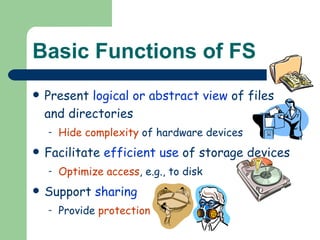
Basic Functions of FS Present  logical or abstract view  of files and directories Hide complexity  of hardware devices Facilitate  efficient use  of storage devices Optimize access , e.g., to disk Support  sharing Provide  protection
File System and Input/Output Lecture 10: File Systems Hierarchical Model of a File System
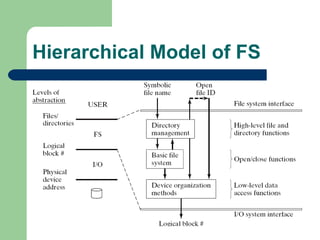
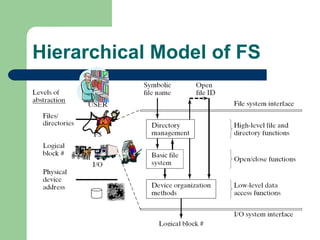
Hierarchical Model of FS
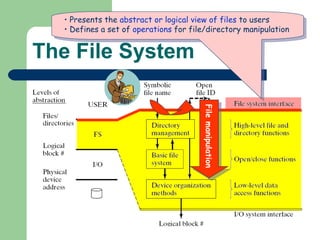
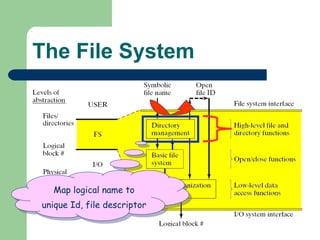
The File System Presents the  abstract or logical view of files  to users Defines a set of  operations  for file/directory manipulation File manipulation
The File System Map logical name to unique Id, file descriptor
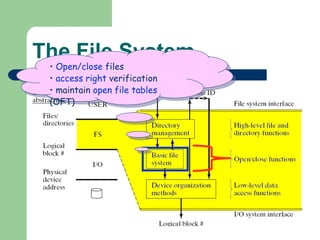
The File System Open/close  files access right  verification maintain  open file tables  (OFT)
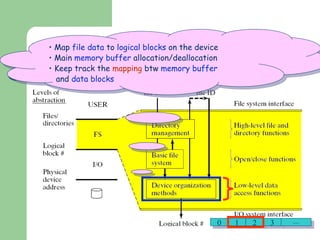
The File System Map  file data  to  logical blocks  on the device Main  memory buffer  allocation/deallocation Keep track the  mapping  btw  memory buffer and  data blocks 0 1 2 3 
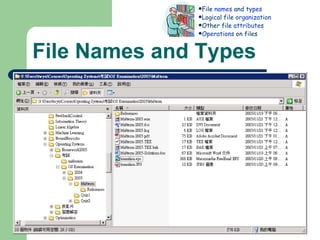
File Names and Types Valid name  Number of characters Lower vs upper case Extension Tied to type of file Used by applications File type recorded in  header Cannot be changed (even when extension changes) Basic types: text, object, load file; directory Application-specific types, e.g., .doc, .ps, .html File  names  and  types Logical file  organization Other file  attributes Operations  on files
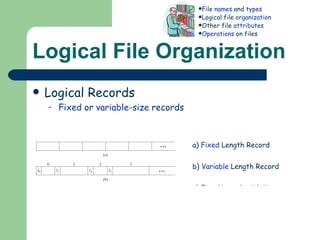
Logical File Organization Logical Records Fixed  or  variable-size  records Keyed  or  unkeyed  records File  names  and  types Logical file  organization Other file  attributes Operations  on files a)  Fixed  Length Record b)  Variable  Length Record c) Fixed Length with Key d) Variable Length with Key
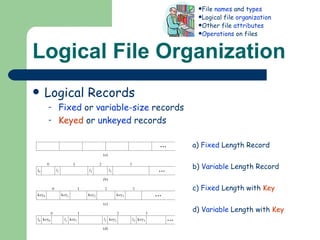
Logical File Organization Logical Records Fixed  or  variable-size  records Keyed  or  unkeyed  records File  names  and  types Logical file  organization Other file  attributes Operations  on files a)  Fixed  Length Record b)  Variable  Length Record c)  Fixed  Length with  Key d)  Variable  Length with  Key
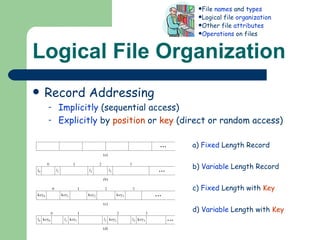
Logical File Organization Record Addressing Implicitly  (sequential access) Explicitly  by  position  or  key  (direct or random access) File  names  and  types Logical file  organization Other file  attributes Operations  on files a)  Fixed  Length Record b)  Variable  Length Record c)  Fixed  Length with  Key d)  Variable  Length with  Key
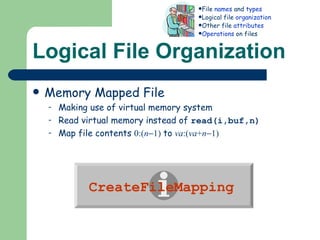
Logical File Organization Memory Mapped File Making use of virtual memory system Read virtual memory instead of  read(i,buf,n) Map file contents  0:( n  1)   to   va :( va + n  1)   File  names  and  types Logical file  organization Other file  attributes Operations  on files CreateFileMapping
Other file attributes Ownership File Size File Use Time  of  creation , last  access , last  modification File Disposition Permanent  or  Temporary Protection Who  can access and what  type  of access Location File  names  and  types Logical file  organization Other file  attributes Operations  on files
Operations on files Create/Delete Create/delete  file descriptor Modify  directory Open/Close Open    Setup  open file table  (“OFT”) &  buffer Close     Reverse  the effect of open Read/Write (sequential or direct) Modify  file descriptor Transfer data  between disk and buffer Seek/Rewind Modify  open file table File  names  and  types Logical file  organization Other file  attributes Operations  on files
File System and Input/Output Lecture 10: File Systems File Directories
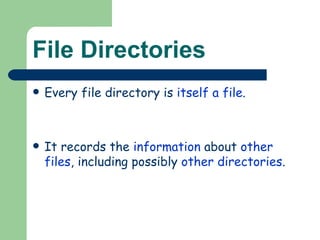
File Directories Every file directory is  itself a file . It records the  information  about  other files , including possibly  other directories .
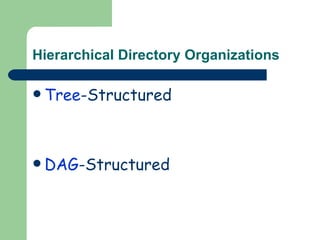
Hierarchical Directory Organizations Tree -Structured DAG -Structured
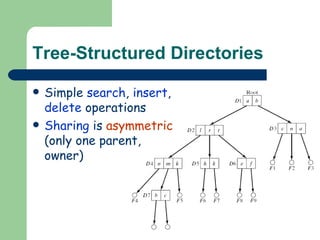
Tree-Structured Directories Simple  search ,  insert ,  delete  operations Sharing  is  asymmetric  (only one parent, owner)
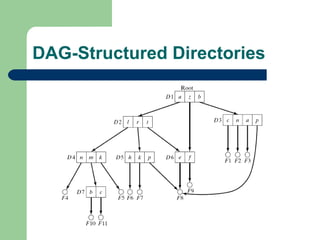
DAG-Structured Directories
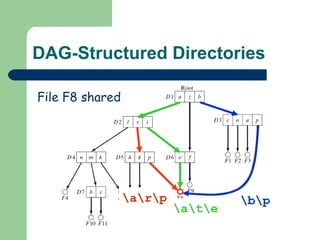
DAG-Structured Directories \a\r\p \b\p \a\t\e File F8 shared
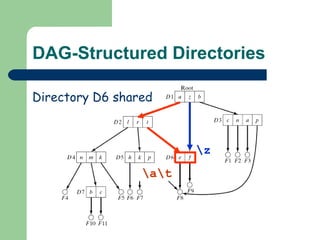
DAG-Structured Directories \a\t \z Directory D6 shared
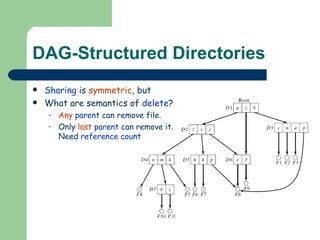
DAG-Structured Directories Sharing  is  symmetric , but What are semantics of  delete ? Any  parent  can remove file. Only  last   parent  can remove it. Need  reference count
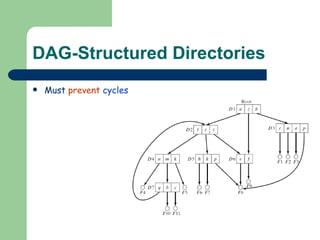
DAG-Structured Directories Must  prevent   cycles
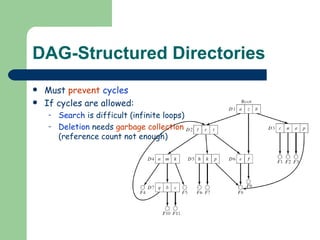
DAG-Structured Directories Must  prevent   cycles   If cycles are allowed: Search  is difficult (infinite loops) Deletion  needs  garbage collection  (reference count not enough)
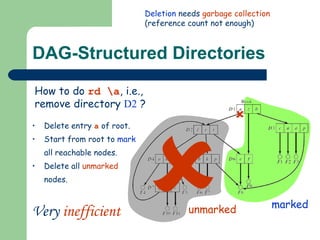
DAG-Structured Directories How to do  rd \a , i.e., remove directory  D2  ? Deletion  needs  garbage collection  (reference count not enough)  Delete entry  a  of root. Start from root to  mark  all reachable nodes. Delete all  unmarked  nodes. marked unmarked  Very  inefficient
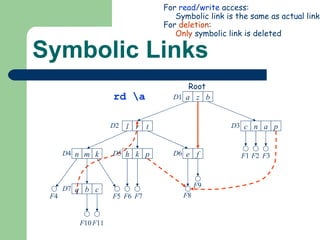
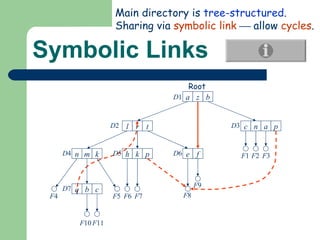
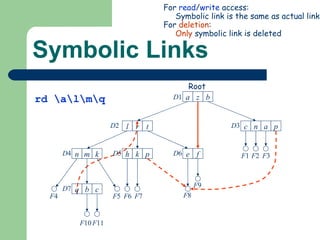
Symbolic Links Main directory is  tree-structured . Sharing via  symbolic link     allow  cycles . F 4 a z b c n a p l r t e f h k p n m k q b c D 1 D 2 D 3 D 4 D 5 D 6 D 7 F 1 F 2 F 3 F 5 F 6 F 7 F 8 F 9 F 10 F 11 Root
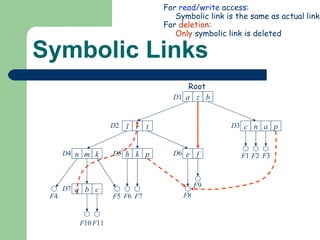
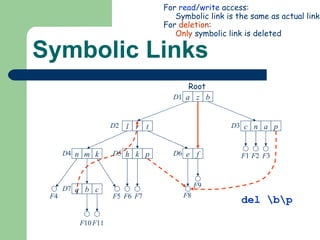
Symbolic Links For  read / write  access: Symbolic link is the same as actual link For  deletion : Only  symbolic link is deleted Root F 4 a z b c n a p l r t e f h k p n m k q b c D 1 D 2 D 3 D 4 D 5 D 6 D 7 F 1 F 2 F 3 F 5 F 6 F 7 F 8 F 9 F 10 F 11
Symbolic Links F 4 a z b c n a p l r t e f h k p n m k q b c D 1 D 2 D 3 D 4 D 5 D 6 D 7 F 1 F 2 F 3 F 5 F 6 F 7 F 8 F 9 F 10 F 11 For  read / write  access: Symbolic link is the same as actual link For  deletion : Only  symbolic link is deleted del \b\p Root
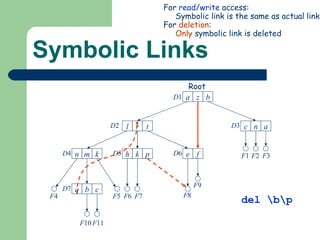
Symbolic Links F 4 a z b c n a l r t e f h k p n m k q b c D 1 D 2 D 3 D 4 D 5 D 6 D 7 F 1 F 2 F 3 F 5 F 6 F 7 F 8 F 9 F 10 F 11 For  read / write  access: Symbolic link is the same as actual link For  deletion : Only  symbolic link is deleted del \b\p Root
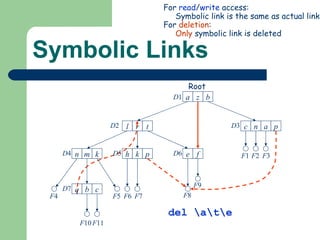
Symbolic Links F 4 a z b c n a p l r t e f h k p n m k q b c D 1 D 2 D 3 D 4 D 5 D 6 D 7 F 1 F 2 F 3 F 5 F 6 F 7 F 8 F 9 F 10 F 11 For  read / write  access: Symbolic link is the same as actual link For  deletion : Only  symbolic link is deleted del \a\t\e Root
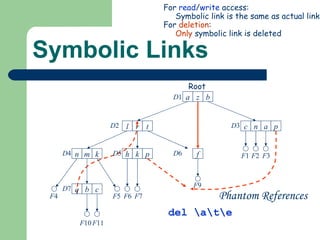
Symbolic Links F 4 a z b c n a l r t f h k n m k q b c D 1 D 2 D 3 D 4 D 5 D 6 D 7 F 1 F 2 F 3 F 5 F 6 F 7 F 9 F 10 F 11 For  read / write  access: Symbolic link is the same as actual link For  deletion : Only  symbolic link is deleted del \a\t\e Phantom References Root p p
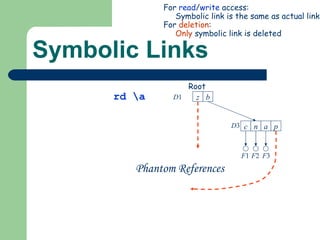
Symbolic Links F 4 a z b c n a p l r t e f h k p n m k q b c D 1 D 2 D 3 D 4 D 5 D 6 D 7 F 1 F 2 F 3 F 5 F 6 F 7 F 8 F 9 F 10 F 11 For  read / write  access: Symbolic link is the same as actual link For  deletion : Only  symbolic link is deleted rd \a Root
Symbolic Links b c n a D 1 D 3 F 1 F 2 F 3 For  read / write  access: Symbolic link is the same as actual link For  deletion : Only  symbolic link is deleted rd \a Phantom References Root z p
Symbolic Links F 4 a z b c n a p l r t e f h k p n m k q b c D 1 D 2 D 3 D 4 D 5 D 6 D 7 F 1 F 2 F 3 F 5 F 6 F 7 F 8 F 9 F 10 F 11 For  read / write  access: Symbolic link is the same as actual link For  deletion : Only  symbolic link is deleted rd \a\l\m\q Root
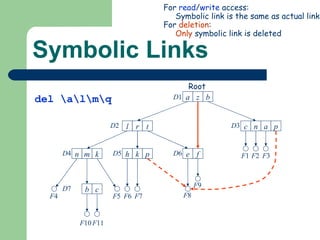
Symbolic Links F 4 a z b c n a p l r t e f h k p n m k b c D 1 D 2 D 3 D 4 D 5 D 6 D 7 F 1 F 2 F 3 F 5 F 6 F 7 F 8 F 9 F 10 F 11 For  read / write  access: Symbolic link is the same as actual link For  deletion : Only  symbolic link is deleted del \a\l\m\q Root
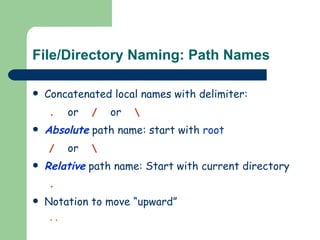
File/Directory Naming: Path Names Concatenated local names with delimiter:  .   or   /   or   \ Absolute  path name: start with  root /   or   \ Relative  path name: Start with current directory .   Notation to move “upward” ..
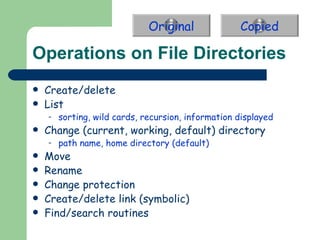
Operations on File Directories Create/delete List sorting, wild cards, recursion, information displayed Change (current, working, default) directory path name, home directory (default) Move Rename Change protection Create/delete link (symbolic) Find/search routines Original Copied
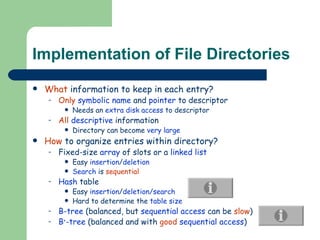
Implementation of File Directories What  information to keep in each entry? Only   symbolic name  and  pointer  to descriptor Needs an  extra disk access  to descriptor All   descriptive  information Directory can become  very large How  to organize entries within directory? Fixed-size  array  of slots or a  linked list Easy  insertion / deletion Search  is  sequential Hash  table Easy  insertion / deletion/search Hard to determine the  table size B-tree  (balanced, but  sequential access  can be  slow ) B + -tree  (balanced and with  good   sequential access )
File System and Input/Output Lecture 10: File Systems Basic File System
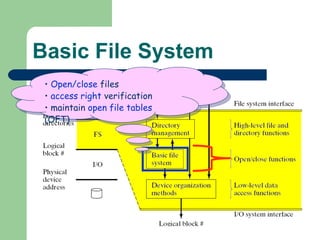
Basic File System Open/close  files access right  verification maintain  open file tables  (OFT)
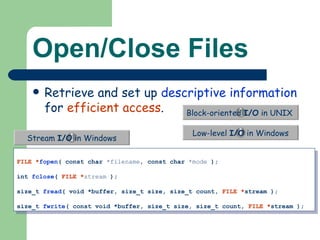
Open/Close Files Retrieve and set up  descriptive information  for  efficient access . FILE * fopen ( const char  *filename,  const   char  *mode  ); int  fclose (  FILE * stream  ); size_t  fread ( void *buffer, size_t size, size_t count,  FILE * stream ); size_t  fwrite ( const void *buffer, size_t size, size_t count,  FILE * stream );   Block-oriented  I/O  in UNIX  Low-level  I/O   in Windows Stream  I/O   in Windows
File Descriptors (Unix i-node)  Owner id File type Protection  information Mapping to  physical disk blocks Time of creation, last use, last modification Reference counter
Open File Table To  keep track  the currently  open files  of the system. Managed by the  open/clos e functions
Open Verify   access rights Allocate   OFT entry Allocate   read/write buffers Fill  in  OFT entry Initialization (e.g., current position) Information from descriptor  (e.g. file length, disk location) Pointers to allocated buffers Return  OFT index
Close Flush  modified  buffers  to disk Release   buffers Update   file descriptor , e.g., file length disk location usage information (e.g., date of last access/modification) Free   OFT entry
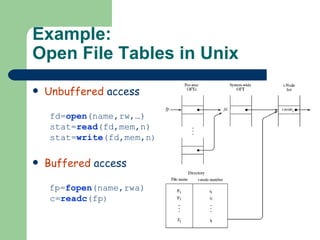
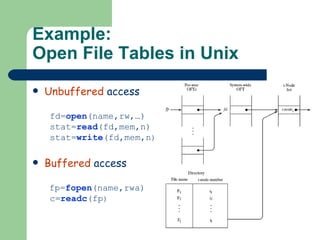
Example: Open File Tables in Unix Unbuffered  access   fd= open (name,rw,…)  stat= read (fd,mem,n)  stat= write (fd,mem,n ) Buffered  access   fp= fopen (name,rwa)  c= readc (fp )
File System and Input/Output Lecture 10: File Systems Physical Organization Methods
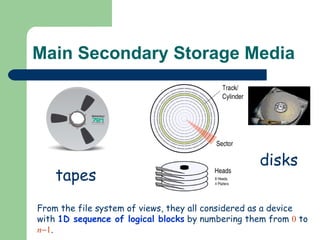
Main Secondary Storage Media tapes disks From the file system of views, they all considered as a device with  1D sequence of logical blocks  by numbering them from  0  to  n  1 .
Device Organization Methods Contiguous  organization Linked  Organization Indexed  Organization
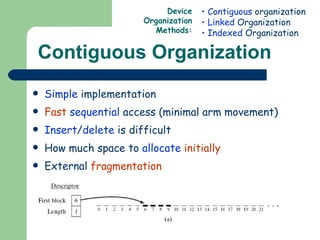
Contiguous Organization Simple  implementation Fast   sequential  access (minimal arm movement) Insert / delete  is difficult How much space to  allocate   initially External  fragmentation Contiguous  organization Linked  Organization Indexed  Organization Device Organization Methods:
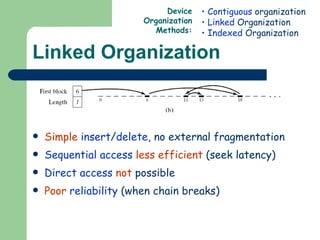
Linked Organization Simple   insert / delete , no external fragmentation Sequential access   less efficient  (seek latency) Direct access   not  possible Poor   reliability  (when chain breaks) Contiguous  organization Linked  Organization Indexed  Organization Device Organization Methods:
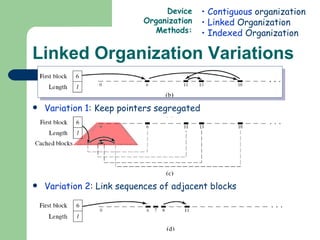
Linked Organization Variations Variation 1 : Keep pointers segregated Variation 2 : Link sequences of adjacent blocks Contiguous  organization Linked  Organization Indexed  Organization Device Organization Methods:
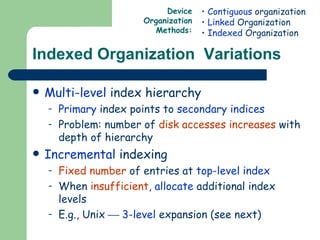
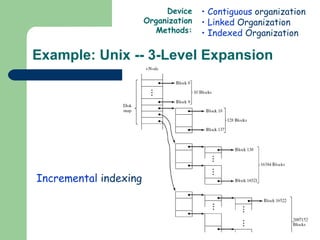
Indexed Organization  Variations Multi-level  index hierarchy Primary  index points to  secondary indices Problem: number of  disk accesses increases  with depth of hierarchy Incremental  indexing Fixed number  of entries at  top-level index When  insufficient ,  allocate  additional index levels  E.g., Unix     3-level  expansion (see next) Contiguous  organization Linked  Organization Indexed  Organization Device Organization Methods:
Example: Unix -- 3-Level Expansion Contiguous  organization Linked  Organization Indexed  Organization Device Organization Methods: Incremental  indexing
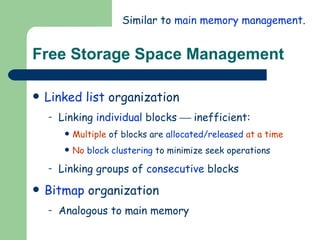
Free Storage Space Management Linked list  organization Linking  individual  blocks    inefficient: Multiple  of blocks are  allocated/released   at a time No   block clustering  to minimize seek operations Linking groups of  consecutive  blocks Bitmap  organization Analogous to main memory Similar to  main memory management .
File System and Input/Output Lecture 10: File Systems Distributed File Systems
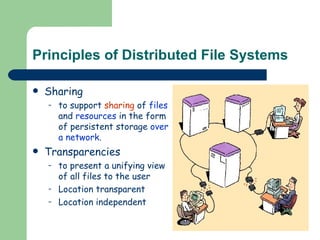
Principles of Distributed File Systems Sharing  to support  sharing  of  files  and  resources  in the form of persistent storage  over a   network . Transparencies to present a unifying view of all files to the user Location transparent Location independent
Directory structures Directory structures differentiated by: Global vs. Local naming: Single  global structure or  different  for each  user ? Location transparency: Does the  path name  reveal anything about  machine  or  server ? Location independence: When a  file moves  between machines, does its path  name change ?
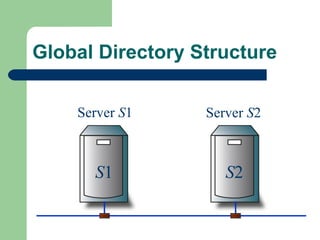
Global Directory Structure Server  S 1 Server  S 2 usr mp        u 1               root directory (/)        usr loc        u 2                      root directory (/) x y S 1 S 2
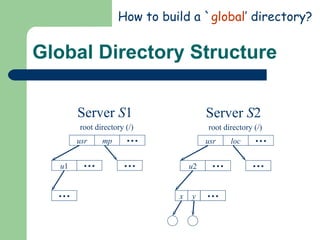
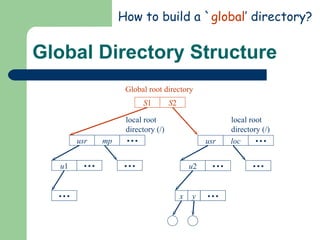
Global Directory Structure Server  S 1 Server  S 2 How to build a ` global ’ directory? usr loc        u 2                      root directory (/) x y usr mp        u 1               root directory (/)       
Global Directory Structure Server  S 1 Server  S 2 How to build a ` global ’ directory? local root directory (/) local root directory (/) Global root directory S 1 S 2 usr mp        u 1               root directory (/)        usr loc        u 2                      root directory (/) x y
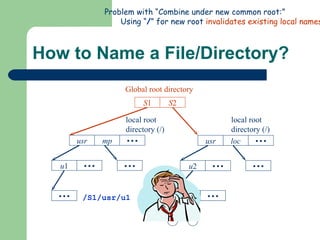
How to Name a File/Directory? usr mp        u 1               root directory (/)        Server  S 1 Server  S 2 root directory (/) local root directory (/) local root directory (/) Global root directory S 1 S 2 /S1/usr/u1 Problem with “Combine under new common root:” Using “ / ” for new root  invalidates existing local names . usr loc        u 2                      root directory (/) x y
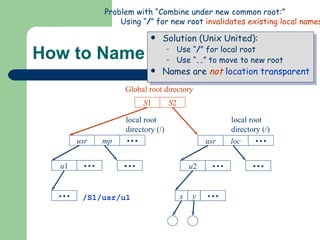
How to Name a File/Directory? Solution (Unix United): Use “ / ” for local root Use “ .. ” to move to new root Names are  not   location transparent usr mp        u 1               root directory (/)        Server  S 1 Server  S 2 root directory (/) local root directory (/) local root directory (/) Global root directory S 1 S 2 /S1/usr/u1 Problem with “Combine under new common root:” Using “ / ” for new root  invalidates existing local names . usr loc        u 2                      root directory (/) x y

Os10 2

  • 1.
    File System andInput/Output Lecture 10: File Systems 主講人:虞台文
  • 2.
    Content Basic Functionsof File Management Hierarchical Model of a File System File Directories Hierarchical Directory Organizations Operations on Directories Implementation of File Directories Basic File System File Descriptors Opening and Closing of Files Physical Organization Methods Contiguous Organization Linked Organization Indexed Organization Management of Free Storage Space Distributed File Systems Directory Structures and Sharing Semantics of File Sharing Implementing DFS
  • 3.
    File System andInput/Output Lecture 10: File Systems Basic Functions of File Management
  • 4.
    Basic Functions ofFS Present logical or abstract view of files and directories Hide complexity of hardware devices Facilitate efficient use of storage devices Optimize access , e.g., to disk Support sharing Provide protection
  • 5.
    File System andInput/Output Lecture 10: File Systems Hierarchical Model of a File System
  • 6.
  • 7.
  • 8.
    The File SystemPresents the abstract or logical view of files to users Defines a set of operations for file/directory manipulation File manipulation
  • 9.
    The File SystemMap logical name to unique Id, file descriptor
  • 10.
    The File SystemOpen/close files access right verification maintain open file tables (OFT)
  • 11.
    The File SystemMap file data to logical blocks on the device Main memory buffer allocation/deallocation Keep track the mapping btw memory buffer and data blocks 0 1 2 3 
  • 12.
    File Names andTypes Valid name Number of characters Lower vs upper case Extension Tied to type of file Used by applications File type recorded in header Cannot be changed (even when extension changes) Basic types: text, object, load file; directory Application-specific types, e.g., .doc, .ps, .html File names and types Logical file organization Other file attributes Operations on files
  • 13.
    File Names andTypes Valid name Number of characters Lower vs upper case Extension Tied to type of file Used by applications File type recorded in header Cannot be changed (even when extension changes) Basic types: text, object, load file; directory Application-specific types, e.g., .doc, .ps, .html File names and types Logical file organization Other file attributes Operations on files
  • 14.
    Logical File OrganizationLogical Records Fixed or variable-size records Keyed or unkeyed records File names and types Logical file organization Other file attributes Operations on files a) Fixed Length Record b) Variable Length Record c) Fixed Length with Key d) Variable Length with Key
  • 15.
    Logical File OrganizationLogical Records Fixed or variable-size records Keyed or unkeyed records File names and types Logical file organization Other file attributes Operations on files a) Fixed Length Record b) Variable Length Record c) Fixed Length with Key d) Variable Length with Key
  • 16.
    Logical File OrganizationRecord Addressing Implicitly (sequential access) Explicitly by position or key (direct or random access) File names and types Logical file organization Other file attributes Operations on files a) Fixed Length Record b) Variable Length Record c) Fixed Length with Key d) Variable Length with Key
  • 17.
    Logical File OrganizationMemory Mapped File Making use of virtual memory system Read virtual memory instead of read(i,buf,n) Map file contents 0:( n  1) to va :( va + n  1) File names and types Logical file organization Other file attributes Operations on files CreateFileMapping
  • 18.
    Other file attributesOwnership File Size File Use Time of creation , last access , last modification File Disposition Permanent or Temporary Protection Who can access and what type of access Location File names and types Logical file organization Other file attributes Operations on files
  • 19.
    Operations on filesCreate/Delete Create/delete file descriptor Modify directory Open/Close Open  Setup open file table (“OFT”) & buffer Close  Reverse the effect of open Read/Write (sequential or direct) Modify file descriptor Transfer data between disk and buffer Seek/Rewind Modify open file table File names and types Logical file organization Other file attributes Operations on files
  • 20.
    File System andInput/Output Lecture 10: File Systems File Directories
  • 21.
    File Directories Everyfile directory is itself a file . It records the information about other files , including possibly other directories .
  • 22.
    Hierarchical Directory OrganizationsTree -Structured DAG -Structured
  • 23.
    Tree-Structured Directories Simple search , insert , delete operations Sharing is asymmetric (only one parent, owner)
  • 24.
  • 25.
    DAG-Structured Directories \a\r\p\b\p \a\t\e File F8 shared
  • 26.
    DAG-Structured Directories \a\t\z Directory D6 shared
  • 27.
    DAG-Structured Directories Sharing is symmetric , but What are semantics of delete ? Any parent can remove file. Only last parent can remove it. Need reference count
  • 28.
  • 29.
    DAG-Structured Directories Must prevent cycles If cycles are allowed: Search is difficult (infinite loops) Deletion needs garbage collection (reference count not enough)
  • 30.
    DAG-Structured Directories Howto do rd \a , i.e., remove directory D2 ? Deletion needs garbage collection (reference count not enough)  Delete entry a of root. Start from root to mark all reachable nodes. Delete all unmarked nodes. marked unmarked  Very inefficient
  • 31.
    Symbolic Links Maindirectory is tree-structured . Sharing via symbolic link  allow cycles . F 4 a z b c n a p l r t e f h k p n m k q b c D 1 D 2 D 3 D 4 D 5 D 6 D 7 F 1 F 2 F 3 F 5 F 6 F 7 F 8 F 9 F 10 F 11 Root
  • 32.
    Symbolic Links For read / write access: Symbolic link is the same as actual link For deletion : Only symbolic link is deleted Root F 4 a z b c n a p l r t e f h k p n m k q b c D 1 D 2 D 3 D 4 D 5 D 6 D 7 F 1 F 2 F 3 F 5 F 6 F 7 F 8 F 9 F 10 F 11
  • 33.
    Symbolic Links F4 a z b c n a p l r t e f h k p n m k q b c D 1 D 2 D 3 D 4 D 5 D 6 D 7 F 1 F 2 F 3 F 5 F 6 F 7 F 8 F 9 F 10 F 11 For read / write access: Symbolic link is the same as actual link For deletion : Only symbolic link is deleted del \b\p Root
  • 34.
    Symbolic Links F4 a z b c n a l r t e f h k p n m k q b c D 1 D 2 D 3 D 4 D 5 D 6 D 7 F 1 F 2 F 3 F 5 F 6 F 7 F 8 F 9 F 10 F 11 For read / write access: Symbolic link is the same as actual link For deletion : Only symbolic link is deleted del \b\p Root
  • 35.
    Symbolic Links F4 a z b c n a p l r t e f h k p n m k q b c D 1 D 2 D 3 D 4 D 5 D 6 D 7 F 1 F 2 F 3 F 5 F 6 F 7 F 8 F 9 F 10 F 11 For read / write access: Symbolic link is the same as actual link For deletion : Only symbolic link is deleted del \a\t\e Root
  • 36.
    Symbolic Links F4 a z b c n a l r t f h k n m k q b c D 1 D 2 D 3 D 4 D 5 D 6 D 7 F 1 F 2 F 3 F 5 F 6 F 7 F 9 F 10 F 11 For read / write access: Symbolic link is the same as actual link For deletion : Only symbolic link is deleted del \a\t\e Phantom References Root p p
  • 37.
    Symbolic Links F4 a z b c n a p l r t e f h k p n m k q b c D 1 D 2 D 3 D 4 D 5 D 6 D 7 F 1 F 2 F 3 F 5 F 6 F 7 F 8 F 9 F 10 F 11 For read / write access: Symbolic link is the same as actual link For deletion : Only symbolic link is deleted rd \a Root
  • 38.
    Symbolic Links bc n a D 1 D 3 F 1 F 2 F 3 For read / write access: Symbolic link is the same as actual link For deletion : Only symbolic link is deleted rd \a Phantom References Root z p
  • 39.
    Symbolic Links F4 a z b c n a p l r t e f h k p n m k q b c D 1 D 2 D 3 D 4 D 5 D 6 D 7 F 1 F 2 F 3 F 5 F 6 F 7 F 8 F 9 F 10 F 11 For read / write access: Symbolic link is the same as actual link For deletion : Only symbolic link is deleted rd \a\l\m\q Root
  • 40.
    Symbolic Links F4 a z b c n a p l r t e f h k p n m k b c D 1 D 2 D 3 D 4 D 5 D 6 D 7 F 1 F 2 F 3 F 5 F 6 F 7 F 8 F 9 F 10 F 11 For read / write access: Symbolic link is the same as actual link For deletion : Only symbolic link is deleted del \a\l\m\q Root
  • 41.
    File/Directory Naming: PathNames Concatenated local names with delimiter: . or / or \ Absolute path name: start with root / or \ Relative path name: Start with current directory . Notation to move “upward” ..
  • 42.
    Operations on FileDirectories Create/delete List sorting, wild cards, recursion, information displayed Change (current, working, default) directory path name, home directory (default) Move Rename Change protection Create/delete link (symbolic) Find/search routines Original Copied
  • 43.
    Implementation of FileDirectories What information to keep in each entry? Only symbolic name and pointer to descriptor Needs an extra disk access to descriptor All descriptive information Directory can become very large How to organize entries within directory? Fixed-size array of slots or a linked list Easy insertion / deletion Search is sequential Hash table Easy insertion / deletion/search Hard to determine the table size B-tree (balanced, but sequential access can be slow ) B + -tree (balanced and with good sequential access )
  • 44.
    File System andInput/Output Lecture 10: File Systems Basic File System
  • 45.
    Basic File SystemOpen/close files access right verification maintain open file tables (OFT)
  • 46.
    Open/Close Files Retrieveand set up descriptive information for efficient access . FILE * fopen ( const char *filename, const char *mode ); int fclose ( FILE * stream ); size_t fread ( void *buffer, size_t size, size_t count, FILE * stream ); size_t fwrite ( const void *buffer, size_t size, size_t count, FILE * stream ); Block-oriented I/O in UNIX Low-level I/O in Windows Stream I/O in Windows
  • 47.
    File Descriptors (Unixi-node) Owner id File type Protection information Mapping to physical disk blocks Time of creation, last use, last modification Reference counter
  • 48.
    Open File TableTo keep track the currently open files of the system. Managed by the open/clos e functions
  • 49.
    Open Verify access rights Allocate OFT entry Allocate read/write buffers Fill in OFT entry Initialization (e.g., current position) Information from descriptor (e.g. file length, disk location) Pointers to allocated buffers Return OFT index
  • 50.
    Close Flush modified buffers to disk Release buffers Update file descriptor , e.g., file length disk location usage information (e.g., date of last access/modification) Free OFT entry
  • 51.
    Example: Open FileTables in Unix Unbuffered access fd= open (name,rw,…) stat= read (fd,mem,n) stat= write (fd,mem,n ) Buffered access fp= fopen (name,rwa) c= readc (fp )
  • 52.
    Example: Open FileTables in Unix Unbuffered access fd= open (name,rw,…) stat= read (fd,mem,n) stat= write (fd,mem,n ) Buffered access fp= fopen (name,rwa) c= readc (fp )
  • 53.
    File System andInput/Output Lecture 10: File Systems Physical Organization Methods
  • 54.
    Main Secondary StorageMedia tapes disks From the file system of views, they all considered as a device with 1D sequence of logical blocks by numbering them from 0 to n  1 .
  • 55.
    Device Organization MethodsContiguous organization Linked Organization Indexed Organization
  • 56.
    Contiguous Organization Simple implementation Fast sequential access (minimal arm movement) Insert / delete is difficult How much space to allocate initially External fragmentation Contiguous organization Linked Organization Indexed Organization Device Organization Methods:
  • 57.
    Linked Organization Simple insert / delete , no external fragmentation Sequential access less efficient (seek latency) Direct access not possible Poor reliability (when chain breaks) Contiguous organization Linked Organization Indexed Organization Device Organization Methods:
  • 58.
    Linked Organization VariationsVariation 1 : Keep pointers segregated Variation 2 : Link sequences of adjacent blocks Contiguous organization Linked Organization Indexed Organization Device Organization Methods:
  • 59.
    Indexed Organization Variations Multi-level index hierarchy Primary index points to secondary indices Problem: number of disk accesses increases with depth of hierarchy Incremental indexing Fixed number of entries at top-level index When insufficient , allocate additional index levels E.g., Unix  3-level expansion (see next) Contiguous organization Linked Organization Indexed Organization Device Organization Methods:
  • 60.
    Example: Unix --3-Level Expansion Contiguous organization Linked Organization Indexed Organization Device Organization Methods: Incremental indexing
  • 61.
    Free Storage SpaceManagement Linked list organization Linking individual blocks  inefficient: Multiple of blocks are allocated/released at a time No block clustering to minimize seek operations Linking groups of consecutive blocks Bitmap organization Analogous to main memory Similar to main memory management .
  • 62.
    File System andInput/Output Lecture 10: File Systems Distributed File Systems
  • 63.
    Principles of DistributedFile Systems Sharing to support sharing of files and resources in the form of persistent storage over a network . Transparencies to present a unifying view of all files to the user Location transparent Location independent
  • 64.
    Directory structures Directorystructures differentiated by: Global vs. Local naming: Single global structure or different for each user ? Location transparency: Does the path name reveal anything about machine or server ? Location independence: When a file moves between machines, does its path name change ?
  • 65.
    Global Directory StructureServer S 1 Server S 2 usr mp    u 1       root directory (/)    usr loc    u 2          root directory (/) x y S 1 S 2
  • 66.
    Global Directory StructureServer S 1 Server S 2 How to build a ` global ’ directory? usr loc    u 2          root directory (/) x y usr mp    u 1       root directory (/)   
  • 67.
    Global Directory StructureServer S 1 Server S 2 How to build a ` global ’ directory? local root directory (/) local root directory (/) Global root directory S 1 S 2 usr mp    u 1       root directory (/)    usr loc    u 2          root directory (/) x y
  • 68.
    How to Namea File/Directory? usr mp    u 1       root directory (/)    Server S 1 Server S 2 root directory (/) local root directory (/) local root directory (/) Global root directory S 1 S 2 /S1/usr/u1 Problem with “Combine under new common root:” Using “ / ” for new root invalidates existing local names . usr loc    u 2          root directory (/) x y
  • 69.
    How to Namea File/Directory? Solution (Unix United): Use “ / ” for local root Use “ .. ” to move to new root Names are not location transparent usr mp    u 1       root directory (/)    Server S 1 Server S 2 root directory (/) local root directory (/) local root directory (/) Global root directory S 1 S 2 /S1/usr/u1 Problem with “Combine under new common root:” Using “ / ” for new root invalidates existing local names . usr loc    u 2          root directory (/) x y