R2
Configuring Files And Filegroups.
Transaction Logs.
Filestream data
Files and Filegroups
 Data within a database is stored on disk in one or more data files.
 SQL Server uses two different types of files:
 Data file responsible for the long-term storage of all the
data within a database
 Transaction log files storing all the transactions that are
executed against a database.
Every transaction is written to a transaction log file.
 Filegroups are a logical structure, defined within a database, that
map a database and the objects contained within a database, to
the data files on disk.
 Filegroups can contain more than one data file.
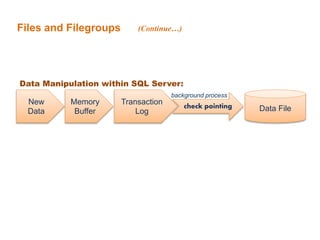
Files and Filegroups
New
Data
Memory
Buffer
Transaction
Log Data Filecheck pointing
background process
Data Manipulation within SQL Server:
(Continue…)
Files and Filegroups
 At the time that a file is added to a database, you specify the initial size of
the file.
 You can also specify a maximum size for the file.
 SQL Server automatically increases the size of the file when it is full of data.
 SQL Server uses a proportional fill algorithm.
 The proportional fill algorithm is designed to ensure that all files within a
filegroup reach the maximum defined capacity at the same time.
 The proportional fill algorithm is designed to allow a resize operation to occur
at a filegroup level.
(Continue…)
Files and Filegroups (Continue…)
File Groups
Files and Filegroups
 SQL Server uses three file extensions: .mdf, .ndf, and .ldf.
 The file extensions are nothing more than naming conventions,NO effect
on SQL server itself.
 A file with an .mdf extension generally is :
o The primary data file that is created within a database
o Associated with the primary filegroup.
o Contains all the system objects necessary to a database.
 The .ndf extension generally is:
o Secondary data files used for all other primary data files
o Some databases may not have any secondary data files, while
others have several secondary data files
 The .ldf extension generally is used for transaction logs.
o The transaction log records every change that occurs within a
database to persist all transactions to disk.
(Continue…)
Files and Filegroups (Continue…)
SQL Server files have two names :
 LOGICAL_FILE_NAME
 The logical_file_name is the name used to refer to the physical file
in all Transact-SQL statements.
 The logical file name must comply with the rules for SQL Server
identifiers
 Must be unique among logical file names in the database.
 OS_FILE_NAME
 The os_file_name is the name of the physical file including the
directory path.
 It must follow the rules for the operating system file names
Files and Filegroups (Continue…)
 Designing the data layer of a database begins with the database
creation.
 When you create a database, it should have three files and two
filegroups, You should have :
 A file with an .mdf extension within a filegroup named PRIMARY.
 A file with an .ndf extension in a filegroup with any name that you
choose.
 The transaction log with an .ldf extension.
 Notes :
SQL Server data and log files can be put on either FAT or NTFS file
systems. We recommend using the NTFS file system because the
security aspects of NTFS.
Files and Filegroups (Continue…)
 When the database is created, the primary filegroup is marked as the
default filegroup.
 After you create the database, you should mark the second filegroup as
default filegroup.
 Any created object placed on the second filegroup.
 Only the system objects for the database reside on the primary
filegroup.
ALTER DATABASE <database name> MODIFY FILEGROUP
<filegroup name> DEFAULT
 You can change the default filegroup by the following command:
Create Database & Filegroup
FILESTREAM
 The FILESTREAM feature allows you to associate files with a
database.
 The files are stored in a folder on the operating system, but are
linked directly into a database
 To store FILESTREAM data within a database, you need to specify
where the data will be stored
 You define the location for FILESTREAM data in a database by
designating a filegroup within the database to be used for storage
with the contains filestream property.
 The Filename property defined for a FILESTREAM filegroup
specifies the path to a folder.
(Continue…)
 A filestream.hdr file is created in the folder, which is a system file
used to manage the files subsequently written to the folder.
Tempdb Database
 SQL Server uses tempdb for worktables used in grouping/sorting
operations, worktables to support cursors, the version store supporting
snapshot isolation level, and overflow for table variables.
 Temporary tables are created in tempdb.
 Unlike user databases, there's no recovery process in tempdb.
 One reason to use a temporary table is to take the load off of a user
database when you need to persist temporary data.
 Temporary table names are prefixed with a number symbol (#) for local
temporary tables (which are visible only to the connection that created
them) OR (##) for global temporary tables (which are visible to all
connections).
Review
1- You have a reference database named OrderHistory, which should
not allow any data to be modified. How can you ensure, with the
least amount of effort, that users can only read data from the
database?
A. Add all database users to the db_datareader role.
B. Create views for all the tables and grant select permission only on the
views to database users.
C. Set the database to READ_ONLY.
D. Grant select permission on the database to all users and revoke insert,
update, and delete permissions from all users on the database.
1. Correct Answer: C
A) Incorrect: Members of the db_owner role are still able to change data
in the database.
B) Incorrect: Members of the db_owner role are still able to change data
in the database.
C) Correct: Unless the database is in READ_ONLY mode, members of
the db_owner role can still change data in the database.
D) Incorrect: Members of the db_owner role are still able to change data
in the database.
Answers
Sql server lesson3

Sql server lesson3

  • 1.
  • 2.
    Configuring Files AndFilegroups. Transaction Logs. Filestream data
  • 3.
    Files and Filegroups Data within a database is stored on disk in one or more data files.  SQL Server uses two different types of files:  Data file responsible for the long-term storage of all the data within a database  Transaction log files storing all the transactions that are executed against a database. Every transaction is written to a transaction log file.  Filegroups are a logical structure, defined within a database, that map a database and the objects contained within a database, to the data files on disk.  Filegroups can contain more than one data file.
  • 4.
    Files and Filegroups New Data Memory Buffer Transaction LogData Filecheck pointing background process Data Manipulation within SQL Server: (Continue…)
  • 5.
    Files and Filegroups At the time that a file is added to a database, you specify the initial size of the file.  You can also specify a maximum size for the file.  SQL Server automatically increases the size of the file when it is full of data.  SQL Server uses a proportional fill algorithm.  The proportional fill algorithm is designed to ensure that all files within a filegroup reach the maximum defined capacity at the same time.  The proportional fill algorithm is designed to allow a resize operation to occur at a filegroup level. (Continue…)
  • 6.
    Files and Filegroups(Continue…) File Groups
  • 7.
    Files and Filegroups SQL Server uses three file extensions: .mdf, .ndf, and .ldf.  The file extensions are nothing more than naming conventions,NO effect on SQL server itself.  A file with an .mdf extension generally is : o The primary data file that is created within a database o Associated with the primary filegroup. o Contains all the system objects necessary to a database.  The .ndf extension generally is: o Secondary data files used for all other primary data files o Some databases may not have any secondary data files, while others have several secondary data files  The .ldf extension generally is used for transaction logs. o The transaction log records every change that occurs within a database to persist all transactions to disk. (Continue…)
  • 8.
    Files and Filegroups(Continue…) SQL Server files have two names :  LOGICAL_FILE_NAME  The logical_file_name is the name used to refer to the physical file in all Transact-SQL statements.  The logical file name must comply with the rules for SQL Server identifiers  Must be unique among logical file names in the database.  OS_FILE_NAME  The os_file_name is the name of the physical file including the directory path.  It must follow the rules for the operating system file names
  • 9.
    Files and Filegroups(Continue…)  Designing the data layer of a database begins with the database creation.  When you create a database, it should have three files and two filegroups, You should have :  A file with an .mdf extension within a filegroup named PRIMARY.  A file with an .ndf extension in a filegroup with any name that you choose.  The transaction log with an .ldf extension.  Notes : SQL Server data and log files can be put on either FAT or NTFS file systems. We recommend using the NTFS file system because the security aspects of NTFS.
  • 10.
    Files and Filegroups(Continue…)  When the database is created, the primary filegroup is marked as the default filegroup.  After you create the database, you should mark the second filegroup as default filegroup.  Any created object placed on the second filegroup.  Only the system objects for the database reside on the primary filegroup. ALTER DATABASE <database name> MODIFY FILEGROUP <filegroup name> DEFAULT  You can change the default filegroup by the following command:
  • 11.
  • 12.
    FILESTREAM  The FILESTREAMfeature allows you to associate files with a database.  The files are stored in a folder on the operating system, but are linked directly into a database  To store FILESTREAM data within a database, you need to specify where the data will be stored  You define the location for FILESTREAM data in a database by designating a filegroup within the database to be used for storage with the contains filestream property.  The Filename property defined for a FILESTREAM filegroup specifies the path to a folder. (Continue…)  A filestream.hdr file is created in the folder, which is a system file used to manage the files subsequently written to the folder.
  • 13.
    Tempdb Database  SQLServer uses tempdb for worktables used in grouping/sorting operations, worktables to support cursors, the version store supporting snapshot isolation level, and overflow for table variables.  Temporary tables are created in tempdb.  Unlike user databases, there's no recovery process in tempdb.  One reason to use a temporary table is to take the load off of a user database when you need to persist temporary data.  Temporary table names are prefixed with a number symbol (#) for local temporary tables (which are visible only to the connection that created them) OR (##) for global temporary tables (which are visible to all connections).
  • 14.
    Review 1- You havea reference database named OrderHistory, which should not allow any data to be modified. How can you ensure, with the least amount of effort, that users can only read data from the database? A. Add all database users to the db_datareader role. B. Create views for all the tables and grant select permission only on the views to database users. C. Set the database to READ_ONLY. D. Grant select permission on the database to all users and revoke insert, update, and delete permissions from all users on the database.
  • 15.
    1. Correct Answer:C A) Incorrect: Members of the db_owner role are still able to change data in the database. B) Incorrect: Members of the db_owner role are still able to change data in the database. C) Correct: Unless the database is in READ_ONLY mode, members of the db_owner role can still change data in the database. D) Incorrect: Members of the db_owner role are still able to change data in the database. Answers