File And Directory Structure
The logical structure of a directory includes:
 Single-Level Directory
 Two-Level Directory
 Tree-Structured Directories
 Acyclic-Graph Directories
Shared files and subdirectories can be implemented in several ways. A
common way, exemplified by many of the UNIX systems, is to create a new
directory entry called a link. A link is effectively a pointer to another file or
subdirectory.
Another common approach to implementing shared files is simply to
duplicate all information about them in both sharing directories. Thus, both
entries are identical and equal. A link is clearly different from the original
directory entry; thus, the two are not equal. Duplicate directory entries,
however, make the original and the copy indistinguishable. A major problem
with duplicate directory entries is maintaining consistency when a file is
modified.
 General Graph Directory
Using Garbage Collection, Cycles are avoided, and no extra overhead is incurred.
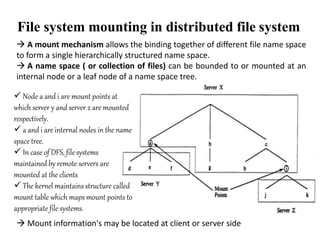
File system mounting in distributed file system
 A mount mechanism allows the binding together of different file name space
to form a single hierarchically structured name space.
 A name space ( or collection of files) can be bounded to or mounted at an
internal node or a leaf node of a name space tree.
 Mount information's may be located at client or server side
 Node a and i are mount points at
which server y and server z are mounted
respectively.
 a and i are internal nodes in the name
space tree.
 In case of DFS, file systems
maintained by remote servers are
mounted at the clients
 The kernel maintains structure called
mount table which maps mount points to
appropriate file systems.
File Sharing
• Once multiple users are allowed to share files,
• the challenge is to extend sharing to multiple file systems
• Finally, we consider what to do about conflicting actions occurring on
shared files.
• if multiple users are writing to a file
• should all the writes be allowed to occur, or
• should the operating system protect the users’
actions from one another?
File Protection
• In a multiuser system
• Protection mechanisms provide controlled access by limiting the types of
file access that can be made.
• Several different types of operations may be controlled:
• Read
• Write
• Execute
• Append
• Delete
• List
Access Control
• Different users may need different types of access to a file or directory.
• Associate with each file and directory an access-control list (ACL)
specifying user names and the types of access allowed for each user.
• The main problem with access lists is its length.
• If we want to allow everyone to read a file, we must list all users with
read access.
• This technique has two undesirable consequences:
• Constructing such a list may be a tedious and unrewarding task
• The directory entry, previously of fixed size, now needs to be of
variable size
• These problems can be resolved by use of a condensed version of the access
list.
• Owner. The user who created the file is the owner.
• Group. A set of users who are sharing the file and need similar access is a
group, or work group.
• Universe. All other users in the system constitute the universe.
Cont’d…
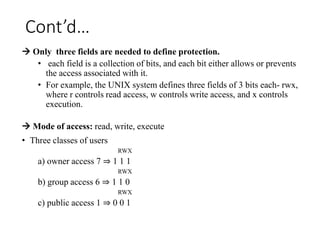
 Only three fields are needed to define protection.
• each field is a collection of bits, and each bit either allows or prevents
the access associated with it.
• For example, the UNIX system defines three fields of 3 bits each- rwx,
where r controls read access, w controls write access, and x controls
execution.
 Mode of access: read, write, execute
• Three classes of users
RWX
a) owner access 7 ⇒ 1 1 1
RWX
b) group access 6 ⇒ 1 1 0
RWX
c) public access 1 ⇒ 0 0 1
Cont’d…
Cont’d…
Cont’d…
Cont’d…
1. Introduction
1.1 Files Systems (FS)
11
• In computer system File system is the basic major task of a
system.
• Computer systems store data in organized way.
 Hard Disk , the secondary storage device in the system
 Main memory, where the needed file by the processor
store
 Registers, small memories used to store recourses needed
by the processor for the current execution
 Caches, also store file(data) which are used frequently and
need to use again soon. And so on…
 When we talk about computed system or operating system it
directly go to file and data, actually it is all about data.
1.2 Distributed Files Systems (DFS)
• A special case of distributed system
• Implement a common file system that can be shared by all
autonomous computers in a distributed system
• Allows multi-computer systems to share files
• Sharing devices
• E.g.,
• NFS (Sun’s Network File System)
• Windows NT, 2000, XP others…..
12
• Goal: provide common view of centralized file system, but
distributed implementation.
• Ability to open & update any file on any machine on network
• All of synchronization issues and capabilities of shared local files
• Network transparency
• High availability
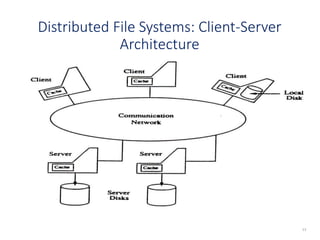
Distributed File Systems: Client-Server
Architecture
13
2.2 File Name Mapping
(1) Name Server: Provides mapping (name resolution) the names
supplied by clients into objects (files and directories)
• Takes place when process attempts to access file or directory the
first time.
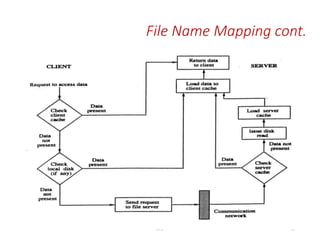
(2) Cache manager: Improves performance through file caching
• Caching at the client - When client references file at server:
• Copy of data brought from server to client machine
• Subsequent accesses done locally at the client
• Caching at the server:
• File saved in memory to reduce subsequent access time
* Issue: different cached copies can become inconsistent. Cache
managers (at server and clients) have to provide coordination.
14
DFSI 15
File Name Mapping cont.
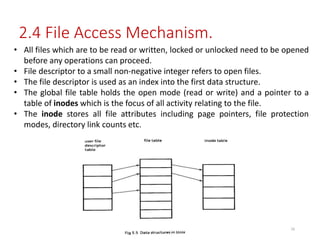
• All files which are to be read or written, locked or unlocked need to be opened
before any operations can proceed.
• File descriptor to a small non-negative integer refers to open files.
• The file descriptor is used as an index into the first data structure.
• The global file table holds the open mode (read or write) and a pointer to a
table of inodes which is the focus of all activity relating to the file.
• The inode stores all file attributes including page pointers, file protection
modes, directory link counts etc.
2.4 File Access Mechanism.
16
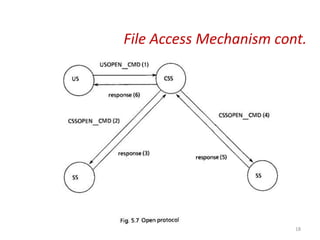
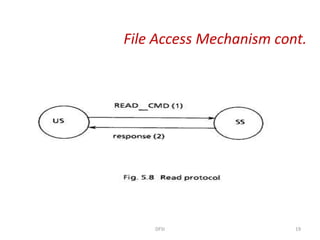
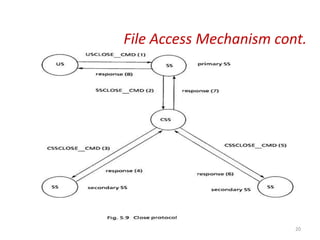
• The request message consists of a token that specifies the
logical site to which the message is destined (CSS or SS).
• token that specifies the system call the process server should
execute on behalf of the client, parameters of the system call
and environmental data such as user id, current directory, user
hosts address etc.
• Has three protocols,
• open,
• read and
• close protocol
File Access Mechanism cont.
DFSI 17
File Access Mechanism cont.
18
File Access Mechanism cont.
DFSI 19
File Access Mechanism cont.
20
What is Directory?
Directory is a well organized mechanism of file storing in the secondary hard disk.
 Why Directory implementation?
The selection of directory-allocation and directory-management algorithms
significantly affects the:
 efficiency
 performance and
 reliability of the file system.
That means directories need to be fast to search, Insert and delete entries with a
minimum of wasted disk space. Thus, to minimize the above significant effects and to
satisfy the needs, there should have to be a mechanism for Directory implementation.
 Directory implementation methods:
Linear list
Hash table
Linear list
 Linear List: is list of file names with pointers to the data blocks.
 It is the simplest and easiest directory structure to program and implement.
 To create a new file, we must first search the directory to be sure that no existing
file has the same name. Then, we add a new entry at the end of the directory.
 To delete a file, we search the directory for the named file and then release the
space allocated to it.
 To finding a desired file requires a linear search process.
 Could keep files ordered alphabetically via linked list or use B+ tree
Advantage: Simple to Program and Implement.
Disadvantage: Time-consuming to search(linear search).
Hash Table
 Hash Table: is linear list with hash data structure.
 It stores things in associative array form as key, value pairs
 Insertion and deletion are fairly straightforward due to the existence of the hash
function.
 collisions are possible: when two or more file names hash to the same location.
 Possible resolutions for collision are:
1. open address – looking up else where in the hash table for empty slot, for the
colliding key.
2. chaining – creating a separate linked list for the colliding key
Advantage: decreases directory searching time based up on the hash function
effectiveness.
Disadvantage : The occurrence of collisions and being fixed in size.
File system Structure
• The file system structure is the most basic level of organization in an operating system.
• Almost all of the ways an operating system interacts with its users, applications, and
security model are dependent upon the way it organizes files on storage devices.
• Disks provide the bulk of secondary storage on which a file system is maintained.
 File system resides(exit) on secondary storage (disks)
• Provided user interface to storage, mapping logical to physical
• Provides efficient and convenient access to disk by allowing data to be stored, located
retrieved
easily
 Device driver controls the physical device
 File control block – storage structure consisting of information about a file
 File systems are organized into layers
12/24/2023 24
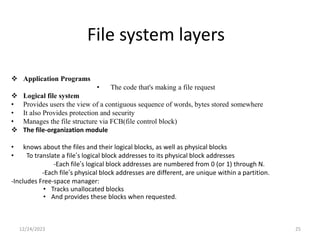
File system layers
 Application Programs
• The code that's making a file request
 Logical file system
• Provides users the view of a contiguous sequence of words, bytes stored somewhere
• It also Provides protection and security
• Manages the file structure via FCB(file control block)
 The file-organization module
• knows about the files and their logical blocks, as well as physical blocks
• To translate a file’s logical block addresses to its physical block addresses
-Each file’s logical block addresses are numbered from 0 (or 1) through N.
-Each file’s physical block addresses are different, are unique within a partition.
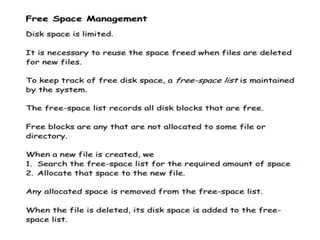
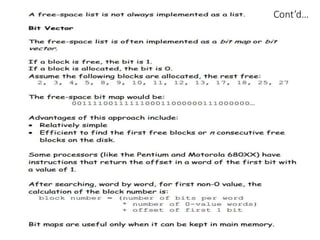
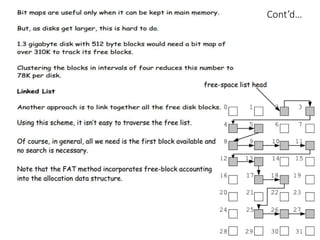
-Includes Free-space manager:
• Tracks unallocated blocks
• And provides these blocks when requested.
12/24/2023 25
Cont…
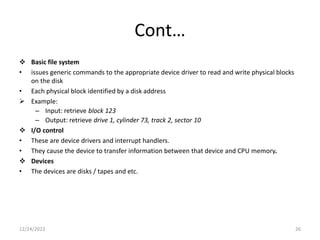
 Basic file system
• issues generic commands to the appropriate device driver to read and write physical blocks
on the disk
• Each physical block identified by a disk address
 Example:
– Input: retrieve block 123
– Output: retrieve drive 1, cylinder 73, track 2, sector 10
 I/O control
• These are device drivers and interrupt handlers.
• They cause the device to transfer information between that device and CPU memory.
 Devices
• The devices are disks / tapes and etc.
12/24/2023 26
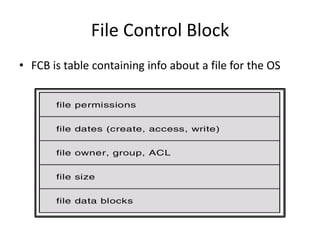
File Control Block
• FCB is table containing info about a file for the OS
Two important goals of DFS
1. Network Transparency
Users do not have to be aware of the location of files to access them. This property of
a distributed file system is known as network transparency.
2. High Availability
Users should have the same easy access to files irrespective of their physical location
System failures or regularly scheduled activities such as backups or maintenance should
not result in the unavailability of files.
29
 In general files in DFS can be located in “any” system. We call the “source(s)” of
files to be servers and those accessing them to be clients.
 However, most distributed file systems distinguish between clients and servers in
more strict ways:
 Clients simply access files and do not have share local files
 Servers are the actual source of files
 In most cases ,servers are more powerful machines(in terms of CPU, physical
memory, disk bandwidth….)
30
In this model, clients and servers are not distinguished from one another; instead, all nodes
within the system are considered peers, and each may act as either a client or a server,
depending on whether it is requesting or providing a service.
To participate in a peer-to-peer system, a node must first join the network
of peers. Once a node has joined the network, it can begin providing services
to—and requesting services from—other nodes in the network.
Example : video chat protocols
Design issues
1. Naming and name resolution
2. Cache on disk or in main memory
3. Writing policy
4. Availability
5. Scalability
6. Fault tolerance
7. Directory service
1. Naming and Name Resolution
• Name in file system is associated with an object (e.g. a file or a directory)
• Name resolution refers to the process of mapping a name to an object or, in case of replication, to multiple objects
• Three approaches to name files in DFS
– Concatenation of host and local name (not location Xparent)
– Remote directories are mounted to local directories
– Directory structured with single global directory of all files
• Name Server
– Resolves the names in distributed systems
– Drawbacks include single point of failure, performance bottleneck
– Alternative is to have multiple name servers ( e.g. Domain Name Servers)
2. Cache Locations
Advantages
• Diskless workstations can cache
• Faster than disk
• Server cache is in the main memory, so both server and client utilize a single cache design
Disadvantages
• Competes with virtual memory system for physical memory space
• Complex cache manager and memory management system
• Large files cannot be cached completely in memory
• Cache on Local Disk
– Large files can be cached without affecting performance
– Virtual memory management is simple
– Facilitates incorporation of portable computers into DS
3. Write Policy
• When modified cache block at a client should be transferred to the server
• Write-through
– All writes requested by the applications at clients are also carried out at the server immediately (reliable but not utilizing cache to
fullest)
• Delayed write policy
– Modifications due to a write are reflected at the server after some delay (how long?)
• Write-on-close policy
– The updating of the files at the server is not done until the file is closed
5. Availability
• Replication is used for enhancing availability of files at different servers
• Expensive because
– Extra storage space required
• Issues involve
– How to keep the replicas of a file consistent
– How to detect inconsistencies among replicas of a file and recover
from these inconsistencies
• Causes of Inconsistency
– Replica is not updated due to failure of server
– All the file servers are not reachable from all the clients due to
network partition
– Replicas of a file in different partitions are updated differently
6. Scalability
• Design of a system must deal with demands of a growing system (client server
most common organization currently)
• As system grows larger, both the size of the server state and the load due to
invalidations increase
7. Fault Tolerance
• Good to design in terms of idempotent operations so can have stateless servers
State full
• Shorter requests
• Better performance in processing requests
• Cache coherence together is possible since server knows who’s accessing what
• File locking is possible
Stateless
Each request must identify file and offsets
• No state to lose, so server can crash/recover
• Client can crash/recover
• No open/close needed for files (this is state)
• No server space used for state
• File locking not possible

File System operating system operating system

  • 1.
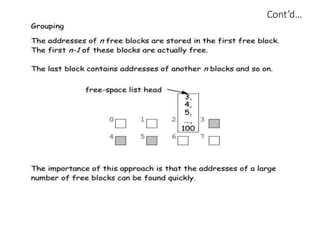
    File And DirectoryStructure The logical structure of a directory includes:  Single-Level Directory  Two-Level Directory  Tree-Structured Directories  Acyclic-Graph Directories Shared files and subdirectories can be implemented in several ways. A common way, exemplified by many of the UNIX systems, is to create a new directory entry called a link. A link is effectively a pointer to another file or subdirectory. Another common approach to implementing shared files is simply to duplicate all information about them in both sharing directories. Thus, both entries are identical and equal. A link is clearly different from the original directory entry; thus, the two are not equal. Duplicate directory entries, however, make the original and the copy indistinguishable. A major problem with duplicate directory entries is maintaining consistency when a file is modified.  General Graph Directory Using Garbage Collection, Cycles are avoided, and no extra overhead is incurred.
  • 2.
    File system mountingin distributed file system  A mount mechanism allows the binding together of different file name space to form a single hierarchically structured name space.  A name space ( or collection of files) can be bounded to or mounted at an internal node or a leaf node of a name space tree.  Mount information's may be located at client or server side  Node a and i are mount points at which server y and server z are mounted respectively.  a and i are internal nodes in the name space tree.  In case of DFS, file systems maintained by remote servers are mounted at the clients  The kernel maintains structure called mount table which maps mount points to appropriate file systems.
  • 3.
    File Sharing • Oncemultiple users are allowed to share files, • the challenge is to extend sharing to multiple file systems • Finally, we consider what to do about conflicting actions occurring on shared files. • if multiple users are writing to a file • should all the writes be allowed to occur, or • should the operating system protect the users’ actions from one another? File Protection • In a multiuser system • Protection mechanisms provide controlled access by limiting the types of file access that can be made. • Several different types of operations may be controlled: • Read • Write • Execute • Append • Delete • List
  • 4.
    Access Control • Differentusers may need different types of access to a file or directory. • Associate with each file and directory an access-control list (ACL) specifying user names and the types of access allowed for each user. • The main problem with access lists is its length. • If we want to allow everyone to read a file, we must list all users with read access. • This technique has two undesirable consequences: • Constructing such a list may be a tedious and unrewarding task • The directory entry, previously of fixed size, now needs to be of variable size • These problems can be resolved by use of a condensed version of the access list. • Owner. The user who created the file is the owner. • Group. A set of users who are sharing the file and need similar access is a group, or work group. • Universe. All other users in the system constitute the universe.
  • 5.
    Cont’d…  Only threefields are needed to define protection. • each field is a collection of bits, and each bit either allows or prevents the access associated with it. • For example, the UNIX system defines three fields of 3 bits each- rwx, where r controls read access, w controls write access, and x controls execution.  Mode of access: read, write, execute • Three classes of users RWX a) owner access 7 ⇒ 1 1 1 RWX b) group access 6 ⇒ 1 1 0 RWX c) public access 1 ⇒ 0 0 1
  • 7.
  • 8.
  • 9.
  • 10.
  • 11.
    1. Introduction 1.1 FilesSystems (FS) 11 • In computer system File system is the basic major task of a system. • Computer systems store data in organized way.  Hard Disk , the secondary storage device in the system  Main memory, where the needed file by the processor store  Registers, small memories used to store recourses needed by the processor for the current execution  Caches, also store file(data) which are used frequently and need to use again soon. And so on…  When we talk about computed system or operating system it directly go to file and data, actually it is all about data.
  • 12.
    1.2 Distributed FilesSystems (DFS) • A special case of distributed system • Implement a common file system that can be shared by all autonomous computers in a distributed system • Allows multi-computer systems to share files • Sharing devices • E.g., • NFS (Sun’s Network File System) • Windows NT, 2000, XP others….. 12 • Goal: provide common view of centralized file system, but distributed implementation. • Ability to open & update any file on any machine on network • All of synchronization issues and capabilities of shared local files • Network transparency • High availability
  • 13.
    Distributed File Systems:Client-Server Architecture 13
  • 14.
    2.2 File NameMapping (1) Name Server: Provides mapping (name resolution) the names supplied by clients into objects (files and directories) • Takes place when process attempts to access file or directory the first time. (2) Cache manager: Improves performance through file caching • Caching at the client - When client references file at server: • Copy of data brought from server to client machine • Subsequent accesses done locally at the client • Caching at the server: • File saved in memory to reduce subsequent access time * Issue: different cached copies can become inconsistent. Cache managers (at server and clients) have to provide coordination. 14
  • 15.
    DFSI 15 File NameMapping cont.
  • 16.
    • All fileswhich are to be read or written, locked or unlocked need to be opened before any operations can proceed. • File descriptor to a small non-negative integer refers to open files. • The file descriptor is used as an index into the first data structure. • The global file table holds the open mode (read or write) and a pointer to a table of inodes which is the focus of all activity relating to the file. • The inode stores all file attributes including page pointers, file protection modes, directory link counts etc. 2.4 File Access Mechanism. 16
  • 17.
    • The requestmessage consists of a token that specifies the logical site to which the message is destined (CSS or SS). • token that specifies the system call the process server should execute on behalf of the client, parameters of the system call and environmental data such as user id, current directory, user hosts address etc. • Has three protocols, • open, • read and • close protocol File Access Mechanism cont. DFSI 17
  • 18.
  • 19.
    File Access Mechanismcont. DFSI 19
  • 20.
  • 21.
    What is Directory? Directoryis a well organized mechanism of file storing in the secondary hard disk.  Why Directory implementation? The selection of directory-allocation and directory-management algorithms significantly affects the:  efficiency  performance and  reliability of the file system. That means directories need to be fast to search, Insert and delete entries with a minimum of wasted disk space. Thus, to minimize the above significant effects and to satisfy the needs, there should have to be a mechanism for Directory implementation.  Directory implementation methods: Linear list Hash table
  • 22.
    Linear list  LinearList: is list of file names with pointers to the data blocks.  It is the simplest and easiest directory structure to program and implement.  To create a new file, we must first search the directory to be sure that no existing file has the same name. Then, we add a new entry at the end of the directory.  To delete a file, we search the directory for the named file and then release the space allocated to it.  To finding a desired file requires a linear search process.  Could keep files ordered alphabetically via linked list or use B+ tree Advantage: Simple to Program and Implement. Disadvantage: Time-consuming to search(linear search).
  • 23.
    Hash Table  HashTable: is linear list with hash data structure.  It stores things in associative array form as key, value pairs  Insertion and deletion are fairly straightforward due to the existence of the hash function.  collisions are possible: when two or more file names hash to the same location.  Possible resolutions for collision are: 1. open address – looking up else where in the hash table for empty slot, for the colliding key. 2. chaining – creating a separate linked list for the colliding key Advantage: decreases directory searching time based up on the hash function effectiveness. Disadvantage : The occurrence of collisions and being fixed in size.
  • 24.
    File system Structure •The file system structure is the most basic level of organization in an operating system. • Almost all of the ways an operating system interacts with its users, applications, and security model are dependent upon the way it organizes files on storage devices. • Disks provide the bulk of secondary storage on which a file system is maintained.  File system resides(exit) on secondary storage (disks) • Provided user interface to storage, mapping logical to physical • Provides efficient and convenient access to disk by allowing data to be stored, located retrieved easily  Device driver controls the physical device  File control block – storage structure consisting of information about a file  File systems are organized into layers 12/24/2023 24
  • 25.
    File system layers Application Programs • The code that's making a file request  Logical file system • Provides users the view of a contiguous sequence of words, bytes stored somewhere • It also Provides protection and security • Manages the file structure via FCB(file control block)  The file-organization module • knows about the files and their logical blocks, as well as physical blocks • To translate a file’s logical block addresses to its physical block addresses -Each file’s logical block addresses are numbered from 0 (or 1) through N. -Each file’s physical block addresses are different, are unique within a partition. -Includes Free-space manager: • Tracks unallocated blocks • And provides these blocks when requested. 12/24/2023 25
  • 26.
    Cont…  Basic filesystem • issues generic commands to the appropriate device driver to read and write physical blocks on the disk • Each physical block identified by a disk address  Example: – Input: retrieve block 123 – Output: retrieve drive 1, cylinder 73, track 2, sector 10  I/O control • These are device drivers and interrupt handlers. • They cause the device to transfer information between that device and CPU memory.  Devices • The devices are disks / tapes and etc. 12/24/2023 26
  • 27.
    File Control Block •FCB is table containing info about a file for the OS
  • 28.
    Two important goalsof DFS 1. Network Transparency Users do not have to be aware of the location of files to access them. This property of a distributed file system is known as network transparency. 2. High Availability Users should have the same easy access to files irrespective of their physical location System failures or regularly scheduled activities such as backups or maintenance should not result in the unavailability of files.
  • 29.
    29  In generalfiles in DFS can be located in “any” system. We call the “source(s)” of files to be servers and those accessing them to be clients.  However, most distributed file systems distinguish between clients and servers in more strict ways:  Clients simply access files and do not have share local files  Servers are the actual source of files  In most cases ,servers are more powerful machines(in terms of CPU, physical memory, disk bandwidth….)
  • 30.
    30 In this model,clients and servers are not distinguished from one another; instead, all nodes within the system are considered peers, and each may act as either a client or a server, depending on whether it is requesting or providing a service. To participate in a peer-to-peer system, a node must first join the network of peers. Once a node has joined the network, it can begin providing services to—and requesting services from—other nodes in the network. Example : video chat protocols
  • 31.
    Design issues 1. Namingand name resolution 2. Cache on disk or in main memory 3. Writing policy 4. Availability 5. Scalability 6. Fault tolerance 7. Directory service
  • 32.
    1. Naming andName Resolution • Name in file system is associated with an object (e.g. a file or a directory) • Name resolution refers to the process of mapping a name to an object or, in case of replication, to multiple objects • Three approaches to name files in DFS – Concatenation of host and local name (not location Xparent) – Remote directories are mounted to local directories – Directory structured with single global directory of all files • Name Server – Resolves the names in distributed systems – Drawbacks include single point of failure, performance bottleneck – Alternative is to have multiple name servers ( e.g. Domain Name Servers) 2. Cache Locations Advantages • Diskless workstations can cache • Faster than disk • Server cache is in the main memory, so both server and client utilize a single cache design Disadvantages • Competes with virtual memory system for physical memory space • Complex cache manager and memory management system • Large files cannot be cached completely in memory • Cache on Local Disk – Large files can be cached without affecting performance – Virtual memory management is simple – Facilitates incorporation of portable computers into DS
  • 33.
    3. Write Policy •When modified cache block at a client should be transferred to the server • Write-through – All writes requested by the applications at clients are also carried out at the server immediately (reliable but not utilizing cache to fullest) • Delayed write policy – Modifications due to a write are reflected at the server after some delay (how long?) • Write-on-close policy – The updating of the files at the server is not done until the file is closed 5. Availability • Replication is used for enhancing availability of files at different servers • Expensive because – Extra storage space required • Issues involve – How to keep the replicas of a file consistent – How to detect inconsistencies among replicas of a file and recover from these inconsistencies • Causes of Inconsistency – Replica is not updated due to failure of server – All the file servers are not reachable from all the clients due to network partition – Replicas of a file in different partitions are updated differently 6. Scalability • Design of a system must deal with demands of a growing system (client server most common organization currently) • As system grows larger, both the size of the server state and the load due to invalidations increase
  • 34.
    7. Fault Tolerance •Good to design in terms of idempotent operations so can have stateless servers State full • Shorter requests • Better performance in processing requests • Cache coherence together is possible since server knows who’s accessing what • File locking is possible Stateless Each request must identify file and offsets • No state to lose, so server can crash/recover • Client can crash/recover • No open/close needed for files (this is state) • No server space used for state • File locking not possible