ORAL PRESENTATION AT
CONFERNCES/SEMINAR
                Aarti Sareen
               MSPT-I honours
                 Roll no. 8
• An oral presentation is a short talk
  on a set topic given to a
  tutorial/researcher or seminar
  group. In an oral presentation one
  (or more) presenters give a talk to
  a audience group and present
  views on a topic based on their
  readings or research. The rest of
  the group then joins in a
  discussion/cross questioning of the
  topic.
ORAL PRESENTATION MEANS

•   Presenting research paper
•    Preparing and delivering a talk
•    Leading a group discussion
•    Preparing handouts and visual aids
•     Submitting a written assignment based on
    the presentation topic
MOST COMMAN

• PowerPoint presentation

• Overhead projector

• Poster
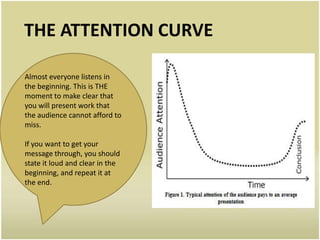
THE ATTENTION CURVE

Almost everyone listens in
the beginning. This is THE
moment to make clear that
you will present work that
the audience cannot afford to
miss.

If you want to get your
message through, you should
state it loud and clear in the
beginning, and repeat it at
the end.
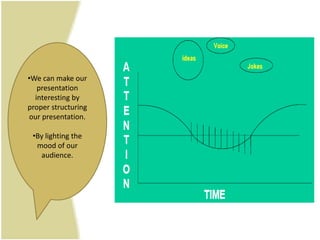
•We can make our
   presentation
  interesting by
proper structuring
our presentation.

 •By lighting the
  mood of our
   audience.
WHAT TO PRESENT AND
        PLAN
• Following should be
  considered

• Concept of the
  seminar/conference
• Types/number of audience
• Duration allotted
• Requirements
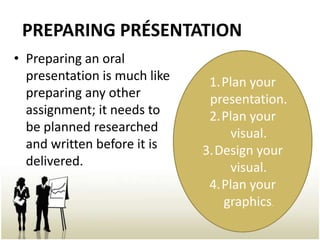
PREPARING PRÉSENTATION
• Preparing an oral
  presentation is much like    1.Plan your
  preparing any other          presentation.
  assignment; it needs to      2.Plan your
  be planned researched           visual.
  and written before it is    3.Design your
  delivered.                      visual.
                               4.Plan your
                                 graphics.
STRUCTURE OF ORAL PRESENTATION

• A good oral presentation is well structured;
  this makes it easier for the listener to follow.
• Basically there are three parts to a typical oral
  presentation: the
• Beginning(INTRODUCTION)
• the middle and (BODY)
• the end (CONCLUSION)
INTRODUCTION/BEGINNING

An introduction is like a road map that
tells your audience the direction your
presentation will take.

• State your topic and tell the audience
what your presentation will cover.
• Outline the main points.

A good introduction will capture an
audience’s attention.
Start your talk by greeting
the audience
and introducing yourself.
• State your topic clearly. For
example:
• ‘I’m going to talk about...’
• ‘Today I’d like to discuss…’
• Provide an outline of the
main points.
• Provide any necessary
background or
definition of terms.
BODY/MIDDLE
• This is the further progression part of the
  presentation. The body of your presentation is
  where you develop the main points and present
  examples and evidence.

• Make sure you provide clear links between main
  points, explanations and examples.

• Use visual aids to engage the interest of your
  audience and 'show’ instead of just ‘tell’.

• Emphasize important information. Tell your
  audience when information is particularly
  important or interesting. Tell them Why.
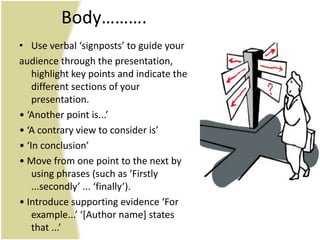
Body……….
• Use verbal ‘signposts’ to guide your
audience through the presentation,
    highlight key points and indicate the
    different sections of your
    presentation.
• ‘Another point is...’
• ‘A contrary view to consider is’
• ‘In conclusion’
• Move from one point to the next by
    using phrases (such as ‘Firstly
    ...secondly’ ... ‘finally’).
• Introduce supporting evidence ‘For
    example...’ ‘*Author name+ states
    that ...’
CONCLUSION/THE END
• The conclusion is usually a summary
  of the main points made in the body
               of the talk.
      • Restate the main points.
      • Re-answer the question.

• Don’t introduce any new information
         in the conclusion. Take
 the opportunity to show that you have
    covered all the points you made in
            your introduction.
Conclusion cont……..


                      Thank the audience,
                      and invite questions:

                      • Restate the purpose
                      of your talk, and
                      say that you have
                      achieved your aim:
                      • ‘I think it’s now clear
                      that ...’
HANDLING QUESTIONS
• You are the expert
   – Prepare among friends
   – Insist that they challenge you
• It’s OK to say you don’t know, or haven’t
  done the experiment yet
• The three “D”’s
   – Defend
   – Deflect
   – Defer
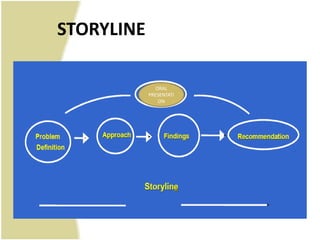
STORYLINE

               ORAL
            PRESENTATI
                ON
4 KEYS FOR SUCCESFUL ORAL
           PRESENTATION

•   1. Timing
•   2. Attention span
•   3. Personal approach
•   4. Practice
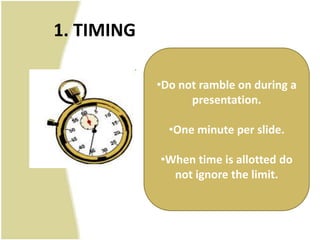
1. TIMING

            •Do not ramble on during a
                  presentation.

              •One minute per slide.

            •When time is allotted do
              not ignore the limit.
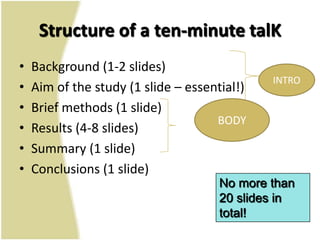
Structure of a ten-minute talK
•   Background (1-2 slides)
                                              INTRO
•   Aim of the study (1 slide – essential!)
•   Brief methods (1 slide)
                                     BODY
•   Results (4-8 slides)
•   Summary (1 slide)
•   Conclusions (1 slide)
                                      No more than
                                      20 slides in
                                      total!
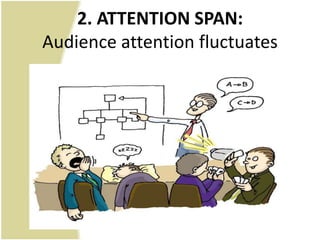
2. ATTENTION SPAN:
Audience attention fluctuates
3. Personal Approach
       Personal features of the presenter can make or
                     break presentation


•   A. Gesture/body language
•   B. Voice
•   C. Eye Contact
•   D. Breathing
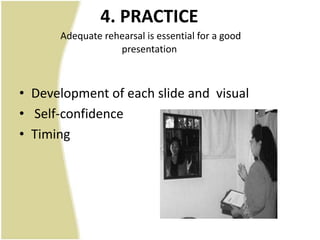
4. PRACTICE
      Adequate rehearsal is essential for a good
                  presentation


• Development of each slide and visual
• Self-confidence
• Timing
ELEMENTS OF ORAL
          PRESENTATION


• Good visual aids
• Logical sequence
WHY WE NEED VISUAL AIDS ?

• crystallize ideas
• keep speaker on track
• generate interest
• help information retention
• Use visual aids to maximize the
effectiveness of your presentation
LOGICAL SEQUENCE

•   Enhance interest
•   Create link
•   Enhance understanding
•   Concentrate on focus
DO’s
• Ensure in advance that the room has a projector.
• Do a number of practice runs through the presentation before
  the real thing.
• Be prepared for all technology to fail and either have backup
  transparencies for images or a full set of notes in order to give
  the presentation without any slides.
• Limit how many slides you include - you usually need far less
  than you think you do. Again, practice will help you gain
  confidence to know how many are sufficient.
• Only use keywords and simple phrases.
• Use a large enough, easy-to-read font.
• Label any graphs, charts, figures and diagrams (again in a
  readable font size).
• Include images for visual interest occasionally if relevant.
DON’T
• Rely too heavily on the PowerPoint presentation, which may
  experience technical difficulties on the day.
• Simply read from your slides - let them be reminders and key
  points.
• Use amusing fonts - stick to the basics such as Times or Arial.
• Use unnecessary slide or text transitions - it's distracting and
  slow to watch letters appear one at a time.
• Use PowerPoint sounds or any other sounds unless it's part of
  the presentation.
• Choose a template that's busy and doesn't relate to the
  presentation.
CONCLUSION

• Any professional can become an effective
  presenter.
• Knowledge is not enough.
• Being able to communicate is equally
  important.
• Investing time and effort in improving
  presentation skills is “always rewarded”.
QUESTIONS……????
Thank You…

Oral presentation at confernces

  • 1.
    ORAL PRESENTATION AT CONFERNCES/SEMINAR Aarti Sareen MSPT-I honours Roll no. 8
  • 2.
    • An oralpresentation is a short talk on a set topic given to a tutorial/researcher or seminar group. In an oral presentation one (or more) presenters give a talk to a audience group and present views on a topic based on their readings or research. The rest of the group then joins in a discussion/cross questioning of the topic.
  • 3.
    ORAL PRESENTATION MEANS • Presenting research paper • Preparing and delivering a talk • Leading a group discussion • Preparing handouts and visual aids • Submitting a written assignment based on the presentation topic
  • 4.
    MOST COMMAN • PowerPointpresentation • Overhead projector • Poster
  • 5.
    THE ATTENTION CURVE Almosteveryone listens in the beginning. This is THE moment to make clear that you will present work that the audience cannot afford to miss. If you want to get your message through, you should state it loud and clear in the beginning, and repeat it at the end.
  • 6.
    •We can makeour presentation interesting by proper structuring our presentation. •By lighting the mood of our audience.
  • 7.
    WHAT TO PRESENTAND PLAN • Following should be considered • Concept of the seminar/conference • Types/number of audience • Duration allotted • Requirements
  • 8.
    PREPARING PRÉSENTATION • Preparingan oral presentation is much like 1.Plan your preparing any other presentation. assignment; it needs to 2.Plan your be planned researched visual. and written before it is 3.Design your delivered. visual. 4.Plan your graphics.
  • 9.
    STRUCTURE OF ORALPRESENTATION • A good oral presentation is well structured; this makes it easier for the listener to follow. • Basically there are three parts to a typical oral presentation: the • Beginning(INTRODUCTION) • the middle and (BODY) • the end (CONCLUSION)
  • 10.
    INTRODUCTION/BEGINNING An introduction islike a road map that tells your audience the direction your presentation will take. • State your topic and tell the audience what your presentation will cover. • Outline the main points. A good introduction will capture an audience’s attention.
  • 11.
    Start your talkby greeting the audience and introducing yourself. • State your topic clearly. For example: • ‘I’m going to talk about...’ • ‘Today I’d like to discuss…’ • Provide an outline of the main points. • Provide any necessary background or definition of terms.
  • 12.
    BODY/MIDDLE • This isthe further progression part of the presentation. The body of your presentation is where you develop the main points and present examples and evidence. • Make sure you provide clear links between main points, explanations and examples. • Use visual aids to engage the interest of your audience and 'show’ instead of just ‘tell’. • Emphasize important information. Tell your audience when information is particularly important or interesting. Tell them Why.
  • 13.
    Body………. • Use verbal‘signposts’ to guide your audience through the presentation, highlight key points and indicate the different sections of your presentation. • ‘Another point is...’ • ‘A contrary view to consider is’ • ‘In conclusion’ • Move from one point to the next by using phrases (such as ‘Firstly ...secondly’ ... ‘finally’). • Introduce supporting evidence ‘For example...’ ‘*Author name+ states that ...’
  • 14.
    CONCLUSION/THE END • Theconclusion is usually a summary of the main points made in the body of the talk. • Restate the main points. • Re-answer the question. • Don’t introduce any new information in the conclusion. Take the opportunity to show that you have covered all the points you made in your introduction.
  • 15.
    Conclusion cont…….. Thank the audience, and invite questions: • Restate the purpose of your talk, and say that you have achieved your aim: • ‘I think it’s now clear that ...’
  • 16.
    HANDLING QUESTIONS • Youare the expert – Prepare among friends – Insist that they challenge you • It’s OK to say you don’t know, or haven’t done the experiment yet • The three “D”’s – Defend – Deflect – Defer
  • 17.
    STORYLINE ORAL PRESENTATI ON
  • 18.
    4 KEYS FORSUCCESFUL ORAL PRESENTATION • 1. Timing • 2. Attention span • 3. Personal approach • 4. Practice
  • 19.
    1. TIMING •Do not ramble on during a presentation. •One minute per slide. •When time is allotted do not ignore the limit.
  • 20.
    Structure of aten-minute talK • Background (1-2 slides) INTRO • Aim of the study (1 slide – essential!) • Brief methods (1 slide) BODY • Results (4-8 slides) • Summary (1 slide) • Conclusions (1 slide) No more than 20 slides in total!
  • 21.
    2. ATTENTION SPAN: Audienceattention fluctuates
  • 22.
    3. Personal Approach Personal features of the presenter can make or break presentation • A. Gesture/body language • B. Voice • C. Eye Contact • D. Breathing
  • 23.
    4. PRACTICE Adequate rehearsal is essential for a good presentation • Development of each slide and visual • Self-confidence • Timing
  • 24.
    ELEMENTS OF ORAL PRESENTATION • Good visual aids • Logical sequence
  • 25.
    WHY WE NEEDVISUAL AIDS ? • crystallize ideas • keep speaker on track • generate interest • help information retention • Use visual aids to maximize the effectiveness of your presentation
  • 26.
    LOGICAL SEQUENCE • Enhance interest • Create link • Enhance understanding • Concentrate on focus
  • 27.
    DO’s • Ensure inadvance that the room has a projector. • Do a number of practice runs through the presentation before the real thing. • Be prepared for all technology to fail and either have backup transparencies for images or a full set of notes in order to give the presentation without any slides. • Limit how many slides you include - you usually need far less than you think you do. Again, practice will help you gain confidence to know how many are sufficient. • Only use keywords and simple phrases. • Use a large enough, easy-to-read font. • Label any graphs, charts, figures and diagrams (again in a readable font size). • Include images for visual interest occasionally if relevant.
  • 28.
    DON’T • Rely tooheavily on the PowerPoint presentation, which may experience technical difficulties on the day. • Simply read from your slides - let them be reminders and key points. • Use amusing fonts - stick to the basics such as Times or Arial. • Use unnecessary slide or text transitions - it's distracting and slow to watch letters appear one at a time. • Use PowerPoint sounds or any other sounds unless it's part of the presentation. • Choose a template that's busy and doesn't relate to the presentation.
  • 29.
    CONCLUSION • Any professionalcan become an effective presenter. • Knowledge is not enough. • Being able to communicate is equally important. • Investing time and effort in improving presentation skills is “always rewarded”.
  • 30.
  • 31.