PRESENTATION
How to Make a Presentation
INTRODUCTION
Successful and inspiring speakers are remembered not only because they
were eloquent, humorous, or had a good style, but primarily and
principally because their messages and ideas caused a change in
their audience’s actions, attitudes, lives, or made the purpose clear to
them.
This is true for all types of presentations—professional presentations,
business speeches, classroom lectures, and so on, especially in an age of
instantaneous communication via telephone, computer, and fax.
Face-to-face business presentations are enormous time consumers from
scheduling a date when everyone can attend, to making every
arrangement necessary for the presentation, it takes much more time and
effort than it would have taken to send the same message as
an attachment in an email, in the form of a memorandum, circular, or
 Parts of presentation
 All types of presentations consist of three basic parts:
 The introduction (10 – 15% of your speaking time)The body
(75% of your speaking time)The conclusion (10% of your
speaking time)
 The Introduction
 The introduction is the most important part of your
presentation.The best introductions are those that are
creative and original.The introduction needs to be brief, so
that there is enough time for the main part of the
presentation.
EXAMPLE
Throughout our career, we are bound to encounter innumerable situations
that require professional presentations to be made. To mention a few,
A team leader may have to present before the corporate body about
a product that his/her team has brought out
A top administrator of an institution may have to present the goals,
activities, and achievements
of the institution to an important visitor.
A project manager may have to present before a committee the results of a
project recently
undertaken by the company
A college student may have to attend seminars or may have to present
project reports to fellow students and faculty members.
THE FOLLOWING POINTS ARE TO BE ATTENDED TO WHEN
PREPARING FOR A PROFESSIONAL PRESENTATION
1. Planning: Occasion, audience, purpose and material
2. Outlining and structuring: Introduction, main body, and
conclusion
3. Choosing the mode of delivery
4. Guidelines for effective delivery
5. Body language and voice
6. Visual aids
1. PLANNING: OCCASION, AUDIENCE, PURPOSE,
THESIS, AND MATERIAL
 Occasion refers to the factors such as the facilities available for
our presentation, time, and context of our presentation.
 Facilities include the venue or locale along with the projection
equipment, lighting, seating, ventilation, etc.
 We may present in magnificently large auditoriums or
oppressively small conference rooms.
 We need to know the physical setting; find out whether we will
have a podium or a table, whether we will have a public address
system, and so on.
 Also, attention should be paid to the physical conditions prevalent
in the venue such as seating, room temperature, and lighting.
AUDIENCE
 All audiences have one thing in common. They are at the
receiving end of our communication.
 The nature of our audience has a direct impact on the
strategy we devise for our presentation. Hence, it is
necessary to have some prior knowledge of the audience.
 What are their interests, likes, and dislikes? Are they familiar
with the topic? Is their attitude hostile or friendly? What is
the size of the group? Age range? Gender distribution
PURPOSE
 There can be three different purposes of a presentation:
 To inform
 To analyze
 To persuade
MATERIAL
 Collecting material requires some research.
 When we are giving a product presentation, besides the
complete information about the product, we may have to
collect information pertaining to the competing products and
their features.
 For most of the professional presentations, we may have to
consult the library, Internet, magazines, newspapers,
organizational records, statistics, and publications.
 Sometimes, we may even have to collect information through
surveys or interviews.
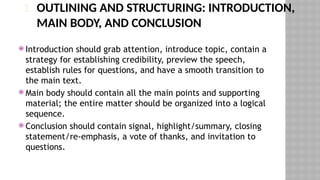
1. OUTLINING AND STRUCTURING: INTRODUCTION,
MAIN BODY, AND CONCLUSION
 Introduction should grab attention, introduce topic, contain a
strategy for establishing credibility, preview the speech,
establish rules for questions, and have a smooth transition to
the main text.
 Main body should contain all the main points and supporting
material; the entire matter should be organized into a logical
sequence.
 Conclusion should contain signal, highlight/summary, closing
statement/re-emphasis, a vote of thanks, and invitation to
questions.
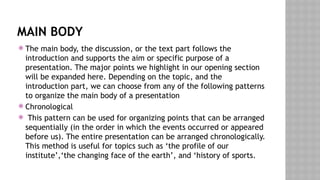
MAIN BODY
 The main body, the discussion, or the text part follows the
introduction and supports the aim or specific purpose of a
presentation. The major points we highlight in our opening section
will be expanded here. Depending on the topic, and the
introduction part, we can choose from any of the following patterns
to organize the main body of a presentation
 Chronological
 This pattern can be used for organizing points that can be arranged
sequentially (in the order in which the events occurred or appeared
before us). The entire presentation can be arranged chronologically.
This method is useful for topics such as ‘the profile of our
institute’,‘the changing face of the earth’, and ‘history of sports.
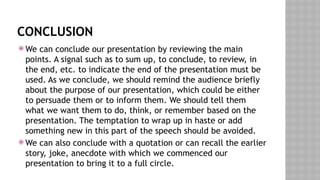
CONCLUSION
 We can conclude our presentation by reviewing the main
points. A signal such as to sum up, to conclude, to review, in
the end, etc. to indicate the end of the presentation must be
used. As we conclude, we should remind the audience briefly
about the purpose of our presentation, which could be either
to persuade them or to inform them. We should tell them
what we want them to do, think, or remember based on the
presentation. The temptation to wrap up in haste or add
something new in this part of the speech should be avoided.
 We can also conclude with a quotation or can recall the earlier
story, joke, anecdote with which we commenced our
presentation to bring it to a full circle.
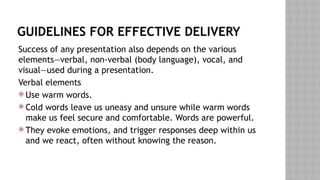
GUIDELINES FOR EFFECTIVE DELIVERY
Success of any presentation also depends on the various
elements—verbal, non-verbal (body language), vocal, and
visual—used during a presentation.
Verbal elements
 Use warm words.
 Cold words leave us uneasy and unsure while warm words
make us feel secure and comfortable. Words are powerful.
 They evoke emotions, and trigger responses deep within us
and we react, often without knowing the reason.
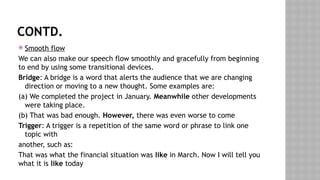
CONTD.
 Smooth flow
We can also make our speech flow smoothly and gracefully from beginning
to end by using some transitional devices.
Bridge: A bridge is a word that alerts the audience that we are changing
direction or moving to a new thought. Some examples are:
(a) We completed the project in January. Meanwhile other developments
were taking place.
(b) That was bad enough. However, there was even worse to come
Trigger: A trigger is a repetition of the same word or phrase to link one
topic with
another, such as:
That was what the financial situation was like in March. Now I will tell you
what it is like today
 Interjection: An interjection is a word or phrase inserted in a
commentary to highlight the importance or placement of an idea,
such as:
 So, what we have learned—and this is important—is that, it is impossible
to control personal use of office telephones.
 Now here is another feature—perhaps the best of all—that makes this such
a terrific plan.
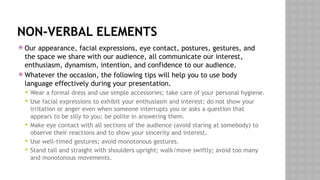
NON-VERBAL ELEMENTS
 Our appearance, facial expressions, eye contact, postures, gestures, and
the space we share with our audience, all communicate our interest,
enthusiasm, dynamism, intention, and confidence to our audience.
 Whatever the occasion, the following tips will help you to use body
language effectively during your presentation.
 Wear a formal dress and use simple accessories; take care of your personal hygiene.
 Use facial expressions to exhibit your enthusiasm and interest; do not show your
irritation or anger even when someone interrupts you or asks a question that
appears to be silly to you; be polite in answering them.
 Make eye contact with all sections of the audience (avoid staring at somebody) to
observe their reactions and to show your sincerity and interest.
 Use well-timed gestures; avoid monotonous gestures.
 Stand tall and straight with shoulders upright; walk/move swiftly; avoid too many
and monotonous movements.
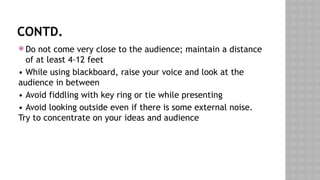
CONTD.
 Do not come very close to the audience; maintain a distance
of at least 4–12 feet
• While using blackboard, raise your voice and look at the
audience in between
• Avoid fiddling with key ring or tie while presenting
• Avoid looking outside even if there is some external noise.
Try to concentrate on your ideas and audience
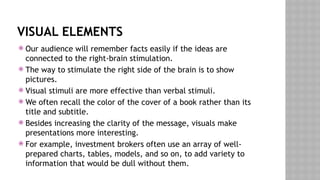
VISUAL ELEMENTS
 Our audience will remember facts easily if the ideas are
connected to the right-brain stimulation.
 The way to stimulate the right side of the brain is to show
pictures.
 Visual stimuli are more effective than verbal stimuli.
 We often recall the color of the cover of a book rather than its
title and subtitle.
 Besides increasing the clarity of the message, visuals make
presentations more interesting.
 For example, investment brokers often use an array of well-
prepared charts, tables, models, and so on, to add variety to
information that would be dull without them.
VARIOUS PRESENTATION TOOLS
Visual aids
Pie charts, videos, tables, Graphs, Picture Story

PRESENTATION SKILL- BUSINESS ENVIRONMENT unit-III.pptx

  • 1.
  • 2.
    INTRODUCTION Successful and inspiringspeakers are remembered not only because they were eloquent, humorous, or had a good style, but primarily and principally because their messages and ideas caused a change in their audience’s actions, attitudes, lives, or made the purpose clear to them. This is true for all types of presentations—professional presentations, business speeches, classroom lectures, and so on, especially in an age of instantaneous communication via telephone, computer, and fax. Face-to-face business presentations are enormous time consumers from scheduling a date when everyone can attend, to making every arrangement necessary for the presentation, it takes much more time and effort than it would have taken to send the same message as an attachment in an email, in the form of a memorandum, circular, or
  • 3.
     Parts ofpresentation  All types of presentations consist of three basic parts:  The introduction (10 – 15% of your speaking time)The body (75% of your speaking time)The conclusion (10% of your speaking time)  The Introduction  The introduction is the most important part of your presentation.The best introductions are those that are creative and original.The introduction needs to be brief, so that there is enough time for the main part of the presentation.
  • 4.
    EXAMPLE Throughout our career,we are bound to encounter innumerable situations that require professional presentations to be made. To mention a few, A team leader may have to present before the corporate body about a product that his/her team has brought out A top administrator of an institution may have to present the goals, activities, and achievements of the institution to an important visitor. A project manager may have to present before a committee the results of a project recently undertaken by the company A college student may have to attend seminars or may have to present project reports to fellow students and faculty members.
  • 5.
    THE FOLLOWING POINTSARE TO BE ATTENDED TO WHEN PREPARING FOR A PROFESSIONAL PRESENTATION 1. Planning: Occasion, audience, purpose and material 2. Outlining and structuring: Introduction, main body, and conclusion 3. Choosing the mode of delivery 4. Guidelines for effective delivery 5. Body language and voice 6. Visual aids
  • 6.
    1. PLANNING: OCCASION,AUDIENCE, PURPOSE, THESIS, AND MATERIAL  Occasion refers to the factors such as the facilities available for our presentation, time, and context of our presentation.  Facilities include the venue or locale along with the projection equipment, lighting, seating, ventilation, etc.  We may present in magnificently large auditoriums or oppressively small conference rooms.  We need to know the physical setting; find out whether we will have a podium or a table, whether we will have a public address system, and so on.  Also, attention should be paid to the physical conditions prevalent in the venue such as seating, room temperature, and lighting.
  • 7.
    AUDIENCE  All audienceshave one thing in common. They are at the receiving end of our communication.  The nature of our audience has a direct impact on the strategy we devise for our presentation. Hence, it is necessary to have some prior knowledge of the audience.  What are their interests, likes, and dislikes? Are they familiar with the topic? Is their attitude hostile or friendly? What is the size of the group? Age range? Gender distribution
  • 8.
    PURPOSE  There canbe three different purposes of a presentation:  To inform  To analyze  To persuade
  • 9.
    MATERIAL  Collecting materialrequires some research.  When we are giving a product presentation, besides the complete information about the product, we may have to collect information pertaining to the competing products and their features.  For most of the professional presentations, we may have to consult the library, Internet, magazines, newspapers, organizational records, statistics, and publications.  Sometimes, we may even have to collect information through surveys or interviews.
  • 10.
    1. OUTLINING ANDSTRUCTURING: INTRODUCTION, MAIN BODY, AND CONCLUSION  Introduction should grab attention, introduce topic, contain a strategy for establishing credibility, preview the speech, establish rules for questions, and have a smooth transition to the main text.  Main body should contain all the main points and supporting material; the entire matter should be organized into a logical sequence.  Conclusion should contain signal, highlight/summary, closing statement/re-emphasis, a vote of thanks, and invitation to questions.
  • 11.
    MAIN BODY  Themain body, the discussion, or the text part follows the introduction and supports the aim or specific purpose of a presentation. The major points we highlight in our opening section will be expanded here. Depending on the topic, and the introduction part, we can choose from any of the following patterns to organize the main body of a presentation  Chronological  This pattern can be used for organizing points that can be arranged sequentially (in the order in which the events occurred or appeared before us). The entire presentation can be arranged chronologically. This method is useful for topics such as ‘the profile of our institute’,‘the changing face of the earth’, and ‘history of sports.
  • 12.
    CONCLUSION  We canconclude our presentation by reviewing the main points. A signal such as to sum up, to conclude, to review, in the end, etc. to indicate the end of the presentation must be used. As we conclude, we should remind the audience briefly about the purpose of our presentation, which could be either to persuade them or to inform them. We should tell them what we want them to do, think, or remember based on the presentation. The temptation to wrap up in haste or add something new in this part of the speech should be avoided.  We can also conclude with a quotation or can recall the earlier story, joke, anecdote with which we commenced our presentation to bring it to a full circle.
  • 13.
    GUIDELINES FOR EFFECTIVEDELIVERY Success of any presentation also depends on the various elements—verbal, non-verbal (body language), vocal, and visual—used during a presentation. Verbal elements  Use warm words.  Cold words leave us uneasy and unsure while warm words make us feel secure and comfortable. Words are powerful.  They evoke emotions, and trigger responses deep within us and we react, often without knowing the reason.
  • 14.
    CONTD.  Smooth flow Wecan also make our speech flow smoothly and gracefully from beginning to end by using some transitional devices. Bridge: A bridge is a word that alerts the audience that we are changing direction or moving to a new thought. Some examples are: (a) We completed the project in January. Meanwhile other developments were taking place. (b) That was bad enough. However, there was even worse to come Trigger: A trigger is a repetition of the same word or phrase to link one topic with another, such as: That was what the financial situation was like in March. Now I will tell you what it is like today
  • 15.
     Interjection: Aninterjection is a word or phrase inserted in a commentary to highlight the importance or placement of an idea, such as:  So, what we have learned—and this is important—is that, it is impossible to control personal use of office telephones.  Now here is another feature—perhaps the best of all—that makes this such a terrific plan.
  • 16.
    NON-VERBAL ELEMENTS  Ourappearance, facial expressions, eye contact, postures, gestures, and the space we share with our audience, all communicate our interest, enthusiasm, dynamism, intention, and confidence to our audience.  Whatever the occasion, the following tips will help you to use body language effectively during your presentation.  Wear a formal dress and use simple accessories; take care of your personal hygiene.  Use facial expressions to exhibit your enthusiasm and interest; do not show your irritation or anger even when someone interrupts you or asks a question that appears to be silly to you; be polite in answering them.  Make eye contact with all sections of the audience (avoid staring at somebody) to observe their reactions and to show your sincerity and interest.  Use well-timed gestures; avoid monotonous gestures.  Stand tall and straight with shoulders upright; walk/move swiftly; avoid too many and monotonous movements.
  • 17.
    CONTD.  Do notcome very close to the audience; maintain a distance of at least 4–12 feet • While using blackboard, raise your voice and look at the audience in between • Avoid fiddling with key ring or tie while presenting • Avoid looking outside even if there is some external noise. Try to concentrate on your ideas and audience
  • 18.
    VISUAL ELEMENTS  Ouraudience will remember facts easily if the ideas are connected to the right-brain stimulation.  The way to stimulate the right side of the brain is to show pictures.  Visual stimuli are more effective than verbal stimuli.  We often recall the color of the cover of a book rather than its title and subtitle.  Besides increasing the clarity of the message, visuals make presentations more interesting.  For example, investment brokers often use an array of well- prepared charts, tables, models, and so on, to add variety to information that would be dull without them.
  • 19.
    VARIOUS PRESENTATION TOOLS Visualaids Pie charts, videos, tables, Graphs, Picture Story