Improving your Presentation Skills
Introduction
You don’t have to have perfect spoken English to give a very effective presentation. In fact,
even native speakers find presenting difficult. There is a lot more to presenting than knowing
the language well.
Among the key aspects of a successful oral presentation are: having a firm idea of what your
audience already knows, careful presentation and rehearsal, making clear the structure of your
talk clear, and dealing effectively with questions.
Planning / choosing a topic
At this first stage, study Checklists: Preparing a Presentation; Using Visual Aids, Hand-outs
and Notes, and Signposts and Language Signals.
Rehearsal
Before you start rehearsing your talk, read through Checklist 4 on Non-verbal communication
and think about the points mentioned there.
Apart from the obvious benefits of practice, rehearsing allows you to time your presentation.
It tends to take about 20% longer to talk ‘live’ to an audience than in the rehearsal. It is
strongly recommended that you record yourself as you practise giving your presentation.
Replay and listen carefully to what you said and how you said it. If you can ask someone else
to listen to it and tell you where they didn’t understand, so much the better. Note the points
you need to improve. Record yourself again. The more often you can practise and reflect on
your performance, the more polished the final result will be.
Giving the presentation
At the end of your presentation, the audience will ask questions and raise points for
discussion. Think about the probable questions and discussion points before you give the
presentation. In preparing for your talk, look through Checklist 5 on Asking and dealing with
questions.
Remember to repeat or summarise each question, in order to make sure you (and the
audience) have got it right – and to give yourself a little longer to think about your answer.
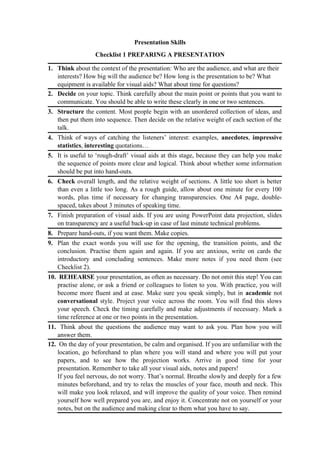
Presentation Skills
Checklist 1 PREPARING A PRESENTATION
1. Think about the context of the presentation: Who are the audience, and what are their
interests? How big will the audience be? How long is the presentation to be? What
equipment is available for visual aids? What about time for questions?
2. Decide on your topic. Think carefully about the main point or points that you want to
communicate. You should be able to write these clearly in one or two sentences.
3. Structure the content. Most people begin with an unordered collection of ideas, and
then put them into sequence. Then decide on the relative weight of each section of the
talk.
4. Think of ways of catching the listeners’ interest: examples, anecdotes, impressive
statistics, interesting quotations…
5. It is useful to ‘rough-draft’ visual aids at this stage, because they can help you make
the sequence of points more clear and logical. Think about whether some information
should be put into hand-outs.
6. Check overall length, and the relative weight of sections. A little too short is better
than even a little too long. As a rough guide, allow about one minute for every 100
words, plus time if necessary for changing transparencies. One A4 page, double-
spaced, takes about 3 minutes of speaking time.
7. Finish preparation of visual aids. If you are using PowerPoint data projection, slides
on transparency are a useful back-up in case of last minute technical problems.
8. Prepare hand-outs, if you want them. Make copies.
9. Plan the exact words you will use for the opening, the transition points, and the
conclusion. Practise them again and again. If you are anxious, write on cards the
introductory and concluding sentences. Make more notes if you need them (see
Checklist 2).
10. REHEARSE your presentation, as often as necessary. Do not omit this step! You can
practise alone, or ask a friend or colleagues to listen to you. With practice, you will
become more fluent and at ease. Make sure you speak simply, but in academic not
conversational style. Project your voice across the room. You will find this slows
your speech. Check the timing carefully and make adjustments if necessary. Mark a
time reference at one or two points in the presentation.
11. Think about the questions the audience may want to ask you. Plan how you will
answer them.
12. On the day of your presentation, be calm and organised. If you are unfamiliar with the
location, go beforehand to plan where you will stand and where you will put your
papers, and to see how the projection works. Arrive in good time for your
presentation. Remember to take all your visual aids, notes and papers!
If you feel nervous, do not worry. That’s normal. Breathe slowly and deeply for a few
minutes beforehand, and try to relax the muscles of your face, mouth and neck. This
will make you look relaxed, and will improve the quality of your voice. Then remind
yourself how well prepared you are, and enjoy it. Concentrate not on yourself or your
notes, but on the audience and making clear to them what you have to say.
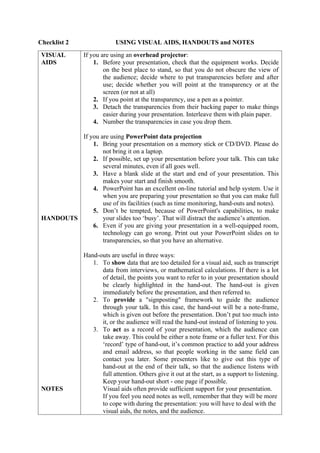
Checklist 2 USING VISUAL AIDS, HANDOUTS and NOTES
VISUAL
AIDS
HANDOUTS
NOTES
If you are using an overhead projector:
1. Before your presentation, check that the equipment works. Decide
on the best place to stand, so that you do not obscure the view of
the audience; decide where to put transparencies before and after
use; decide whether you will point at the transparency or at the
screen (or not at all)
2. If you point at the transparency, use a pen as a pointer.
3. Detach the transparencies from their backing paper to make things
easier during your presentation. Interleave them with plain paper.
4. Number the transparencies in case you drop them.
If you are using PowerPoint data projection
1. Bring your presentation on a memory stick or CD/DVD. Please do
not bring it on a laptop.
2. If possible, set up your presentation before your talk. This can take
several minutes, even if all goes well.
3. Have a blank slide at the start and end of your presentation. This
makes your start and finish smooth.
4. PowerPoint has an excellent on-line tutorial and help system. Use it
when you are preparing your presentation so that you can make full
use of its facilities (such as time monitoring, hand-outs and notes).
5. Don’t be tempted, because of PowerPoint's capabilities, to make
your slides too ‘busy’. That will distract the audience’s attention.
6. Even if you are giving your presentation in a well-equipped room,
technology can go wrong. Print out your PowerPoint slides on to
transparencies, so that you have an alternative.
Hand-outs are useful in three ways:
1. To show data that are too detailed for a visual aid, such as transcript
data from interviews, or mathematical calculations. If there is a lot
of detail, the points you want to refer to in your presentation should
be clearly highlighted in the hand-out. The hand-out is given
immediately before the presentation, and then referred to.
2. To provide a "signposting" framework to guide the audience
through your talk. In this case, the hand-out will be a note-frame,
which is given out before the presentation. Don’t put too much into
it, or the audience will read the hand-out instead of listening to you.
3. To act as a record of your presentation, which the audience can
take away. This could be either a note frame or a fuller text. For this
‘record’ type of hand-out, it’s common practice to add your address
and email address, so that people working in the same field can
contact you later. Some presenters like to give out this type of
hand-out at the end of their talk, so that the audience listens with
full attention. Others give it out at the start, as a support to listening.
Keep your hand-out short - one page if possible.
Visual aids often provide sufficient support for your presentation.
If you feel you need notes as well, remember that they will be more
to cope with during the presentation: you will have to deal with the
visual aids, the notes, and the audience.
1. Cards, or A5 paper, are often recommended because they are neater
in the hand than big pages. Make sure you number them clearly!
2. A good alternative is to use photocopies of your visual aids, with
notes written on them. It is then easier to coordinate your progress
through notes and visual aids.
3. Write very large and clear, with plenty space.
4. Use colour, so that you can quickly locate key points or words.
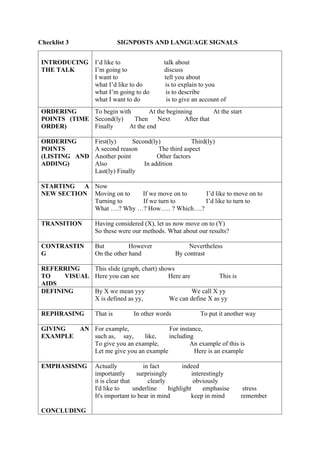
Checklist 3 SIGNPOSTS AND LANGUAGE SIGNALS
INTRODUCING
THE TALK
I’d like to talk about
I’m going to discuss
I want to tell you about
what I’d like to do is to explain to you
what I’m going to do is to describe
what I want to do is to give an account of
ORDERING
POINTS (TIME
ORDER)
To begin with At the beginning At the start
Second(ly) Then Next After that
Finally At the end
ORDERING
POINTS
(LISTING AND
ADDING)
First(ly) Second(ly) Third(ly)
A second reason The third aspect
Another point Other factors
Also In addition
Last(ly) Finally
STARTING A
NEW SECTION
Now
Moving on to If we move on to I’d like to move on to
Turning to If we turn to I’d like to turn to
What ….? Why …? How….. ? Which….?
TRANSITION Having considered (X), let us now move on to (Y)
So these were our methods. What about our results?
CONTRASTIN
G
But However Nevertheless
On the other hand By contrast
REFERRING
TO VISUAL
AIDS
This slide (graph, chart) shows
Here you can see Here are This is
DEFINING By X we mean yyy We call X yy
X is defined as yy, We can define X as yy
REPHRASING That is In other words To put it another way
GIVING AN
EXAMPLE
For example, For instance,
such as, say, like, including
To give you an example, An example of this is
Let me give you an example Here is an example
EMPHASISING
CONCLUDING
Actually in fact indeed
importantly surprisingly interestingly
it is clear that clearly obviously
I'd like to underline highlight emphasise stress
It's important to bear in mind keep in mind remember
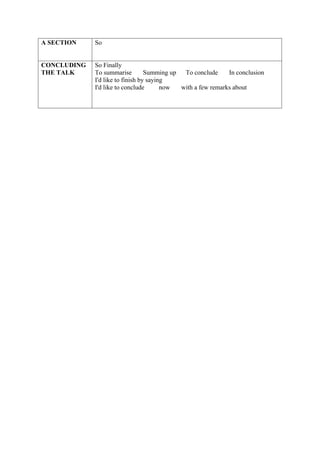
A SECTION So
CONCLUDING
THE TALK
So Finally
To summarise Summing up To conclude In conclusion
I'd like to finish by saying
I'd like to conclude now with a few remarks about
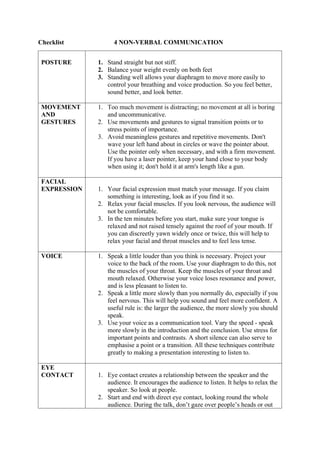
Checklist 4 NON-VERBAL COMMUNICATION
POSTURE 1. Stand straight but not stiff.
2. Balance your weight evenly on both feet
3. Standing well allows your diaphragm to move more easily to
control your breathing and voice production. So you feel better,
sound better, and look better.
MOVEMENT
AND
GESTURES
1. Too much movement is distracting; no movement at all is boring
and uncommunicative.
2. Use movements and gestures to signal transition points or to
stress points of importance.
3. Avoid meaningless gestures and repetitive movements. Don't
wave your left hand about in circles or wave the pointer about.
Use the pointer only when necessary, and with a firm movement.
If you have a laser pointer, keep your hand close to your body
when using it; don't hold it at arm's length like a gun.
FACIAL
EXPRESSION 1. Your facial expression must match your message. If you claim
something is interesting, look as if you find it so.
2. Relax your facial muscles. If you look nervous, the audience will
not be comfortable.
3. In the ten minutes before you start, make sure your tongue is
relaxed and not raised tensely against the roof of your mouth. If
you can discreetly yawn widely once or twice, this will help to
relax your facial and throat muscles and to feel less tense.
VOICE 1. Speak a little louder than you think is necessary. Project your
voice to the back of the room. Use your diaphragm to do this, not
the muscles of your throat. Keep the muscles of your throat and
mouth relaxed. Otherwise your voice loses resonance and power,
and is less pleasant to listen to.
2. Speak a little more slowly than you normally do, especially if you
feel nervous. This will help you sound and feel more confident. A
useful rule is: the larger the audience, the more slowly you should
speak.
3. Use your voice as a communication tool. Vary the speed - speak
more slowly in the introduction and the conclusion. Use stress for
important points and contrasts. A short silence can also serve to
emphasise a point or a transition. All these techniques contribute
greatly to making a presentation interesting to listen to.
EYE
CONTACT 1. Eye contact creates a relationship between the speaker and the
audience. It encourages the audience to listen. It helps to relax the
speaker. So look at people.
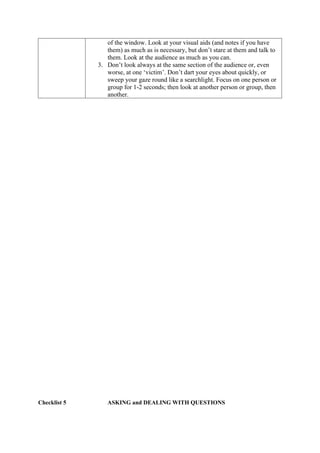
2. Start and end with direct eye contact, looking round the whole
audience. During the talk, don’t gaze over people’s heads or out
of the window. Look at your visual aids (and notes if you have
them) as much as is necessary, but don’t stare at them and talk to
them. Look at the audience as much as you can.
3. Don’t look always at the same section of the audience or, even
worse, at one ‘victim’. Don’t dart your eyes about quickly, or
sweep your gaze round like a searchlight. Focus on one person or
group for 1-2 seconds; then look at another person or group, then
another.
Checklist 5 ASKING and DEALING WITH QUESTIONS
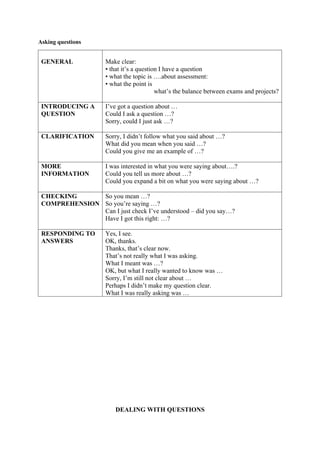
Asking questions
GENERAL Make clear:
• that it’s a question I have a question
• what the topic is ….about assessment:
• what the point is
what’s the balance between exams and projects?
INTRODUCING A
QUESTION
I’ve got a question about …
Could I ask a question …?
Sorry, could I just ask …?
CLARIFICATION Sorry, I didn’t follow what you said about …?
What did you mean when you said …?
Could you give me an example of …?
MORE
INFORMATION
I was interested in what you were saying about….?
Could you tell us more about …?
Could you expand a bit on what you were saying about …?
CHECKING
COMPREHENSION
So you mean …?
So you’re saying …?
Can I just check I’ve understood – did you say…?
Have I got this right: …?
RESPONDING TO
ANSWERS
Yes, I see.
OK, thanks.
Thanks, that’s clear now.
That’s not really what I was asking.
What I meant was …?
OK, but what I really wanted to know was …
Sorry, I’m still not clear about …
Perhaps I didn’t make my question clear.
What I was really asking was …
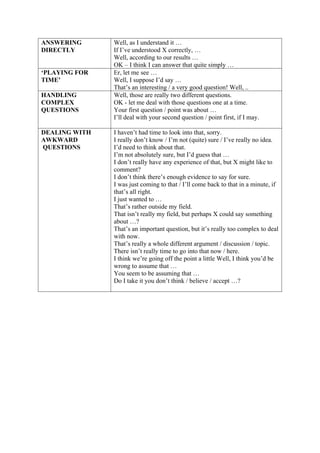
DEALING WITH QUESTIONS
ANSWERING
DIRECTLY
Well, as I understand it …
If I’ve understood X correctly, …
Well, according to our results …
OK – I think I can answer that quite simply …
‘PLAYING FOR
TIME’
Er, let me see …
Well, I suppose I’d say …
That’s an interesting / a very good question! Well, ..
HANDLING
COMPLEX
QUESTIONS
Well, those are really two different questions.
OK - let me deal with those questions one at a time.
Your first question / point was about …
I’ll deal with your second question / point first, if I may.
DEALING WITH
AWKWARD
QUESTIONS
I haven’t had time to look into that, sorry.
I really don’t know / I’m not (quite) sure / I’ve really no idea.
I’d need to think about that.
I’m not absolutely sure, but I’d guess that …
I don’t really have any experience of that, but X might like to
comment?
I don’t think there’s enough evidence to say for sure.
I was just coming to that / I’ll come back to that in a minute, if
that’s all right.
I just wanted to …
That’s rather outside my field.
That isn’t really my field, but perhaps X could say something
about …?
That’s an important question, but it’s really too complex to deal
with now.
That’s really a whole different argument / discussion / topic.
There isn’t really time to go into that now / here.
I think we’re going off the point a little Well, I think you’d be
wrong to assume that …
You seem to be assuming that …
Do I take it you don’t think / believe / accept …?

Improving your_ Presentatio_ Skills docx

  • 1.
    Improving your PresentationSkills Introduction You don’t have to have perfect spoken English to give a very effective presentation. In fact, even native speakers find presenting difficult. There is a lot more to presenting than knowing the language well. Among the key aspects of a successful oral presentation are: having a firm idea of what your audience already knows, careful presentation and rehearsal, making clear the structure of your talk clear, and dealing effectively with questions. Planning / choosing a topic At this first stage, study Checklists: Preparing a Presentation; Using Visual Aids, Hand-outs and Notes, and Signposts and Language Signals. Rehearsal Before you start rehearsing your talk, read through Checklist 4 on Non-verbal communication and think about the points mentioned there. Apart from the obvious benefits of practice, rehearsing allows you to time your presentation. It tends to take about 20% longer to talk ‘live’ to an audience than in the rehearsal. It is strongly recommended that you record yourself as you practise giving your presentation. Replay and listen carefully to what you said and how you said it. If you can ask someone else to listen to it and tell you where they didn’t understand, so much the better. Note the points you need to improve. Record yourself again. The more often you can practise and reflect on your performance, the more polished the final result will be. Giving the presentation At the end of your presentation, the audience will ask questions and raise points for discussion. Think about the probable questions and discussion points before you give the presentation. In preparing for your talk, look through Checklist 5 on Asking and dealing with questions. Remember to repeat or summarise each question, in order to make sure you (and the audience) have got it right – and to give yourself a little longer to think about your answer.
  • 2.
    Presentation Skills Checklist 1PREPARING A PRESENTATION 1. Think about the context of the presentation: Who are the audience, and what are their interests? How big will the audience be? How long is the presentation to be? What equipment is available for visual aids? What about time for questions? 2. Decide on your topic. Think carefully about the main point or points that you want to communicate. You should be able to write these clearly in one or two sentences. 3. Structure the content. Most people begin with an unordered collection of ideas, and then put them into sequence. Then decide on the relative weight of each section of the talk. 4. Think of ways of catching the listeners’ interest: examples, anecdotes, impressive statistics, interesting quotations… 5. It is useful to ‘rough-draft’ visual aids at this stage, because they can help you make the sequence of points more clear and logical. Think about whether some information should be put into hand-outs. 6. Check overall length, and the relative weight of sections. A little too short is better than even a little too long. As a rough guide, allow about one minute for every 100 words, plus time if necessary for changing transparencies. One A4 page, double- spaced, takes about 3 minutes of speaking time. 7. Finish preparation of visual aids. If you are using PowerPoint data projection, slides on transparency are a useful back-up in case of last minute technical problems. 8. Prepare hand-outs, if you want them. Make copies. 9. Plan the exact words you will use for the opening, the transition points, and the conclusion. Practise them again and again. If you are anxious, write on cards the introductory and concluding sentences. Make more notes if you need them (see Checklist 2). 10. REHEARSE your presentation, as often as necessary. Do not omit this step! You can practise alone, or ask a friend or colleagues to listen to you. With practice, you will become more fluent and at ease. Make sure you speak simply, but in academic not conversational style. Project your voice across the room. You will find this slows your speech. Check the timing carefully and make adjustments if necessary. Mark a time reference at one or two points in the presentation. 11. Think about the questions the audience may want to ask you. Plan how you will answer them. 12. On the day of your presentation, be calm and organised. If you are unfamiliar with the location, go beforehand to plan where you will stand and where you will put your papers, and to see how the projection works. Arrive in good time for your presentation. Remember to take all your visual aids, notes and papers! If you feel nervous, do not worry. That’s normal. Breathe slowly and deeply for a few minutes beforehand, and try to relax the muscles of your face, mouth and neck. This will make you look relaxed, and will improve the quality of your voice. Then remind yourself how well prepared you are, and enjoy it. Concentrate not on yourself or your notes, but on the audience and making clear to them what you have to say.
  • 3.
    Checklist 2 USINGVISUAL AIDS, HANDOUTS and NOTES VISUAL AIDS HANDOUTS NOTES If you are using an overhead projector: 1. Before your presentation, check that the equipment works. Decide on the best place to stand, so that you do not obscure the view of the audience; decide where to put transparencies before and after use; decide whether you will point at the transparency or at the screen (or not at all) 2. If you point at the transparency, use a pen as a pointer. 3. Detach the transparencies from their backing paper to make things easier during your presentation. Interleave them with plain paper. 4. Number the transparencies in case you drop them. If you are using PowerPoint data projection 1. Bring your presentation on a memory stick or CD/DVD. Please do not bring it on a laptop. 2. If possible, set up your presentation before your talk. This can take several minutes, even if all goes well. 3. Have a blank slide at the start and end of your presentation. This makes your start and finish smooth. 4. PowerPoint has an excellent on-line tutorial and help system. Use it when you are preparing your presentation so that you can make full use of its facilities (such as time monitoring, hand-outs and notes). 5. Don’t be tempted, because of PowerPoint's capabilities, to make your slides too ‘busy’. That will distract the audience’s attention. 6. Even if you are giving your presentation in a well-equipped room, technology can go wrong. Print out your PowerPoint slides on to transparencies, so that you have an alternative. Hand-outs are useful in three ways: 1. To show data that are too detailed for a visual aid, such as transcript data from interviews, or mathematical calculations. If there is a lot of detail, the points you want to refer to in your presentation should be clearly highlighted in the hand-out. The hand-out is given immediately before the presentation, and then referred to. 2. To provide a "signposting" framework to guide the audience through your talk. In this case, the hand-out will be a note-frame, which is given out before the presentation. Don’t put too much into it, or the audience will read the hand-out instead of listening to you. 3. To act as a record of your presentation, which the audience can take away. This could be either a note frame or a fuller text. For this ‘record’ type of hand-out, it’s common practice to add your address and email address, so that people working in the same field can contact you later. Some presenters like to give out this type of hand-out at the end of their talk, so that the audience listens with full attention. Others give it out at the start, as a support to listening. Keep your hand-out short - one page if possible. Visual aids often provide sufficient support for your presentation. If you feel you need notes as well, remember that they will be more to cope with during the presentation: you will have to deal with the visual aids, the notes, and the audience.
  • 4.
    1. Cards, orA5 paper, are often recommended because they are neater in the hand than big pages. Make sure you number them clearly! 2. A good alternative is to use photocopies of your visual aids, with notes written on them. It is then easier to coordinate your progress through notes and visual aids. 3. Write very large and clear, with plenty space. 4. Use colour, so that you can quickly locate key points or words.
  • 5.
    Checklist 3 SIGNPOSTSAND LANGUAGE SIGNALS INTRODUCING THE TALK I’d like to talk about I’m going to discuss I want to tell you about what I’d like to do is to explain to you what I’m going to do is to describe what I want to do is to give an account of ORDERING POINTS (TIME ORDER) To begin with At the beginning At the start Second(ly) Then Next After that Finally At the end ORDERING POINTS (LISTING AND ADDING) First(ly) Second(ly) Third(ly) A second reason The third aspect Another point Other factors Also In addition Last(ly) Finally STARTING A NEW SECTION Now Moving on to If we move on to I’d like to move on to Turning to If we turn to I’d like to turn to What ….? Why …? How….. ? Which….? TRANSITION Having considered (X), let us now move on to (Y) So these were our methods. What about our results? CONTRASTIN G But However Nevertheless On the other hand By contrast REFERRING TO VISUAL AIDS This slide (graph, chart) shows Here you can see Here are This is DEFINING By X we mean yyy We call X yy X is defined as yy, We can define X as yy REPHRASING That is In other words To put it another way GIVING AN EXAMPLE For example, For instance, such as, say, like, including To give you an example, An example of this is Let me give you an example Here is an example EMPHASISING CONCLUDING Actually in fact indeed importantly surprisingly interestingly it is clear that clearly obviously I'd like to underline highlight emphasise stress It's important to bear in mind keep in mind remember
  • 6.
    A SECTION So CONCLUDING THETALK So Finally To summarise Summing up To conclude In conclusion I'd like to finish by saying I'd like to conclude now with a few remarks about
  • 7.
    Checklist 4 NON-VERBALCOMMUNICATION POSTURE 1. Stand straight but not stiff. 2. Balance your weight evenly on both feet 3. Standing well allows your diaphragm to move more easily to control your breathing and voice production. So you feel better, sound better, and look better. MOVEMENT AND GESTURES 1. Too much movement is distracting; no movement at all is boring and uncommunicative. 2. Use movements and gestures to signal transition points or to stress points of importance. 3. Avoid meaningless gestures and repetitive movements. Don't wave your left hand about in circles or wave the pointer about. Use the pointer only when necessary, and with a firm movement. If you have a laser pointer, keep your hand close to your body when using it; don't hold it at arm's length like a gun. FACIAL EXPRESSION 1. Your facial expression must match your message. If you claim something is interesting, look as if you find it so. 2. Relax your facial muscles. If you look nervous, the audience will not be comfortable. 3. In the ten minutes before you start, make sure your tongue is relaxed and not raised tensely against the roof of your mouth. If you can discreetly yawn widely once or twice, this will help to relax your facial and throat muscles and to feel less tense. VOICE 1. Speak a little louder than you think is necessary. Project your voice to the back of the room. Use your diaphragm to do this, not the muscles of your throat. Keep the muscles of your throat and mouth relaxed. Otherwise your voice loses resonance and power, and is less pleasant to listen to. 2. Speak a little more slowly than you normally do, especially if you feel nervous. This will help you sound and feel more confident. A useful rule is: the larger the audience, the more slowly you should speak. 3. Use your voice as a communication tool. Vary the speed - speak more slowly in the introduction and the conclusion. Use stress for important points and contrasts. A short silence can also serve to emphasise a point or a transition. All these techniques contribute greatly to making a presentation interesting to listen to. EYE CONTACT 1. Eye contact creates a relationship between the speaker and the audience. It encourages the audience to listen. It helps to relax the speaker. So look at people. 2. Start and end with direct eye contact, looking round the whole audience. During the talk, don’t gaze over people’s heads or out
  • 8.
    of the window.Look at your visual aids (and notes if you have them) as much as is necessary, but don’t stare at them and talk to them. Look at the audience as much as you can. 3. Don’t look always at the same section of the audience or, even worse, at one ‘victim’. Don’t dart your eyes about quickly, or sweep your gaze round like a searchlight. Focus on one person or group for 1-2 seconds; then look at another person or group, then another. Checklist 5 ASKING and DEALING WITH QUESTIONS
  • 9.
    Asking questions GENERAL Makeclear: • that it’s a question I have a question • what the topic is ….about assessment: • what the point is what’s the balance between exams and projects? INTRODUCING A QUESTION I’ve got a question about … Could I ask a question …? Sorry, could I just ask …? CLARIFICATION Sorry, I didn’t follow what you said about …? What did you mean when you said …? Could you give me an example of …? MORE INFORMATION I was interested in what you were saying about….? Could you tell us more about …? Could you expand a bit on what you were saying about …? CHECKING COMPREHENSION So you mean …? So you’re saying …? Can I just check I’ve understood – did you say…? Have I got this right: …? RESPONDING TO ANSWERS Yes, I see. OK, thanks. Thanks, that’s clear now. That’s not really what I was asking. What I meant was …? OK, but what I really wanted to know was … Sorry, I’m still not clear about … Perhaps I didn’t make my question clear. What I was really asking was … DEALING WITH QUESTIONS
  • 10.
    ANSWERING DIRECTLY Well, as Iunderstand it … If I’ve understood X correctly, … Well, according to our results … OK – I think I can answer that quite simply … ‘PLAYING FOR TIME’ Er, let me see … Well, I suppose I’d say … That’s an interesting / a very good question! Well, .. HANDLING COMPLEX QUESTIONS Well, those are really two different questions. OK - let me deal with those questions one at a time. Your first question / point was about … I’ll deal with your second question / point first, if I may. DEALING WITH AWKWARD QUESTIONS I haven’t had time to look into that, sorry. I really don’t know / I’m not (quite) sure / I’ve really no idea. I’d need to think about that. I’m not absolutely sure, but I’d guess that … I don’t really have any experience of that, but X might like to comment? I don’t think there’s enough evidence to say for sure. I was just coming to that / I’ll come back to that in a minute, if that’s all right. I just wanted to … That’s rather outside my field. That isn’t really my field, but perhaps X could say something about …? That’s an important question, but it’s really too complex to deal with now. That’s really a whole different argument / discussion / topic. There isn’t really time to go into that now / here. I think we’re going off the point a little Well, I think you’d be wrong to assume that … You seem to be assuming that … Do I take it you don’t think / believe / accept …?