Oracle: Data Warehouse Builder
What Is Oracle Warehouse Builder?
  – Oracle Warehouse Builder is Oracle’s industry-
    leading enterprise business intelligence integration
    design tool.
  – Warehouse Builder manages the full life cycle of
    data and metadata for Oracle Database.
     • Provides an easy to use, graphical environment to design,
       deploy, and manage business intelligence systems
     • Enables the extraction, transformation, and loading (ETL)
       of data for quality information in the Oracle database
     • Protects and leverages customer investment in the Oracle
       technology stack through data and metadata integration
Producing Quality Information
                          Business
    Transformation        intelligence               Action
 Data       Information                  Knowledge

           (quality
           information)


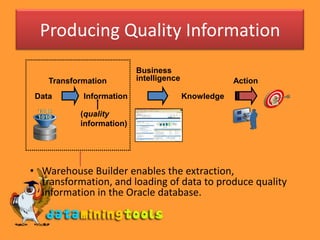
• Warehouse Builder enables the extraction,
  transformation, and loading of data to produce quality
  information in the Oracle database.
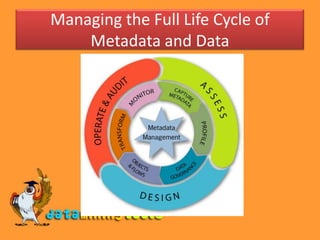
Managing the Full Life Cycle of
    Metadata and Data
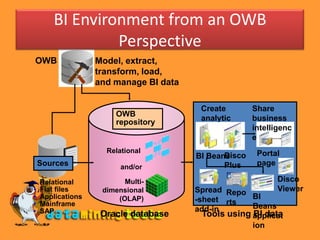
BI Environment from an OWB
                Perspective
OWB                Model, extract,
                   transform, load,
                   and manage BI data

                                         Create        Share
                       OWB
                       repository        analytic      business
                                         content       intelligenc
                                                       e
                     Relational                         Portal
                                               Disco
                                        BI Beans
    Sources              and/or                Plus     page

•   Relational            Multi-                              Disco
•   Flat files      dimensional         Spread Repo           Viewer
•   Applications        (OLAP)          -sheet rts    BI
•   Mainframe                                         Beans
•   SAP                                 add-in
                    Oracle database       Tools using applicat
                                                      BI data
                                                      ion
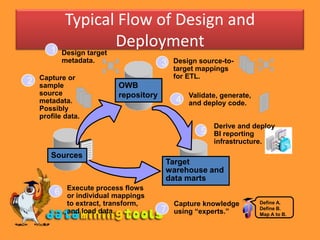
Typical Flow of Design and
       1
                   Deployment
            Design target
            metadata.                    3   Design source-to-
                                             target mappings
    Capture or                               for ETL.
2   sample                  OWB
    source                  repository           Validate, generate,
    metadata.                                4   and deploy code.
    Possibly
    profile data.
                                                        Derive and deploy
                                                    5   BI reporting
                                                        infrastructure.
       Sources
                                         Target
                                         warehouse and
                                         data marts
             Execute process flows
        6    or individual mappings
             to extract, transform,          Capture knowledge         Define A.
             and load data.              7   using “experts.”          Define B.
                                                                       Map A to B.
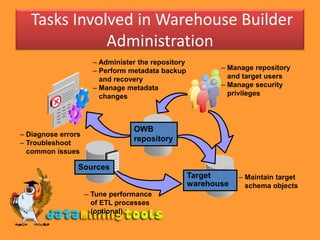
Tasks Involved in Warehouse Builder
              Administration
                      – Administer the repository
                      – Perform metadata backup            – Manage repository
                        and recovery                         and target users
                      – Manage metadata                    – Manage security
                        changes                              privileges


                                 OWB
– Diagnose errors
– Troubleshoot
                                 repository
  common issues

                Sources
                                                    Target      – Maintain target
                                                    warehouse     schema objects
                    – Tune performance
                      of ETL processes
                      (optional)
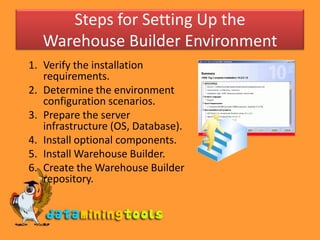
Steps for Setting Up the
   Warehouse Builder Environment
1. Verify the installation
   requirements.
2. Determine the environment
   configuration scenarios.
3. Prepare the server
   infrastructure (OS, Database).
4. Install optional components.
5. Install Warehouse Builder.
6. Create the Warehouse Builder
   repository.
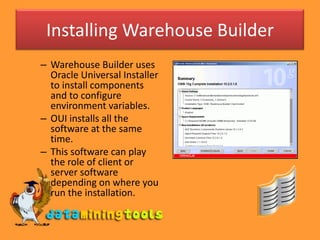
Installing Warehouse Builder
– Warehouse Builder uses
  Oracle Universal Installer
  to install components
  and to configure
  environment variables.
– OUI installs all the
  software at the same
  time.
– This software can play
  the role of client or
  server software
  depending on where you
  run the installation.
Creating a Warehouse Builder
           Repository
– Two ways of defining a Warehouse Builder repository:
   • Using Repository Assistant (wizard)
   • Using the OMB Plus OMBINSTALL OWB_REPOSITORY
     command
– Two ways to create a repository when using the
  Repository Assistant:
   • Basic Install
   • Advanced Setup
Logging In to OWB Design Center


If you have not yet created a
repository, click the Get Started
button to create one. This launches
the Repository Assistant.
Design Center
                                                        Menus
Save                                                 Toolbar


                        Project Explorer
                                                          Connection Explorer

       Project Explorer: Holds all project organized
       metadata (also known as your design).
       Connection Explorer: Holds all information
       about physical locations and how these are
       managed in control centers
       Global Explorer: Holds all objects that are
       shared among users across the repository. It
       holds pre-built content, and you can create your
       own content for sharing across projects.

                                                           Global Explorer
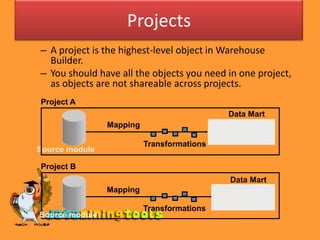
Projects
– A project is the highest-level object in Warehouse
  Builder.
– You should have all the objects you need in one project,
  as objects are not shareable across projects.
Project A
                                               Data Mart
                Mapping                     Warehouse
                                            module-Finance
                          Transformations
Source module

Project B
                                                Data Mart
                Mapping                     Warehouse
                                            module-Sales
                          Transformations
Source module
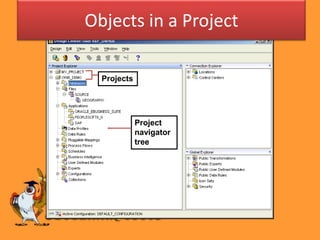
Objects in a Project

  Projects


             Project
             navigator
             tree
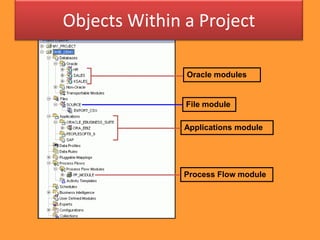
Objects Within a Project

               Oracle modules


               File module

               Applications module


               Process Flow module
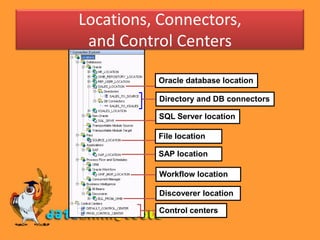
Locations, Connectors,
 and Control Centers

          Oracle database location

          Directory and DB connectors

          SQL Server location

          File location

          SAP location

          Workflow location

          Discoverer location

          Control centers
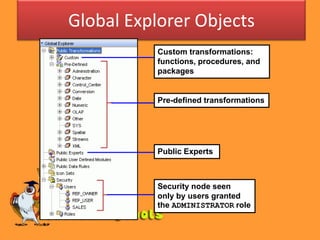
Global Explorer Objects
           Custom transformations:
           functions, procedures, and
           packages


           Pre-defined transformations


           Public Experts


           Security node seen
           only by users granted
           the ADMINISTRATOR role
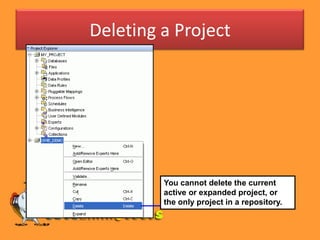
Deleting a Project


         You cannot delete the current
         active or expanded project, or
         the only project in a repository.
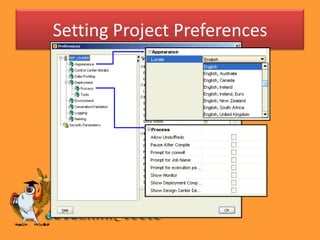
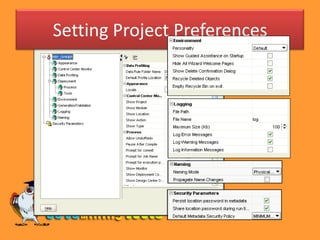
Setting Project Preferences
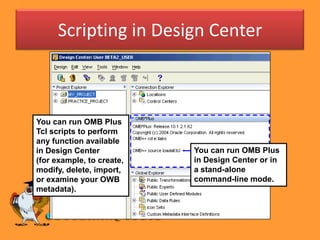
Scripting in Design Center


You can run OMB Plus
Tcl scripts to perform
any function available
in Design Center           You can run OMB Plus
(for example, to create,   in Design Center or in
modify, delete, import,    a stand-alone
or examine your OWB        command-line mode.
metadata).
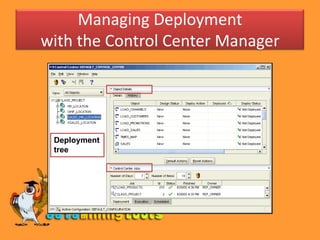
Managing Deployment
with the Control Center Manager


 Deployment
 tree
Visit more self help tutorials

• Pick a tutorial of your choice and browse
  through it at your own pace.
• The tutorials section is free, self-guiding and
  will not involve any additional support.
• Visit us at www.dataminingtools.net

Oracle Data Warehouse

  • 1.
  • 2.
    What Is OracleWarehouse Builder? – Oracle Warehouse Builder is Oracle’s industry- leading enterprise business intelligence integration design tool. – Warehouse Builder manages the full life cycle of data and metadata for Oracle Database. • Provides an easy to use, graphical environment to design, deploy, and manage business intelligence systems • Enables the extraction, transformation, and loading (ETL) of data for quality information in the Oracle database • Protects and leverages customer investment in the Oracle technology stack through data and metadata integration
  • 3.
    Producing Quality Information Business Transformation intelligence Action Data Information Knowledge (quality information) • Warehouse Builder enables the extraction, transformation, and loading of data to produce quality information in the Oracle database.
  • 4.
    Managing the FullLife Cycle of Metadata and Data
  • 5.
    BI Environment froman OWB Perspective OWB Model, extract, transform, load, and manage BI data Create Share OWB repository analytic business content intelligenc e Relational Portal Disco BI Beans Sources and/or Plus page • Relational Multi- Disco • Flat files dimensional Spread Repo Viewer • Applications (OLAP) -sheet rts BI • Mainframe Beans • SAP add-in Oracle database Tools using applicat BI data ion
  • 6.
    Typical Flow ofDesign and 1 Deployment Design target metadata. 3 Design source-to- target mappings Capture or for ETL. 2 sample OWB source repository Validate, generate, metadata. 4 and deploy code. Possibly profile data. Derive and deploy 5 BI reporting infrastructure. Sources Target warehouse and data marts Execute process flows 6 or individual mappings to extract, transform, Capture knowledge Define A. and load data. 7 using “experts.” Define B. Map A to B.
  • 7.
    Tasks Involved inWarehouse Builder Administration – Administer the repository – Perform metadata backup – Manage repository and recovery and target users – Manage metadata – Manage security changes privileges OWB – Diagnose errors – Troubleshoot repository common issues Sources Target – Maintain target warehouse schema objects – Tune performance of ETL processes (optional)
  • 8.
    Steps for SettingUp the Warehouse Builder Environment 1. Verify the installation requirements. 2. Determine the environment configuration scenarios. 3. Prepare the server infrastructure (OS, Database). 4. Install optional components. 5. Install Warehouse Builder. 6. Create the Warehouse Builder repository.
  • 9.
    Installing Warehouse Builder –Warehouse Builder uses Oracle Universal Installer to install components and to configure environment variables. – OUI installs all the software at the same time. – This software can play the role of client or server software depending on where you run the installation.
  • 10.
    Creating a WarehouseBuilder Repository – Two ways of defining a Warehouse Builder repository: • Using Repository Assistant (wizard) • Using the OMB Plus OMBINSTALL OWB_REPOSITORY command – Two ways to create a repository when using the Repository Assistant: • Basic Install • Advanced Setup
  • 11.
    Logging In toOWB Design Center If you have not yet created a repository, click the Get Started button to create one. This launches the Repository Assistant.
  • 12.
    Design Center Menus Save Toolbar Project Explorer Connection Explorer Project Explorer: Holds all project organized metadata (also known as your design). Connection Explorer: Holds all information about physical locations and how these are managed in control centers Global Explorer: Holds all objects that are shared among users across the repository. It holds pre-built content, and you can create your own content for sharing across projects. Global Explorer
  • 13.
    Projects – A projectis the highest-level object in Warehouse Builder. – You should have all the objects you need in one project, as objects are not shareable across projects. Project A Data Mart Mapping Warehouse module-Finance Transformations Source module Project B Data Mart Mapping Warehouse module-Sales Transformations Source module
  • 14.
    Objects in aProject Projects Project navigator tree
  • 15.
    Objects Within aProject Oracle modules File module Applications module Process Flow module
  • 16.
    Locations, Connectors, andControl Centers Oracle database location Directory and DB connectors SQL Server location File location SAP location Workflow location Discoverer location Control centers
  • 17.
    Global Explorer Objects Custom transformations: functions, procedures, and packages Pre-defined transformations Public Experts Security node seen only by users granted the ADMINISTRATOR role
  • 18.
    Deleting a Project You cannot delete the current active or expanded project, or the only project in a repository.
  • 19.
  • 20.
  • 21.
    Scripting in DesignCenter You can run OMB Plus Tcl scripts to perform any function available in Design Center You can run OMB Plus (for example, to create, in Design Center or in modify, delete, import, a stand-alone or examine your OWB command-line mode. metadata).
  • 22.
    Managing Deployment with theControl Center Manager Deployment tree
  • 23.
    Visit more selfhelp tutorials • Pick a tutorial of your choice and browse through it at your own pace. • The tutorials section is free, self-guiding and will not involve any additional support. • Visit us at www.dataminingtools.net