Business Intelligence
   Release Management Best Practices
                  By
             John Heaton
Oracle OpenWorld UnConference Sep 2010
Definition
Release Management is a well defined
repeatable process in which code at the atomic
level is moved from a source environment to a
target environment in an auditable manner.
Business Intelligence
• Multiple software vendors and tools
• Differing capabilities of software versioning
• Various support / non support for version control
  software
• Capabilities for release management very immature
• No segregation of duties
• Lack of audit capabilities across the different software
  products
• Specialize processes and procedures required for each
  software product requires high investment in resource
  training
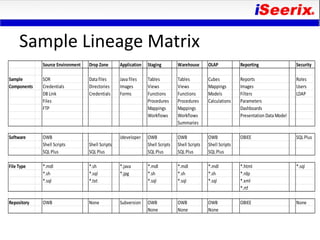
Sample Lineage Matrix
             Source Environment   Drop Zone       Application   Staging         Warehouse       OLAP            Reporting                 Security

Sample       SOR                  Data files      Java files    Tables          Tables          Cubes           Reports                   Roles
Components   Credentials          Directories     Images        Views           Views           Mappings        Images                    Users
             DB Link              Credentials     Forms         Functions       Functions       Models          Filters                   LDAP
             Files                                              Procedures      Procedures      Calculations    Parameters
             FTP                                                Mappings        Mappings                        Dashboards
                                                                Workflows       Workflows                       Presentation Data Model
                                                                                Summaries

Software     OWB                                  Jdeveloper    OWB             OWB             OWB             OBIEE                     SQL Plus
             Shell Scripts        Shell Scripts                 Shell Scripts   Shell Scripts   Shell Scripts
             SQL Plus             SQL Plus                      SQL Plus        SQL Plus        SQL Plus

File Type    *.mdl                *.sh            *.java        *.mdl           *.mdl           *.mdl           *.html                    *.sql
             *.sh                 *.sql           *.jpg         *.sh            *.sh            *.sh            *.rdp
             *.sql                *.txt                         *.sql           *.sql           *.sql           *.xml
                                                                                                                *.rtf

Repository   OWB                  None            Subversion    OWB             OWB             OWB             OBIEE                     None
                                                                None            None            None
Release Management
Release Management Process Steps
• Define – identification of and the sequence for
  components within a unique patch / patch set or
  version.
• Build – snapshot / image components at an
  acceptable point in time during the software
  development lifecycle.
• Deploy – the installation of the components into
  the target environment.
• Manage – definition and credentials for the
  different portions of the software solution.
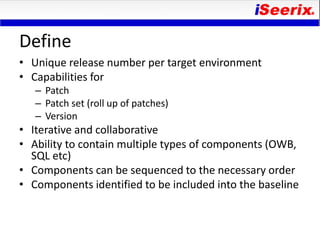
Define
• Unique release number per target environment
• Capabilities for
   – Patch
   – Patch set (roll up of patches)
   – Version
• Iterative and collaborative
• Ability to contain multiple types of components (OWB,
  SQL etc)
• Components can be sequenced to the necessary order
• Components identified to be included into the baseline
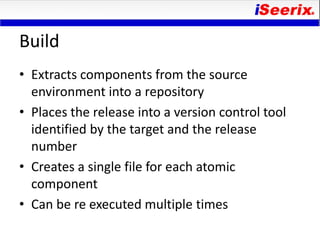
Build
• Extracts components from the source
  environment into a repository
• Places the release into a version control tool
  identified by the target and the release
  number
• Creates a single file for each atomic
  component
• Can be re executed multiple times
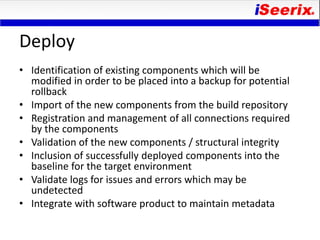
Deploy
• Identification of existing components which will be
  modified in order to be placed into a backup for potential
  rollback
• Import of the new components from the build repository
• Registration and management of all connections required
  by the components
• Validation of the new components / structural integrity
• Inclusion of successfully deployed components into the
  baseline for the target environment
• Validate logs for issues and errors which may be
  undetected
• Integrate with software product to maintain metadata
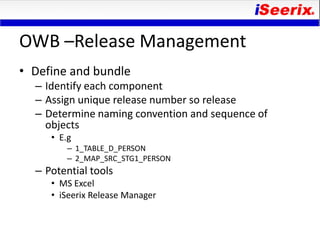
OWB –Release Management
• Define and bundle
  – Identify each component
  – Assign unique release number so release
  – Determine naming convention and sequence of
    objects
     • E.g
         – 1_TABLE_D_PERSON
         – 2_MAP_SRC_STG1_PERSON
  – Potential tools
     • MS Excel
     • iSeerix Release Manager
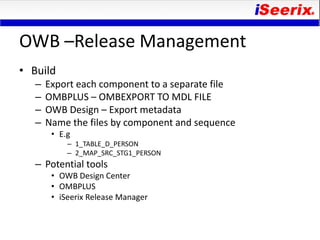
OWB –Release Management
• Build
   –   Export each component to a separate file
   –   OMBPLUS – OMBEXPORT TO MDL FILE
   –   OWB Design – Export metadata
   –   Name the files by component and sequence
        • E.g
            – 1_TABLE_D_PERSON
            – 2_MAP_SRC_STG1_PERSON
   – Potential tools
        • OWB Design Center
        • OMBPLUS
        • iSeerix Release Manager
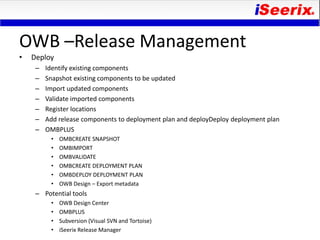
OWB –Release Management
•   Deploy
     –   Identify existing components
     –   Snapshot existing components to be updated
     –   Import updated components
     –   Validate imported components
     –   Register locations
     –   Add release components to deployment plan and deployDeploy deployment plan
     –   OMBPLUS
          •   OMBCREATE SNAPSHOT
          •   OMBIMPORT
          •   OMBVALIDATE
          •   OMBCREATE DEPLOYMENT PLAN
          •   OMBDEPLOY DEPLOYMENT PLAN
          •   OWB Design – Export metadata
     – Potential tools
          •   OWB Design Center
          •   OMBPLUS
          •   Subversion (Visual SVN and Tortoise)
          •   iSeerix Release Manager
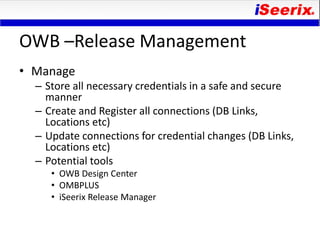
OWB –Release Management
• Manage
  – Store all necessary credentials in a safe and secure
    manner
  – Create and Register all connections (DB Links,
    Locations etc)
  – Update connections for credential changes (DB Links,
    Locations etc)
  – Potential tools
     • OWB Design Center
     • OMBPLUS
     • iSeerix Release Manager
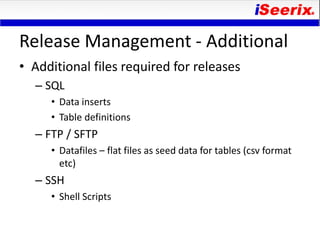
Release Management - Additional
• Additional files required for releases
  – SQL
     • Data inserts
     • Table definitions
  – FTP / SFTP
     • Datafiles – flat files as seed data for tables (csv format
       etc)
  – SSH
     • Shell Scripts
Version Control
• Unified storage / repository across all software
  products
• Components stored at the atomic level
• Defined by target environment
• Separate release from baseline
• Baseline – culmination of the most recent
  components across all releases required to
  rebuild an environment
• Bridge between development and production
  environments
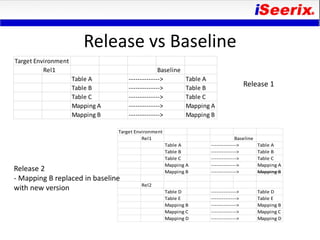
Release vs Baseline
Target Environment
          Rel1                                    Baseline
                     Table A         -------------->         Table A
                     Table B         -------------->         Table B
                                                                                      Release 1
                     Table C         -------------->         Table C
                     Mapping A       -------------->         Mapping A
                     Mapping B       -------------->         Mapping B

                                 Target Environment
                                           Rel1                                  Baseline
                                                      Table A       -------------->         Table A
                                                      Table B       -------------->         Table B
                                                      Table C       -------------->         Table C
                                                      Mapping A     -------------->         Mapping A
Release 2                                             Mapping B     -------------->         Mapping B
- Mapping B replaced in baseline
                                          Rel2
with new version                                      Table D       -------------->         Table D
                                                      Table E       -------------->         Table E
                                                      Mapping B     -------------->         Mapping B
                                                      Mapping C     -------------->         Mapping C
                                                      Mapping D     -------------->         Mapping D
Conclusion
• Release Management is a complex and
  potentially manual process
• Technology and tools can be utilized to
  automate the environment
• Use manual procedure to complete the steps
  of release management or invest in an
  automation tool

Business Intelligence Release Management Best Practices

  • 1.
    Business Intelligence Release Management Best Practices By John Heaton Oracle OpenWorld UnConference Sep 2010
  • 2.
    Definition Release Management isa well defined repeatable process in which code at the atomic level is moved from a source environment to a target environment in an auditable manner.
  • 3.
    Business Intelligence • Multiplesoftware vendors and tools • Differing capabilities of software versioning • Various support / non support for version control software • Capabilities for release management very immature • No segregation of duties • Lack of audit capabilities across the different software products • Specialize processes and procedures required for each software product requires high investment in resource training
  • 4.
    Sample Lineage Matrix Source Environment Drop Zone Application Staging Warehouse OLAP Reporting Security Sample SOR Data files Java files Tables Tables Cubes Reports Roles Components Credentials Directories Images Views Views Mappings Images Users DB Link Credentials Forms Functions Functions Models Filters LDAP Files Procedures Procedures Calculations Parameters FTP Mappings Mappings Dashboards Workflows Workflows Presentation Data Model Summaries Software OWB Jdeveloper OWB OWB OWB OBIEE SQL Plus Shell Scripts Shell Scripts Shell Scripts Shell Scripts Shell Scripts SQL Plus SQL Plus SQL Plus SQL Plus SQL Plus File Type *.mdl *.sh *.java *.mdl *.mdl *.mdl *.html *.sql *.sh *.sql *.jpg *.sh *.sh *.sh *.rdp *.sql *.txt *.sql *.sql *.sql *.xml *.rtf Repository OWB None Subversion OWB OWB OWB OBIEE None None None None
  • 5.
  • 6.
    Release Management ProcessSteps • Define – identification of and the sequence for components within a unique patch / patch set or version. • Build – snapshot / image components at an acceptable point in time during the software development lifecycle. • Deploy – the installation of the components into the target environment. • Manage – definition and credentials for the different portions of the software solution.
  • 7.
    Define • Unique releasenumber per target environment • Capabilities for – Patch – Patch set (roll up of patches) – Version • Iterative and collaborative • Ability to contain multiple types of components (OWB, SQL etc) • Components can be sequenced to the necessary order • Components identified to be included into the baseline
  • 8.
    Build • Extracts componentsfrom the source environment into a repository • Places the release into a version control tool identified by the target and the release number • Creates a single file for each atomic component • Can be re executed multiple times
  • 9.
    Deploy • Identification ofexisting components which will be modified in order to be placed into a backup for potential rollback • Import of the new components from the build repository • Registration and management of all connections required by the components • Validation of the new components / structural integrity • Inclusion of successfully deployed components into the baseline for the target environment • Validate logs for issues and errors which may be undetected • Integrate with software product to maintain metadata
  • 10.
    OWB –Release Management •Define and bundle – Identify each component – Assign unique release number so release – Determine naming convention and sequence of objects • E.g – 1_TABLE_D_PERSON – 2_MAP_SRC_STG1_PERSON – Potential tools • MS Excel • iSeerix Release Manager
  • 11.
    OWB –Release Management •Build – Export each component to a separate file – OMBPLUS – OMBEXPORT TO MDL FILE – OWB Design – Export metadata – Name the files by component and sequence • E.g – 1_TABLE_D_PERSON – 2_MAP_SRC_STG1_PERSON – Potential tools • OWB Design Center • OMBPLUS • iSeerix Release Manager
  • 12.
    OWB –Release Management • Deploy – Identify existing components – Snapshot existing components to be updated – Import updated components – Validate imported components – Register locations – Add release components to deployment plan and deployDeploy deployment plan – OMBPLUS • OMBCREATE SNAPSHOT • OMBIMPORT • OMBVALIDATE • OMBCREATE DEPLOYMENT PLAN • OMBDEPLOY DEPLOYMENT PLAN • OWB Design – Export metadata – Potential tools • OWB Design Center • OMBPLUS • Subversion (Visual SVN and Tortoise) • iSeerix Release Manager
  • 13.
    OWB –Release Management •Manage – Store all necessary credentials in a safe and secure manner – Create and Register all connections (DB Links, Locations etc) – Update connections for credential changes (DB Links, Locations etc) – Potential tools • OWB Design Center • OMBPLUS • iSeerix Release Manager
  • 14.
    Release Management -Additional • Additional files required for releases – SQL • Data inserts • Table definitions – FTP / SFTP • Datafiles – flat files as seed data for tables (csv format etc) – SSH • Shell Scripts
  • 15.
    Version Control • Unifiedstorage / repository across all software products • Components stored at the atomic level • Defined by target environment • Separate release from baseline • Baseline – culmination of the most recent components across all releases required to rebuild an environment • Bridge between development and production environments
  • 16.
    Release vs Baseline TargetEnvironment Rel1 Baseline Table A --------------> Table A Table B --------------> Table B Release 1 Table C --------------> Table C Mapping A --------------> Mapping A Mapping B --------------> Mapping B Target Environment Rel1 Baseline Table A --------------> Table A Table B --------------> Table B Table C --------------> Table C Mapping A --------------> Mapping A Release 2 Mapping B --------------> Mapping B - Mapping B replaced in baseline Rel2 with new version Table D --------------> Table D Table E --------------> Table E Mapping B --------------> Mapping B Mapping C --------------> Mapping C Mapping D --------------> Mapping D
  • 17.
    Conclusion • Release Managementis a complex and potentially manual process • Technology and tools can be utilized to automate the environment • Use manual procedure to complete the steps of release management or invest in an automation tool