Introduction to
Oracle 10g Database
Eryk Budi Pratama
Agenda
•   Review SQL Statements
•   Oracle Architecture (Physical Structure)
•   Oracle Architecture (Logical Structure)
•   Oracle Instance
•   User Process
•   Program Global Area (PGA)
•   System Global Area (SGA)
•   Oracle Background Process
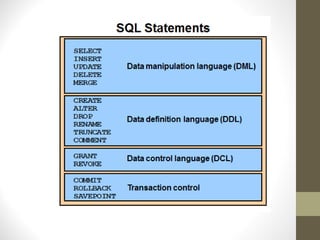
Review
• Data Definition Language
• Data Manipulation Language
• Data Control Language
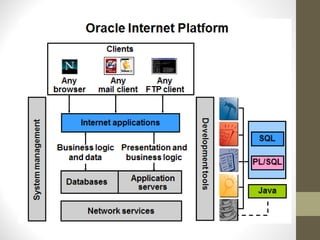
PL/SQL
• PL/SQL is a powerful extension to SQL that not
  only adds condition testing, looping, and
  exception handling, but also allows developers
  to write application-specific functions,
  procedures, packages, and triggers
Oracle Server Architecture
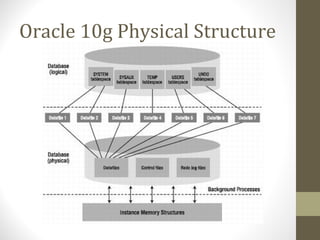
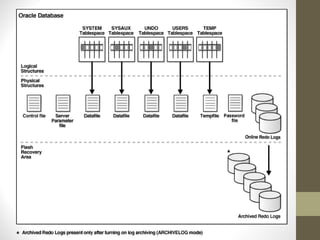
Oracle 10g Physical Structure
Physical Structures
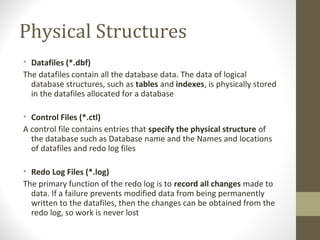
• Datafiles (*.dbf)
The datafiles contain all the database data. The data of logical
  database structures, such as tables and indexes, is physically stored
  in the datafiles allocated for a database

• Control Files (*.ctl)
A control file contains entries that specify the physical structure of
  the database such as Database name and the Names and locations
  of datafiles and redo log files

• Redo Log Files (*.log)
The primary function of the redo log is to record all changes made to
  data. If a failure prevents modified data from being permanently
  written to the datafiles, then the changes can be obtained from the
  redo log, so work is never lost
Physical Structures (cont.)
• Archive Log Files (*.log)
  • Oracle automatically archives log files when the database is in
    ARCHIVELOG mode. This prevents oracle from overwriting the
    redo log files before they have been safely archived to
    another location.

• Parameter Files (initSID.ora)
  • Parameter files contain a list of configuration parameters for
    that instance and database.

• Alert and Trace Log Files (*.trc)
  • Each server and background process can write to an
     associated trace file. When an internal error is detected by a
     process, it dumps information about the error to its trace file.
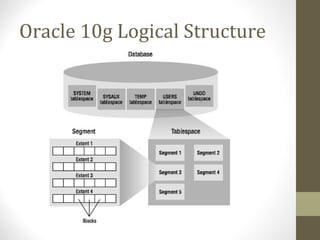
Oracle 10g Logical Structure
Logical Structures
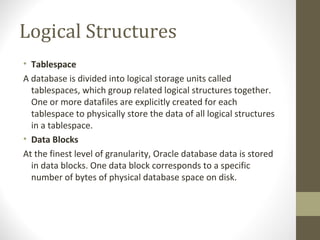
• Tablespace
A database is divided into logical storage units called
  tablespaces, which group related logical structures together.
  One or more datafiles are explicitly created for each
  tablespace to physically store the data of all logical structures
  in a tablespace.
• Data Blocks
At the finest level of granularity, Oracle database data is stored
  in data blocks. One data block corresponds to a specific
  number of bytes of physical database space on disk.
Logical Structures (Cont)
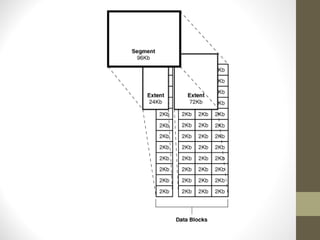
• Extents
An extent is a specific number of contiguous data blocks,
  obtained in a single allocation, used to store a specific type of
  information.
• Segments
A segment is a set of extents allocated for a certain logical
  structure. The different types of segments are :
1.Data segment – stores table data
2.Index segment – stores index data
3.Temporary segment – temporary space used during SQL
  execution
4.Rollback Segment – stores undo information
• Schema
A schema is a collection of database objects. A schema is
  owned by a database user and has the same name as
  that user. Schema objects are the logical structures that
  directly refer to the database's data. Schema objects
  include structures like tables, views, and indexes
The Oracle Server architecture can be described in three
categories:
•User-related processes
•Logical memory structures that are collectively called an
Oracle instance
•Physical file structures that are collectively called a
database
Oracle Instance
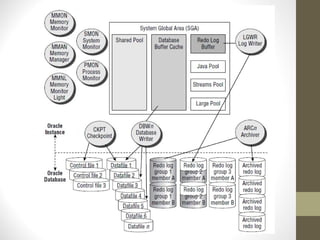
An Oracle database server consists of an Oracle database
and an Oracle instance. Every time a database is started, a
system global area (SGA) is allocated and Oracle
background processes are started. The combination of the
background processes and memory buffers is called an
Oracle instance.
User Processes
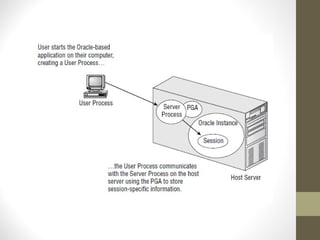
• User Processes initiates connection
• Maintaining connection in a session
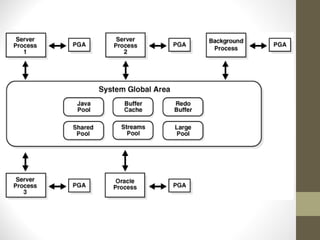
Program Global Area (PGA
• PGA is a memory buffer that contains data and control
  information for a server process
• PGA is created by oracle when a server process is started
• PGA area is a non-shared area of memory created by
  oracle when a server process is started.
System Global Area (SGA)
• System Global Area (SGA) is a shared memory region
  that contains data and co ntrol information for one
  Oracle instance
• Oracle allocates the SGA when an instance starts and
  deallocates it when the instance shuts down
• Each instance has its own SGA
SGA Memory Structure
• Buffer Cache
Database buffers store the most recently used blocks of
  data. The set of database buffers in an instance is the
  database buffer cache.
• Redo Log Buffer
Redo log buffer stores redo entries—a log of changes
  made to the database
• Shared Pool
Shared pool contains shared memory constructs, such as
  shared SQL areas
Oracle Background Process
An Oracle database uses memory structures and processes
to manage and access the database. All memory structures
exist in the main memory of the computers that constitute
the database system. Processes are jobs that work in the
memory of these computers.
Oracle Background Process
(cont.)
• System Monitor – SMON
  • This database background process performs instance
    recovery at the start of the database. SMON also
    cleans up temporary segments that are no longer in
    use and recovers dead transactions skipped during
    crash and instance recovery because of file-read or
    offline errors. It coalesces i.e. combines contiguous
    free extents into larger free extents.
• Process Monitor - PMON
  • This database background process cleans up failed
    user processes. PMON is responsible for releasing the
    lock i.e. cleaning up the cache and freeing resources
    that the process was using. Its effect can be seen
    when a process holding a lock is killed.
Oracle Background Process
(cont.)
• Database Writer - DBWR
 • This background process is responsible for managing
   the contents of the data block buffer cache and
   dictionary cache. DBWR performs batch writes of
   changed block. Since Oracle uses write-ahead logging,
   DBWR does not need to write blocks when a
   transaction commits.


• Recover - RECO
 • The recover process automatically cleans up failed or
   suspended distributed transactions.
Oracle Background Process
(cont.)
• Log Writer - LGWR
   • This background process manages the writing of the
     contents of the redo log buffer to the online redo log files.
     LGWR writes the log entries in batch form. The Redo log
     buffers entries always contain the most up-to-date status
     of the database.

• Archiver - ARCH
  • The Archiver process reads the redo log files once Oracle
    has filled them and writes a copy of the used redo log files
    to the specified archive log destination(s). Actually, for
    most databases, ARCH has no effect on the overall system
    performance. On some large database sites, however,
    archiving can have an impact on system performance.
Oracle Background Process
(cont.)
• Checkpoint - CKPT
  • All modified information in database buffer in the SGA is written
    to the datafiles by a database write process (DBWR). This event
    indicates a checkpoint. The checkpoint process is responsible for
    signaling DBWR at checkpoints and updating all of the datafiles
    and control files of the database.

• Job Queue Processes
  • Job queue processes are used for batch processing. They run user
    jobs. They can be viewed as a scheduler service that can be used
    to schedule jobs as PL/SQL statements or procedures on an
    Oracle instance. Given a start date and an interval, the job queue
    processes try to run the job at the next occurrence of the
    interval.
Q&A

Oracle 10g Introduction 1

  • 1.
    Introduction to Oracle 10gDatabase Eryk Budi Pratama
  • 2.
    Agenda • Review SQL Statements • Oracle Architecture (Physical Structure) • Oracle Architecture (Logical Structure) • Oracle Instance • User Process • Program Global Area (PGA) • System Global Area (SGA) • Oracle Background Process
  • 3.
    Review • Data DefinitionLanguage • Data Manipulation Language • Data Control Language
  • 5.
    PL/SQL • PL/SQL isa powerful extension to SQL that not only adds condition testing, looping, and exception handling, but also allows developers to write application-specific functions, procedures, packages, and triggers
  • 10.
  • 11.
  • 12.
    Physical Structures • Datafiles(*.dbf) The datafiles contain all the database data. The data of logical database structures, such as tables and indexes, is physically stored in the datafiles allocated for a database • Control Files (*.ctl) A control file contains entries that specify the physical structure of the database such as Database name and the Names and locations of datafiles and redo log files • Redo Log Files (*.log) The primary function of the redo log is to record all changes made to data. If a failure prevents modified data from being permanently written to the datafiles, then the changes can be obtained from the redo log, so work is never lost
  • 13.
    Physical Structures (cont.) •Archive Log Files (*.log) • Oracle automatically archives log files when the database is in ARCHIVELOG mode. This prevents oracle from overwriting the redo log files before they have been safely archived to another location. • Parameter Files (initSID.ora) • Parameter files contain a list of configuration parameters for that instance and database. • Alert and Trace Log Files (*.trc) • Each server and background process can write to an associated trace file. When an internal error is detected by a process, it dumps information about the error to its trace file.
  • 15.
  • 16.
    Logical Structures • Tablespace Adatabase is divided into logical storage units called tablespaces, which group related logical structures together. One or more datafiles are explicitly created for each tablespace to physically store the data of all logical structures in a tablespace. • Data Blocks At the finest level of granularity, Oracle database data is stored in data blocks. One data block corresponds to a specific number of bytes of physical database space on disk.
  • 17.
    Logical Structures (Cont) •Extents An extent is a specific number of contiguous data blocks, obtained in a single allocation, used to store a specific type of information. • Segments A segment is a set of extents allocated for a certain logical structure. The different types of segments are : 1.Data segment – stores table data 2.Index segment – stores index data 3.Temporary segment – temporary space used during SQL execution 4.Rollback Segment – stores undo information
  • 18.
    • Schema A schemais a collection of database objects. A schema is owned by a database user and has the same name as that user. Schema objects are the logical structures that directly refer to the database's data. Schema objects include structures like tables, views, and indexes
  • 20.
    The Oracle Serverarchitecture can be described in three categories: •User-related processes •Logical memory structures that are collectively called an Oracle instance •Physical file structures that are collectively called a database
  • 21.
    Oracle Instance An Oracledatabase server consists of an Oracle database and an Oracle instance. Every time a database is started, a system global area (SGA) is allocated and Oracle background processes are started. The combination of the background processes and memory buffers is called an Oracle instance.
  • 23.
    User Processes • UserProcesses initiates connection • Maintaining connection in a session
  • 25.
    Program Global Area(PGA • PGA is a memory buffer that contains data and control information for a server process • PGA is created by oracle when a server process is started • PGA area is a non-shared area of memory created by oracle when a server process is started.
  • 27.
    System Global Area(SGA) • System Global Area (SGA) is a shared memory region that contains data and co ntrol information for one Oracle instance • Oracle allocates the SGA when an instance starts and deallocates it when the instance shuts down • Each instance has its own SGA
  • 28.
    SGA Memory Structure •Buffer Cache Database buffers store the most recently used blocks of data. The set of database buffers in an instance is the database buffer cache. • Redo Log Buffer Redo log buffer stores redo entries—a log of changes made to the database • Shared Pool Shared pool contains shared memory constructs, such as shared SQL areas
  • 29.
    Oracle Background Process AnOracle database uses memory structures and processes to manage and access the database. All memory structures exist in the main memory of the computers that constitute the database system. Processes are jobs that work in the memory of these computers.
  • 30.
    Oracle Background Process (cont.) •System Monitor – SMON • This database background process performs instance recovery at the start of the database. SMON also cleans up temporary segments that are no longer in use and recovers dead transactions skipped during crash and instance recovery because of file-read or offline errors. It coalesces i.e. combines contiguous free extents into larger free extents. • Process Monitor - PMON • This database background process cleans up failed user processes. PMON is responsible for releasing the lock i.e. cleaning up the cache and freeing resources that the process was using. Its effect can be seen when a process holding a lock is killed.
  • 31.
    Oracle Background Process (cont.) •Database Writer - DBWR • This background process is responsible for managing the contents of the data block buffer cache and dictionary cache. DBWR performs batch writes of changed block. Since Oracle uses write-ahead logging, DBWR does not need to write blocks when a transaction commits. • Recover - RECO • The recover process automatically cleans up failed or suspended distributed transactions.
  • 32.
    Oracle Background Process (cont.) •Log Writer - LGWR • This background process manages the writing of the contents of the redo log buffer to the online redo log files. LGWR writes the log entries in batch form. The Redo log buffers entries always contain the most up-to-date status of the database. • Archiver - ARCH • The Archiver process reads the redo log files once Oracle has filled them and writes a copy of the used redo log files to the specified archive log destination(s). Actually, for most databases, ARCH has no effect on the overall system performance. On some large database sites, however, archiving can have an impact on system performance.
  • 33.
    Oracle Background Process (cont.) •Checkpoint - CKPT • All modified information in database buffer in the SGA is written to the datafiles by a database write process (DBWR). This event indicates a checkpoint. The checkpoint process is responsible for signaling DBWR at checkpoints and updating all of the datafiles and control files of the database. • Job Queue Processes • Job queue processes are used for batch processing. They run user jobs. They can be viewed as a scheduler service that can be used to schedule jobs as PL/SQL statements or procedures on an Oracle instance. Given a start date and an interval, the job queue processes try to run the job at the next occurrence of the interval.
  • 34.

Editor's Notes

  • #4 A data manipulation language ( DML ) is a family of syntax elements similar to a computer programming language used for inserting, deleting and updating data in a database. Performing read-only queries of data is sometimes also considered a component of DML. A data definition language or data description language ( DDL ) is a syntax similar to a computer programming language for defining data structures, especially database schemas. A data control language ( DCL ) is a syntax similar to a computer programming language used to control access to data stored in a database.
  • #12 http://images.devshed.com/ds/stories/Oracle_Database_XE/mini-image_2.JPG
  • #13 Datafiles Every Oracle database has one or more physical datafiles. The datafiles contain all the database data. The data of logical database structures, such as tables and indexes, is physically stored in the datafiles allocated for a database. One or more datafiles form a logical unit of database storage called a tablespace. Data in a datafile is read, as needed, during normal database operation and stored in the memory cache of Oracle. For example, assume that a user wants to access some data in a table of a database. If the requested information is not already in the memory cache for the database, then it is read from the appropriate datafiles and stored in memory. Modified or new data is not necessarily written to a datafile immediately. To reduce the amount of disk access and to increase performance, data is pooled in memory and written to the appropriate datafiles all at once, as determined by the database writer process (DBWn) background process. Control Files Every Oracle database has a control file. A control file contains entries that specify the physical structure of the database such as Database name and the Names and locations of datafiles and redo log files. Oracle can multiplex the control file, that is, simultaneously maintain a number of identical control file copies, to protect against a failure involving the control file. Every time an instance of an Oracle database is started, its control file identifies the database and redo log files that must be opened for database operation to proceed. If the physical makeup of the database is altered (for example, if a new datafile or redo log file is created), then the control file is automatically modified by Oracle to reflect the change. A control file is also used in database recovery. Redo Log Files Every Oracle database has a set of two or more redo log files. The set of redo log files is collectively known as the redo log for the database. A redo log is made up of redo entries (also called redo records). The primary function of the redo log is to record all changes made to data. If a failure prevents modified data from being permanently written to the datafiles, then the changes can be obtained from the redo log, so work is never lost. To protect against a failure involving the redo log itself, Oracle allows a multiplexed redo log so that two or more copies of the redo log can be maintained on different disks. The information in a redo log file is used only to recover the database from a system or media failure that prevents database data from being written to the datafiles. For example, if an unexpected power outage terminates database operation, then data in memory cannot be written to the datafiles, and the data is lost. However, lost data can be recovered when the database is opened, after power is restored. By applying the information in the most recent redo log files to the database datafiles, Oracle restores the database to the time at which the power failure occurred. The process of applying the redo log during a recovery operation is called rolling forward.
  • #14 Archive Log Files You can enable automatic archiving of the redo log. Oracle automatically archives log files when the database is in ARCHIVELOG mode. This prevents oracle from overwriting the redo log files before a they have been safely archived to another location. Parameter Files Parameter files contain a list of configuration parameters for that instance and database. Oracle recommends that you create a server parameter file (SPFILE) as a dynamic means of maintaining initialization parameters. A server parameter file lets you store and manage your initialization parameters persistently in a server-side disk file. Alert and Trace Log Files Each server and background process can write to an associated trace file. When an internal error is detected by a process, it dumps information about the error to its trace file. Some of the information written to a trace file is intended for the database administrator, while other information is for Oracle Support Services. Trace file information is also used to tune applications and instances. The alert file, or alert log, is a special trace file. The alert log of a database is a chronological log of messages and errors.
  • #15 http://docs.oracle.com/cd/B28359_01/server.111/b28301/img/admqs003.gif
  • #16 http://images.devshed.com/ds/stories/Oracle_Database_XE/image_1.JPG
  • #30 An Oracle database uses memory structures and processes to manage and access the database. All memory structures exist in the main memory of the computers that constitute the database system. Processes are jobs that work in the memory of these computers. Oracle creates a set of background processes for each instance. The background processes consolidate functions that would otherwise be handled by multiple Oracle programs running for each user process. They asynchronously perform I/O and monitor other Oracle processes to provide increased parallelism for better performance and reliability. The most common background processes are : System Monitor – SMON This database background process performs instance recovery at the start of the database. SMON also cleans up temporary segments that are no longer in use and recovers dead transactions skipped during crash and instance recovery because of file-read or offline errors. It coalesces i.e. combines contiguous free extents into larger free extents.
  • #31 Process Monitor - PMON This database background process cleans up failed user processes. PMON is responsible for releasing the lock i.e. cleaning up the cache and freeing resources that the process was using. Its effect can be seen when a process holding a lock is killed. Database Writer - DBWR This background process is responsible for managing the contents of the data block buffer cache and dictionary cache. DBWR performs batch writes of changed block. Since Oracle uses write-ahead logging, DBWR does not need to write blocks when a transaction commits. In the most common case, DBWR writes only when more data needs to be read into the system global area and too few database buffers are free. The least recently used data is written to the datafiles first. Although there is only one SMON and one PMON process running per database instance, one can have multiple DBWR processes running at the same time. Note the number of DBWR processes running is set via the DB_WRITER_PROCESSES.
  • #32 Process Monitor - PMON This database background process cleans up failed user processes. PMON is responsible for releasing the lock i.e. cleaning up the cache and freeing resources that the process was using. Its effect can be seen when a process holding a lock is killed. Database Writer - DBWR This background process is responsible for managing the contents of the data block buffer cache and dictionary cache. DBWR performs batch writes of changed block. Since Oracle uses write-ahead logging, DBWR does not need to write blocks when a transaction commits. In the most common case, DBWR writes only when more data needs to be read into the system global area and too few database buffers are free. The least recently used data is written to the datafiles first. Although there is only one SMON and one PMON process running per database instance, one can have multiple DBWR processes running at the same time. Note the number of DBWR processes running is set via the DB_WRITER_PROCESSES.