Oracle	Statistics	by	Example
Mauro	Pagano
Background
• Optimizer	generates	execution	plans
• Many	execution	plans	for	each	SQL
• Optimal	execution	plan	has	lower	cost	(*)
• Cost	is	computed	based	on	
– Statistical	formulas	(Oracle	IP)
– Many	statistics	around	the	SQL	(seeded	by	us)
1/29/17 2
Some	terminology
• Cost
– Unit	of	measure	to	compare	plan	estimated	perf
– Equivalent	to	expected	#single	block	reads
• Cardinality
– Number	of	rows	handled,	produced	/	consumed	
• Selectivity
– %	of	filtering	caused	by	predicates,	range	is	[0,1]
– Output	card	=	input	card	*	selectivity
1/29/17 3
Why	so	much	emphasis?
• Statistics	are	“picture”	about	entities
• Quality	of	the	picture	affects	quality	plan
– Poor	stats	generally	lead	to	poor	plans	(*)
– Better	stats	generally	lead	to	better	plans	(*)
• Our	best	bet	is	to	provide	good	quality	stats
– Not	always	as	trivial	as	it	sounds
1/29/17 4
Many	type	of	statistics
• Oracle	Optimizer	uses	statistics	about
– Objects:	tables,	indexes,	columns,	etc
– System:	CPU	Speed	and	many	IO	metrics
– Dictionary:	Oracle	internal	physical	objects
– Fixed	Objects:	memory	structure	(X$)
• First	two	affect	application	SQLs
– Focus	of	this	presentation	is	object	statistics
1/29/17 5
What	should	I	do	about	statistics?
• Collect	them	J
– Object	stats	when	there	are	“enough”	changes
– System	stats	once,	if	any	(*)
• Oracle-seeded	package	DBMS_STATS
• Used	to	collect	all	type	of	statistics
– Plus	drop,	exp/imp,	set	prefs,	etc etc
• Many	params to	affect	how/what	to	collect
– Can	have	large	impact	on	quality
1/29/17 6
When	should	I	gather	stats?
• No	specific	threshold	in	terms	of	time
• Balance	between	frequency	and	quality
– Gather	high	quality	is	expensive	thus	slow	exec
– Gather	frequently	require	fast	exec
• Optimal	plans	tend	not	to	change	over	time
– Favor	quality	over	frequency
1/29/17 7
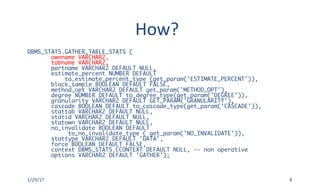
How?
DBMS_STATS.GATHER_TABLE_STATS (
ownname VARCHAR2,
tabname VARCHAR2,
partname VARCHAR2 DEFAULT NULL,
estimate_percent NUMBER DEFAULT
to_estimate_percent_type (get_param('ESTIMATE_PERCENT')),
block_sample BOOLEAN DEFAULT FALSE,
method_opt VARCHAR2 DEFAULT get_param('METHOD_OPT'),
degree NUMBER DEFAULT to_degree_type(get_param('DEGREE')),
granularity VARCHAR2 DEFAULT GET_PARAM('GRANULARITY'),
cascade BOOLEAN DEFAULT to_cascade_type(get_param('CASCADE')),
stattab VARCHAR2 DEFAULT NULL,
statid VARCHAR2 DEFAULT NULL,
statown VARCHAR2 DEFAULT NULL,
no_invalidate BOOLEAN DEFAULT
to_no_invalidate_type ( get_param('NO_INVALIDATE')),
stattype VARCHAR2 DEFAULT 'DATA',
force BOOLEAN DEFAULT FALSE,
context DBMS_STATS.CCONTEXT DEFAULT NULL, -- non operative
options VARCHAR2 DEFAULT 'GATHER');
1/29/17 8
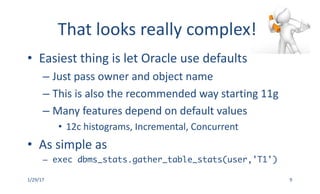
That	looks	really	complex!
• Easiest	thing	is	let	Oracle	use	defaults
– Just	pass	owner	and	object	name
– This	is	also	the	recommended	way	starting	11g
– Many	features	depend	on	default	values
• 12c	histograms,	Incremental,	Concurrent
• As	simple	as
– exec dbms_stats.gather_table_stats(user,'T1')
1/29/17 9
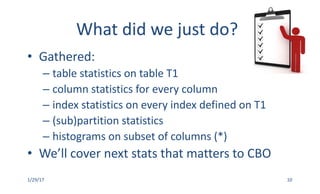
What	did	we	just	do?
• Gathered:	
– table	statistics	on	table	T1
– column	statistics	for	every	column
– index	statistics	on	every	index	defined	on	T1
– (sub)partition	statistics
– histograms	on	subset	of	columns	(*)
• We’ll	cover	next	stats	that	matters	to	CBO
1/29/17 10
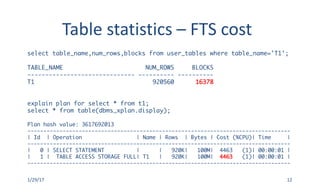
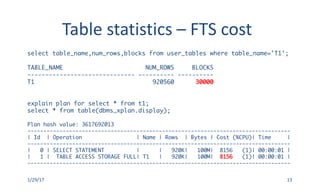
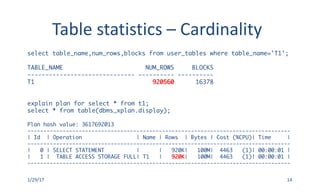
Table	statistics
• Optimizer	only	uses	two	statistics
– Number	of	blocks	below	HWM
• [ALL|DBA|USER]_TABLES.NUM_BLOCKS
• Used	to	cost	Full	Table	Scan	operations
– Number	of	rows	in	the	table
• [ALL|DBA|USER]_TABLES.NUM_ROWS
• Used	to	estimate	how	many	rows	we	dealing	with
1/29/17 11
Table	statistics	– FTS	cost
select table_name,num_rows,blocks from user_tables where table_name='T1';
TABLE_NAME NUM_ROWS BLOCKS
------------------------------ ---------- ----------
T1 920560 16378
explain plan for select * from t1;
select * from table(dbms_xplan.display);
Plan hash value: 3617692013
----------------------------------------------------------------------------------
| Id | Operation | Name | Rows | Bytes | Cost (%CPU)| Time |
----------------------------------------------------------------------------------
| 0 | SELECT STATEMENT | | 920K| 100M| 4463 (1)| 00:00:01 |
| 1 | TABLE ACCESS STORAGE FULL| T1 | 920K| 100M| 4463 (1)| 00:00:01 |
----------------------------------------------------------------------------------
1/29/17 12
Table	statistics	– FTS	cost
select table_name,num_rows,blocks from user_tables where table_name='T1';
TABLE_NAME NUM_ROWS BLOCKS
------------------------------ ---------- ----------
T1 920560 30000
explain plan for select * from t1;
select * from table(dbms_xplan.display);
Plan hash value: 3617692013
----------------------------------------------------------------------------------
| Id | Operation | Name | Rows | Bytes | Cost (%CPU)| Time |
----------------------------------------------------------------------------------
| 0 | SELECT STATEMENT | | 920K| 100M| 8156 (1)| 00:00:01 |
| 1 | TABLE ACCESS STORAGE FULL| T1 | 920K| 100M| 8156 (1)| 00:00:01 |
----------------------------------------------------------------------------------
1/29/17 13
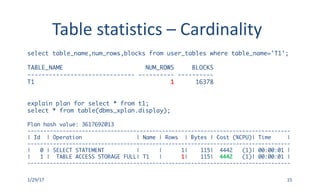
Table	statistics	– Cardinality
select table_name,num_rows,blocks from user_tables where table_name='T1';
TABLE_NAME NUM_ROWS BLOCKS
------------------------------ ---------- ----------
T1 920560 16378
explain plan for select * from t1;
select * from table(dbms_xplan.display);
Plan hash value: 3617692013
----------------------------------------------------------------------------------
| Id | Operation | Name | Rows | Bytes | Cost (%CPU)| Time |
----------------------------------------------------------------------------------
| 0 | SELECT STATEMENT | | 920K| 100M| 4463 (1)| 00:00:01 |
| 1 | TABLE ACCESS STORAGE FULL| T1 | 920K| 100M| 4463 (1)| 00:00:01 |
----------------------------------------------------------------------------------
1/29/17 14
Table	statistics	– Cardinality
select table_name,num_rows,blocks from user_tables where table_name='T1';
TABLE_NAME NUM_ROWS BLOCKS
------------------------------ ---------- ----------
T1 1 16378
explain plan for select * from t1;
select * from table(dbms_xplan.display);
Plan hash value: 3617692013
----------------------------------------------------------------------------------
| Id | Operation | Name | Rows | Bytes | Cost (%CPU)| Time |
----------------------------------------------------------------------------------
| 0 | SELECT STATEMENT | | 1| 115| 4442 (1)| 00:00:01 |
| 1 | TABLE ACCESS STORAGE FULL| T1 | 1| 115| 4442 (1)| 00:00:01 |
----------------------------------------------------------------------------------
1/29/17 15
Column	Statistics
• Optimizer	uses
– Number	of	distinct	values	(NDV)
• [ALL|DBA|USER]_TAB_COLS.NUM_DISTINCT
• Used	to	determine	selectivity	(no	histogram	present)
– Number	of	NULLs
• [ALL|DBA|USER]_TAB_COLS.NUM_NULLS
• Used	to	estimate	how	many	rows	we	dealing	with
– Min/Max	value
• [ALL|DBA|USER]_TAB_COLS.[LOW|HIGH]_VALUE
• Used	to	determine	in|out-of range
1/29/17 16
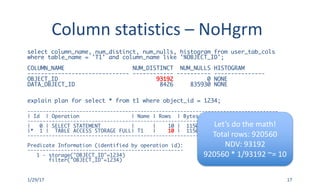
Column statistics	– NoHgrm
1/29/17 17
select column_name, num_distinct, num_nulls, histogram from user_tab_cols
where table_name = 'T1' and column_name like '%OBJECT_ID';
COLUMN_NAME NUM_DISTINCT NUM_NULLS HISTOGRAM
------------------------------ ------------ ---------- ---------------
OBJECT_ID 93192 0 NONE
DATA_OBJECT_ID 8426 835930 NONE
explain plan for select * from t1 where object_id = 1234;
----------------------------------------------------------------------------------
| Id | Operation | Name | Rows | Bytes | Cost (%CPU)| Time |
----------------------------------------------------------------------------------
| 0 | SELECT STATEMENT | | 10 | 1150 | 4453 (1)| 00:00:01 |
|* 1 | TABLE ACCESS STORAGE FULL| T1 | 10 | 1150 | 4453 (1)| 00:00:01 |
----------------------------------------------------------------------------------
Predicate Information (identified by operation id):
---------------------------------------------------
1 - storage("OBJECT_ID"=1234)
filter("OBJECT_ID"=1234)
Let’s	do	the	math!
Total	rows:	920560
NDV:	93192
920560	*	1/93192	~=	10
Column statistics	– NoHgrm
1/29/17 18
select column_name, num_distinct, num_nulls, histogram from user_tab_cols
where table_name = 'T1' and column_name like '%OBJECT_ID';
COLUMN_NAME NUM_DISTINCT NUM_NULLS HISTOGRAM
------------------------------ ------------ ---------- ---------------
OBJECT_ID 93192 0 NONE
DATA_OBJECT_ID 8426 835930 NONE
explain plan for select * from t1 where data_object_id = 1234;
----------------------------------------------------------------------------------
| Id | Operation | Name | Rows | Bytes | Cost (%CPU)| Time |
----------------------------------------------------------------------------------
| 0 | SELECT STATEMENT | | 10 | 1150 | 4454 (1)| 00:00:01 |
|* 1 | TABLE ACCESS STORAGE FULL| T1 | 10 | 1150 | 4454 (1)| 00:00:01 |
----------------------------------------------------------------------------------
Predicate Information (identified by operation id):
---------------------------------------------------
1 - storage(”DATA_OBJECT_ID"=1234)
filter(”DATA_OBJECT_ID"=1234)
Let’s	do	the	math!
Total	rows:	920560
Total	NULLs:	835930
NDV:	8426
(920560	– 835930)/8426	~=	10
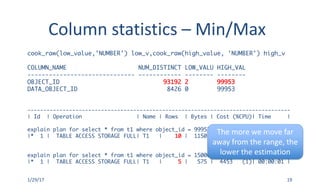
Column statistics	– Min/Max
1/29/17 19
cook_raw(low_value,'NUMBER') low_v,cook_raw(high_value, 'NUMBER') high_v
COLUMN_NAME NUM_DISTINCT LOW_VALU HIGH_VAL
------------------------------ ------------ -------- --------
OBJECT_ID 93192 2 99953
DATA_OBJECT_ID 8426 0 99953
----------------------------------------------------------------------------------
| Id | Operation | Name | Rows | Bytes | Cost (%CPU)| Time |
explain plan for select * from t1 where object_id = 99953;
|* 1 | TABLE ACCESS STORAGE FULL| T1 | 10 | 1150 | 4453 (1)| 00:00:01 |
explain plan for select * from t1 where object_id = 150000;
|* 1 | TABLE ACCESS STORAGE FULL| T1 | 5 | 575 | 4453 (1)| 00:00:01 |
The	more	we	move	far	
away	from	the	range,	the	
lower	the	estimation
Column	Statistics
• Optimizer	also	uses
– Density
• Not	stored	in	dictionary	(old	one	was,	new	one	no)
• Used	for	unpopular	value	selectivity
– Histogram
• [ALL|DBA|USER]_TAB_COLS.LOW_VALUE
• [ALL|DBA|USER]_TAB_COLS.HIGH_VALUE
• [ALL|DBA|USER]_TAB_HISTOGRAMS
• Used	for	popular	value	selectivity
1/29/17 20
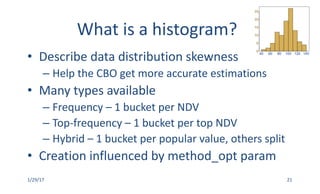
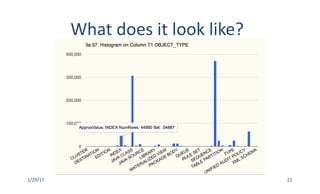
What	is	a	histogram?
• Describe	data	distribution	skewness
– Help	the	CBO	get	more	accurate	estimations
• Many	types	available	
– Frequency	– 1	bucket	per	NDV
– Top-frequency	– 1	bucket	per	top	NDV
– Hybrid	– 1	bucket	per	popular	value,	others	split
• Creation	influenced	by	method_opt param
1/29/17 21
What	does	it	look	like?
1/29/17 22
Column statistics	– Histogram
1/29/17 23
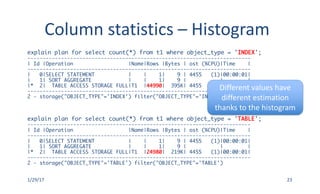
explain plan for select count(*) from t1 where object_type = 'INDEX';
-------------------------------------------------------------------------
| Id |Operation |Name|Rows |Bytes | ost (%CPU)|Time |
-------------------------------------------------------------------------
| 0|SELECT STATEMENT | | 1| 9 | 4455 (1)|00:00:01|
| 1| SORT AGGREGATE | | 1| 9 | | |
|* 2| TABLE ACCESS STORAGE FULL|T1 |44990| 395K| 4455 (1)|00:00:01|
-------------------------------------------------------------------------
2 - storage("OBJECT_TYPE"='INDEX') filter("OBJECT_TYPE"='INDEX')
explain plan for select count(*) from t1 where object_type = 'TABLE';
-------------------------------------------------------------------------
| Id |Operation |Name|Rows |Bytes | ost (%CPU)|Time |
-------------------------------------------------------------------------
| 0|SELECT STATEMENT | | 1| 9 | 4455 (1)|00:00:01|
| 1| SORT AGGREGATE | | 1| 9 | | |
|* 2| TABLE ACCESS STORAGE FULL|T1 |24980| 219K| 4455 (1)|00:00:01|
-------------------------------------------------------------------------
2 - storage("OBJECT_TYPE"='TABLE') filter("OBJECT_TYPE"='TABLE')
Different	values	have	
different	estimation	
thanks	to	the	histogram
What	is	an	index?
• Structure	that	stores	pair	key(s)-location
– Key(s)	are	stored	in	sorted	order
• Used	to	identify	rows	of	interest	without	FTS
– Navigating	index	and	extraction	location(s)
• Depending	on	filters,	faster	than	FTS	(or	not)
– No	fixed	threshold,	cheaper	option	wins		
1/29/17 24
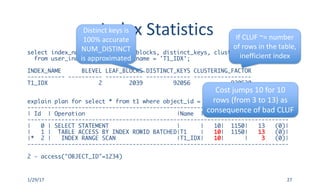
Index	Statistics
• Optimizer	uses
– Blevel
• [ALL|DBA|USER]_INDEXES.BLEVEL
• Used	to	estimate	how	expensive	is	to	locate	first	leaf
– Number	of	leaf	blocks	(LB)
• [ALL|DBA|USER]_INDEXES.LEAF_BLOCKS
• Used	to	estimate	how	many	index	leaf	blocks	to	read
– Clustering	Factor	(CLUF)
• [ALL|DBA|USER]_INDEXES.CLUSTERING_FACTOR
• Used	to	estimate	how	many	table	blocks	to	read
– Distinct	Keys	(DK)
• [ALL|DBA|USER]_INDEXES.DISTINCT_KEYS
• Used	to	help	with	data	correlation
1/29/17 25
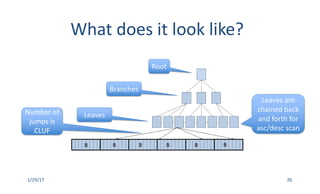
What	does	it	look	like?
1/29/17 26
B B B B B B
Root
Branches
Leaves
Leaves	are	
chained	back	
and	forth	for	
asc/desc scan
Number	of	
jumps	is	
CLUF
Index	Statistics
1/29/17 27
select index_name, blevel, leaf_blocks, distinct_keys, clustering_factor
from user_indexes where index_name = 'T1_IDX';
INDEX_NAME BLEVEL LEAF_BLOCKS DISTINCT_KEYS CLUSTERING_FACTOR
----------- ---------- ----------- ------------- -----------------
T1_IDX 2 2039 92056 920530
explain plan for select * from t1 where object_id = 1234;
-----------------------------------------------------------------------------
| Id | Operation |Name |Rows | Bytes|Cost (%CPU)|
-----------------------------------------------------------------------------
| 0 | SELECT STATEMENT | | 10| 1150| 13 (0)|
| 1 | TABLE ACCESS BY INDEX ROWID BATCHED|T1 | 10| 1150| 13 (0)|
|* 2 | INDEX RANGE SCAN |T1_IDX| 10| | 3 (0)|
-----------------------------------------------------------------------------
2 - access("OBJECT_ID"=1234)
Distinct	keys	is	
100%	accurate	
NUM_DISTINCT	
is	approximated
If	CLUF	~=	number	
of	rows	in	the	table,	
inefficient	index
Cost	jumps	10	for	10	
rows	(from	3	to	13)	as	
consequence	of	bad	CLUF
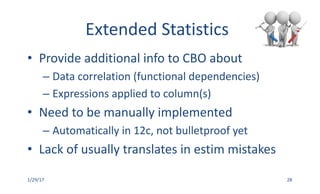
Extended	Statistics
• Provide	additional	info	to	CBO	about
– Data	correlation	(functional	dependencies)
– Expressions	applied	to	column(s)
• Need	to	be	manually	implemented
– Automatically	in	12c,	not	bulletproof	yet
• Lack	of	usually	translates	in	estim mistakes
1/29/17 28
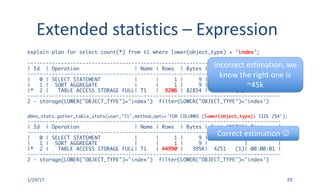
Extended	statistics	– Expression
1/29/17 29
explain plan for select count(*) from t1 where lower(object_type) = 'index';
-----------------------------------------------------------------------------------
| Id | Operation | Name | Rows | Bytes | Cost (%CPU)| Time |
-----------------------------------------------------------------------------------
| 0 | SELECT STATEMENT | | 1 | 9 | 4459 (1)| 00:00:01 |
| 1 | SORT AGGREGATE | | 1 | 9 | | |
|* 2 | TABLE ACCESS STORAGE FULL| T1 | 9206 | 82854 | 4459 (1)| 00:00:01 |
-----------------------------------------------------------------------------------
2 - storage(LOWER("OBJECT_TYPE")='index') filter(LOWER("OBJECT_TYPE")='index')
dbms_stats.gather_table_stats(user,'T1',method_opt=>'FOR COLUMNS (lower(object_type)) SIZE 254');
-----------------------------------------------------------------------------------
| Id | Operation | Name | Rows | Bytes | Cost (%CPU)| Time |
-----------------------------------------------------------------------------------
| 0 | SELECT STATEMENT | | 1 | 9 | 4251 (1)| 00:00:01 |
| 1 | SORT AGGREGATE | | 1 | 9 | | |
|* 2 | TABLE ACCESS STORAGE FULL| T1 | 44990 | 395K| 4251 (1)| 00:00:01 |
-----------------------------------------------------------------------------------
2 - storage(LOWER("OBJECT_TYPE")='index') filter(LOWER("OBJECT_TYPE")='index')
Incorrect	estimation,	we	
know	the	right	one	is	
~45k
Correct	estimation	J
estimate_percent
• Amount	of	data	to	sample	for	gathering	stats
• Has	an	impact	on	time	to	gather	and	quality
• Recommended	(default)	AUTO_SAMPLE_SIZE
– Not	recommended	in	10g,	yes	in	11g	onwards
– Required	for	many	features	
– Use	HyperLogLog algorithm	internally	(*)
1/29/17 30
method_opt
• On	which	columns	gather	stats	
• On	which	columns	gather	histograms	(#buckets)
• Recom (default)	FOR ALL COLUMNS SIZE AUTO
– Not	recommended	in	10g,	yes	in	11g	onwards
– Oracle	determines	hist/no-hist based	on	col	usage
– If	app	knows	better,	follow	app	recommendations
1/29/17 31
Can’t	Oracle	do	it	for	me?
• Oracle	provides	nightly	job	to	gather	stats
– Does	a	decent	job	starting	11g	(so	so	in	10g)
– Prioritize	tables	order	depending	on	#changes
– Only	allowed	to	run	for	fixed	number	of	hours
• Might	not	touch	all	needed	objects
– Collects	object	and	dictionary	stats	only
• Apps	might	have	specific	req,	follow	them
1/29/17 32
33
References
• Oracle	Database	PL/SQL	Packages	and	Types	
Reference	12.1
• Oracle	Database	SQL	Tuning	Guide	12.1
• http://blogs.oracle.com/optimizer
• Master	Note:	Optimizer	Statistics	(Doc	ID	
1369591.1)
34
Contact	Information
• http://mauro-pagano.com
– Tools
• SQLd360,	TUNAs360,	Pathfinder
• Email
– mauro.pagano@gmail.com
35

Oracle statistics by example

  • 1.
  • 2.
    Background • Optimizer generates execution plans • Many execution plans for each SQL •Optimal execution plan has lower cost (*) • Cost is computed based on – Statistical formulas (Oracle IP) – Many statistics around the SQL (seeded by us) 1/29/17 2
  • 3.
    Some terminology • Cost – Unit of measure to compare plan estimated perf –Equivalent to expected #single block reads • Cardinality – Number of rows handled, produced / consumed • Selectivity – % of filtering caused by predicates, range is [0,1] – Output card = input card * selectivity 1/29/17 3
  • 4.
    Why so much emphasis? • Statistics are “picture” about entities • Quality of the picture affects quality plan –Poor stats generally lead to poor plans (*) – Better stats generally lead to better plans (*) • Our best bet is to provide good quality stats – Not always as trivial as it sounds 1/29/17 4
  • 5.
    Many type of statistics • Oracle Optimizer uses statistics about – Objects: tables, indexes, columns, etc –System: CPU Speed and many IO metrics – Dictionary: Oracle internal physical objects – Fixed Objects: memory structure (X$) • First two affect application SQLs – Focus of this presentation is object statistics 1/29/17 5
  • 6.
    What should I do about statistics? • Collect them J – Object stats when there are “enough” changes –System stats once, if any (*) • Oracle-seeded package DBMS_STATS • Used to collect all type of statistics – Plus drop, exp/imp, set prefs, etc etc • Many params to affect how/what to collect – Can have large impact on quality 1/29/17 6
  • 7.
    When should I gather stats? • No specific threshold in terms of time • Balance between frequency and quality –Gather high quality is expensive thus slow exec – Gather frequently require fast exec • Optimal plans tend not to change over time – Favor quality over frequency 1/29/17 7
  • 8.
    How? DBMS_STATS.GATHER_TABLE_STATS ( ownname VARCHAR2, tabnameVARCHAR2, partname VARCHAR2 DEFAULT NULL, estimate_percent NUMBER DEFAULT to_estimate_percent_type (get_param('ESTIMATE_PERCENT')), block_sample BOOLEAN DEFAULT FALSE, method_opt VARCHAR2 DEFAULT get_param('METHOD_OPT'), degree NUMBER DEFAULT to_degree_type(get_param('DEGREE')), granularity VARCHAR2 DEFAULT GET_PARAM('GRANULARITY'), cascade BOOLEAN DEFAULT to_cascade_type(get_param('CASCADE')), stattab VARCHAR2 DEFAULT NULL, statid VARCHAR2 DEFAULT NULL, statown VARCHAR2 DEFAULT NULL, no_invalidate BOOLEAN DEFAULT to_no_invalidate_type ( get_param('NO_INVALIDATE')), stattype VARCHAR2 DEFAULT 'DATA', force BOOLEAN DEFAULT FALSE, context DBMS_STATS.CCONTEXT DEFAULT NULL, -- non operative options VARCHAR2 DEFAULT 'GATHER'); 1/29/17 8
  • 9.
    That looks really complex! • Easiest thing is let Oracle use defaults – Just pass owner and object name –This is also the recommended way starting 11g – Many features depend on default values • 12c histograms, Incremental, Concurrent • As simple as – exec dbms_stats.gather_table_stats(user,'T1') 1/29/17 9
  • 10.
    What did we just do? • Gathered: – table statistics on table T1 –column statistics for every column – index statistics on every index defined on T1 – (sub)partition statistics – histograms on subset of columns (*) • We’ll cover next stats that matters to CBO 1/29/17 10
  • 11.
    Table statistics • Optimizer only uses two statistics – Number of blocks below HWM •[ALL|DBA|USER]_TABLES.NUM_BLOCKS • Used to cost Full Table Scan operations – Number of rows in the table • [ALL|DBA|USER]_TABLES.NUM_ROWS • Used to estimate how many rows we dealing with 1/29/17 11
  • 12.
    Table statistics – FTS cost select table_name,num_rows,blocksfrom user_tables where table_name='T1'; TABLE_NAME NUM_ROWS BLOCKS ------------------------------ ---------- ---------- T1 920560 16378 explain plan for select * from t1; select * from table(dbms_xplan.display); Plan hash value: 3617692013 ---------------------------------------------------------------------------------- | Id | Operation | Name | Rows | Bytes | Cost (%CPU)| Time | ---------------------------------------------------------------------------------- | 0 | SELECT STATEMENT | | 920K| 100M| 4463 (1)| 00:00:01 | | 1 | TABLE ACCESS STORAGE FULL| T1 | 920K| 100M| 4463 (1)| 00:00:01 | ---------------------------------------------------------------------------------- 1/29/17 12
  • 13.
    Table statistics – FTS cost select table_name,num_rows,blocksfrom user_tables where table_name='T1'; TABLE_NAME NUM_ROWS BLOCKS ------------------------------ ---------- ---------- T1 920560 30000 explain plan for select * from t1; select * from table(dbms_xplan.display); Plan hash value: 3617692013 ---------------------------------------------------------------------------------- | Id | Operation | Name | Rows | Bytes | Cost (%CPU)| Time | ---------------------------------------------------------------------------------- | 0 | SELECT STATEMENT | | 920K| 100M| 8156 (1)| 00:00:01 | | 1 | TABLE ACCESS STORAGE FULL| T1 | 920K| 100M| 8156 (1)| 00:00:01 | ---------------------------------------------------------------------------------- 1/29/17 13
  • 14.
    Table statistics – Cardinality select table_name,num_rows,blocksfrom user_tables where table_name='T1'; TABLE_NAME NUM_ROWS BLOCKS ------------------------------ ---------- ---------- T1 920560 16378 explain plan for select * from t1; select * from table(dbms_xplan.display); Plan hash value: 3617692013 ---------------------------------------------------------------------------------- | Id | Operation | Name | Rows | Bytes | Cost (%CPU)| Time | ---------------------------------------------------------------------------------- | 0 | SELECT STATEMENT | | 920K| 100M| 4463 (1)| 00:00:01 | | 1 | TABLE ACCESS STORAGE FULL| T1 | 920K| 100M| 4463 (1)| 00:00:01 | ---------------------------------------------------------------------------------- 1/29/17 14
  • 15.
    Table statistics – Cardinality select table_name,num_rows,blocksfrom user_tables where table_name='T1'; TABLE_NAME NUM_ROWS BLOCKS ------------------------------ ---------- ---------- T1 1 16378 explain plan for select * from t1; select * from table(dbms_xplan.display); Plan hash value: 3617692013 ---------------------------------------------------------------------------------- | Id | Operation | Name | Rows | Bytes | Cost (%CPU)| Time | ---------------------------------------------------------------------------------- | 0 | SELECT STATEMENT | | 1| 115| 4442 (1)| 00:00:01 | | 1 | TABLE ACCESS STORAGE FULL| T1 | 1| 115| 4442 (1)| 00:00:01 | ---------------------------------------------------------------------------------- 1/29/17 15
  • 16.
    Column Statistics • Optimizer uses – Number of distinct values (NDV) •[ALL|DBA|USER]_TAB_COLS.NUM_DISTINCT • Used to determine selectivity (no histogram present) – Number of NULLs • [ALL|DBA|USER]_TAB_COLS.NUM_NULLS • Used to estimate how many rows we dealing with – Min/Max value • [ALL|DBA|USER]_TAB_COLS.[LOW|HIGH]_VALUE • Used to determine in|out-of range 1/29/17 16
  • 17.
    Column statistics – NoHgrm 1/29/1717 select column_name, num_distinct, num_nulls, histogram from user_tab_cols where table_name = 'T1' and column_name like '%OBJECT_ID'; COLUMN_NAME NUM_DISTINCT NUM_NULLS HISTOGRAM ------------------------------ ------------ ---------- --------------- OBJECT_ID 93192 0 NONE DATA_OBJECT_ID 8426 835930 NONE explain plan for select * from t1 where object_id = 1234; ---------------------------------------------------------------------------------- | Id | Operation | Name | Rows | Bytes | Cost (%CPU)| Time | ---------------------------------------------------------------------------------- | 0 | SELECT STATEMENT | | 10 | 1150 | 4453 (1)| 00:00:01 | |* 1 | TABLE ACCESS STORAGE FULL| T1 | 10 | 1150 | 4453 (1)| 00:00:01 | ---------------------------------------------------------------------------------- Predicate Information (identified by operation id): --------------------------------------------------- 1 - storage("OBJECT_ID"=1234) filter("OBJECT_ID"=1234) Let’s do the math! Total rows: 920560 NDV: 93192 920560 * 1/93192 ~= 10
  • 18.
    Column statistics – NoHgrm 1/29/1718 select column_name, num_distinct, num_nulls, histogram from user_tab_cols where table_name = 'T1' and column_name like '%OBJECT_ID'; COLUMN_NAME NUM_DISTINCT NUM_NULLS HISTOGRAM ------------------------------ ------------ ---------- --------------- OBJECT_ID 93192 0 NONE DATA_OBJECT_ID 8426 835930 NONE explain plan for select * from t1 where data_object_id = 1234; ---------------------------------------------------------------------------------- | Id | Operation | Name | Rows | Bytes | Cost (%CPU)| Time | ---------------------------------------------------------------------------------- | 0 | SELECT STATEMENT | | 10 | 1150 | 4454 (1)| 00:00:01 | |* 1 | TABLE ACCESS STORAGE FULL| T1 | 10 | 1150 | 4454 (1)| 00:00:01 | ---------------------------------------------------------------------------------- Predicate Information (identified by operation id): --------------------------------------------------- 1 - storage(”DATA_OBJECT_ID"=1234) filter(”DATA_OBJECT_ID"=1234) Let’s do the math! Total rows: 920560 Total NULLs: 835930 NDV: 8426 (920560 – 835930)/8426 ~= 10
  • 19.
    Column statistics – Min/Max 1/29/1719 cook_raw(low_value,'NUMBER') low_v,cook_raw(high_value, 'NUMBER') high_v COLUMN_NAME NUM_DISTINCT LOW_VALU HIGH_VAL ------------------------------ ------------ -------- -------- OBJECT_ID 93192 2 99953 DATA_OBJECT_ID 8426 0 99953 ---------------------------------------------------------------------------------- | Id | Operation | Name | Rows | Bytes | Cost (%CPU)| Time | explain plan for select * from t1 where object_id = 99953; |* 1 | TABLE ACCESS STORAGE FULL| T1 | 10 | 1150 | 4453 (1)| 00:00:01 | explain plan for select * from t1 where object_id = 150000; |* 1 | TABLE ACCESS STORAGE FULL| T1 | 5 | 575 | 4453 (1)| 00:00:01 | The more we move far away from the range, the lower the estimation
  • 20.
    Column Statistics • Optimizer also uses – Density •Not stored in dictionary (old one was, new one no) • Used for unpopular value selectivity – Histogram • [ALL|DBA|USER]_TAB_COLS.LOW_VALUE • [ALL|DBA|USER]_TAB_COLS.HIGH_VALUE • [ALL|DBA|USER]_TAB_HISTOGRAMS • Used for popular value selectivity 1/29/17 20
  • 21.
    What is a histogram? • Describe data distribution skewness – Help the CBO get more accurate estimations •Many types available – Frequency – 1 bucket per NDV – Top-frequency – 1 bucket per top NDV – Hybrid – 1 bucket per popular value, others split • Creation influenced by method_opt param 1/29/17 21
  • 22.
  • 23.
    Column statistics – Histogram 1/29/1723 explain plan for select count(*) from t1 where object_type = 'INDEX'; ------------------------------------------------------------------------- | Id |Operation |Name|Rows |Bytes | ost (%CPU)|Time | ------------------------------------------------------------------------- | 0|SELECT STATEMENT | | 1| 9 | 4455 (1)|00:00:01| | 1| SORT AGGREGATE | | 1| 9 | | | |* 2| TABLE ACCESS STORAGE FULL|T1 |44990| 395K| 4455 (1)|00:00:01| ------------------------------------------------------------------------- 2 - storage("OBJECT_TYPE"='INDEX') filter("OBJECT_TYPE"='INDEX') explain plan for select count(*) from t1 where object_type = 'TABLE'; ------------------------------------------------------------------------- | Id |Operation |Name|Rows |Bytes | ost (%CPU)|Time | ------------------------------------------------------------------------- | 0|SELECT STATEMENT | | 1| 9 | 4455 (1)|00:00:01| | 1| SORT AGGREGATE | | 1| 9 | | | |* 2| TABLE ACCESS STORAGE FULL|T1 |24980| 219K| 4455 (1)|00:00:01| ------------------------------------------------------------------------- 2 - storage("OBJECT_TYPE"='TABLE') filter("OBJECT_TYPE"='TABLE') Different values have different estimation thanks to the histogram
  • 24.
    What is an index? • Structure that stores pair key(s)-location – Key(s) are stored in sorted order •Used to identify rows of interest without FTS – Navigating index and extraction location(s) • Depending on filters, faster than FTS (or not) – No fixed threshold, cheaper option wins 1/29/17 24
  • 25.
    Index Statistics • Optimizer uses – Blevel •[ALL|DBA|USER]_INDEXES.BLEVEL • Used to estimate how expensive is to locate first leaf – Number of leaf blocks (LB) • [ALL|DBA|USER]_INDEXES.LEAF_BLOCKS • Used to estimate how many index leaf blocks to read – Clustering Factor (CLUF) • [ALL|DBA|USER]_INDEXES.CLUSTERING_FACTOR • Used to estimate how many table blocks to read – Distinct Keys (DK) • [ALL|DBA|USER]_INDEXES.DISTINCT_KEYS • Used to help with data correlation 1/29/17 25
  • 26.
    What does it look like? 1/29/17 26 B BB B B B Root Branches Leaves Leaves are chained back and forth for asc/desc scan Number of jumps is CLUF
  • 27.
    Index Statistics 1/29/17 27 select index_name,blevel, leaf_blocks, distinct_keys, clustering_factor from user_indexes where index_name = 'T1_IDX'; INDEX_NAME BLEVEL LEAF_BLOCKS DISTINCT_KEYS CLUSTERING_FACTOR ----------- ---------- ----------- ------------- ----------------- T1_IDX 2 2039 92056 920530 explain plan for select * from t1 where object_id = 1234; ----------------------------------------------------------------------------- | Id | Operation |Name |Rows | Bytes|Cost (%CPU)| ----------------------------------------------------------------------------- | 0 | SELECT STATEMENT | | 10| 1150| 13 (0)| | 1 | TABLE ACCESS BY INDEX ROWID BATCHED|T1 | 10| 1150| 13 (0)| |* 2 | INDEX RANGE SCAN |T1_IDX| 10| | 3 (0)| ----------------------------------------------------------------------------- 2 - access("OBJECT_ID"=1234) Distinct keys is 100% accurate NUM_DISTINCT is approximated If CLUF ~= number of rows in the table, inefficient index Cost jumps 10 for 10 rows (from 3 to 13) as consequence of bad CLUF
  • 28.
    Extended Statistics • Provide additional info to CBO about – Data correlation (functional dependencies) –Expressions applied to column(s) • Need to be manually implemented – Automatically in 12c, not bulletproof yet • Lack of usually translates in estim mistakes 1/29/17 28
  • 29.
    Extended statistics – Expression 1/29/17 29 explainplan for select count(*) from t1 where lower(object_type) = 'index'; ----------------------------------------------------------------------------------- | Id | Operation | Name | Rows | Bytes | Cost (%CPU)| Time | ----------------------------------------------------------------------------------- | 0 | SELECT STATEMENT | | 1 | 9 | 4459 (1)| 00:00:01 | | 1 | SORT AGGREGATE | | 1 | 9 | | | |* 2 | TABLE ACCESS STORAGE FULL| T1 | 9206 | 82854 | 4459 (1)| 00:00:01 | ----------------------------------------------------------------------------------- 2 - storage(LOWER("OBJECT_TYPE")='index') filter(LOWER("OBJECT_TYPE")='index') dbms_stats.gather_table_stats(user,'T1',method_opt=>'FOR COLUMNS (lower(object_type)) SIZE 254'); ----------------------------------------------------------------------------------- | Id | Operation | Name | Rows | Bytes | Cost (%CPU)| Time | ----------------------------------------------------------------------------------- | 0 | SELECT STATEMENT | | 1 | 9 | 4251 (1)| 00:00:01 | | 1 | SORT AGGREGATE | | 1 | 9 | | | |* 2 | TABLE ACCESS STORAGE FULL| T1 | 44990 | 395K| 4251 (1)| 00:00:01 | ----------------------------------------------------------------------------------- 2 - storage(LOWER("OBJECT_TYPE")='index') filter(LOWER("OBJECT_TYPE")='index') Incorrect estimation, we know the right one is ~45k Correct estimation J
  • 30.
    estimate_percent • Amount of data to sample for gathering stats • Has an impact on time to gather and quality •Recommended (default) AUTO_SAMPLE_SIZE – Not recommended in 10g, yes in 11g onwards – Required for many features – Use HyperLogLog algorithm internally (*) 1/29/17 30
  • 31.
    method_opt • On which columns gather stats • On which columns gather histograms (#buckets) •Recom (default) FOR ALL COLUMNS SIZE AUTO – Not recommended in 10g, yes in 11g onwards – Oracle determines hist/no-hist based on col usage – If app knows better, follow app recommendations 1/29/17 31
  • 32.
    Can’t Oracle do it for me? • Oracle provides nightly job to gather stats – Does a decent job starting 11g (so so in 10g) –Prioritize tables order depending on #changes – Only allowed to run for fixed number of hours • Might not touch all needed objects – Collects object and dictionary stats only • Apps might have specific req, follow them 1/29/17 32
  • 33.
  • 34.
    References • Oracle Database PL/SQL Packages and Types Reference 12.1 • Oracle Database SQL Tuning Guide 12.1 •http://blogs.oracle.com/optimizer • Master Note: Optimizer Statistics (Doc ID 1369591.1) 34
  • 35.
    Contact Information • http://mauro-pagano.com – Tools •SQLd360, TUNAs360, Pathfinder • Email – mauro.pagano@gmail.com 35