Oracle Architecture
Oracle Architecture
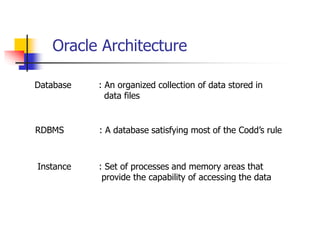
Database : An organized collection of data stored in
data files
Instance : Set of processes and memory areas that
provide the capability of accessing the data
RDBMS : A database satisfying most of the Codd’s rule
Oracle Architecture
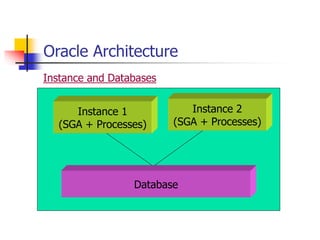
Database
Instance 1
(SGA + Processes)
Instance 2
(SGA + Processes)
Instance and Databases
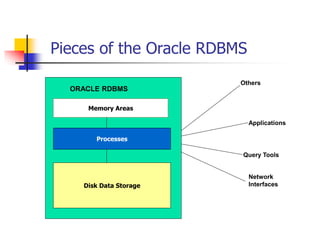
Pieces of the Oracle RDBMS
ORACLE RDBMS
Others
Applications
Query Tools
Network
Interfaces
Memory Areas
Processes
Disk Data Storage
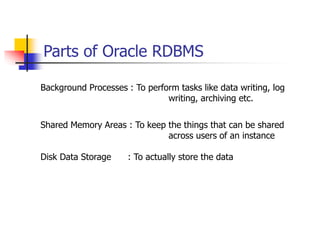
Parts of Oracle RDBMS
Background Processes : To perform tasks like data writing, log
writing, archiving etc.
Shared Memory Areas : To keep the things that can be shared
across users of an instance
Disk Data Storage : To actually store the data
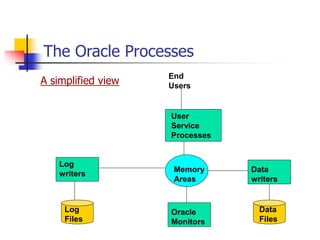
The Oracle Processes
A simplified view
End
Users
User
Service
Processes
Memory
Areas
Oracle
Monitors
Log
writers
Data
writers
Log
Files
Data
Files
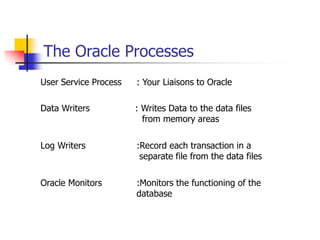
The Oracle Processes
User Service Process : Your Liaisons to Oracle
Data Writers : Writes Data to the data files
from memory areas
Log Writers :Record each transaction in a
separate file from the data files
Oracle Monitors :Monitors the functioning of the
database
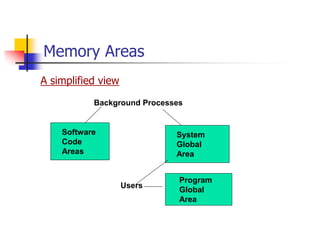
Memory Areas
A simplified view
Users
Background Processes
Software
Code
Areas
System
Global
Area
Program
Global
Area
Memory Areas
Software Code Areas : Home to the software containing all
the functionality from Oracle
database
System Global Area : Heart of an Oracle instance. Shared area
for all users in an instance
Program Global Area : Information used by a single user
process
Disk Storage
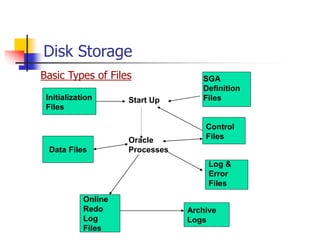
Basic Types of Files
Initialization
Files
SGA
Definition
Files
Control
Files
Log &
Error
Files
Data Files
Online
Redo
Log
Files
Archive
Logs
Start Up
Oracle
Processes
Disk Storage
Data Files:
• Records of data arranged in a database
• Other database objects like indexes, views, packages etc.
Disk Storage
Online redo Log Files
• Record of every transaction made to the database
• Used for recovery
Archive Log Files
• Background process writes the copy of the redo log file to
this file
• On a magnetic disk drive or a magnetic tape
Disk Storage
Initialization Files
• Equivalent of autoexec.bat and config.sys
• Inittest.ora and configtest.ora : Contains
• Values of tunable parameters
• Locations of control files and archive log files
• Locations for some of the log and error files
Disk Storage
Control Files
• Where the datafiles are
• Number of latest transaction to the database
• Binary format
Disk Storage
SGA Definition File
• Some details about creating the SGA on startup
Log and error Files
• All major database activities in log files
• When oracle monitoring processes detect a problem
they log it into a series of error files
Oracle Memory Structures
• Mostly real memory and not virtual memory
• Permission on the operating system to setup shared
memory areas is automatically done
• SGA, PGA, Software code areas
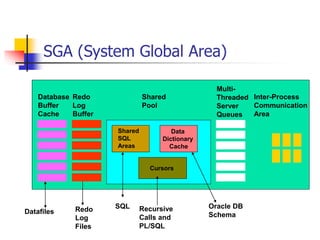
SGA (System Global Area)
Database
Buffer
Cache
Redo
Log
Buffer
Shared
Pool
Multi-
Threaded
Server
Queues
Inter-Process
Communication
Area
Shared
SQL
Areas
Data
Dictionary
Cache
Cursors
SQL Oracle DB
Schema
Recursive
Calls and
PL/SQL
Datafiles Redo
Log
Files
SGA
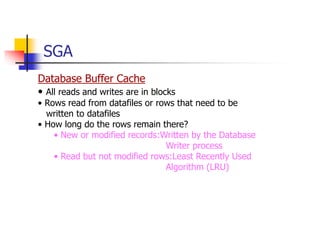
Database Buffer Cache
• All reads and writes are in blocks
• Rows read from datafiles or rows that need to be
written to datafiles
• How long do the rows remain there?
• New or modified records:Written by the Database
Writer process
• Read but not modified rows:Least Recently Used
Algorithm (LRU)
SGA
Redo Log Buffer
• Way-station between oracle-process that creates a
database update and redo log files
• First in First out approach
• Log writer writes these buffers to redo log files
SGA
Shared Pool
Shared SQL Areas (Library Cache):
• Parsed query for any uses to access
• Modified form of LRU
Data Dictionary Cache (Row Cache):
• Info about tables, there location, access privileges etc.
Cursors
• Areas in memory for further processing of retrieved data
• Implicit cursors, recursive calls (create table) and explicit
PL/SQL cursors
• PGA contains pointers to SGA for cursors
Program Global Area (PGA)
• Owned by a single-user process
• If no memory is available on your computer, you receive
an oracle error to that effect
• Allocated on the machine that acts as a database server
• Also known as Process Global Area
• Size depends on Oracle version running on the operating
system.
• Parameters affecting size :
• Open database links #
• Database files #
• Log Files #
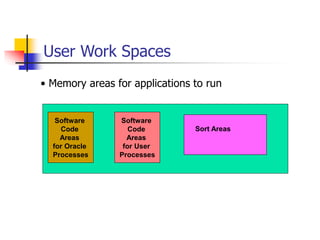
User Work Spaces
• Memory areas for applications to run
Software
Code
Areas
for Oracle
Processes
Software
Code
Areas
for User
Processes
Sort Areas
User Work Spaces
Software Code Area for Oracle Processes:
• Owned by Oracle User, protected by operating system,
sharable
• Desirable to have one copy running on multiple instances
Software Code Area for User Processes:
• For custom applications
• Area required is much smaller than SGA
• Inactive users can be swapped out to disk (virtual memory)
User Work Spaces
Sort Area
• For sorting
• Maximum size : SORT_AREA_SIZE
• Minimum size : SORT_AREA_RETAINED_SIZE (reduced to
this parameter after sorting is over)
• If data to sort does not fit in memory ,data is sorted in
chunks and chunks are sorted
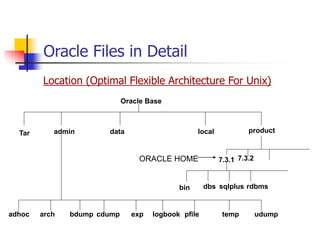
Oracle Files in Detail
Location (Optimal Flexible Architecture For Unix)
Tar admin data local product
Oracle Base
7.3.1 7.3.2
bin dbs sqlplus rdbms
ORACLE HOME
adhoc arch bdump cdump exp logbook pfile temp udump
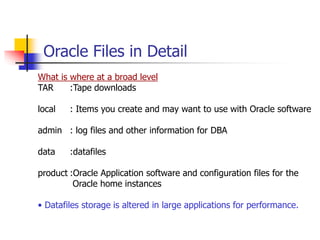
Oracle Files in Detail
What is where at a broad level
TAR :Tape downloads
local : Items you create and may want to use with Oracle software
admin : log files and other information for DBA
data :datafiles
product :Oracle Application software and configuration files for the
Oracle home instances
• Datafiles storage is altered in large applications for performance.
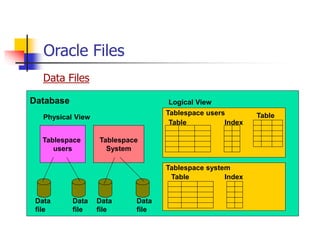
Oracle Files
Data Files
Tablespace
users
Tablespace
System
Database
Physical View
Logical View
Tablespace users
Tablespace system
Table Index
Table Index
Table
Data
file
Data
file
Data
file
Data
file
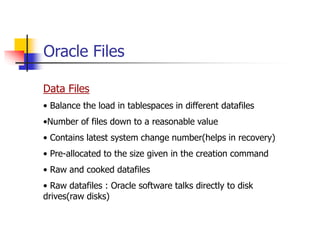
Oracle Files
Data Files
• Balance the load in tablespaces in different datafiles
•Number of files down to a reasonable value
• Contains latest system change number(helps in recovery)
• Pre-allocated to the size given in the creation command
• Raw and cooked datafiles
• Raw datafiles : Oracle software talks directly to disk
drives(raw disks)
Oracle Files
Data Files
• Having number of tablespaces across several disks improves
performance
• Should be on a separate disk drive from those of redo log files
• Read only tablespaces : No need to check SCN. Can be placed
on CD-ROMs
• Info about datafiles can be queried from sys.dba_data_files
Oracle Files
Redo Log Files
• Have a small number of large redo log files (not too fast
log switches)
• Used in a cyclical manner
• You can not overwrite the contents of a redo log file until
it has been completely copied to an archive log file in
archive log mode
• Groups of redo log files
• Info about these files can be queried from v$logfile
Oracle Files
Archiving to Log Files
• Disk or magnetic tape
• What u need to do ?
• Set LOG_ARCHIVE_START parameter to TRUE in
init.ora
• Tell it the format for the name of your archive log file
names :
LOG_ARCHIVE_DEST = /disk32/oracle/logs/alog
LOG_ARCHIVE_FORMAT = ‘%s.arc’
• Shutdown the instance and perform a full backup
Oracle Files
Archiving to Log Files
• What u need to do ?
• Bring up the instance with database not open
(startup nomount)
• alter database archivelog;
• Open the database .Verify that archive logs are
actually created.Force a redo log switch with the
command
alter system switch log file.
Oracle Files
Control Files
• Can not be edited
• Contains info about name of db, datafiles, redo log files,
and a record of when they were created
• Have at least two control files. They will be identical
• When one is corrupted, copy the other one and restart
the system
• Spread control files over separate disks
Oracle Files
Initialization Files
• init.ora (same for more than one instance)
ORACLE_HOME/dbs/ initmarscash.ora.
• config.ora (specific to an instance)
ORACLE_BASE/admin/instance_name/pfile/ configmarscash.ora
In init.ora set ifile=filename with path of config.ora
Oracle Files
Log Files
• alert_marscash.ora
• Contains :Major DBA activities that occur
Internal Oracle errors
Messages related to multi-threaded server
Errors related to snapshots refresh
Oracle Files
Trace files
• Parameter in initialization files :BACKGROUND_DUMP_DEST
• Typically ORACLE_BASE/admin/instance_name/bdump
• Produced by Oracle background processes
• Contains : Date and time of the problem
Process with which the problem occurred
Numbered Oracle error messages.
Clean up your log and trace files and keep a backup
Oracle Processes
Database writer processes (DBWR)
• Can have more than one DBWR (DB_WRITERS in init.ora)
• Writes dirty blocks to disks
• One of the enforcers of LRU. Chooses records that are inactive.
• Called into action when :
•No of dirt buffers > ½ * DB_BLOCK_WRITE_BATCH
• A server process does not find a free buffer after scanning
DB_BLOCK_MAX_SCAN_CNT buffers
• DBWR wakes up routinely after 3 seconds
• When a checkpoint occurs
Oracle Processes
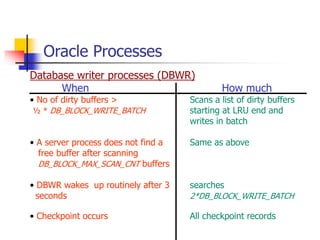
Database writer processes (DBWR)
When How much
• No of dirty buffers > Scans a list of dirty buffers
½ * DB_BLOCK_WRITE_BATCH starting at LRU end and
writes in batch
• A server process does not find a Same as above
free buffer after scanning
DB_BLOCK_MAX_SCAN_CNT buffers
• DBWR wakes up routinely after 3 searches
seconds 2*DB_BLOCK_WRITE_BATCH
• Checkpoint occurs All checkpoint records
Oracle Processes
Checkpoint (CKPT)
• Updates the datafile headers in the datafiles and control
files to record the SCN
• Occurs when :
•An online redo log file fills
• LOG_CHECKPOINT_INTERVAL in init.ora
• CHECKPOINT_PROCESS = TRUE in init.ora
• Only if high transaction volume delaying log switches
• Also done by the Log Writer(LGWR) in its free time
Oracle Processes
Log Writer (LGWR)
• Writes from redo log buffer to redo log files on first in first
out basis in a cyclical manner
• When activated
• Commit from a user process
• Every 3 seconds
• Redo log buffer is 1/3rd full
• When the DBWR writes to datafiles, LGWR writes the
corresponding records to redo log files
•Updates the datafile headers in the DB buffer and control
files to record the SCN
Oracle Processes
Archiver (ARCH)
• Writes copy of a redo log file to archive log file
• When an online redo log file is full
• May cause contentions
Recoverer (RECO)
• Problems with distributed transaction
• Waits until connection is re-established ,goes over doubtful
transactions and resolves any updates on the remote system
Oracle Processes
Lock Writer(LCKn)
• For parallel server (Multiple instances on different nodes
sharing the same physical database)
• LCK0 to LCK9 depending on GC_LCK_PROCS in init.ora
• They talk to one another and ensure that records are
properly locked
Dedicated Server Process
• Interface between user processes and memory areas and
disks
• All user get this process and it remains until they
disconnect
Oracle Processes
System Monitor(SMON)
• Cleanup after the Oracle instance
• Instance recovery at start up
• Cleanup instances periodically
• Coalesces free space
• Called by other processes to do some free up say temporary
segment
Oracle Processes
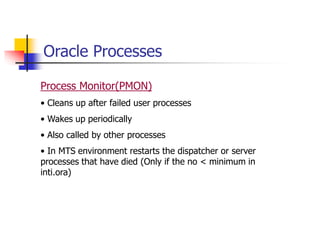
Process Monitor(PMON)
• Cleans up after failed user processes
• Wakes up periodically
• Also called by other processes
• In MTS environment restarts the dispatcher or server
processes that have died (Only if the no < minimum in
inti.ora)
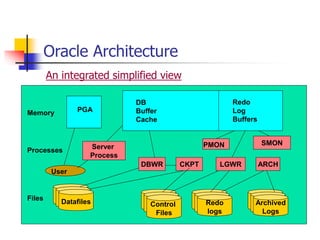
Oracle Architecture
An integrated simplified view
DB
Buffer
Cache
Server
Process
DBWR CKPT LGWR ARCH
SMON
Datafiles Control
Files
Redo
logs
Archived
Logs
PMON
PGA
Redo
Log
Buffers
Memory
Processes
Files
User
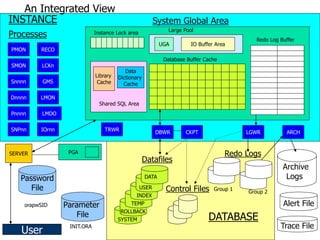
An Integrated View
Library
Cache
Data
Dictionary
Cache
UGA IO Buffer Area
Shared SQL Area
Database Buffer Cache
Large Pool
Redo Log Buffer
System Global Area
Instance Lock area
PMON
SMON
Snnnn
Dnnnn
Pnnnn
SNPnn
RECO
LCKn
GMS
LMON
LMDO
IOrnn TRWR
SYSTEM
ROLLBACK
TEMP
INDEX
USER
DATA
Datafiles
Control Files
Archive
Logs
Alert File
Trace File
Redo Logs
Group 1
Group 2
DATABASE
INSTANCE
SERVER
Processes
PGA
Parameter
File
Password
File
User
DBWR CKPT LGWR ARCH
INIT.ORA
orapwSID
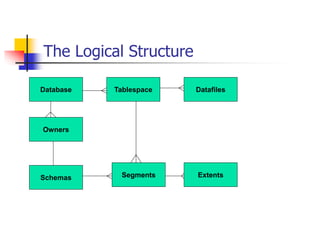
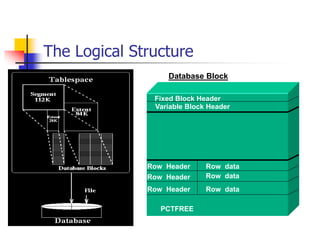
The Logical Structure
Database Tablespace Datafiles
Owners
Schemas Segments Extents
The Logical Structure
Fixed Block Header
Variable Block Header
Row Header Row data
Row Header Row data
Row Header Row data
PCTFREE
Database Block
Database Block
Row Data
• Table or index data
• Rows can span blocks
Row Header
• Row Number and column Names
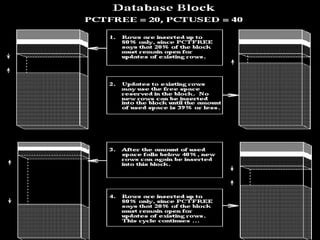
Free Space
• To insert new rows and for updates to rows
• PCTFREE and PCTUSED
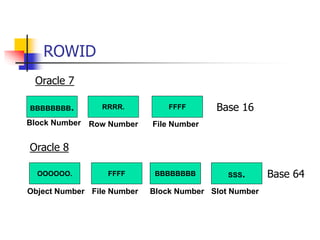
ROWID
Oracle 7
BBBBBBBB. RRRR. FFFF
Block Number Row Number File Number
Oracle 8
Base 16
BBBBBBBB
OOOOOO. FFFF
Block Number
Object Number File Number
Base 64
SSS.
Slot Number
SQL Execution
1. Parse - Compile SQL statement in shared pool and check
user privileges
2. Execute - Parsed code is executed
3. Fetch - Data retrieved and returned to the user
SQL Execution in detail
1) OPEN SQL Statement
• Obtain cursor(memory address) in library cache of
shared pool
• Obtain private sql area in PGA where statement
return values will be stored
2) PARSE SQL Statement
• Check syntax
• Check objects referred and permissions
• Create execution plan (also called a parse tree) and
put into the shared pool
SQL Execution in detail
3) Create BIND variables (only for select)
4) EXECUTE the statement.
• Applies parse tree to data buffers
• Performs logical/physical reads
• Performs constraint checking
• Changes data if needed.
5) FETCH (Only for select)
Returns dataset into BIND variables
SQL Execution in detail
Select
• If Blocks is in the memory, perform logical read.
• If not in memory, perform physical read
• If index exist server process reads index blocks, actual data
blocks are read into database buffer using rowid
• If no index, full table scan performed, every block are read
into buffer cache until required row found
SQL Execution in detail
Update
• Acquire data blocks into the db buffer cache
• Acquire rollback blocks into the database buffer cache
• Place exclusive row locks on rows that are about to change .
• Store record in the redo log buffer
• Save rollback data into a rollback segment block buffer
• Applies changes to the database block buffer
SQL Execution in detail
Fast Commit
1. The server puts the commit record and SCN into the redo
log buffer.
2. LGWR does contiguous write of all redo log buffer data up to
and including the commit record to the redo log file.
3. User is notified of commit completion.
4. Server process indicates to Oracle that the transaction is
complete and that locks can be released.
References
 Oracle DBA Survival Guide - Greene
 Oracle DBA Handbook – Kevin Loney
 http://metalink.oracle.com

Oracle Architecture software overview ppts

  • 1.
  • 2.
    Oracle Architecture Database :An organized collection of data stored in data files Instance : Set of processes and memory areas that provide the capability of accessing the data RDBMS : A database satisfying most of the Codd’s rule
  • 3.
    Oracle Architecture Database Instance 1 (SGA+ Processes) Instance 2 (SGA + Processes) Instance and Databases
  • 4.
    Pieces of theOracle RDBMS ORACLE RDBMS Others Applications Query Tools Network Interfaces Memory Areas Processes Disk Data Storage
  • 5.
    Parts of OracleRDBMS Background Processes : To perform tasks like data writing, log writing, archiving etc. Shared Memory Areas : To keep the things that can be shared across users of an instance Disk Data Storage : To actually store the data
  • 6.
    The Oracle Processes Asimplified view End Users User Service Processes Memory Areas Oracle Monitors Log writers Data writers Log Files Data Files
  • 7.
    The Oracle Processes UserService Process : Your Liaisons to Oracle Data Writers : Writes Data to the data files from memory areas Log Writers :Record each transaction in a separate file from the data files Oracle Monitors :Monitors the functioning of the database
  • 8.
    Memory Areas A simplifiedview Users Background Processes Software Code Areas System Global Area Program Global Area
  • 9.
    Memory Areas Software CodeAreas : Home to the software containing all the functionality from Oracle database System Global Area : Heart of an Oracle instance. Shared area for all users in an instance Program Global Area : Information used by a single user process
  • 10.
    Disk Storage Basic Typesof Files Initialization Files SGA Definition Files Control Files Log & Error Files Data Files Online Redo Log Files Archive Logs Start Up Oracle Processes
  • 11.
    Disk Storage Data Files: •Records of data arranged in a database • Other database objects like indexes, views, packages etc.
  • 12.
    Disk Storage Online redoLog Files • Record of every transaction made to the database • Used for recovery Archive Log Files • Background process writes the copy of the redo log file to this file • On a magnetic disk drive or a magnetic tape
  • 13.
    Disk Storage Initialization Files •Equivalent of autoexec.bat and config.sys • Inittest.ora and configtest.ora : Contains • Values of tunable parameters • Locations of control files and archive log files • Locations for some of the log and error files
  • 14.
    Disk Storage Control Files •Where the datafiles are • Number of latest transaction to the database • Binary format
  • 15.
    Disk Storage SGA DefinitionFile • Some details about creating the SGA on startup Log and error Files • All major database activities in log files • When oracle monitoring processes detect a problem they log it into a series of error files
  • 16.
    Oracle Memory Structures •Mostly real memory and not virtual memory • Permission on the operating system to setup shared memory areas is automatically done • SGA, PGA, Software code areas
  • 17.
    SGA (System GlobalArea) Database Buffer Cache Redo Log Buffer Shared Pool Multi- Threaded Server Queues Inter-Process Communication Area Shared SQL Areas Data Dictionary Cache Cursors SQL Oracle DB Schema Recursive Calls and PL/SQL Datafiles Redo Log Files
  • 18.
    SGA Database Buffer Cache •All reads and writes are in blocks • Rows read from datafiles or rows that need to be written to datafiles • How long do the rows remain there? • New or modified records:Written by the Database Writer process • Read but not modified rows:Least Recently Used Algorithm (LRU)
  • 19.
    SGA Redo Log Buffer •Way-station between oracle-process that creates a database update and redo log files • First in First out approach • Log writer writes these buffers to redo log files
  • 20.
    SGA Shared Pool Shared SQLAreas (Library Cache): • Parsed query for any uses to access • Modified form of LRU Data Dictionary Cache (Row Cache): • Info about tables, there location, access privileges etc. Cursors • Areas in memory for further processing of retrieved data • Implicit cursors, recursive calls (create table) and explicit PL/SQL cursors • PGA contains pointers to SGA for cursors
  • 21.
    Program Global Area(PGA) • Owned by a single-user process • If no memory is available on your computer, you receive an oracle error to that effect • Allocated on the machine that acts as a database server • Also known as Process Global Area • Size depends on Oracle version running on the operating system. • Parameters affecting size : • Open database links # • Database files # • Log Files #
  • 22.
    User Work Spaces •Memory areas for applications to run Software Code Areas for Oracle Processes Software Code Areas for User Processes Sort Areas
  • 23.
    User Work Spaces SoftwareCode Area for Oracle Processes: • Owned by Oracle User, protected by operating system, sharable • Desirable to have one copy running on multiple instances Software Code Area for User Processes: • For custom applications • Area required is much smaller than SGA • Inactive users can be swapped out to disk (virtual memory)
  • 24.
    User Work Spaces SortArea • For sorting • Maximum size : SORT_AREA_SIZE • Minimum size : SORT_AREA_RETAINED_SIZE (reduced to this parameter after sorting is over) • If data to sort does not fit in memory ,data is sorted in chunks and chunks are sorted
  • 25.
    Oracle Files inDetail Location (Optimal Flexible Architecture For Unix) Tar admin data local product Oracle Base 7.3.1 7.3.2 bin dbs sqlplus rdbms ORACLE HOME adhoc arch bdump cdump exp logbook pfile temp udump
  • 26.
    Oracle Files inDetail What is where at a broad level TAR :Tape downloads local : Items you create and may want to use with Oracle software admin : log files and other information for DBA data :datafiles product :Oracle Application software and configuration files for the Oracle home instances • Datafiles storage is altered in large applications for performance.
  • 27.
    Oracle Files Data Files Tablespace users Tablespace System Database PhysicalView Logical View Tablespace users Tablespace system Table Index Table Index Table Data file Data file Data file Data file
  • 28.
    Oracle Files Data Files •Balance the load in tablespaces in different datafiles •Number of files down to a reasonable value • Contains latest system change number(helps in recovery) • Pre-allocated to the size given in the creation command • Raw and cooked datafiles • Raw datafiles : Oracle software talks directly to disk drives(raw disks)
  • 29.
    Oracle Files Data Files •Having number of tablespaces across several disks improves performance • Should be on a separate disk drive from those of redo log files • Read only tablespaces : No need to check SCN. Can be placed on CD-ROMs • Info about datafiles can be queried from sys.dba_data_files
  • 30.
    Oracle Files Redo LogFiles • Have a small number of large redo log files (not too fast log switches) • Used in a cyclical manner • You can not overwrite the contents of a redo log file until it has been completely copied to an archive log file in archive log mode • Groups of redo log files • Info about these files can be queried from v$logfile
  • 31.
    Oracle Files Archiving toLog Files • Disk or magnetic tape • What u need to do ? • Set LOG_ARCHIVE_START parameter to TRUE in init.ora • Tell it the format for the name of your archive log file names : LOG_ARCHIVE_DEST = /disk32/oracle/logs/alog LOG_ARCHIVE_FORMAT = ‘%s.arc’ • Shutdown the instance and perform a full backup
  • 32.
    Oracle Files Archiving toLog Files • What u need to do ? • Bring up the instance with database not open (startup nomount) • alter database archivelog; • Open the database .Verify that archive logs are actually created.Force a redo log switch with the command alter system switch log file.
  • 33.
    Oracle Files Control Files •Can not be edited • Contains info about name of db, datafiles, redo log files, and a record of when they were created • Have at least two control files. They will be identical • When one is corrupted, copy the other one and restart the system • Spread control files over separate disks
  • 34.
    Oracle Files Initialization Files •init.ora (same for more than one instance) ORACLE_HOME/dbs/ initmarscash.ora. • config.ora (specific to an instance) ORACLE_BASE/admin/instance_name/pfile/ configmarscash.ora In init.ora set ifile=filename with path of config.ora
  • 35.
    Oracle Files Log Files •alert_marscash.ora • Contains :Major DBA activities that occur Internal Oracle errors Messages related to multi-threaded server Errors related to snapshots refresh
  • 36.
    Oracle Files Trace files •Parameter in initialization files :BACKGROUND_DUMP_DEST • Typically ORACLE_BASE/admin/instance_name/bdump • Produced by Oracle background processes • Contains : Date and time of the problem Process with which the problem occurred Numbered Oracle error messages. Clean up your log and trace files and keep a backup
  • 37.
    Oracle Processes Database writerprocesses (DBWR) • Can have more than one DBWR (DB_WRITERS in init.ora) • Writes dirty blocks to disks • One of the enforcers of LRU. Chooses records that are inactive. • Called into action when : •No of dirt buffers > ½ * DB_BLOCK_WRITE_BATCH • A server process does not find a free buffer after scanning DB_BLOCK_MAX_SCAN_CNT buffers • DBWR wakes up routinely after 3 seconds • When a checkpoint occurs
  • 38.
    Oracle Processes Database writerprocesses (DBWR) When How much • No of dirty buffers > Scans a list of dirty buffers ½ * DB_BLOCK_WRITE_BATCH starting at LRU end and writes in batch • A server process does not find a Same as above free buffer after scanning DB_BLOCK_MAX_SCAN_CNT buffers • DBWR wakes up routinely after 3 searches seconds 2*DB_BLOCK_WRITE_BATCH • Checkpoint occurs All checkpoint records
  • 39.
    Oracle Processes Checkpoint (CKPT) •Updates the datafile headers in the datafiles and control files to record the SCN • Occurs when : •An online redo log file fills • LOG_CHECKPOINT_INTERVAL in init.ora • CHECKPOINT_PROCESS = TRUE in init.ora • Only if high transaction volume delaying log switches • Also done by the Log Writer(LGWR) in its free time
  • 40.
    Oracle Processes Log Writer(LGWR) • Writes from redo log buffer to redo log files on first in first out basis in a cyclical manner • When activated • Commit from a user process • Every 3 seconds • Redo log buffer is 1/3rd full • When the DBWR writes to datafiles, LGWR writes the corresponding records to redo log files •Updates the datafile headers in the DB buffer and control files to record the SCN
  • 41.
    Oracle Processes Archiver (ARCH) •Writes copy of a redo log file to archive log file • When an online redo log file is full • May cause contentions Recoverer (RECO) • Problems with distributed transaction • Waits until connection is re-established ,goes over doubtful transactions and resolves any updates on the remote system
  • 42.
    Oracle Processes Lock Writer(LCKn) •For parallel server (Multiple instances on different nodes sharing the same physical database) • LCK0 to LCK9 depending on GC_LCK_PROCS in init.ora • They talk to one another and ensure that records are properly locked Dedicated Server Process • Interface between user processes and memory areas and disks • All user get this process and it remains until they disconnect
  • 43.
    Oracle Processes System Monitor(SMON) •Cleanup after the Oracle instance • Instance recovery at start up • Cleanup instances periodically • Coalesces free space • Called by other processes to do some free up say temporary segment
  • 44.
    Oracle Processes Process Monitor(PMON) •Cleans up after failed user processes • Wakes up periodically • Also called by other processes • In MTS environment restarts the dispatcher or server processes that have died (Only if the no < minimum in inti.ora)
  • 45.
    Oracle Architecture An integratedsimplified view DB Buffer Cache Server Process DBWR CKPT LGWR ARCH SMON Datafiles Control Files Redo logs Archived Logs PMON PGA Redo Log Buffers Memory Processes Files User
  • 46.
    An Integrated View Library Cache Data Dictionary Cache UGAIO Buffer Area Shared SQL Area Database Buffer Cache Large Pool Redo Log Buffer System Global Area Instance Lock area PMON SMON Snnnn Dnnnn Pnnnn SNPnn RECO LCKn GMS LMON LMDO IOrnn TRWR SYSTEM ROLLBACK TEMP INDEX USER DATA Datafiles Control Files Archive Logs Alert File Trace File Redo Logs Group 1 Group 2 DATABASE INSTANCE SERVER Processes PGA Parameter File Password File User DBWR CKPT LGWR ARCH INIT.ORA orapwSID
  • 47.
    The Logical Structure DatabaseTablespace Datafiles Owners Schemas Segments Extents
  • 48.
    The Logical Structure FixedBlock Header Variable Block Header Row Header Row data Row Header Row data Row Header Row data PCTFREE Database Block
  • 49.
    Database Block Row Data •Table or index data • Rows can span blocks Row Header • Row Number and column Names Free Space • To insert new rows and for updates to rows • PCTFREE and PCTUSED
  • 51.
    ROWID Oracle 7 BBBBBBBB. RRRR.FFFF Block Number Row Number File Number Oracle 8 Base 16 BBBBBBBB OOOOOO. FFFF Block Number Object Number File Number Base 64 SSS. Slot Number
  • 52.
    SQL Execution 1. Parse- Compile SQL statement in shared pool and check user privileges 2. Execute - Parsed code is executed 3. Fetch - Data retrieved and returned to the user
  • 53.
    SQL Execution indetail 1) OPEN SQL Statement • Obtain cursor(memory address) in library cache of shared pool • Obtain private sql area in PGA where statement return values will be stored 2) PARSE SQL Statement • Check syntax • Check objects referred and permissions • Create execution plan (also called a parse tree) and put into the shared pool
  • 54.
    SQL Execution indetail 3) Create BIND variables (only for select) 4) EXECUTE the statement. • Applies parse tree to data buffers • Performs logical/physical reads • Performs constraint checking • Changes data if needed. 5) FETCH (Only for select) Returns dataset into BIND variables
  • 55.
    SQL Execution indetail Select • If Blocks is in the memory, perform logical read. • If not in memory, perform physical read • If index exist server process reads index blocks, actual data blocks are read into database buffer using rowid • If no index, full table scan performed, every block are read into buffer cache until required row found
  • 56.
    SQL Execution indetail Update • Acquire data blocks into the db buffer cache • Acquire rollback blocks into the database buffer cache • Place exclusive row locks on rows that are about to change . • Store record in the redo log buffer • Save rollback data into a rollback segment block buffer • Applies changes to the database block buffer
  • 57.
    SQL Execution indetail Fast Commit 1. The server puts the commit record and SCN into the redo log buffer. 2. LGWR does contiguous write of all redo log buffer data up to and including the commit record to the redo log file. 3. User is notified of commit completion. 4. Server process indicates to Oracle that the transaction is complete and that locks can be released.
  • 58.
    References  Oracle DBASurvival Guide - Greene  Oracle DBA Handbook – Kevin Loney  http://metalink.oracle.com