Operating Systems - UNIT I
Concepts and Design Approaches
By
Dr. Y. Kiran Kumar M.C.A, Ph.D.
UNIT - I Topics of Operating Systems
• Computer System Overview
• Concept of an Operating System
• Functions of Operating System
• Types of Operating Systems
• Computer-System Organization
• General System Architecture
• System Components
• Operating System Services
• System Calls
• System Programs
• Approaches to OS Design and Implementation
– Microkernel Approach
– Layered Approach
– Monolithic Kernel Approach
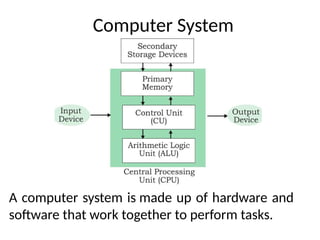
Computer System
A computer system is made up of hardware and
software that work together to perform tasks.
Computer System
• A computer system is a set of integrated devices
that input, output, process, and store data and
information.
• Computer systems are currently built around at
least one digital processing device.
• There are five main hardware components in a
computer system: Input, Processing, Storage,
Output and Communication devices.
Hardware
Central processing unit (CPU): The main hardware
component that controls the computer
Memory: The working place where information is
temporarily stored
Input/output devices: Allow the computer to receive data
and send information
Storage devices: Store programs and data on a long-term
basis
Computer ports: Allow the computer to connect to other
devices
Software
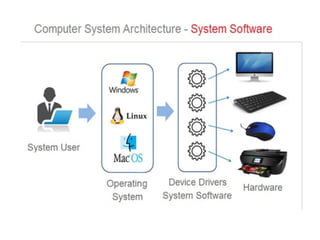
Operating system: Manages memory, files,
processes, input, and output
Application software: Performs tasks like word
processing.
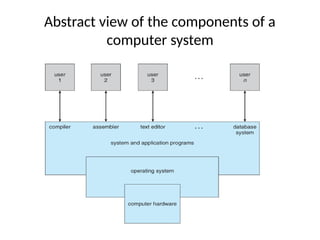
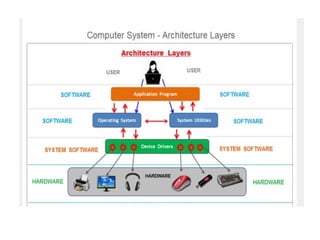
Abstract view of the components of a
computer system
Components of a computer system
• The diagram illustrates the layered structure of a
computer system, showcasing the interaction between
users, system and application programs, the operating
system, and computer hardware.
Explanation of the Diagram:
Users (Top Layer):
• Multiple users (user 1, user 2, user 3, ... user n) interact
with the system.
• Each user requires different system functionalities, such as
compilers, assemblers, text editors, or database systems.
Users (Top Layer):
• This layer consists of various programs that users interact
with, including:
Compiler: Converts high-level programming code into
machine code.
Assembler: Translates assembly language into machine
code.
Text Editor: Allows users to write and edit code or
documents.
Database System: Manages and retrieves structured data.
These programs act as intermediaries between the user and
the operating system.
Operating System (Middle Layer)
• Manages hardware resources and provides
services to system/application programs.
• Facilitates task scheduling, memory
management, file management, and security.
Computer Hardware (Bottom Layer)
• The foundation of the system, including the processor, memory,
storage, and input/output devices.
• The operating system directly interacts with the hardware to execute
instructions and manage resources.
Conclusion:
• This diagram represents the hierarchical structure of a computer
system, emphasizing how users interact with application programs,
which in turn rely on the operating system to manage hardware
resources. It highlights the layered abstraction that enables efficient
computing.
Computer System Overview
• Components:
- Hardware (CPU, memory, I/O devices)
- Operating System (manages resources)
- Application Software (user programs)
- Users (people, software, other systems)
Introduction to Operating Systems
Definition: An OS manages hardware and software resources.
Functions: Process management, memory management, file
management, security, user interface.
Importance: Ensures efficient resource utilization.
An Operating System (OS) is a system software that acts as an
interface between the computer hardware and the users. It
manages hardware resources, provides essential services to
application programs, and enables users to interact with the
system efficiently.
Concept of an Operating System
• Acts as an intermediary between users and
hardware.
• Provides an environment for executing
programs.
• Ensures security, stability, and multitasking.
• Examples: Windows, Linux, macOS, Android,
iOS.
What is an Operating System Used for?
As a platform for Application programs: It provides a
platform, on top of which, other programs, called
application programs can run.
Managing Input-Output unit: It also allows the
computer to manage its own resources such as
memory, monitor, keyboard, printer, etc.
Management of these resources is required for
effective and fair utilization.
Multitasking: It manages memory and allows
multiple programs to run in their own space and even
communicate with each other through shared
memory.
Operating System Used for?
Manages memory and Files: It manages the
computer’s main memory and second storage.
Additionally, it allows and deallocates memory
to all tasks and applications.
Provides Security: It helps to maintain the
system and applications safe through the
authorization process. Thus, the OS provides
security to the system.
Functions of the Operating System
Process Management: The operating system is
responsible for starting, stopping, and managing
processes and programs. It also controls the
scheduling of processes and allocates resources to
them.
Memory Management: The operating system
manages the computer’s primary memory and
provides mechanisms for optimizing memory usage.
File Management: The operating system is
responsible for organizing and managing the file
system, including the creation, deletion, and
manipulation of files and directories.
Functions of the Operating System (Cont..)
Security: The operating system provides a secure
environment for the user, applications, and data
by implementing security policies and
mechanisms such as access controls and
encryption.
User Interface: The operating system provides a
user interface that enables users to interact with
the computer system. This can be a
Graphical User Interface (GUI), a Command-Line I
nterface (CLI)
, or a combination of both.
Types of Operating Systems
1. Batch OS: Executes jobs in batches.
2. Time-Sharing OS: Allocates CPU time to
multiple users.
3. Real-Time OS: Provides immediate responses
(e.g., embedded systems).
4. Distributed OS: Manages networked systems.
5. Network OS: Controls network operations.
6. Mobile OS: Designed for smartphones.
1. Batch Operating System (Batch OS)
Definition:
A Batch Operating System executes jobs in batches without user
interaction during execution. Jobs are collected, grouped, and
processed sequentially.
How It Works:
Users submit jobs to an operator.
The operator groups similar jobs into a batch.
The batch is processed sequentially without interruption.
Advantages:
✅ Efficient for large volumes of repetitive tasks.
✅ Reduces CPU idle time by automatically executing jobs.
✅ No user intervention required once the job starts.
Batch OS(Cont..)
Disadvantages:
❌ No real-time interaction with users.
❌ Debugging is difficult since errors are detected only after
execution.
❌ Processing time can be long if multiple jobs are queued.
Examples:
Payroll systems in large companies.
Bank transactions processing.
Data processing for scientific applications.
2. Time-Sharing Operating System (Multi-User OS)
Definition:
A Time-Sharing Operating System allows multiple users to share CPU
time. The OS rapidly switches between tasks, giving the illusion of
simultaneous execution.
How It Works:
CPU time is divided into small time slots (quantum).
The OS switches between users/processes frequently.
If a process does not complete in its allocated time, it is paused and
resumed later.
Advantages:
✅ Allows multiple users to work on a system simultaneously.
✅ Provides fast response time for each user.
✅ Efficient CPU utilization.
Time-Sharing Operating System(Cont..)
Disadvantages:
❌ Complex scheduling algorithms needed.
❌ High CPU overhead due to frequent switching.
❌ Security risks as multiple users access the system.
Examples:
Unix and Linux multi-user environments.
Cloud computing services.
Online banking and ticket reservation systems.
3. Real-Time Operating System (RTOS)
Definition:
A Real-Time Operating System provides immediate responses and guarantees
task completion within a fixed time. Used in time-sensitive applications.
Types:
Hard Real-Time OS – Strict time constraints (e.g., medical devices, space
systems).
Soft Real-Time OS – Slight delays acceptable (e.g., multimedia streaming).
How It Works:
Uses priority scheduling for task execution.
Handles multiple tasks with strict timing constraints.
Ensures low latency for critical operations.
RTOS (Cont..)
Advantages:
✅ High reliability and predictability.
✅ Minimal delays, making it suitable for embedded systems.
✅ Ensures smooth and uninterrupted operation.
Disadvantages:
❌ Complex and expensive to develop.
❌ Limited multitasking capabilities compared to general OS.
Examples:
Embedded systems in aircraft control and automotive systems.
Medical devices like pacemakers.
Industrial automation and robotics.
4. Distributed Operating System
Definition:
A Distributed Operating System manages multiple
interconnected computers, appearing as a single system to
users.
How It Works:
The OS runs on a network of computers.
Tasks are distributed among multiple machines.
Users access shared resources as if they are on a single system.
Advantages:
✅ Improved scalability and fault tolerance.
✅ Efficient resource sharing among multiple systems.
✅ Faster processing as tasks are distributed.
Distributed Operating System (Cont..)
Disadvantages:
❌ Complex networking and synchronization required.
❌ Security risks due to multiple connected systems.
Examples:
Google's distributed computing systems.
Cloud platforms like AWS, Microsoft Azure.
Cluster computing in research institutions.
5. Network Operating System (NOS)
Definition:
A Network Operating System is designed to manage and coordinate
networked devices and resources.
How It Works:
Provides file sharing, printer sharing, and remote access.
Uses client-server or peer-to-peer models.
Ensures data security and user authentication.
Advantages:
✅ Centralized control over network resources.
✅ Allows multiple users to communicate and share files.
✅ Enhanced security and administration.
NOS (Cont..)
Disadvantages:
❌ Requires dedicated network administrators.
❌ High maintenance cost.
❌ Dependent on network stability.
Examples:
Windows Server OS.
Linux-based NOS (Red Hat, Ubuntu Server).
Novell NetWare.
6. Mobile Operating System
Definition:
A Mobile OS is specifically designed for smartphones, tablets, and
handheld devices.
How It Works:
Optimized for touchscreen interfaces and low-power hardware.
Manages mobile applications and background processes.
Supports wireless communication (Wi-Fi, Bluetooth, GPS).
Advantages:
✅ User-friendly interface for mobile devices.
✅ Optimized for battery efficiency.
✅ Supports app development and third-party integrations.
Mobile Operating System (Cont..)
Disadvantages:
❌ Limited multitasking compared to desktop OS.
❌ Security vulnerabilities due to app permissions.
❌ Hardware-specific OS versions (e.g., iOS runs only on Apple
devices).
Examples:
Android OS (by Google).
iOS (by Apple).
Windows Mobile OS (discontinued).
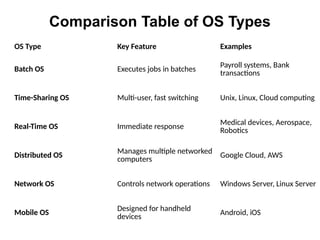
Comparison Table of OS Types
OS Type Key Feature Examples
Batch OS Executes jobs in batches
Payroll systems, Bank
transactions
Time-Sharing OS Multi-user, fast switching Unix, Linux, Cloud computing
Real-Time OS Immediate response
Medical devices, Aerospace,
Robotics
Distributed OS
Manages multiple networked
computers
Google Cloud, AWS
Network OS Controls network operations Windows Server, Linux Server
Mobile OS
Designed for handheld
devices
Android, iOS
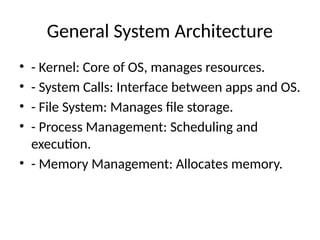
General System Architecture
• - Kernel: Core of OS, manages resources.
• - System Calls: Interface between apps and OS.
• - File System: Manages file storage.
• - Process Management: Scheduling and
execution.
• - Memory Management: Allocates memory.
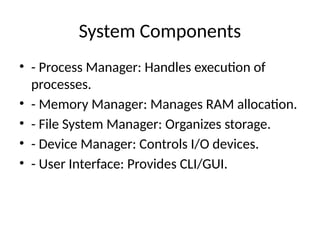
System Components
• - Process Manager: Handles execution of
processes.
• - Memory Manager: Manages RAM allocation.
• - File System Manager: Organizes storage.
• - Device Manager: Controls I/O devices.
• - User Interface: Provides CLI/GUI.
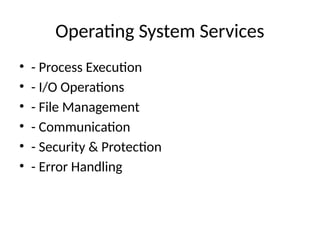
Operating System Services
• - Process Execution
• - I/O Operations
• - File Management
• - Communication
• - Security & Protection
• - Error Handling
System Calls
• - Interface between applications and OS.
• - Types:
• - Process Control: Create, execute, terminate.
• - File Management: Open, read, write, close.
• - Device Management: Request and release
devices.
• - Communication: Send/receive messages.
System Programs
• - File management utilities (copy, move, delete
files).
• - Editors (Notepad, Vim).
• - Compilers (C, Java, Python).
• - System Monitoring Tools (Task Manager, top
command).
Approaches to OS Design
• 1. Microkernel: Essential services only.
• 2. Layered Approach: Divided into layers.
• 3. Monolithic Kernel: OS runs as a single
process.
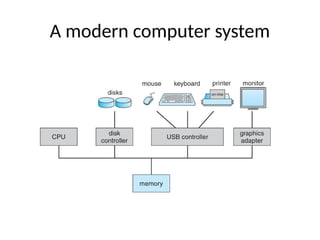
A modern computer system
A modern computer system (Cont..)
• A modern general purpose computer system consists
of one or more CPUs and a number of device
controllers connected through a common bus that
provides access to shared memory
• Each device controller is in charge of a specific type
of device
• For example, disk drives, audio devices, or video
displays).
Summary
• - OS manages hardware and software.
• - Different OS types serve different needs.
• - OS architecture affects performance.
• - System calls enable user interaction.
• - Design approaches include microkernel,
layered, and monolithic.
Thank You!
• Questions & Discussion.

Operating_Systems_UNIT_Concept of an Operating System1.pptx

  • 1.
    Operating Systems -UNIT I Concepts and Design Approaches By Dr. Y. Kiran Kumar M.C.A, Ph.D.
  • 2.
    UNIT - ITopics of Operating Systems • Computer System Overview • Concept of an Operating System • Functions of Operating System • Types of Operating Systems • Computer-System Organization • General System Architecture • System Components • Operating System Services • System Calls • System Programs • Approaches to OS Design and Implementation – Microkernel Approach – Layered Approach – Monolithic Kernel Approach
  • 3.
    Computer System A computersystem is made up of hardware and software that work together to perform tasks.
  • 4.
    Computer System • Acomputer system is a set of integrated devices that input, output, process, and store data and information. • Computer systems are currently built around at least one digital processing device. • There are five main hardware components in a computer system: Input, Processing, Storage, Output and Communication devices.
  • 5.
    Hardware Central processing unit(CPU): The main hardware component that controls the computer Memory: The working place where information is temporarily stored Input/output devices: Allow the computer to receive data and send information Storage devices: Store programs and data on a long-term basis Computer ports: Allow the computer to connect to other devices
  • 6.
    Software Operating system: Managesmemory, files, processes, input, and output Application software: Performs tasks like word processing.
  • 7.
    Abstract view ofthe components of a computer system
  • 8.
    Components of acomputer system • The diagram illustrates the layered structure of a computer system, showcasing the interaction between users, system and application programs, the operating system, and computer hardware. Explanation of the Diagram: Users (Top Layer): • Multiple users (user 1, user 2, user 3, ... user n) interact with the system. • Each user requires different system functionalities, such as compilers, assemblers, text editors, or database systems.
  • 9.
    Users (Top Layer): •This layer consists of various programs that users interact with, including: Compiler: Converts high-level programming code into machine code. Assembler: Translates assembly language into machine code. Text Editor: Allows users to write and edit code or documents. Database System: Manages and retrieves structured data. These programs act as intermediaries between the user and the operating system.
  • 10.
    Operating System (MiddleLayer) • Manages hardware resources and provides services to system/application programs. • Facilitates task scheduling, memory management, file management, and security.
  • 11.
    Computer Hardware (BottomLayer) • The foundation of the system, including the processor, memory, storage, and input/output devices. • The operating system directly interacts with the hardware to execute instructions and manage resources. Conclusion: • This diagram represents the hierarchical structure of a computer system, emphasizing how users interact with application programs, which in turn rely on the operating system to manage hardware resources. It highlights the layered abstraction that enables efficient computing.
  • 13.
    Computer System Overview •Components: - Hardware (CPU, memory, I/O devices) - Operating System (manages resources) - Application Software (user programs) - Users (people, software, other systems)
  • 14.
    Introduction to OperatingSystems Definition: An OS manages hardware and software resources. Functions: Process management, memory management, file management, security, user interface. Importance: Ensures efficient resource utilization. An Operating System (OS) is a system software that acts as an interface between the computer hardware and the users. It manages hardware resources, provides essential services to application programs, and enables users to interact with the system efficiently.
  • 16.
    Concept of anOperating System • Acts as an intermediary between users and hardware. • Provides an environment for executing programs. • Ensures security, stability, and multitasking. • Examples: Windows, Linux, macOS, Android, iOS.
  • 17.
    What is anOperating System Used for? As a platform for Application programs: It provides a platform, on top of which, other programs, called application programs can run. Managing Input-Output unit: It also allows the computer to manage its own resources such as memory, monitor, keyboard, printer, etc. Management of these resources is required for effective and fair utilization. Multitasking: It manages memory and allows multiple programs to run in their own space and even communicate with each other through shared memory.
  • 18.
    Operating System Usedfor? Manages memory and Files: It manages the computer’s main memory and second storage. Additionally, it allows and deallocates memory to all tasks and applications. Provides Security: It helps to maintain the system and applications safe through the authorization process. Thus, the OS provides security to the system.
  • 19.
    Functions of theOperating System Process Management: The operating system is responsible for starting, stopping, and managing processes and programs. It also controls the scheduling of processes and allocates resources to them. Memory Management: The operating system manages the computer’s primary memory and provides mechanisms for optimizing memory usage. File Management: The operating system is responsible for organizing and managing the file system, including the creation, deletion, and manipulation of files and directories.
  • 20.
    Functions of theOperating System (Cont..) Security: The operating system provides a secure environment for the user, applications, and data by implementing security policies and mechanisms such as access controls and encryption. User Interface: The operating system provides a user interface that enables users to interact with the computer system. This can be a Graphical User Interface (GUI), a Command-Line I nterface (CLI) , or a combination of both.
  • 21.
    Types of OperatingSystems 1. Batch OS: Executes jobs in batches. 2. Time-Sharing OS: Allocates CPU time to multiple users. 3. Real-Time OS: Provides immediate responses (e.g., embedded systems). 4. Distributed OS: Manages networked systems. 5. Network OS: Controls network operations. 6. Mobile OS: Designed for smartphones.
  • 22.
    1. Batch OperatingSystem (Batch OS) Definition: A Batch Operating System executes jobs in batches without user interaction during execution. Jobs are collected, grouped, and processed sequentially. How It Works: Users submit jobs to an operator. The operator groups similar jobs into a batch. The batch is processed sequentially without interruption. Advantages: ✅ Efficient for large volumes of repetitive tasks. ✅ Reduces CPU idle time by automatically executing jobs. ✅ No user intervention required once the job starts.
  • 23.
    Batch OS(Cont..) Disadvantages: ❌ Noreal-time interaction with users. ❌ Debugging is difficult since errors are detected only after execution. ❌ Processing time can be long if multiple jobs are queued. Examples: Payroll systems in large companies. Bank transactions processing. Data processing for scientific applications.
  • 24.
    2. Time-Sharing OperatingSystem (Multi-User OS) Definition: A Time-Sharing Operating System allows multiple users to share CPU time. The OS rapidly switches between tasks, giving the illusion of simultaneous execution. How It Works: CPU time is divided into small time slots (quantum). The OS switches between users/processes frequently. If a process does not complete in its allocated time, it is paused and resumed later. Advantages: ✅ Allows multiple users to work on a system simultaneously. ✅ Provides fast response time for each user. ✅ Efficient CPU utilization.
  • 25.
    Time-Sharing Operating System(Cont..) Disadvantages: ❌Complex scheduling algorithms needed. ❌ High CPU overhead due to frequent switching. ❌ Security risks as multiple users access the system. Examples: Unix and Linux multi-user environments. Cloud computing services. Online banking and ticket reservation systems.
  • 26.
    3. Real-Time OperatingSystem (RTOS) Definition: A Real-Time Operating System provides immediate responses and guarantees task completion within a fixed time. Used in time-sensitive applications. Types: Hard Real-Time OS – Strict time constraints (e.g., medical devices, space systems). Soft Real-Time OS – Slight delays acceptable (e.g., multimedia streaming). How It Works: Uses priority scheduling for task execution. Handles multiple tasks with strict timing constraints. Ensures low latency for critical operations.
  • 27.
    RTOS (Cont..) Advantages: ✅ Highreliability and predictability. ✅ Minimal delays, making it suitable for embedded systems. ✅ Ensures smooth and uninterrupted operation. Disadvantages: ❌ Complex and expensive to develop. ❌ Limited multitasking capabilities compared to general OS. Examples: Embedded systems in aircraft control and automotive systems. Medical devices like pacemakers. Industrial automation and robotics.
  • 28.
    4. Distributed OperatingSystem Definition: A Distributed Operating System manages multiple interconnected computers, appearing as a single system to users. How It Works: The OS runs on a network of computers. Tasks are distributed among multiple machines. Users access shared resources as if they are on a single system. Advantages: ✅ Improved scalability and fault tolerance. ✅ Efficient resource sharing among multiple systems. ✅ Faster processing as tasks are distributed.
  • 29.
    Distributed Operating System(Cont..) Disadvantages: ❌ Complex networking and synchronization required. ❌ Security risks due to multiple connected systems. Examples: Google's distributed computing systems. Cloud platforms like AWS, Microsoft Azure. Cluster computing in research institutions.
  • 30.
    5. Network OperatingSystem (NOS) Definition: A Network Operating System is designed to manage and coordinate networked devices and resources. How It Works: Provides file sharing, printer sharing, and remote access. Uses client-server or peer-to-peer models. Ensures data security and user authentication. Advantages: ✅ Centralized control over network resources. ✅ Allows multiple users to communicate and share files. ✅ Enhanced security and administration.
  • 31.
    NOS (Cont..) Disadvantages: ❌ Requiresdedicated network administrators. ❌ High maintenance cost. ❌ Dependent on network stability. Examples: Windows Server OS. Linux-based NOS (Red Hat, Ubuntu Server). Novell NetWare.
  • 32.
    6. Mobile OperatingSystem Definition: A Mobile OS is specifically designed for smartphones, tablets, and handheld devices. How It Works: Optimized for touchscreen interfaces and low-power hardware. Manages mobile applications and background processes. Supports wireless communication (Wi-Fi, Bluetooth, GPS). Advantages: ✅ User-friendly interface for mobile devices. ✅ Optimized for battery efficiency. ✅ Supports app development and third-party integrations.
  • 33.
    Mobile Operating System(Cont..) Disadvantages: ❌ Limited multitasking compared to desktop OS. ❌ Security vulnerabilities due to app permissions. ❌ Hardware-specific OS versions (e.g., iOS runs only on Apple devices). Examples: Android OS (by Google). iOS (by Apple). Windows Mobile OS (discontinued).
  • 34.
    Comparison Table ofOS Types OS Type Key Feature Examples Batch OS Executes jobs in batches Payroll systems, Bank transactions Time-Sharing OS Multi-user, fast switching Unix, Linux, Cloud computing Real-Time OS Immediate response Medical devices, Aerospace, Robotics Distributed OS Manages multiple networked computers Google Cloud, AWS Network OS Controls network operations Windows Server, Linux Server Mobile OS Designed for handheld devices Android, iOS
  • 35.
    General System Architecture •- Kernel: Core of OS, manages resources. • - System Calls: Interface between apps and OS. • - File System: Manages file storage. • - Process Management: Scheduling and execution. • - Memory Management: Allocates memory.
  • 36.
    System Components • -Process Manager: Handles execution of processes. • - Memory Manager: Manages RAM allocation. • - File System Manager: Organizes storage. • - Device Manager: Controls I/O devices. • - User Interface: Provides CLI/GUI.
  • 37.
    Operating System Services •- Process Execution • - I/O Operations • - File Management • - Communication • - Security & Protection • - Error Handling
  • 38.
    System Calls • -Interface between applications and OS. • - Types: • - Process Control: Create, execute, terminate. • - File Management: Open, read, write, close. • - Device Management: Request and release devices. • - Communication: Send/receive messages.
  • 39.
    System Programs • -File management utilities (copy, move, delete files). • - Editors (Notepad, Vim). • - Compilers (C, Java, Python). • - System Monitoring Tools (Task Manager, top command).
  • 40.
    Approaches to OSDesign • 1. Microkernel: Essential services only. • 2. Layered Approach: Divided into layers. • 3. Monolithic Kernel: OS runs as a single process.
  • 41.
  • 42.
    A modern computersystem (Cont..) • A modern general purpose computer system consists of one or more CPUs and a number of device controllers connected through a common bus that provides access to shared memory • Each device controller is in charge of a specific type of device • For example, disk drives, audio devices, or video displays).
  • 43.
    Summary • - OSmanages hardware and software. • - Different OS types serve different needs. • - OS architecture affects performance. • - System calls enable user interaction. • - Design approaches include microkernel, layered, and monolithic.
  • 44.