Operating SystemsOperating Systems
AUGUSTNE C THEVERKUNNEL
S2 M.TECH (IE & M)
ROLL NO: 02
1
What is OS?
 Operating System is a software
 It is the software that enables all the programs we use.
 The OS organizes and controls the hardware.
 OS acts as an interface between the application
programs and the machine hardware.
 Examples: Windows, Linux, Unix, etc.,
2
FUNCTIONS OF OPERATING SYSTEM
 Convenience: An OS makes a computer more
convenient to use.
 Efficiency: An OS allows the computer system
resources to be used in an efficient manner.
 Ability to Evolve: It helps in the proper
functioning of the computer without interruption
3
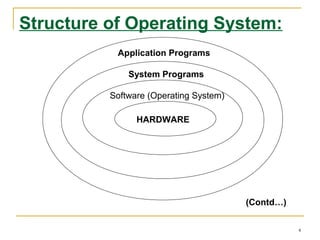
Structure of Operating System:
Application Programs
System Programs
Software (Operating System)
HARDWARE
(Contd…)
4
Structure of Operating System
(Contd…):
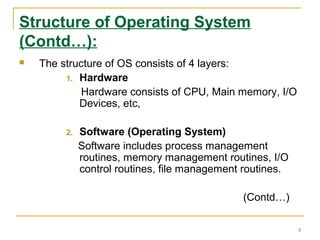
 The structure of OS consists of 4 layers:
1. Hardware
Hardware consists of CPU, Main memory, I/O
Devices, etc,
2. Software (Operating System)
Software includes process management
routines, memory management routines, I/O
control routines, file management routines.
(Contd…)
5
Structure of Operating System
(Contd…):
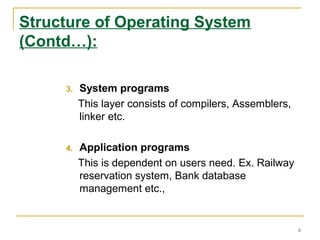
3. System programs
This layer consists of compilers, Assemblers,
linker etc.
4. Application programs
This is dependent on users need. Ex. Railway
reservation system, Bank database
management etc.,
6
Batch Processing:
 In Batch processing same type of jobs batch (BATCH- a
set of jobs with similar needs) together and execute at a
time.
 The OS was simple, its major task was to transfer
control from one job to the next.
 The job was submitted to the computer operator in form
of punch cards. At some later time the output appeared.
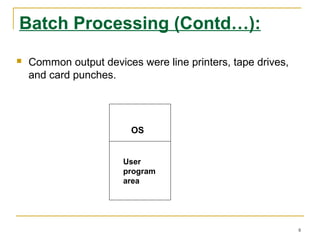
 The OS was always resident in memory. (Ref. Fig. next
slide)
 Common Input devices were card readers and tape
drives.
7
Batch Processing (Contd…):
 Common output devices were line printers, tape drives,
and card punches.
OS
User
program
area
8
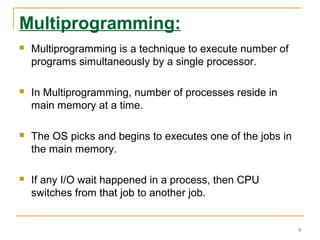
Multiprogramming:
 Multiprogramming is a technique to execute number of
programs simultaneously by a single processor.
 In Multiprogramming, number of processes reside in
main memory at a time.
 The OS picks and begins to executes one of the jobs in
the main memory.
 If any I/O wait happened in a process, then CPU
switches from that job to another job.
9
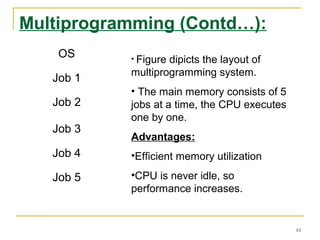
Multiprogramming (Contd…):
OS
Job 1
Job 2
Job 3
Job 4
Job 5
• Figure dipicts the layout of
multiprogramming system.
• The main memory consists of 5
jobs at a time, the CPU executes
one by one.
Advantages:
•Efficient memory utilization
•CPU is never idle, so
performance increases.
10
Time Sharing Systems:
 Time sharing, or multitasking, is a logical extension of
multiprogramming.
 Multiple jobs are executed by switching the CPU
between them.
 In this, the CPU time is shared by different processes, so
it is called as “Time sharing Systems”.
 Examples: Multics, Unix, etc.,
11
Types of OS:
Operating System can also be classified as,-
 Single User Systems
 Multi User Systems
12
Single User Systems:
 Provides a platform for only one user at a
time.
 They are popularly associated with Desk Top
operating system which run on standalone
systems where no user accounts are
required.
 Example: DOS
13
Multi-User Systems:
 Provides regulated access for a number of users by
maintaining a database of known users.
 Refers to computer systems that support two or more
simultaneous users.
 Another term for multi-user is time sharing.
 Ex: All mainframes and are multi-user systems.
 Example: Unix
14
UNIX OPERATING SYSTEM
 Unix is a multitasking, multi-user computer operating
system
 It is written in C language
 UNIX can be used in a wide variety of computers
15
MICROKERNEL BASED OPERATING
SYSTEM
 A set of independent system servers using the
primitive, generic services of a microkernel.
 The micro-kernel provides a virtual machine for
processor use, memory allocation and
communication between operating system
components
16
MICROKERNEL BASED OPERATING SYSTEM
 In order to make an OS portable it is necessary
to make the machine dependent part as small as
possible
 The microkernel was developed in the early
1990s to overcome the problems concerning
portability, extensibility, and reliability of kernels
 Microkernel is a very small core of an operating
system
17
18

operating systems

  • 1.
    Operating SystemsOperating Systems AUGUSTNEC THEVERKUNNEL S2 M.TECH (IE & M) ROLL NO: 02 1
  • 2.
    What is OS? Operating System is a software  It is the software that enables all the programs we use.  The OS organizes and controls the hardware.  OS acts as an interface between the application programs and the machine hardware.  Examples: Windows, Linux, Unix, etc., 2
  • 3.
    FUNCTIONS OF OPERATINGSYSTEM  Convenience: An OS makes a computer more convenient to use.  Efficiency: An OS allows the computer system resources to be used in an efficient manner.  Ability to Evolve: It helps in the proper functioning of the computer without interruption 3
  • 4.
    Structure of OperatingSystem: Application Programs System Programs Software (Operating System) HARDWARE (Contd…) 4
  • 5.
    Structure of OperatingSystem (Contd…):  The structure of OS consists of 4 layers: 1. Hardware Hardware consists of CPU, Main memory, I/O Devices, etc, 2. Software (Operating System) Software includes process management routines, memory management routines, I/O control routines, file management routines. (Contd…) 5
  • 6.
    Structure of OperatingSystem (Contd…): 3. System programs This layer consists of compilers, Assemblers, linker etc. 4. Application programs This is dependent on users need. Ex. Railway reservation system, Bank database management etc., 6
  • 7.
    Batch Processing:  InBatch processing same type of jobs batch (BATCH- a set of jobs with similar needs) together and execute at a time.  The OS was simple, its major task was to transfer control from one job to the next.  The job was submitted to the computer operator in form of punch cards. At some later time the output appeared.  The OS was always resident in memory. (Ref. Fig. next slide)  Common Input devices were card readers and tape drives. 7
  • 8.
    Batch Processing (Contd…): Common output devices were line printers, tape drives, and card punches. OS User program area 8
  • 9.
    Multiprogramming:  Multiprogramming isa technique to execute number of programs simultaneously by a single processor.  In Multiprogramming, number of processes reside in main memory at a time.  The OS picks and begins to executes one of the jobs in the main memory.  If any I/O wait happened in a process, then CPU switches from that job to another job. 9
  • 10.
    Multiprogramming (Contd…): OS Job 1 Job2 Job 3 Job 4 Job 5 • Figure dipicts the layout of multiprogramming system. • The main memory consists of 5 jobs at a time, the CPU executes one by one. Advantages: •Efficient memory utilization •CPU is never idle, so performance increases. 10
  • 11.
    Time Sharing Systems: Time sharing, or multitasking, is a logical extension of multiprogramming.  Multiple jobs are executed by switching the CPU between them.  In this, the CPU time is shared by different processes, so it is called as “Time sharing Systems”.  Examples: Multics, Unix, etc., 11
  • 12.
    Types of OS: OperatingSystem can also be classified as,-  Single User Systems  Multi User Systems 12
  • 13.
    Single User Systems: Provides a platform for only one user at a time.  They are popularly associated with Desk Top operating system which run on standalone systems where no user accounts are required.  Example: DOS 13
  • 14.
    Multi-User Systems:  Providesregulated access for a number of users by maintaining a database of known users.  Refers to computer systems that support two or more simultaneous users.  Another term for multi-user is time sharing.  Ex: All mainframes and are multi-user systems.  Example: Unix 14
  • 15.
    UNIX OPERATING SYSTEM Unix is a multitasking, multi-user computer operating system  It is written in C language  UNIX can be used in a wide variety of computers 15
  • 16.
    MICROKERNEL BASED OPERATING SYSTEM A set of independent system servers using the primitive, generic services of a microkernel.  The micro-kernel provides a virtual machine for processor use, memory allocation and communication between operating system components 16
  • 17.
    MICROKERNEL BASED OPERATINGSYSTEM  In order to make an OS portable it is necessary to make the machine dependent part as small as possible  The microkernel was developed in the early 1990s to overcome the problems concerning portability, extensibility, and reliability of kernels  Microkernel is a very small core of an operating system 17
  • 18.