


PERATING SYSTEM
a) To cope with the speed mismatch
between producer (or sender) and
consumer (or receiver) of a data
stream.
b) To adapt between the devices having
different data-transfer size.
A process of storing data in
memory area called Buffers
while data is being transferred
between two devices or between
a device and an application.
I/O BUFFERING
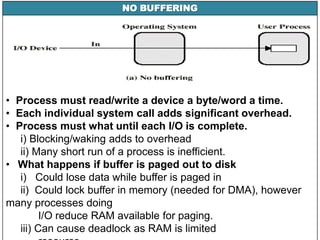
NO BUFFERING
• Process must read/write a device a byte/word a time.
• Each individual system call adds significant overhead.
• Process must what until each I/O is complete.
i) Blocking/waking adds to overhead
ii) Many short run of a process is inefficient.
• What happens if buffer is paged out to disk
i) Could lose data while buffer is paged in
ii) Could lock buffer in memory (needed for DMA), however
many processes doing
I/O reduce RAM available for paging.
iii) Can cause deadlock as RAM is limited
USER LEVEL BUFFERING
• User process can process one block of data while next
block is read in.
• Swapping can occur since input is taking place in system
memory, not user memory.
• Operating system keeps track of assignment of system
buffers to user processes.
• Assume:
– T is transfer time for a block from device
– C is computation time to process incoming block
– M is time to copy kernel buffer to user buffer
USER LEVEL BUFFERING
• Process specifies a memory buffer that incoming data is
placed in until it fills.
– Filling can be done by interrupt service routine.
– Only a single system call, and block/wakeup per data
buffer.
• Much more efficient.
• When is buffer available for re-use?
– Either process must block until potential slow device
drains buffer
– OR deal with asynchronous signals indicating buffer
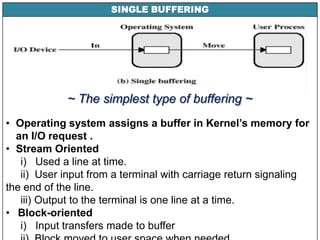
SINGLE BUFFERING
~ The simplest type of buffering ~
• Operating system assigns a buffer in Kernel’s memory for
an I/O request .
• Stream Oriented
i) Used a line at time.
ii) User input from a terminal with carriage return signaling
the end of the line.
iii) Output to the terminal is one line at a time.
• Block-oriented
i) Input transfers made to buffer
DOUBLE BUFFERING
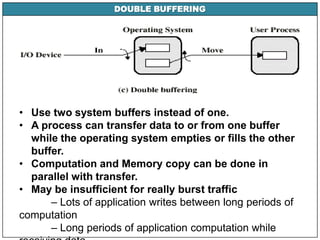
• Use two system buffers instead of one.
• A process can transfer data to or from one buffer
while the operating system empties or fills the other
buffer.
• Computation and Memory copy can be done in
parallel with transfer.
• May be insufficient for really burst traffic
– Lots of application writes between long periods of
computation
– Long periods of application computation while
CIRCULAR BUFFERING
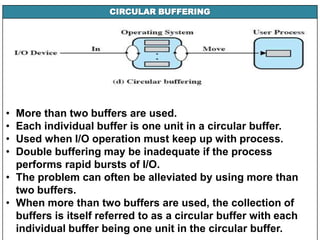
• More than two buffers are used.
• Each individual buffer is one unit in a circular buffer.
• Used when I/O operation must keep up with process.
• Double buffering may be inadequate if the process
performs rapid bursts of I/O.
• The problem can often be alleviated by using more than
two buffers.
• When more than two buffers are used, the collection of
buffers is itself referred to as a circular buffer with each
individual buffer being one unit in the circular buffer.
UTILITY BUFFERING
Buffering is a technique that smoothest out
peaks in I/O demand. However, no amount of
buffering will allow an I/O device to keep pace
with a process indefinitely when the average
demand of the process is greater than the I/O
device can service. If offline operation after the
data has been read and the CPU is operated on
it the magnetic tapes are instructed to store the
next input into some reserve memory area called
buffer.
UTILITY BUFFERING
• Buffering is done for 3 reasons
- To cope with the speed mismatch between producer (or
sender) and consumer (or
receiver) of a data stream
- To adapt between devices having different data-transfer size
- To support copy semantics for application I/O
• The time taken to complete a job is faster but the CPU is
more utilized as the access time from memory to the CPU
is faster than the access time from any I/O device to the
CPU.
• Buffering overlaps I/O of a job with job’s computations. In
a multiple programming environment, when there is a
I/O Buffering

I/O Buffering

  • 1.
  • 2.
    a) To copewith the speed mismatch between producer (or sender) and consumer (or receiver) of a data stream. b) To adapt between the devices having different data-transfer size. A process of storing data in memory area called Buffers while data is being transferred between two devices or between a device and an application. I/O BUFFERING
  • 3.
    NO BUFFERING • Processmust read/write a device a byte/word a time. • Each individual system call adds significant overhead. • Process must what until each I/O is complete. i) Blocking/waking adds to overhead ii) Many short run of a process is inefficient. • What happens if buffer is paged out to disk i) Could lose data while buffer is paged in ii) Could lock buffer in memory (needed for DMA), however many processes doing I/O reduce RAM available for paging. iii) Can cause deadlock as RAM is limited
  • 4.
    USER LEVEL BUFFERING •User process can process one block of data while next block is read in. • Swapping can occur since input is taking place in system memory, not user memory. • Operating system keeps track of assignment of system buffers to user processes. • Assume: – T is transfer time for a block from device – C is computation time to process incoming block – M is time to copy kernel buffer to user buffer
  • 5.
    USER LEVEL BUFFERING •Process specifies a memory buffer that incoming data is placed in until it fills. – Filling can be done by interrupt service routine. – Only a single system call, and block/wakeup per data buffer. • Much more efficient. • When is buffer available for re-use? – Either process must block until potential slow device drains buffer – OR deal with asynchronous signals indicating buffer
  • 6.
    SINGLE BUFFERING ~ Thesimplest type of buffering ~ • Operating system assigns a buffer in Kernel’s memory for an I/O request . • Stream Oriented i) Used a line at time. ii) User input from a terminal with carriage return signaling the end of the line. iii) Output to the terminal is one line at a time. • Block-oriented i) Input transfers made to buffer
  • 7.
    DOUBLE BUFFERING • Usetwo system buffers instead of one. • A process can transfer data to or from one buffer while the operating system empties or fills the other buffer. • Computation and Memory copy can be done in parallel with transfer. • May be insufficient for really burst traffic – Lots of application writes between long periods of computation – Long periods of application computation while
  • 8.
    CIRCULAR BUFFERING • Morethan two buffers are used. • Each individual buffer is one unit in a circular buffer. • Used when I/O operation must keep up with process. • Double buffering may be inadequate if the process performs rapid bursts of I/O. • The problem can often be alleviated by using more than two buffers. • When more than two buffers are used, the collection of buffers is itself referred to as a circular buffer with each individual buffer being one unit in the circular buffer.
  • 9.
    UTILITY BUFFERING Buffering isa technique that smoothest out peaks in I/O demand. However, no amount of buffering will allow an I/O device to keep pace with a process indefinitely when the average demand of the process is greater than the I/O device can service. If offline operation after the data has been read and the CPU is operated on it the magnetic tapes are instructed to store the next input into some reserve memory area called buffer.
  • 10.
    UTILITY BUFFERING • Bufferingis done for 3 reasons - To cope with the speed mismatch between producer (or sender) and consumer (or receiver) of a data stream - To adapt between devices having different data-transfer size - To support copy semantics for application I/O • The time taken to complete a job is faster but the CPU is more utilized as the access time from memory to the CPU is faster than the access time from any I/O device to the CPU. • Buffering overlaps I/O of a job with job’s computations. In a multiple programming environment, when there is a