OPERATING SYSTEM
THE DEFINITION OF AN
OS
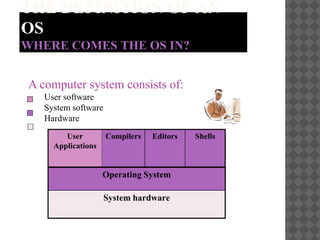
WHERE COMES THE OS IN?
A computer system consists of:
User software
System software
Hardware
User
Applications
Compilers Editors Shells
Operating System
System hardware
THE DEFINITION OF AN
OS
WHAT IS AN OS?
 A system software
 A collection of programs that:
 manage all the system’s hardware resources (the CPU, memory, I/O
devices, etc.) of a computer system
 provide the users the environment in which they can:
 use the system resources
 run their own applications
 Two primary objectives of an OS are:
 Making a computer system convenient to use
 Managing the resources of a computer system
TYPES OF OS
Basic types of OS are as follows:
 Batch operating system
 Time sharing operating system
 Network operating system
 Etc…
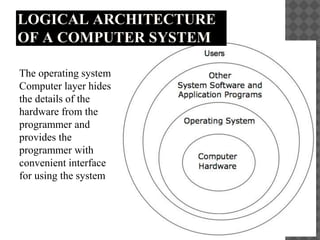
LOGICAL ARCHITECTURE
OF A COMPUTER SYSTEM
The operating system
Computer layer hides
the details of the
hardware from the
programmer and
provides the
programmer with
convenient interface
for using the system
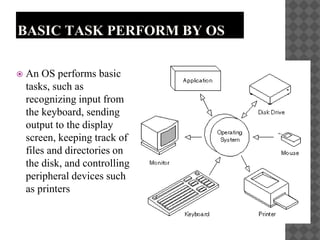
BASIC TASK PERFORM BY OS
 An OS performs basic
tasks, such as
recognizing input from
the keyboard, sending
output to the display
screen, keeping track of
files and directories on
the disk, and controlling
peripheral devices such
as printers
TASK SWITCHING
 In computing, multitasking is a concept of performing
multiple tasks (also known as processes) over a certain
period of time by executing them concurrently. New tasks
start and interrupt already started ones before they have
reached completion, instead of executing the tasks
sequentially so each started task needs to reach its end
before a new one is started. As a result, a computer executes
segments of multiple tasks in an interleaved manner, while
the tasks share common processing resources such as central
processing units (CPUs) and main memory
 A multitasking OS allows you to run multiple processes
(tasks) "simultaneously". They do not actually run at the
same time, of course, since there is only one CPU.
MAIN FUNCTIONS OF AN
OS
 Process management : creates, schedules and destroy
processes
 Memory management: Allocates and releases memory
 File management: create, read, modify, remove etc. files
 Security
UTILITY SOFTWARE
 Utility software is system software designed to
help analyze, configure, optimize or maintain a
computer.
 Utility software, along with operating system
software, is a type of system software used to
support the computer infrastructure, distinguishing
it from application software which is aimed at
directly performing tasks that benefit ordinary
users
EXAMPLES
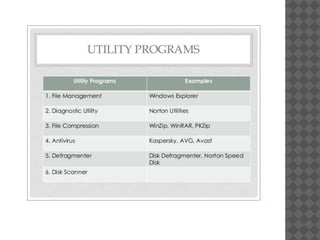
 Antivirus software, as the name suggests, helps to
protect a computer system from viruses and other
harmful programs.
 Backup software helps in the creation of a backup
of the files on your computer.
 Etc.
Operating System

Operating System

  • 1.
  • 2.
    THE DEFINITION OFAN OS WHERE COMES THE OS IN? A computer system consists of: User software System software Hardware User Applications Compilers Editors Shells Operating System System hardware
  • 3.
    THE DEFINITION OFAN OS WHAT IS AN OS?  A system software  A collection of programs that:  manage all the system’s hardware resources (the CPU, memory, I/O devices, etc.) of a computer system  provide the users the environment in which they can:  use the system resources  run their own applications  Two primary objectives of an OS are:  Making a computer system convenient to use  Managing the resources of a computer system
  • 4.
    TYPES OF OS Basictypes of OS are as follows:  Batch operating system  Time sharing operating system  Network operating system  Etc…
  • 5.
    LOGICAL ARCHITECTURE OF ACOMPUTER SYSTEM The operating system Computer layer hides the details of the hardware from the programmer and provides the programmer with convenient interface for using the system
  • 6.
    BASIC TASK PERFORMBY OS  An OS performs basic tasks, such as recognizing input from the keyboard, sending output to the display screen, keeping track of files and directories on the disk, and controlling peripheral devices such as printers
  • 7.
    TASK SWITCHING  Incomputing, multitasking is a concept of performing multiple tasks (also known as processes) over a certain period of time by executing them concurrently. New tasks start and interrupt already started ones before they have reached completion, instead of executing the tasks sequentially so each started task needs to reach its end before a new one is started. As a result, a computer executes segments of multiple tasks in an interleaved manner, while the tasks share common processing resources such as central processing units (CPUs) and main memory  A multitasking OS allows you to run multiple processes (tasks) "simultaneously". They do not actually run at the same time, of course, since there is only one CPU.
  • 8.
    MAIN FUNCTIONS OFAN OS  Process management : creates, schedules and destroy processes  Memory management: Allocates and releases memory  File management: create, read, modify, remove etc. files  Security
  • 9.
    UTILITY SOFTWARE  Utilitysoftware is system software designed to help analyze, configure, optimize or maintain a computer.  Utility software, along with operating system software, is a type of system software used to support the computer infrastructure, distinguishing it from application software which is aimed at directly performing tasks that benefit ordinary users
  • 10.
    EXAMPLES  Antivirus software,as the name suggests, helps to protect a computer system from viruses and other harmful programs.  Backup software helps in the creation of a backup of the files on your computer.  Etc.