Network Operating System 
By Elena Otte 
Distributed Data Processing
Table of content: 
 System 
 Network 
 Operating System 
 Network Operating System 
 Features 
 Remote Login with an example 
 Remote file transfer (Example) 
 Anonymous FTP method 
 Network and Operating System 
Security 
 Novell NetWare and protocols 
 Linux 
 Windows XP 
 MS-DOS environment 
 Difference between OS and 
NOS 
 Summary 
 Sources
What is a system? 
• set of interacting or interdependent entities 
Multiple meaning: 
 collection of organized things 
 way of organizing or planning 
 whole composed relationship among the members 
Characteristics: 
 have a structure that is defined by its parts and 
processes 
 tend to function in the same way 
(involves inputs and outputs of material)
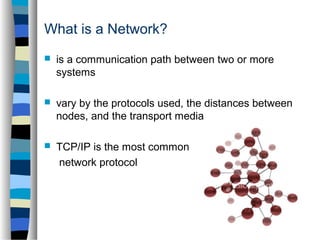
What is a Network? 
 is a communication path between two or more 
systems 
 vary by the protocols used, the distances between 
nodes, and the transport media 
 TCP/IP is the most common 
network protocol
Operating System 
 program that manages the computer hardware 
 provides a basis for application programs and acts 
as an 
intermediary between the user and the hardware 
 offers a reasonable way to solve the problem of 
creating a usable computing system 
Types of Operating Systems: Windows Vista 
Linux and Unix 
Microsoft Windows 
Mac OS X
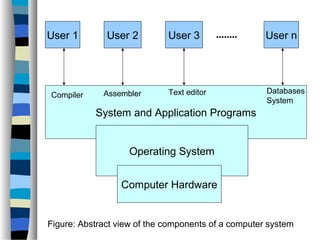
User 1 User 2 User 3 User n 
Compiler Assembler Text editor Databases 
System and Application Programs 
Operating System 
Computer Hardware 
System 
........ 
Figure: Abstract view of the components of a computer system
Network Operating System 
 provides an environment in which users, who are aware of 
multiplicity of machines, can access remote resources either: 
-> logging in to the remote machine* or 
-> transferring data from the remote 
machine to their own machines 
 mostly used with local area networks and widearea networks 
*Remote machine: refers to a computer connected to the network 
which a user is using
Features 
 Provides basic operating system features; support for 
processors, protocols, automatic hardware detection, 
support multi-processing of applications 
 Security features; authentication, authorization, 
access control 
 Provides names and directory services 
 Provides files, print, web services, back-up and 
replication services
 Supports Internetworking such as routing and WAN 
ports 
 User management and support for login and logoff, 
remote access, system management 
 Clustering capabilities, fault tolerant and and high 
availability systems 
Cluster: = group of linked computers working together closely, 
connected to LAN
Remote Login with an example 
 important function of a NOS is to allow users to log in remotely 
 internet provides the telnet facility for this purpose 
 Example: a user at Westminster College wishes to compute 
on “cs.yale.edu,“ a computer that is located at Yale 
University 
-> user must have a valid account on that machine 
to log in remotely the user issues the command: 
t e lnet cs.yale.edu 
Command results in the formation of a socket connection between 
the local machine at 
Westminster College and the “cs.yale.edu“ computer
 connection has been established 
 transparent, bidirectional link that all 
characters entered by the user are sent to a 
process “cs.yale.edu“ 
 all the output from that process is sent back 
to the user
Remote File Transfer 
 Provide a mechanism for remote file transfer from 
one machine to another 
 Each computer maintains its own local file system 
 User: “cs.uvm.edu“ wants to access a file located on 
another computer “cs.yale.edu“ file must be copied 
from the computer at Yale to the PC at Uni of 
Vermont 
 Internet provides the transfer with file transfer 
protocol (FTP) program
Example: 
 User on “cs.uvm.edu“ -> copy Java program 
Server.java that resides on “cs.yale.edu“ 
 Invoke FTP program ftp cs.yale.edu 
 Login name and password 
 Correct information has been received, user must 
connect to the file Server.java and after copy the file 
by executing get Server.java
 File location is not transparent to the user 
 No real file sharing 
 Remember: User at the Uni of Vermont must have 
login permission on “cs.yale.edu“ 
 FTP provides a way to allow a user to copy files 
remotely 
 Remote copying is accomplished through 
“anonymous FTP“ method
Anonymous FTP Method 
 File to be copied (Server.java) must be placed in a 
subdirectory (ftp) with the protection set to allow the 
public to read the file 
 User uses ftp command 
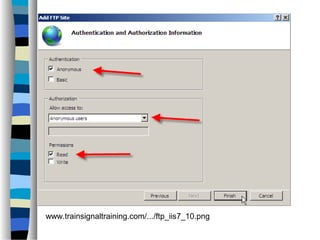
 Login name – “anonymous“ and password 
 Anonymous login is accomplished 
 User is allowed to access only those files that are in 
the directory tree of user “anonymous“
www.trainsignaltraining.com/.../ftp_iis7_10.png
 FTP mechanism is implemented (similar to telnet 
implementation) 
 Daemon on remote site -> watches for connection 
requests to system‘s FTP port 
 Login authentication is accomplished ->user can 
execute commands remotely 
 telnet daemon executes any command for user 
 FTP daemon responds to a predefined set of file-related 
commands
 Get: transfer a file from the remote machine to the 
local machine 
 Put: transfer from the local machine to the remote 
machine 
 Ls or dir: list files in the current directory on the 
remote machine 
 Cd: change the current directory on the remote 
machine
Network and Operating System Security 
 OS: system must protect itself 
 Runway process could constitute an accidental 
denial-of-service attack 
 Query to service could reveal passwords 
 Stack overflow could allow the launching of an 
unauthorized process 
 List of possible breaches is almost endless
 Travels over private leased lines, shared lines like the 
internet, wireless connections, or dial-up lines 
 Intercepting these data could be harmful as breaking 
into a computer 
 Interruption of communications could constitute a 
remote denial-of-service attack, 
diminishing user‘s use of 
and trust in the system
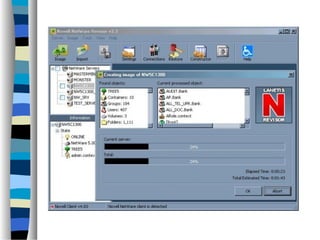
Novell NetWare 
 Is a NOS 
 Used cooperative multitasking to run several services 
on a PC 
 File sharing instead of disk sharing 
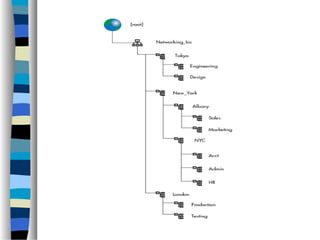
 NDS (Novell Directory Services) 
 Server administration 
 Desktop Management 
 Software distribution 
 Integrated cache 
 Enhanced security
Novell NetWare Protocols 
 Are widely used for PC LANs 
 Windows XP Nwlink protocol connects the NetBIOs 
to NetWare networks 
 In combination with a redirector this protocol enables 
a Windows XP client to connect to a NetWare server 
 Some NOSs for DOS and Windows system include 
Novell NetWare: Windows NT and 2000 OS/2 etc.
Linux 
 Free OS based on Unix standards 
 Provides a programming interface and user interface 
 Core Linux OS kernel is original, but allows much existing free 
Unix software to run 
 Multiuser system, providing protection between processes and 
running multiple processes according to a time-sharing (or 
multitasking) scheduler 
 Multiple networking protocols can be accessed simultaneously 
through socket interface
 Uses an abstraction layer to manage multiple file 
systems 
 Device-oriented, networked, and virtual file systems 
are supported 
 Network devices are dealt with differently from block 
and character devices 
 Users cannot directly transfer data to network 
devices-instead- must communicate indirectly by 
opening a connection to the kernel‘s networking 
subsystem
Windows XP 
 Was designed to be an extensible, portable OS 
 Supports multiple operating environments and 
symmetric multiprocessing 
 32-bit and 64-bit processors 
 Use of kernel objects to provide basic services 
 Network device interface specification (NDIS) and 
transport driver interface (TDI) 
 NDIS interface seperates network adapters from 
transport protocols 
 TDI supports both connection-based and 
connectionless transport, function to send any type of 
data
MS-DOS Environment 
 No complexity of other Windows XP subsystems 
 Provided by Win32 API application (VDM) 
 Windows XP command shell is a program that 
creates a window-looks like MS-DOS 
 Can run 16-bit and 32-bit executables 
 Some MS-DOS access the disk hardware directly -> 
fail to operate under Windows XP
Difference between Operating System and 
Network Operating System 
 OS runs the computer itself 
Example: Windows 
 Network OS run on a server 
and can be accessed 
through client machines 
connected on the network 
Example: Novell Netware and 
Linux run on a server and 
can be used as NOS, even 
there are Windows server 
OS‘s which can be used by 
clients connected on the 
network
Summary 
 NOS provides features such as file sharing across the network 
 Includes communication scheme 
 Allows different processes on different computers to exchange 
messages 
 Computer running a NOS acts autonomously from all other 
computers on the network 
 It is aware of the network – able to communicate with other 
networked computers
Sources 
 Book: “Operating System Concepts“ 
 www.answers.com/topic/network-operating-system 
 www.wikipedia.com 
 www.trainsignaltraining.com/.../ftp_iis7_10.png
Thank you for attention!!

Network operating systems

  • 1.
    Network Operating System By Elena Otte Distributed Data Processing
  • 2.
    Table of content:  System  Network  Operating System  Network Operating System  Features  Remote Login with an example  Remote file transfer (Example)  Anonymous FTP method  Network and Operating System Security  Novell NetWare and protocols  Linux  Windows XP  MS-DOS environment  Difference between OS and NOS  Summary  Sources
  • 3.
    What is asystem? • set of interacting or interdependent entities Multiple meaning:  collection of organized things  way of organizing or planning  whole composed relationship among the members Characteristics:  have a structure that is defined by its parts and processes  tend to function in the same way (involves inputs and outputs of material)
  • 4.
    What is aNetwork?  is a communication path between two or more systems  vary by the protocols used, the distances between nodes, and the transport media  TCP/IP is the most common network protocol
  • 5.
    Operating System program that manages the computer hardware  provides a basis for application programs and acts as an intermediary between the user and the hardware  offers a reasonable way to solve the problem of creating a usable computing system Types of Operating Systems: Windows Vista Linux and Unix Microsoft Windows Mac OS X
  • 6.
    User 1 User2 User 3 User n Compiler Assembler Text editor Databases System and Application Programs Operating System Computer Hardware System ........ Figure: Abstract view of the components of a computer system
  • 7.
    Network Operating System  provides an environment in which users, who are aware of multiplicity of machines, can access remote resources either: -> logging in to the remote machine* or -> transferring data from the remote machine to their own machines  mostly used with local area networks and widearea networks *Remote machine: refers to a computer connected to the network which a user is using
  • 8.
    Features  Providesbasic operating system features; support for processors, protocols, automatic hardware detection, support multi-processing of applications  Security features; authentication, authorization, access control  Provides names and directory services  Provides files, print, web services, back-up and replication services
  • 9.
     Supports Internetworkingsuch as routing and WAN ports  User management and support for login and logoff, remote access, system management  Clustering capabilities, fault tolerant and and high availability systems Cluster: = group of linked computers working together closely, connected to LAN
  • 10.
    Remote Login withan example  important function of a NOS is to allow users to log in remotely  internet provides the telnet facility for this purpose  Example: a user at Westminster College wishes to compute on “cs.yale.edu,“ a computer that is located at Yale University -> user must have a valid account on that machine to log in remotely the user issues the command: t e lnet cs.yale.edu Command results in the formation of a socket connection between the local machine at Westminster College and the “cs.yale.edu“ computer
  • 11.
     connection hasbeen established  transparent, bidirectional link that all characters entered by the user are sent to a process “cs.yale.edu“  all the output from that process is sent back to the user
  • 12.
    Remote File Transfer  Provide a mechanism for remote file transfer from one machine to another  Each computer maintains its own local file system  User: “cs.uvm.edu“ wants to access a file located on another computer “cs.yale.edu“ file must be copied from the computer at Yale to the PC at Uni of Vermont  Internet provides the transfer with file transfer protocol (FTP) program
  • 13.
    Example:  Useron “cs.uvm.edu“ -> copy Java program Server.java that resides on “cs.yale.edu“  Invoke FTP program ftp cs.yale.edu  Login name and password  Correct information has been received, user must connect to the file Server.java and after copy the file by executing get Server.java
  • 14.
     File locationis not transparent to the user  No real file sharing  Remember: User at the Uni of Vermont must have login permission on “cs.yale.edu“  FTP provides a way to allow a user to copy files remotely  Remote copying is accomplished through “anonymous FTP“ method
  • 15.
    Anonymous FTP Method  File to be copied (Server.java) must be placed in a subdirectory (ftp) with the protection set to allow the public to read the file  User uses ftp command  Login name – “anonymous“ and password  Anonymous login is accomplished  User is allowed to access only those files that are in the directory tree of user “anonymous“
  • 16.
  • 17.
     FTP mechanismis implemented (similar to telnet implementation)  Daemon on remote site -> watches for connection requests to system‘s FTP port  Login authentication is accomplished ->user can execute commands remotely  telnet daemon executes any command for user  FTP daemon responds to a predefined set of file-related commands
  • 18.
     Get: transfera file from the remote machine to the local machine  Put: transfer from the local machine to the remote machine  Ls or dir: list files in the current directory on the remote machine  Cd: change the current directory on the remote machine
  • 19.
    Network and OperatingSystem Security  OS: system must protect itself  Runway process could constitute an accidental denial-of-service attack  Query to service could reveal passwords  Stack overflow could allow the launching of an unauthorized process  List of possible breaches is almost endless
  • 20.
     Travels overprivate leased lines, shared lines like the internet, wireless connections, or dial-up lines  Intercepting these data could be harmful as breaking into a computer  Interruption of communications could constitute a remote denial-of-service attack, diminishing user‘s use of and trust in the system
  • 21.
    Novell NetWare Is a NOS  Used cooperative multitasking to run several services on a PC  File sharing instead of disk sharing  NDS (Novell Directory Services)  Server administration  Desktop Management  Software distribution  Integrated cache  Enhanced security
  • 22.
    Novell NetWare Protocols  Are widely used for PC LANs  Windows XP Nwlink protocol connects the NetBIOs to NetWare networks  In combination with a redirector this protocol enables a Windows XP client to connect to a NetWare server  Some NOSs for DOS and Windows system include Novell NetWare: Windows NT and 2000 OS/2 etc.
  • 24.
    Linux  FreeOS based on Unix standards  Provides a programming interface and user interface  Core Linux OS kernel is original, but allows much existing free Unix software to run  Multiuser system, providing protection between processes and running multiple processes according to a time-sharing (or multitasking) scheduler  Multiple networking protocols can be accessed simultaneously through socket interface
  • 26.
     Uses anabstraction layer to manage multiple file systems  Device-oriented, networked, and virtual file systems are supported  Network devices are dealt with differently from block and character devices  Users cannot directly transfer data to network devices-instead- must communicate indirectly by opening a connection to the kernel‘s networking subsystem
  • 27.
    Windows XP Was designed to be an extensible, portable OS  Supports multiple operating environments and symmetric multiprocessing  32-bit and 64-bit processors  Use of kernel objects to provide basic services  Network device interface specification (NDIS) and transport driver interface (TDI)  NDIS interface seperates network adapters from transport protocols  TDI supports both connection-based and connectionless transport, function to send any type of data
  • 28.
    MS-DOS Environment No complexity of other Windows XP subsystems  Provided by Win32 API application (VDM)  Windows XP command shell is a program that creates a window-looks like MS-DOS  Can run 16-bit and 32-bit executables  Some MS-DOS access the disk hardware directly -> fail to operate under Windows XP
  • 29.
    Difference between OperatingSystem and Network Operating System  OS runs the computer itself Example: Windows  Network OS run on a server and can be accessed through client machines connected on the network Example: Novell Netware and Linux run on a server and can be used as NOS, even there are Windows server OS‘s which can be used by clients connected on the network
  • 30.
    Summary  NOSprovides features such as file sharing across the network  Includes communication scheme  Allows different processes on different computers to exchange messages  Computer running a NOS acts autonomously from all other computers on the network  It is aware of the network – able to communicate with other networked computers
  • 31.
    Sources  Book:“Operating System Concepts“  www.answers.com/topic/network-operating-system  www.wikipedia.com  www.trainsignaltraining.com/.../ftp_iis7_10.png
  • 32.
    Thank you forattention!!