Software
Components
Contents
 Computer Instructions or data, anything that can be stored
electronically is Software
 System Software
 Application Software
 Educational software
 Entertainment software
 Open source Software and
 Proprietary Software
System Software
 System software is a term referring to any computer
software which manages and controls the hardware so that
application software can perform a task.
 System Software have direct control and access to your
computer hardware , and memory locations .
 They perform I/O operations on various memory locations ,
and control the hardware , to make the application software
do a task . Operating systems , are the main examples for
system software .
System Software Examples
 Microsoft Windows
 Linux
 Unix
 Mac OSX
 DOS
 BIOS Software
 Device Driver Software i.e Graphics Driver
 Linker Software
 Assembler and Compiler Software
Application Software
 Application Software consists of programs that tell a
computer how to produce information.
 Application software run under System Software , and
are made to do a specific task i.e ( Word Processing
etc) , which have indirect access to the hardware (i.e
Behind
System Software) .
 General Purpose Application Software
 Special Purpose Application Software
General Purpose Application Software
 This category includes common software packages that are found on most of
the desktop computers.
 Opera (Web Browser)
 Microsoft Word (Word Processing)
 Microsoft Excel (Spreadsheet software)
 MySQL (Database Software)
 Microsoft Powerpoint (Presentation Software)
 iTunes (Music / Sound Software)
 VLC Media Player (Audio / Video Software )
 World of Warcraft (Game Software)
 Adobe Photoshop (Graphics Software)
Word Processing
 Word Processing software is used to create and print
documents. A key advantage of word processing
software is that users easily can make changes in
documents.
Electronic Spreadsheets
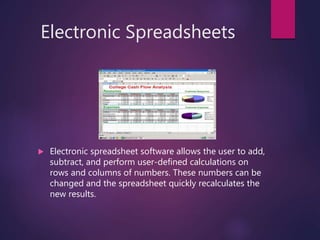
 Electronic spreadsheet software allows the user to add,
subtract, and perform user-defined calculations on
rows and columns of numbers. These numbers can be
changed and the spreadsheet quickly recalculates the
new results.
Presentation Graphics
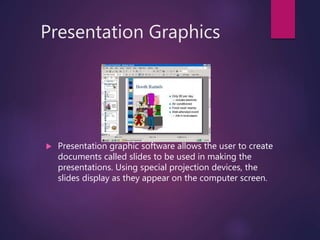
 Presentation graphic software allows the user to create
documents called slides to be used in making the
presentations. Using special projection devices, the
slides display as they appear on the computer screen.
Database Software
 Allows the user to enter, retrieve, and update data in an
organized and efficient manner, with flexible inquiry
and reporting capabilities.
Special Purpose Application Software
 This software is made for some special purpose. There
are thousands of specialist applications that are
available to perform tasks such as
 Keeping Business Accounts
 Stock Control information
 Payroll
 General Practice managements and appointments
Educational Software
 Software that can be used for learning purposes…
 Mavis Beacon Teaches Typing
 Encarta or World Book
Entertainment Software
 Games
Open Source Software:
 Open source software (OSS) is computer
software whose source code is available under a
license that permits users to use, change, and
improve the software, and to redistribute it in
modified or unmodified form.
 It is often developed in a public, collaborative
manner.
Well-known OSS products are Linux, Netscape,
Apache, etc.,
Proprietary Software:
 Proprietary software (also called non-free software) is
software with restrictions on using, copying and
modifying as enforced by the proprietor. Restrictions
on use, modification and copying is achieved by
either legal or technical means and sometimes both.
 Proponents of proprietary software are Microsoft.
 Ex: CAD, Nortan Antivirus etc.,

Software components

  • 1.
  • 2.
    Contents  Computer Instructionsor data, anything that can be stored electronically is Software  System Software  Application Software  Educational software  Entertainment software  Open source Software and  Proprietary Software
  • 3.
    System Software  Systemsoftware is a term referring to any computer software which manages and controls the hardware so that application software can perform a task.  System Software have direct control and access to your computer hardware , and memory locations .  They perform I/O operations on various memory locations , and control the hardware , to make the application software do a task . Operating systems , are the main examples for system software .
  • 4.
    System Software Examples Microsoft Windows  Linux  Unix  Mac OSX  DOS  BIOS Software  Device Driver Software i.e Graphics Driver  Linker Software  Assembler and Compiler Software
  • 5.
    Application Software  ApplicationSoftware consists of programs that tell a computer how to produce information.  Application software run under System Software , and are made to do a specific task i.e ( Word Processing etc) , which have indirect access to the hardware (i.e Behind System Software) .  General Purpose Application Software  Special Purpose Application Software
  • 6.
    General Purpose ApplicationSoftware  This category includes common software packages that are found on most of the desktop computers.  Opera (Web Browser)  Microsoft Word (Word Processing)  Microsoft Excel (Spreadsheet software)  MySQL (Database Software)  Microsoft Powerpoint (Presentation Software)  iTunes (Music / Sound Software)  VLC Media Player (Audio / Video Software )  World of Warcraft (Game Software)  Adobe Photoshop (Graphics Software)
  • 7.
    Word Processing  WordProcessing software is used to create and print documents. A key advantage of word processing software is that users easily can make changes in documents.
  • 8.
    Electronic Spreadsheets  Electronicspreadsheet software allows the user to add, subtract, and perform user-defined calculations on rows and columns of numbers. These numbers can be changed and the spreadsheet quickly recalculates the new results.
  • 9.
    Presentation Graphics  Presentationgraphic software allows the user to create documents called slides to be used in making the presentations. Using special projection devices, the slides display as they appear on the computer screen.
  • 10.
    Database Software  Allowsthe user to enter, retrieve, and update data in an organized and efficient manner, with flexible inquiry and reporting capabilities.
  • 11.
    Special Purpose ApplicationSoftware  This software is made for some special purpose. There are thousands of specialist applications that are available to perform tasks such as  Keeping Business Accounts  Stock Control information  Payroll  General Practice managements and appointments
  • 12.
    Educational Software  Softwarethat can be used for learning purposes…  Mavis Beacon Teaches Typing  Encarta or World Book
  • 13.
  • 14.
    Open Source Software: Open source software (OSS) is computer software whose source code is available under a license that permits users to use, change, and improve the software, and to redistribute it in modified or unmodified form.  It is often developed in a public, collaborative manner. Well-known OSS products are Linux, Netscape, Apache, etc.,
  • 15.
    Proprietary Software:  Proprietarysoftware (also called non-free software) is software with restrictions on using, copying and modifying as enforced by the proprietor. Restrictions on use, modification and copying is achieved by either legal or technical means and sometimes both.  Proponents of proprietary software are Microsoft.  Ex: CAD, Nortan Antivirus etc.,