OpenSSL + QAT Engine Setup Instructions
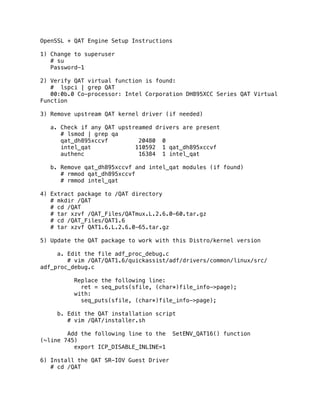
1) Change to superuser
# su
Password-1
2) Verify QAT virtual function is found:
# lspci | grep QAT
00:0b.0 Co-processor: Intel Corporation DH895XCC Series QAT Virtual
Function
3) Remove upstream QAT kernel driver (if needed)
a. Check if any QAT upstreamed drivers are present
# lsmod | grep qa
qat_dh895xccvf 20480 0
intel_qat 110592 1 qat_dh895xccvf
authenc 16384 1 intel_qat
b. Remove qat_dh895xccvf and intel_qat modules (if found)
# rmmod qat_dh895xccvf
# rmmod intel_qat
4) Extract package to /QAT directory
# mkdir /QAT
# cd /QAT
# tar xzvf /QAT_Files/QATmux.L.2.6.0-60.tar.gz
# cd /QAT_Files/QAT1.6
# tar xzvf QAT1.6.L.2.6.0-65.tar.gz
5) Update the QAT package to work with this Distro/kernel version
a. Edit the file adf_proc_debug.c
# vim /QAT/QAT1.6/quickassist/adf/drivers/common/linux/src/
adf_proc_debug.c
Replace the following line:
ret = seq_puts(sfile, (char*)file_info->page);
with:
seq_puts(sfile, (char*)file_info->page);
b. Edit the QAT installation script
# vim /QAT/installer.sh
Add the following line to the SetENV_QAT16() function
(~line 745)
export ICP_DISABLE_INLINE=1
6) Install the QAT SR-IOV Guest Driver
# cd /QAT
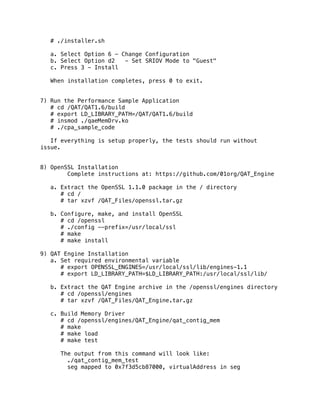
# ./installer.sh
a. Select Option 6 - Change Configuration
b. Select Option d2 - Set SRIOV Mode to "Guest"
c. Press 3 - Install
When installation completes, press 0 to exit.
7) Run the Performance Sample Application
# cd /QAT/QAT1.6/build
# export LD_LIBRARY_PATH=/QAT/QAT1.6/build
# insmod ./qaeMemDrv.ko
# ./cpa_sample_code
If everything is setup properly, the tests should run without
issue.
8) OpenSSL Installation
Complete instructions at: https://github.com/01org/QAT_Engine
a. Extract the OpenSSL 1.1.0 package in the / directory
# cd /
# tar xzvf /QAT_Files/openssl.tar.gz
b. Configure, make, and install OpenSSL
# cd /openssl
# ./config --prefix=/usr/local/ssl
# make
# make install
9) QAT Engine Installation
a. Set required environmental variable
# export OPENSSL_ENGINES=/usr/local/ssl/lib/engines-1.1
# export LD_LIBRARY_PATH=$LD_LIBRARY_PATH:/usr/local/ssl/lib/
b. Extract the QAT Engine archive in the /openssl/engines directory
# cd /openssl/engines
# tar xzvf /QAT_Files/QAT_Engine.tar.gz
c. Build Memory Driver
# cd /openssl/engines/QAT_Engine/qat_contig_mem
# make
# make load
# make test
The output from this command will look like:
./qat_contig_mem_test
seg mapped to 0x7f3d5cb87000, virtualAddress in seg
0xffff880331285000, length 64
Hello world!
# PASS Verify for QAT Contig Mem Test.
d. Build QAT Engine
# cd /openssl/engines/QAT_Engine/
# ./configure --with-qat_dir=/QAT/QAT1.6 --with-openssl_dir=/
openssl --with-openssl_install_dir=/usr/local/ssl
# make
# make install
e. Update QAT configuration file
# vim /openssl/engines/QAT_Engine/qat/config/dh895xcc/
multi_process_optimized/dh895xcc_qa_dev0.conf
Replace:
NumProcesses = 32
With:
NumProcesses = 1
f. Copy updated QAT configuration file to /etc folder and restart
QAT driver
# cp /openssl/engines/QAT_Engine/qat/config/dh895xcc/
multi_process_optimized/dh895xcc_qa_dev0.conf /etc/
# /etc/init.d/qat_service restart
10) Testing OpenSSL with QAT Engine:
a. Verify QAT Engine is properly configured
# cd /openssl/apps
# ./openssl engine -t -c -vvvv qat
The output will look like:
(qat) Reference implementation of QAT crypto engine
[RSA, DSA, DH, AES-128-CBC-HMAC-SHA1, AES-128-CBC-HMAC-
SHA256, AES-256-CBC-HMAC-SHA1, AES-256-CBC-HMAC-SHA256, TLS1-PRF]
[ available ]
ENABLE_EXTERNAL_POLLING: Enables the external
polling interface to the engine.
(input flags): NO_INPUT
POLL: Polls the engine for any completed requests
(input flags): NO_INPUT
SET_INSTANCE_FOR_THREAD: Set instance to be used
by this thread
(input flags): NUMERIC
GET_NUM_OP_RETRIES: Get number of retries
(input flags): NO_INPUT
SET_MAX_RETRY_COUNT: Set maximum retry count
(input flags): NUMERIC
SET_INTERNAL_POLL_INTERVAL: Set internal polling
interval
(input flags): NUMERIC
GET_EXTERNAL_POLLING_FD: Returns non blocking fd
for crypto engine
(input flags): NO_INPUT
ENABLE_EVENT_DRIVEN_POLLING_MODE: Set event
driven polling mode
(input flags): NO_INPUT
GET_NUM_CRYPTO_INSTANCES: Get the number of
crypto instances
(input flags): NO_INPUT
DISABLE_EVENT_DRIVEN_POLLING_MODE: Unset event
driven polling mode
(input flags): NO_INPUT
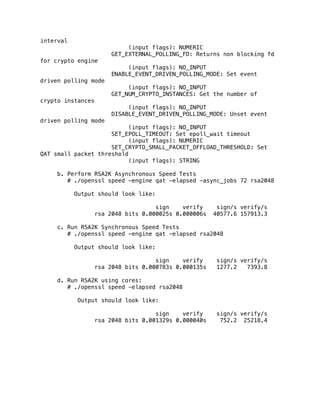
SET_EPOLL_TIMEOUT: Set epoll_wait timeout
(input flags): NUMERIC
SET_CRYPTO_SMALL_PACKET_OFFLOAD_THRESHOLD: Set
QAT small packet threshold
(input flags): STRING
b. Perform RSA2K Asynchronous Speed Tests
# ./openssl speed -engine qat -elapsed -async_jobs 72 rsa2048
Output should look like:
sign verify sign/s verify/s
rsa 2048 bits 0.000025s 0.000006s 40577.6 157913.3
c. Run RSA2K Synchronous Speed Tests
# ./openssl speed -engine qat -elapsed rsa2048
Output should look like:
sign verify sign/s verify/s
rsa 2048 bits 0.000783s 0.000135s 1277.2 7393.8
d. Run RSA2K using cores:
# ./openssl speed -elapsed rsa2048
Output should look like:
sign verify sign/s verify/s
rsa 2048 bits 0.001329s 0.000040s 752.2 25218.4

OpenSSL + Intel (r) Quick Assist Technology Engine Setup Instructions

  • 1.
    OpenSSL + QATEngine Setup Instructions 1) Change to superuser # su Password-1 2) Verify QAT virtual function is found: # lspci | grep QAT 00:0b.0 Co-processor: Intel Corporation DH895XCC Series QAT Virtual Function 3) Remove upstream QAT kernel driver (if needed) a. Check if any QAT upstreamed drivers are present # lsmod | grep qa qat_dh895xccvf 20480 0 intel_qat 110592 1 qat_dh895xccvf authenc 16384 1 intel_qat b. Remove qat_dh895xccvf and intel_qat modules (if found) # rmmod qat_dh895xccvf # rmmod intel_qat 4) Extract package to /QAT directory # mkdir /QAT # cd /QAT # tar xzvf /QAT_Files/QATmux.L.2.6.0-60.tar.gz # cd /QAT_Files/QAT1.6 # tar xzvf QAT1.6.L.2.6.0-65.tar.gz 5) Update the QAT package to work with this Distro/kernel version a. Edit the file adf_proc_debug.c # vim /QAT/QAT1.6/quickassist/adf/drivers/common/linux/src/ adf_proc_debug.c Replace the following line: ret = seq_puts(sfile, (char*)file_info->page); with: seq_puts(sfile, (char*)file_info->page); b. Edit the QAT installation script # vim /QAT/installer.sh Add the following line to the SetENV_QAT16() function (~line 745) export ICP_DISABLE_INLINE=1 6) Install the QAT SR-IOV Guest Driver # cd /QAT
  • 2.
    # ./installer.sh a. SelectOption 6 - Change Configuration b. Select Option d2 - Set SRIOV Mode to "Guest" c. Press 3 - Install When installation completes, press 0 to exit. 7) Run the Performance Sample Application # cd /QAT/QAT1.6/build # export LD_LIBRARY_PATH=/QAT/QAT1.6/build # insmod ./qaeMemDrv.ko # ./cpa_sample_code If everything is setup properly, the tests should run without issue. 8) OpenSSL Installation Complete instructions at: https://github.com/01org/QAT_Engine a. Extract the OpenSSL 1.1.0 package in the / directory # cd / # tar xzvf /QAT_Files/openssl.tar.gz b. Configure, make, and install OpenSSL # cd /openssl # ./config --prefix=/usr/local/ssl # make # make install 9) QAT Engine Installation a. Set required environmental variable # export OPENSSL_ENGINES=/usr/local/ssl/lib/engines-1.1 # export LD_LIBRARY_PATH=$LD_LIBRARY_PATH:/usr/local/ssl/lib/ b. Extract the QAT Engine archive in the /openssl/engines directory # cd /openssl/engines # tar xzvf /QAT_Files/QAT_Engine.tar.gz c. Build Memory Driver # cd /openssl/engines/QAT_Engine/qat_contig_mem # make # make load # make test The output from this command will look like: ./qat_contig_mem_test seg mapped to 0x7f3d5cb87000, virtualAddress in seg
  • 3.
    0xffff880331285000, length 64 Helloworld! # PASS Verify for QAT Contig Mem Test. d. Build QAT Engine # cd /openssl/engines/QAT_Engine/ # ./configure --with-qat_dir=/QAT/QAT1.6 --with-openssl_dir=/ openssl --with-openssl_install_dir=/usr/local/ssl # make # make install e. Update QAT configuration file # vim /openssl/engines/QAT_Engine/qat/config/dh895xcc/ multi_process_optimized/dh895xcc_qa_dev0.conf Replace: NumProcesses = 32 With: NumProcesses = 1 f. Copy updated QAT configuration file to /etc folder and restart QAT driver # cp /openssl/engines/QAT_Engine/qat/config/dh895xcc/ multi_process_optimized/dh895xcc_qa_dev0.conf /etc/ # /etc/init.d/qat_service restart 10) Testing OpenSSL with QAT Engine: a. Verify QAT Engine is properly configured # cd /openssl/apps # ./openssl engine -t -c -vvvv qat The output will look like: (qat) Reference implementation of QAT crypto engine [RSA, DSA, DH, AES-128-CBC-HMAC-SHA1, AES-128-CBC-HMAC- SHA256, AES-256-CBC-HMAC-SHA1, AES-256-CBC-HMAC-SHA256, TLS1-PRF] [ available ] ENABLE_EXTERNAL_POLLING: Enables the external polling interface to the engine. (input flags): NO_INPUT POLL: Polls the engine for any completed requests (input flags): NO_INPUT SET_INSTANCE_FOR_THREAD: Set instance to be used by this thread (input flags): NUMERIC GET_NUM_OP_RETRIES: Get number of retries (input flags): NO_INPUT SET_MAX_RETRY_COUNT: Set maximum retry count (input flags): NUMERIC SET_INTERNAL_POLL_INTERVAL: Set internal polling
  • 4.
    interval (input flags): NUMERIC GET_EXTERNAL_POLLING_FD:Returns non blocking fd for crypto engine (input flags): NO_INPUT ENABLE_EVENT_DRIVEN_POLLING_MODE: Set event driven polling mode (input flags): NO_INPUT GET_NUM_CRYPTO_INSTANCES: Get the number of crypto instances (input flags): NO_INPUT DISABLE_EVENT_DRIVEN_POLLING_MODE: Unset event driven polling mode (input flags): NO_INPUT SET_EPOLL_TIMEOUT: Set epoll_wait timeout (input flags): NUMERIC SET_CRYPTO_SMALL_PACKET_OFFLOAD_THRESHOLD: Set QAT small packet threshold (input flags): STRING b. Perform RSA2K Asynchronous Speed Tests # ./openssl speed -engine qat -elapsed -async_jobs 72 rsa2048 Output should look like: sign verify sign/s verify/s rsa 2048 bits 0.000025s 0.000006s 40577.6 157913.3 c. Run RSA2K Synchronous Speed Tests # ./openssl speed -engine qat -elapsed rsa2048 Output should look like: sign verify sign/s verify/s rsa 2048 bits 0.000783s 0.000135s 1277.2 7393.8 d. Run RSA2K using cores: # ./openssl speed -elapsed rsa2048 Output should look like: sign verify sign/s verify/s rsa 2048 bits 0.001329s 0.000040s 752.2 25218.4