
P.1
Upgrade GCC & Install Qt 5.4
On CentOS 6.5
William.L
wiliwe@gmail.com
2015-05-14
P.2
Index
Install/Upgrad GCC Supporting C++11 or above Standard ............................................................................ 3
Install Qt 5 ............................................................................................................................................................. 7
P.3
Install/Upgrad GCC Supporting C++11 or above
Standard
For some librariese that need GCC C++ compiler supporting C++11 or above standard mandatorily, so it would
fail to build on CentOS 6.5 whose GCC’s version is v4.4.7, it is too old.
From GCC v4.7, GCC supports C++11 standard; from GCC v4.9, GCC supports C++14 standard.
Here using GCC v4.9.0 as an example for upgrading GCC on CentOS 6.5.
To retrieve a copy of GCC source archive, please refer to the GNU GCC download site:
* ftp://ftp.gnu.org/gnu/gcc/
* http://ftp.gnu.org/gnu/gcc/
* https://ftp.gnu.org/gnu/gcc/
1) Dowload GCC v4.9.0 source archive.
# curl -O http://ftp.gnu.org/gnu/gcc/gcc-4.9.0/gcc-4.9.0.tar.gz
or
# wget http://ftp.gnu.org/gnu/gcc/gcc-4.9.0/gcc-4.9.0.tar.gz
2) Unpack gcc-4.9.0.tar.gz, it will generate a folder name “gcc-4.9.0”:
# tar zxf gcc-4.9.0.tar.gz
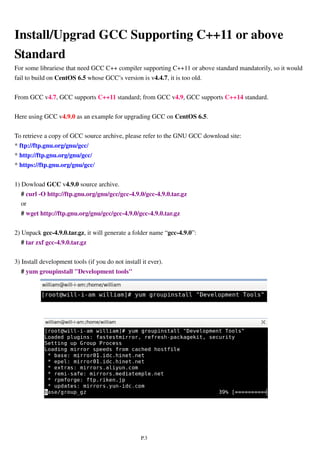
3) Install development tools (if you do not install it ever).
# yum groupinstall "Development tools"
P.4
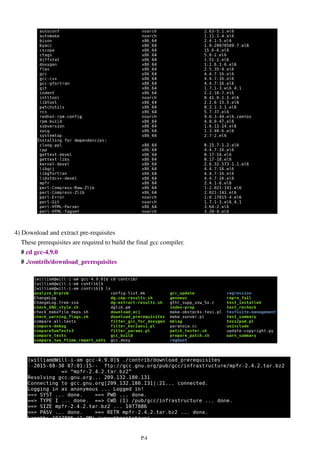
4) Download and extract pre-requisites
These prerequisites are required to build the final gcc compiler.
# cd gcc-4.9.0
# ./contrib/download_prerequisites
P.5
Note:
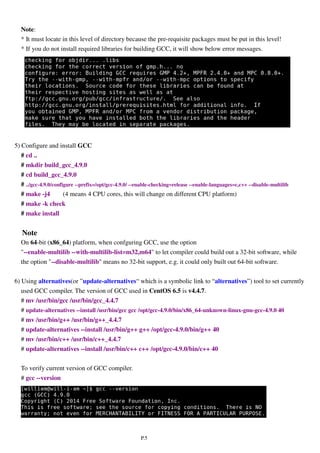
* It must locate in this level of directory because the pre-requisite packages must be put in this level!
* If you do not install required libraries for building GCC, it will show below error messages.
5) Configure and install GCC
# cd ..
# mkdir build_gcc_4.9.0
# cd build_gcc_4.9.0
# ../gcc-4.9.0/configure --prefix=/opt/gcc-4.9.0/ --enable-checking=release --enable-languages=c,c++ --disable-multilib
# make -j4 (4 means 4 CPU cores, this will change on different CPU platform)
# make -k check
# make install
Note
On 64-bit (x86_64) platform, when confguring GCC, use the option
"--enable-multilib --with-multilib-list=m32,m64" to let compiler could build out a 32-bit software, while
the option "--disable-multilib" means no 32-bit support, e.g. it could only built out 64-bit software.
6) Using alternatives(or ”update-alternatives“ which is a symbolic link to “alternatives”) tool to set currently
used GCC compiler. The version of GCC used in CentOS 6.5 is v4.4.7.
# mv /usr/bin/gcc /usr/bin/gcc_4.4.7
# update-alternatives --install /usr/bin/gcc gcc /opt/gcc-4.9.0/bin/x86_64-unknown-linux-gnu-gcc-4.9.0 40
# mv /usr/bin/g++ /usr/bin/g++_4.4.7
# update-alternatives --install /usr/bin/g++ g++ /opt/gcc-4.9.0/bin/g++ 40
# mv /usr/bin/c++ /usr/bin/c++_4.4.7
# update-alternatives --install /usr/bin/c++ c++ /opt/gcc-4.9.0/bin/c++ 40
To verify current version of GCC compiler.
# gcc --version
P.6
# g++ --version
# c++ --version
7) Copy new GCC libraries to system library folder
[for 32-bit]
# mv /usr/lib/libstdc++.so.6 /usr/lib/libstdc++.so.6.backup
# cp -P /opt/gcc-4.9.0/lib/libstdc++.so.6 /usr/lib/
# cp /opt/gcc-4.9.0/lib/libstdc++.so.6.0.20 /usr/lib/
[for 64-bit]
# mv /usr/lib64/libstdc++.so.6 /usr/lib64/libstdc++.so.6.backup
# cp -P /opt/gcc-4.9.0/lib64/libstdc++.so.6 /usr/lib64/
# cp /opt/gcc-4.9.0/lib64/libstdc++.so.6.0.20 /usr/lib64/
To verify current version of all system libraries
# ldconfig -v
If you want to update the “man” document for the new GCC, it could copy folders and files under
/opt/gcc-4.9.0/share to /usr/lib/share or /usr/lib64/share.
P.7
Install Qt 5
Here using Qt v5.4.1 for example.
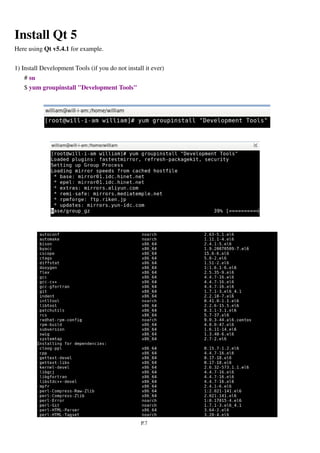
1) Install Development Tools (if you do not install it ever)
# su
$ yum groupinstall "Development Tools"
P.8
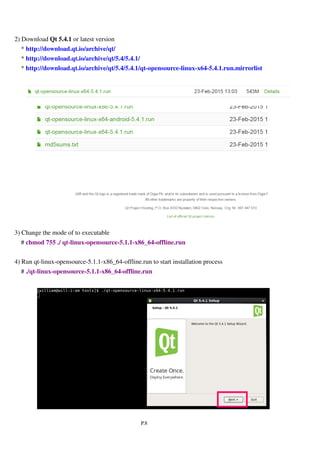
2) Download qt -opensource-linux-x64-5.4.1.run or latest version
* http://download.qt.io/archive/qt/
* http://download.qt.io/archive/qt/5.4/5.4.1/
* http://download.qt.io/archive/qt/5.4/5.4.1/qt-opensource-linux-x64-5.4.1.run.mirrorlist
3) Change the mode of to executable
# chmod 755 ./qt-opensource-linux-x64-5.4.1.run
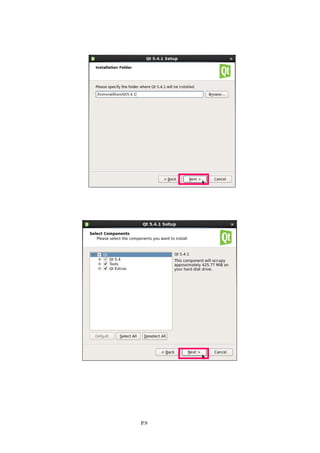
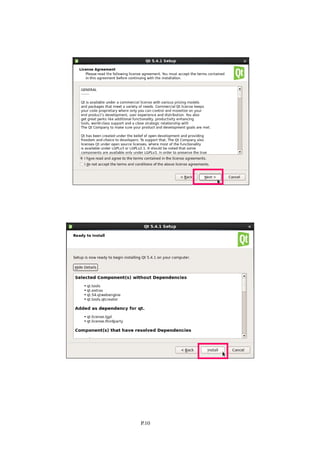
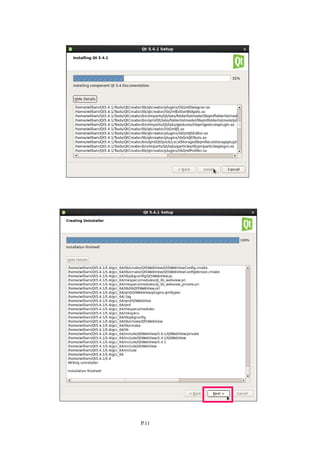
4) Run qt-opensource-linux-x64-5.4.1.run to start installation process
# ./qt-opensource-linux-x64-5.4.1.run
P.9
P.10
P.11
P.12
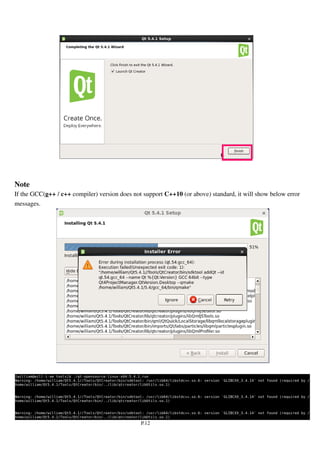
Note
If the GCC(g++ / c++ compiler) version does not support C++10 (or above) standard, it will show below error
messages.
P.13
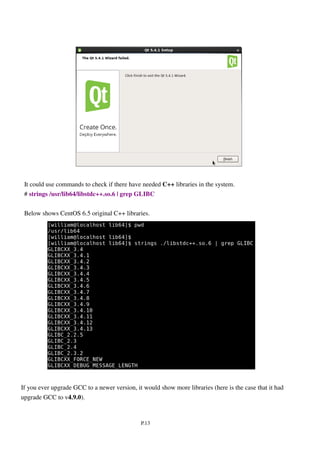
It could use commands to check if there have needed C++ libraries in the system.
# strings /usr/lib64/libstdc++.so.6 | grep GLIBC
Below shows CentOS 6.5 original C++ libraries.
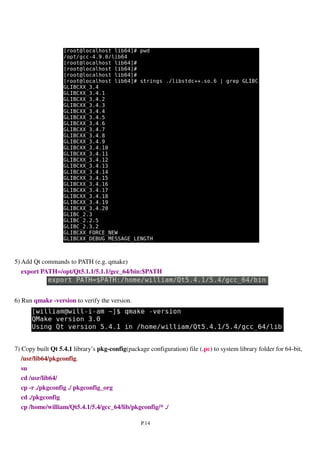
If you ever upgrade GCC to a newer version, it would show more libraries (here is the case that it had
upgrade GCC to v4.9.0).
P.14
5) Add Qt commands to PATH (e.g. qmake).
Ex:
export PATH=$PATH :/home/william/Qt5.4.1/5.4/gcc_64/bin
6) Run qmake -version to verify the version.
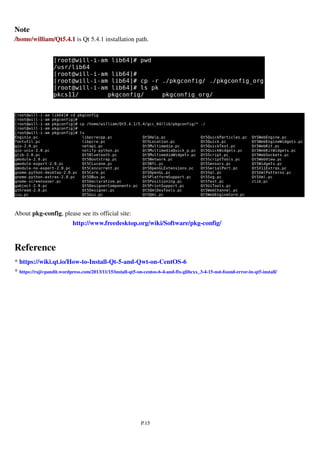
7) Copy built Qt 5.4.1 library’s pkg-config(package configuration) file (.pc) to system library folder for 64-bit,
/usr/lib64/pkgconfig.
su
cd /usr/lib64/
cp -r ./pkgconfig ./ pkgconfig_org
cd ./pkgconfig
cp /home/william/Qt5.4.1/5.4/gcc_64/lib/pkgconfig/* ./
P.15
Note
/home/william/Qt5.4.1 is Qt 5.4.1 installation path.
About pkg-config, please see its official site:
http://www.freedesktop.org/wiki/Software/pkg-config/
Reference
* https://wiki.qt.io/How-to-Install-Qt-5-and-Qwt-on-CentOS-6
* https://rajivpandit.wordpress.com/2013/11/15/install-qt5-on-centos-6-4-and-fix-glibcxx_3-4-15-not-found-error-in-qt5-install/

Upgrade GCC & Install Qt 5.4 on CentOS 6.5

  • 1.
    P.1 Upgrade GCC &Install Qt 5.4 On CentOS 6.5 William.L wiliwe@gmail.com 2015-05-14
  • 2.
    P.2 Index Install/Upgrad GCC SupportingC++11 or above Standard ............................................................................ 3 Install Qt 5 ............................................................................................................................................................. 7
  • 3.
    P.3 Install/Upgrad GCC SupportingC++11 or above Standard For some librariese that need GCC C++ compiler supporting C++11 or above standard mandatorily, so it would fail to build on CentOS 6.5 whose GCC’s version is v4.4.7, it is too old. From GCC v4.7, GCC supports C++11 standard; from GCC v4.9, GCC supports C++14 standard. Here using GCC v4.9.0 as an example for upgrading GCC on CentOS 6.5. To retrieve a copy of GCC source archive, please refer to the GNU GCC download site: * ftp://ftp.gnu.org/gnu/gcc/ * http://ftp.gnu.org/gnu/gcc/ * https://ftp.gnu.org/gnu/gcc/ 1) Dowload GCC v4.9.0 source archive. # curl -O http://ftp.gnu.org/gnu/gcc/gcc-4.9.0/gcc-4.9.0.tar.gz or # wget http://ftp.gnu.org/gnu/gcc/gcc-4.9.0/gcc-4.9.0.tar.gz 2) Unpack gcc-4.9.0.tar.gz, it will generate a folder name “gcc-4.9.0”: # tar zxf gcc-4.9.0.tar.gz 3) Install development tools (if you do not install it ever). # yum groupinstall "Development tools"
  • 4.
    P.4 4) Download andextract pre-requisites These prerequisites are required to build the final gcc compiler. # cd gcc-4.9.0 # ./contrib/download_prerequisites
  • 5.
    P.5 Note: * It mustlocate in this level of directory because the pre-requisite packages must be put in this level! * If you do not install required libraries for building GCC, it will show below error messages. 5) Configure and install GCC # cd .. # mkdir build_gcc_4.9.0 # cd build_gcc_4.9.0 # ../gcc-4.9.0/configure --prefix=/opt/gcc-4.9.0/ --enable-checking=release --enable-languages=c,c++ --disable-multilib # make -j4 (4 means 4 CPU cores, this will change on different CPU platform) # make -k check # make install Note On 64-bit (x86_64) platform, when confguring GCC, use the option "--enable-multilib --with-multilib-list=m32,m64" to let compiler could build out a 32-bit software, while the option "--disable-multilib" means no 32-bit support, e.g. it could only built out 64-bit software. 6) Using alternatives(or ”update-alternatives“ which is a symbolic link to “alternatives”) tool to set currently used GCC compiler. The version of GCC used in CentOS 6.5 is v4.4.7. # mv /usr/bin/gcc /usr/bin/gcc_4.4.7 # update-alternatives --install /usr/bin/gcc gcc /opt/gcc-4.9.0/bin/x86_64-unknown-linux-gnu-gcc-4.9.0 40 # mv /usr/bin/g++ /usr/bin/g++_4.4.7 # update-alternatives --install /usr/bin/g++ g++ /opt/gcc-4.9.0/bin/g++ 40 # mv /usr/bin/c++ /usr/bin/c++_4.4.7 # update-alternatives --install /usr/bin/c++ c++ /opt/gcc-4.9.0/bin/c++ 40 To verify current version of GCC compiler. # gcc --version
  • 6.
    P.6 # g++ --version #c++ --version 7) Copy new GCC libraries to system library folder [for 32-bit] # mv /usr/lib/libstdc++.so.6 /usr/lib/libstdc++.so.6.backup # cp -P /opt/gcc-4.9.0/lib/libstdc++.so.6 /usr/lib/ # cp /opt/gcc-4.9.0/lib/libstdc++.so.6.0.20 /usr/lib/ [for 64-bit] # mv /usr/lib64/libstdc++.so.6 /usr/lib64/libstdc++.so.6.backup # cp -P /opt/gcc-4.9.0/lib64/libstdc++.so.6 /usr/lib64/ # cp /opt/gcc-4.9.0/lib64/libstdc++.so.6.0.20 /usr/lib64/ To verify current version of all system libraries # ldconfig -v If you want to update the “man” document for the new GCC, it could copy folders and files under /opt/gcc-4.9.0/share to /usr/lib/share or /usr/lib64/share.
  • 7.
    P.7 Install Qt 5 Hereusing Qt v5.4.1 for example. 1) Install Development Tools (if you do not install it ever) # su $ yum groupinstall "Development Tools"
  • 8.
    P.8 2) Download qt-opensource-linux-x64-5.4.1.run or latest version * http://download.qt.io/archive/qt/ * http://download.qt.io/archive/qt/5.4/5.4.1/ * http://download.qt.io/archive/qt/5.4/5.4.1/qt-opensource-linux-x64-5.4.1.run.mirrorlist 3) Change the mode of to executable # chmod 755 ./qt-opensource-linux-x64-5.4.1.run 4) Run qt-opensource-linux-x64-5.4.1.run to start installation process # ./qt-opensource-linux-x64-5.4.1.run
  • 9.
  • 10.
  • 11.
  • 12.
    P.12 Note If the GCC(g++/ c++ compiler) version does not support C++10 (or above) standard, it will show below error messages.
  • 13.
    P.13 It could usecommands to check if there have needed C++ libraries in the system. # strings /usr/lib64/libstdc++.so.6 | grep GLIBC Below shows CentOS 6.5 original C++ libraries. If you ever upgrade GCC to a newer version, it would show more libraries (here is the case that it had upgrade GCC to v4.9.0).
  • 14.
    P.14 5) Add Qtcommands to PATH (e.g. qmake). Ex: export PATH=$PATH :/home/william/Qt5.4.1/5.4/gcc_64/bin 6) Run qmake -version to verify the version. 7) Copy built Qt 5.4.1 library’s pkg-config(package configuration) file (.pc) to system library folder for 64-bit, /usr/lib64/pkgconfig. su cd /usr/lib64/ cp -r ./pkgconfig ./ pkgconfig_org cd ./pkgconfig cp /home/william/Qt5.4.1/5.4/gcc_64/lib/pkgconfig/* ./
  • 15.
    P.15 Note /home/william/Qt5.4.1 is Qt5.4.1 installation path. About pkg-config, please see its official site: http://www.freedesktop.org/wiki/Software/pkg-config/ Reference * https://wiki.qt.io/How-to-Install-Qt-5-and-Qwt-on-CentOS-6 * https://rajivpandit.wordpress.com/2013/11/15/install-qt5-on-centos-6-4-and-fix-glibcxx_3-4-15-not-found-error-in-qt5-install/