@Waterstonsltd
www.waterstons.com
Office 365
Cloud or not, you should know how it will shape your organisation’s
future
Introduction
• Alex, Charlie, Andrew, Ben
• Why the seminar?
• What this isn’t
• A different angle
• Weighing the pros and cons
• History / What
• Considerations
Background and History
• Launched June 2011
• Brought together SharePoint, Exchange and Lync into a
single offering
• Replaced Business Productivity Online Suite
• Responding to Google’s service Google Apps
• Upgraded in February 2013 to the Office 2013 versions
• $1.5 billion for Microsoft
• Fastest growing commercial product in Microsoft history
The Traditional Benefits
• Cost*
• 100 users – Midsize business plan is £11,760 per annum
• Scalability and Resilience*
• Updates and Maintenance*
• Technical Support*
• Universal Access*
* your mileage will vary
The Traditional Challenges
• Integration *
• Data Security / Compliance *
• Service Availability / Uptime *
• Technical Support *
• Customisations *
* your mileage will vary
What is Included?
But what do you actually get?
Something New
• Cloud first
• User experience
• Added features / functionality not available yet
• Quick and simple to pilot
“Microsoft is a devices
and Services company”
– Steve Ballmer
“Mobile first, Cloud first”
- Satya Nadella
“The cloud is going to be
core to everything we do”
- Brad Anderson
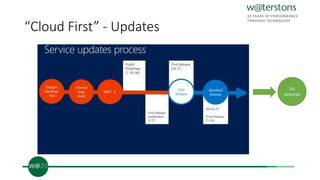
“Cloud First” - Updates
On
premise
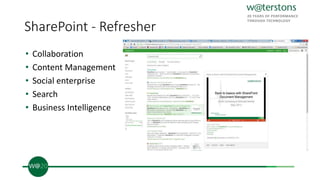
SharePoint - Refresher
• Collaboration
• Content Management
• Social enterprise
• Search
• Business Intelligence
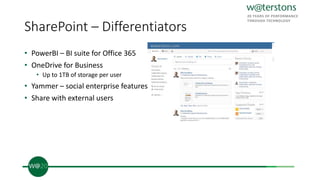
SharePoint – Differentiators
• PowerBI – BI suite for Office 365
• OneDrive for Business
• Up to 1TB of storage per user
• Yammer – social enterprise features
• Share with external users
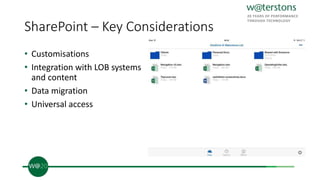
SharePoint – Key Considerations
• Customisations
• Integration with LOB systems
and content
• Data migration
• Universal access
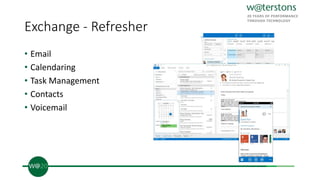
Exchange - Refresher
• Email
• Calendaring
• Task Management
• Contacts
• Voicemail
Exchange – Deployment Options
• Everything on-premises
• Everything in Office 365
• Hybrid
• Specific services
• Archiving
• Anti-spam / anti-virus
• Data loss prevention
• Intellectual rights management
Exchange –365 Differentiators?
• IRM
• Active Directory Rights Management Services
• Azure Rights Management
• Yammer
• Mailbox clutter
• Journaling
Exchange – Key Considerations
• Customisations
• Integration with LOB systems
• Backups
• Data retention
• Client support (software)
• Outlook version
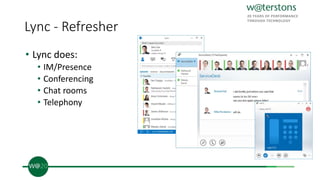
Lync - Refresher
• Lync does:
• IM/Presence
• Conferencing
• Chat rooms
• Telephony
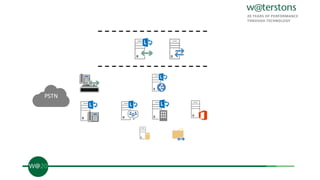
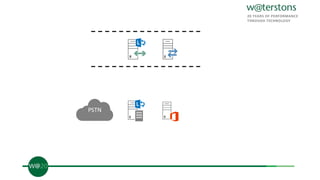
Lync – On prem
• Pro
• All functionality
• Phone integration
• Deployment Flexibility
• Cons
• Infrastructure requirements
PSTN
PSTN
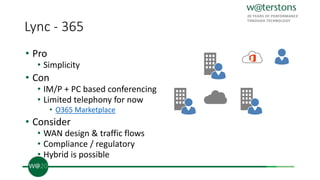
Lync - 365
• Pro
• Simplicity
• Con
• IM/P + PC based conferencing
• Limited telephony for now
• O365 Marketplace
• Consider
• WAN design & traffic flows
• Compliance / regulatory
• Hybrid is possible
Desktops/Laptops/Devices
• Office interaction with any other application
• Where is your data?
• You need an internet connection
• Operating system/software and hardware dependencies
• Windows 7 or 8. Mac users OS X 10.6 (or later).
• Internet access to install Office 365 and to activate and manage
your subscription (once a month).
• IE 9, Firefox 12, Safari 5, or Chrome 18.
• Hardware spec
Infrastructure Applications
• Anything that interacts with Office, Exchange, Lync, SharePoint
• Usually overlooked
• Examples
• Fax to email / Alerting
• Click to mail/message in Service Desk tools
• SharePoint interaction with SSRS
• Anything you click a button in and automatically opens an office
document
• Upgrading
• Limited control
• Re-validation
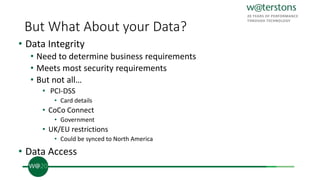
But What About your Data?
• Data Integrity
• Need to determine business requirements
• Meets most security requirements
• But not all…
• PCI-DSS
• Card details
• CoCo Connect
• Government
• UK/EU restrictions
• Could be synced to North America
• Data Access
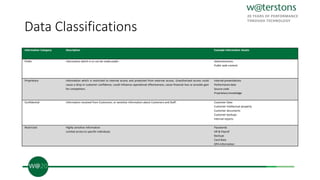
Data Classifications
Information Category Description Example Information Assets
Public Information which is or can be made public. Advertisements
Public web content
Proprietary Information which is restricted to internal access and protected from external access. Unauthorised access could
cause a drop in customer confidence, could influence operational effectiveness, cause financial loss or provide gain
for competitors.
Internal presentations
Performance data
Source code
Proprietary knowledge
Confidential Information received from Customers, or sensitive information about Customers and Staff. Customer Data
Customer intellectual property
Customer documents
Customer backups
Internal reports
Restricted Highly sensitive information
Limited access to specific individuals
Passwords
HR & Payroll
Backups
Card Data
DPA Information
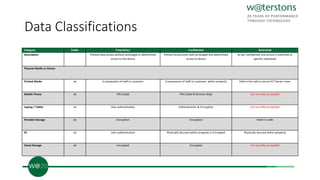
Data Classifications
Category Public Proprietary Confidential Restricted
Description: Prevent easy access without prolonged or determined
access to the device
Prevent access even with prolonged and determined
access to device
As per confidential and access is restricted to
specific individuals
Physical Media or Device
Printed Media ok In possession of staff or customer In possession of staff or customer, within property Held in the safe or secure ICT Server room
Mobile Phone ok PIN Coded PIN Coded & Remote Wipe not normally acceptable
Laptop / Tablet ok User authentication Authentication & Encryption not normally acceptable
Portable Storage ok Encryption Encryption Held in a safe
PC ok User authentication Physically Secured within property or Encrypted Physically secured within property
Cloud Storage ok Encrypted Encrypted not normally acceptable
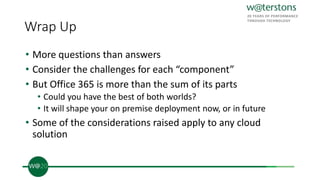
Wrap Up
• More questions than answers
• Consider the challenges for each “component”
• But Office 365 is more than the sum of its parts
• Could you have the best of both worlds?
• It will shape your on premise deployment now, or in future
• Some of the considerations raised apply to any cloud
solution
Upcoming Events….
• Beyond Intelligence: The Business Insights Maturity Model
• 20th June
Waterstons’ Business analytics specialists Dan, Chris and Michael will present
Waterstons’ latest thinking and experience around the drivers behind analytics and
intelligence in the business environment, and the current business analytics
marketplace.
Keep in Touch….
Alex.Bookless@waterstons.com
Andrew.Quinn@waterstons.com
Ben.Lee@waterstons.com
Charlie.Hales@waterstons.com
www.waterstons.com
@WaterstonsLtd

OFFICE 365- CLOUD OR NOT, YOU SHOULD KNOW HOW IT WILL SHAPE YOUR ORGANISATION’S FUTURE

  • 1.
    @Waterstonsltd www.waterstons.com Office 365 Cloud ornot, you should know how it will shape your organisation’s future
  • 2.
    Introduction • Alex, Charlie,Andrew, Ben • Why the seminar? • What this isn’t • A different angle • Weighing the pros and cons • History / What • Considerations
  • 3.
    Background and History •Launched June 2011 • Brought together SharePoint, Exchange and Lync into a single offering • Replaced Business Productivity Online Suite • Responding to Google’s service Google Apps • Upgraded in February 2013 to the Office 2013 versions • $1.5 billion for Microsoft • Fastest growing commercial product in Microsoft history
  • 4.
    The Traditional Benefits •Cost* • 100 users – Midsize business plan is £11,760 per annum • Scalability and Resilience* • Updates and Maintenance* • Technical Support* • Universal Access* * your mileage will vary
  • 5.
    The Traditional Challenges •Integration * • Data Security / Compliance * • Service Availability / Uptime * • Technical Support * • Customisations * * your mileage will vary
  • 6.
  • 7.
    But what doyou actually get?
  • 8.
    Something New • Cloudfirst • User experience • Added features / functionality not available yet • Quick and simple to pilot “Microsoft is a devices and Services company” – Steve Ballmer “Mobile first, Cloud first” - Satya Nadella “The cloud is going to be core to everything we do” - Brad Anderson
  • 9.
    “Cloud First” -Updates On premise
  • 10.
    SharePoint - Refresher •Collaboration • Content Management • Social enterprise • Search • Business Intelligence
  • 11.
    SharePoint – Differentiators •PowerBI – BI suite for Office 365 • OneDrive for Business • Up to 1TB of storage per user • Yammer – social enterprise features • Share with external users
  • 12.
    SharePoint – KeyConsiderations • Customisations • Integration with LOB systems and content • Data migration • Universal access
  • 13.
    Exchange - Refresher •Email • Calendaring • Task Management • Contacts • Voicemail
  • 14.
    Exchange – DeploymentOptions • Everything on-premises • Everything in Office 365 • Hybrid • Specific services • Archiving • Anti-spam / anti-virus • Data loss prevention • Intellectual rights management
  • 15.
    Exchange –365 Differentiators? •IRM • Active Directory Rights Management Services • Azure Rights Management • Yammer • Mailbox clutter • Journaling
  • 16.
    Exchange – KeyConsiderations • Customisations • Integration with LOB systems • Backups • Data retention • Client support (software) • Outlook version
  • 17.
    Lync - Refresher •Lync does: • IM/Presence • Conferencing • Chat rooms • Telephony
  • 18.
    Lync – Onprem • Pro • All functionality • Phone integration • Deployment Flexibility • Cons • Infrastructure requirements
  • 19.
  • 20.
  • 21.
    Lync - 365 •Pro • Simplicity • Con • IM/P + PC based conferencing • Limited telephony for now • O365 Marketplace • Consider • WAN design & traffic flows • Compliance / regulatory • Hybrid is possible
  • 22.
    Desktops/Laptops/Devices • Office interactionwith any other application • Where is your data? • You need an internet connection • Operating system/software and hardware dependencies • Windows 7 or 8. Mac users OS X 10.6 (or later). • Internet access to install Office 365 and to activate and manage your subscription (once a month). • IE 9, Firefox 12, Safari 5, or Chrome 18. • Hardware spec
  • 23.
    Infrastructure Applications • Anythingthat interacts with Office, Exchange, Lync, SharePoint • Usually overlooked • Examples • Fax to email / Alerting • Click to mail/message in Service Desk tools • SharePoint interaction with SSRS • Anything you click a button in and automatically opens an office document • Upgrading • Limited control • Re-validation
  • 24.
    But What Aboutyour Data? • Data Integrity • Need to determine business requirements • Meets most security requirements • But not all… • PCI-DSS • Card details • CoCo Connect • Government • UK/EU restrictions • Could be synced to North America • Data Access
  • 25.
    Data Classifications Information CategoryDescription Example Information Assets Public Information which is or can be made public. Advertisements Public web content Proprietary Information which is restricted to internal access and protected from external access. Unauthorised access could cause a drop in customer confidence, could influence operational effectiveness, cause financial loss or provide gain for competitors. Internal presentations Performance data Source code Proprietary knowledge Confidential Information received from Customers, or sensitive information about Customers and Staff. Customer Data Customer intellectual property Customer documents Customer backups Internal reports Restricted Highly sensitive information Limited access to specific individuals Passwords HR & Payroll Backups Card Data DPA Information
  • 26.
    Data Classifications Category PublicProprietary Confidential Restricted Description: Prevent easy access without prolonged or determined access to the device Prevent access even with prolonged and determined access to device As per confidential and access is restricted to specific individuals Physical Media or Device Printed Media ok In possession of staff or customer In possession of staff or customer, within property Held in the safe or secure ICT Server room Mobile Phone ok PIN Coded PIN Coded & Remote Wipe not normally acceptable Laptop / Tablet ok User authentication Authentication & Encryption not normally acceptable Portable Storage ok Encryption Encryption Held in a safe PC ok User authentication Physically Secured within property or Encrypted Physically secured within property Cloud Storage ok Encrypted Encrypted not normally acceptable
  • 27.
    Wrap Up • Morequestions than answers • Consider the challenges for each “component” • But Office 365 is more than the sum of its parts • Could you have the best of both worlds? • It will shape your on premise deployment now, or in future • Some of the considerations raised apply to any cloud solution
  • 28.
    Upcoming Events…. • BeyondIntelligence: The Business Insights Maturity Model • 20th June Waterstons’ Business analytics specialists Dan, Chris and Michael will present Waterstons’ latest thinking and experience around the drivers behind analytics and intelligence in the business environment, and the current business analytics marketplace.
  • 29.

Editor's Notes

  • #28 Lessons learned for cloud deployments apply equally for Google or other hosted providers