@Waterstonsltd
www.waterstons.com
‘Joining the dots’
The benefits of Integration
Presented by
Richard Begg
Lead Specialist: Integration & Software Architecture
Agenda
@ A typical SMB IT landscape challenges
@ How using Integration can help
@ Importance of Integration strategy
@ Forms & Approaches of Integration
@ Conclusion
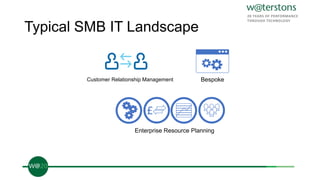
Typical SMB IT Landscape
Customer Relationship Management
£
Enterprise Resource Planning
Bespoke
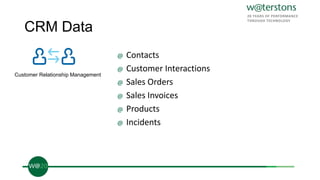
CRM Data
@ Contacts
@ Customer Interactions
@ Sales Orders
@ Sales Invoices
@ Products
@ Incidents
Customer Relationship Management
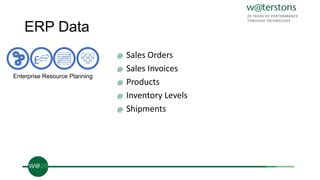
ERP Data
@ Sales Orders
@ Sales Invoices
@ Products
@ Inventory Levels
@ Shipments
£
Enterprise Resource Planning
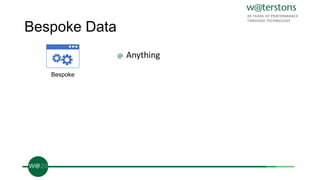
Bespoke Data
@ Anything
Bespoke
SMB IT Landscape Challenges
@ Customers and employees working with data that could be incorrect
or out-of-date
@ Employees being less productive due to the need to interact with
multiple systems to do common tasks
@ Customers and employees not having the right information available
in a timely manner
@ IT unable to adapt to changing business needs
How does Integrated IT help?
@ Reduce data replication and increase data currency
@ Make more use of your data and business functions
@ Increase the agility of your IT
@ Improve business process monitoring and manageability
Integration Strategy
@ Using the right strategy is critical
@ Integration projects are often large and complex
@ Smaller Integration projects delivered in an iterative manner are
more likely to succeed
@ The correct architecture and technology choices allow the solution to
grow to meet business needs
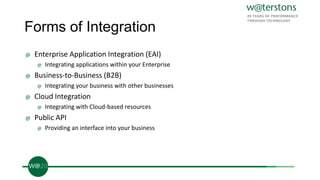
Forms of Integration
@ Enterprise Application Integration (EAI)
@ Integrating applications within your Enterprise
@ Business-to-Business (B2B)
@ Integrating your business with other businesses
@ Cloud Integration
@ Integrating with Cloud-based resources
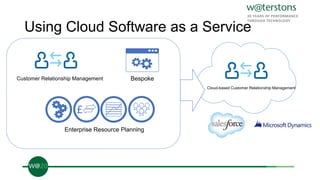
Using Cloud Software as a Service
Customer Relationship Management
£
Enterprise Resource Planning
Bespoke
Cloud-based Customer Relationship Management
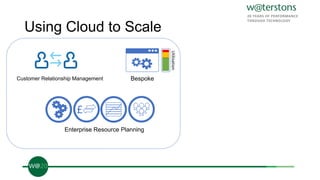
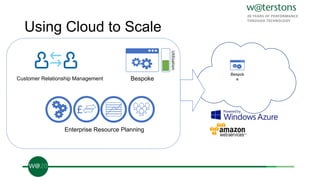
Using Cloud to Scale
Customer Relationship Management
£
Enterprise Resource Planning
Bespoke
Utilisation
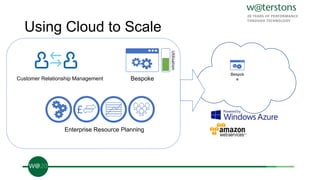
Using Cloud to Scale
Customer Relationship Management
£
Enterprise Resource Planning
Bespoke
Bespok
e
Utilisation
Using Cloud to Scale
Customer Relationship Management
£
Enterprise Resource Planning
Bespoke
Bespok
e
Utilisation
Forms of Integration
@ Enterprise Application Integration (EAI)
@ Integrating applications within your Enterprise
@ Business-to-Business (B2B)
@ Integrating your business with other businesses
@ Cloud Integration
@ Integrating with Cloud-based resources
@ Public API
@ Providing an interface into your business
Public API
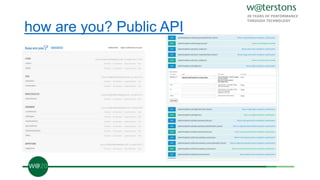
@ Exposes your business functions and data via a documented web
service API (REST/SOAP)
@ Allows third-parties to add value to your business
@ Public doesn’t mean open access (e.g. OAuth)
@ Decreases complexity by providing a common API to all parties
@ Large growth area
Public API - Examples
@ Google Maps API
@ Facebook API
@ Twitter API
@ National Grid UK Energy & Gas Flow API
how are you? Public API
Approaches to Integration
@ Each form of Integration can be realised using different approaches
@ Not one right answer
@ Using a combination of approaches can give greater flexibility
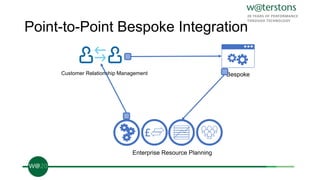
Point-to-Point Bespoke Integration
Customer Relationship Management
£
Enterprise Resource Planning
Bespoke
Point-to-Point Bespoke Integration
Pros
@ Simple to implement
@ Simple to operate
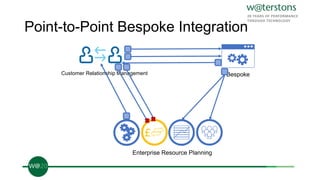
Point-to-Point Bespoke Integration
Customer Relationship Management
£
Enterprise Resource Planning
Bespoke
£
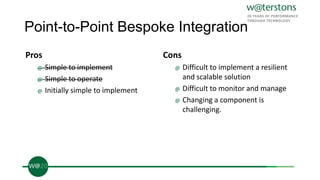
Point-to-Point Bespoke Integration
Pros
@ Simple to implement
@ Simple to operate
@ Initially simple to implement
Cons
@ Difficult to implement a resilient
and scalable solution
@ Difficult to monitor and manage
@ Changing a component is
challenging.
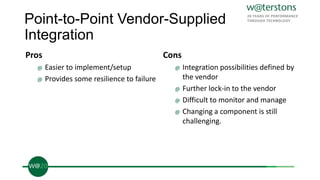
Point-to-Point Vendor-Supplied
Integration
Pros
@ Easier to implement/setup
@ Provides some resilience to failure
Cons
@ Integration possibilities defined by
the vendor
@ Further lock-in to the vendor
@ Difficult to monitor and manage
@ Changing a component is still
challenging.
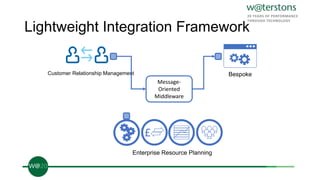
Lightweight Integration Framework
Customer Relationship Management
£
Enterprise Resource Planning
Message-
Oriented
Middleware
Bespoke
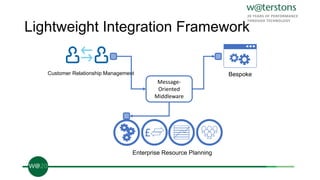
Lightweight Integration Framework
Customer Relationship Management
£
Enterprise Resource Planning
Message-
Oriented
Middleware
Bespoke
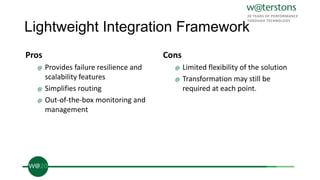
Lightweight Integration Framework
Pros
@ Provides failure resilience and
scalability features
@ Simplifies routing
@ Out-of-the-box monitoring and
management
Cons
@ Limited flexibility of the solution
@ Transformation may still be
required at each point.
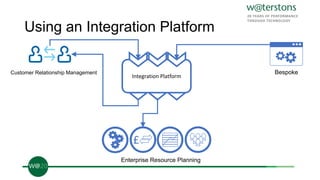
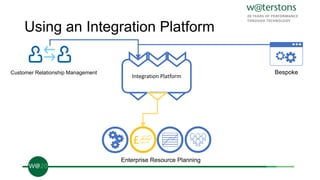
Using an Integration Platform
Customer Relationship Management
£
Enterprise Resource Planning
Bespoke
Integration Platform
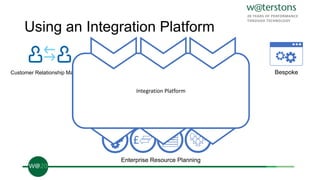
Using an Integration Platform
Customer Relationship Management
£
Enterprise Resource Planning
Bespoke
Integration Platform
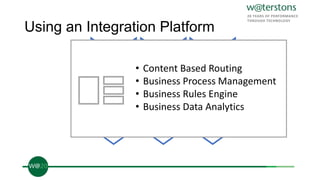
Using an Integration Platform
Integration Platform
• Content Based Routing
• Business Process Management
• Business Rules Engine
• Business Data Analytics
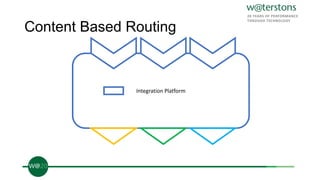
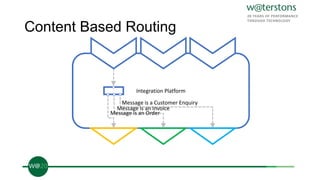
Content Based Routing
Integration Platform
Content Based Routing
Integration Platform
Message is an Order
Message is an Invoice
Message is a Customer Enquiry
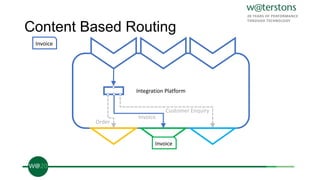
Content Based Routing
Integration Platform
Invoice
Invoice
Order
Invoice
Customer Enquiry
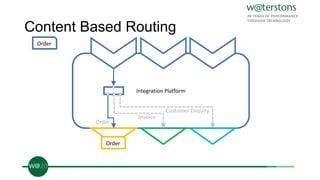
Content Based Routing
Integration Platform
Order
Order
Order
Invoice
Customer Enquiry
Using an Integration Platform
Customer Relationship Management
£
Enterprise Resource Planning
Bespoke
Integration Platform
£
Integration Platform as a Service (IPaaS)
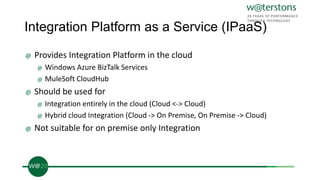
@ Provides Integration Platform in the cloud
@ Windows Azure BizTalk Services
@ MuleSoft CloudHub
@ Should be used for
@ Integration entirely in the cloud (Cloud <-> Cloud)
@ Hybrid cloud Integration (Cloud -> On Premise, On Premise -> Cloud)
@ Not suitable for on premise only Integration
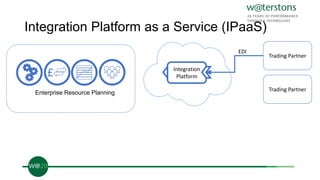
Integration Platform as a Service (IPaaS)
£
Enterprise Resource Planning
Trading Partner
Trading Partner
Integration
Platform
EDI
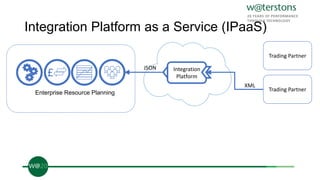
Integration Platform as a Service (IPaaS)
£
Enterprise Resource Planning
Trading Partner
Trading Partner
Integration
Platform
XML
JSON
Using an Integration Platform
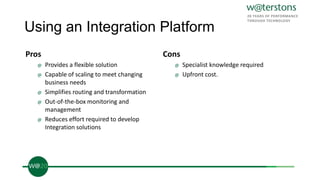
Pros
@ Provides a flexible solution
@ Capable of scaling to meet changing
business needs
@ Simplifies routing and transformation
@ Out-of-the-box monitoring and
management
@ Reduces effort required to develop
Integration solutions
Cons
@ Specialist knowledge required
@ Upfront cost.
Using an Integration Platform
Pros
@ Provides a flexible solution
@ Capable of scaling to meet changing
business needs
@ Simplifies routing and transformation
@ Out-of-the-box monitoring and
management
@ Reduces effort required to develop
Integration solutions
@ Simplifies infrastructure complexity and
cost
@ Payment by subscription lowers TCO
Cons
@ Specialist knowledge required
@ Possible legislative or commercial issues
regarding data in the cloud
@ Only suitable for Integration in the cloud.
Conclusion
@ The right combination of strategy, architecture and technology is key
to building a successful integrated IT platform and allows the
solution to grow to meet business needs
@ Integration maximises the availability and currency of data and
business function across the enterprise
@ Integrating services in the cloud lowers TCO and increases the agility
of your IT to respond to real-time demands.
What’s next?
The Business case: why bother?
Friday 28th March 2014, 11:45am
Jo Adair

‘Joining the dots’ of your applications and systems – the benefits of Integration

  • 1.
    @Waterstonsltd www.waterstons.com ‘Joining the dots’ Thebenefits of Integration Presented by Richard Begg Lead Specialist: Integration & Software Architecture
  • 2.
    Agenda @ A typicalSMB IT landscape challenges @ How using Integration can help @ Importance of Integration strategy @ Forms & Approaches of Integration @ Conclusion
  • 3.
    Typical SMB ITLandscape
  • 4.
    Typical SMB ITLandscape Customer Relationship Management £ Enterprise Resource Planning Bespoke
  • 5.
    CRM Data @ Contacts @Customer Interactions @ Sales Orders @ Sales Invoices @ Products @ Incidents Customer Relationship Management
  • 6.
    ERP Data @ SalesOrders @ Sales Invoices @ Products @ Inventory Levels @ Shipments £ Enterprise Resource Planning
  • 7.
  • 8.
    SMB IT LandscapeChallenges @ Customers and employees working with data that could be incorrect or out-of-date @ Employees being less productive due to the need to interact with multiple systems to do common tasks @ Customers and employees not having the right information available in a timely manner @ IT unable to adapt to changing business needs
  • 9.
    How does IntegratedIT help? @ Reduce data replication and increase data currency @ Make more use of your data and business functions @ Increase the agility of your IT @ Improve business process monitoring and manageability
  • 10.
  • 11.
    Integration Strategy @ Usingthe right strategy is critical @ Integration projects are often large and complex @ Smaller Integration projects delivered in an iterative manner are more likely to succeed @ The correct architecture and technology choices allow the solution to grow to meet business needs
  • 12.
  • 13.
    Forms of Integration @Enterprise Application Integration (EAI) @ Integrating applications within your Enterprise @ Business-to-Business (B2B) @ Integrating your business with other businesses @ Cloud Integration @ Integrating with Cloud-based resources
  • 14.
    Using Cloud Softwareas a Service Customer Relationship Management £ Enterprise Resource Planning Bespoke Cloud-based Customer Relationship Management
  • 15.
    Using Cloud toScale Customer Relationship Management £ Enterprise Resource Planning Bespoke Utilisation
  • 16.
    Using Cloud toScale Customer Relationship Management £ Enterprise Resource Planning Bespoke Bespok e Utilisation
  • 17.
    Using Cloud toScale Customer Relationship Management £ Enterprise Resource Planning Bespoke Bespok e Utilisation
  • 18.
    Forms of Integration @Enterprise Application Integration (EAI) @ Integrating applications within your Enterprise @ Business-to-Business (B2B) @ Integrating your business with other businesses @ Cloud Integration @ Integrating with Cloud-based resources @ Public API @ Providing an interface into your business
  • 19.
    Public API @ Exposesyour business functions and data via a documented web service API (REST/SOAP) @ Allows third-parties to add value to your business @ Public doesn’t mean open access (e.g. OAuth) @ Decreases complexity by providing a common API to all parties @ Large growth area
  • 20.
    Public API -Examples @ Google Maps API @ Facebook API @ Twitter API @ National Grid UK Energy & Gas Flow API
  • 21.
    how are you?Public API
  • 22.
  • 23.
    Approaches to Integration @Each form of Integration can be realised using different approaches @ Not one right answer @ Using a combination of approaches can give greater flexibility
  • 24.
    Point-to-Point Bespoke Integration CustomerRelationship Management £ Enterprise Resource Planning Bespoke
  • 25.
    Point-to-Point Bespoke Integration Pros @Simple to implement @ Simple to operate
  • 26.
    Point-to-Point Bespoke Integration CustomerRelationship Management £ Enterprise Resource Planning Bespoke £
  • 27.
    Point-to-Point Bespoke Integration Pros @Simple to implement @ Simple to operate @ Initially simple to implement Cons @ Difficult to implement a resilient and scalable solution @ Difficult to monitor and manage @ Changing a component is challenging.
  • 28.
    Point-to-Point Vendor-Supplied Integration Pros @ Easierto implement/setup @ Provides some resilience to failure Cons @ Integration possibilities defined by the vendor @ Further lock-in to the vendor @ Difficult to monitor and manage @ Changing a component is still challenging.
  • 29.
    Lightweight Integration Framework CustomerRelationship Management £ Enterprise Resource Planning Message- Oriented Middleware Bespoke
  • 30.
    Lightweight Integration Framework CustomerRelationship Management £ Enterprise Resource Planning Message- Oriented Middleware Bespoke
  • 31.
    Lightweight Integration Framework Pros @Provides failure resilience and scalability features @ Simplifies routing @ Out-of-the-box monitoring and management Cons @ Limited flexibility of the solution @ Transformation may still be required at each point.
  • 32.
    Using an IntegrationPlatform Customer Relationship Management £ Enterprise Resource Planning Bespoke Integration Platform
  • 33.
    Using an IntegrationPlatform Customer Relationship Management £ Enterprise Resource Planning Bespoke Integration Platform Integration Platform
  • 34.
    Using an IntegrationPlatform Integration Platform • Content Based Routing • Business Process Management • Business Rules Engine • Business Data Analytics
  • 35.
  • 36.
    Content Based Routing IntegrationPlatform Message is an Order Message is an Invoice Message is a Customer Enquiry
  • 37.
    Content Based Routing IntegrationPlatform Invoice Invoice Order Invoice Customer Enquiry
  • 38.
    Content Based Routing IntegrationPlatform Order Order Order Invoice Customer Enquiry
  • 39.
    Using an IntegrationPlatform Customer Relationship Management £ Enterprise Resource Planning Bespoke Integration Platform £
  • 40.
    Integration Platform asa Service (IPaaS) @ Provides Integration Platform in the cloud @ Windows Azure BizTalk Services @ MuleSoft CloudHub @ Should be used for @ Integration entirely in the cloud (Cloud <-> Cloud) @ Hybrid cloud Integration (Cloud -> On Premise, On Premise -> Cloud) @ Not suitable for on premise only Integration
  • 41.
    Integration Platform asa Service (IPaaS) £ Enterprise Resource Planning Trading Partner Trading Partner Integration Platform EDI
  • 42.
    Integration Platform asa Service (IPaaS) £ Enterprise Resource Planning Trading Partner Trading Partner Integration Platform XML JSON
  • 43.
    Using an IntegrationPlatform Pros @ Provides a flexible solution @ Capable of scaling to meet changing business needs @ Simplifies routing and transformation @ Out-of-the-box monitoring and management @ Reduces effort required to develop Integration solutions Cons @ Specialist knowledge required @ Upfront cost.
  • 44.
    Using an IntegrationPlatform Pros @ Provides a flexible solution @ Capable of scaling to meet changing business needs @ Simplifies routing and transformation @ Out-of-the-box monitoring and management @ Reduces effort required to develop Integration solutions @ Simplifies infrastructure complexity and cost @ Payment by subscription lowers TCO Cons @ Specialist knowledge required @ Possible legislative or commercial issues regarding data in the cloud @ Only suitable for Integration in the cloud.
  • 45.
    Conclusion @ The rightcombination of strategy, architecture and technology is key to building a successful integrated IT platform and allows the solution to grow to meet business needs @ Integration maximises the availability and currency of data and business function across the enterprise @ Integrating services in the cloud lowers TCO and increases the agility of your IT to respond to real-time demands.
  • 46.
    What’s next? The Businesscase: why bother? Friday 28th March 2014, 11:45am Jo Adair