@Waterstonsltd
www.waterstons.com
How to achieve UC
success
Ben Lee – 11.04.14
Define UC?
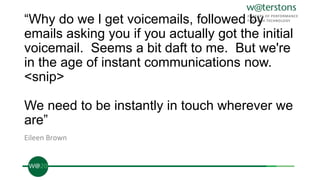
“Why do we l get voicemails, followed by
emails asking you if you actually got the initial
voicemail. Seems a bit daft to me. But we're
in the age of instant communications now.
<snip>
We need to be instantly in touch wherever we
are”
Eileen Brown
UC Maturity
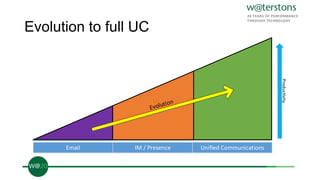
Evolution to full UC
Email IM / Presence Unified Communications
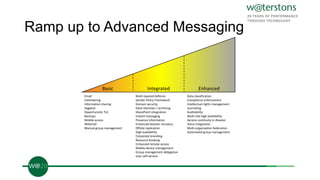
Ramp up to Advanced Messaging
Basic Integrated Enhanced
Email
Calendaring
Information sharing
Hygiene
Opportunistic TLS
Backups
Mobile access
Webmail
Manual group management
Multi-layered defence
Sender Policy Framework
Domain security
Data retention / archiving
SharePoint integration
Instant messaging
Presence information
Enhanced disaster recovery
Offsite replication
High availability
Corporate branding
Resource booking
Enhanced remote access
Mobile device management
Group management delegation
User self-service
Data classification
Compliance enforcement
Intellectual rights management
Journaling
Auditability
Multi-site high availability
Service continuity in disaster
Voice integration
Multi-organisation federation
Automated group management
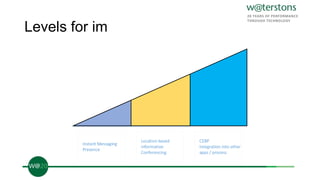
Levels for im
Instant Messaging
Presence
Location based
information
Conferencing
CEBP
Integration into other
apps / process
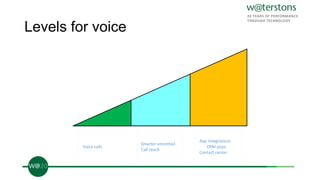
Levels for voice
Voice calls
Smarter voicemail
Call reach
App integrations
CRM pops
Contact center
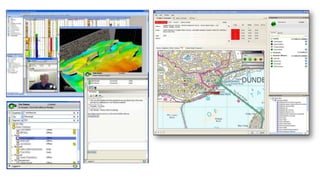
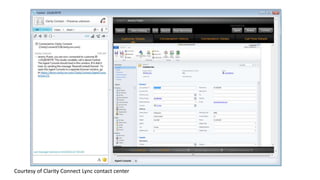
Courtesy of Clarity Connect Lync contact center
Culture
What is special about a UC
project?
Getting the spark
Adoption planning
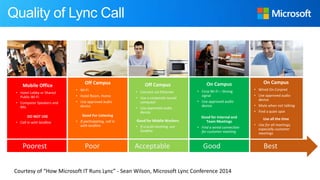
Off Campus
• Wi-Fi
• Hotel Room, Home
• Use approved audio
device
Good For Listening
• If participating, call in
with landline
Off Campus
• Connect via Ethernet
• Use a corporate issued
computer
• Use approved audio
device
Good for Mobile Workers
• If crucial meeting, use
landline
On Campus
• Corp Wi-Fi – Strong
signal
• Use approved audio
device
Good for Internal and
Team Meetings
• Find a wired connection
for customer meeting
On Campus
• Wired On Corpnet
• Use approved audio
device
• Mute when not talking
• Find a quiet spot
Use all the time
• Use for all meetings,
especially customer
meetings
Quality of Lync Call
Poorest Poor Acceptable Good Best
Mobile Office
• Hotel Lobby or Shared
Public Wi-Fi
• Computer Speakers and
Mic
DO NOT USE
• Call in with landline
Courtesy of “How Microsoft IT Runs Lync” - Sean Wilson, Microsoft Lync Conference 2014
Technical planning
Endpoint selection
Pilot, Pilot, Pilot
(You should totally do a pilot…)
Expanding to live
Follow up
Don’t sit still
Summary
Get your business case / find your advocates
This should not be an IT project
Design & build your environment to support the features you want
Pilot your deployment
NOT WITH IT!
Plan your rollout
Train, train, train
<3
Iterate
What comes next – beyond
UC
Upcoming Events….
“Mobile Device Management & BYOD Technologies – Simple Changes
Big Benefits”
By Charlie Hales and Nigel Robson
Demonstrating how your business could use technologies it may have
already invested in, such as System Center Configuration manager
(SCCM) and Exchange to enable its Mobile Device Management
(MDM) & BYOD strategies.
Keep in Touch….
Ben.Lee@waterstons.com
www.waterstons.com
@WaterstonsLtd

How to Achieve Unified Communications Success

  • 1.
    @Waterstonsltd www.waterstons.com How to achieveUC success Ben Lee – 11.04.14
  • 2.
  • 3.
    “Why do wel get voicemails, followed by emails asking you if you actually got the initial voicemail. Seems a bit daft to me. But we're in the age of instant communications now. <snip> We need to be instantly in touch wherever we are” Eileen Brown
  • 4.
  • 5.
    Evolution to fullUC Email IM / Presence Unified Communications
  • 6.
    Ramp up toAdvanced Messaging Basic Integrated Enhanced Email Calendaring Information sharing Hygiene Opportunistic TLS Backups Mobile access Webmail Manual group management Multi-layered defence Sender Policy Framework Domain security Data retention / archiving SharePoint integration Instant messaging Presence information Enhanced disaster recovery Offsite replication High availability Corporate branding Resource booking Enhanced remote access Mobile device management Group management delegation User self-service Data classification Compliance enforcement Intellectual rights management Journaling Auditability Multi-site high availability Service continuity in disaster Voice integration Multi-organisation federation Automated group management
  • 7.
    Levels for im InstantMessaging Presence Location based information Conferencing CEBP Integration into other apps / process
  • 9.
    Levels for voice Voicecalls Smarter voicemail Call reach App integrations CRM pops Contact center
  • 10.
    Courtesy of ClarityConnect Lync contact center
  • 11.
  • 12.
    What is specialabout a UC project?
  • 13.
  • 14.
  • 15.
    Off Campus • Wi-Fi •Hotel Room, Home • Use approved audio device Good For Listening • If participating, call in with landline Off Campus • Connect via Ethernet • Use a corporate issued computer • Use approved audio device Good for Mobile Workers • If crucial meeting, use landline On Campus • Corp Wi-Fi – Strong signal • Use approved audio device Good for Internal and Team Meetings • Find a wired connection for customer meeting On Campus • Wired On Corpnet • Use approved audio device • Mute when not talking • Find a quiet spot Use all the time • Use for all meetings, especially customer meetings Quality of Lync Call Poorest Poor Acceptable Good Best Mobile Office • Hotel Lobby or Shared Public Wi-Fi • Computer Speakers and Mic DO NOT USE • Call in with landline Courtesy of “How Microsoft IT Runs Lync” - Sean Wilson, Microsoft Lync Conference 2014
  • 16.
  • 17.
  • 18.
    Pilot, Pilot, Pilot (Youshould totally do a pilot…)
  • 19.
  • 20.
  • 21.
  • 22.
    Summary Get your businesscase / find your advocates This should not be an IT project Design & build your environment to support the features you want Pilot your deployment NOT WITH IT! Plan your rollout Train, train, train <3 Iterate
  • 23.
    What comes next– beyond UC
  • 25.
    Upcoming Events…. “Mobile DeviceManagement & BYOD Technologies – Simple Changes Big Benefits” By Charlie Hales and Nigel Robson Demonstrating how your business could use technologies it may have already invested in, such as System Center Configuration manager (SCCM) and Exchange to enable its Mobile Device Management (MDM) & BYOD strategies.
  • 26.